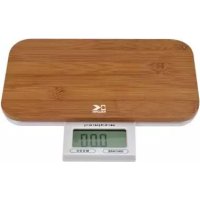
EKS 37068 - Kitchen scales KALORIK - Free user manual and instructions
Find the device manual for free EKS 37068 KALORIK in PDF.



User questions about EKS 37068 KALORIK
0 question about this device. Answer the ones you know or ask your own.
Ask a new question about this device
Download the instructions for your Kitchen scales in PDF format for free! Find your manual EKS 37068 - KALORIK and take your electronic device back in hand. On this page are published all the documents necessary for the use of your device. EKS 37068 by KALORIK.
USER MANUAL EKS 37068 KALORIK
Digital kitchen scale
Bascula de cocina digital
Balance de cuisine digitale
USK EKS 37068
1×3V (CR2032)

Front cover page (first page)
EN OPERATING INSTRUCTIONS IMPORTANT SAFEGUARDS
Please read these instructions carefully before using the appliance.
Important: People (including children) who are not able to use the appliance in a safe way, due to their physical, sensorial or mental capacity or their lack of experience or knowledge, must never use the appliance except if they are supervised by a person responsible for their safety or if they previously received instructions concerning the safe use of the appliance.
Close supervision is necessary to prevent children from using the appliance as a toy.
- Never leave the appliance unsupervised when in use.
- From time to time check the appliance for damages. Never use the appliance if it shows any signs of damage. All repairs should be made by a qualified electrician.
- Only use the appliance for domestic purposes and in the way indicated in these instructions.
- Never immerse the appliance in water or any other liquid for any reason whatsoever.
- Before cleaning, always remove the battery.
If the battery leaks, remove it, clean the contacts of the appliance and wash your hands.
If you do not use the appliance for a long time, remove the battery so that it does not leak.
SAVE THESE INSTRUCTIONS HOUSEHOLD USE ONLY
CHARACTERISTICS OF YOUR SCALE
- Bamboo wood platform
Automatic switch-off
Large LCD display
Two weight unit systems: convertible g / lb. + oz. (1 ounce = 28.35 g)
Maximum weight (for normal weighing) = 5000 g / 11 lb. - Precision of the measurement = 1g / 0.1oz
- Low battery indicator and overloading indicator
BEFORE THE FIRST USE
This appliance works with 1 lithium battery (3 V, type CR2032, included). If battery is not pre-installed, remove the lid of the battery housing on the rear part of the scale. Place the battery, the positive pole facing outwards, and then put back the lid. You can now use your scale.
WEIGHT UNIT
Your scale allows you to use the metric measurement system (grams) OR the imperial system (ounce). Choose the measurement system at any time by pressing the "Mode" touchpad (oz...g), depending on the measurement system you wish to use. This button is situated under the LCD display.
USE
Put the scale on an even and hard surface, for instance a table or countertop. Avoid soft surfaces.
WEIGHING
1) Slide the retractable LCD panel out
2) Switch scale on using the on/off switch situated on the underside of the scale. LCD screen will initialize and indicate "HELO"
3) The scale will turn on and the LCD display will show "0 g" or "0.0 oz." or 0 lb. 0.0 Oz."
4) Put the object you want to weigh on the bamboo plate. The stabilized weight is displayed.
5) Remove the object from the platform.
6) The scale turns off automatically after 60 seconds. You can also switch the scale off anytime by using the on/off switch.
7) If scale goes off automatically, press on the ON/TARE touchpad to switch on again.
THE TARE FUNCTION
The fare function is extremely useful to calculate the weight of ingredients that cannot be put directly on the platform. For example flour, or liquids, which require a container before weighing.
In order to use this function, place the empty container on the scale, and then press the "On/Tare" touchpad under the LCD display. The scale will switch on and indicate 0g or 0.00 oz. Add the ingredient to weigh. The weight indicated on the display is the weight of the ingredient added inside the container!
Note: When you remove the container from the platform, the LCD display will show the weight as negative ("-") will appear on the left-hand side). To reset, press "On/Tare" again.
ERROR INDICATION
If the display shows symbols randomly or if the scale doesn't turn off automatically, it means that your scale has a problem (wrong initialization or weighing error).
Remove any object from the scale and wait for it to turn off. Then start again.
If the problem goes on, remove the batteries for 10 seconds, and then put them back in place.
OVERLOADING INDICATOR
If the "IEEE" symbol appears on the LCD screen, it means that the maximum weight accepted by your scale is exceeded, please remove the object from the glass plate in order not to damage your scale.
LOW BATTERY INDICATOR
If the "LO" symbol is displayed on the LCD screen, it means that the batteries of your scale are low and should be replaced soon. Please dispose of the old batteries in an environmentally friendly way.
BATTERY
If your appliance does not work properly, it is probably because the batteries are discharged. In that case, replace them by new ones of the same type (see paragraph "Before the first use"). Please dispose of the old batteries in an environmentally friendly way.
TIPS FOR USE AND MAINTENANCE
- Be careful when manipulating the scale because it is a precision device.
- Clean the outside parts only with a lightly damp cloth.
- Never use abrasive products to clean your scale.
- NEVER USE THIS APPLIANCE NEAR WATER; NEVER IMMERSE IT IN WATER OR ANY LIQUID WHATSOEVER.
- Keep the scale in a cool and dry place.
- Always keep your scale in a horizontal position.
- No liability will be taken for damages caused by an inappropriate use. The warranty becomes null and void if the appliance has been opened or damaged.
PROTECTION OF THE ENVIRONMENT
In order to preserve our environment and protect human health, the waste electrical and electronic equipment should be disposed of in accordance with specific rules with the implication of both suppliers and users. For this
reason, as indicated by the symbol on the rating label or on the packaging, your appliance should not be disposed of as assorted municipal waste. The user should bring it to a municipal collection point performing waste recovery by means of reuse, recycling or use for other applications in accordance with the directive.
WARRANTY
We suggest that you complete and return the enclosed Product Registration Card promptly to facilitate verification of the date of original purchase. However, return of the Product Registration Card is not a condition of these warranties. You can also fill this warranty card online, at the following address: www.KALORIK.com
This KALORIK product is warranted in the U.S.A. for 1 year from the date of purchase against defects in material and workmanship. This warranty is not transferable. Keep the original sales receipt. Proof of purchase is required to obtain warranty performance.
During this period, the KALORIK product that, upon inspection by KALORIK, is proved defective, will be repaired or replaced, at Kalorik's option, without charge to the customer. If a replacement product is sent, it will carry the remaining warranty of the original product.
This warranty does not apply to any defect arising from a buyer's or user's misuse of the product, negligence, failure to follow KALORIK instructions noted in the user's manual, use on current or voltage other than that stamped on the product, wear and tear, alteration or repair not authorized by KALORIK, or use for commercial purposes. There is no warranty for glass parts, glass containers, filter basket, blades and agitators, and accessories in general. There is also no warranty for parts lost by the user.
ANY WARRANTY OF MERCHANTABILITY OR FITNESS WITH RESPECT TO THIS PRODUCT IS ALSO LIMITED TO THE ONE YEAR LIMITED WARRANTY PERIOD.
Some states do not allow limitation on how long an implied warranty lasts or do not allow the exclusion of incidental or consequential damages, so the above limitations may not apply to you. This warranty gives you specific legal rights, and you may also have other rights which vary from state to state.

If the appliance should become defective within the warranty period and more than 30 days after date of purchase, do not return the appliance to the store: often, our Customer Service Representatives can help solve the problem without having the product serviced. If servicing is needed, a Representative can confirm whether the product is under warranty and direct you to the nearest service location.
If this is the case, bring the product, or send it, postage prepaid by the user (all Kalorik customers are responsible for the initial shipment back to the warranty center), along with proof of purchase and indicating a return authorization number given by our Customer Service Representatives, to the authorized KALORIK Service Center (please visit our website at www.KALORIK.com or call our Customer Service Department for the address of our authorized KALORIK Service Center). If you send the product, please include a letter explaining the nature of the claimed defect.
If you have additional questions, please call our Customer Service Department (please see below for complete contact information), Monday through Friday from 9:00am - 6:00pm (EST). Please note hours are subject to change.
If you would like to write, please send your letter to:
KALORIK Customer Service Department
Team International Group of America Inc.
1400 N.W 159th Street, Suite 102
Miami Gardens, FL 33169 USA
Or call:
Toll Free: +1 888-521-TEAM / +1 888-KALORIK
Only letters can be accepted at this address above. Shipments and packages that do not have a return authorization number will be refused.

Team International Group of America Inc.
1400 N.W 159th Street, Suite 102
Miami Gardens, FL 33169 USA
Team International Group of America Inc.
1400 N.W 159th Street, Suite 102
Miami Gardens, FL 33169 USA
Copies of the I/B. Please reproduce them without any changes except under special instruction from Team International USA. The pages must be reproduced and folded in order to obtain a booklet A5 (+/- 148.5 mm width x 210 mm height). When folding, make sure you keep the good numbering when you turn the pages of the I/B. Don't change the page numbering. Keep the language integrity. Print only what is inside the frame,

K111026
20
USK EKS 37068-111026

Back cover page (last page)
Assembly page 20/20