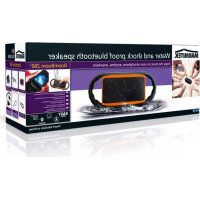
BoomBoom 260 - Docking station MARMITEK - Free user manual and instructions
Find the device manual for free BoomBoom 260 MARMITEK in PDF.


User questions about BoomBoom 260 MARMITEK
0 question about this device. Answer the ones you know or ask your own.
Ask a new question about this device
Download the instructions for your Docking station in PDF format for free! Find your manual BoomBoom 260 - MARMITEK and take your electronic device back in hand. On this page are published all the documents necessary for the use of your device. BoomBoom 260 by MARMITEK.
USER MANUAL BoomBoom 260 MARMITEK
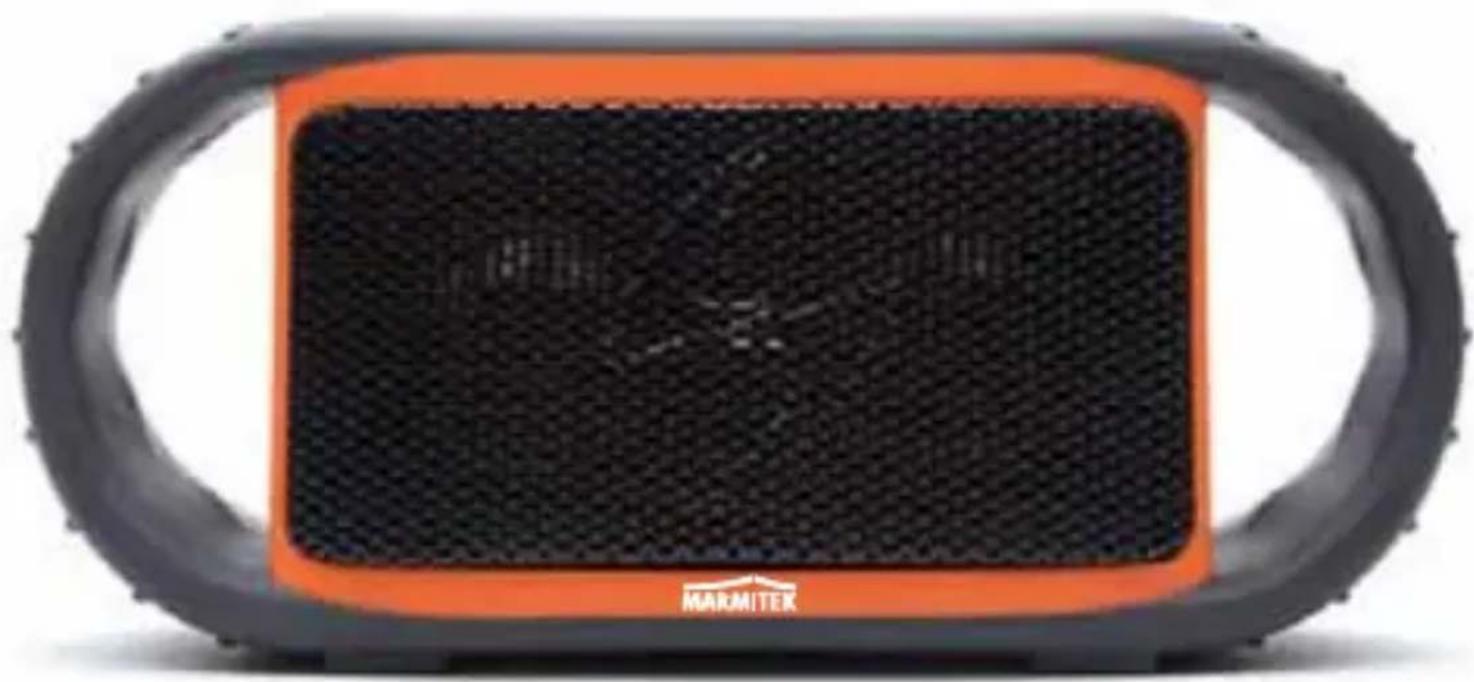
Water and shock proof bluetooth speaker
natural_image
Black and orange MARMITEK portable speaker with textured grille (no visible text or symbols on body)| USER MANUAL | 3 |
| GEBRAUCHSANLEITUNG | 13 |
| GUIDE UTILISATEUR | 23 |
| MODO DE EMPLEO | 33 |
| MANUALE D'ISTRUZIONI | 43 |
| GEBRUIKSAANWIJZING | 53 |
SAFETY WARNINGS
- Do not expose the components of your system to extremely high temperatures or bright light sources.
- In case of improper usage or if you have altered and repaired the product yourself, all guarantees expire. Marmitek does not accept responsibility in the case of improper usage of the product or when the product is used for purposes other than specified. Marmitek does not accept responsibility for additional damage other than that covered by the legal product responsibility.
- This product is not a toy. Keep out of reach of children.
- Avoid using speakers with the volume turned up for an extended period of time. Doing so may damage your hearing. It is advisable to keep the volume at a moderate level at all times.
- Do not open the product: the device may contain live parts. The product should only be repaired or serviced by a qualified expert.
- The built-in rechargeable battery is not replaceable. Do not remove or replace battery. Dispose of unit properly. Do not dispose unit in trash or fire.
- Only connect the adapter to the mains after checking whether the mains voltage is the same as the values on the identification tags. Never connect an adapter or power cord when it is damaged. In that case, contact your supplier.
TABLE OF CONTENTS
SAFETY WARNINGS.... 3
TABLE OF CONTENTS 4
INTRODUCTION....5
SET CONTENTS.... 5
FEATURES & OPERATION....6
Top Panel, Buttons & Indicators 6
The Marmitek BoomBoom 260 is a unique portable audio system combining Bluetooth, Lithium Ion Battery & Waterproof Technologies. The result is a shock resistant, floating, waterproof, full range rechargeable wireless speaker system. Does everything from stream & play your music from your Bluetooth enabled Smartphone or audio device, to answering your calls over the built-in speaker phone!
SET CONTENTS
1 x BoomBoom 260
1 x USB Cable
1 x USB-to-AC Power Adapter (for use with the USB Cable)
1 x stainless steel carbine hook 5.5 mm x 60mm
1 x Lanyard (for use with the back panel Cap)
1 x set of instructions in English, German, French, Spanish, Italian, Dutch.
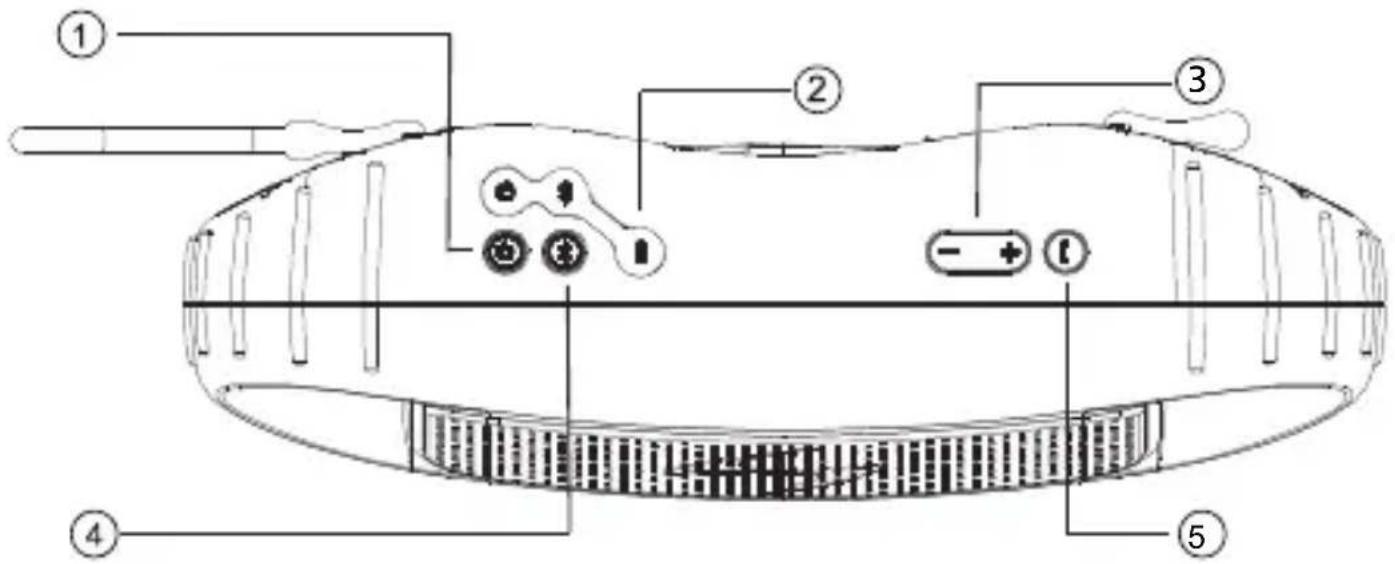
Top Panel, Buttons & Indicators
text_image
Diagram of a device with labeled components including battery, switch, and motor① POWER ON / OFF
Press & release POWER button 1 time, wait approx. 3 seconds for 1 short beep tone indicating unit is powered ON
② BATTERY INDICATOR
Connect USB to power source. LED indicates charging status.
RED: charge in process GREEN: full charge complete
③ SPEAKER VOLUME
- + Press [ - ] to decrease volume, Press [ + ] to increase volume.
NOTE: 1 short beep tone will sound when max vol. setting is reached on the BoomBoom 260.
NOTE: ensure the volume setting on your Smartphone is set at max level for maximum speaker volume.
④ PAIR / CONNECT with BLUETOOTH
STEP 1. Find & enable the Bluetooth Section on your Smartphone/Audio Device and select the option to "Search for a Device" to search for Bluetooth signal.
STEP 2. Press & release Bluetooth PAIRING button on the BoomBoom 260 top panel & wait approx. 3 seconds for unit to search for your Smartphone/Audio Device's Bluetooth signal.
NOTE: The blue LED on the top panel will blink quickly & 2 short beep tones will indicate the Bluetooth function has been selected & awaits pairing.
STEP 3. Find 'BoomBoom 260' as a selection on your Smartphone/Audio Device. Select 'BoomBoom 260' in order to pair with the BoomBoom 260 unit.
NOTE: 2 short, briefly separated beep tones will sound to indicate successful pairing & the quick flashing blue LED on the top panel will turn solid blue.
STEP 4. Find your music section on your device, press PLAY & LISTEN to your music!
⑤ ANSWER CALLS
© (MUST be paired with Bluetooth)
Press the button to answer incoming calls from your Smartphone. Listen to the caller over BoomBoom 260 speakers & talk over the built-in Microphone (mic).
The MIC is located on the bottom front left section of the front panel & is designed for use with the Bluetooth speakerphone system. For best results, speak within 45 cm of the MIC during a call.
CAP, AUX-IN, CHARGING & USB CONNECTION
USB power & 3.5mm AUX-IN connections are under the CAP. Remove the CAP to access the connections.
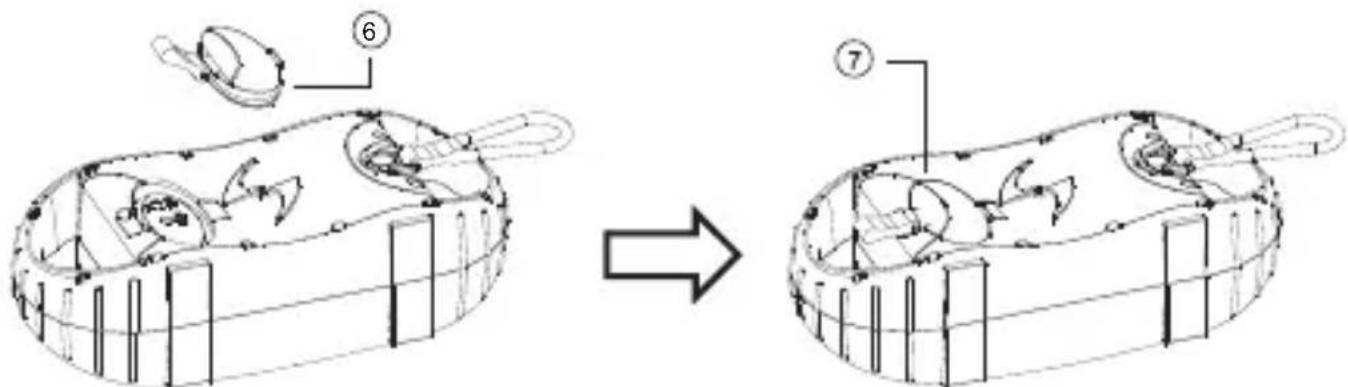
IMPORTANT: IF the CAP is off or not securely closed, the unit is NOT watertight. In order to ensure the unit is watertight the back panel CAP MUST be closed securely. To securely close the back panel CAP, the CAP MUST be inserted so that the lines on the CAP align with the back panel lines and the top of the CAP is pushed flush with the back surface of the unit so that the gray rubber gasket around the edge of the CAP cannot be seen.
BACK PANEL CAP & CONNECTIONS
text_image
Technical diagram showing a mechanical assembly before and after transformation, with labeled parts 6 and 7.⑥ gray rubber gasket
⑦ back panel Lines
NOTE: A removable LANYARD is included with the BoomBoom 260 and is intended to assist in avoiding misplacing the back panel CAP. Attach one end to the nylon tab on the CAP and the other end to the handle.
AUX-IN
AUX-IN can be used as an optional connection to play an audio device using a 3.5mm audio cable connection.
CHARGING & USB CONNECTION
- Charge the built-in rechargeable battery using the USB cord (included) connected to your computer OR connected to the USB-to-AC power adapter (included) and a wall power outlet.
- When connected to a power source via the USB connection on the back panel, the Battery LED on the top panel ② will indicate the power status. IF not connected, the LED will NOT indicate the power status. A RED LED indicates charging is in progress. A GREEN LED indicates the battery is fully charged.
- The Power LED will flash 2 times quickly every 30 seconds when approx. 30 minutes of playtime remain.
NOTE: BoomBoom 260 can charge while playing audio. Be sure to plug the USB into the desired power source prior to playing audio or unit may need to be restarted
CARE, MAINTENANCE & PRECAUTIONS
-
Although the unit is waterproof when the CAP is properly closed, the unit is NOT designed for use under water. Do NOT intentionally submerge the unit underwater.
-
Close the CAP properly before use, see 'diagram 2' for reference. If the unit is placed in water without the cap properly closed, water may enter into the unit and void your warranty.
-
Dry unit completely before opening the cap. Do NOT open the cap if wet or in a wet environment.
-
Do NOT apply excessive force to any surfaces of the unit when wet or in a wet environment.
-
Do NOT use or store the unit in places with high temperature.
-
AVOID direct exposure to sunlight and strong magnetic fields.
-
Periodically check the rubber seal ring on the cap for premature wear.
-
Periodically clean the rubber seal ring with a soft moist cloth and ensure no objects such as dirt, or sand are on the rubber seal ring. Do NOT use any oily solvent or chemicals for cleaning.
-
Rinse off the unit with tap water after use in salt water or swimming pool.
-
Power the unit using the built-in rechargeable battery for portable use and connect the USB cord to a computer USB connection or to an AC outlet using the AC-to-USB cord adapter to charge unit.
-
Noise and audio distortion may occur when the batteries are nearing end of charge.
-
Do NOT remove the built-in battery. Do NOT remove the grill cover.
FREQUENTLY ASKED QUESTIONS
I can't connect my BoomBoom 260.
Check the following:
- Ensure that the power adapter is connected and/or that the battery is fully charged.
- Ensure that the Bluetooth function on your mobile telephone is on (check your phone's manual for reference).
- Ensure that the distance between your mobile phone and the BoomBoom 260 is no greater than 10 metres and that there are no large obstacles in the way.
Do you have other questions that have not been resolved by the above information?
Please go to www.marmitek.com

natural_image
Symbol of a trash bin crossed with no text or labelsEnvironmental Information for Customers in the European Union
European Directive 2002/96/EC requires that the equipment bearing this symbol on the product and/or its packaging must not be disposed of with unsorted municipal waste. The symbol indicates that this product
should be disposed of separately from regular household waste streams. It is your responsibility to dispose of this and other electric and electronic equipment via designated collection facilities appointed by the government or local authorities. Correct disposal and recycling will help prevent potential negative consequences to the environment and human health. For more detailed information about the disposal of your old equipment, please contact your local authorities, waste disposal service, or the shop where you purchased the product.
TECHNICAL DATA
Overall
Supply voltage: 100-240VAC, 5V 1000mA
Bluetooth Frequency: 2.402GHz\~2.480GHz ISM Band
Bluetooth version: Bluetooth2.1 + EDR, Class 2
Supported Bluetooth profiles: A2DP,AVRCP,HFP,HSP
Supported Codec: SBC (subband codec)
Support multiple pair: yes
Range: Up to 10 metres with Class 2 source.
Up to 30 metres with Class 1 source.
Battery type: Lithium Ion Battery
Battery Capacity: 1800mAh
Battery Voltage: 3,7V
Charger Time: 2.0-2.5 hours
Battery Life: 10+ hours from full charge
Audio Input Connection: 3.5mm stereo jack plug
Operation temperature: -5 - 40°C
Storage temperature: -10 - 55°C
Waterproof Rating: IP67
Operation on BoomBoom 260 and audio source
Phone functions answer call, end call
Audio functions Volume+, Volume-, power ON/OFF
Weight: 680g
Size 71 x 229 x 102 mm
Microphone
Microphone unit: (size) 6 x 2.7mm
Sensitivity: (in dB) -34 ±2 db
Directional sensitivity: omni-directional
Impedance: ≤ 2,2 Kohm
Frequency response: 100Hz-16,000Hz
Drivers
drivers 2 speakers
Driver diameter: 50 mm
Impedance: 4ohms
Total Harmonic Distortion: Max 1% at 4ohm/2W
Output power (RMS) : 6W (2 x 3W)
Output power (PMPO) : 12W (2 x 6W)
Signal To Noise Ratio S/N: 88db +/- 3dB
Frequency response: 20Hz-20,000Hz
Specifications may be modified without prior notice.
SICHERHEITSHINWEISE
text_image
Diagram of a device with labeled parts including battery, switch, and power button① EIN/AUS
text_image
Diagram showing a mechanical assembly before and after transformation, with labeled parts ⑥ and ⑦.natural_image
Symbol of a trash bin crossed with no text or labels, accompanied by a black rectangular block below (no readable text or symbols)Driver Durchmesser: 50 mm
Impedanz: 4Ohms
text_image
Diagram of a device with labeled parts including battery, switch, and power button① MARCHE / ARRÊT
text_image
Diagram illustrating the transformation of a mechanical component from an open body to a closed body, with labeled parts 6 and 7.natural_image
Symbol of a trash bin crossed with no text or labels, accompanied by a black rectangle below (no readable text or symbols)text_image
Diagram of a device with labeled components including battery, switch, and power connections① ENCENDER / APAGAR
text_image
Technical diagram showing a mechanical assembly before and after modification, with labeled parts 6 and 7.natural_image
Symbol of a trash bin with crossed lines indicating no waste, and a solid black rectangle below (no text or labels)Europea
text_image
Diagram of a device with labeled components including battery, switch, and motortext_image
Diagram illustrating a mechanical assembly process, showing transformation from a device with labeled parts to a final component.natural_image
Symbol of a trash bin crossed with a diagonal line, no text or numbers presentVEILIGHEIDSWAARSCHUWINGEN
VEILIGHEIDSWAARSCHUWINGEN 53
INHOUDSOPGAVE....54
INLEIDING 55
INHOUD VAN SET.... 55
FUNCTIONS & BEDIENING 56
Bovenpaneel, knoppen & indicatoren 56
MICROFOON (MIC) & SPEAKERPHONESYSTEEM.... 58
AFDICHTING, AUX-IN, OPLADEN & USB-AANSLUITING..... 58
text_image
Diagram of a device with labeled components including battery, switch, and motor① AAN / UIT
text_image
Technical diagram showing a device before and after assembly, with labeled parts 6 and 7natural_image
Symbol of a trash bin crossed with no text or numbers, representing waste sorting or disposal (no text present)DECLARATION OF CONFORMITY
Hereby, Marmitek BV, declares that this BOOMBOOM 260 is in compliance with the essential requirements and other relevant provisions of the following Directives:
Directive 1999/5/EC of the European Parliament and of the Council of 9 March 1999 on radio equipment and telecommunications terminal equipment and the mutual recognition of their conformity
Directive 2004/108/EC of the European Parliament and of the Council of 15 December 2004 on the approximation of the laws of the Member States relating to electromagnetic compatibility
Directive 2006/95/EC of the European Parliament and of the Council of 12 December 2006 on the harmonisation of the laws of Member States relating to electrical equipment designed for use within certain voltage limits
Directive 2011/65/eu of the european parliament and of the council of 8 June 2011 on the restriction of the use of certain hazardous substances in electrical and electronic equipment
Commission Regulation (EC) No 278/2009 of 6 April 2009 implementing Directive 2005/32/EC of the European Parliament and of the Council with regard to ecodesign requirements for no-load condition electric power consumption and average active efficiency of external power supplies
Marmitek is a trademark of Pattitude B.V.
BoomBoom 260 ^™ is a trademark of Marmitek B.V. All rights reserved.
Every effort has been made to ensure that the information in this manual is accurate. Marmitek is not responsible for printing or clerical errors.
Copyright and all other proprietary rights in the content (including but not limited to model numbers, software, audio, video, text and photographs) rests with Marmitek B.V. Any use of the Content, but without limitation, distribution, reproduction, modification, display or transmission without the prior written consent of
Marmitek is strictly prohibited. All copyright and other proprietary notices shall be retained on all reproductions.
Other company and product names mentioned herein may be trademarks of their respective companies. Mention of third-party products is for informational purposes only and constitutes neither an endorsement nor a recommendation. Marmitek assumes no responsibility with regard to the performance or use of these products.
MARMITEK BV
P.O. BOX 4257
5604 EG EINDHOVEN
THE NETHERLANDS
CE 2280