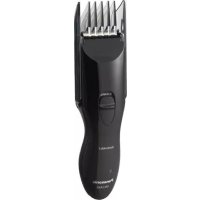
ERCA35K - Beard trimmer PANASONIC - Free user manual and instructions
Find the device manual for free ERCA35K PANASONIC in PDF.



User questions about ERCA35K PANASONIC
0 question about this device. Answer the ones you know or ask your own.
Ask a new question about this device
Download the instructions for your Beard trimmer in PDF format for free! Find your manual ERCA35K - PANASONIC and take your electronic device back in hand. On this page are published all the documents necessary for the use of your device. ERCA35K by PANASONIC.
USER MANUAL ERCA35K PANASONIC
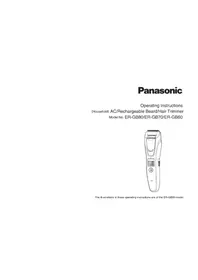
Operating Instructions
AC/Rechargeable Hair Clipper
Before operating this unit, please read these instructions completely.
IMPORTANT SAFETY INSTRUCTIONS
When using an electrical appliance, basic precautions are required to always be followed, including the following:
Read all instructions before using this appliance.
DANGER To reduce the risk of electric shock:
- Do not reach for an appliance that has fallen into water. Unplug immediately.
- Do not use while bathing or in a shower.
- Do not place or store appliance where it is able to fall or be pulled into a tub or sink. Do not place in or drop into water or other liquid.
- Except when charging, always unplug this appliance from the electrical outlet immediately after using.
- Unplug this appliance before cleaning.
WARNING To reduce the risk of burns, fire, electric shock, or injury to persons:
- Close supervision is required when this appliance is used by, on, or near children or invalids.
-
Use this appliance only for its intended use as described in this manual. Do not use attachments not specified by the manufacturer.
-
Never operate this appliance when it has a damaged cord or plug, when it is not working properly, after it has been dropped or damaged, or after it has been dropped into water. Return the appliance to a service center for examination and repair.
- Keep the cord away from heated surfaces.
- Never drop or insert any object into any opening.
- Do not use outdoors or operate where aerosol (spray) products are being used or where oxygen is being administered.
- Do not use this appliance with a damaged or broken comb, as it has the potential to result in facial injury.
- Always attach plug to appliance first, then to outlet. To disconnect, turn all controls to "off" then remove plug from outlet.
SAVE THESE INSTRUCTIONS
Specifications
Power source: See the name plate on the product. (Automatic voltage conversion)
Motor voltage: 1.2 V DC
Charging time: 8 hours
This product is intended for household use only.
Safety instructions
Failure to observe the Safety instructions may result in death, serious injury, electric shock, fire or short circuit.
Be careful when treating the AC adaptor
- Disconnect the AC adaptor from the outlet when cleaning the clipper.
- Always grip the AC adaptor and not the power cord.
- Do not use the clipper if the power cord or the AC adaptor is worn, or if the AC adaptor does not fit snugly in the outlet.
- Do not damage or deform the power cord. Do not place heavy objects on the power cord or trap it between objects.
- Clean the power plug regularly to remove any dust or dirt.
- The power cord cannot be replaced. If it is damaged, the AC adaptor should be discarded.
Keep out of liquid
- Do not use the clipper with AC operation in bathrooms.
- Do not insert and remove the AC adaptor with wet hands.
- Do not allow the AC adaptor to get wet.
- Do not wipe the clipper or AC adaptor with thinner, benzine or alcohol.
Failure to observe the following may result in injuries to the skin
- Do not press the blade against the skin.
- Do not use the clipper for any purpose other than trimming.
- Do not trim the hair of a pet.
- Check that the blades are not damaged or deformed before use.
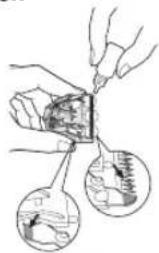
Before using each time, apply oil at the places marked with arrows. (See page 6.)
Caution for charge
- Charging for longer than 48 hours may shorten the life of the battery.
-
The clipper may become warm during operation and/or charging. This is normal.
-
Charge the clipper at temperatures between 5^ (41^) and 35^ (95^) to work correctly.
- Do not use any power cord or AC adaptor other than one specifically designed for this model. (RE9-45)
- The adaptor is intended to be correctly oriented in a vertical or floor mount position.
Caution for usage and storage
- Do not disassemble or modify the clipper. Do not attempt repairs.
- Repairs must always be requested to your dealer.
- This appliance is not intended for use by persons (including children) with reduced physical, sensory or mental capabilities, or lack of experience and knowledge, unless they have been given supervision or instruction concerning use of the appliance by a person responsible for their safety. Children should be supervised to ensure that they do not play with the appliance.
- This clipper is for indoor use only.
- Do not store the clipper in a place exposed to direct sunlight or near a heater or other source of heat.
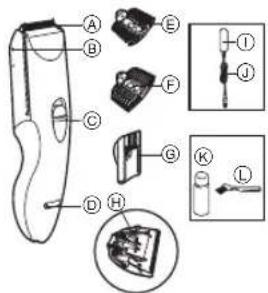
Parts identification
A Blade
⑥ Attachment mounting
Switch
Charging indicator lamp
1/8" / 1/4" (3/6mm) comb attachment
F 3 / 8^ / 1 / 2^ (9/12mm) comb attachment
0.8'' / 1.2'' / 1.6'' (20/30/40mm) comb attachment
Lever for cleaning
① AC adaptor (RE9-45)
① Power cord
Oil
Cleaning brush
Charge
Charging
-
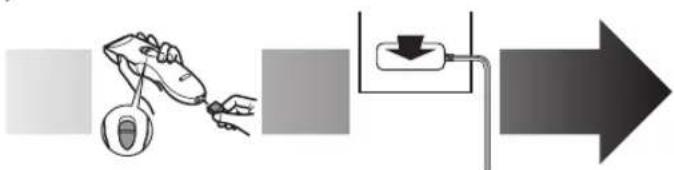
Set the switch to "0-CHARGE", and insert the power cord into the clipper.
-
Connect the AC adaptor into an outlet. The charging indicator lamp will light up.
-
Disconnect the AC adaptor from an outlet when charging is completed.
The charging time is 8 hours.
1 full charge will provide approximately 40 minutes of continuous operation.
- If the shape of the plug does not fit the power outlet, use an attachment plug adaptor of the proper configuration.
Inserting the attachment
0.8^ / 1.2^ / 1.6^ (20/30/40mm) comb attachment
-
Adjust the attachment to the desired trimming height by sliding it until it clicks while the switch is in "0-CHARGE".
-
Set the attachment to the correct position. Otherwise you cannot set the switch to "1".
Actual hair length will be a little longer than the height you set.
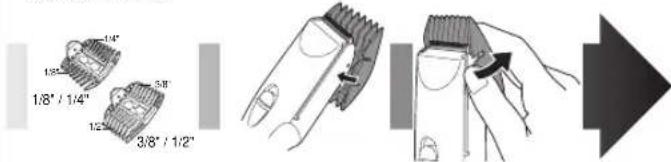
1/8" / 1/4" (3/6mm), 3/8" / 1/2" (9/12mm) comb attachments
-
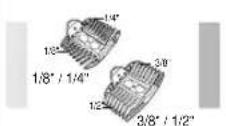
Select the cutting heights indicated on the insides and sides of the attachments.
-
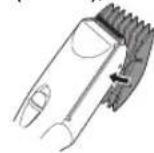
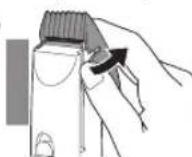
Mount the attachment to the clipper as illustrated.
-
Remove the attachment from the clipper.
Cut
Cutting your hair
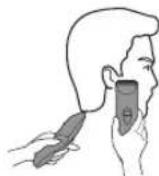
1 Cut hair to the correct height by moving the clipper back against the flow of the hair.
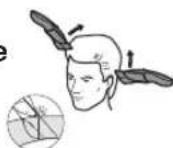
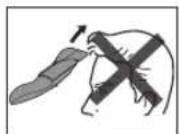
- Do not use the clipper in an inverted position. This can cut hair too deeply.
Trimming with no attachments
Cutting without an attachment will trim hair length to 1mm or less.
- Cut hair by placing the clipper head directly on the scalp.
AC operation
If you connect the AC adaptor to the clipper in the same way as for charging, and set the switch to "1", you can use it even if the battery capacity is low.
- If the clipper does not operate, set the switch to "0·CHARGE", wait about 1 minute and then set it back to "1".
- Be careful not to discharge the battery completely with the switch left in "1". It results in shortening the battery life.
Care
Blade maintenance
The following is the symbol for a washable clipper. The symbol means the hand-held part may be cleaned under water.

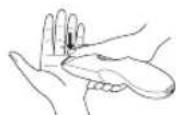
Mounting and removal of the blade
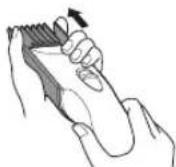
- Hold the clipper with the "Panasonic" mark facing upward and push the blade with your thumb while catching the blade in your other hand.
- Be sure to set the switch to "0·CHARGE" before you remove the blade.
- To remount the blade, fit the mounting hook into the blade mounting on the clipper and push in until it clicks.
Blade life
Blade life will vary according to the frequency and length of use. It is expected to be about 2 years when using the clipper twice a month for 20 minutes each time. If cutting efficiency is reduced despite proper maintenance, change the blades.
Battery life
Battery life will vary according to the frequency and length of use. If the batteries are charged 3 times a month, the service life will be approximately 3 years.
- It is recommended that the clipper be recharged at least every 6 months even when not in regular use because the charge will drain from the batteries and their service life may be shortened.
Cleaning the blade
If washing in water
WARNING: Detach the hand-held part from the supply cord before cleaning it in water.
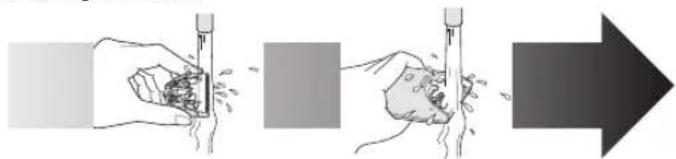
- Rinse off any hairs sticking to the blade and any hairs inside the clipper.
- Shake the clipper 4 or 5 times gently, wipe off any water drops from the clipper and blade, and then let it dry onto a towel with the "Washable" indicator facing upward.
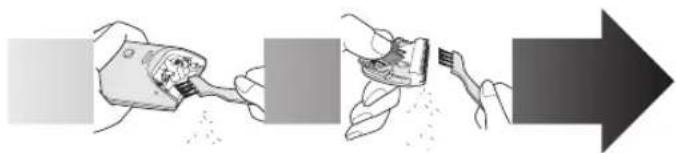
If cleaning with brush
-
Brush off any hairs from the clipper and from around the blade.
-
Remove the blade and brush off the hairs from the blade edge.
-
Brush the hairs out from between the fixed blade and the moving blade while pressing down on the lever for cleaning to raise the moving blade.
After cleaning the blade with water or brush
- Apply a few drops of the oil to the points indicated by the arrows.
- Remount the blade on the clipper.
- Apply the oil to the clipper after use. Otherwise the blades may become dull, make abnormal noises, or becomes hot and lead to the deterioration of cutting performance.
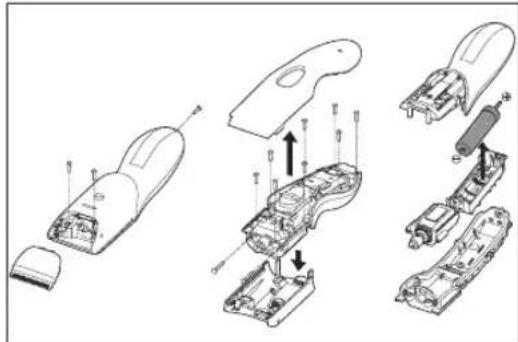
Removing the built-in rechargeable battery
ATTENTION:
A nickel metal hydride battery that is recyclable powers the product you have purchased. Please call 1-800-8-BATTERY for information on how to recycle this battery.

WARNING:
Do not attempt to replace the battery for the purpose of reusing the clipper. This could result in the risk of fire or electric shock.
Remove the battery as illustrated.
1.Disconnect the clipper from the AC adaptor when removing the battery.
2. Fully discharge the battery.
3.Be careful not to short the + and - terminals of the battery after removing it.
FOR YOUR CONVENIENCE, WE HAVE ESTABLISHED A TOLLFREE (IN USA ONLY) NATIONAL ACCESSORY PURCHASE HOT LINE AT 1-800-332-5368. IN CANADA, CONTACT CANADA INC. AT THE ADDRESS OR TELEPHONE NUMBER ON THE BACK PAGE.
CONSIGNES DE SECURITE IMPORTANTES
Sabots de 1/8" / 1/4" (3/6 mm), 3/8" / 1/2" (9/12 mm)
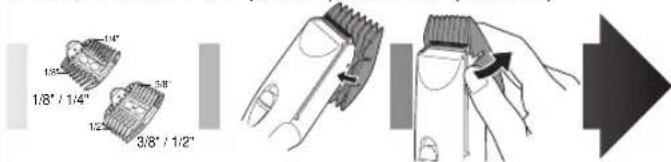
Peines de 1/8" / 1/4" (3/6mm), 3/8" / 1/2" (9/12mm)
Panasonic Canada Inc.
5770 Ambler Drive, Mississauga, Ontario L4W 2T3 (905) 624-5010
En Mexico:
Panasonic de Mexico, S.A de C.V.
Mexico D.F.
Moras No. 313 Col. Tlacoquemecati del Valle Del. Benito Juarez, Mexico, D.F., C.P.03200 R.F.C PME-780907754 Tel: 54-88-10-00
Service · Assistance · Accessories
Dépannage · Assistance · Accessoires
Call 1-800-338-0552 (In USA)
http://www.panasonic.com/shavers/
http://www.panasonic.com/consumersupport/
Call 1-800-561-5505 (In Canada)
Composer 1-800-561-5505 (Au Canada)
http://www.panasonic.ca/
F. No.1 EN FR SP (U.S.A/CANADA)
Printed in China
Imprimé en China
Impresso na China