HAVWKL12 - Alarm clock radio KONIG - Free user manual and instructions
Find the device manual for free HAVWKL12 KONIG in PDF.



User questions about HAVWKL12 KONIG
0 question about this device. Answer the ones you know or ask your own.
Ask a new question about this device
Download the instructions for your Alarm clock radio in PDF format for free! Find your manual HAVWKL12 - KONIG and take your electronic device back in hand. On this page are published all the documents necessary for the use of your device. HAVWKL12 by KONIG.
USER MANUAL HAVWKL12 KONIG
MANUAL (p.2) Clock radio with light
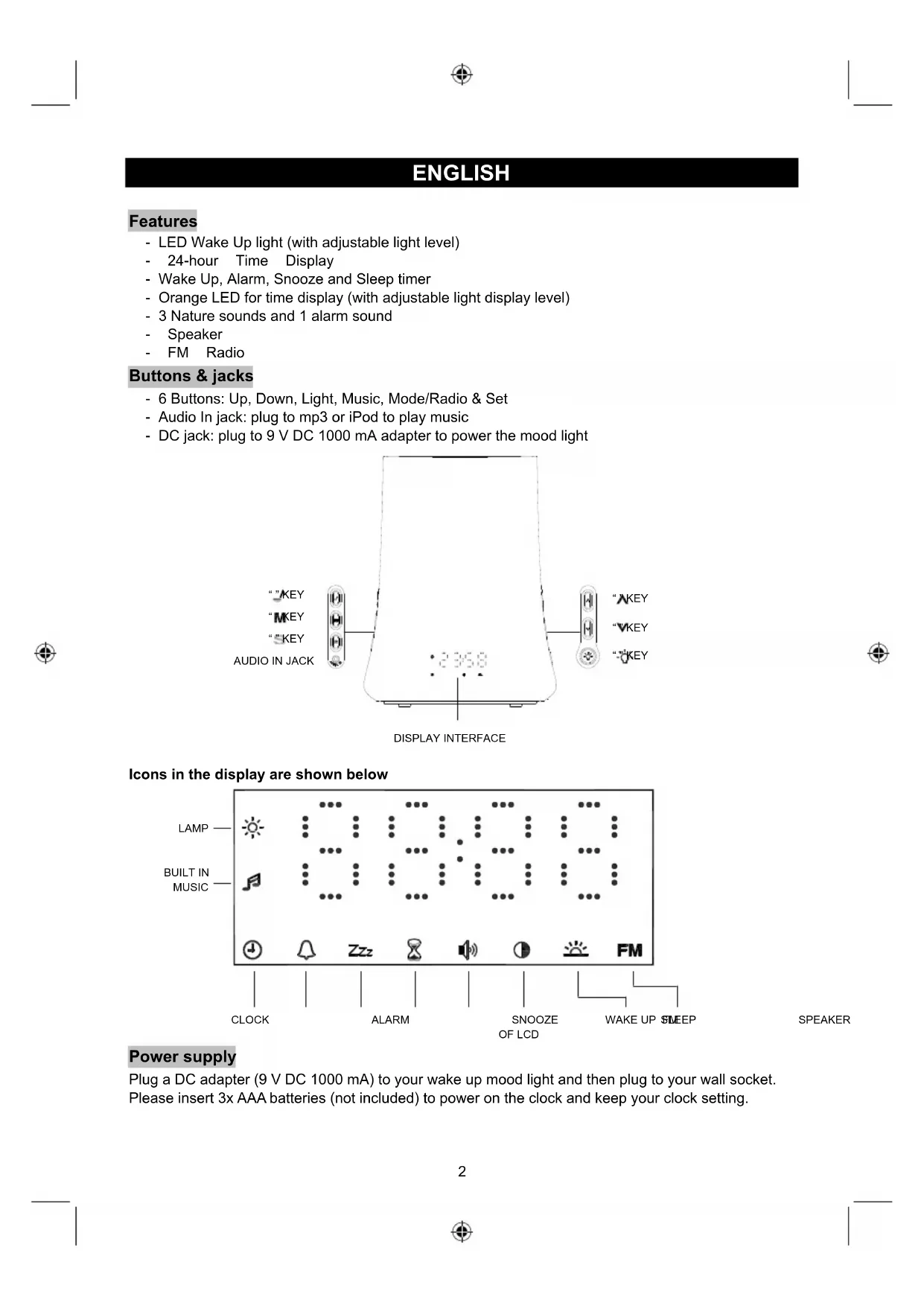
- LED Wake Up light (with adjustable light level)
- 24-hour Time Display
- Wake Up, Alarm, Snooze and Sleep timer
- Orange LED for time display (with adjustable light display level)
- 3 Nature sounds and 1 alarm sound
- Speaker
FM Radio
Buttons & jacks
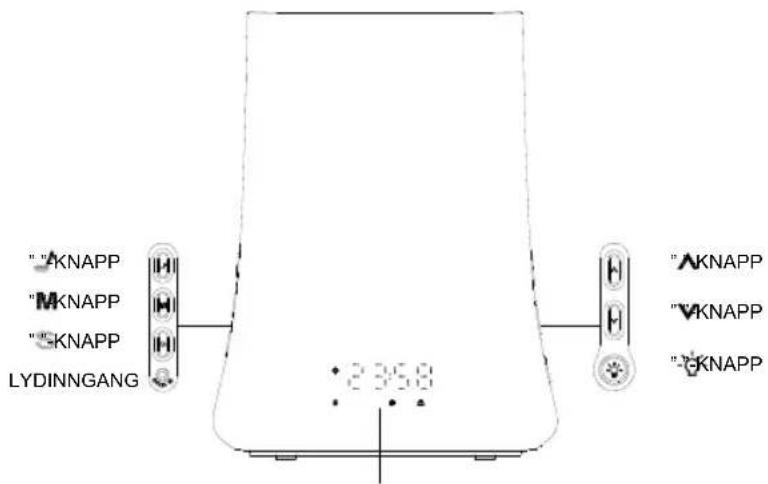
- 6 Buttons: Up, Down, Light, Music, Mode/Radio & Set
- Audio In jack: plug to mp3 or iPod to play music
- DC jack: plug to 9 V DC 1000 mA adapter to power the mood light
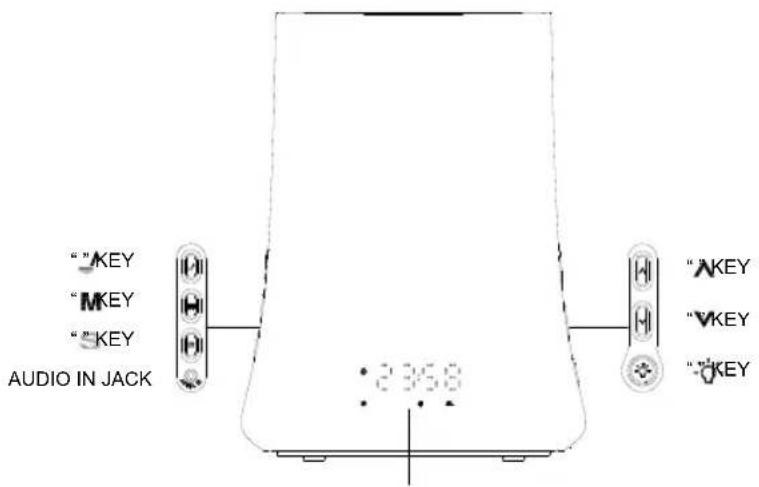
DISPLAY INTERFACE
Icons in the display are shown below
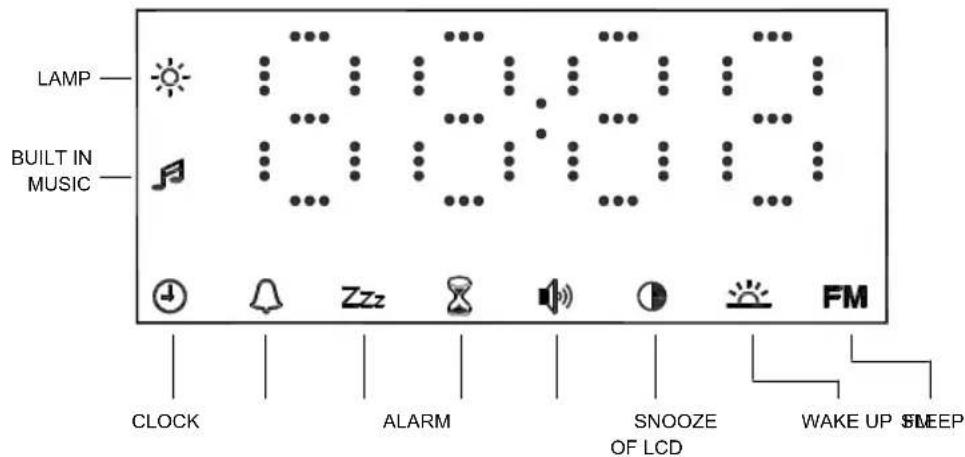
SPEAKER
Power supply
Plug a DC adapter (9 V DC 1000 mA) to your wake up mood light and then plug to your wall socket. Please insert 3x AAA batteries (not included) to power on the clock and keep your clock setting.
Turning on the light
Press the " 喜 " key to turn the light ON. The " 喜 " symbol is shown on the display. Press the "up" and "down" keys to adjust the light level, from level 01 to 20.
Press the " 品 " key again to turn the light OFF.
Clock instructions
When the mood light is plugged in using the DC adapter, the LED clock will appear on the lower part of the mood light. The time will show 0:00 to indicate that you have to set the clock time.
How to set the clock time
When 0:00 is shown on the display, start by pressing the "SET" key to enter time setting mode. The " " symbol is shown on the display, and the hour flashes. Press the "up" and "down" keys until you get to your desired hour, and then press the "SET" key again to set the minutes by pressing the "up" and "down" buttons.
Press the "SET" key again to complete and save the setting.
Remarks
The display will return to normal time display by pressing the "MODE" key or by not pressing any key within 30 seconds.
The hour can be set from 0 to 23, the minutes can be set from 0 to 59.
How to set wake up alarm with snooze
To set the wake up alarm, choose an alarm time, snooze period (from 5, 10, 15, 30 or 60 minutes) and the type of sound (3 nature sounds or 1 alarm sound) that you want to wake up to. The wake up alarm is set when the "..." symbol is visible on the display. The light intensity of the lamp gradually increases to the set level in 20 minutes and the alarm sound gradually increases to the set level 2 minutes before the set wake-up time.
When the unit is in clock mode, hold the "MODE" key until the "..." symbol is shown on the display.
Press the "SET" key to enter the wake up time settings and set in the order of:
Hour Minute Music Snooze time.
Press the "up" and "down" keys to adjust to your desired setting.
The hour can be set from 0 to 23, the minutes can be set from 0 to 59 and 3 nature sounds and 1 alarm sound can be selected.
How to turn off the wake up alarm
When the alarm goes off, press any key to switch off the alarm function and enter the snooze function. The light will be ON.
When the snooze alarm goes off, press any key to switch off the snooze function. The snooze function can be activated 3 times.
When the clock is in wake up time mode, press the " " key for 2 seconds to turn the wake up time on or off.
When the clock is in clock time mode, press the "Set" key for 2 seconds to turn the snooze time on or off.
Remarks
The display will return to normal time display by pressing the "MODE" button or by not pressing any button within 30 seconds.
The light brightness level and sound level for the wake up alarm is the same as your previous pre-set level.
How to set the alarm time
When the unit is in clock mode, hold the "MODE" key until the "0" symbol is shown on the display.
Press the "SET" key to enter the alarm time settings, and set in the order of: Hour Minute Music.
Press the "up" and "down" keys to adjust to your desired setting.
The hour can be set from 0 to 23, the minutes can be set from 0 to 59 and 3 nature sounds and 1 alarm sound can be selected.
How to turn off the alarm
When the alarm goes off, press any key to switch off the alarm function and enter the snooze function. The alarm will sound for 1 minute and the snooze function can be activated 3 times.
When the clock is in alarm time mode, press the ^ key for 2 seconds to turn the alarm time on or off. When the clock is in snooze mode, press the "Set" key for 2 seconds to turn the snooze time on or off.
Remarks
The display will return to normal time display by pressing the "MODE" button or by not pressing any button after 30 seconds.
The alarm will not function if the alarm time is set within the wake up period.
How to set the sleep timer
To set the sleep timer, choose a sleep period (from 5, 15, 30 or 60 minutes) and the type of sound (3 nature sounds or 1 alarm sound) you want to set. The sleep timer is set when the "s" symbol is visible on the display. The light intensity of the lamp gradually decreases until it fades and the alarm sound gradually decreases until it becomes silent after the sleep time.
When the unit is in clock mode, hold the "MODE" key until the "8" symbol is shown on the display.
Press the "SET" key to enter the sleep time from: 00:05→00:15→00:30→00:45→1:00→Music.
Press the "up" and "down" keys to adjust to your desired setting.
3 nature sounds and 1 alarm sound can be selected.
How to turn off the sleep timer
When the clock is in sleep timer mode, press the "J" key for 2 seconds to turn the sleep timer on or off.
Remarks
The display will return to normal time display by pressing the "MODE" button or by not pressing any button after 30 seconds.
The light brightness level and sound level for the sleep timer is the same as your previous pre-set level.
The sleep timer will not function when the sleep time is set within the wake up period.
If the light intensity or sound level is adjusted during the sleep time period, the light intensity or sound level will remain the same as the level upon setting. The timer will keep counting down.
How to set the brightness of the LED digits
When the unit is in clock mode, hold the "MODE" key until the "0" symbol is shown on the display. Press the "SET" key to enter the setting mode.
You can set 4 levels (from 1 to 4) for the brightness of the LED display by pressing the "up" and "down" keys to adjust to your desired setting.
Remarks
The display will return to normal time display by pressing the "MODE" button or by not pressing any button after 30 seconds.
How to select the sleep sound
Press the "A" key and the sleep sound is played. Press the "F" key again to turn off the sleep sound, and press it twice to change to the other sleep sound. 4 different sleep sounds are built into the mood light (1=beep, 2=forest, 3=wide field and 4=ocean wave).
Press the "A" key and then press the "up" and "down" keys to adjust the sound level from 00 to 20. Press the "SET" key to enter the sleep sound mode, press the "up" and "down" keys to select the music playing time from 1 to 60 minutes, and then press "SET" again to complete the setting.
How to connect your MP3, iPod or music device
Plug your MP3, iPod or music device into the audio in jack using the earphone cable (included). The "..." symbol is shown on the display.
Press the "A" key to enter the music mode, and then press the "up" and "down" keys to adjust the sound level from 00 to 20.
Remarks
The display will return to normal time display by pressing the "MODE" button or by not pressing any button after 30 seconds.
How to turn the FM Radio on and off
To turn on: in clock mode, press the "M" key for 2 seconds to turn on the radio and enter the interface displaying the FM radio.
To turn off: in any mode, press the M^ key for 2 seconds to turn off the radio.
How to search for radio channels
In FM radio mode, press the ^v key to search for channels.
Press the "up" or "down" keys for a few seconds to automatically search for channels.
How to adjust the volume
In FM radio mode, press the key to switch to the volume adjust interface. Press the "up" key to increase the volume, press the "down" key to reduce the volume.
Remarks
Press the "A" key to enter FM radio mode from any other mode if the radio function is ON.
CAUTION
- Do not let water enter or spill onto the lamp.
- Do not drop the lamp or expose it to heavy shocks.
- Do not place the LCD under intense sunlight.
- Wipe the surface with a fine dust cloth, do not use corrosive cleaning fluids and other chemical solvents.
- Make sure there is at least 20mm of space around the lamp.
- Do not place other items on the lamp.
- Please press "RESET" to turn it on again in the event of any dysfunction.
Safety precautions:

CAUTIO
RISK OF ELECTRIC SHOCK DO NOT OPEN

To reduce risk of electric shock, this product should ONLY be opened by an authorized technician when service is required. Disconnect the product from mains and other equipment if a problem should occur. Do not expose the product to water or moisture.
Maintenance:
Clean only with a dry cloth. Do not use cleaning solvents or abrasives.
Warranty:
No guarantee or liability can be accepted for any changes and modifications of the product or damage caused due to incorrect use of this product.
General:
Designs and specifications are subject to change without notice.
All logos brands and product names are trademarks or registered trademarks of their respective holders and are hereby recognized as such.
Keep this manual and packaging for future reference.
Attention:

This product is marked with this symbol. It means that used electrical and electronic products should not be mixed with general household waste. There is a separate collections system for these products.
DEUTSCH
Eigenschaften
00:05→00:15→00:30→00:45→1:00→Geluid.
00:05→00:15→00:30→00:45→1:00→zene.
A'lltsa be a kivant ertekeket a,fe" es,le" gombbal.
00:05→00:15→00:30→00:45→1:00→Hudba.
00:05→00:15→00:30→00:45→1:00→Muzica.
TpOncpuOngns wpaTou uTnnpoiu
Otau n ova piokei aon nv kataaon pooyiou, kpatnoTe to TAnKtpo 门 _ 一 nEvo ec otou eapaviotei to ouBoLo onv oovn.
SKJERM FOR TIDSVISNING
FARE FOR STRØMSTØT MAIKKE APNES

Description: Clock radio with light