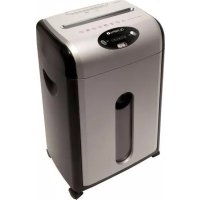
ECS 950 CCD - Shredder OLYMPIA - Free user manual and instructions
Find the device manual for free ECS 950 CCD OLYMPIA in PDF.



| Product type | Document shredder |
| Brand | Olympia |
| Model | ECS 950 CCD |
| Security level (DIN 32757) | 3 |
| Cutting method (paper) | Cross cut (particle cut) 4 x 44 mm |
| Cutting capacity (paper) | Max. 12 sheets DIN A4 (70 g/m²) |
| Paper entry width | 220 mm |
| CDs/DVDs/credit cards entry | Yes, max. 1 unit, strip cut 23.5 mm |
| Operating cycle | 7 min on / 50 min off |
| Cutting speed | 1.6 m/min |
| Blade block material | Fine steel |
| Noise level | 60 dB(A) |
| Paper bin volume | 18 litres (approx. 230 A4 sheets) |
| CDs/DVDs/other bin volume | 1 litre |
| Bin with inspection window | Yes |
| Dimensions (W x D x H) | 338 x 248 x 515 mm |
| Weight | 10.5 kg |
| Casters | Yes |
| Power supply | 230 V / 50 Hz |
| Electrical power | Max. 280 W (1.2 A) |
| Main functions | Auto start/stop (ECS), emergency stop, forward/reverse |
| Displays | Green LED (on), red LED (jam, overheating, bin full) |
| Maintenance | Oil the blade block regularly with special shredder oil |
| Safety | Thermal protection, emergency stop, do not open the blade block cover |
Frequently Asked Questions - ECS 950 CCD OLYMPIA
User questions about ECS 950 CCD OLYMPIA
0 question about this device. Answer the ones you know or ask your own.
Ask a new question about this device
Download the instructions for your Shredder in PDF format for free! Find your manual ECS 950 CCD - OLYMPIA and take your electronic device back in hand. On this page are published all the documents necessary for the use of your device. ECS 950 CCD by OLYMPIA.
USER MANUAL ECS 950 CCD OLYMPIA
Operating Instructions
Mode d'emploi
Manuale d'uso
Operating Instructions 15
Mode d'emploi 27
Manuale d'uso 39
m = 311 ;
Operating Instructions
[ENGLISH]
11.2010
1 Important Safety Regulations
In order to be able to exploit all the functions of your shredder, please read this manual thoroughly before starting to use the product and keep it handy for future reference.
- Keep the device out of reach of children and pets! The device may only be operated by adults.
- The device can only be used by one person at a time.
- Do not carry out any other activities when operating the device, such as clean it.
- Never leave the device unattended when in operation.
- Protect the equipment from direct sunlight, extreme heat and damp!
- Never attempt to repair the device yourself. Risk of injury! In addition, all claims under the terms of guarantee will be deemed null and void. Repairs may only be carried out by properly trained specialists.
- Observe all the warnings and information in this manual, on the device and on the packing!
- Do not remove any labels or inscriptions from the device housing. Never make any other modifications to the housing. Risk of injury! In addition, all claims under the terms of guarantee will be deemed null and void.
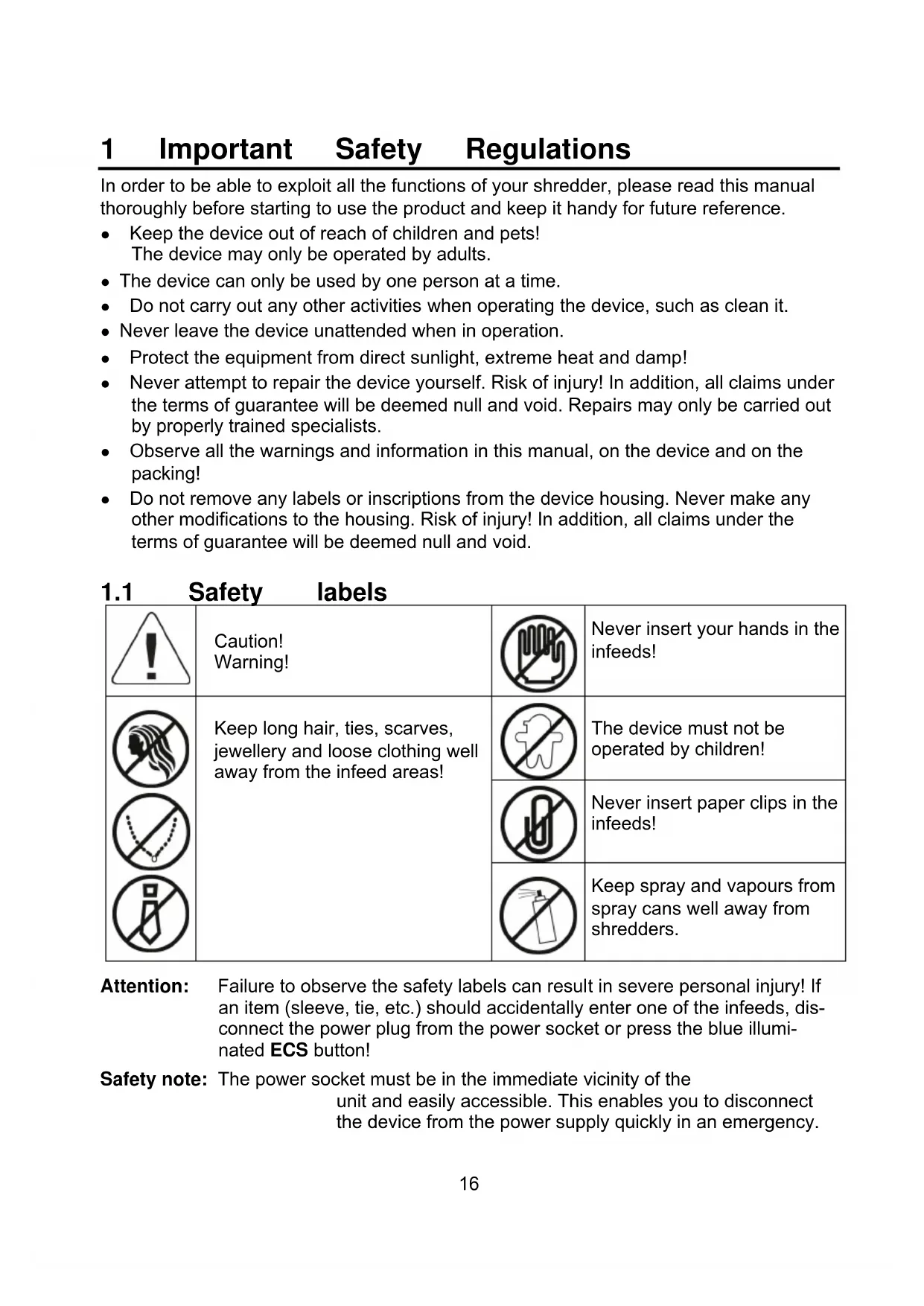
1.1 Safety labels
| ! | Caution! Warning! | Never insert your hands in the infeeds! | |
| Keep long hair, ties, scarves, jewellery and loose clothing well away from the infeed areas! | The device must not be operated by children! | ||
| Never insert paper clips in the infeeds! | |||
| Keep spray and vapours from spray cans well away from shredders. |
Attention: Failure to observe the safety labels can result in severe personal injury! If an item (sleeve, tie, etc.) should accidentally enter one of the infeeds, disconnect the power plug from the power socket or press the blue illuminated ECS button!
Safety note: The power socket must be in the immediate vicinity of the unit and easily accessible. This enables you to disconnect the device from the power supply quickly in an emergency.
1.2 Electrical safety guidelines
Attention: Ensure that the voltage specification of the device coincides with that of your power outlet, refer to Chapter "Technical Data!"
-
Disconnect the power plug from the power socket:
-
before emptying the waste bin,
- if it will remain unused for a longer period,
- before cleaning the device,
-
before moving the device.
-
Do not put the device into operation in the case of damage to the power cable, the power plug or the device itself (risk of injury)!
- Do not complete any modifications to the power cable because it is designed for the power supply specified.
- Only use an approved extension cable. Do not use any multiple sockets, adapters or unapproved extension cables.
- Never exceed the recommended load capacity of the power socket or any connected extension cables!
Attention: It is forbidden to open the cutting mechanism attachment for repair purposes. Risk of fatal injury! In addition, all claims under the terms of guarantee will be deemed null and void.
2 Intended Use
- Only use the ECS 950 CCD shredder to shred paper, CDs, DVDs and credit cards by inserting them in the respective slot! The material to be shredded must be dry and comply with the requirements stipulated in Chapter "Technical Data!" Attempting to shred other material can lead to personal injury (e.g. through splinters from hard material, etc.) and damage to the equipment (e.g. damage to the cutting mechanism etc.).
- Remove all paper clips before feeding paper in the device!
- Do not shred continuous forms, labels or envelopes in this device! Doing so could damage the cutting mechanism and, as a result, all claims under the terms of guarantee will be deemed null and void.
- The unit may only be used in dry, indoor rooms.
- The device is not intended for commercial use. Observe the operating cycle stipulated in Chapter "Technical Data".
3 Operating Elements
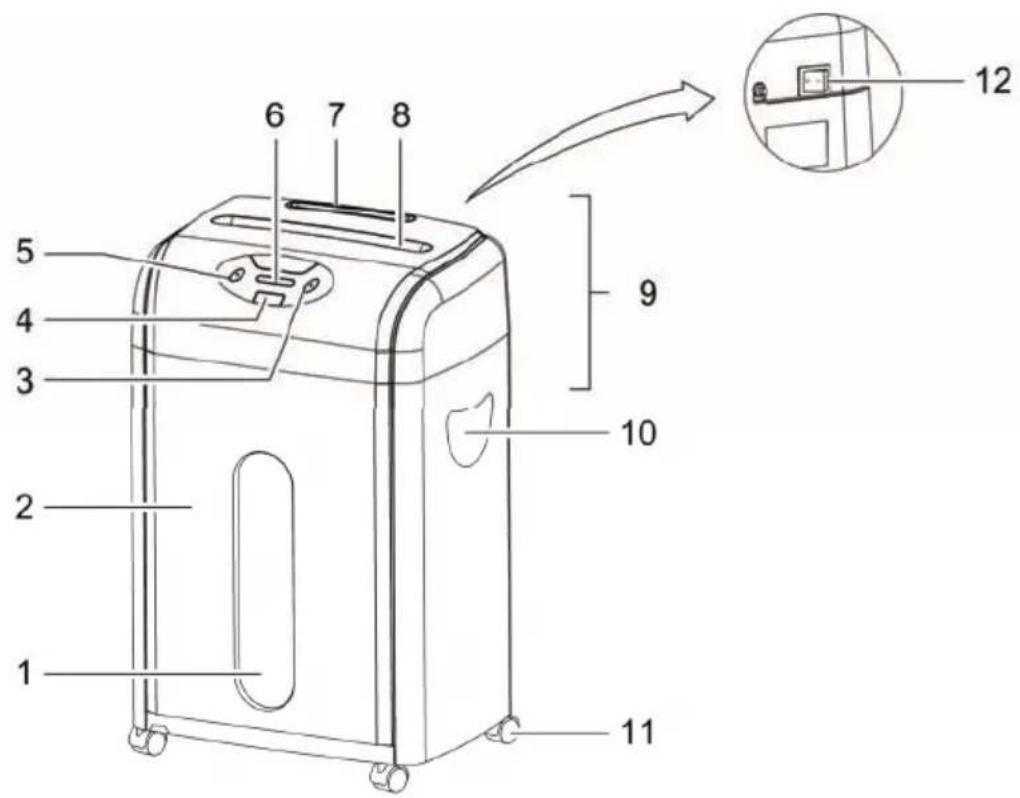
1 Window to waste bin
2 Waste bin
3 FWD button (forward operation)
4 ECS button (EcoShred operation) / Emergency Stop button
5 REV button (reverse operation)
6 Indicator elements
7 CD infeed (and credit cards)
8 Paper infeed
9 Cutting mechanism attachment
10 Grip
11 Castors
12 On/Off switch
4 Starting Up
- Remove the device carefully from the packaging.
Attention: The underside of the cutting mechanism attachment has sharp edges. Risk of injury!
- Place the device on a level surface.
- Position the device near a power socket. However, do not position it near a source of heat or water.
- Insert the waste bin.
Note: The shredder only operates when the original waste bin is inserted correctly.
- Set the On/Off switch to its OFF position.
- Connect the power plug to a power socket.
Note: Pay attention that the power cable is laid so that people or pets do not walk over it or that other objects can be set down on it. Pay attention to the information regarding power supply on the rear side of the device for the necessary precautions.
Safety information: For reasons of safety, the power socket to which the shredder power plug is connected must be near to the device and freely accessible so that the power supply can be disconnected quickly in an emergency!
5 Operation
Note: The recommended capacities stipulated in Chapter "Technical Data" must not be exceeded, otherwise material will jam! Do not forget that the thickness of the paper increases when folded, as a result of which the recommended sheet capacity can be exceeded. Also reduce the quantity of paper when shredding coarse paper.
5.1 Switching the device on
- Set the On/Off switch to its ON position.
The green "power on" lamp lights up.
The device is ready to operate.
5.2 ECS function (automatic EcoShred operation)
When the ECS ^2 function is activated, the shredding operation of the cutting mechanism starts up as soon as material is inserted in the respective infeed slot:
The device switches to forward drive and draws the material in.
- 5 seconds after shredding is finished, the device switches off automatically.
The ECS function is activated by pressing the ECS button. The ECS button then lights up blue.
Note: When the ECS function is activated, paper can be shredded via the paper infeed and CDs, DVDs and credit cards shredded via the CD infeed. Only one infeed may be used at a time. If you use more than one infeed, the device stops. Pay attention to the permissible quantity of material which can be shredded.
Note: When the ECS function is activated, the device has a very low power consumption.
5.3 Shredding paper
Note: A maximum of 12 sheets of A4 paper with a weight of maximally 70g / m may be inserted in the paper infeed at a time.
2
Note: Remove any other material from the paper, such as paper clips or labels.
- The device is switched on and the ECS function is activated.
- Insert paper in the paper infeed.
5.4 Shredding CDs, DVDs or credit cards
Note: Only insert 1 CD, DVD or credit card at a time for the shredding process.
- The device is switched on and the ECS function is activated.
- Insert the CD, DVD or credit card in the CD infeed.
Note: If, for security reasons, you want to shred credit cards using particle-cut (cross-cut), you can also feed credit cards into the shredder's paper infeed. This only applies for credit cards and not for CDs/DVDs!
5.5 Emergency stop
If the ECS function is activated or forward or reverse operation are on, you can stop the device immediately in an emergency situation by pressing the ECS button.
5.6 Switching the device off
Set the On/Off switch to its OFF position.
6 Indicator Elements
| Indicator | Cause | Solution |
| Device is ON | ||
| Overloading (material jam) | Clear the material jam, refer to Chapter "Clearing a material jam". Observe the recommended capacities regarding the material to be shred stipulated in Chapter "Technical Data". | |
| Motor has overheated | Let the motor cool down, refer to Chapter "Motor protection". Observe the operating cycle described in Chapter "Technical Data". | |
| Waste bin full | The waste bin is full and must be emptied, refer to Chapter "Emptying the waste bin". |
7 Motor Protection
The motor switches off automatically in the event of an overload. The red "motor overheated" lamp lights up in this case.
- First of all, disconnect the power plug from the power socket and allow the motor to cool down to room temperature.
- Then connect the power plug to the power socket again and continue operation.
Note: Observe the operating cycle stipulated in Chapter "Technical Data".
8 Clearing Material Jams
If too much material (paper, CDs, DVDs, credit cards) is fed to the cutting mechanism at one time, a material jam occurs. The shredder switches off automatically in the event of a material jam. The red "material jam" lamp lights up in this case.
Proceed as follows:
- Either the shredder feeds the material back out automatically (automatic reverse) or you must start reverse operation manually, refer to Chapter "REV button (reverse operation)".
- Press the FWD button to clear any residual material from the infeeds, refer to Chapter "FWD button (forward operation)".
- If necessary, switch the machine to forward and reverse operation alternately until there is no more material in the infeeds.
- Remove any residual material from the infeeds, refer to Chapter "Removing residual material from the infeeds manually".
Press the ECS button to reactivate the automatic shredding function. - Reduce the quantity of material being fed into the shredder.
- Pay attention that the material is inserted in the respective infeed (paper in the wide paper infeed, CDs/DVDs/credit cards in the small CD infeed).
8.1 REV button (reverse operation)
Press the REV button so that the cutting mechanism runs in reverse and feeds the material back out of the shredder indeed.
Note: If a paper jam has occurred when the paper infeed is in operation, you must also check whether there is any residual paper in the paper infeed and remove it manually!
8.2 FWD button (forward operation)
Press the FWD button to run the cutting mechanism forwards and shred any residual material left in the infeed and feed it out of the cutting mechanism.
Note: The FWD button is used after clearing a material jam to start the cutting mechanism running without feeding any new material through the respective infeed.
8.3 Removing residual material from the infeeds manually
- Set the On/Off switch to its OFF position and disconnect the power plug from the power socket.
- Remove any jammed material carefully from the cutting mechanism using a suitable tool.
- Reconnect the power plug in the power socket and set the On/Off switch to ON.
Attention: Maintenance work may only be completed when the power plug has been disconnected from the power socket!
9.1 Emptying the waste bin
The waste bin must be emptied when the red "waste bin full" lamp lights up at the latest.
- Set the On/Off switch to its OFF position.
- Pull the waste bin to the front and out of the device.
- Empty the contents according to waste disposal requirements.
- Slide the waste bin back in the device.
Note: It is recommended not to allow the waste bin to fill up against the cutting mechanism. This prevents the shredded paper congesting and jamming in the cutting mechanism. Empty the waste bin regularly.
Note: When the waste bin is removed from the device, the shredder cannot be used. The shredder only operates when the original waste bin is inserted correctly.
9.2 Lubricating the cutting mechanism
To ensure a long service life for your paper shredder, we recommend clearing any residue from the cutting mechanism regularly and applying a little special oil for paper shredders on the cutting tool. You can obtain the special CFC-free oil from your supplier or directly from our service center in Hattingen. This helps lengthen the service life of the device.
Each time the waste bin is emptied, apply several lines of the special oil in a lateral direction on a suitable sheet of paper and feed this sheet through the shredder when the ECS function is set.
Attention: It is forbidden to use oil spray from aerosol cans containing CFC!
9.3 Cleaning the device
Safety note: It is forbidden to use easily inflammable substances. Risk of injury!
- Set the On/Off switch to its OFF position and disconnect the power plug from the power socket.
- Clean the outside of the device with a soft, slightly damp cloth.
Note: In order to clean the housing, do not use any aggressive, common household cleaning agents or any chemicals (e.g. solvents, petroleum ether). If necessary, only use cleaning products specifically approved for cleaning shredders.
10 Technical Data
| ECS 950 CCD | |
| Not intended for commercial use. | |
| Security level complying with DIN 32757 3 | |
| Infeed for paper and credit cards: Yes | |
| Cutting capacity | Max. 12 sheets A4 (70 g/m2) or max. 1 credit card |
| Cutting method, cut width Cross cut (particle cut), 4 x 44 mm | |
| Width of paper infeed 220 mm | |
| Infeed for CDs/DVDs/credit cards: Yes | |
| Cutting capacity Max. 1 piece at a time | |
| Cutting method, cut width Strip-cut, 23,5 mm (strip width) | |
| Insert width 122 mm | mm |
| Operating cycle 7 min ON, 50 min OFF | |
| Shredding speed 1.6 m/min | |
| Cutting mechanism Quality steel | |
| Noise level | 60 dB(A) |
| Waste bin volume, paper | 18 litres (approx. 230 sheets A4) |
| Waste bin volume, CDs/DVDs etc. | 1 litre |
| Waste bin with control window | Yes |
| Range of operations | Emergency stop Auto start/Auto stop Reverse running (automatic and manual) Forward running (without material feed) |
| Indicator elements | Power on (green LED) Material jam (red LED) Overheating protection (red LED) Waste bin full (red LED) |
| Dimensions (W x D x H) | 338 x 248 x 515 mm |
| Weight | 10.5 kg |
| Castors | Yes |
| Power supply | 230 V / 50 Hz |
| Rated input power | Max. 280 W (1.2 A) |
11 Troubleshooting
| Problem | Diagnosis & | Cause Solution |
| Device does not work | Is the power plug connected properly in the power socket? | Connect the power plug to the power socket properly. |
| Is the On/Off switch set to OFF? | Set the On/Off switch to its ON position. | |
| Is the ECS function activated? | Press the ECS button so that it lights up blue. | |
| Has the device been assembled properly? | Ensure that the waste bin has been inserted properly. | |
| Does the motor fail to start when material is inserted ? | Slide the material in the respective infeed slot so that it makes contact with the sensor in the middle. | |
| Device no longer functions after a longer period out of service or stops during operation | Was the device shutdown for a longer time? Is the surface of the device warm? The permissible operating cycle has probably been exceeded. | First of all, disconnect the power plug from the power socket and allow the motor to cool down to room temperature. For information on the operating cycle, refer to Chapter "Technical Data". |
| Overloading (material jam) | Have you exceeded the permissible material capacity (refer to Chapter "Technical Data"? Has the material been fed in askew? | Clear the material jam, refer to Chapter "Clearing a material jam". |
Note: If you cannot clear the fault yourself, contact your dealer or call the Olympia hotline.
12 Disposal
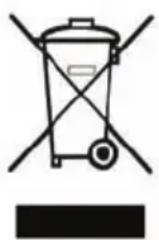
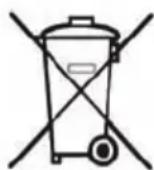
This symbol (crossed out waste bin) indicates that the product must be returned to an authorised recycling centre or separate collection point when it has reached the end of its service life. The symbol only applies to states within the EEA*
- EEA = European Economic Area, which is comprised of the member states of the EU plus Norway, Island and Liechtenstein.
13 Warranty
In the case of a defect, please return the device together with the receipt and original packing material to the point-of-sale.
OLYMPIA®
ECS 950 CCD
5.4 Cd's,DVD's of creditcards versnipperen
Hattingen, November 2010 Heinz Prygoda, Managing Director

- Operating Instructions
- Important Safety Regulations
- Safety labels
- Electrical safety guidelines
- Intended Use
- Operating Elements
- Starting Up
- Operation
- Switching the device on
- ECS function (automatic EcoShred operation)
- Shredding paper
- Shredding CDs, DVDs or credit cards
- Emergency stop
- Switching the device off
- Indicator Elements
- Motor Protection
- Clearing Material Jams
- Proceed as follows:
- REV button (reverse operation)
- FWD button (forward operation)
- Removing residual material from the infeeds manually
- Emptying the waste bin
- Lubricating the cutting mechanism
- Cleaning the device
- Troubleshooting
- Disposal
- Warranty
- OLYMPIA®
- Cd's,DVD's of creditcards versnipperen
Brand : OLYMPIA
Model : ECS 950 CCD
Category : Shredder