MegaView 20 - Digital decoder MARMITEK - Free user manual and instructions
Find the device manual for free MegaView 20 MARMITEK in PDF.


User questions about MegaView 20 MARMITEK
0 question about this device. Answer the ones you know or ask your own.
Ask a new question about this device
Download the instructions for your Digital decoder in PDF format for free! Find your manual MegaView 20 - MARMITEK and take your electronic device back in hand. On this page are published all the documents necessary for the use of your device. MegaView 20 by MARMITEK.
USER MANUAL MegaView 20 MARMITEK
Audio Video Sender over Coax
USER MANUAL 3
- To prevent short circuits, this product should only be used inside and only in dry spaces. Do not expose the components to rain or moisture. Do not use the product close to a bath, swimming pool etc.
- Do not expose the components of your systems to extremely high temperatures or bright light sources.
- In case of improper usage or if you have altered and repaired the product yourself, all guarantees expire. Marmitek does not accept responsibility in the case of improper usage of the product or when the product is used for purposes other than specified. Marmitek does not accept responsibility for additional damage other than covered by the legal product responsibility.
- This product is not a toy. Keep out of reach of children.
- Do not open the product: the device may contain live parts. The product should only be repaired or serviced by a qualified expert.
- Only connect the adapter to the mains after checking whether the mains voltage is the same as the values on the identification tags. Never connect an adapter or power cord when it is damaged. In that case, contact your supplier.
TABLE OF CONTENTS
INTRODUCTION 3
- APPLICATION AND OPERATION MEGAVIEW20 4
- CONTENTS OF THE PACKING 4
- CONNECTING THE DEVICE TO THE MEGAVIEW20 MODULATOR 5
- CONNECTING THE ANTENNA SIGNAL TO THE MEGAVIEW20 MODULATOR 6
- SELECTING THE CHANNEL 7
- EXTRA OPTIONS 8
- FREQUENTLY ASKED QUESTIONS 9
- TECHNICAL DATA 9
INTRODUCTION
Congratulations on your purchase of the Marmitek MegaView20. The MegaView20 is a programmable modulator which converts audio- and video signals of for instance your DVD-player, satellite receiver, VCR, surveillance camera, decoder, set top box or PC and adds them as an extra
TV channel on your antenna cable. Then you can watch this signal as a kind of internal TV-channel everywhere in your home assumed there is an antenna connection.
The Marmitek products are manufactured with the utmost precision and are of high quality. Please read this manual first and follow the instructions so you can enjoy the possibilities of this product optimally.
The antenna cable is, as you could say, looped into the modulator. The incoming antenna signal is connected to the antenna connection, besides that you can connect an A/V device of your choice to the input on the MegaView20. The outgoing antenna signal then carries both the standard antenna signal and the added Audio/Video-signal (of for instance a DVD-player or AV-camera). On every TV connected to this antenna system after the modulator ('To TV / RF OUT' of your MegaView20) the added Audio/Video-signal can be watched on the selected channel. You do not need to make any changes to the rest of your antenna network.
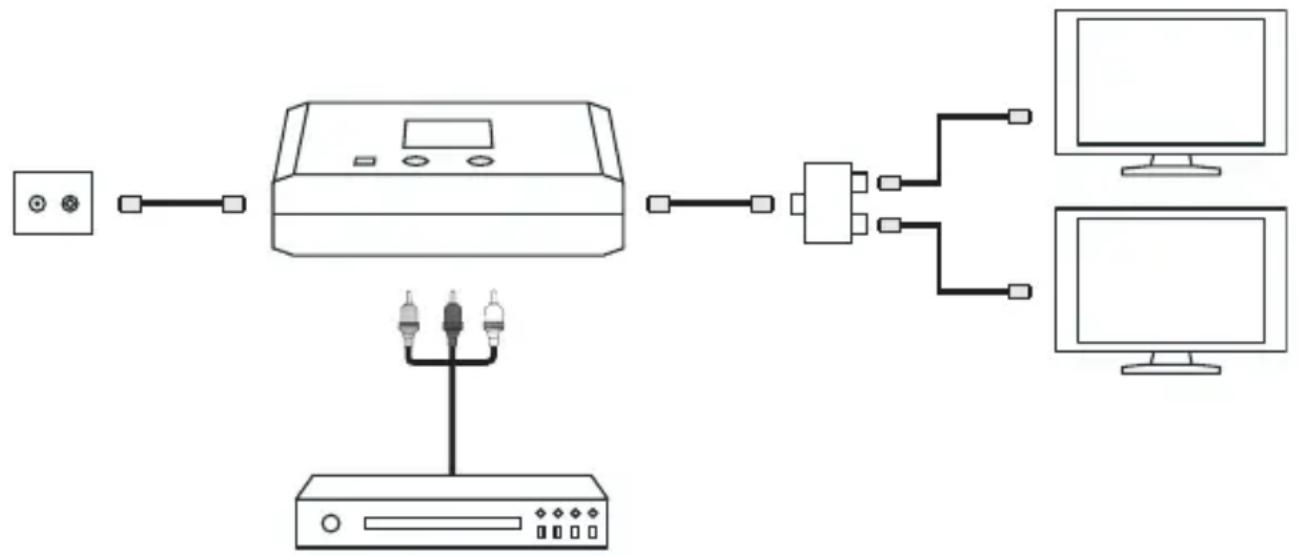
The modulator itself has no influence on the strength of the signal. The maximum length of the cables to be used is determined by the present cable network in your home. If you want to connect multiple TV sets or want to use a longer cable, we advice you to use an amplifier/splitter. Your antenna material supplier can advice you in this.
2. CONTENTS OF THE PACKING
Check after unpacking if the following parts and accessories are present:
1x MegaView20 modulator
1x Power adapter
1x IEC Antenna cable (1 metre)
1x Manual
3. CONNECTING THE DEVICE TO THE MEGAVIEW20 MODULATOR
Switch off all devices before you start connecting. Then connect the device you want to connect (for instance the DVD-player or AV-camera) to the MegaView20. You can connect the device with a SCART cable or a cinch cable. Use one of the two possibilities mentioned below.
Connecting an A/V appliance via SCART (1)
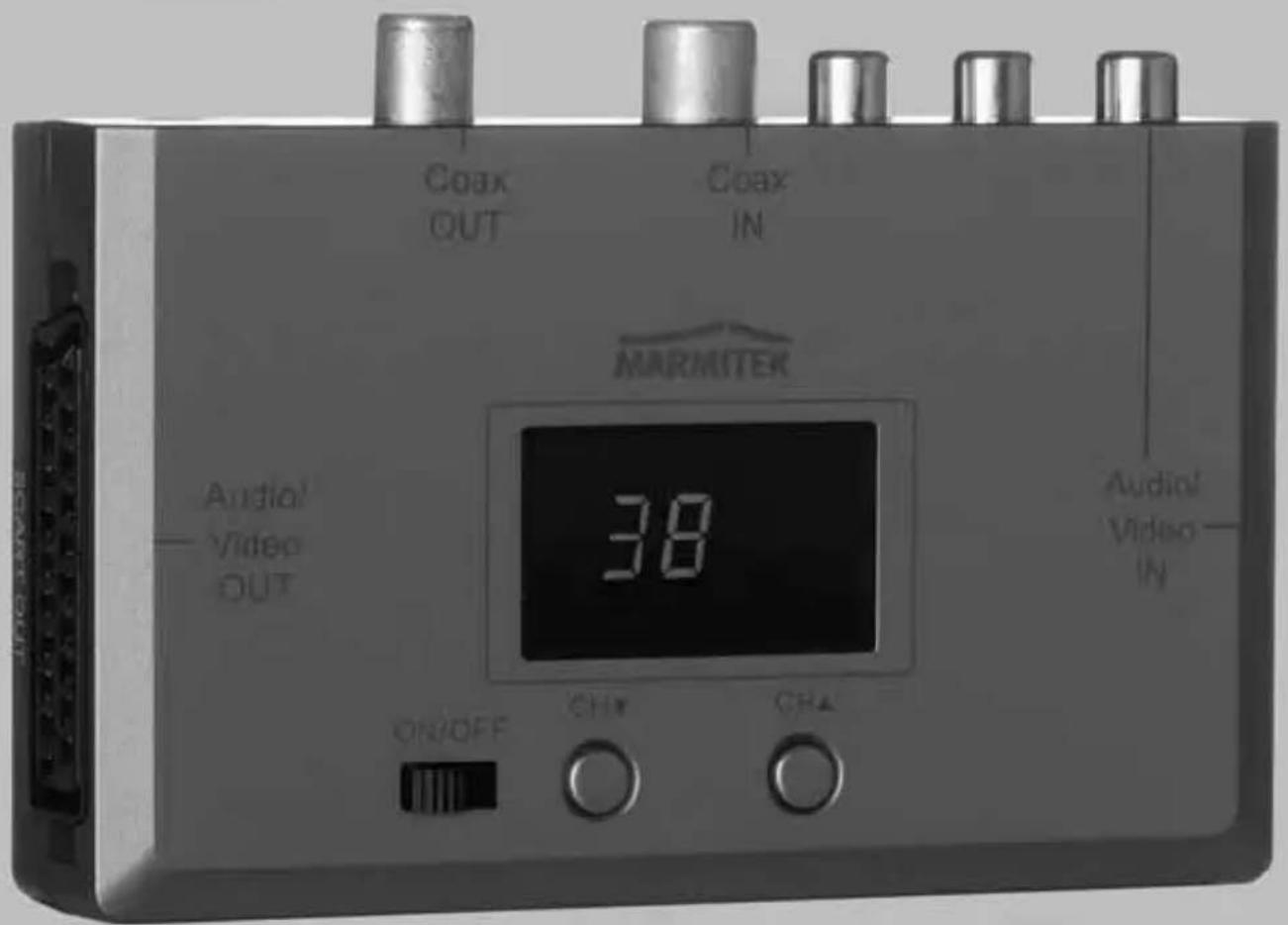
You can use the 'SCART connection' on the modulator to add the video-and audio signal desired to the antenna signal. You can use a SCART cable (not included) and you connect this to the 'SCART IN' of the MegaView20.

Tip: See chapter 6 Extra options for the possibility to connect multiple devices
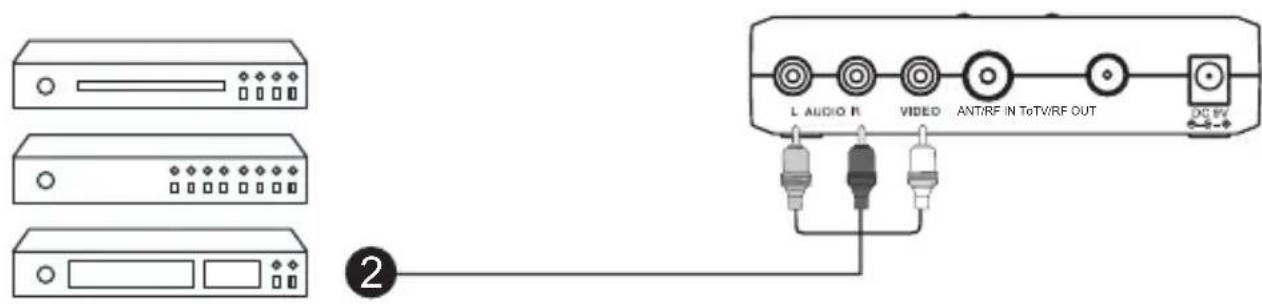
Connecting an A/V appliance via cinch cable (2)
Any so called composite audio- and video signal can be connected to the modulator. For this you can use a cinch cable (not included). Make sure the colours of the plugs and the sockets are corresponding. That means red to red, white to white and yellow to yellow.
A/V appliance via SCART to TV (3)
The 'SCART OUT' connection on your MegaView20 offers you the possibility to connect not only the signal of your A/V devices to the antenna signal, but to also loop it to a TV set via SCART (for instance for TV sets that are not connected to your antenna network).

Attention: This connection only transfers the A/V signal of the connected device back to the TV set and not the other TV channels.
4. CONNECTING THE ANTENNA SIGNAL TO THE MEGAVIEW20 MODULATOR
Follow the description below to connect the antenna cable.
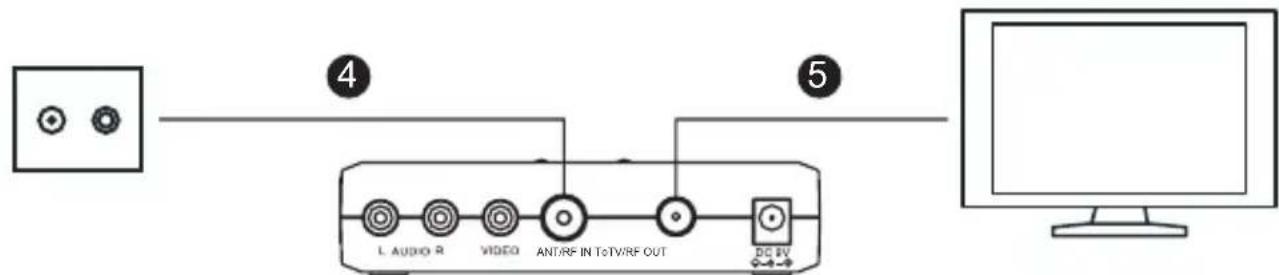
Connecting an antenna cable (4)
Connect the existing antenna cable to the 'ANT/RF IN' connector of the MegaView20. Depending on the current situation you may need to disconnect some of the cables before you can connect the antenna.
Connecting an antenna cable to TV (5)
Connect the 'To TV/ RF OUT' of the MegaView20 to the antenna port of the television set (if necessary with the use of included antenna cable).
If you want to watch this signal at multiple places, you connect a splitter between the MegaView20 and the TV (your supplier of antenna materials can advice you in this). On every television connected to the antenna
system after the modulator the added audio/video signal can be watched on the selected channel (see display).
Tips:
- Make sure the connectors are fitted properly to the coax cable.
- Use high frequency shielded connectors to prevent radiation and interference.
- Use only broadband amplifiers and splitters with a range of 5-1000 MHz.
5. SELECTING THE CHANNEL
The added Audio/Video-signal (of for instance a DVD-player or AV-camera) is converted into a normal TV-channel.
With the MegaView20 you can actually choose every free channel. It is important to choose a free channel, which is not yet in use by an existing TV-channel. Which channels are free depends on the incoming antenna signal. For this, consult the channel chart provided by your cable company, or if you have your own antenna, the channel overview in your TV-guide.
- Connect the power adapter to the modulator and plug this in the socket. Turn on the modulator by switching the ON/OFF switch to ON.
- Take your channel chart and look for two free adjacent channels. Then you choose the higher of these two channels. Example: when channel 37 and 38 are free, you should choose channel 38. With three free adjacent channels, you should choose the middle one.
- Use the CH▼ and the CH▲ keys on top of the modulator to select the chosen channel. The illuminated digital display on top of the panel shows this channel.
- Now switch on the desired A/V device (DVD, VCR, satellite receiver, PC, camera, etc.).
- Turn on the TV, and find the selected channel. How to do this can be read in the manual of your TV. If you cannot select channels on your TV set,
but only frequencies, you can look this up in the enclosed table in the back of this manual. This set channel now shows the connected A/V device and from now on you can watch this on the channel you selected.
- Now check if there is no interference on the TV-channels close by. If there is, you need to find two (or if possible three) other free channels and set the modulator to that one.
If you have multiple TV sets in your home (connected to the same antenna network), then you can watch this signal on the other TV sets as well. However first you need to set the right channel on every TV.
6. EXTRA OPTIONS Infrared extension
Do you want to operate your DVD-player or satellite tuner in the living room from your bedroom? Or operate devices in a closed cabinet? Marmitek infrared extenders make sure that the signal of your remote control goes right through cabinet doors, walls and floors.
- The VideoControl3 sends the signal of your remote control back to another room via the existing antenna cable.
- Right through walls and ceilings with your existing remote control? This is possible with the PowermidXS. The wireless solution for extending the signal of your remote control!
Connecting multiple devices
- Do you want to connect multiple A/V devices? With the Connect 236 you can connect all of your devices to your MegaView20 with just one cable, preserving the quality.
- You can also connect a second A/V device using a second MegaView20. By selecting another TV channel on it you can watch both devices at different places.
A/V Camera
Do you want a more comfortable and safer feeling in and around your house? With the MegaCam1 you can keep an eye on your house, garden, garage and driveway. Connect this to your MegaView20 and you can watch these images on TV in various rooms in your house.
7. FREQUENTLY ASKED QUESTIONS
No image, no sound
- Check if all cables are connected properly.
- Check if the channel is set correctly.
The MegaView20 picture is interfered and all the other channels are o.k.
There might be a TV channel too close to the selected MegaView20 channel. Choose another channel for the MegaView20 (preferably the middle one of three or if possible five free channels).
Interference with the other channels
Choose another channel, preferably the middle of three free channels in the band.
Distorted sound
Turn down the volume of the connected device.
Do you have any questions that are not answered here? Then check www.marmitek.com.
8. TECHNICAL DATA
MONO RF Modulator
Power: 230VAC/50Hz, DC 9V/200mA
Standard:
PAL
B/G
Modulation frequency range: UHF: 471.25~855.25MHz channel 21-69
Input: Video, Audio L+R (SCART, RCA)
Output level: 72dB V + / - 3dB in 75 Ohm
Insertion loss: < 1,5dB at 860MHz
Carrier wave audio: 5.5MHz
Modulation method: Double side band modulation
Size: 120 × 84 × 33mm
Environmental Information for Customers in the European Union
European Directive 2002/96/EC requires that the equipment bearing this symbol on the product and/or its packaging must not be disposed of with unsorted municipal waste. The symbol indicates that this product should be disposed of separately from regular household
waste streams. It is your responsibility to dispose of this and other electric and electronic equipment via designated collection facilities appointed by the government or local authorities. Correct disposal and recycling will help prevent potential negative consequences to the environment and human health. For more detailed information about the disposal of your old equipment, please contact your local authorities, waste disposal service, or the shop where you purchased the product.
SICHERHEITSHINWEISE
6 OPTIONS ADDITIONNELLES
Rallonge infrarouge
Alimentation: 230VAC/50Hz, DC 9V/200mA
Standard: PAL B/G
Porte modulation de fréquence: UHF: 471.25~855.25MHz canal 21-69
Entree: Video, Audio L+R (SCART, RCA)
Conectar various aparatos
VEILIGHEIDSWAARSCHUWINGEN
Voeding: 230VAC/50Hz, DC 9V/200mA
Standaard:
PAL
B/G
Modulatie frequentie bereik: UHF: 471.25~855.25MHz kanaal 21-69
Ingang: Video, Audio L+R (SCART, RCA)
Uitgangsnaiveau: 72dB V + / - 3dB in 75 Ohm
Channel Frequency (MHz)
21 471.25
22 479.25
23 487.25
24 495.25
25 503.25
26 511.25
27 519.25
28 527.25
29 535.25
30 543.25
31 551.25
32 559.25
33 567.25
34 575.25
35 583.25
36 591.25
37 599.25
38 607.25
39 615.25
40 623.25
41 631.25
42 639.25
43 647.25
44 655.25
45 663.25
46 671.25
47 679.25
48 687.25
49 695.25
50 703.25
51 711.25
52 719.25
53 727.25
54 735.25
55 743.25
56 751.25
57 759.25
58 767.25
59 775.25
60 783.25
61 791.25
62 799.25
63 807.25
64 815.25
65 823.25
66 831.25
67 839.25
68 847.25
69 855.25
DECLARATION OF CONFORMITY
Hereby, Marmitek BV, declares that this MegaView20 is in compliance with the essential requirements and other relevant provisions of the following Directives:
DIRECTIVE 2004/108/EC OF THE EUROPEAN PARLIAMENT AND OF THE COUNCIL of 15 December 2004 on the approximation of the laws of the Member States relating to electromagnetic compatibility
Council Directive 73/23/EEC of 19 February 1973 on the harmonization of the laws of Member States relating to electrical equipment designed for use within certain voltage limits
Hiermit erklart Marmitek BV die Übereinstimmung des Gerätes MegaView20 den grundlegenden Anforderungen und den anderen relevanten Festlegungen der Richtlinien:
RICHTLINIE 2004/108/EG DES EUROPÄISCHEN PARLAMENTS UND DES RATES vom 15. Dezember 2004 zur Angleichung der Rechtsvorschriften der Mitgliedstatesen über die elektromagnetische Verträgekeit
Richtlinie 73/23/EWG des Rates vom 19. Februar 1973 zur Angleichung der Rechtsvorschriften der Mitgliedstaaten betreffend elektrische Betriebsmittel zur Verwendung innerhalb bestimmter Spannungsgrenzen
Par la presente Marmitek BV déclare que l'appareil MegaView20 est conforme aux exigences essentielles et aux autres dispositions pertinentes de la directives:
DIRECTIVE 2004/108/CE DU PARLEMENT EUROPEEN ET DU CONSEIL du 15 décembre 2004 relative au rapprochement des législations des États membres concernant la compatibilité electromagnétique
Directive 73/23/CEE du Conseil, du 19 février 1973, concernant le rapprochement des législations des États membres relatives au matériel électrique destiné à être employé dans certaines limites de tension
Marmitek BV declara que este MegaView20 cumple con las exigencias esenciales y con las demas reglas relevantes de la directriz:
DIRECTIVA 2004/108/CE DEL PARLAMENTO EUROPEO Y DEL CONSEJO de 15 de diciembre de 2004 relativa a la aproxima de las legislaciones de los Estados miembrlos en materia de compatibiliidad electromagnética
Directiva 73/23/CEE del Consejo, de 19 de febrero de 1973, relativa a la aproximacion de las legislaciones de los Estados Miembros sobre el material eletrico destinado a utiliser con determinados limites de tension
Con ciò, Marmitek BV, dichiara che il MegaView20 è conforme ai requisiti essenziali ed alter disposizioni relative alla Direttiva :
DIRTTIVA 2004/108/CE DEL PARLAMENTO EUROPEO E DEL CONSIGlio del 15 dicembre 2004 concennte il ravicinamento delle legislazioni degli Stati membri relative alla compatibilità elettromagnetica
Direttiva 73/23/CEE del Consiglio, del 19 febbraio 1973, concennte il ravvicinamento delle legislazioni degli Stati Membrile relative al materiale elettrico destinato ad essere adoperato entro taluni limiti di tensione
Bij deze verklaart Marmitek BV, dat deze MegaView20 voldoet aan de essentiele eisen en aan de overige relevante bepalingen van Richtlijnen:
RICHTLIJN 2004/108/EG VAN HET EUROPEES PARLEMENT EN DE RAAD van 15 deember 2004 betreffende de onderlinge aanpassing van de wetgevingen van de lidstates inzake elektromagnetische compatibiliteit
Richtlijn 73/23/EEG van de Raad van 19 februar 1973 betreffende de onderlinge aanpassing van de wettelijk voorschriften der Lid-Staten inzake elektrisch materiaal bestemd voor gebruik binnen bepaalde spanningsgrenzen
MARMITEK BV - P.O. BOX 4257 - 5604 EG EINDHOVEN - NETHERLANDS
CE
Copyrights - Marmitek is a trademark of Marmidenko B.V. - MegaView20 is a trademark of Marmitek B.V. All rights reserved. Copyright and all other proprietary rights in the content (including but not limited to model numbers, software, audio, video, text and photographs) rests with Marmitek B.V. Any use of the Content, but without limitation, distribution, reproduction, modification, display or transmission without the prior written consent of Marmitek is strictly prohibited. All copyright and other proprietary notices shall be retained on all reproductions.