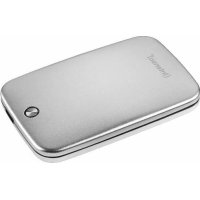
Memory Space - External hard drive INTENSO - Free user manual and instructions
Find the device manual for free Memory Space INTENSO in PDF.



| Product type | External hard drive |
| Brand | Intenso |
| Model | Memory Space |
| Dimensions (L × l × h) | 128 × 82 × 15 mm |
| Weight | Approximately 150 g |
| Interface | USB 3.0 (backward compatible with USB 2.0) |
| Maximum transfer rate | 5 Gbit/s (USB 3.0) |
| Power supply | Via USB port (bus-powered) |
| Compatible operating systems | Windows XP, Vista, 7; Mac OS 10.x |
| LED indicator | Yes (blinks during read/write) |
| Operating conditions | Operating temperature: 5 °C to 35 °C |
| Maintenance and cleaning | Protect from shocks, drops and electrostatic discharges. Do not expose to excessive humidity. |
| Safety | Do not open the casing; the warranty sticker must not be damaged. |
| Spare parts and repairability | USB 3.0 cable included. No spare parts provided; repair only by after-sales service. |
| Warranty | Legal warranty (keep the purchase receipt). |
Frequently Asked Questions - Memory Space INTENSO
User questions about Memory Space INTENSO
0 question about this device. Answer the ones you know or ask your own.
Ask a new question about this device
Download the instructions for your External hard drive in PDF format for free! Find your manual Memory Space - INTENSO and take your electronic device back in hand. On this page are published all the documents necessary for the use of your device. Memory Space by INTENSO.
USER MANUAL Memory Space INTENSO
Service Center (thre RMA-Mr.)
Service Hotline: +49 (0) 900 - 150 40 30
Operating Instructions
2,5”
MEMORYSPACE
Scope of Delivery
- Intenso High-Speed USB 3.0 hard drive (downwardly compatible)
USB 3.0 cable - Operating instructions
Technical Data
External USB 3.0 hard disk 2,5" (6,35cm)
Dimensions: 15 × 82 × 128 mm
Maximal transfer 5 GBit/sec (USB 3.0)
Capacity: 1MB = 1,000,000 bytes / 1GB = 1,000,000,000 bytes
Instructions for use

Operational between:
5°C and 35°C
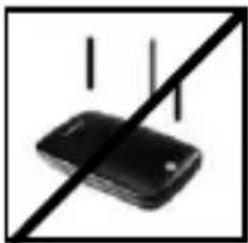
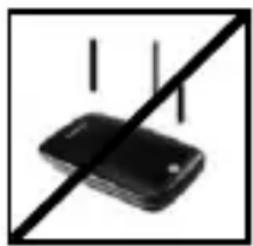
Crush, fall
Protect the device in every operation condition from crush and fall. Do not move the device during operation.

Electrostatic discharge
It is an electrostatic discharge sensitive device. Protect the device from every kind of electrostatic discharge.
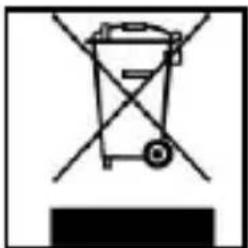
Disposal of WEEE (Waste Electrical and E lectronic Equipment)
Devices marked with the WEEE logo are subject to the European Community Directive 2002/96/EC.
Waste Electrical and Electronic Equipment must be separated from household rubbish and disposed at sites that collect WEEE.
By orderly disposing WEEE you will avoid damage caused to the environment.
Installation Instructions
System Requirements:
This hard drive is compatible with the operating systems MS Windows XP / Vista / Windows 7 and Mac OS 10.x.
Please note:
For the USB 3.0 operation an USB 3.0 interface card is needed. The hard disk is downwardly compatible with the previous USB standards.
Your PC's hardware configuration as well as the operating system employed can influence the compatibility of the hard drive.
Power supply under USB 2.0: If your USB 3.0 hard disc is not recognized on your PC with a USB 2.0 connection, this could probably be caused by the power supply. In this case, please connect an USB hub with an external power supply.
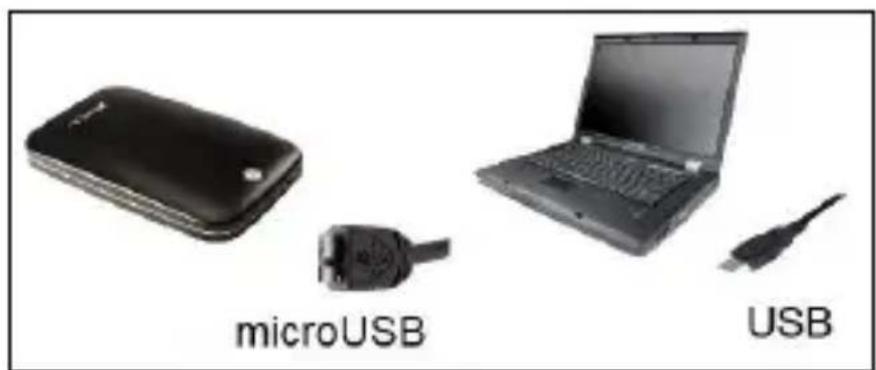
Hard Drive Connection:
To connect an external hard drive to your computer, please use the USB cable provided. Connect the USB 3.0 plug with the Intenso hard drive and the plug of the USB cable ending with your computer.
The computer automatically detects the "New Device" and installs the driver. Please wait until driver installation is completed. Your computer now shows an additional drive named "Intenso".
As soon as the hard drive is connected to your computer, the LED flashes. The LED flashes, when writing or reading procedure is carried out.
Trademark: Windows XP / Vista / Windows 7 are registered trademarks of the Microsoft Corporation. Macintosh and MAC are registered trademarks of Apple Computer. All trademarks and names of third parties are property of the respective user.
Limited guarantee conditions
The guarantee only covers the use of this Intenso product. The guarantee does not cover normal wear resulting from faulty, improper use, negligence, accidents, incompatibility or poor functionality of certain computer hardware or computer software.
Claim under guarantee does not exist in the case of noncompliance with the Intenso user manual as well as in case of improper assembly, use or defects of other devices.
Claim under guarantee does not exist in the case that the device is exposed to shock, electrostatic discharge, heat or humidity beyond the product specifications.
Intenso is not liable for data loss or any other occurring indirect damages or secondary damages, for the violation of the guarantee conditions or any other damages, no matter what the reason is.
Important information:
Please note that any claim under guarantee expires, if the capacity label (= guarantee sealing) on the rear side is damaged and if the housing of the hard disk is opened.
This product is not intended for commercial use, for medical or special applications, where a failure of the product can cause injuries, fatalities or substantial property damage.
(Intenso) WARRANTY CONDITIONS
Dear Intenso customer,

Thank you for opting for a high-quality Intenso product. All Intenso products are subject to constant quality inspections and the legal warranty period applies, of course, from the date of purchase. Please be sure therefore to save the sales receipt as proof of purchase.
Warranty conditions
The warranty only covers material and production defects. Intenso GmbH is not liable for the loss of data in units sent to us. The free of charge warranty service covers the repair or replacement of defective parts. Please understand that we cannot render any warranty services, e.g. in case of:
Misuse or improper handling, installation or use
- Damages, scratches or wear
- Modifications, manipulation or repairs by third parties
Damages through force majeure or transport
Your Intenso GmbH
CLAIM PROCEDURE
In case of a claim, please proceed as follows:
- Only returns accompanied with all accessories and sales receipt are accepted.
- In addition, a RMA number is absolutely required for return shipments. You can request this RMA number via e-mail or through the service hotline.
- Please package the product including all accessories and the sales receipt safe for transport. Please stamp the package.
- Please affix the RMA number clearly visible on the outside of the package.
Please send to the following service address:
INTENSO GMBH
Service Center (your RMA-No.)
(0.39 €/min from the landline in Germany
Usual costs apply.)
Email support@intenso.de
Internet www.intenso.de
Istruzioni d'uso
2,5”
MEMORYSPACE
Volume di segna
Capacité: 1MB = 1,000,000 bytes / 1GB = 1,000,000,000 bytes
Service Center (Votre reference RMA)
Service Hotline: +49 (0) 900-150 40 30
Capacidade: 1MB = 1,000,000 bytes / 1GB = 1,000,000,000 bytes
Indicações de uso:

Operacional entre:
Service Center (Seu N° ADM)
Email support@intensode
Internet www.intenso.de
Instrukcja obstugi
2,5”
MEMORYSPACE
USB 3.0 BheuHn JecTkni Dnck 2,5" (6,35cm)
Pa3Mepbl: 15 x 82 x 128 MM
Ckopoctb nepepaHmakc.5Γbnt/c (USB 3.0)
EMKOCb:1MB=1000006aaiTOB/1GB=100000006aaiTOB
Yka3aHnI NOJIb3OBaTeJIa



Pa6o7a TeMnepaTpa MexKdy:
5° C ≠ 35° C
yap, naeHne
3aunuaiTe np6op B JIObOM pa6oem COCTOHNOT ynapa npaen. He nepeBnraTe np6op B pa6oem COCTOHN.
3neKtpocTaTnueckn pa3pnd
HCTpyKzno HCTaJIaIcN
Tpe6obHnK cnCTeme:
ТOT Лжеск COBmecTm CОпационьIMСИСтЕмМ MS Windows XP / Vista / Windows 7 n Mac OS 10.x.
IpeynpeKdeHue:
Дя paьc USB 3.0 Heobxodma unmeppechna nama USB 3.0. Jecmku duck omeeaem cmahdapmam USB npedbyux bercu.
KoHpuZpaua annapamHo2o obecneueHna Bauezo PK u npumHeMa onepaUOnHa cucmema Mozym EJnA h a coemcmmocmb Jecmko2o ducka.
3nekmponumahue uepe3 USB 2.0: cnyae, ecnu kecmku duck USB 3.0 He byem ono3nHa ha komnbomepe c 2he3dOm USB 2.0, npuuhou moxem bimb omcymcme oka. Nodknoyume makom cnyae pa3eumelb USB c heunum ucmouhukom numaHua.
CoeHHeHne XecTKoro DnCKa:
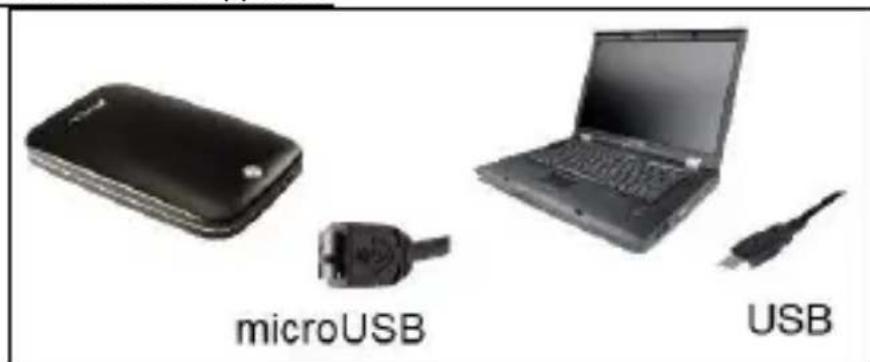
UTo6bI npncOeHNHTb BHeuHn JecTKn DnCK K BaWeMy KOMnbTepy, nCnoJIb3yIte, noXaIyIcTa, dOCTaBnEHHbI Ka6eIb USB. CoeHNHTe USB 3.0 wTeKkep c Intenso JecTKm DnCKom I USB wTeKkep c BaWM KOMNbIOTePOM.
KoMnIbTepeapno3Haet,HOBoe annapatHoe oBeceueHne" n HnCTaJInpyET dpaBep aBTOMaTnueckn. IOnOxJnte, noka 3aBepuNTcra HHCTaJIpyeI dpaBepa. Ha ,Pa6oyem Mecte" B paCnpjKeHn Tepepb IMeETc eIe ODNH DnCKOBOD c O6O3NaUeHHeM ,Intenso".
KaK TOnbKO BHeuHn JxecTKn DnCK CoeHNHeC KOMNbIOTepOM HaunHaet MInrA Tb CBeToaNoD. CBeToaNoD MInraeT, Korda NDeT npOceCC 3aNcN nnu YTeHnJ.
Toprobamapka:WindowsXP/Vista/Windows7yBnIOTc3apeHCTpnpOBaHHbIMN ToprobimMapkamKopnapuMn Microsoft.Macintosh n MAC-3to 3apeHCTpnpOBaHHbIe Toprobbe MapKn Apple Computer.Bce mapknHa3BaHnT TpeTbe CTOpONblYrOCTcCo6CTBeHHOCtBuCOOTBeTCTByUoJe rnoJb30BaTeJI.
OrpaHnueHHbIe ycIOBnra rapaHTn
TapaHTnBkIIOUaET TOnbKO Bo3MeueHne npOdyKta HHTeHCo.
TapaHTnHe paCnpocTpaHareTcHa o6bIuHbIe np3HaKn n3HoCa, KOToPbIe RaBnIoTcR cIeIcTBnE M HeNpaBnIbHOrO n HeUMeJIOr OcNoJIb3OBaHnI, He6peXHOCTn, aBapn, HecOBMeCTIMoCTn Inn HeYDoBJIeTBOpHTeNbHO pa6OTbl ONpeJeHHoro KOMnbIOTepHO rObOpyIDOBaHnI nn IporpaMMHOrO obecneueHnI.
TapaHTnHe paCnpocTppaHReTcHa cLyuAn Heco6IIODeHn yCIOBn 3KcPlyaTaUm, a TaKKe HeymeIoro MoHTaJa, IcNoJIb3OBaHnI nI npI NOBpeXdEHNx DpyrIMn PpeDMeTaMn.
Ecn npodukT 6bl nOBepHyT BnnaHIO COtpcHNI,
3JIeKTPoCTaTNueckx pa3pIIOB, TeIIa IIIN BnaJXHOCTN, KOToPbIE
He BXODrT B ONiCaHne npodukTa, Tpe6ObaHne Ha rapaHTNU
TepeETc.
HHTeHCO He OTBeuaet 3a NOTePIO DaHHbIX NIN BO3HNKUne COnyTCTByOUsne INI KOCBeHHbIe y6bITKn, 3a HApUSeHne rapaHTnHBix YcNoBn INI dpyrIe y6bITKn, He3aBNCmO OT TOrO, KaKOBa INx PruHaHa.
BaxHo:


- OPERATING INSTRUCTIONS
- 2,5
- MEMORYSPACE
- SCOPE OF DELIVERY
- TECHNICAL DATA
- INSTRUCTIONS FOR USE
- OPERATIONAL BETWEEN
- CRUSH, FALL
- ELECTROSTATIC DISCHARGE
- DISPOSAL OF WEEE (WASTE ELECTRICAL AND E LECTRONIC EQUIPMENT)
- INSTALLATION INSTRUCTIONS
- SYSTEM REQUIREMENTS
- LIMITED GUARANTEE CONDITIONS
- (INTENSO) WARRANTY CONDITIONS
- WARRANTY CONDITIONS
- YOUR INTENSO GMBH
- CLAIM PROCEDURE
- VOLUME DI SEGNA
- INDICAÇÕES DE USO
- OPERACIONAL ENTRE
- INSTRUKCJA OBSTUGI
- YKA3AHNI NOJIB3OBATEJIA
- PA6O7A TEMNEPATPA MEXKDY
- YAP, NAEHNE
- 3NEKTPOCTATNUECKN PA3PND
- HCTPYKZNO HCTAJIAICN
- ORPAHNUEHHBIE YCIOBNRA RAPAHTN
- BAXHO
Brand : INTENSO
Model : Memory Space
Category : External hard drive