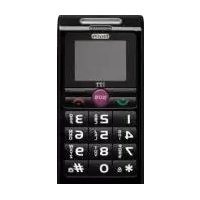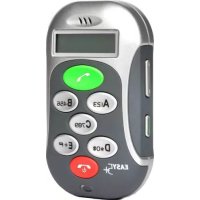
Easy5+ - Smartphone ITTM - Free user manual and instructions
Find the device manual for free Easy5+ ITTM in PDF.


| Product Type | Basic mobile phone (feature phone) |
| Brand | ITTM |
| Model | Easy5+ |
| Screen | Not specified (likely small monochrome LCD screen) |
| Dimensions | Approximately 120 x 50 x 10 mm (estimated) |
| Weight | Approximately 80 g (estimated) |
| Battery | Lithium-ion, capacity not specified (estimated 1000 mAh) |
| Power supply | Mains charger 5 V (micro-USB or jack plug) |
| Standby time | Not specified (estimated 200 h) |
| Talk time | Not specified (estimated 4 h) |
| Keypad | 5 numeric keys (1-5) + function keys (ON/OFF, call, side keys) |
| Main functions | Calls, speaker, volume control, 10 ringtones (8 melodies + vibrator + vibrator+ringtone), emergency calls, SIM memory |
| Indicator light | Status indicator (network, charging, low battery, SIM error) |
| SIM compatibility | Standard SIM card, disable PIN code before use |
| Safety | Max SAR 0.70 W/kg (at ear and 1.5 cm from body) |
| Maintenance | Clean with a soft dry cloth; avoid water, dust, extreme temperatures |
| Certifications | CE, compliant with R&TTE directive |
| Operating temperature | Not specified (estimated -10°C to 45°C) |
| Provided accessories | Charger, battery, user manual |
Frequently Asked Questions - Easy5+ ITTM
User questions about Easy5+ ITTM
0 question about this device. Answer the ones you know or ask your own.
Ask a new question about this device
Download the instructions for your Smartphone in PDF format for free! Find your manual Easy5+ - ITTM and take your electronic device back in hand. On this page are published all the documents necessary for the use of your device. Easy5+ by ITTM.
USER MANUAL Easy5+ ITTM
text_image
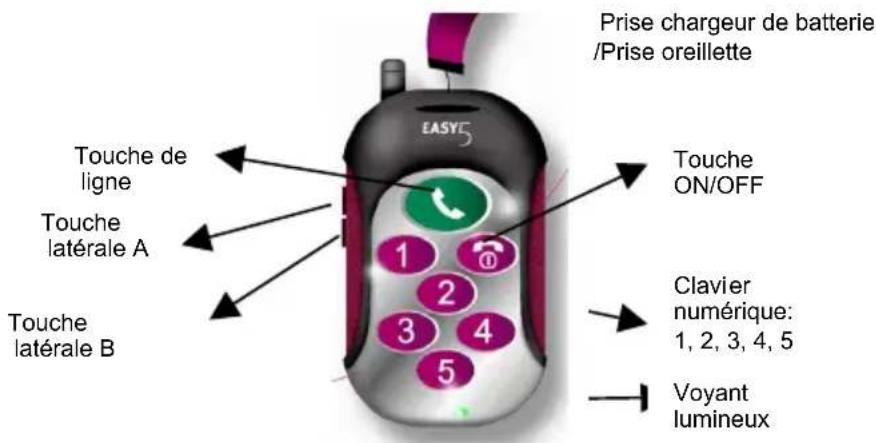
Battery charging connector /Earphone connector Call Key Side Key A Power Key EASYC Side Key B Numeric Key: 1, 2, 3, 4, 5 Indicator LED1.3 Power Key
The power key switches the phone on / off. You can also use the power key to reject calls and cancel functions.
1.4 Call Key
Press the key to make or answer a call. Long press the key to make emergency call whether the SIM card is in the handset or not.
1.5 Numeric Key
| Standby / Network coverage 1 | flash every 8 seconds |
| Power on the handset and search the network | Keep lighting until the handset is logged onto the network |
| Charging Keep lighting until | charging is complete or the charger is disconnected |
| No SIM card in the handset when power on | Flash quickly |
| Incorrect PIN code | |
| No network | |
| Other abnormal status |
2 Installation Instructions
2.1 Installing the SIM card
You need to store the phone numbers prior to inserting the SIM card. Please see section 3 for details.
Please ensure the handset is powered off and is not being charged before the SIM is inserted.
o Remove Battery
o Place the SIM card into the SIM card holder with the chip side facing downwards.
o Secure the SIM card by pushing the metal leaf downwards.
2.2 Removing the SIM Card
Please ensure you have powered off the handset before the following steps:
o Remove the back cover and battery
o Push the metal leaf upwards and take out the SIM card from the SIM card holder.
2.3 Installing the Battery
o Open the back cover
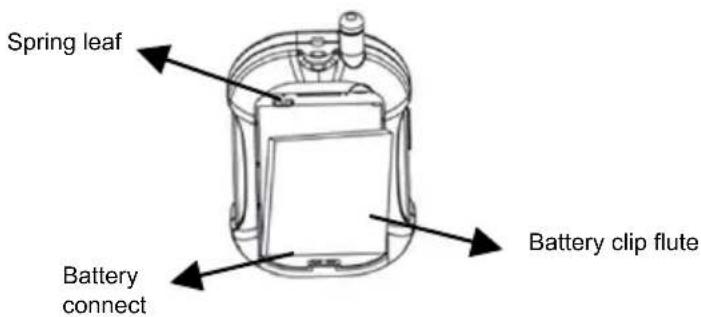
o Push the lower end of the battery into its holding position. Gently lower the upper part of the battery until the spring leaf locks it. Replace the back cover. (see 2.5)
text_image
Spring leaf Battery connect Battery clip flute2.4 Removing the Battery
natural_image
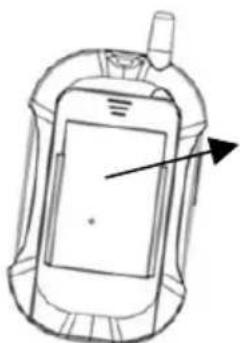
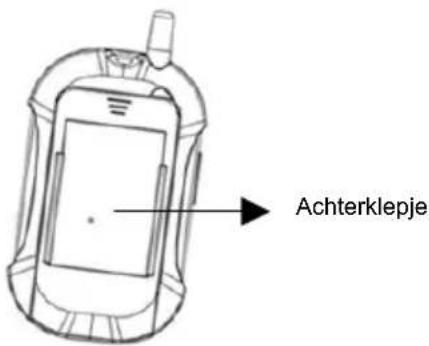
Line drawing of a mobile phone with antenna and screen (no text or symbols)Back cover
2.6 Removing the Back Cover
Please ensure the handset is powered off and push the cover down and out towards the bottom of the phone.
3 Operating Instructions
3.1 Storing Phone Numbers
Easy5 has the ability to call 5 phone numbers pre-stored in the SIM card. As the Easy5 has only 5 numeric keys, please insert the SIM card into a normal mobile phone first.
Store phone numbers as normal, but you need add number 1,2,3,4,5 at the front of name. Please save these 5 number in your SIM card phone book.
3.2 Power on Your Easy5
Press and hold the power key until the indicator LED lights•and the switch-on ring tone will play. After searching and registering the network successfully, the LED will continue to flash as per 1.7. If there is no SIM card in the handset, the LED will keep flashing to indicate there is no network available.
Before powering on, please ensure you have read 3.9 regarding the Easy5 and SIM PIN code.
If the SIM card is in the handset but the LED flashes continuously when the handset is powered on, your SIM card is blocked and you may need to contact your Service Provider.
3.3 Power Off your Easy5
Press and hold the power key until the indicator LED lights up and you will hear a beep. The LED will go off when the power down procedure is complete.
3.4 Making a Call
There are two way to make a call:
- When the handset is in standby mode, long press (press 3 seconds) the numeric key to dial the phone number stored in the SIM card. (For example, long press numeric key 1 to dial the number saved as '1SON' in the SIM card)
- Or short press the numeric key, then press the call key within 5 seconds to dial the phone number stored in the SIM card.
EMERGENCY CALL: WHEN THE HANDSET IS POWERED ON, YOU CAN DIAL THE EMERGENCY NUMBER BY LONG PRESSING THE CALL KEY, WHETHER THE SIM CARD IS IN THE HANDSET OR NOT.
3.5 Incoming Calls
There are ten methods to choose form, including eight ring tones, plus vibra alert and an alert with ring tone. When the handset is in standby mode, you can preview and select the ring tones by continually pressing the Side Key A, preview and select vibra alert and alert with ring tone by pressing the Side Key B.
3.8 Battery Charging and Low Power Indication
When the battery power is low you will hear a beep to indicate this. When in charging, the indicator LED will keep lighting until charging is complete or the charger is disconnected. The LED will flash 1 time every 8 seconds, after the charging is complete and returns to normal status.
3.9 Attention (for the PIN1 of SIM)
\*Before you insert your SIM card into Easy5, please make sure you must deactivate your PIN1 of SIM in a normal mobile phone .\*
- When your SIM PIN is active, if you switch on the handset, the SIM card will be locked after the handset has been switched on for 3 times.
- If you switch on the handset and the indicator LED flashes continuously, your SIM card is locked. You must contact your Service Provider for a PUK code to unlock it. Insert the Easy5 SIM card in a normal handset and enter the code.
To keep using Easy5 easy, we still suggest the users don't activate PIN1 of SIM.
Caution:
To protect battery, please remove the battery from the handset if you will not use Easy5 long time.
de damaged.
- Please keep the handset out of excessive heat or cold.
- Please handle the unit with care and ensure that it is not violently shaken.
- You can clean the handset with a dry cloth. Please refrain from using chemicals, detergents or other cleaning materials.
- Please do not coat the handset with any pigment or other foreign substances as this could adversely affect the handsets functions.
- Please do not modify the handset in any way.
5 Declaration
The manufacturer has the right to modify the product to improve its performances, without being compelled to previously give any information.
Both manufacturer and distributors are not liable for any lack in working due to any improper use and caused by operations which are not in compliance with the instructions reported in this manual.
For more information, please visit www.easy5mobile.com
MANUEL D'INSTRUCTIONS
1.2 Présentation
natural_image
Technical line drawing of a mechanical component with arrows indicating direction (no text or symbols)text_image
Coperchionatural_image
Diagram of a mechanical device with arrows indicating directional components (no text or symbols)Acanaladura de la bateria
natural_image
Technical line drawing of a mechanical component with arrows indicating direction (no text or symbols)natural_image
Diagram of a cylindrical device with internal components and directional arrows indicating movement or force (no text or symbols)Accuklem
text_image
AchterklepjeTo which this declaration relates is in conformity with the relevant sections of the Following specifications:
Safety: EN 60950-1
Radio Spectrum: EN 301 51 1
Following the provisions of Low Voltage Directive 73/23/EEC and EMC Directive 89/336/EEC, as amended by Directive 93/68/EEC, R&TTE Directive 1999/5/EC on the approximation of the laws of the Member States relating to electromagnetic compatibility.
CK Telecommunications Company Limited.