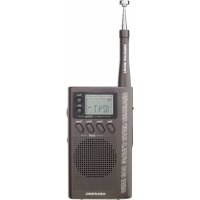
MINI 300 PE - Radio ETON - Free user manual and instructions
Find the device manual for free MINI 300 PE ETON in PDF.



User questions about MINI 300 PE ETON
0 question about this device. Answer the ones you know or ask your own.
Ask a new question about this device
Download the instructions for your Radio in PDF format for free! Find your manual MINI 300 PE - ETON and take your electronic device back in hand. On this page are published all the documents necessary for the use of your device. MINI 300 PE by ETON.
USER MANUAL MINI 300 PE ETON
(Canada); 650-903-3866 (worldwide); M-F, 8:30-4:30, Pacific
Standard Time; www.etoncorp.com.
WARNING
- Do not submerge or expose for extended period to water.
- Only operate within specified temperature range (0 °C to 40 °C).
- Unplug immediately if liquid has been spilled or object have fallen into the apparatus.
- Clean only with a dry cloth. Do not use detergents or chemical solvents as this might damage the finish.
- Unplug and disconnect external antennas during lightning storms.
- Do not remove cover [or back].
• Refer servicing to qualified service personnel.
ENVIRONMENT

Disposal
According to the European Directive 2002/96/EC all electrical and electronic products must be collected separately by a local collection system.
Please act according to your local rules and do not dispose of your old products with your normal household waste.
TABLE OF CONTENTS
1 BASIC CONTROLS ......p.4
2 BATTERIES ......p.6
3 POWER ON/OFF/ VOLUME ......p.7
4 FM RADIO p.8
5 AM/SW1-7 RADIO p.8
6 ANTENNA p.9
7 CLOCK p.10
8 ALARM p.12
9 SLEEP FUNCTION ......p.14
10 INTRODUCTION TO SHORTWAVE ......p.16
11 SHORTWAVE BANDS ......p.17
12 GUIDELINES ......p.18
13 STATIONS p.20
14 SERVICE INFORMATION ......p.22
15 ONE YEAR LIMITED WARRANTY ......p.23
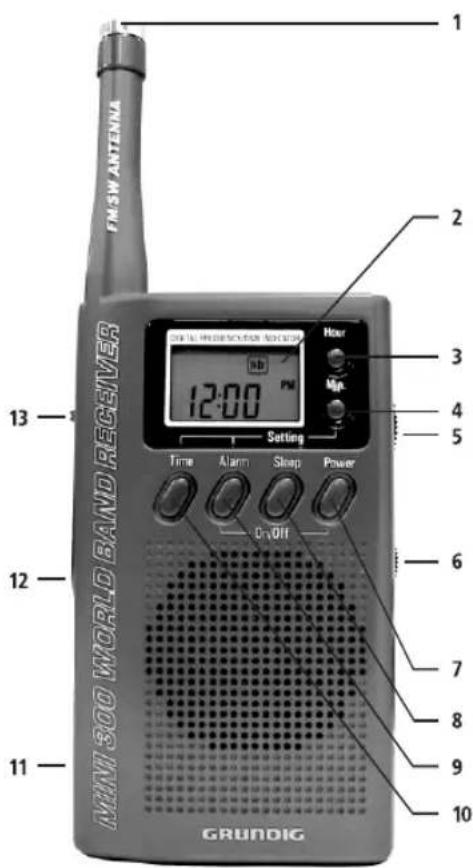
1 BASIC CONTROLS
1 ANTENNA
2 DISPLAY
3 HOUR
4 MINUTES
5 TUNING KNOB
6 VOLUME KNOB
7 POWER
8 SLEEP
9 ALARM
10 TIME
11 BATTERY COVER
12 EAR PHONE JACK
13 BAND SWITCH
text_image
FM-SW ANTENNA MINI 300 WORLD BAND RECEIVER 12:00 Time Alarm Sleep Power 0-Off 2 Hour Mp. 13 2 3 4 5 6 7 8 9 10 GRUNDIG2 BATTERIES
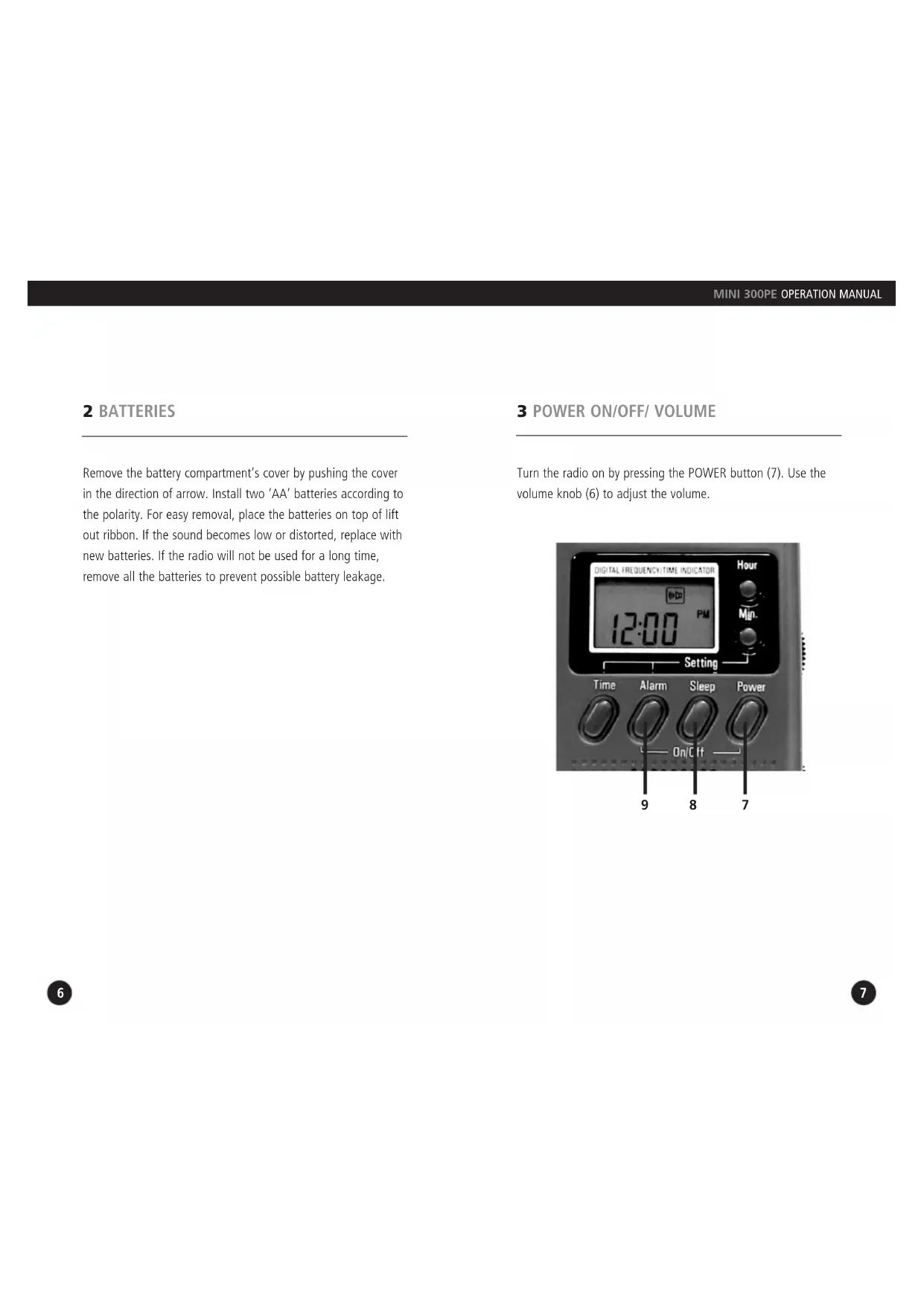
Remove the battery compartment's cover by pushing the cover in the direction of arrow. Install two 'AA' batteries according to the polarity. For easy removal, place the batteries on top of lift out ribbon. If the sound becomes low or distorted, replace with new batteries. If the radio will not be used for a long time, remove all the batteries to prevent possible battery leakage.
3 POWER ON/OFF/ VOLUME
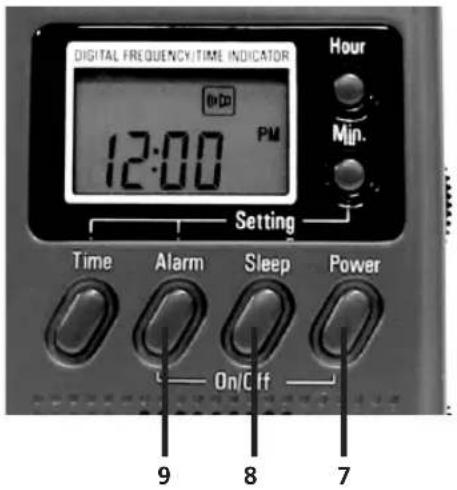
Turn the radio on by pressing the POWER button (7). Use the volume knob (6) to adjust the volume.
text_image
DIGITAL FREQUENCY/TIME INDICATOR 12:00 PM Hour Min. Setting Time Alarm Sleep Power On/Off 9 8 74 FM RADIO
Select the FM band by using the band selector switch (13). Use the tuning knob (5) to tune the radio to the desired frequency.
5 AM/SW1-7 RADIO
Select the desired band, AM or SW 1-7, by using the band selector switch (13). Turn the tuning knob (5) to the desired frequency, which appears in the display (2) or just tune around and listen for stations. Note that MW appears in the display when AM is selected, as the AM band is called MW for medium wave in some parts of the world. SW appears in the display when SW1-8 is selected.
6 ANTENNA
A. For AM (MW) the radio uses an internal, directional, ferrite bar antenna. Rotate the radio for best reception.
B. For FM/SW, fully extend the telescopic antenna (1). For FM, rotate the antenna for best reception.
7 CLOCK
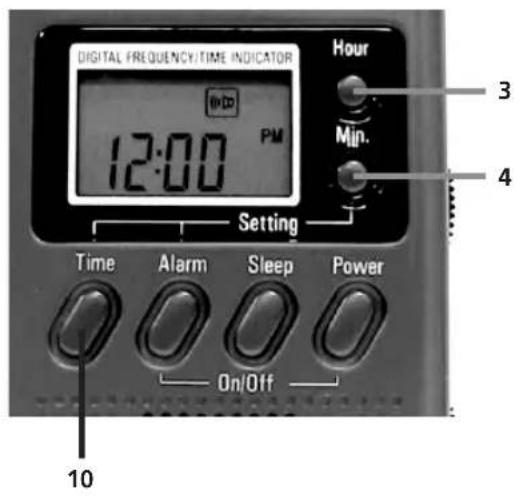
The clock displays time in 12 hour, AM/PM format. While keeping the TIME button (10) pressed, set the correct hour and minutes with the HOUR (3) and MINUTE (4) buttons. They can be pressed with quick, short presses to advance slowly or they can be kept pressed down to advance rapidly. When finished, release the TIME button
text_image
DIGITAL FREQUENCY/TIME INDICATOR 12:00 PM Setting Time Alarm Sleep Power On/Off Hour 3 Min. 4 108 ALARM
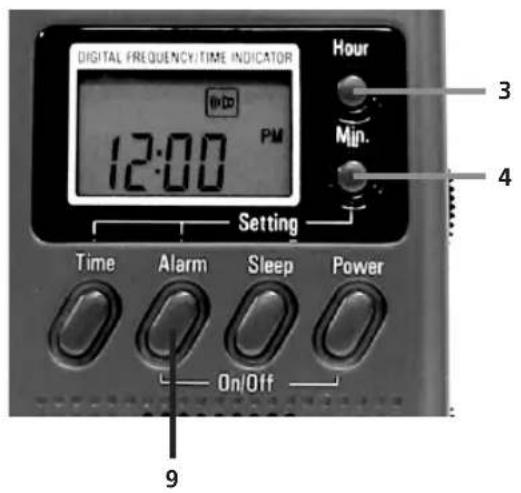
With the radio turned off, keeping the ALARM button (9) pressed, set the correct wake up hour and minutes with the HOUR (3) and MINUTE (4). They can be pressed with quick, short presses to advance slowly or they can be kept pressed rapidly. When finished, release the ALARM button and this will cause the loudspeaker symbol appears in the display. If you want to deactivate the alarm, press the ALARM button (9) again and the loudspeaker symbol will disappear from the display.
When the activated alarm turns the radio on, it can be turned off by pressing the ALARM button (9) again. The Power button (7) cannot be used for this purpose.
While the radio is playing in alarm mode and without any manual interruption to deactivate the alarm, it will turn off automatically after 60 minutes.
text_image
DIGITAL FREQUENCY/TIME INDICATOR 12:00 PM Setting Time Alarm Sleep Power On/Off Hour 3 Min. 4 99 SLEEP FUNCTION
The sleep function enables the radio to play for a specified time before automatically shutting off (from 1 hour 59 minutes to just one minute).
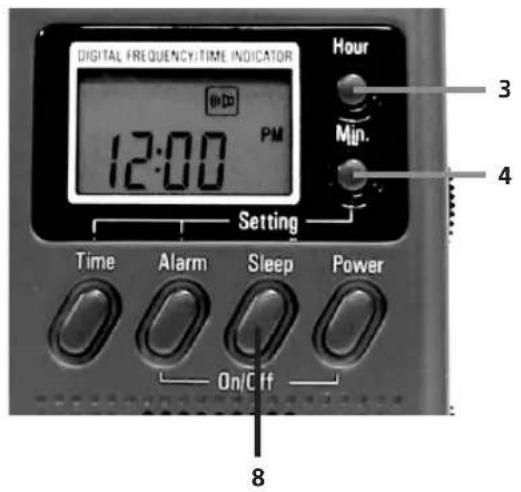
With the radio turned off, press and do not release the SLEEP button (8). This turns the radio on and "0:59" appears in the display. This also activates the sleep timer activation symbol in the display.
To set SLEEP function for 59 minutes, release the SLEEP button. To set SLEEP function as desired, continue to keep the SLEEP button pressed and use the HOUR and MINUTE buttons to adjust the sleep time for you needs. When finished, release the SLEEP button.
While it is playing in sleep mode, it can be turned off by pressing the SLEEP button. The power button (7) cannot be used for this purpose. The sleep timer activation symbol will disappear from the display. If the POWER button is pressed, you need to press SLEEP button again to deactivate the SLEEP function (The symbol will disappear from display) and press POWER button again to turn off the radio.
Note: The sleep function cannot be activated again within 2 minutes after this function was deactivated before.
text_image
DIGITAL FREQUENCY/TIME INDICATOR 12:00 PM Setting Time Alarm Sleep Power On/C If Hour 3 Min. 4 810 INTRODUCTION TO SHORTWAVE
Shortwave enables you to hear stations from around the world. Now that you have a shortwave radio, no doubt you'll want to hear worldwide stations right away. If you're new to shortwave, please take some time to learn the basics outlined below. To successfully listen to shortwave stations you must know how to find them. They are found in the shortwave 'bands'. On the Mini 300, the shortwave bands are numbered 1-7. The chart below and the one on the back of the radio show the relationship of bands 1-7 to their official names and the frequency ranges covered by them.
11 SHORTWAVE BANDS
| MINI 300 SWITCH SETTING | OFFICIAL SHORT-WAVE BAND NAME | FREQUENCY RANGE IN MHz | FREQUENCY RANGE IN MHz |
| SW1 | 49 meters | 5.950-6.20 | 5.950-6.20 |
| SW2 | 41 meters | 7.10-7.30 | 7.10-7.30 |
| SW3 | 31 meters | 9.50-9.95 | 9.50-9.95 |
| SW4 | 25 meters | 11.600-12.100 | 11.600-12.100 |
| SW5 | 22 meters | 13.600-13.800 | 13.600-13.800 |
| SW6 | 19 meters | 15.10-15.80 | 15.10-15.80 |
| SW7 | 16 meters | 17.500-17.90 | 17.500-17.90 |
12 GUIDELINES
HERE ARE SOME GENERAL GUIDELINES
- In general, the bands with frequencies below 13 MHz are better at night and the bands with frequencies above 13 MHz are best during the day. This guideline, while approximate, is a useful general rule of thumb.
- During the day, listen in SW5-7. These may start getting good just before sunrise and may stay good all day, until just after sunset.
- At night, listen in SW1-4. These may start getting good just before sunset and may stay good all night, until just after sunrise.
- Around sunrise and sunset, both the day and night bands might be good, sometimes exceptionally good.
- Winter shortwave is generally somewhat better than summer shortwave.
-
Holding the radio while listening to shortwave will improve signal strengths.
-
Getting close to a window may substantially improve your reception because the construction materials of some buildings do not let signals in very well. Signals penetrate wood frame buildings easiest, while concrete and brick buildings usually block signals. If you are in a building with one or more stories above you, signals can also be impaired in strength. In such a situation, get as close to a window as possible while listening.
- These guidelines can be used worldwide and are not dependent on location.
13 STATIONS
HOW TO IDENTIFY WHAT YOU'RE LISTENING TO AND HOW TO FIND STATIONS THAT YOU WANT TO HEAR
For this, you'll need to use a shortwave directory. We recommend the use of a comprehensive shortwave directory, especially if you want to hear specific countries or to identify the station you're listening to. Such a directory will alphabetically list the countries broadcasting on shortwave, showing their language, target area, broadcast time and frequency that is used. The easiest to use shortwave directory is PASSPORT TO WORLD BAND RADIO, available in major bookstores and directly from the publisher. Published by International Broadcasting Services, Ltd., Box 300, Penn's Park, Pennsylvania 18943 (www.passband.com). This publication has separate chapters for English and non-English broadcasts, titled World-Wide Broadcasts In English and Voices From Home.
14 SERVICE INFORMATION
You may contact the Etón Service Department for additional information or assistance by calling toll-free Monday through Friday, 8:30am - 4:00pm Pacific Standard Time:
1-800-872-2228 (United States)
1-800-673-1648 (Canada)
1-650-903-3866 (Worldwide)
Call for a Return Authorization prior to shipping your unit. Should you want to return your unit for service, pack the receiver carefully using the original carton or other suitable container. Write your return address clearly on the shipping carton and on an enclosed cover letter describing the service required, symptoms or problems. Also, include your daytime telephone number and a copy of your proof of purchase. The receiver will be serviced under the terms of the Etón Limited Warranty and returned to you.
15 ONE YEAR LIMITED WARRANTY
Etón warrants to the original purchaser this product shall be free from defects in material or workmanship for one year from the date of original purchase. During the warranty period Etón or an authorized Etón service facility will provide, free of charge, both parts and labor necessary to correct defects in material and workmanship. At their option, Etón may replace a defective unit.
- Complete and send in the Warranty Registration Card within ten (10) days of purchase.
- Call Etón or the nearest authorized service facility, as soon as possible after discovery of a possible defect.
Have ready:
(a) the model and serial number.
(b) the identity of the seller and the approximate date of purchase.
(c) a detailed description of the problem, including details on the electrical connection to associated equipment and the list of such equipment.
- Etón will issue a Return Authorization number and the
15 ONE YEAR LIMITED WARRANTY
address to which the unit can be shipped. Ship the unit in its original container or equivalent, fully insured and shipping charges prepaid.
Correct maintenance, repair, and use are important to obtain proper performance from this product. Therefore carefully read the Instruction Manual. This warranty does not apply to any defect that Etón determines is due to:
- Improper maintenance or repair, including the installation of parts or accessories that do not conform to the quality and specification of the original parts.
- Misuse, abuse, neglect or improper installation.
- Accidental or intentional damage.
- Battery leakage.
All implied warranties, if any, including warranties of merchantability and fitness for a particular purpose, terminate one (1) year from the date of the original purchase.
The foregoing constitutes Etón entire obligation with respect to this product, and the original purchaser shall have no other remedy and no claim for incidental or consequential damages,
ONE YEAR LIMITED WARRANTY continued
losses, or expenses. Some states do not allow limitations on how long an implied warranty lasts or do not allow the exclusions or limitation of incidental or consequential damages, so the above limitation and exclusion may not apply to you. This warranty give you specific legal rights and you may also have other rights which vary from state to state.
For service information contact:
Etón Corporation
1015 Corporation Way
Palo Alto, CA 94303
U.S.A.

VOUS AVEZ BESOIN D'AIDE? CONTACTEZ-NOUS.
Eton Corporation, 1015 Corporation Way, Palo Alto, CA 94303, USA. 1-800-872-2228 (U.S.); 1-800-637-1648 (Canada); 650-903-3866 (mondial); lu-ve, 8:30-4:30, heure du Pacifique; www.etoncorp.com.
ATTENTION
5 EMPFANG VON MW BZW. KW 1-7
text_image
DIGITAL FREQUENCY/TIME INDICATOR 12:00 PM Hour 3 Mip. 4 Setting Time Alarm Sleep Power On/Off 8+1-650-903-3866 (Worldwide)
Corporate Headquarters
1015 Corporation Way
Palo Alto, California 94303 USA
tel +1 650-903-3866
tel +1 800-872-2228
fax +1 650-903-3867
etónEurope/Lextronix Germany
Rosenstrasse 2
D-10178 Berlin, Germany
tel +49 [0]30 243102149
etónCanada
1 Yonge Street, Suite 1801
Toronto, Ontario M5E 1W7 Canada
tel +1 416-214-6885
v. 07-24-06