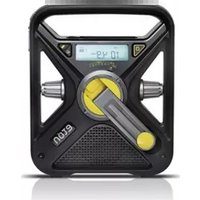
FRX3 - Radio ETON - Free user manual and instructions
Find the device manual for free FRX3 ETON in PDF.


| Product Type | AM/FM/Weatherband Radio with Flashlight and Smartphone Charger |
| Brand | Eton |
| Model | FRX3 |
| Power Sources | Internal rechargeable Ni-MH battery (3.6V/600mAh), 3 AAA batteries, hand turbine dynamo, solar panel, USB DC-in |
| Battery Charging Time (USB) | Approximately 2 hours |
| Battery Charging Time (Solar) | Approximately 10 hours in direct sunlight |
| Radio Play Time (fully charged, low volume) | Approximately 3 to 4 hours |
| Cranking Time (90 seconds) | Provides about 5 to 7 minutes of radio at low volume, or about 20 minutes of flashlight |
| Frequency Coverage | AM, FM, and 7 NOAA Weatherband channels (162.400–162.550 MHz) |
| Speaker | Built-in speaker (front) |
| Flashlight | Yes, push-button on/off |
| Smartphone Charging | USB output (5V) for charging compatible devices (requires USB cable and charging tip, sold separately) |
| Display | LCD with backlight (5-second illumination upon button press) |
| Clock / Alarm | Adjustable clock and alarm with snooze |
| Audio Outputs | Earphone jack (3.5mm), AUX input (3.5mm) |
| Antenna | Extendable telescopic antenna (back) |
| Temperature Range | 0°C to 40°C (operating) |
| Dimensions | Not specified in manual (compact portable size) |
| Weight | Not specified in manual (lightweight) |
| Warranty | Limited warranty; registration recommended via website or mail |
| Service & Repair | Contact Etón service at 1-800-872-2228 (US) or 1-800-637-1648 (Canada); send to authorized facilities with return authorization |
| Safety Warnings | Do not expose to rain/moisture; unplug if liquid spills; use dry cloth only; refer servicing to qualified personnel |
| Disposal | Dispose of batteries and electronic waste per local regulations; comply with EU Directive 2002/96/EC |
Frequently Asked Questions - FRX3 ETON
User questions about FRX3 ETON
0 question about this device. Answer the ones you know or ask your own.
Ask a new question about this device
Download the instructions for your Radio in PDF format for free! Find your manual FRX3 - ETON and take your electronic device back in hand. On this page are published all the documents necessary for the use of your device. FRX3 by ETON.
USER MANUAL FRX3 ETON
with USB Smartphone Charger
NEED HELP? CONTACT US.
Etón Corporation, 1015 Corporation Way, Palo Alto, CA 94303, USA. 1-800-872-2228 (U.S.); 1-800-637-1648 (Canada); 650-903-3866 (worldwide); M-F, 8:00-4:30, Pacific Standard Time; www.etoncorp.com.
WARNING
Do not expose this appliance to rain or moisture. •
Do not submerge or expose for extended period to water.
Protect from high humidity and rain.
Only operate within specified temperature range • (0 °C to 40 °C).
Unplug immediately if liquid has been spilled or any • object has fallen into the apparatus.
Clean only with a dry cloth. Do not use detergents or chemical solvents as this might damage the finish.
Unplug and disconnect external antennas during • lightning storms.
Do not remove cover [or back].
Refer servicing to qualified service personnel.
ENVIRONMENT
Disposal
According to the European Directive 2002/96/EC all electrical and electronic products must be collected separately by a local collection system.
Please act according to your local rules and do not dispose of your old products with your normal household waste.
Please dispose of all types of batteries per your
Government, State or Local rules and/or regulations.
If you are unsure, please call the appropriate local authority to find out how to dispose of them safely and help protect the environment.
FRX3
Thank you for purchasing the Eton FRX3. We want you to thoroughly enjoy the use of this product. To take advantage of its many excellent and unique features, we urge you to carefully read the user's manual.
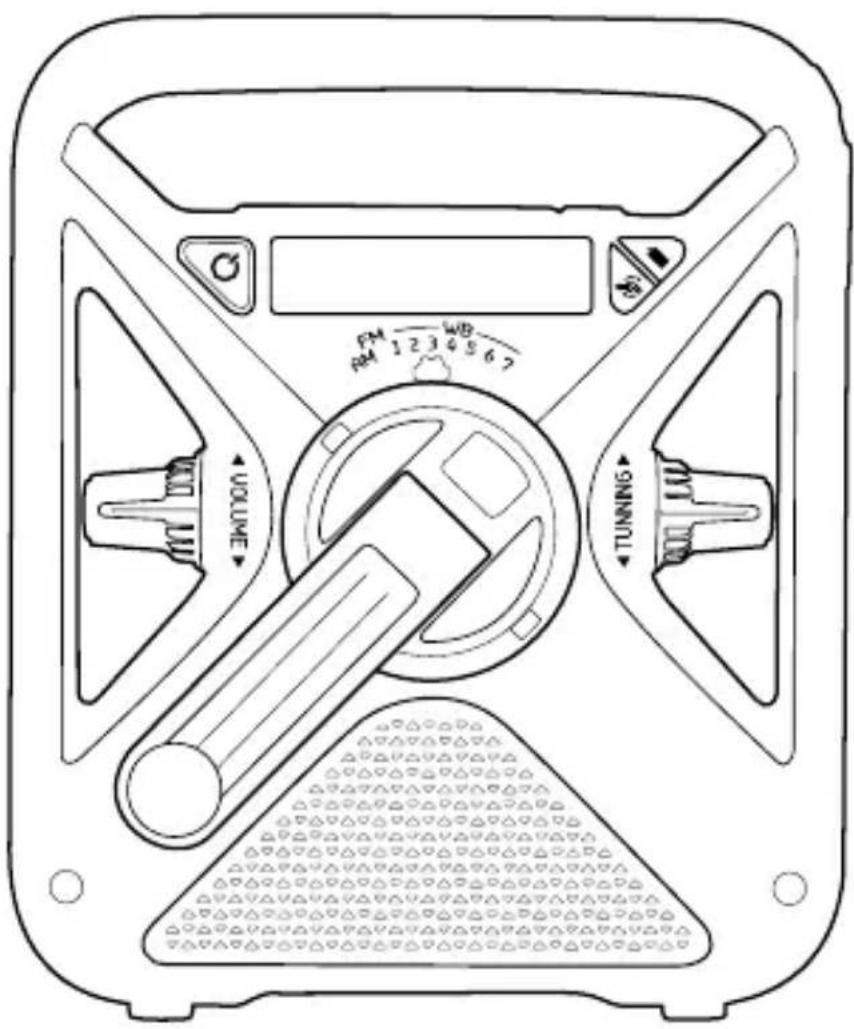
Top Buttons

① Alarm ON/OFF Button
② Tune Up Button
③ Tune Down Button
④ Alert Button
⑤ Set Button
⑤ Cell Button
FRX3 Front

⑦ Power/Standby Button
⑧ AM/FM/WB Selector Dial
⑨ Volume Knob
10 Hand Turbine/Dynamo
⑪ Battery (BATT) Button (AAA batteries)
⑫ Dynamo/Solar (DYN) Button
NOTE: For rechargeable
Ni-MH battery
⑬ Tunning Knob
14 Speaker
Right Side

FRX3 Back
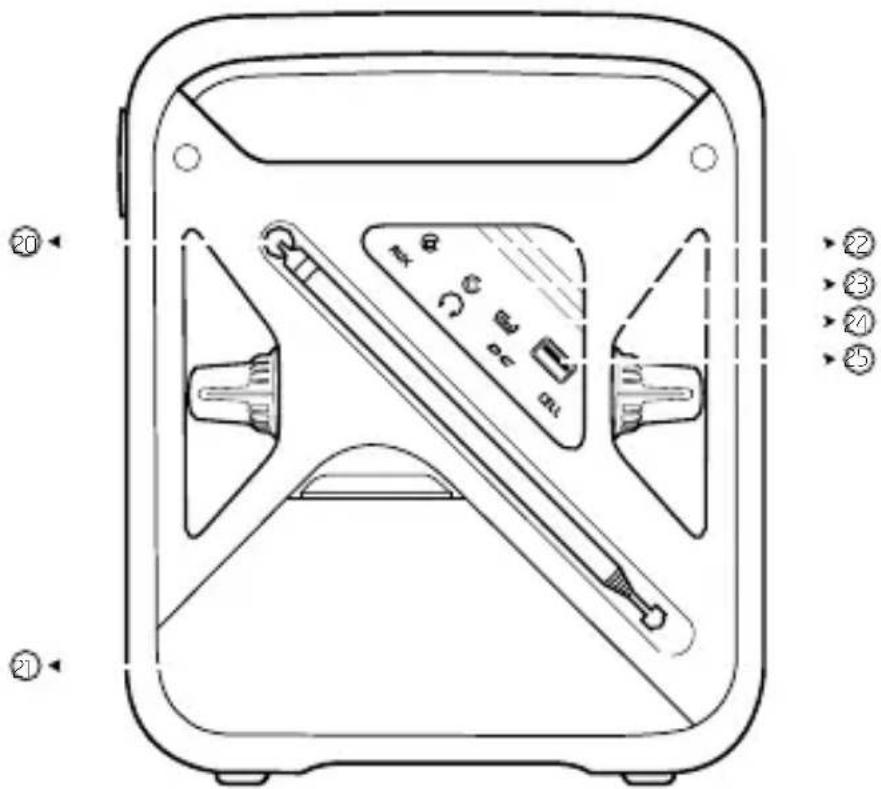
20 Antenna
② Battery Compartment
NOTE: Rechargeable Ni-MH battery and AAA battery slot
22 AUX Port
23 Earphone Port
24 DC-input
25 Cellphone Charge USB Port
TURNING ON THE FRX3
The FRX3 is powered with either the internal rechargeable Ni-MH battery (600mAh, 3.6V), 3 AAA batteries, the hand turbine and solar cell, or USB DC-in (included). Select the power source and press the Power Button < ⏻> to turn radio on.
DYNAMO POWER
(RECHARGEABLE Ni-MH BATTERIES)
The rechargeable Ni-MH (nickel-metal-hydride) battery is in the battery compartment. To use it, plug the battery into the socket adjacent to it, then press the Dynamo Power button < ⚙️>. Turn the dynamo to recharge the internal Ni-MH battery. The rechargeable battery will eventually lose its ability to hold a charge over time. Call Etón Corporation to order another one.
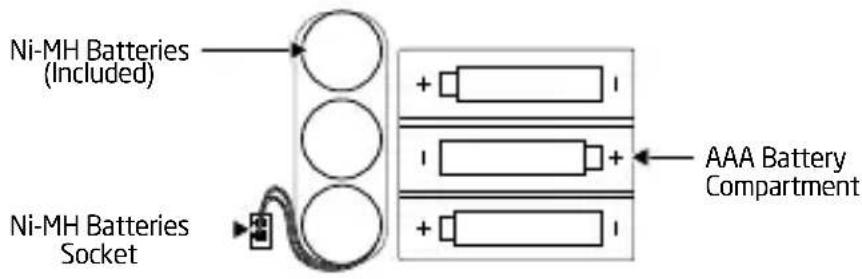
NOTE: Before initial use, make sure the rechargeable Ni-MH battery pack (included) is connected to the unit's electric socket. The Ni-MH battery is rated at 3.6V/600mAh.
BATTERY POWER (3 AAA BATTERIES)
Install 3 AAA batteries using the polarity diagram inside the battery compartment (on the back of the radio). To turn on the radio using AAA batteries, press the Battery Power button < ■>.
SOLAR POWER
When in Dynamo Power mode and the solar panels are in direct sunlight (not through a window or in the shade), the Ni-MH rechargeable battery recharges automatically. The LCD power status bar (under DYN) will show the recharging icon < .
USB CABLE POWER
To charge the Ni-MH battery via the USB port (DC-in), make sure the unit is on Dynamo Power option. Plug the USB cable port into the computer, plug the other port into the mini USB jack. The recharge icon < 📄> appears.
ANSWERS TO QUESTIONS REGARDING CHARGING
How much operating time does 90 seconds of hand • cranking provide for the radio to play and for flashlight?
About 5 to 7 minutes of radio, at low volume.
About 20 minutes of flashlight.
How long does it take to fully charge the radio's battery • with the USB adapter?
About 2 hours.
How long will the radio play when the rechargeable • battery is fully charged?
About 3 to 4 hours, at low volume.
How long does it take to fully charge the radio's battery • with the solar panel?
About 10 hrs in direct sunlight (not through a window or in the shade).
CHARGING SMARTPHONES
If your cell phone has a USB charging cord, you can use it. If not, you can purchase one from www.iGo.com, or call 1-888-205-0093. To purchase a charging tip and cord for your cell phone, go to www.iGo.com, or call 1-888-205-0093.
Plug the USB cell phone charging cord into the USB PHONE CHARGER jack (located under the rubber cover on the back of the radio.). Plug the other end of the cord into the cell phone charging tip and then into the jack of the cell phone. Press the CELL button to start dump charge. Charging stops once the internal Ni-MH battery is out of power.
NOTE: When the Ni-MH battery is out of power, the hand turbine may be used to recharge the battery. Disconnect the USB cable (to smartphone) before using the hand turbine. Turn the hand crank at a rate of 2 or more revolutions per second. Continue turning until the desired battery level has been reached. If you decide to stop cranking for whatever reason, please wait at least 5 seconds before beginning to crank again. Not following these instructions may cause damage to your cell phone for which Etón disclaims any liability and will not be held liable for any actual or consequential damages related to this matter.
FLASHLIGHT
Push the flashlight button to turn it ON/OFF.
VOLUME CONTROL
Turn the Volume Adjusting Knob (located on the front left knob) to adjust volume level. Always turn down the volume before using earphones.
TUNNING CONTROL
Turn the tuning knob (located on the front right knob) to change frequencies.
LCD BACKLIGHT
To light the display for about 5 seconds, press the ANY button located in front if the unit.
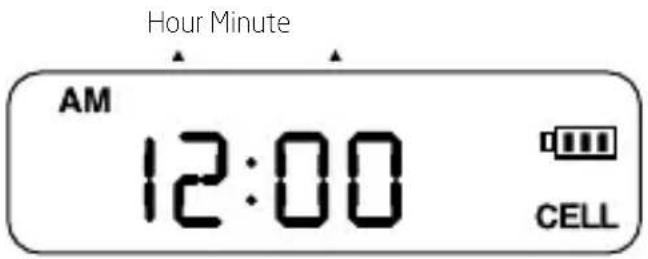
ADJUST CLOCK TIME
- In the standard mode, press the SET button. The LCD display type will flash.
- Adjust the time by pressing the UP or DOWN button, then press SET to confirm. Repeat for the minute value.
ALARM ON/OFF
Press the alarm button to turn ON/OFF the alarm. The word
ADJUST ALARM
Make sure
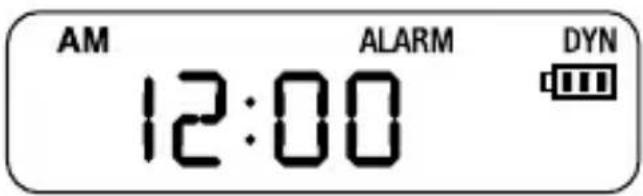
Adjust hour of alarm by pressing the UP or DOWN button, then press SET to confirm. Repeat for the minute value.
RECEPTION OF NOAA WEATHERBAND FREQUENCIES
To hear your local weather station, pull up the antenna, turn on the radio and select a channel. Turn up the volume and turn the WB dial to go through all 7 weather channels.

WB frequency appears on the display. You will only hear one channel, but if you hear a weather broadcast on more than one, select the strongest. The strongest one will usually be your local weather station. Below are the frequencies that correspond to the radio's channels:
WB1; Channel 1 162.400 MHz
WB2; Channel 2 162.425 MHz
WB3; Channel 3 162.450 MHz
WB4; Channel 4 162.475 MHz
WB5; Channel 5 162.500 MHz
WB6; Channel 6 162.525 MHz
WB7; Channel 7 162.550 MHz
WARRANTY REGISTRATION
To ensure full warranty coverage or product updates, registration of your product should be completed as soon as possible after purchase or receipt. You may use one of the following options to register your product:
- By visiting our website at http://www.etoncorp.com.
- Mail in enclosed warranty card.
- Mail your registration card or information to the following address; Include your name, full mailing address, phone number, model purchased, date purchased, retail vendor name and product serial number (typically located in or near the battery compartment):
Etón Corporation
1015 Corporation Way
Palo Alto, CA 94303
LIMITED WARRANTY
Retain the warranty information from your warranty card with your proof of purchase or the Limited Warranty information can also be viewed at www.etoncorp.com.
SERVICE FOR YOUR PRODUCT
To obtain service for your product, we recommend first contacting an Etón service representative at 800-872-2228 US, 800-637-1648 Canada or (650) 903-3866 for problem determination and trouble-shooting. If further service is required, the technical staff will instruct how to proceed based on whether the radio is still under warranty or needs non-warranty service.
WARRANTY
If your product is still in warranty and the Etón service representative determines that warranty service is needed, a return authorization will be issued and instructions for shipment to an authorized warranty repair facility. Do not ship your radio back without obtaining the return authorization number.
NON-WARRANTY
If your product is no longer under warranty and requires service our technical staff will refer you to the nearest repair facility that will be able to best handle the repair.
For service outside of North America, please refer to the distributor information included at time of purchase/receipt.

Etón Corporation
Corporate Headquarters
1015 Corporation Way
Palo Alto, California 94303 USA
tel +1 650-903-3866
tel +1 800-872-2228
fax +1 650-903-3867
Etón Canada
1 Yonge Street, Suite 1801
Toronto, Ontario M5E 1W7 Canada
tel +1 416-214-6885
www.etoncorp.com


- NEED HELP? CONTACT US.
- WARNING
- ENVIRONMENT
- Disposal
- FRX3
- TURNING ON THE FRX3
- DYNAMO POWER
- (RECHARGEABLE Ni-MH BATTERIES)
- BATTERY POWER (3 AAA BATTERIES)
- SOLAR POWER
- USB CABLE POWER
- ANSWERS TO QUESTIONS REGARDING CHARGING
- CHARGING SMARTPHONES
- FLASHLIGHT
- VOLUME CONTROL
- TUNNING CONTROL
- LCD BACKLIGHT
- ADJUST CLOCK TIME
- ALARM ON/OFF
- ADJUST ALARM
- RECEPTION OF NOAA WEATHERBAND FREQUENCIES
- WARRANTY REGISTRATION
- Etón Corporation
- LIMITED WARRANTY
- SERVICE FOR YOUR PRODUCT
- WARRANTY
- NON-WARRANTY
- Etón Canada
Brand : ETON
Model : FRX3
Category : Radio