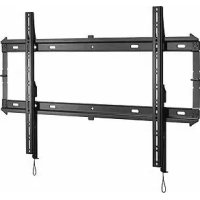
iCXPFM3B02 - Flat screen mount Chief - Free user manual and instructions
Find the device manual for free iCXPFM3B02 Chief in PDF.


User questions about iCXPFM3B02 Chief
0 question about this device. Answer the ones you know or ask your own.
Ask a new question about this device
Download the instructions for your Flat screen mount in PDF format for free! Find your manual iCXPFM3B02 - Chief and take your electronic device back in hand. On this page are published all the documents necessary for the use of your device. iCXPFM3B02 by Chief.
USER MANUAL iCXPFM3B02 Chief
Milestone AV Technologies, and its affiliated corporations and subsidiaries (collectively, "Milestone"), intend to make this manual accurate and complete. However, Milestone makes no claim that the information contained herein covers all details, conditions or variations, nor does it provide for every possible contingency in connection with the installation or use of this product. The information contained in this document is subject to change without notice or obligation of any kind. Milestone makes no representation of warranty, expressed or implied, regarding the information contained herein. Milestone assumes no responsibility for accuracy, completeness or sufficiency of the information contained in this document.
Chief® and Centris™ are trademarks of Milestone AV Technologies. All rights reserved.

IMPORTANT WARNINGS AND CAUTIONS!
WARNING: A WARNING alerts you to the possibility of serious injury or death if you do not follow the instructions.

CAUTION: A CAUTION alerts you to the possibility of damage or destruction of equipment if you do not follow the corresponding instructions.

WARNING: Failure to read, thoroughly understand, and follow all instructions can result in serious personal injury, damage to equipment, or voiding of factory warranty! It is the installer's responsibility to make sure all components are properly assembled and installed using the instructions provided.

WARNING: Failure to provide adequate structural strength for this component can result in serious personal injury or damage to equipment! It is the installer's responsibility to make sure the structure to which this component is attached can support five times the combined weight of all equipment. Reinforce the structure as required before installing the component. The wall to which the mount is being attached may have a maximum drywall thickness of 5/8'' (15.9mm).

WARNING: Exceeding the weight capacity can result in serious personal injury or damage to equipment! It is the installer's responsibility to make sure the combined weight of all components attached does not exceed 125 lbs (56.7 kg) for the iCMPFM3 and iCLPFM3 or 175 lbs (79.4 kg) for the iCXPFM3. Use with products heavier than the maximum weight indicated may result in collapse of the mount and its accessories causing possible injury.

AVISOS Y PRECAUCIONES IMPORANTES!

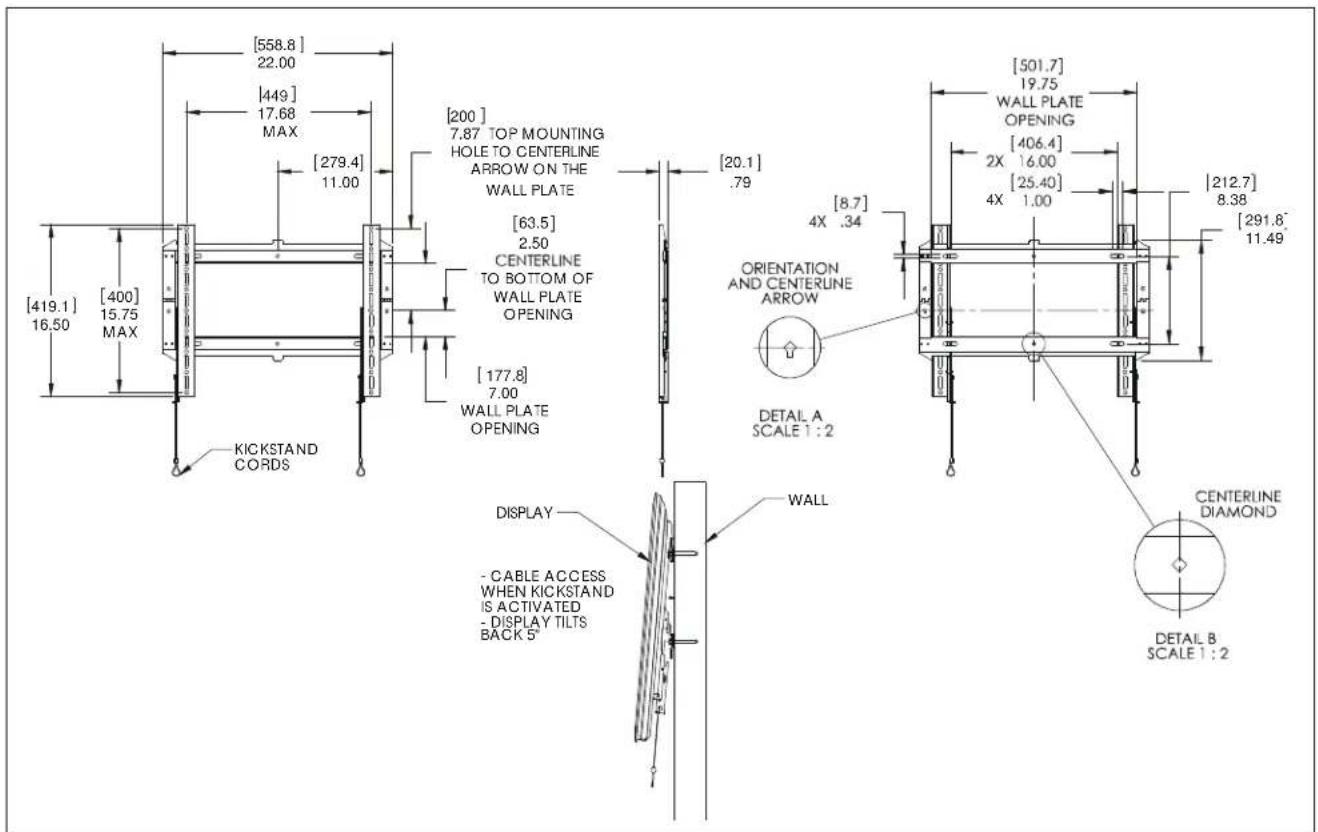
DIMENSIONS - iCMPFM3
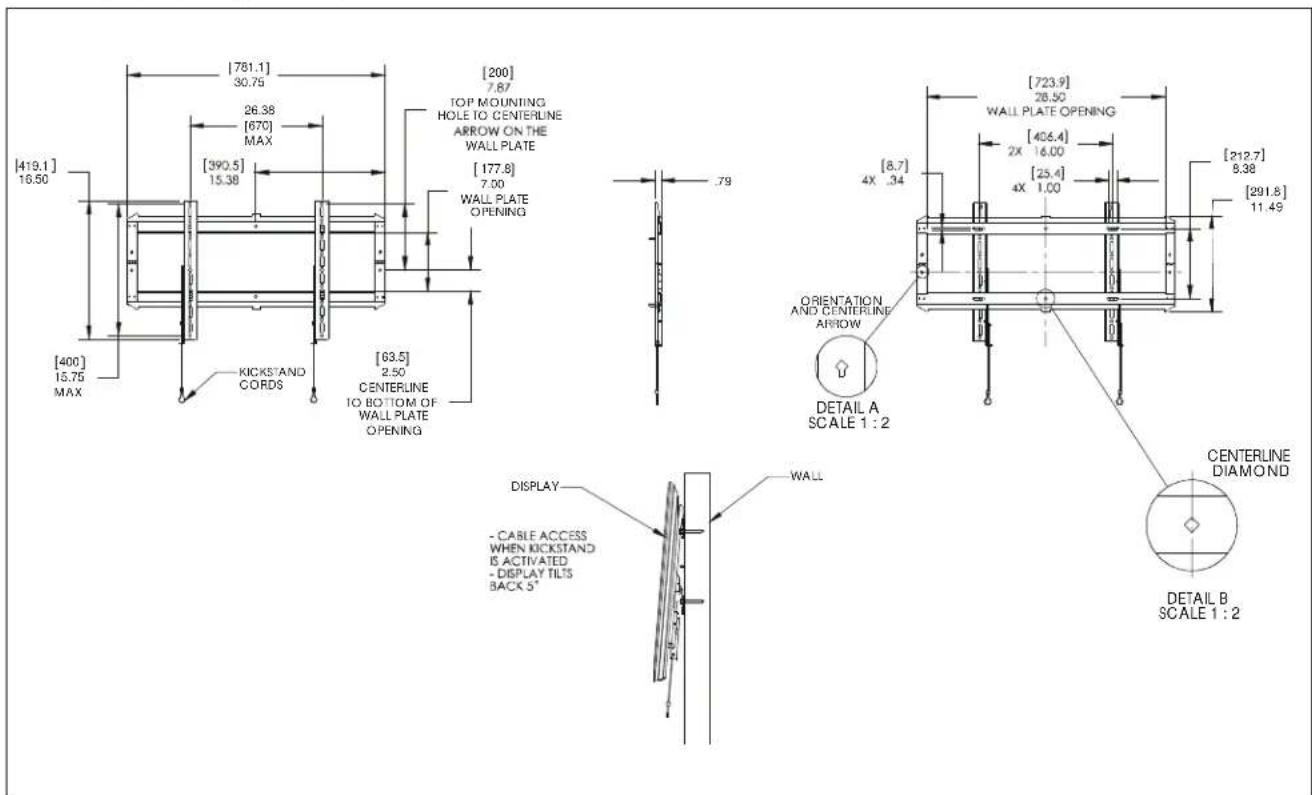
DIMENSIONS - iCLPFM3
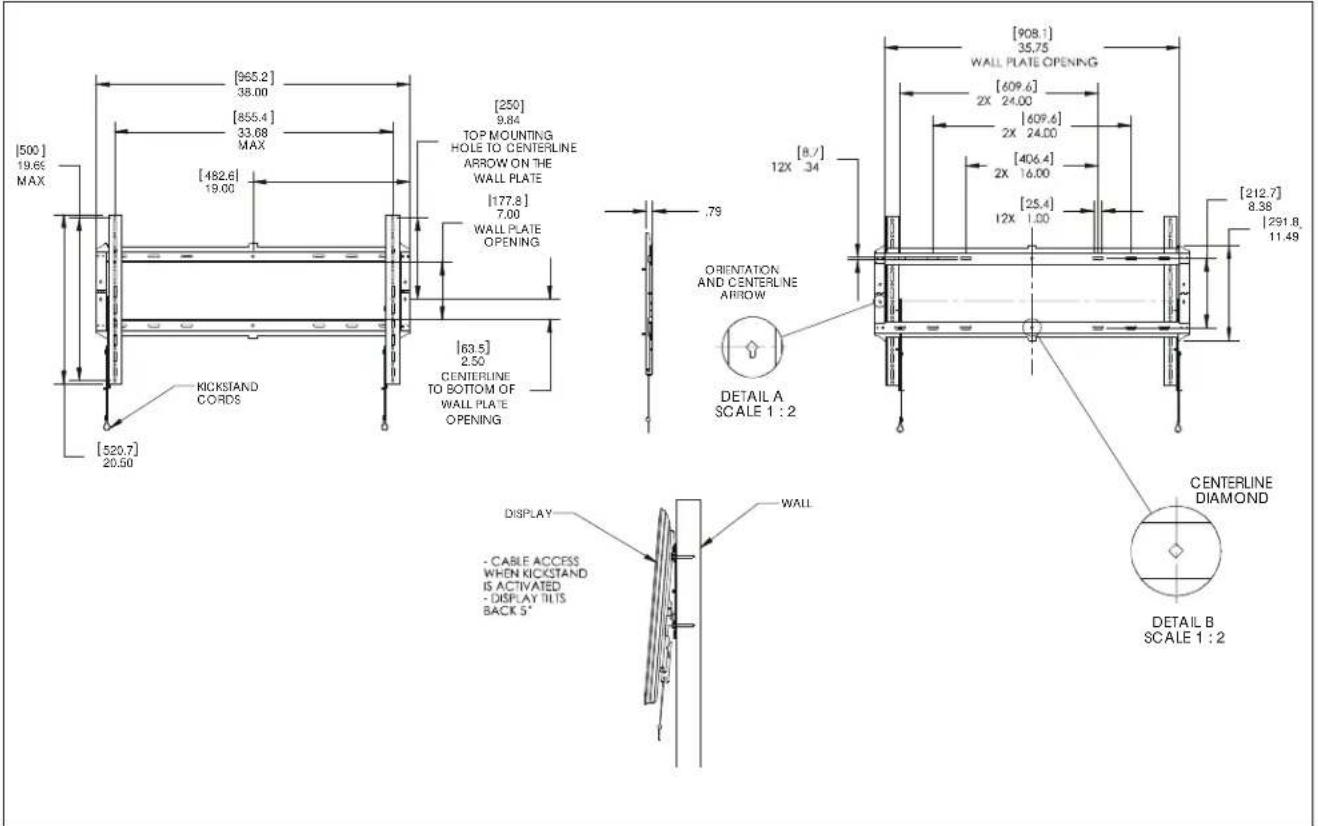
DIMENSIONS - iCXPFM3
| Tighten Fastener | |
| Apertar elemento de fajocon | Stram fastspanendigesablag |
| Befestigungstaf festrochhen | Skuva at fiske |
| Apertar fixador | Krista klinnka |
| Serre il fiasaggio | Dolejeć element moecućjy |
| Bewestigung vostrozian | Zajbyo Zufložovou |
| Serrez les fixadons | Baglantnyi Sklavnien |
| Coaxure 3acteony | Rogzó meghozulaa |
| Lodon Passerier | |
| Afjotar elemento de fajocon | Lager fastspanendigesablag |
| Befostigungstaf lõsen | Losa fõse |
| Dasapertar fixador | Irotva klinnka |
| Allentare il fiasaggio | Pojazowac elementmojućjy |
| Bewestigung losfaden | Xahápárová Zufložovou |
| Dasemozles fixadons | Baglantnyi Gevazin |
| Ocnaflute 3acteony | Rogzó hizkuzlaska |
| Philips Screwdriver | |
| Destanilador Philips | Stipeskiusaktahr |
| Kruzdschlitzschraubender | Kryskužmeyjal |
| Chave de fondas Philips | Riftpänsunwirain |
| Caudavite a shalla | Srubdokr jozkrakówcy |
| Kruskapsohraevendraer | Krasopál & Philips |
| Toumevis à pointe onctiforme | Philips Tornavida |
| Otraepna | Callagfej ciswerhrázó |
| By Hand | |
| Amano | Medhändon |
| Von Hand | Förhand |
| Cam a maior | Käslin |
| Amano | Reçnne |
| Mét de hand | Mić to xćp |
| Alamain | El Ilie |
| Pencil Mark | ||
| Marcar com lapiz | Bya nitrimarne | |
| Stiftmarkeinung | Por mmarketing | |
| Marcar com lapis | Rimasty markia | |
| Segno a matita | Oznacranie okwiem | |
| Potoodemikstaken | Zjudzix με kukdus | |
| Marquage au crayon | Kalem liganti | |
| Mapka/Kapangpaua | Ceruzajekides | |
| Orli Hole | ||
| Portar | Borehul | |
| Bedrioch | Bora hal | |
| Fazer furo | Poraurskii | |
| Praticare un tro | Owdr wency | |
| Gat boren | Adroprom otiriç | |
| Poroz an trau | Matkap Deligi | |
| Oraeporte Tpoavposen | Lyukuras | |
| Ajust | ||
| Ajustar | Juslar | |
| Einstellen | Juslara | |
| Ajustar | Satalla | |
| Regolaro | Wyrregulowac | |
| Atstalien | Flipooquyi | |
| Ajuster | Ayar | |
| Flpecnoco&urea | Balilhas | |
| Hex-Head Wrench | ||
| Lave de caba zhexagonal | Sokkiartet silevanegle | |
| Sechkanitachniassel | Insoenyol'del | |
| Chave de caloqa sotadawda | Kuusekofovalain | |
| Chave esagonale | Khuz 2 ltem szeddiokatym | |
| Zekantaleutil | Kholi üznyunnyi, kaskalv | |
| Clé à tété hexagonale | Althgen Kafali (Allen) Anahtar | |
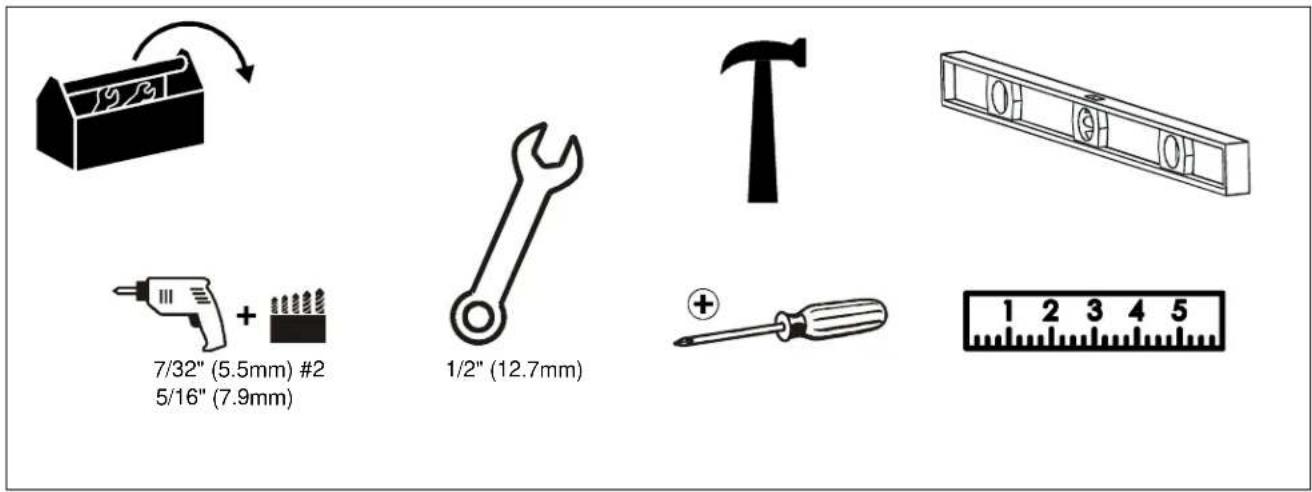
TOOLS REQUIRED FOR INSTALLATION
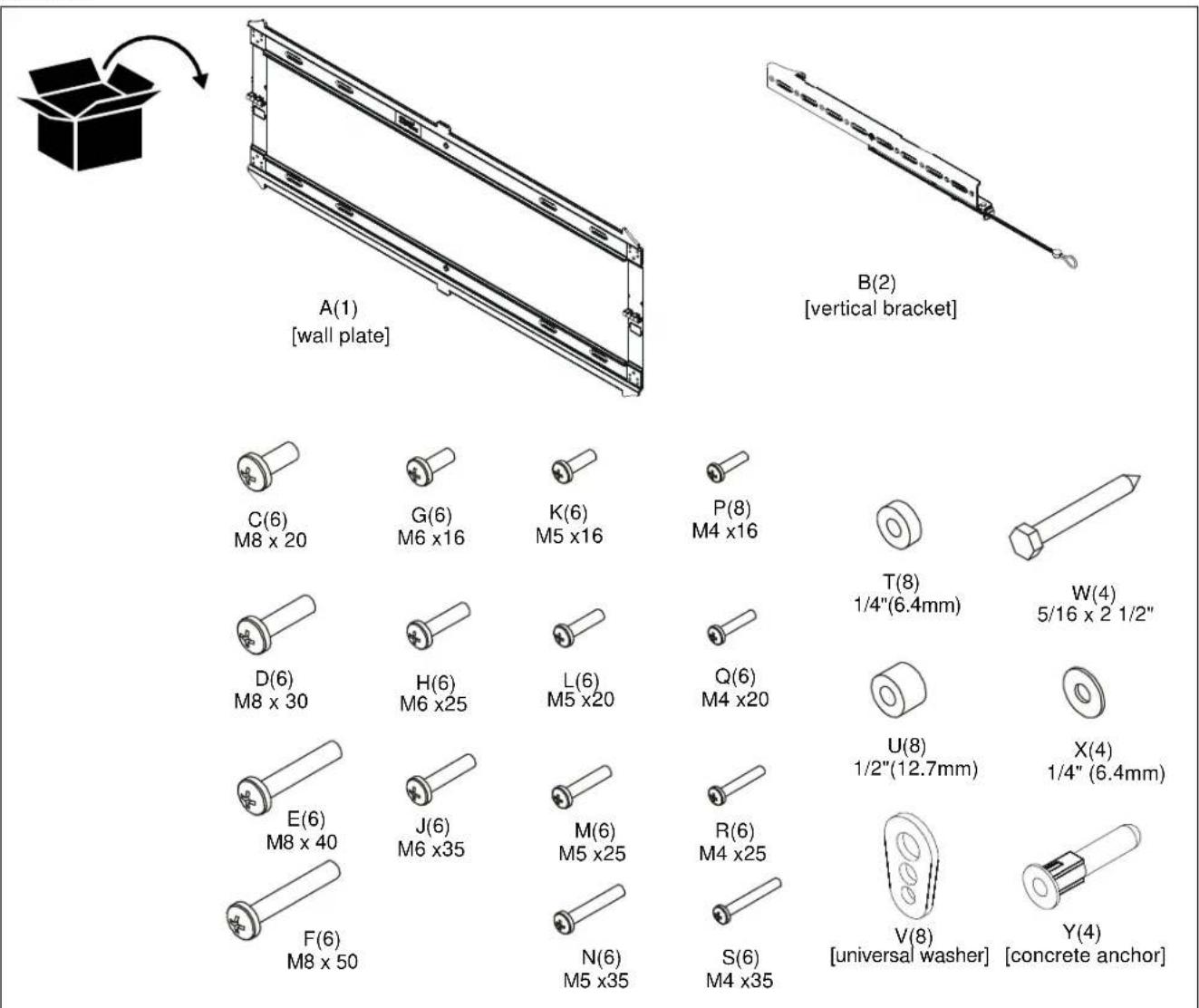
PARTS
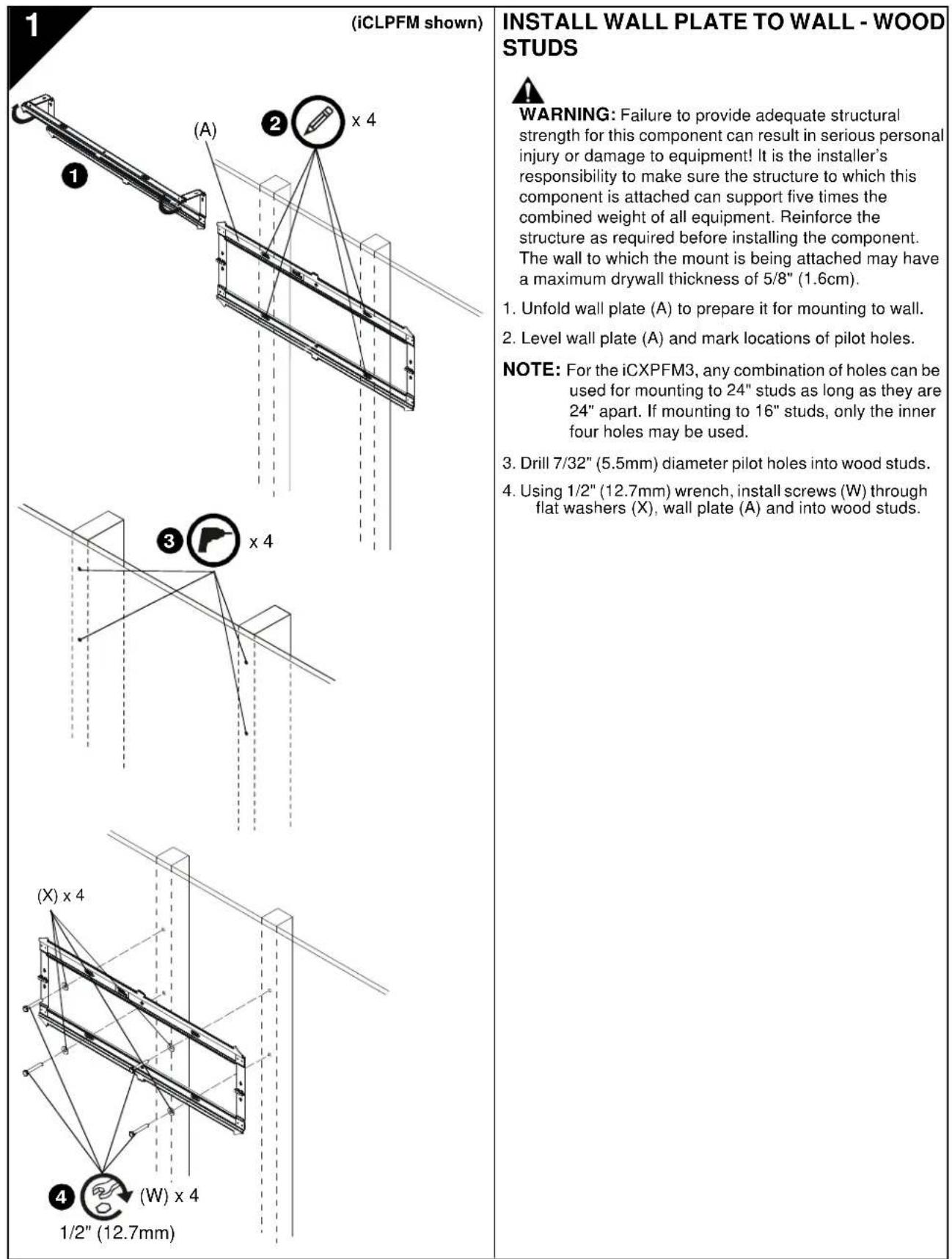
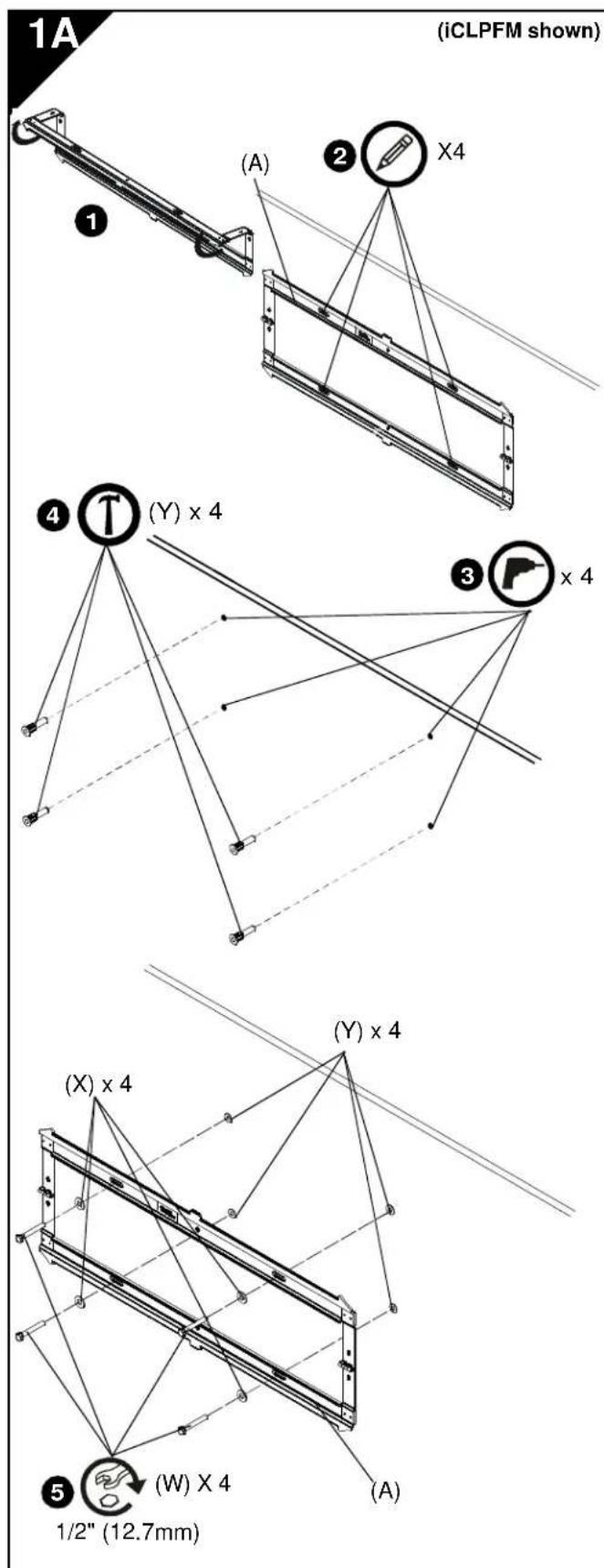
INSTALL WALL PLATE TO WALL - CONCRETE, CONCRETE BLOCK OR BRICK
WARNING: Failure to provide adequate structural strength for this component can result in serious personal injury or damage to equipment! It is the installer's responsibility to make sure the structure to which this component is attached can support five times the combined weight of all equipment. Reinforce the structure as required before installing the component.
WARNING: ELECTRICAL SHOCK HAZARD! CUTTING OR DRILLING INTO ELECTRICAL CORDS OR CABLES CAN CAUSE DEATH OR SERIOUS PERSONAL INJURY! ALWAYS make certain area behind mounting surface is free of electrical wires and cables before drilling or installing fasteners.
WARNING: EXPLOSION AND FIRE HAZARD! CUTTING OR DRILLING INTO GAS PLUMBING CAN CAUSE DEATH OR SERIOUS PERSONAL INJURY! ALWAYS make certain area behind mounting surface is free of gas, water, waste, or any other plumbing before cutting, drilling, or installing fasteners.
- Unfold wall plate (A) to prepare it for mounting to wall.
- Level wall plate (A) and mark locations of pilot holes at desired mounting location.
NOTE: For the iCXPFM3, use the inner four holes on wall plate for installation.
- Drill 5/16" (7.9mm) diameter pilot holes into wall at marked locations. Holes must be drilled at least 2 1/2 inches deep.
- Install four concrete anchors (Y) into drilled holes. Use a hammer to tap anchors into holes.
- Using 1 / 2'' (12.7mm) wrench, install screws (W) through flat washers (X), wall plate (A) and into concrete anchors (Y).
(B) × 2
(B) × 2
INSTALL BRACKETS TO DISPLAY

WARNING: The minimum hole pattern size is 100mm × 100mm for the iCMPFM3 and 200mm × 200mm for the iCLPFM3 and the iCXPFM3.
- Lay display face down on protective surface.

CAUTION: Using screws of improper diameter may damage your display! Proper screws will easily thread into display mounting holes.
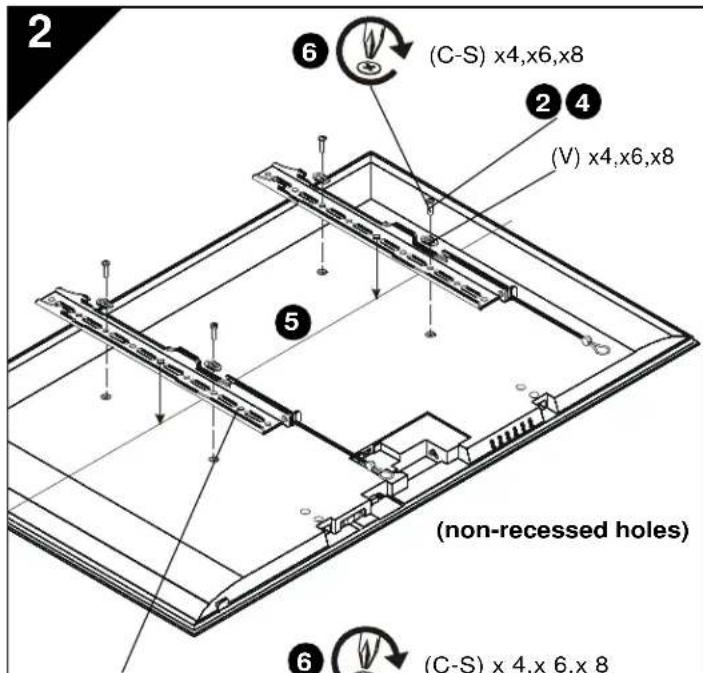
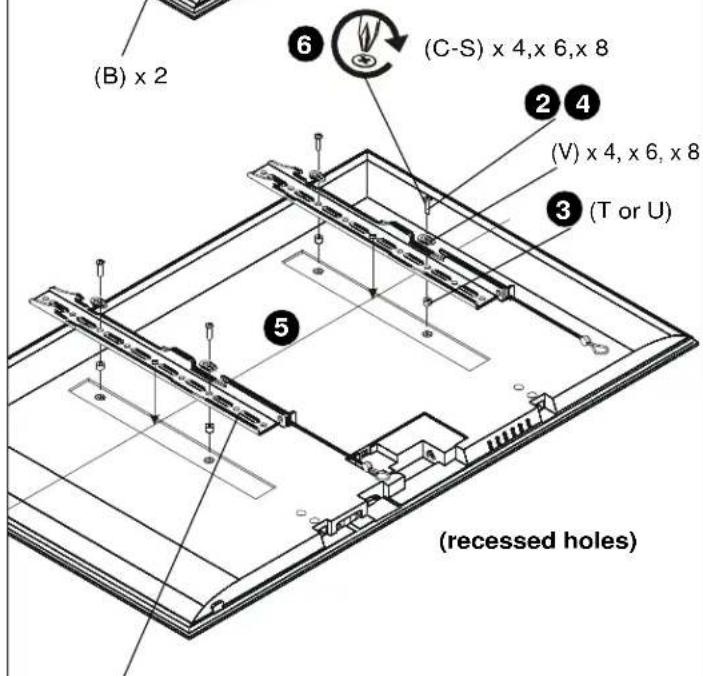
- Select screw diameter by examining hardware (C-S) (8mm, 6mm, 5mm, or 4mm) and comparing with mounting holes on display.
- Select spacers:
If mounting holes are not recessed and both brackets (B) can lay flat against display, then no spacers are required.
- If mounting holes are recessed, or if protrusions prevent brackets (B) from laying flat, then spacers (T or U) must be used. Select shortest spacer which will provide adequate fill. All spacers must be same length.

CAUTION: Using screws of improper length may damage your display! Proper screws will have adequate thread engagement without contacting bottom of display mounting holes.
-
Select screw length:
-
Using your hand, insert SHORTEST length screw of selected diameter (C, G, K or P) through bracket (B), universal washer (V), selected spacer (T or U, if required), into display mounting hole. Do NOT thread screw into hole at this time.
-
Proper screw length requires base of screw head to protrude above flat washer a distance equal to or greater than the screw diameter. If screw length is inadequate, select longer screw. Select shortest screw which will protrude the required distance.
-
Place brackets (B) on display, ensuring:
-
Upper hooks are towards top of display.
-
Center of brackets (B) are as close to the center of the back of display as possible after being installed. Center of bracket is indicated by the diamond-shaped hole.
-
Using Phillips screwdriver, carefully install selected screws through universal washers (V), brackets (B), and spacers (T or U, if required), into display.
- Tighten all screws. Ensure all applicable display mounting holes (4, 6, or 8) are used.
INSTALL DISPLAY TO WALL PLATE

WARNING: Exceeding the weight capacity can result in serious personal injury or damage to equipment! It is the installer's responsibility to make sure the combined weight of all components attached does not exceed 125 lbs (56.7 kg) for the iCMPFM3 and iCLPFM3 or 175 lbs (79.4 kg) for the iCXPFM3. Use with products heavier than the maximum weight indicated may result in collapse of the mount and its accessories causing possible injury.

WARNING: Display may be very heavy! Ensure display can be safely lifted and maneuvered as required to install on wall plate. Failure to take adequate precautions can result in serious personal injury or damage to equipment!

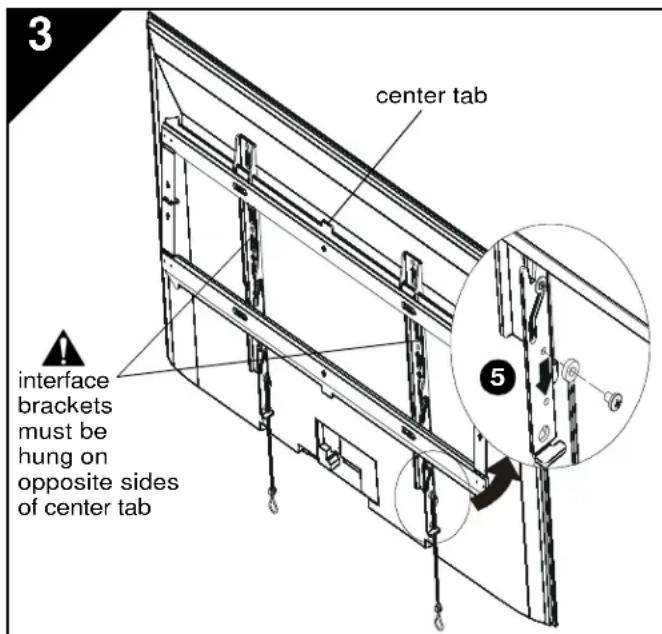
WARNING: Interface brackets must be hung on opposite sides of the center tab on wall plate!
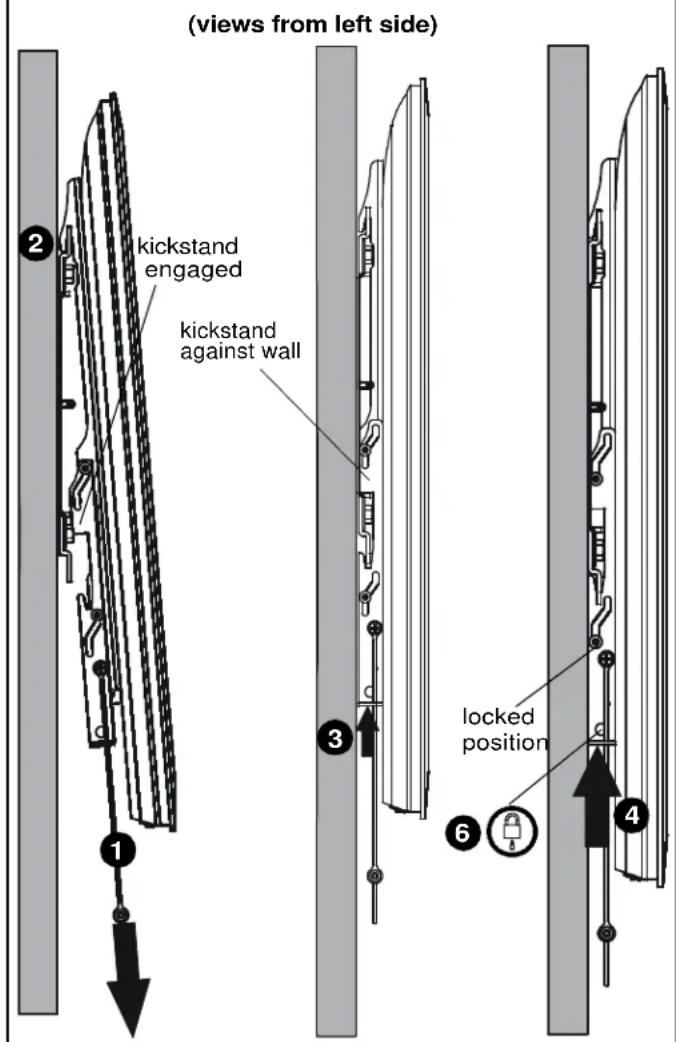
- Make sure interface brackets are in the kickstand position by pulling down on handles as far as possible.
- Hang display with brackets (B) on upper rail of wall plate (A). Kickstand should be engaged with lower portion of wall plate.
NOTE: Any cable management or rear display adjustments should be made when the display is resting on the kickstand.
- Unlock kickstand by pushing up on interface brackets until kickstand rests against the wall.
- Push up on the interface brackets further in order to lock display into position against wall.
NOTE: Straps can be either cut off or tucked behind display after installation is complete so that they will not be visible to the viewer.
- (Optional) The straps can be moved to the lower screw holes on interface brackets in order to improve access to the straps on larger displays.
- (Optional) Route padlock or cable lock (not included) through bottom holes on interface bracket to provide additional security.
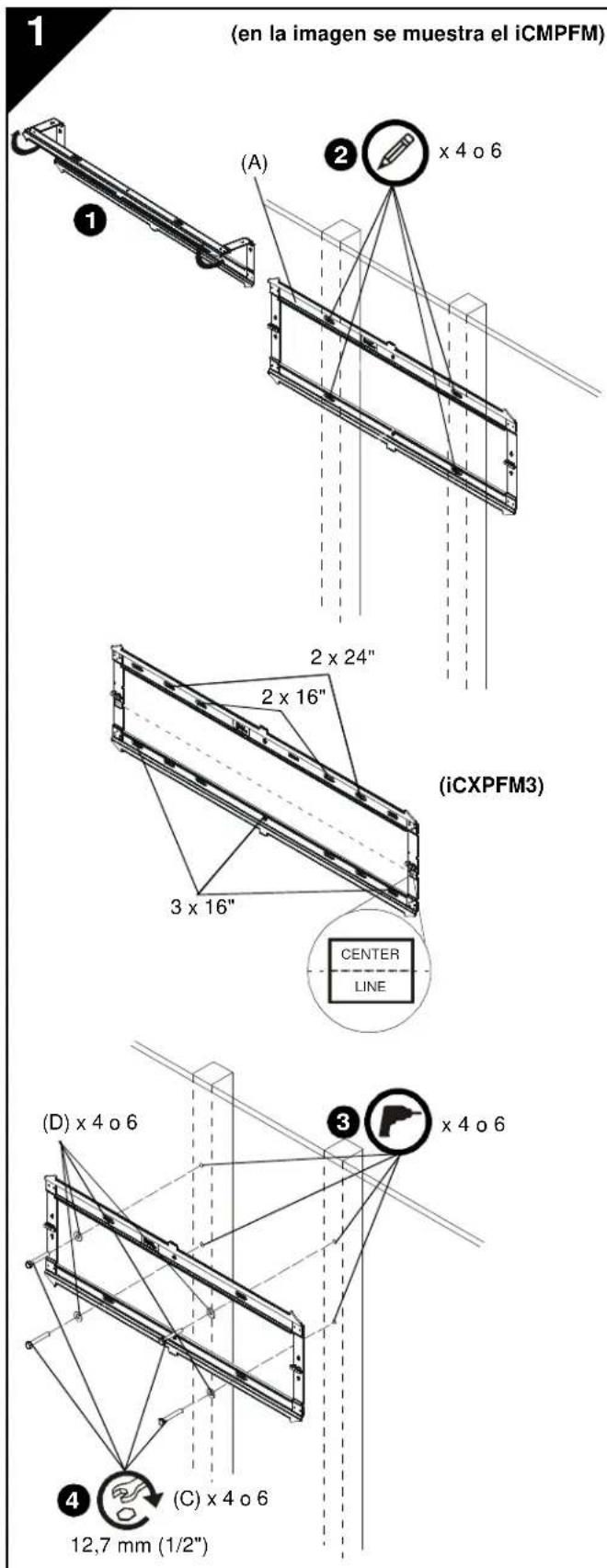
INSTALLACION DE LA PLACA DE PARED EN LA PARED: MONTANTES DE MADERA

- EmakiE to gKos Tuv Bov
Xpmaiaiaivrto xpaicn, oocmntnr n 103 pki MIOPOTEPOY ukrac mc tskayuync baiyau (FA,FE,FI FI L) pleuou ra (Bogovla (B) B. (B) B. (B) B. (B) B. (B) B. (B) B. (B) B. (B) B. (B) B. (B) B. (B) B. (B) B. (B) B. (B) B. (B) B. (B) B. (B) B. (B) B. (B) B. (B) B. (B) B
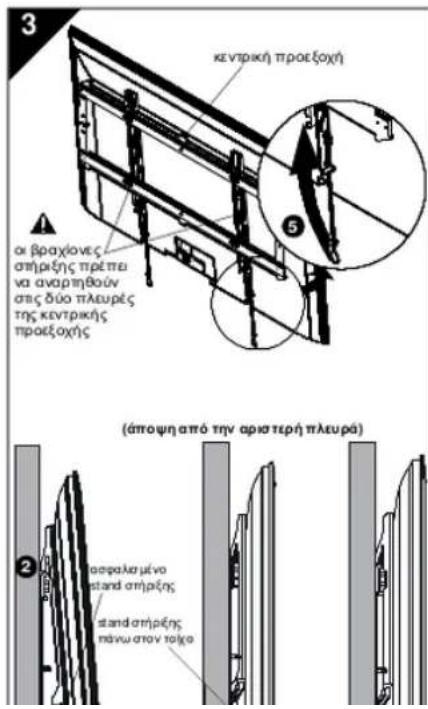
EFKATAETHE THN OONH ETHN IAAKA TOIXOY

NPOEIONOH: Av utpeiivn kovantia
bapouu uupuykivnuoc npokang oabapou
tpauanpovn (BbaCn ot cTnAoi Anotkei
tuvv ouuueu vkyaonravta va Baeovcu on to uuauauo bao pOcakuvu vauo aoyekuv nau
npocapuvi vEv utpbaive ra 125 lbs (56.7kg) va to IcMPFM3 kai to lCPFMn r 175 lbs (79.4kg) va to CXPFM3.Hxpvntpuoviva yauatepou
bapouo amo to lyato baooc nou anopipctos
muptai v npokukuo mwn tsBao kui tvw
eapunipnuu nncpokov tmbov npauanpo

TIPOEIOANOHEH: HOBVnmuoIe vAe mAoIa Ibaopai BiaBaeiTe n o hOBVnuOPeVA auaWpuK KaVa tAeKnBeJ e aogalau vAtoC xpeuOu Cnou ygobovr npoTouvauyavkraataoBtAnm MokaoIaKou. AV dyAotbe Tcnapaonip npoupaeLc, uptoe kivbuvoc pnoanj cooapao npaaepnfaBfBnncnToEaFNO

NPOEIAONIOHE: OIbpoxieovc ampocnpnta vaapnboivou boiv ou mua nucg c kvepkng npoeiaoymviia raiojou!
- Apovriote at Bpoxiovrc omptgns va Bpovknt omBton rou stand omptgs npapvctis tks kaphs npoc ta kato doo to bavovt mepoe
- Awapriote my obovi me tucb poovce (B) atrotny davu pdo 1n 1maoa toiyou (A). To stand oripnc npnte va vaiia deqiepuivto k to kawpeo n maoa toayou.
ZHMEIOEHN Hdoepn kauwduu npuy npooapuyc oio nuiu pucns oovn npnu vayvovn rnv no
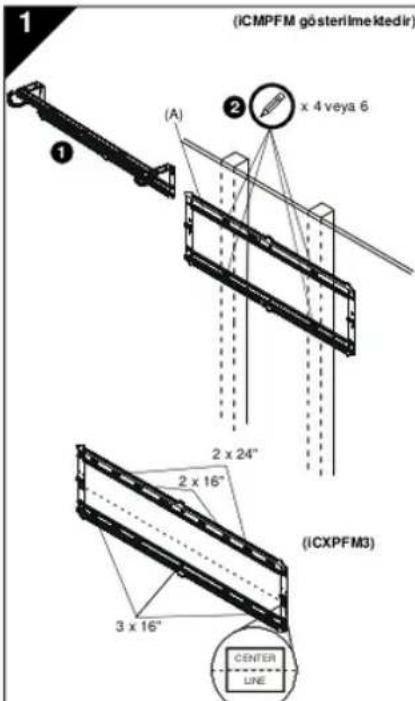
DUVAR PLAKASINI DUVARA - AHsAP CITALARA MONTE ETME
UYARI: Bu bilejen icin yeterli yapsal kuvetim saglanamarnasi, oddi fizikse hasar a ve cinazin zara gormesine neden olabll! Bilejin monte edidigi yapinin, im cihazin toplam agerin bes katna kadar agirigi tajayibildigen dem im dmark monte edinien sorumlulugundadir. Bilejin monte emden once yapinyu guclendirn. Duzenjin monte edidigi duvada ilapan kaliniri en fazla 1.6 cm (5/8) olabilir.
USA·8401 Eagle Creek Parkway, Suite 700·Savage, Minnesota 55378·800.572.1373
EMEA·+31(0)402668620
www.icmounts.com
©2010 Milestone AV Technologies. The iC Logo and StowAway are trademarks of Chief Manufacturing,
a products division of Milestone AV Technologies, a Duchossois Group Company. All rights reserved
Patents and patents pending. Milestone AV Technologies, Savage, MN 55378, USA 8800-002049 Rev 01
02/10