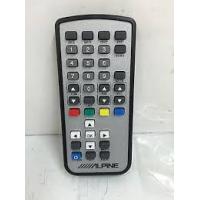
TUE-T200DVB - Mobile digital TV receiver ALPINE - Free user manual and instructions
Find the device manual for free TUE-T200DVB ALPINE in PDF.



User questions about TUE-T200DVB ALPINE
0 question about this device. Answer the ones you know or ask your own.
Ask a new question about this device
Download the instructions for your Mobile digital TV receiver in PDF format for free! Find your manual TUE-T200DVB - ALPINE and take your electronic device back in hand. On this page are published all the documents necessary for the use of your device. TUE-T200DVB by ALPINE.
USER MANUAL TUE-T200DVB ALPINE
Mobile Digital TV Receiver (DVB-T)

Pulal Vuk
Bicucsting
- OWNER'S MANUAL
Please read before using this equipment.
Operating Instructions

WARNING
WARNING 4
CAUTION 4
PRECAUTIONS 5
SAFETY 5
Controls on remote control 6

Basic Operations
Getting Started 7
Installation 8, 9
STB Setup 10, 11, 12
Viewer's Preference 13
Signal Strength 13
About Box 13
Hot Keys 14, 15, 16
CI Module 17
Information
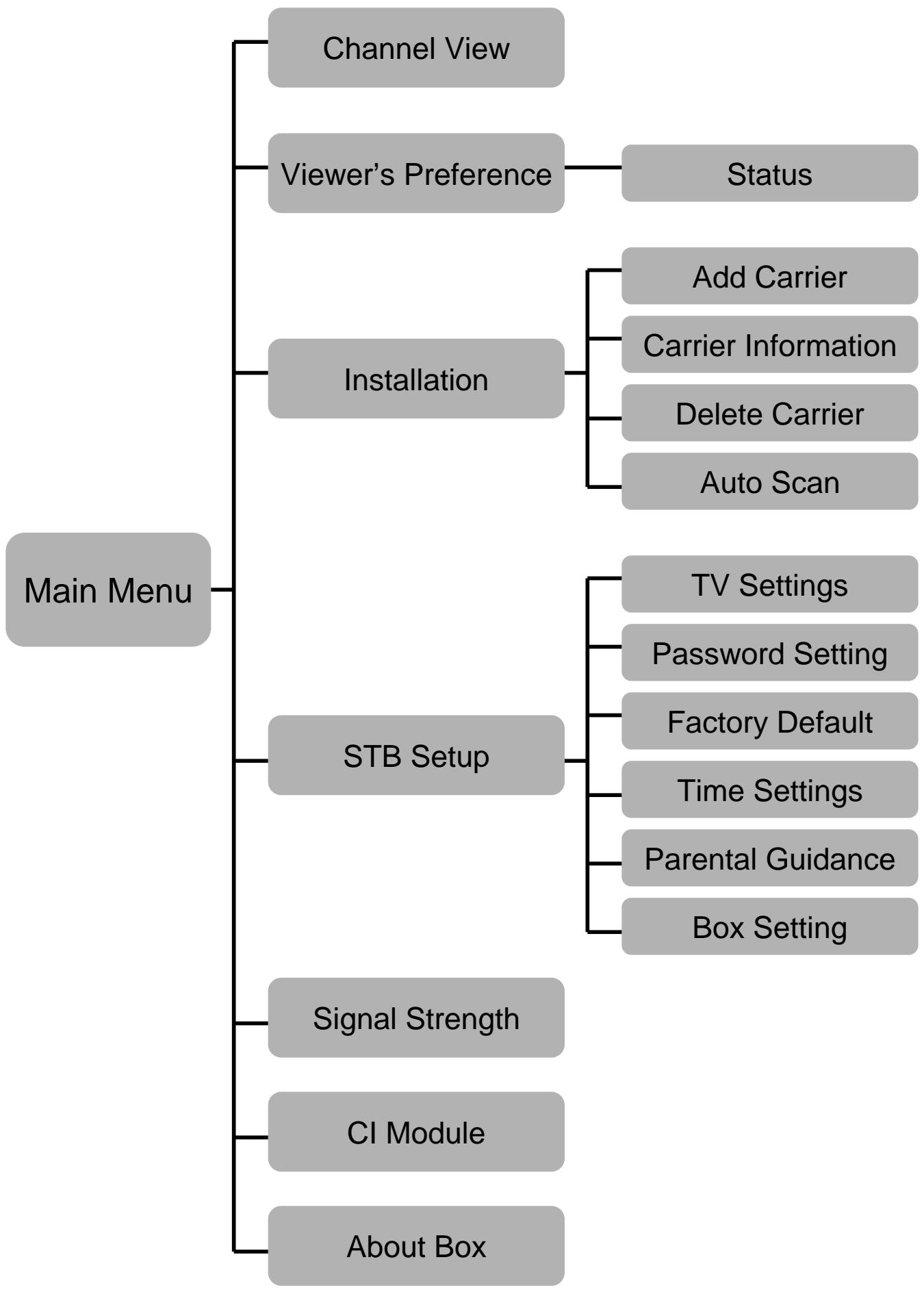
OSD Structure 18
Installation & Connections
WARNING 19
CAUTION 19
PRECAUTIONS 20
Installation 20
Connections & System Wiring 21
Specifications 22

WARNING
This symbol means important instructions. Failure to heed them can result in serious injury or death.

WARNING
This symbol means important instructions. Failure to heed them can result in injury or material property damage.
DO NOT OPERATE ANY FUNCTION THAT TAKES YOUR ATTENTION AWAY FROM SAFELY DRIVING YOUR VEHICLE.
Any function that requires your prolonged attention should only be performed after coming to a complete stop. Always stop the vehicle in a safe location before performing these functions. Failure to do so may result in an accident.
DO NOT DISASSEMBLE OR ALTER.
Doing so may result in an accident, fire or electric shock.
USE THIS PRODUCT FOR MOBILE 12V APPLICATIONS.
Use for other than its designed application may result in fire, electric shock or other injury.
KEEP SMALL OBJECTS SUCH AS BATTERY OUT OF THE REACH OF CHILDREN.
Swallowing them may result in serious injury. If swallowed, consult a physician immediately.
USE THE CORRECT AMPERE RATING WHEN REPLACING FUSES.
Failure to do so may result in fire or electric shock.
HALT USE IMMEDIATELY IF A PROBLEM APPEARS.
Failure to do so may cause personal injury or damage to the product. Return it to your authorized Alpine dealer, the nearest Alpine Service Center for repairing.
DO NOT MIX NEW BATTERIES WITH OLD BATTERIES. INSERT WITH THE CORRECT BATTERY POLARITY.
- When inserting the batteries, be sure to observe proper polarity (+ and -) as instructed.
- Rupture or chemical leakage from the battery may cause fire or personal injury.

PRECAUTIONS
Temperature
Be sure the temperature inside the vehicle is between +45^ (+113^) and 0^ (+32^) before turning your unit on.
Fuse Replacement
When replacing the fuse(s), the replacement must be of the same amperage as shown on the fuse holder. If the fuse(s) blows more than once, carefully check all electrical connections for shorted circuitry. Also have your vehicle's voltage regulator checked.
Maintenance
If you have problems, do not attempt to repair the unit yourself. Return it to your Alpine dealer or the nearest Alpine Service Station for servicing.
Installation Location
Make sure the TUE-T200DVB will not be exposed to:
- Direct sun and heat
High humidity - Excessive dust
- Excessive vibrations

SAFETY
Video Output (front)
In order to ensure vehicle safety, the driver side screen must be connected to the front video output connector. This will ensure the driver won't be able to watch TV while the vehicle is moving, if the blue handbrake wire is properly connected. The driver will be able to watch TV once the handbrake is pulled. The rear passenger screens, connected to the rear video output connectors, do not fall under this restriction.
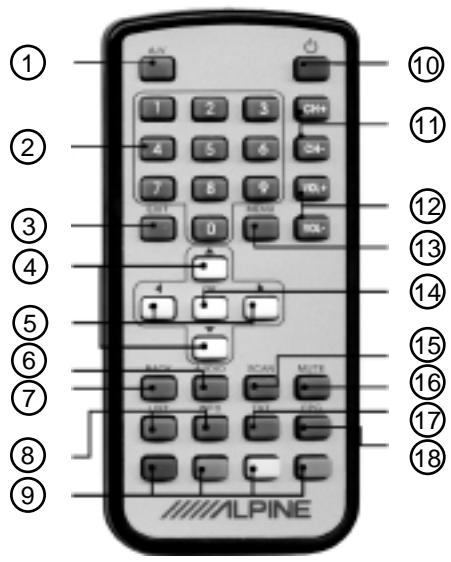
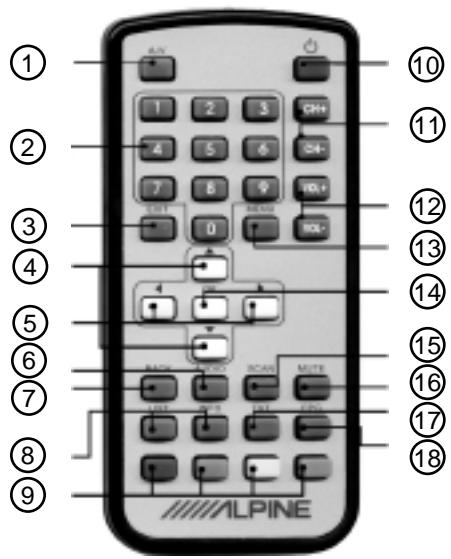
1 A/V button
Press the button and the source will change as shown below:

② Number buttons
Preset services and Teletext pages can be directly accessed by using the number buttons.
(3) Exit button
Press the button to return from a menu.
(4) buttons
Press the up/down buttons to navigate the OSD or to load the next/previous Teletext page.
(5) buttons
Press the left/right buttons to navigate the OSD or to skip the next/previous 100 Teletext pages.
⑥ Audio button
Press the button to enter the audio setup menu.
(7) Back button
Press the button return to the previously selected service.
Hotkey buttons
Press the list button to show a list of all available services.
Press the info button to show reception details of the currently selected service.
Teletext menu buttons
Navigate the Teletext shortcut menu by pressing these buttons In TV mode the yellow/blue button can be pressed to select the next/previous favourite service.
10 Power button
Press the button to turn the DVB-T tuner unit on/off.
CH+/CH- buttons
Press these buttons to select the next/prev. preset service.
VOL+ / VOL- buttons
Press these buttons to adjust the volume output level.
13 Menu button
Press the button to enter the main menu.
14 OK button
Press the button to select a highlighted menu item or to confirm a number input.
15 Scan button
Press the button to start the auto scan procedure.
16 Mute button
Press the button to switch on/off the audio output.
(17) TXT button
Press the button to enter the Teletext menu.
18 EPG button
Press the button to enter the Electronic Program Guide menu.
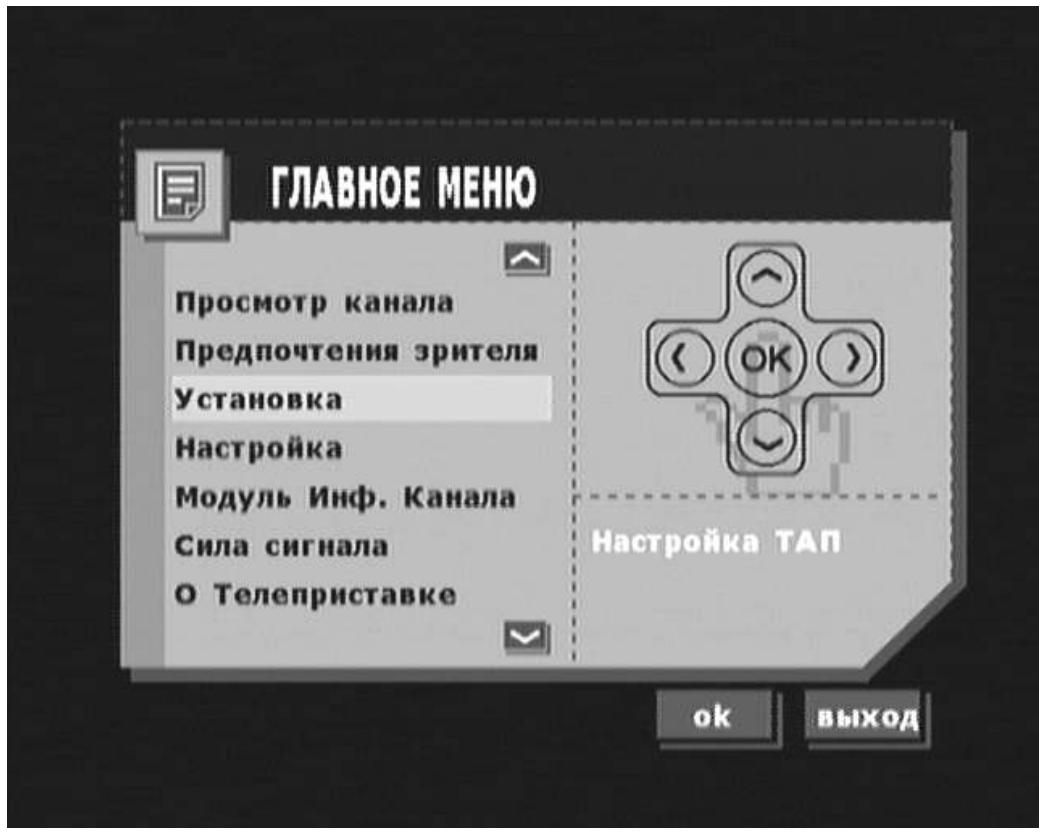
Settings in the main menu
- Press MENU key on the remote control to view the main menu on the screen.
- Press EXIT to quit.
Entering sub-menus
- Select highlighted item and press OK to enter the sub-menu. The sub-menu will be shown on the screen.
- Press EXIT to return to the main menu.
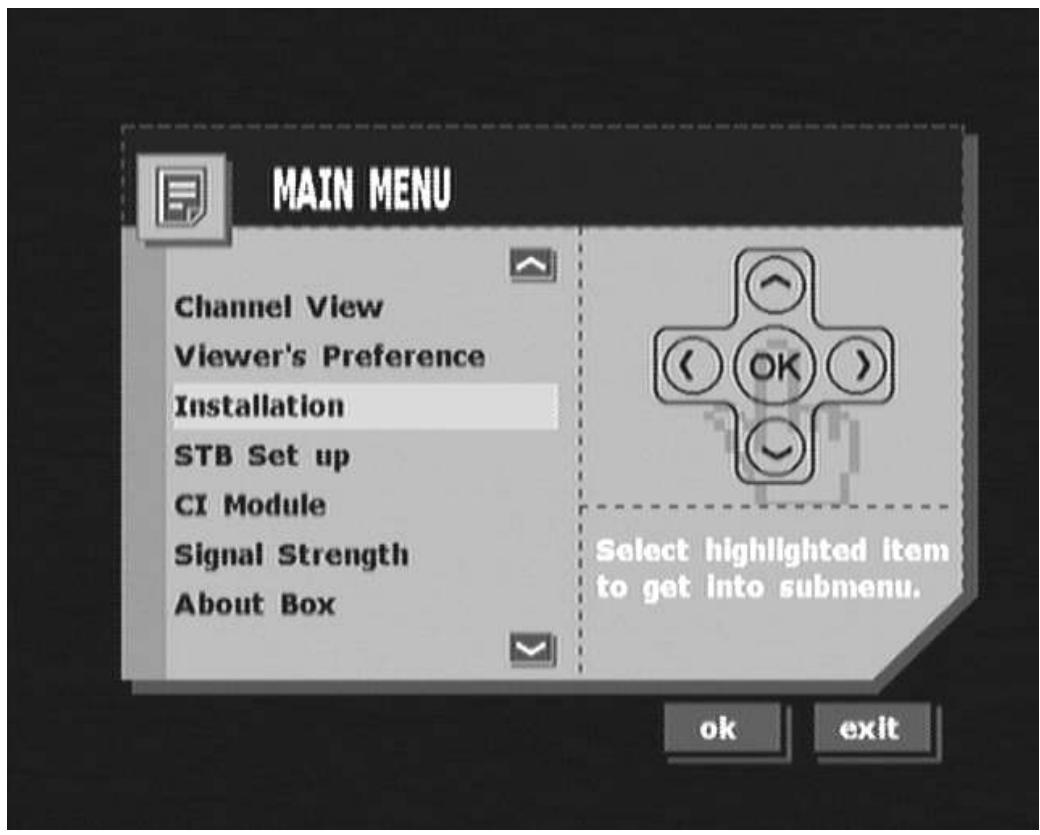
- The installation menu lets you add, delete and auto scan terrestrial carriers.
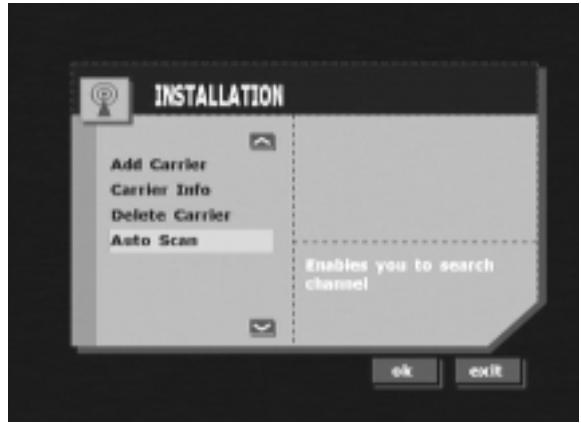
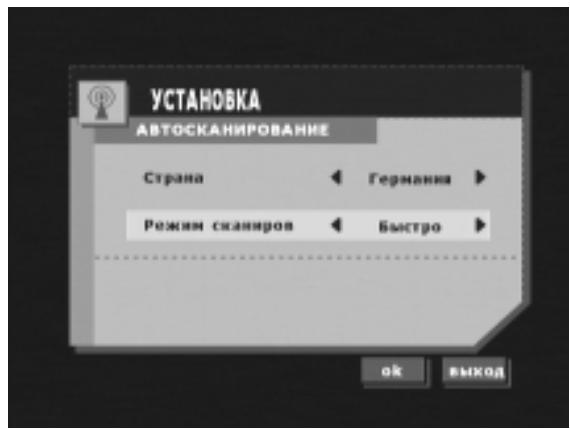
- Auto Scan
In this menu you can select your country and scan mode to do a fast or slow scan.
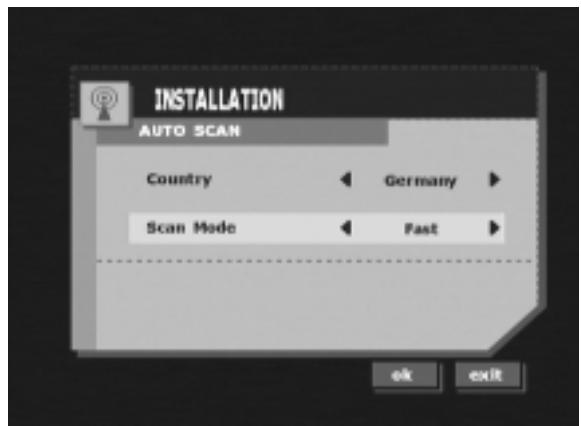
- Fast scan scans a list of carriers.
- Slow scan scans the full range of frequencies.
Press OK to start auto scan after having selected the scanning mode.
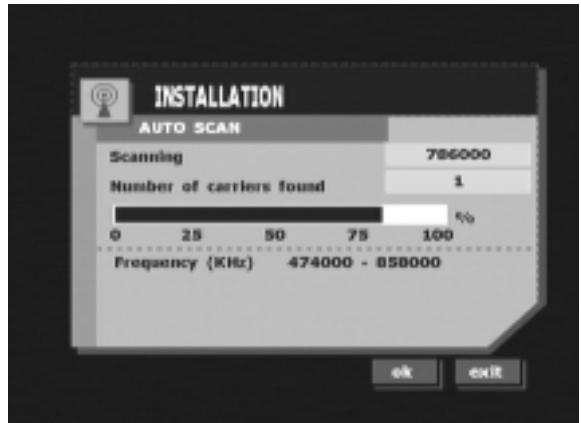
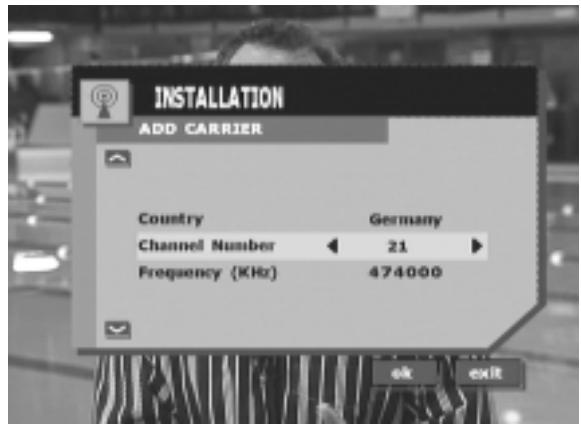
- Add Carrier manually
- Select your country.
- Select the channel number.
Press OK to confirm your input.
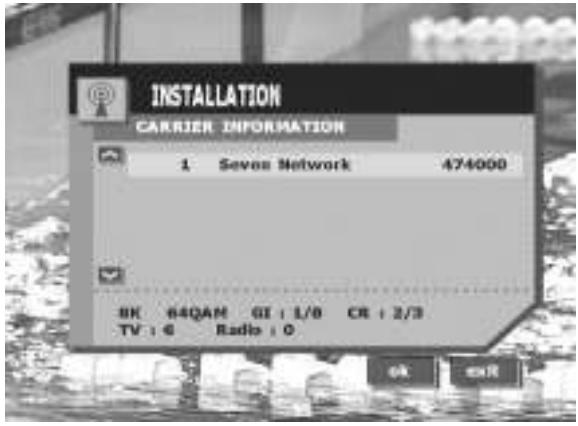
- Carrier Info
In this menu you can see the carrier parameters.
Press OK to re-tune the highlighted carrier.
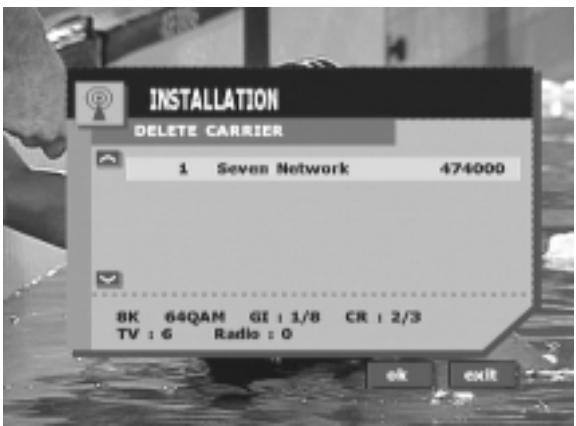
- Delete Carrier
Select a carrier and press OK to delete it.
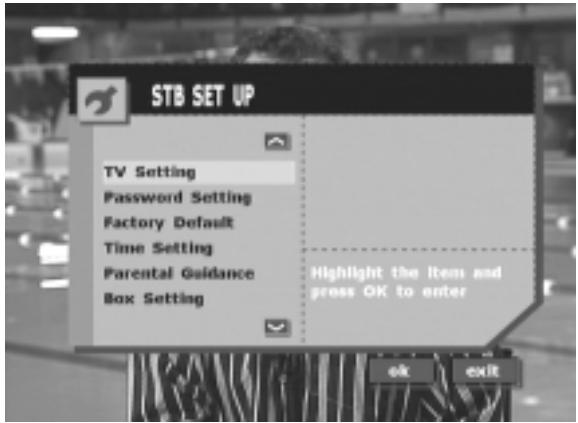
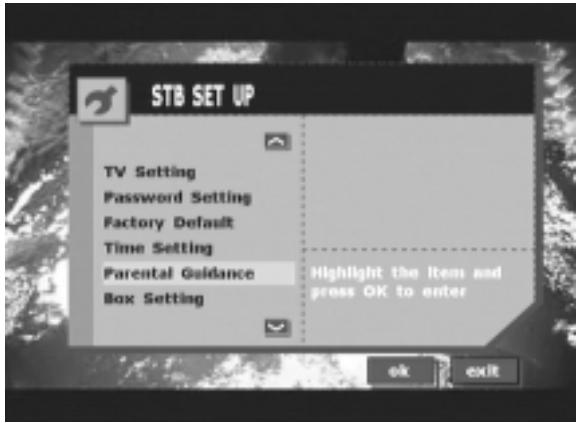
- From the STB Setup menu you can reach the following sub-menus:
- TV Setting
- Password Setting
-Factory Default - Time Setting
- Parental Guidance
-Box Setting
- TV Setting
- Language:
Select your preferred OSD language.
-TV Screen options:
- Mode options if TV screen is set to 16:9:
a.Standard
b. Full Zoom
c. Half Zoom
d. Centred
- Audio Mode lets you switch the audio output between stereo, left channel only and right channel only.
- The transparency of the OSD window can be adjusted by moving the slide bar.
-
The banner timeout of the OSD window can be adjusted by moving the slide bar.
-
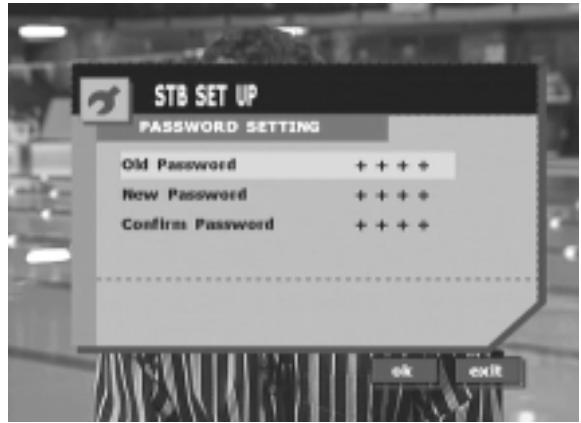
Password Setting In this menu you can change your password. The new password will be automatically stored after the matching confirmation entry is done.
- The default password is 0000.
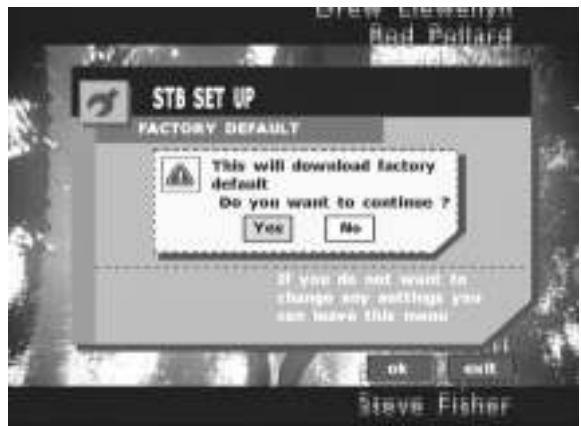
- Factory Default Select Factory Default and confirm with Yes to proceed the download of the device's factory default settings. All user settings will be overwritten.
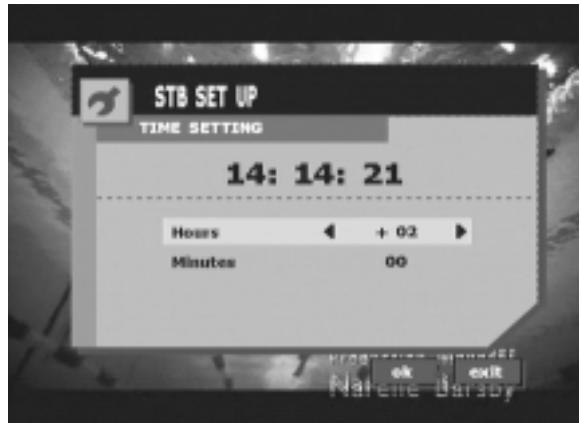
- Time Setting Here you can set the time zone relative to GMT.
- Parental Guidance
In this menu you can set the locking mechanism.
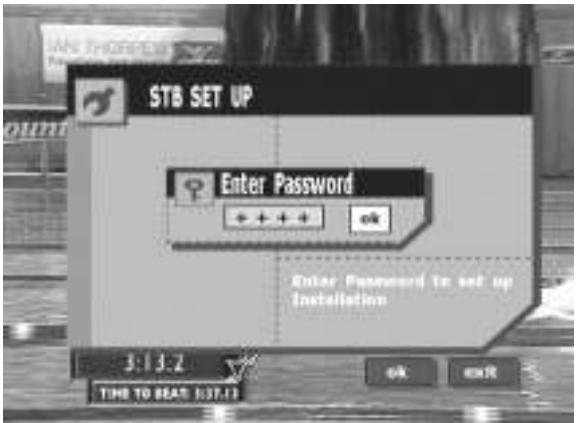
- Enter your password to access the parental guidance level.
- Select the desired locking mechanism
according to the Australian OFLC codes.
(Effective only, if supported by the broadcaster.)
NO: Block none
G: Block G and above
PG: Block PG and above
M: Block M and above
MA: Block MA and above
AV: Block AV and above
R: Block R and above
P: Block P and above
C: Block C and above
ALL: Block all
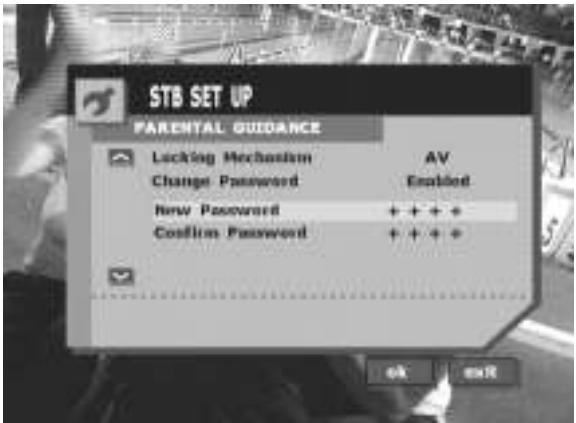
- Change Password
Select "Enabled" to change the parental password.
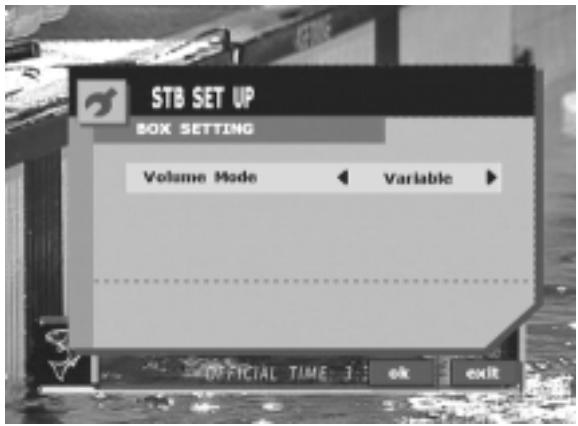
- Box Setting - Volume Mode:
- Select "Variable" to allow volume adjustment by remote control.
-
Select "Fix" to fix the current volume output level and block adjustment by remote control.
-
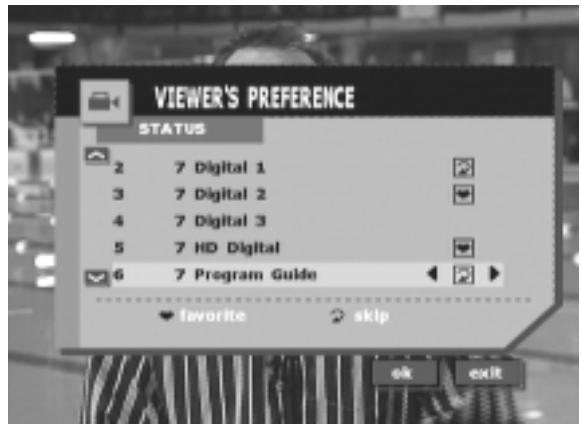
Viewer's Preference
Mark desired services as favourite to access them by using the FAV+ (yellow) and FAV- (blue) buttons.
Mark desired services with the skip icon to skip them when using the CH+ and CH- buttons.

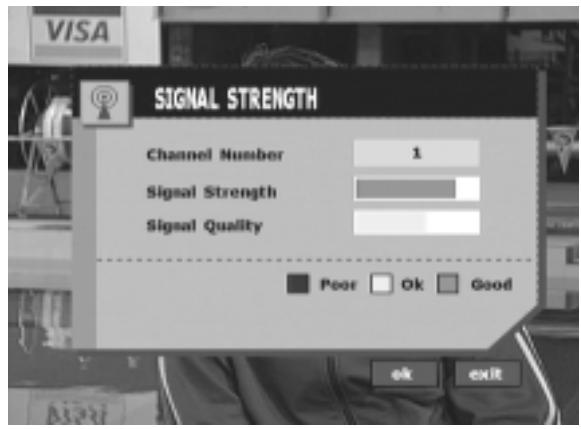
Signal Strength
- Signal Strength
In this menu you can see the signal strength and signal quality for reference to adjust your antenna position.

About Box
- About Box
shows you the hardware and current software version.
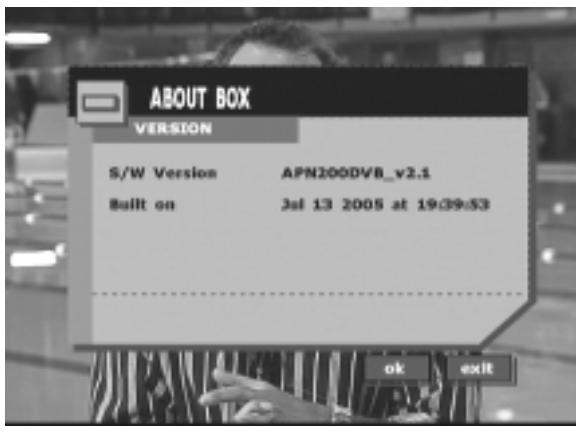
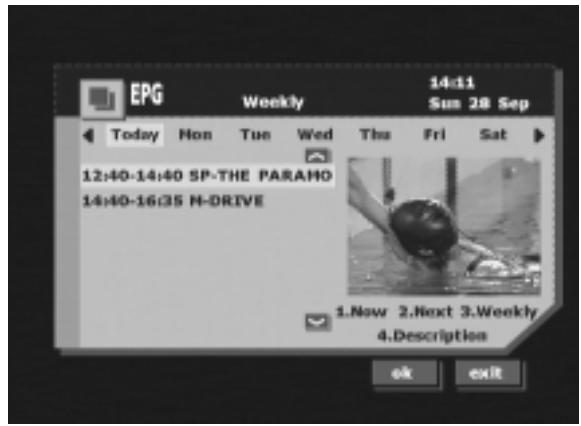
- Electronic Program Guide (EPG)
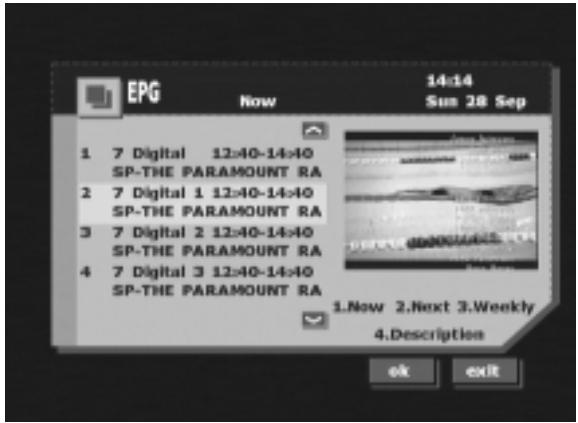
EPG provides information about the current program (Now), the following (Next) and the weekly (Weekly) broadcasts.
(Only available, if supported by the broadcaster.)
- Press the EPG button on the remote control.
- Press the "1" button to show "Now" information.
Press up/down key to view more programs.
- Press "4" button to show detailed information about the highlighted program.
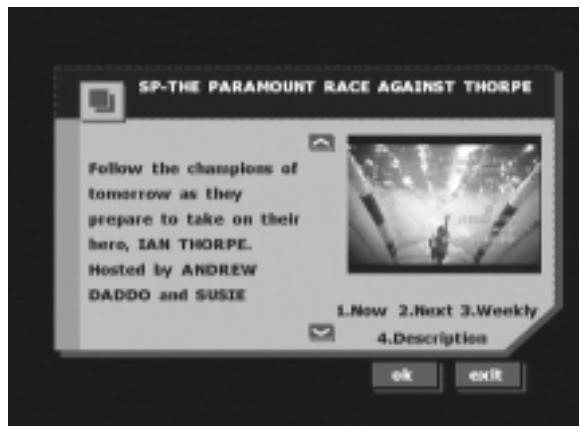
- Press "2" button to show "Next" information.
- Press "4" button to show detailed information about the highlighted program.
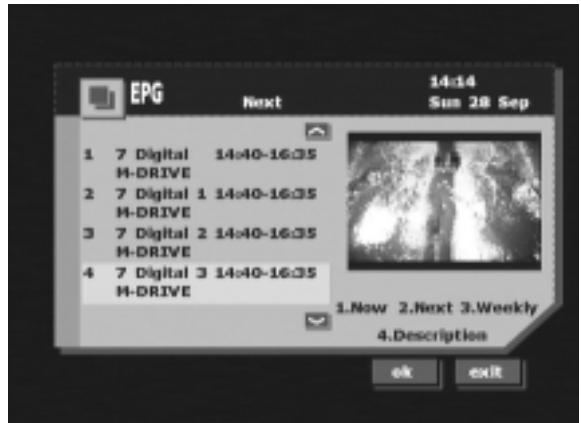
- Press "3" button to show "Weekly" information.
- Press "4" button to show detailed information about the highlighted program.

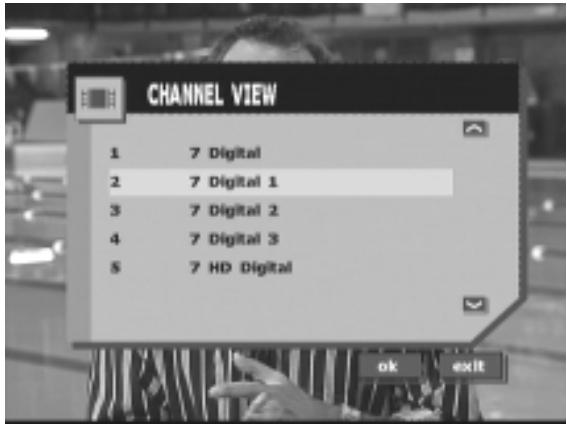
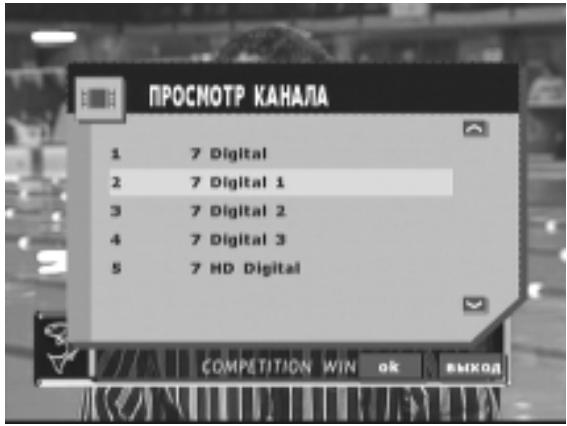
- Channel List
Press the LIST button on the remote control.
All available channel numbers and station names are displayed.
Press the up/down buttons to scroll.

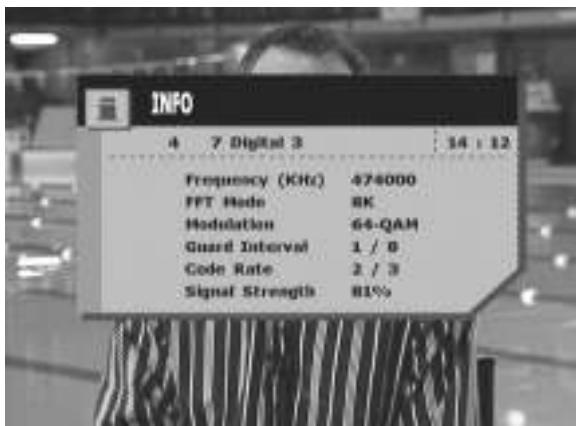
- Carrier Information
Press the INFO button to show the carrier information of the currently selected station.
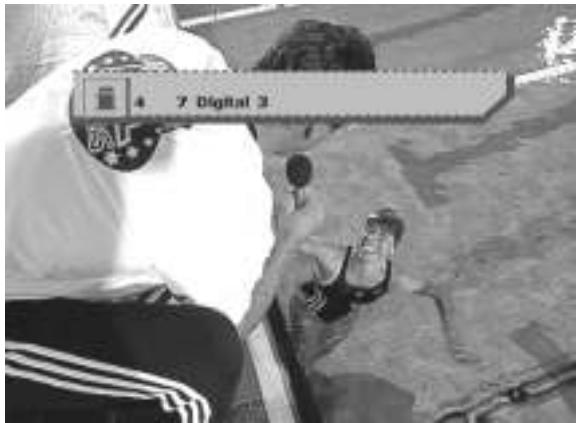
- Previously Viewed Channel
Press the BACK button to switch to the previously viewed channel.
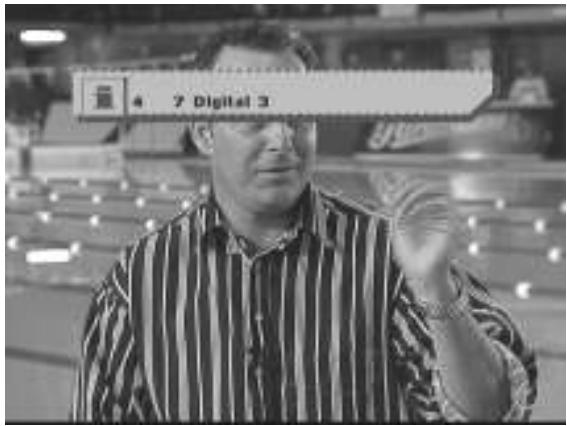
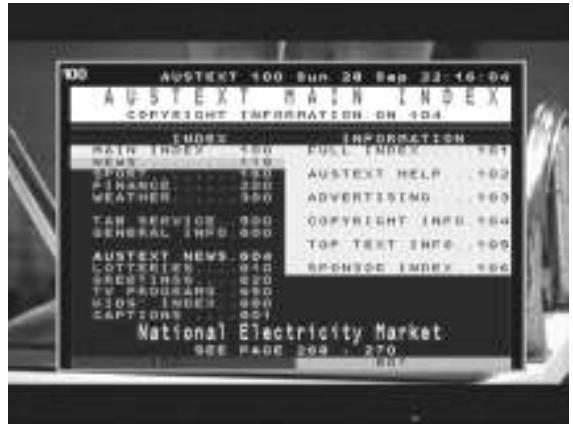
- Press the TXT key to view Teletext, Teletext subtitle or DVB-subtitle.
This information is sent by the broadcaster and is not permanently provided.
In Teletext mode the following controls are available:
- up/down buttons: Load the next/previous page.
- left/right buttons: Skip the next/previous 100 pages.
- Teletext color buttons (red, green, yellow, blue)
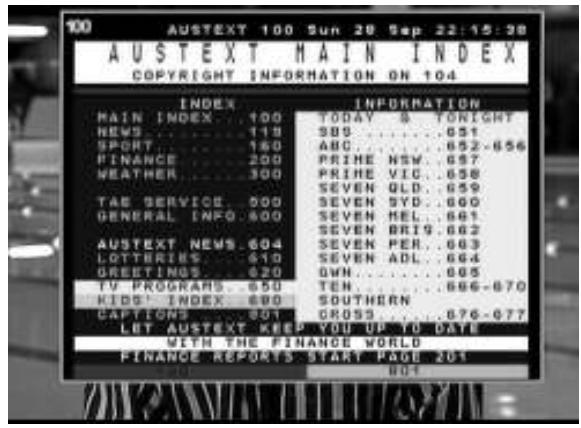
- The A/V button
The output source can be selected by pressing the A/V button.
Sequence: ... > TV > Radio > AUX1 > AUX2 > ...

- CI MODULE
Enter this menu to show the CI Module details and settings.
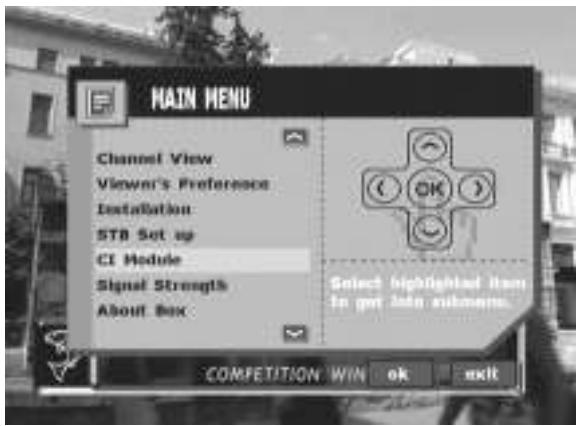
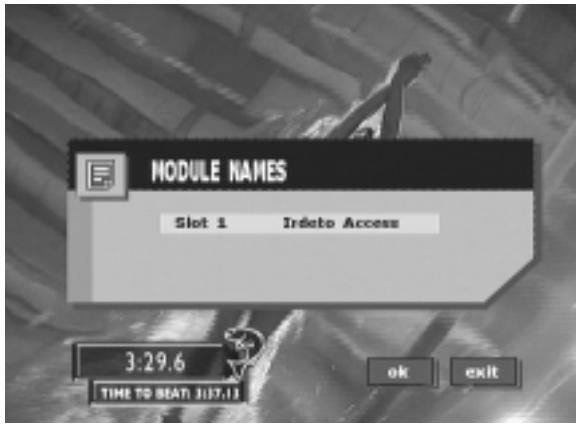
- Insert a CI Module.
Press OK to view CI information.
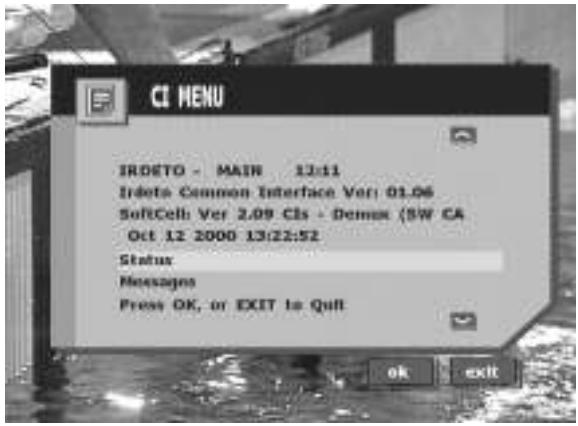
- The CI Module information is shown on the display.
Before installing or connecting the unit, please read the following and pages 2 and 3 of this manual thoroughly for proper use.

Warning
MAKE THE CORRECT CONNECTIONS.
Failure to make the proper connections may result in fire or product damage.
USE ONLY IN CARS WITH A 12 or 24 VOLT NEGATIVE GROUND.
(Check with your dealer if you are not sure.) Failure to do so may result in fire, etc.
BEFORE WIRING, DISCONNECT THE CABLE FROM THE NEGATIVE BATTERY TERMINAL.
Failure to do so may result in electric shock or injury due to electrical shorts.
DO NOT SPLICE INTO ELECTRICAL CABLES.
Never cut away cable insulation to supply power to other equipment. Doing so will exceed the current carrying capacity of the wire and result in fire or electric shock.
DO NOT USE BOLTS OR NUTS IN THE BRAKE OR STEERING SYSTEMS TO MAKE GROUND CONNECTIONS.
Bolts or nuts used for the brake or steering systems (or any other safety-related system), or tanks should NEVER be used for installations or ground connections. Using such parts could disable control of the vehicle and cause fire etc.
KEEP SMALL OBJECTS SUCH AS BATTERY OUT OF THE REACH OF CHILDREN.
Swallowing them may result in serious injury. If swallowed, consult a physician immediately.
DO NOT INSTALL IN LOCATIONS WHICH MIGHT HINDER VEHICLE OPERATION, SUCH AS THE STEERING WHEEL OR GEARSHIFT.
Doing so may obstruct forward vision or hamper movement etc. and results in serious accident.

Caution
HAVETHE WIRING AND INSTALLATIONDONE BY EXPERTS.
The wiring and installation of this unit requires special technical skill and experience. To ensure safety, always contact the dealer where you purchased this product to have the work done.
USE SPECIFIED ACCESSORY PARTS AND INSTALL THEM SECURELY.
Be sure to use only the specified accessory parts. Use of other than designated parts may damage this unit internally or may not securely install the unit in place.
This may cause parts to become loose resulting in hazards or product failure.
ARRANGE THE WIRING SO IT IS NOT CRIMPED OR PINCHED BY A SHARP METAL EDGE.
Route the cables and wiring away from moving parts (like the seat rails) or sharp or pointed edges. This will prevent crimping and damage to the wiring. If wiring passes through a hole in metal, use a rubber grommet to prevent the wire's insulation from being cut by the metal edge of the hole.
DO NOT INSTALL IN LOCATIONS WITH HIGH MOISTURE OR DUST.
Avoid installing the unit in locations with high incidence of moisture or dust. Moisture or dust that penetrates into this unit may result in product failure.
Precautions
Be sure to disconnect the cable from the (-) battery post before installing your TUE-T200DVB. This will reduce any chance of damage to the unit in case of a shortcircuit.
- Be sure to connect the color coded leads according to the diagram. Incorrect connections may cause the unit to malfunction or damage the vehicle's electrical system.
- When making connections to the car's electrical system, be aware of the factory installed components (e.g. on-board computer). Do not tap into these leads to provide power for this unit. When connecting the TUE-T200DVB to the fuse box, make sure the fuse for the intended circuit of the TUE-T200DVB has the appropriate amperage. Failure to do so may result in damage to the unit and/or the vehicle. When in doubt, consult your ALPINE dealer.
- The TUE-T200DVB uses female RCA-type jacks for connection to other units (e.g. amplifier) having RCA connectors. You may need an adaptor to connect other units. If so, please contact your authorized ALPINE dealer for assistance.
Installation
Installing TV TUNER
This TV TUNER can be placed inside the trunk, on the kick panel of the front passenger's seat or underdash. However, to avoid unnecessary signal wiring, it is better to mount the TV TUNER as close as possible to the Display. DO NOT MOUNT THE UNIT IN LOCATIONS THAT WILL BE IN THE VICINITY OF MOISTURE OR EXTREME HEAT (such as the engine compartment).
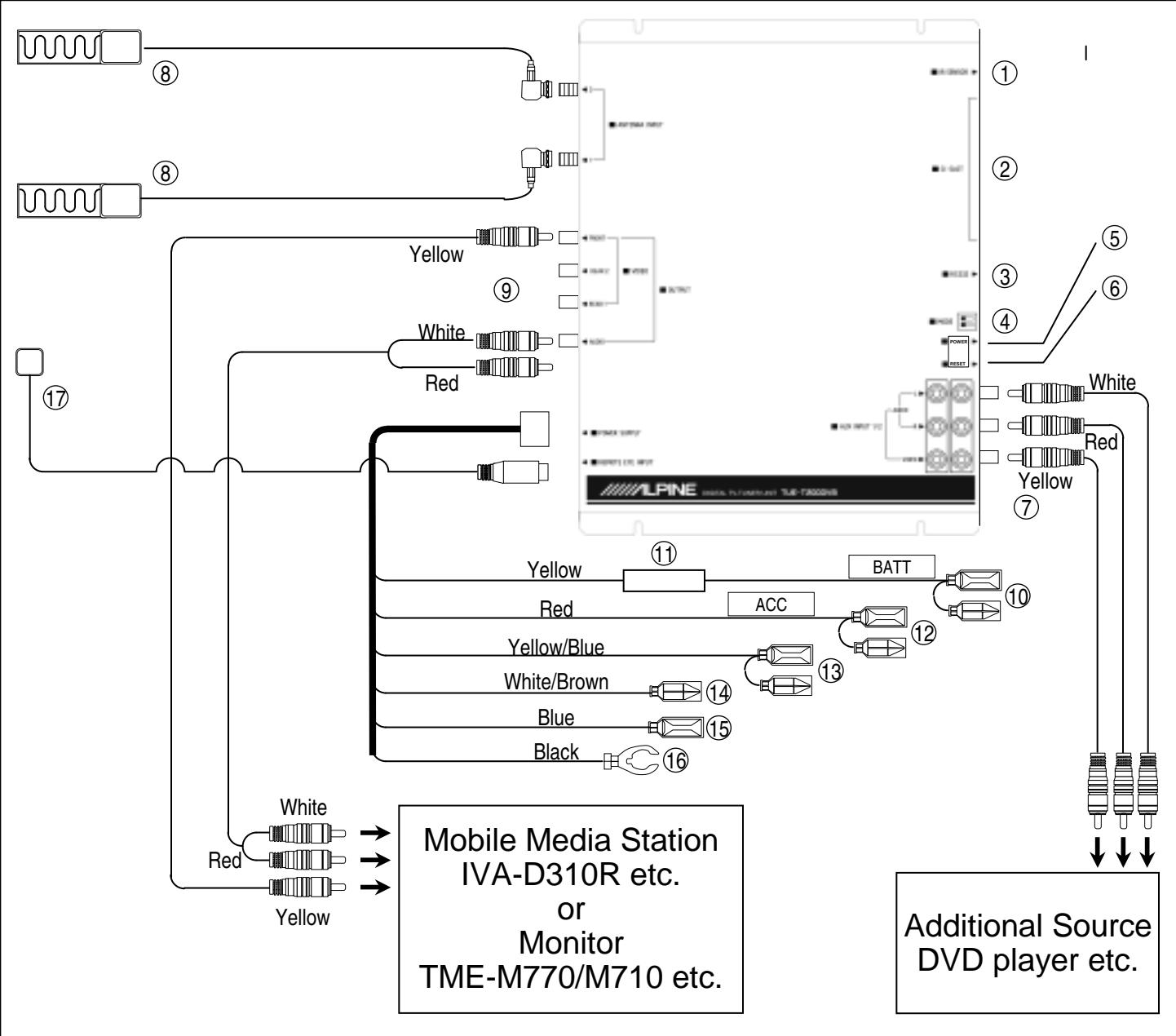
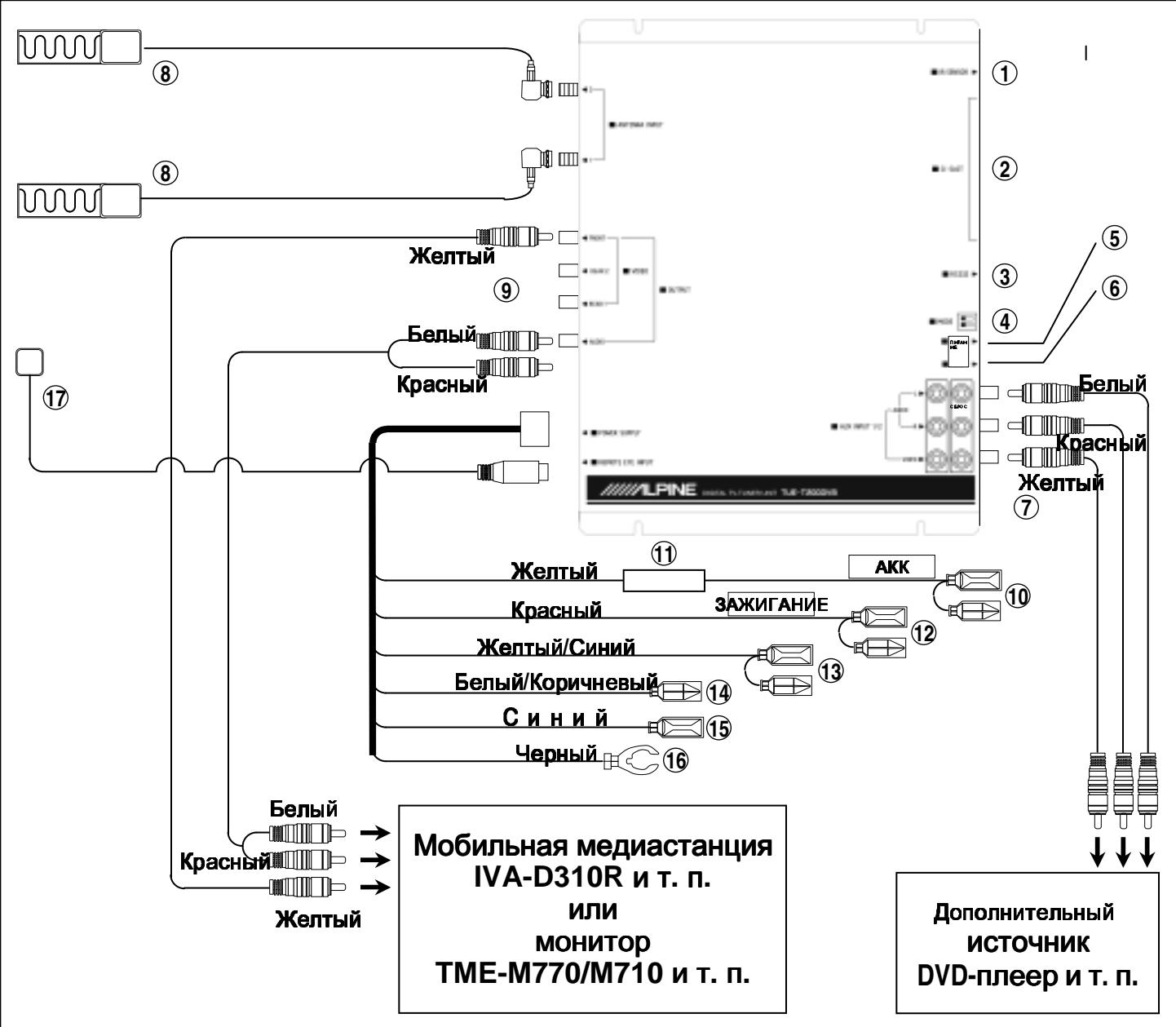
Connections and System Wiring Diagram
① Integrated IR sensor
② CI slot for Common Access Module (CAM)
③ RS232 connector for updating software
④ Mode switches for starting software download and erasing the EEPROM
⑤ Reset button
⑥ Power status LED
(7) 2 × RCA A/V auxiliary input
Antenna input socket (F-plug/female) with integrated 5V/30mA power supply.
⑨ 3x video & 1x audio RCA output
10 Battery lead (yellow)
Connect to a live terminal in the fuse block connecting to the car battery (bypassing the ignition switch).
⑪ Fuse holder (3.0A)
⑫ Switched power lead (Ignition) (red)
Connect to an accessory terminal in the fuse block.
① Parking brake lead (yellow/blue)
Connect to parking brake or metallic body or chassis of the car.
Remote control input lead (white/brown)
Connect to remote control lead of monitor.
15 Power antenna remote output (+5V/60mA) lead (blue)
16 Ground lead (black)
Connect to metallic body or chassis of the car.
17 External IR sensor
Hardware
POWER SUPPLY
Input voltage
12V-24V DC
Power consumption
max. 18W
DEMODULATION
CO FDM
Waveform
Modes
2K & 8K FEC combinations including
hierarchical modes
Constellation
Q PSK, 16-Q AM, 64-Q AM
TUNER
F-type, female (5V, 30mA)
Antenna connector
UHF and VHF (47 - 862MHz)
Input frequency
6, 7, 8 or 7/8MHz
Bandwidth
2x RCA
AV AUX input
1x RCA (stereo)
Audio output
3x RCA (75Ω), PAL/NTSC/SECAM
Video output
for CAM (PCMCIA)
CI slot
GENERAL INFORMATION
0-70℃
Working temperature
235× 172× 37mm
Dimensions
1.4 Kg
Weight
Software
BASIC SYSTEM
MPEG-II Digital,
fully DVB-T compliant
LANGUAGES FOR OSD
English / German / French
Spanish / Italian / Swedish / Russian
NUMBER OF PROGRAMS
400 services
MANUAL CHANNEL SEARCH
Supported
AUTOMATIC CHANNEL SEARCH
Supported
SOFTWARE UPGRADE
via RS232 loader
TELETEXT
Supported
(VBI insertion, OSD Teletext)
DVB SUBTITLING
Supported
EPG
Supported
ALPINE ELECTRONICS MARKETING, INC.
1-1-8 Nishi Gotanda,
Shinagawa-ku,
Tokyo 141-0031, Japan
Phone 03-5496-8231
ALPINE ELECTRONICS OF CANADA, INC.
7300 Warden Ave., Suite 203, Markham,
Ontario L3R 9Z6, Canada
Phone 1-800-ALPINE-1 (1-800-257-4631)
ALPINE ELECTRONICS GmbH
Frankfurter Ring 117
80807 Munchen, Germany
Tel. 089-3242640
ALPINE ELECTRONICS OF AMERICA, INC.
19145 Gramercy Place, Torrance,
California 90501, U.S.A.
Phone 1-800-ALPINE-1 (1-800-257-4631)
ALPINE ELECTRONICS OF AUSTRALIA PTY. LTD.
6-8 Fiveways Boulevard Keysborough,
Victoria 3173, Australia
Phone 03-9769-0000
ALPINE ELECTRONICS OF U.K. LTD.
Alpine House
Fletchamstead Highway, Coventry CV4 9TW, U.K.
Phone 0870-33 33 763
ALPINE ELECTRONICS FRANCE S.A.R.L.
(RCS PONTOISE B 338 101 280)
98, Rue de la Belle Etoile, Z.I. Paris Nord II,
B.P. 50016, 95945 Roissy Charles de Gaulle
Cedex, France
Phone 01-48638989
Naviglio (MI), Italy
Phone 02-484781
ALPINE ELECTRONICS DE ESPANA, S.A.
Portal de Gamarra 36, Pabellon, 32
01013 Vitoria (Alava)-APDO 133, Spain
Phone 945-283588
ALPINE ELECTRONICS (Benelux) GmbH
Leuvensesteenweg 510-B6
1930 Zaventem, Belgium
Tel. 02-7251315
Inhalt
Bedienungsanleitung

WARNING
WARNING 4
ACHTUNG 4
Installation 10, 11, 12
Q PSK, 16-Q AM, 64-Q AM
TUNER
7300 Warden Ave., Suite 203, Markham,
Ontario L3R 9Z6, Kanada
Tel. 1-800-ALPINE-1 (1-800-257-4631)
ALPINE ELECTRONICS OF AUSTRALIA PTY. LTD.
6-8 Fiveways Boulevard Keysborough,
Victoria 3173,Australien
Tel. 03-9769-0000
ALPINE ELECTRONICS GmbH
Frankfurter Ring 117
Fletchamstead Highway, Coventry CV4 9TW, U.K.
Tel. 0870-33 33 763
ALPINE ELECTRONICS FRANCE S.A.R.L.
(RCS PONTOISE B 338 101 280)
98, Rue de la Belle Etoile, Z.I. Paris Nord II,
B.P. 50016, 95945 Roissy Charles de Gaulle
Cedex, Frankreich
Tel. 01-48638989
Q PSK, 16-Q AM, 64-Q AM
Constellation
TUNER
3 x RCA (75 Ω), PAL/NTSC/SECAM
Emplacement CI
pour CAM (PCMCIA)
INFORMATIONS GÉNÉRALES
0 a 70 C
7300 Warden Ave., Suite 203, Markham,
Ontario L3R 9Z6, Canada
Tél. 1-800-ALPINE-1 (1-800-257-4631)
ALPINE ELECTRONICS GmbH
Frankfurter Ring 117
6-8 Fiveways Boulevard Keysborough,
Victoria 3173,Australia
Tél. 03-9769-0000
ALPINE ELECTRONICS OF U.K. LTD.
Alpine House
Fletcherstead Highway, Coventry CV4 9TW, R.U.
Tel. 0870-33 33 763
3 RCA (75 Ω), PAL/NTSC/SECAM
Ranura de CI
para CAM (PCMCIA)
INFORMACION GENERAL
0-70℃
7300 Warden Ave., Suite 203, Markham,
Ontario L3R 9Z6, Canada
6-8FivewaysBoulevardeKeysborough,
Victoria 3173, Australia
Telefono 03-9769-0000
ALPINE ELECTRONICS OF U.K. LTD.
Alpine House
Fletchamstead Highway, Coventry CV4 9TW, Reino Unido
Telefono 0870-33 33 763
3 RCA (75Ω), PAL/NTSC/SECAM
Slot CI
per CAM (PCMCIA)
7300 Warden Ave., Suite 203, Markham,
Ontario L3R 9Z6, Canada
Tel. 1-800-ALPINE-1 (1-800-257-4631)
ALPINE ELECTRONICS GmbH
Frankfurter Ring 117
6-8 Fiveways Boulevard Keysborough,
Victoria 3173, Australia
Tel. 03-9769-0000
ALPINE ELECTRONICS OF U.K. LTD.
Alpine House
Fletchamstead Highway, Coventry CV4 9TW, U.K.
Tel. 0870-33 33 763
STB-installation 10, 11, 12
Programhantering 13
Signalstyrka 13
Omutrustningen 13
Kortkommandon 14, 15, 16
CI-modul 17
Information
OSD-struktur 18
3 RCA (75Ω), PAL/NTSC/SECAM
Videoutgang
for CAM (PCMCIA)
Cl-kortplats
ALLMÄN INFORMATION
0-70℃
Driftstemperatur
235 × 172 × 37 ~mm
Matt
1,4 kg
Vikt
ALPINE ELECTRONICS MARKETING, INC.
1-1-8 Nishi Gotanda,
Shinagawa-ku,
Tokyo 141-0031, Japan
Tel: 03-5496-8231
ALPINE ELECTRONICS OF CANADA, INC.
7300 Warden Ave., Suite 203, Markham,
Ontario L3R 9Z6, Kanada
Tel: 1-800-ALPINE-1 (1-800-257-4631)
ALPINE ELECTRONICS GmbH
Frankfurter Ring 117
80807 Munchen, Tyskland
Tel: 089-3242640
ALPINE ELECTRONICS FRANCE S.A.R.L.
(RCS PONTOISE B 338 101 280)
98, Rue de la Belle Etoile, Z.I. Paris Nord II,
B.P. 50016, 95945 Roissy Charles de Gaulle
Cedex, Frankrike
Tel: 01-48638989
ALPINE ELECTRONICS DE ESPANA, S.A.
Portal de Gamarra 36, Pabellón, 32
01013 Vitoria (Alava)-APDO 133, Spanien
Tel: 945-283588
Programvara
BASSYSTEM
MPEG-II Digital,
MANUELL KANALSOKNING
Stöds
AUTOMATISK KANALSOKNING
Stöds
UPPGRADERING AV PROGRAMVARA
via RS232-läsare
TELETEXT
Stöds
(VBI-inmatning, OSD-teletext)
DVB-TEXTNING
Stöds
EPG
Stöds
ALPINE ELECTRONICS OF AMERICA, INC.
19145 Gramercy Place, Torrance,
California 90501, USA
Tel: 1-800-ALPINE-1 (1-800-257-4631)
ALPINE ELECTRONICS OF AUSTRALIA PTY. LTD.
6-8 Fiveways Boulevard Keysborough,
Victoria 3173,Australien
Tel: 03-9769-0000
ALPINE ELECTRONICS OF U.K. LTD.
Alpine House
Fletchamstead Highway, Coventry CV4 9TW, UK
Tel: 0870-33 33 763
PPEyPExEHHE 4
OCTOPOXHO 4
MEpbI PPEIOCTOPOXHOCTN 5
TEXHnKA B63OpACHOCTN 5
OprahbI ynpaBHeHnI nyIbTa
ДиСТанцИОНHOrOуУпавЛeнь … 6

OchOBHbIe yHKcIMN
IIoIIOToBka K pa6OTe 7
YcTaHOBka 8,9
HactpoJa TAII 10, 11, 12
IIpeIIOuTeHnIa3puTeJIa 13
CnJa cHHaJa 13
OTeJIeIIpHcTaBKe 13
Topaune KJIaBnIIN 14, 15, 16
MoIyJIb HnHΦopMaIIu KaHaJIa 17
HnΦopMaçn
CTpyktypa 3KpaHHoro MeHIO. 18
YCTaHOBka NIOdKJIIOUeHne
PPEyPExEHNIE 19
OCTOPOXHO 19
MEpbI INPEIOCTOPOXHOCTN 20
YcTaHOBka 20
Dnarpamma nookloueHn 21
TexHHueckne xapaKTeepncTnKn 22

ПЕДУПЕЖДЕНЕ
3TOT CnMBOJ CBNIDETeJIbCTByeTO HaJIINuIN BaxHbIX INHCTpyKcI. HecO6JIIODeHne 3Tnx IHCTpyKcI MOKET npNBecTNI K cepBe3HO TpaBMe NLIcMEpTeJIbHOMY NCXOy.

ПРЕДУПЕЖДЕНЕ
3TOT CnMBOJ CBNIDETeJIbCTByeT O HaJIuH N BaxHbIX HnCTpyKcI. HecO6JIIODeHne 3THx MHCtpyKcI MOKeT IpNBecTn K TpaBme IIN IOBpeXdEHNO 06OpydoBaHHa.
HE BbINOJIHRAI TE KAKNX-JINBO DEICTBNI, KOTOPbIE MOrYT OTBJIeYb BAUIE BHIMAHNE OT BE3ONACHO r OYPABJIeHn ABTOMO6NJEM.
JIIO6oeIeIcTBHe, Tpe6yIOuiee OTe BAC JINHTeJIbHO TOBHMaHH JOJIXHO BBIIIOJIHrTbCra TOJIbKO IIOcJE IIOJIHO OCTAHOBKH aBTOMo6HJI.
BceIaOCTaHaBJIHbAaTe aBTOMo6Hb B 6e30IIacHom MecTe IpeEi BbIIOJIHeHHem 3THX fYHKuH. Heco6JIHOeHHe 3TOrO Tpe6OBaHH MoKet IIpHBecTH K aBapHH.
HE PA3BPAIte IN HE BHOCITE N3MEHEHIN B YCTPOICTBO.
Hec6JIIOHeHHe 3THX Tpe6OBAHH MoKeT IIpHBecTH K HeCuaCTHOMy CJyauIO, IIOKApY HJIN IOpaKeHHIO 3JIeKtpHueckHM TOKOM.
NCHONJIb3yIte DAHHOE YCTPOIcTBO JINMOBUNbHOrO INPIMEHEHnB B CETN 12B
HcIIb3OBaHHe yCtpoCTBa IIJIpyTHX ueJIe MoKTe IIpHBecTH K IIoKApY, IIopaxKeHHIO 3JIeKTpHueCKHM TOKOM HJIH TpaBME.
XPAHHTE MEJIKNE IPNHAJIEXKHOCTN, TAKNE KAK BATAPEN, B MECTAX HEIOCTYINbIX DJIa DETeI.
IIporJIaTbIbAHHe 6aTapeiKm MoKeT IIpHBeCTN K cepbe3HOI TpaBMe. B cJIyae IIporJIaTbIbAHn, HeMeJJIeHHO o6paTHTeCb K BpaCy.
IPN 3AMEHE PPEOXPAHNTEJIEN, INCNOJb3yIte PPEOXPAHNTEJIIN C COOTBETCTBYIOUeI CNJIOI TOKA.
Heco6JIHOeHHe 3THX IIpeIOcTOPOKHOcTe MoKeT IIpHBecTH K IOkApy HIN IopaKeHHO 3JIeKTpHuEcKHM TOKOM.
ПРИ BO3HнКHOBEHи ПОБЛЕмbl HEMДLEHNO PNEKPATITE ИСПОЛьЗOBAHNE YCTPOICTBA
Heco6JIOeHHe 3TOI Tpe6OBAHH MoKet IINHBcTH K TpaBMe HIN IOBpeKJeHHIO O6OpyIOBaHH. BepHTe erO aBTOpH3OBAHHOM y INJIepy Alpine HIN O6paTHTeCb B 6JINKaIIHN cepBHCHN IeHTp Alpine JJIpeMOHTa.
HE YCTAHABJIINBAIte BMECTE HOBbie I CTAPbie BATAPEI. BCTABJIYTE IX, COBJIODAI INPABINbHyIO NOJARPHOCTb.
Ipn yctaHOBe 6aTaapey6eHInTeCb Bco6JIIOJeHHN IOJPhOCTH (+H - ) B COOTBeTcBHN C HnCTpyKlHeH.
Pa3pbIB HJIN XHMHueckKa yTeUka H3 6aTapeH MOrYr IInHBecTH KIOKApy HJIN TpaBMe.

MEPbl
ПЕДОCTОPOЖHOCTN
TemnepaTypa
IpeB KBJIOUeHHeM yCTpoHcTBA y6EHTecb, YTO TeMIIEpaTypa BHyTPn aBTOMo6HJIA HAXOJHTcB B IpeJeJIax OT +45^ (+113^) 0o 0^ (+32^)
3aMeHa npedeoxpaHnteJia
Ipn 3aMeHe IpeIOxpaHHTeJ (-en) HObIe IpeIOxpaHHTeJIH IOJHKbI 6bITb paccHTaHb Ha TOK, KOTOpB yKa3aH Ha DePkaTeJIe IpeIOxpaHHTeJI. EcII INpeIOxpaHHTeJIb HEoIHOKpATHO IIpeToPAeT, TIIaTeJIbHO IIPOBepbTe BCE 3JIeKTPnueckHe IIOKJIIOUeHHN H y6eINrEcB B OTCyTCTBHN KOPOTKO 3aMbIKAHH. TaKke IIPOBepbTe peYJITop HaIIpJKeHHBaIIeO aBTOMo6HJI.
06cIyKbAHne
EcJIN B yCtpoCTBe BO3HNKJIN IIpo6JIeMbI, He IIbTaIteCb peMOHTPOBaTb erO caMoCToTeJbHo. CJaTbe erO B peMOHT BaIIeMy IInIepy Alpine HJIN B 6JINKaHIII cepBnCHbI cEHTp Alpine.
MecTo yCTaHOBKn
Y6eIHTecb, YTO yCtpoHCTBO TUE-T200DVB He 6yIeT IIIOBepraTbcra BO3JeHCTBHO:
IprodmbixcoJIHeuHbIXJyuYeH TeIIJa
- BbICOKOuBJIaXHOCTH
БолшоGOКJOINHecTBAПьЛИ
ПОББИЕСНБИМВИБРАЦИМ

TEXHNUKA
БЕЗПАСHOCTN
BndeOBbIXoA (pepeHn)
IIJI Oe6IeHHe 6e0IaChOcTH aBTOMo6HJI cIBNHO H 3KpaH CO CTOpOHb BOITeJI JIOJIKeH 6bITb IIOJKJIOueH K pa3bemy IIepdHeTo BnDeOBbIXOJa Ha JINHeBOI CTOpHe. 3TO He IIIO3BOJHT BOITeJIIO CMOTpeTB TEJIEBHZOp BO BpEMr IBHXeHHaBTOMo6HJI,ecIH CNHH IIPOBOI pyHOrO TOPMo3a IIpaBnJBHo IIOIcoEHNHe.H BoIHTeJI b CMOxET CMOTpeTB TEJIEB3Op TOJIbKO IIOcJE BKJIOHeHH pyHOrO TOPMo3a. 3KpaHb IIaccKaHIOB 3aJHNX CnDEHN, IOIKJIOUeHHbIe K 3aJHM pa3BeMaM BnDeOBbIXOJa, He IIIOIaIOT III JeCTBHe 3TOTO OrpaHHeHH.
① Khonka A/V
HaxMnte 3Ty KHOIky N IUCTOUYHK N3MeHHTbcra B COOTBETCTBUN C PUCYHKOM HNXe:

② LhΦpOBoBbIe KHOJIKN
3apahee yctahOBJIeHHbIe ycnyr n CTpaHnCbI TeJIeTeKCTa MOrYt 6bITb HEnOcpeIcTBeHHo Bbl6paHbI npn NOMOUIuΦpOBbIX KHOJOK.
(3) Khonka Exit
Haxmnte 3ty KhoNkIy IJIa BO3BpTa N3 MeHIO.
(4) ▲
KHONK
Haxmte KhoKn BBePx/Bn3 JIy HABraCnIO 3KpaHHOMy MeHIO IIN DnI 3aRpy3Kn CNeDyUSeI/ npdeIdyuee CTpaHci TeJIeTeKCTa.
(5) KHOHONK
HaxmTe KhoKn BNoB/BoPaBO DnHaBnraCnN O 3KpaHHOMy MeHIO NIN DnI npOnycka CneDyoUx/ npdebluynx 100 cTpaHnTu TeJeTekcta.
(6) Khonka Audio
Haxmnte 3Ty KhoNky dJa BxOda B MeHIO HAcTpoKn ayDnO.
(7) Khonka Back
Haxmnte KhoNky JIJI BO3BpaTa K paHee BbIbpaHHoYcnyre.
8 TopaNe KlaBn
Haxmte KhoNky cncka dIpy noka3a cncka BCEX mHeIOUxxCy ycLyr.
HaxmTe KhoNky HOpMaun DnI POKa3a HOpMaun O npneMe TeKyuEe Bb6paHNo yCnym.
⑨ KhoNkM MeHIO TeJIeTeKcta
IpeMeMaTeCbNo npJIbKaM MeHIO TeNeTeKCT HaxKaTHeM 3TuX KHOPOK B pexkme TeleBn3opa KeJTa/CnHra KHOJa MoKeT HaxmAtcBcDnBb6opacneLyUoEi/npdeBlyuuei npednoHTaemoyycnyr.
10 Khonka nHTaHna
Haxmte 3ty KONky dny BkIOueHn/OTKIOueHn DVB-TIOhepa.
① Khonkn CH+ / CH-
Haxmte 3n KhoNKn DnB Bb6pa CneDyUoae/ npdeBdyuueh HactpoeHHo yCnym.
⑫ Khonkn VOL+/VOL-
Haxmnte 3TN KHOKN DnA NaCTPOKn ypoBna rpOMKOCTN.
13 Khonka MeHIO
Haxmnte 3Ty KhoNky IJRA BXOa B IJIaBHOE MeHIO.
(4) Khonka OK
Haxmte KhoNky IJy Bb6pa BbIeJeHHoH no3nnc MeHIO nIIN NOITBepKdEHHa cHpOBO RxOda.
15 Khonka Scan
Haxmte KhONky dny HauJa npOeDpybI abTOCKaHnPOBaHn.
(16) Khonka Mute
Haxmnte KhoNky Iyra BkIIOueHna/OTKIOueHna ayIOOBblXOJa.
17 Khonka TXT
Haxmnte 3ty KhoNky IJIy BXOda B MeHIO TeIeTeKCTa.
18 Khonka EPG
Haxmte 3ty KONky dIy BXOda B MeHIO 3JIeKTPoHHoro PykoBODCTBa PporpamM.
HactpoBn B rIaBHOM MeHIO
- HaxmTe KhoNky MENU Ha nyIbTe DnctaHcNoHHoro ynpaBJIeHna DnBbOda Ha 3KpaH rIaNBHOro MeHIO.
- Haxmnte EXITДлЯ Вьхoga.
Bxod B IODMeHIO
- BbI6epnte BblJeHHyIO No3nHiIO HaxMITE OK nIaBXoJa BNoMeHIO. Ha 3kpaHe 6yTe Noka3bIBaTbcN ODoMeHIO.
- Haxmnte EXIT Дя ВозвраТа в Гльбге MeHIO.
- MeHIO yCTaHOBKn IO3BOJIeT Bam Do6abJIaTb, YdaJIaTb N aBTOMaTIueCKn cKaHInpoBaTb Ha3EmHbIe YacTOTbl.
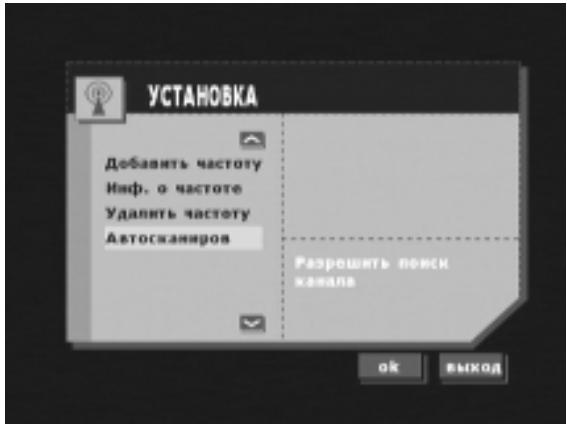
- ABTOCKaHIpOBaHHe B 3TOM MeHIO Bbl MOKeTe Bbl6paTb BaUy CtpaHy N 6blCTpbI INJIM MeDInEHbI peXIM cKaHIpOBaHnA.
M: 6JIOKIpOBaHne M N Bblse
MA: 6JIOKIpOBaHne MA n BbIe
Ha 3kpane 6ydyT npeiCTaBJIeHbI BCE NMeIOUneC HOMepa KaHaJOB I Ha3BaHncaHcI.
Haxmnte KhoTKn BBepx/BHN3 IJn npOKpyTk.

-Инфорmaцьу о чаToTe
Haxmnte KhoNky INFO dIy noka3a HnΦopMaun O yacToTe TeKyuEe Bb6paHHo CTaHUN.
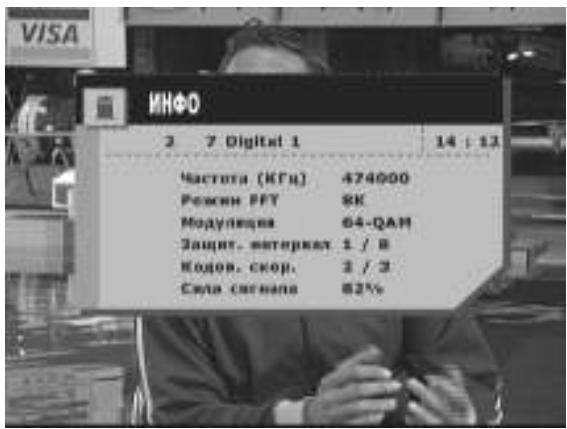
PaHee npocMaTpnuBaBnncKaHaI
Haxmnte KhoNky BACKДлЯ nepeKJIuOeHnHa paHee npocMaTpPbBaBUnsKaHaJ.
- Haxmnte KhoNky TXT ДЯ npocMOTpa TeJeTeKCTa, cy6THTPOB TeJeTeKCTa ИИс cy6THTPOB DVB.
3Ta INΦopMaζη npeOocTbIaTeTcπePaIoUe cTaNcHne H npCytCTByeT He Bcerda.
B pexkme TeIeTeKcTa DocTynHb cJeDyIOuNe opraHb ynpaBJIeHn:
-KHOpKINpepeMeueHnBBepx/BHN3: 3aRpy3Ka cNeDyUoSei/NpeDbI dyuSei CTrpaHnCbl.
-KHONK BJIeBO/BnpaBO: nponyck cJeIyUoInx/npeIbIyUxN 100 cTpaHnU.
-LBbTHbIe KnabuHn TeJIeTeKCTa (KpaHa, 3eJeHa, XeJITa, CnHa)
- KhoIIka A/V
HE YCTAHABLIBAIte B MECTAX C IOBblJEHHOBIJAXHOCTbIO IJI 3ANblIEHHOCTbIO.
H36eaiTe yCTaHaBJINBaTb ycTpoIcTBo B MecTaX, Ie OHO MoKet 6bTb IIIOBeprHyTO BO3JeCTBnO BJIaH HJIN IIBJH. BJIa HJIN IIBJ MOyT IIIOIaCTb BHyTp b, YTO MoKet IIpHBecTH K IOJIOMKe ycTpoIcTba.
Пре dioctopoxkhoctn
Y6eHTecb, YTO BBI OTKJIIOHJIN Ka6eJIb OT KJIeMMbl (-) aKKyMyJIaTopa Ipeep ycTaHOBKO BaIIero yCtpoCTBa TUE-T200DVB. 3To IO3BOJIT IIpeIOTbPaHTb pHK IIOBpeKJHeHHa YcTpoCTBa CJIyae KOpOTKO 3aMbikaHHa.
- Y6eHITecb, TTO Bb IIOJKJIOHJIN IIPOBOda COOTBeTCTBYIOJIero IOBETA B COOTBeTCTBHH C INHaIpaMMoH. HeIIpABHJIbHOe IIOKJIIOUeHHe MOKeT IIpHBecTH K HEnCIIpaBHOCtM yCTpoHCTBa HJIN IOBpeKJDeHNIO 3JIeKTPHueCKOCHCTeMbI ABTomO6HJIa.
- IIpy BbIIOJIHeHHI IOJIKJIOHeHH K 3JIeKTpHueckOcETn ABTOMo6HJIa 6yIbTe OC06eHHO OcTopoKHi c yCTaHOBJEHHbIMN 3aBOIDCKHMN KOMIOHeHTaMn (HaIIpHMeP, 6OpTOBoi KOMIIbIoTeP). IJIA IIHTaHHN JaHHOrO yCTpoHCTBa He IIOJKJIOuayTeCb K 3THM IIPOBoiAm. IIpy IIOJIKJIOUeHH N TUE-T200DVB K 6JIOky IIpeOxpaHHTeJIe, y6eIHNTecb, YTO IIpeOxpaHHTeJIb, IIJaHHpyEmbI IIJRA HCIOJB3OBaHHI INTahHH N TUE-T200DVB, HMeet COOTBeTCTByIOHn paCyEThBi TK. HecO6JIIODeHHe 3TOrO Tpe6OBaHHMOXETN IIIOBpeKJdEHNO yCTpoHCTBa H/HH aBTOMo6HJIa. IIpy BO3HNKHOBeHHN COMHeHne, o6paHTeCb K BaIIeMy IINJIePy KOMIIaHHN ALPINE.
-TUE-T200DVB HcHIOJIb3yeT pa3beMb THIIa RCA c BHyTpEHHMH KOHTaKTamn IJII IOIKJIOUeHHK JpyHM ycTroOhCTBaM (HaIIpHMeP, yCHJIHTeJIHO), HMeOIIHM pa3BeMb RCA. IIJIIOIKJIOUeHHN pyTHX ycTroOHCTB Bam, BO3MOxHO, IOTpe6yetc IIepExoIHKn. B TaKOM CJUYae, 6oPaHTTeCb K BaIeMy aBTOpH3OBaHHom YIJIePy ALPINE 3a coJeCTBHeM.
YCTaHOBka
YcTaHObKa TB TIOHEPA
TOT TB TIOHEP MoKEr yCTaHaBJIHbATbC8 B 6aTaXHHKe HJH Ha IIaHeJH, 3aIIIIaIOIe8 OT YJapa IIaccaKHp a IpeJeHrO ChIeHb JIN IIoI IIpH6OpHo IIaHeJIbIO.
OHaKo, BO H36eKaHHe BbIIOJIHeHHaJIIIHe IIPOBOJKN, JyUWe Bcero yCtHaBaJBnBaTb TB TIOHEP KaK MoXHo 6JIHKe K IINCIJIeIo.
HE YCTAHABJINBAITEYUCTPOINCTBOBMECTAX, IDE OHO BYIETIOIBEPKEHOBO3JEICTBIO BJAIHNIIIN BICOKHM TEMIEPATYPAM
(HaIIpHMeP, IIoI KaIIOTOM).
Диагамma поКлочен
① BCTpoeHHbI NK-daTnuK
② Μa3 MódyNJI INΦOpMaIcHOrO KaHaJa IJIa MoDyJN oBsqero DocTyna
③ Pa3bem RS232 Дя оБновленnersпрогамногообесneyеня
④ПepeKlHuOaTeI npexIMoB dJIa 3arpy3Kn nporpaMMHoro oBeCneueHnI nCTnpaHnI 3CnP3Y
⑤ KhoNka c6poca
6 HndkaTOP coCTOHNIHTAHN
⑦Дононтеловьи BXOD 2x RCA A/V
8 The3do aHTeHHoro BXOda (F-pa3bEm/BHeuHn) co BCTpoEHbIM NITaHnem 5B/30mA.
⑨ 3x Bndeo n1x aydno RCA-BbXoD
10 NpOBoD aKKymyIaTopa (XeJIbI)
IopKJIIOUHTe K KlJEMMe NOI HaNPJxHHeM 6JIOKa IpeDOXpaHNTeJIe, IOKJIIOUeHHORO KaKKyMylTOpY aBTOMo6NJIA (MHyA BbIKJIOUaTeJIb 3aXnraHn).
⑪Дерхатейь пedoхарнтейя (3,0A)
12 BkJIIOUaembI INPOBOID NHTAHnIa (3axnraHne) (KpaChbI)
IopKIOUOHTe K KJIeMMpeINHaJNeXHOCTe6JIOKa npEOxpaHITeJe.
13 IpoBoD CToaHOrO TOpMo3a (KeJIb/CnHnI) POnKJIHOuHTe K CToaHOUcHOMy TOpMo3y, MeTaJIINueCKOMy KOpNcy NIN WACCn ABTomO6NJIA.
14 Пювов BXOД дuctанционногу упаьеня (6ebl/koPnUHeBbI)
IoiKIOUHTe K IPOBOy DnCTaHcNOHHoro ynpabJIeHn MOHITopa.
15 Пювов дистанционногу Bыхова Ha aHTehHy c npuBoDOM (+5B/60MA) (cHm)
16 PpOBoM MaccbI (UepHbI)
IodcoeHnHTe K MeTaJIInueCKomy KopnyCy NIn Waccn ABTOMO6NJ.
17 BHeuHnIK-daTnK
Злестоное оборудане
NITAHNE
BxoHoe HapjKeHne
12B-24B noc. Toka
Potpebnaemam MoocHcTb
MAKc.18BT
DEMODYLIA
CO FDM
ΦopMa cRHaHa
Kombina 2K & 8K FEC, Bklnoua
HepapxNuecknepekMbl
KoHCTeJIaIcIa
QPSK,16-QAM,64-QAM
TIOHEP
F-Tnna, HapyyKhbI (5B, 30MA)
Pa3bem aHTeHHbI
Tempepatya 3KcnJyatau
235 × 172 × 37 MM
Pa3Mepbl
1.4 Kr
Bec
IONHOCTbIO COBMECTMbIc DVB-T
3bIKN DcNJIeA
AnHnIckn/HemecKn/ΦpaHcy3ckn
UcnaHckn / UtaJIbHaHckn / UBeIckn / PyCckn
KOJIINyECTBO IPOIPOAMM
400 ycnyr
PYHON NONCK KAHAJIOB
IopnepKnBaetc
ABTOMATNUECKI IONCK KAHAJIOB
Iopdepkmbaetc
OBHOBJEHEI PPOPGAMMHOTO OBECENEHNA
Yepe3 ycTpoiCTBO 3arpy3kn RS232
TEJETEKCT
PoeepKnBaetc
(BcTabka VBI, 3kpahhh TeNeTeKCT)
DVB CYBTNTPbl
PoeepKnBaetc
3P1
Iopdepkxmbaetc
ALPINE ELECTRONICS MARKETING, INC.
1-1-8 Nishi Gotanda,
Shinagawa-ku,
Tokyo 141-0031, Japan
TeIefoH 03-5496-8231
ALPINE ELECTRONICS OF CANADA, INC.
7300 Warden Ave., Suite 203, Markham,
Ontario L3R 9Z6, Canada
TeIefoH 1-800-ALPINE-1 (1-800-257-4631)
ALPINE ELECTRONICS GmbH
Frankfurter Ring 117
80807 Munchen, Germany
Tepeon 089-3242640
ALPINE ELECTRONICS OF AMERICA, INC.
19145 Gramercy Place, Torrance,
California 90501, U.S.A.
TeIefoH 1-800-ALPINE-1 (1-800-257-4631)
ALPINE ELECTRONICS OF AUSTRALIA PTY. LTD.
6-8 Fiveways Boulevard Keysborough,
Victoria 3173, Australia
TeIefoH 03-9769-0000
ALPINE ELECTRONICS OF U.K. LTD.
Alpine House
Fletchamstead Highway, Coventry CV4 9TW, U.K.
Telepon 0870-33 33 763
ALPINE ELECTRONICS FRANCE S.A.R.L.
(RCS PONTOISE B 338 101 280)
98, Rue de la Belle Etoile, Z.I. Paris Nord II,
B.P. 50016, 95945 Roissy Charles de Gaulle
Cedex, France
TeIepon 01-48638989
Naviglio (MI), Italy
Tepe0h 02-484781
ALPINE ELECTRONICS DE ESPANA, S.A.
Portal de Gamarra 36, Pabellon, 32
01013 Vitoria (Alava)-APDO 133, Spain
Tepeoh 945-283588
ALPINE ELECTRONICS (Benelux) GmbH
Leuvensesteenweg 510-B6
1930 Zaventem, Belgium
TeIeΦoH. 02-7251315