Cyclee View Plus - Bike gear Valeo - Free user manual and instructions
Find the device manual for free Cyclee View Plus Valeo in PDF.

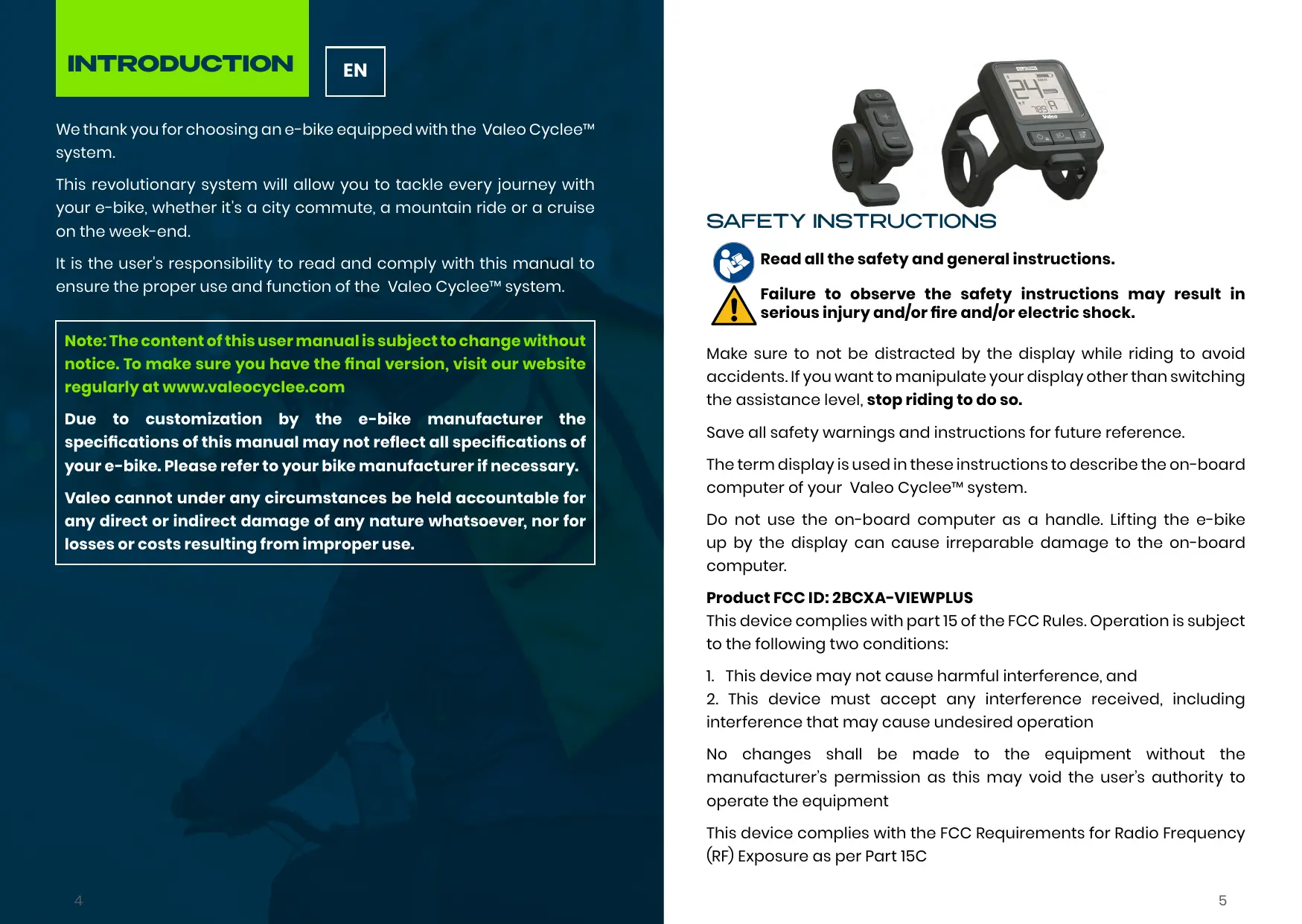


| Product type | Control screen for electric bicycle system |
| Brand | Valeo |
| Model | Cyclee View Plus |
| UG reference | 654200 |
| UG display mount | 654201 |
| Screen dimensions | 40 x 40 mm |
| Protection rating | IP65 |
| Power supply | Electric bicycle system battery |
| USB port | USB-C, 5V/2A max (phone charging and diagnostics) |
| Display | Color, brightness sensor, automatic backlight |
| Assistance modes | Off, Eco, Predict, Turbo |
| Gearbox | Manual (7 gears) and automatic |
| Additional functions | Front/rear lights, lock (anti-theft), boost mode, walk assistance |
| Remote control | +/- buttons, gear mode, throttle |
| Connectivity | Bluetooth (Valeo Cyclee mobile app) |
| Cleaning | Damp soft cloth, do not immerse |
| Safety | Do not use as a handle; stop the system before disconnecting the battery |
| Maintenance | Annual check by an authorized Valeo dealer |
| Compliance | Directives 2014/53/EU and 2011/65/EU |
Frequently Asked Questions - Cyclee View Plus Valeo
User questions about Cyclee View Plus Valeo
0 question about this device. Answer the ones you know or ask your own.
Ask a new question about this device
Download the instructions for your Bike gear in PDF format for free! Find your manual Cyclee View Plus - Valeo and take your electronic device back in hand. On this page are published all the documents necessary for the use of your device. Cyclee View Plus by Valeo.
USER MANUAL Cyclee View Plus Valeo
We thank you for choosing an e-bike equipped with the Valeo Cycler™ system.
This revolutionary system will allow you to tackle every journey with your e-bike, whether it's a city commute, a mountain ride or a cruise on the week-end.
It is the user's responsibility to read and comply with this manual to ensure the proper use and function of the Valeo Cyclee™ system.
Note: The content of this user manual is subject to change without notice. To make sure you have the final version, visit our website regularly at www.valeocyclee.com
Due to customization by the e-bike manufacturer the specifications of this manual may not reflect all specifications of your e-bike. Please refer to your bike manufacturer if necessary.
Valeo cannot under any circumstances be held accountable for any direct or indirect damage of any nature whatsoever, nor for losses or costs resulting from improper use.
SAFETYINSTRUCTIONS

Read all the safety and general instructions.

Failure to observe the safety instructions may result in serious injury and/or fire and/or electric shock.
Make sure to not be distracted by the display while riding to avoid accidents. If you want to manipulate your display other than switching the assistance level, stop riding to do so.
Save all safety warnings and instructions for future reference.
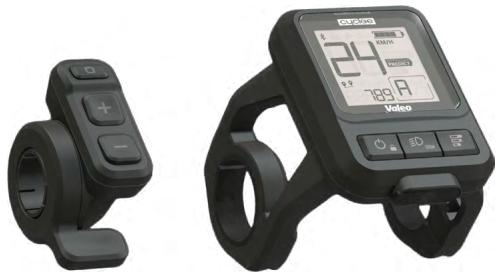
The term display is used in these instructions to describe the on-board computer of your Valeo Ccycle™ system.
Do not use the on-board computer as a handle. Lifting the e-bike up by the display can cause irreparable damage to the on-board computer.
Product FCC ID: 2BCXA-VIEWPLUS
This device complies with part 15 of the FCC Rules. Operation is subject to the following two conditions:
- This device may not cause harmful interference, and
- This device must accept any interference received, including interference that may cause undesired operation
No changes shall be made to the equipment without the manufacturer's permission as this may void the user's authority to operate the equipment
This device complies with the FCC Requirements for Radio Frequency (RF) Exposure as per Part 15C
PRODUCT SPECIFICATIONS
Intended use
The View Plus display is designed to control and give information about the Valeo Cycler™ system. New functions, changes in software may be introduced during the product life.
For some bikes the software specifications may be different than stated in this manual (default specifications), please refer to your bike manufacturer if needed.
PRODUCT FEATURES
The numbering of the components shown refers to the illustrations associated.
Display:
- ON/OFF (long press: anti-theft function)
- Lights (long press: mileage navigation)
- Assistance level selection
- Display holder
- USB-C port (for phone recharge 5V & 2A max. and diagnostic tool connexion)
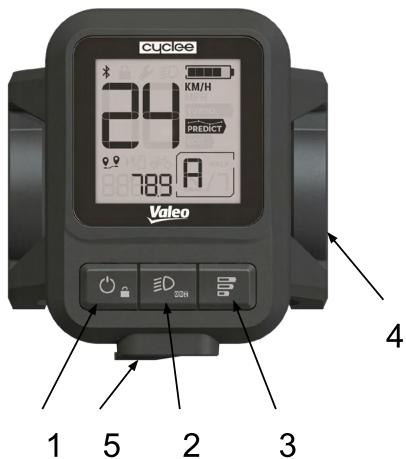
Note: the display is equipped with a luminosity sensor. When the surroundings light drops, the screen backlight will be activated automatically.
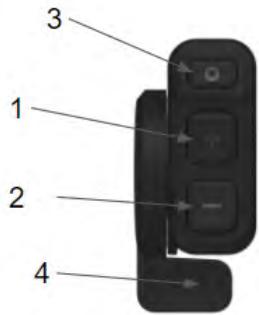
Remote:
- Upshift for gearbox
- Downshift for gearbox
- Gearbox mode selection (Auto - Manual) Long press: Reverse (Optional on defined bikes)
- Throttle (Boost & Walk assist)
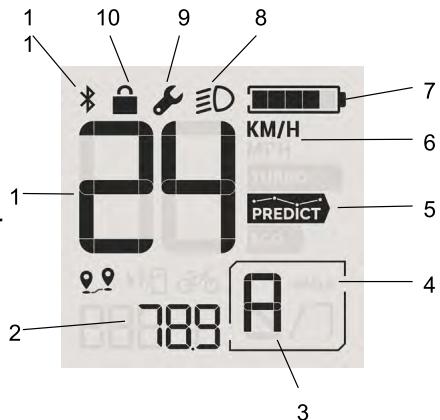
Main screen elements:
- Current speed
- Distance
- Gear engaged
- Walk assist
- Assistance mode
- Unit selected (KM/H or MPH)
- Battery state of charge indicator
- Light status
- Maintenance mode
- Lock mode
- Bluetooth status
TECHNICAL DATA
| Model | View Plus |
| SKU display | 654200 |
| SKU display mount | 654201 |
| Protection rating | IP65 |
| Screen size | 40 x 40 mm |
OPERATING INSTRUCTIONS
The power of the View Plus display is supplied by the Valeo e-bike system battery.

Please read the battery, charger and the Valeo Cyclee™ mobile app user manual before using the View Plus display.
Switching the system On
To switch the e-bike system On you may briefly press the On/Off button on the display. If your Valeo Cyclee™ System is in lock mode you may need to enter a pin code or unlock the e-bike via the Valeo Cyclee™ mobile app. Please refer to the lock mode section below.
You can also turn the e-bike system On by pressing the On/Off button of the battery.
Switching the system Off
To switch Off the e-bike system press the On/Off button, the display and the whole system is switched off.
A short press on the On/Off button will simply turn the system Off, when a long press will turn the system Off and put it in lock mode.
If no energy is drawn from the e-bike system for some time and the e-bike is not moving the system will shut off on its own.
Always switch the system/battery Off before removing or installing the battery onto the e-bike.
Lock mode
The lock mode is the anti-theft function of your Valeo Cyclee™ system.
Before using the lock mode for the first time you need to enable this function in your Valeo Cyclee™ mobile app.
When in lock mode the electrical assistance is automatically shut-off and the integrated gearbox switches in neutral position without any
possibility to crank.
When lock mode is activated the display screen is only showing the lock icon. To activate the bike you need to enter the pin code previously selected on the Valeo Ccycle™ Mobile app or unlock directly through the app.
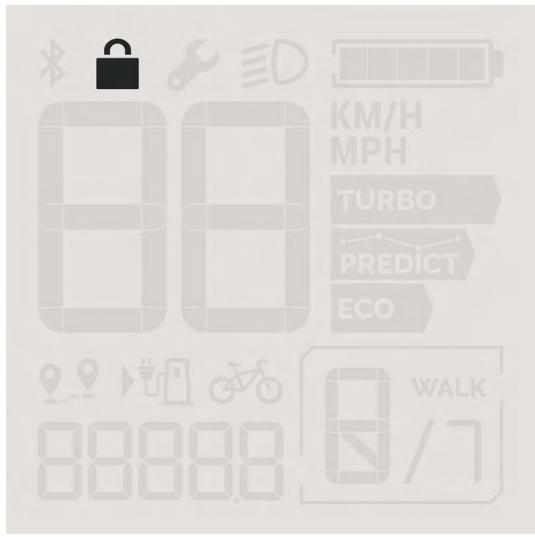

To read more about the lock mode please refer to the Valeo Cyclee™ mobile app user manual.
ASSISTANCE LEVEL
The drive is activated as soon as you step on the pedals (except in assistance level "Off"). The motor output depends on the assistance level selected.
As soon as you stop pedaling when in normal operation, or as soon as you have reached the speed limit of your e-bike, the assistance from the e-bike motor is switched off.
The motor is automatically reactivated as soon as you start pedaling again and the speed is below the speed limit of your e-bike.
Assistance modes
You can select the level of assistance you need from the e-bike motor by selecting the correct assistance mode on the display. The assistance level can be changed at any time, even while riding.
The following assistance levels are available on your Valeo e-bike system:
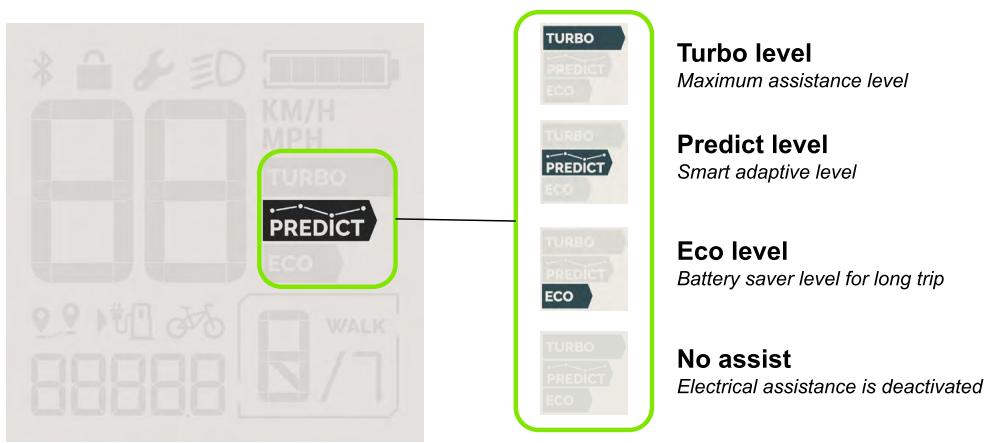
To select the desired assistance level press the assistance level button on the display.
Assistance level button
The assistance modes follow this sequence:
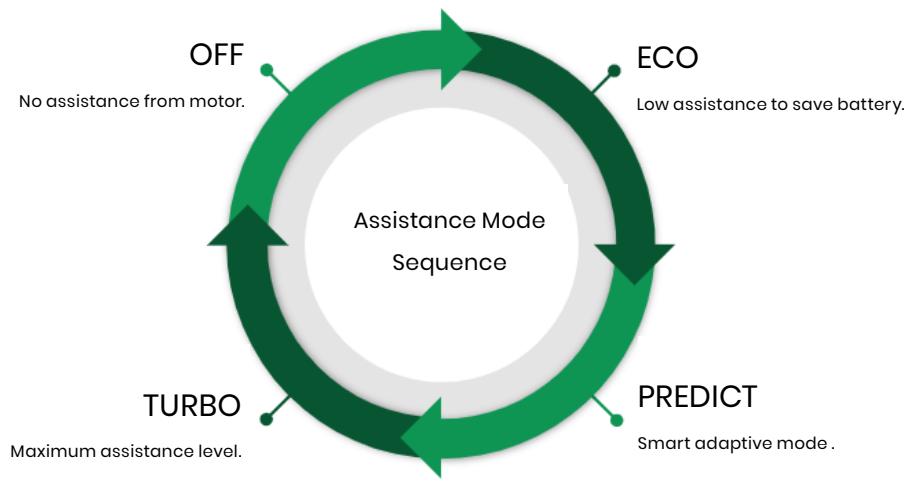
Note: in assistance mode "Predict" the assistance is set by the system according to the rider cadence and power output. In this mode the gearbox is always set to automatic by the smart e-bike system. Manual shifting is not possible in Predict mode.
The Predictive mode does not allow the switch from Automatic to Manual gearbox
To change the gear in manual mode, you must be on the Turbo or Eco mode and then press the Gearbox mode selection button located on the remote control and then
(+ + ) to Upshift
“-” to Downshift
| Assistance level | Description |
| Off | Assistance deactivated |
| Eco | Battery saver mode |
| Predict | Smart adaptive mode |
| Turbo | Maximum assistance mode |
The motor output depends on the force applied on the pedals by the rider and the assistance mode selected, up to 130 Nm in Turbo or Predict mode.
VALEO CYCLEETM
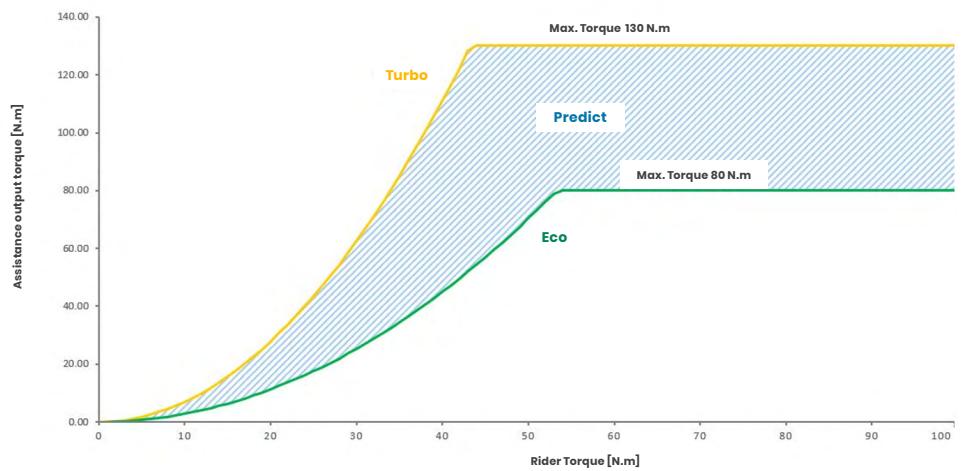
Note: Default level setting, Max torque and assistance factor may vary depending on the setting chosen by each bike brand.
GEAR SELECTION
Gearbox modes
Your Valeo Cyclee™ e-bike system is equipped with a gearbox integrated in the mid drive unit. The gearbox can be operated manually by the rider or automatically by the Valeo Cyclee™ e-bike system.
Note: some e-bikes can be equipped with a reverse mode. Generally on cargo bikes this mode will help you to back up and manoeuvver with heavy payloads. The reverse mode is not present on other e-bikes.
The mode selected is visible in the bottom right corner of your display screen.
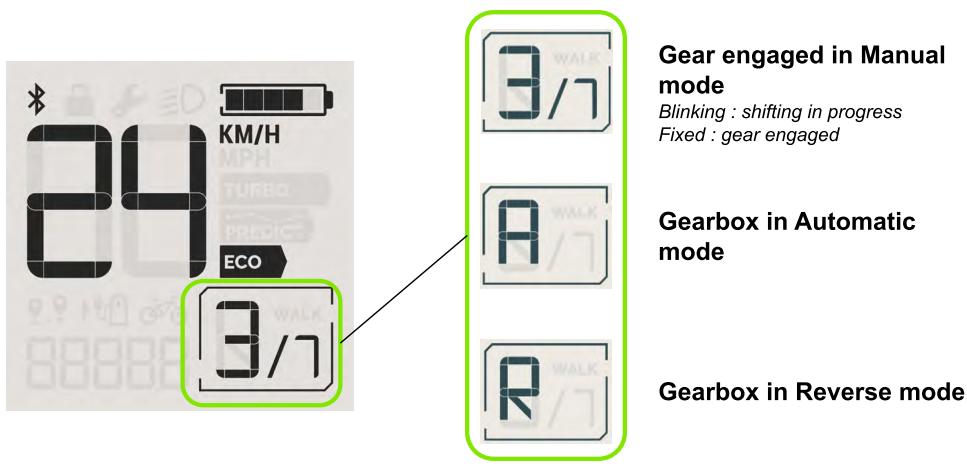
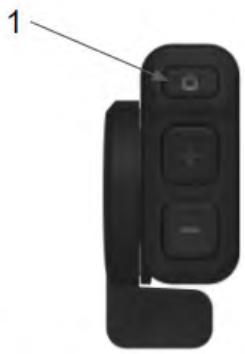
To change between gearbox modes press the gearbox mode button on your deported remote (1). A long press will put the system in reverse mode on equipped bikes.
Gearbox in manual mode
In manual mode the rider has control over the gear shifting. The gear selected is shown in the bottom right corner of the display screen as a number “N/7”.
To change the gear in manual mode press the "+" or "-" buttons on the deported remote.
“+” to Upshift
“-” to Downshift
The gear-shifting should be used in the same way as with a normal bicycle. By selecting the correct gear, you can increase your speed and range while applying the same amount of force on the pedals.
Note: When the selected gear is flashing on the display, the system indicates that it is not possible to shift the gear. Briefly stop pedaling to let the gear engage and resume pedaling. Please refer to your bike shop if this error occurs frequently.
Gearbox in automatic mode
In automatic mode, the e-bike smart system is selecting the best gear available for you according to your pedaling cadence and the terrain profile.
In automatic mode "A" is showing in the bottom right corner of the display screen.
The Predictive mode does not allow the switch from Automatic to Manual gearbox
To change the gear in manual mode, you must be on the Turbo or Eco mode and then press the Gearbox mode selection button located on the remote control and then
“+” to Upshift
“-”toDownshift
Gearbox in reverse mode
The reverse mode allows the rider to back up and manoeuvr the bike easily even with heavy payload. Once in reverse mode, the rider can
activate it by pushing gently the throttle of the deported remote.
The reverse mode isn't present on all systems and is usually reserved to cargo bikes.
In reverse mode “R” is shown in the bottom right corner of the display screen.
SWITCH LIGHTS ON/OFF

On bikes equipped with lighting powered by the e-bike battery, the front and rear lights can be controlled from the display unit by pressing briefly the "lights" button.
When the lights are on, the light icon is showing on the display screen.
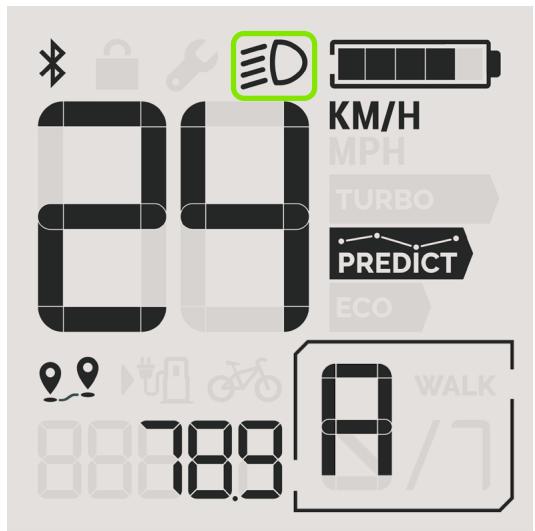
Pressing again the button will switch off the lights and the icon will disappear from the display screen.
SPEED AND DISTANCE
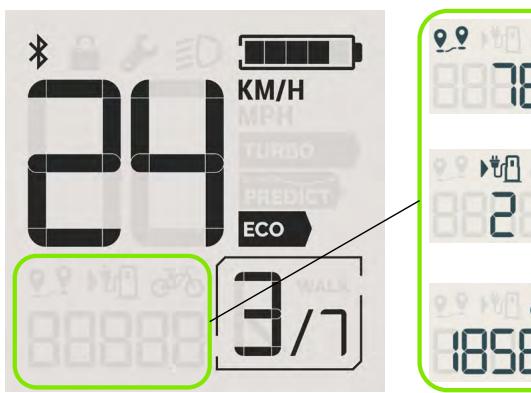
The display unit allows the rider to see essential information about the e-bike and the trip according to the unit selected (km or miles). Main functions are:
| Speed | e-bike current speed, measured from the motor and speed sensor on the rear wheel |
| Trip distance | Daily distance, the trip distance can be reset by a long press on the light button and the assistance level button , simultaneously. |
| e-bike range | Autonomy left with the current state of charge of the battery and depending on the selected assistance mode |
| Total distance / ODO | Total distance covered with the e-bike |
The unit KM/h or MPH can be adjusted by changing this setting in your Valeo Cyclee™ mobile app.
Trip distance
Reset by action on buttons (TBC)
Autonomy according to battery level
Total bike distance over life
BATTERY STATE OF CHARGE
& CHARGING MODE

Before charging your e-bike for the first time please read the battery and charger user guide.
State of charge
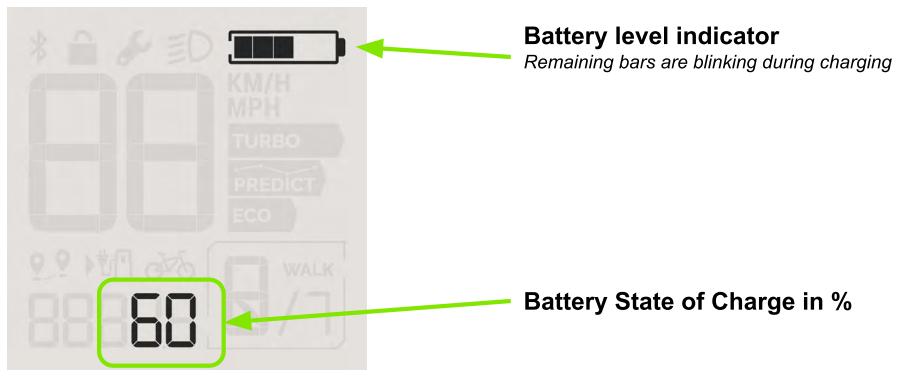
The state of charge of the battery is directly visible on the display screen when it is switched On. The state of charge is indicated by the battery icon on the top right corner of the screen. The battery icon is composed of 5 blocks, each block representing 20% of the total battery capacity.
| The e-bike battery is fully charged (between 80-100%) | |
| The e-bike battery is charged between 0% and 20% | |
| The e-bike battery state of charge is close to 0%, the motor assistance has been progressively reduced to ensure the shifting ability and lighting. |
Charging mode
When the e-bike battery is charged while on the bike, the display screen only indicates the battery icon showing an approximate state of charge and the exact value at the bottom of the screen.
WALK ASSIST AND BOOST MODE
Walk assist
The walk assist mode is helping you to push the e-bike when walking on its side. The walk assist mode is moving the bike forward up to 6 km/h or 3.7 mph.
You can activate the walk assist by holding down the throttle of the deported remote. When releasing the throttle the walk assist stops automatically.
Note: In reverse mode, pushing the throttle will move the bike backwards.
In walk assist or reverse mode the pedals may turn at the same time. Make sure there is enough space between yourself and the e-bike.
Boost mode
When riding on the bike, you can use the boost mode to accelerate or climb a slope for a brief period of time.
To activate the boost mode, hold down the throttle when riding. The throttle acts as an On/Off switch and as soon as you release the throttle the boost mode will stop.
MAINTENANCE
Maintenance mode
When maintenance is needed on your Valeo e-bike system the display screen shows the wrench icon. The associated maintenance code is displayed at the bottom of the screen.
The wrench may be blinking in case of a minor issue or if maintenance is required.
When a critical error occurs the wrench icon will be fixed and associated with an error code. When this happens, stop riding your e-bike immediately and visit your authorized Valeo Cyclee™ dealer.
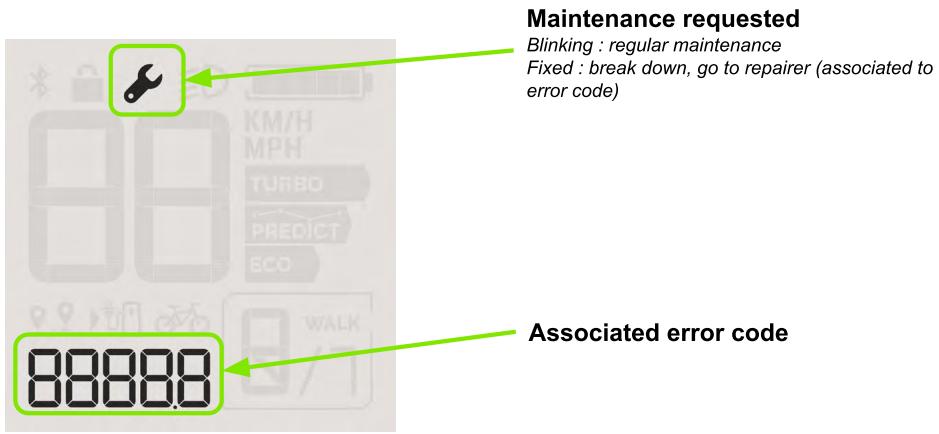
These error codes can also be displayed on the Valeo Cycler™ Mobile app when your e-bike is connected by bluetooth.
| Simplified error code | Component | Error name | Description Potential root cause | System operating restriction/limitation | Action/Solution to solve the issue Troubleshooting Corrective action |
| E0500 | MOTOR | Motor error | Motor is facing an issue | No assistance anymore | Restart the system. If the issue is still present, go to your repairer |
| E0501 | Gearbox error | Gearbox shifter is facing an issue | Gearbox shifting is not available or limited functionality | Restart the system. If the issue is still present, go to your repairer | |
| E0502 | Internal electrical error | Internal voltage error or internal sensor error | No assistance anymore gearbox shifting functionality can be impacted | Restart the system. If the issue is still present, go to your repairer | |
| E0503 | Electrical power error | Input voltage error: - battery under / over voltage - harness bad connection | Limited assistance or No assistance anymore | Turn off the system, remove and reinstall the battery pack. If the issue is still present, go to your repairer | |
| E0504 | External electrical error | Issue detected on output port Example: short circuit on lamps, Overvoltage/ undervoltage | Output port disable | Check lamps (or external devices) connections. Disconnect lamps to see if the issue disappears. If yes, lamp is KO If the issue still present, go to your repairer | |
| E0505 | Speed sensor error | Issue detected on speed sensor | No assistance, and automatic shifting disable | Check your speed sensor position and look for damages on the cable. If the issue is still present, go to your repairer | |
| E0506 | Internal communication error | Internal motor error | No assistance anymore | Restart the system. If the issue is still present, go to your repairer. | |
| E0507 | External communication error | Communication error with battery or display | Display communication error: system will turn off Battery communication error: no assistance anymore | Check display connectors. Remove and reinstall the battery. If the issue is still present, go to your repairer. | |
| E0508 | Over temperature error | Temperature of the motor is too high | No assistance anymore, gearbox shifting can also be impacted | Turn off the system and let the motor cool down. If the issue is still present, go to your repairer. |
| Simplified error code | Component | Error name | Description Potential root cause | System operating restriction/ limitation | Action/Solution to solve the issue Troubleshooting Corrective action |
| E0509 | MOTOR | Under temperature error | Temperature of the motor is too cold | No assistance anymore, gearbox shifting can also be impacted | Go back to nominal temperature (ambient temperature). If the issue is still present, go to your repairer. |
| E0510 | Internal system error | System is facing an internal error | No assistance anymore | Restart the system. If the issue is still present, go to your repairer. | |
| E0511 | Torque sensor error | Issue detected on Torque Sensor | No assistance anymore | Restart the system. If the issue is still present, go to your repairer. | |
| E0201 | BATTERY | Charging error | Issues with external battery charger or plug connections | Battery will no longer charge | Check connections between bike battery & charger disconnect/reconnect the charger on the battery. Check electrical supply to the wall plug. Check connections between charger & wall plug disconnect/reconnect the charger on the wall plug. Check external battery charger itself If the issue is still present, go to your repairer. |
| E0202 | Communication error | Communication error with motor or external device | System will cut off (urgent or nominal cut off) | Remove and reinstall battery, restart system. If the issue is still present, go to your repairer. | |
| E0203 | Electrical error | Battery voltage or current error: - Battery cells under / over voltage or unbalanced - Battery overcurrent | System will cut off (urgently or after 1.5s) | Check the battery for external damages. Restart the system. Try a battery charging cycle at ambient temperature. If the issue is still present, go to your repairer. | |
| E0204 | Internal error | Internal error | System will cut off | Restart the system. If the issue is still present, go to your repairer. | |
| E0205 | Temperature error | Temperature of the battery is too high or too cold | System will cut off | Go back to battery nominal temperature (battery should rest at ambient temperature). Restart the system. If the issue is still present, go to your repairer. | |
| E0301 | DISPLAY | Button blocked | Issue on display or remote button switches | Only gearbox automatic shifting is enabled. Throttle is disabled. | Check that buttons aren't damaged or blocked.If the issue is still present, go to your repairer. |
| E0302 | Communication error | Communication error with motor | System will cut off (nominal cut off) | Check connectors between motor & display.Restart the system.If the issue is still present, go to your repairer. | |
| E0303 | Remote electrical error | Electrical issues on remote | Manual gearbox shifting & Boost mode & Walk Assist disable | Check connections between display & deported box. Restart the system. If the issue is still present, go to your repairer. | |
| E0304 | Internal error | Internal electrical issue on display | Display screen not functional | Restart the system.If the issue is still present, go to your repairer. | |
| E0305 | Temperature error | Temperature of display is too high or too cold or issue on temperature measurement | USB port disable | Go back to display nominal temperature (ambient temperature).If the issue is still present, go to your repairer. | |
| E0306 | USB error | Over current intensity on the USB port | USB port disable | Check USB port (Cleanliness...). Check USB external device & cable isn't damaged. Try to disconnect/reconnect the USB external device. If the issue is still present, go to your repairer. |
Cleaning
To clean your Valeo e-bike display and remote use a soft cloth dampened with water. Do not immerse any component in water or clean with pressurized water.
Check up
Have your Valeo equipped e-bike checked by an authorized Valeo dealer at least once a year. Your Valeo dealer will inspect mechanical parts but also verify that the system software is up to date.
Have all repairs and specific maintenance done by an authorized Valeo e-bike dealer.
After sales service
If you have any questions about the Valeo e-bike system, contact your authorized Valeo e-bike system dealer or visit our website at: valeocyclee.com
Disposal of your Display and remote control
In accordance with Directive 2012/19/EU, electronic devices that are no longer usable and defective/drained batteries must be collected separately and disposed of in an environmentally friendly manner.
Please return parts that are no longer usable to an authorized bicycle dealer.
EU DECLARATION OF CONFORMITY
Hereby, we VALEO Service, declare under our sole responsibility that the stated products are compliant with the essential requirements and other relevant provisions of the following directives 2014/53/EU and 2011/65/EU.
The full text of the EU declaration of conformity is available at the following internet address: valeocyclee.com
UKCA DECLARATION OF CONFORMITY
Hereby, we VALEO Service, declare under our sole responsibility that the stated products are compliant with the essential requirements and other relevant provisions of the UK Statutory Instruments (S.l) including their latest amendments: S.I. 2017 No 1206, S.I. 2012 No 3032.
The full text of the UKCA declaration of conformity is available at the following internet address: valeocyclee.com (direct link)
INTRODUCTION
FR
CHARACTERISTIQUES DU PRODUIT
DÉCLARATION DE CONFORMITÉ UE
Save all safety warnings and instructions for future reference.
The term display is used in these instructions to describe the on-board computer of your Valeo Ccycle™ system.
Do not use the on-board computer as a handle. Lifting the e-bike up by the display can cause irreparable damage to the on-board computer.
PRODUKTSPEZifikATIONEN
Main screen elements:
WALK ASSIST EN BOOST MODE [WANDELMODUS EN BOOSTMODUS]
Walk assist [Wandelmodus]
Main screen elements:
FUNZIONI WALK ASSIST E BOOST ASSIST
Walk Assist
Division Smart Mobility
70, rue Pleyel
93200 Saint-Denis
France
P/N:969433
VALEOCYCLEE.COM
- SAFETYINSTRUCTIONS
- Product FCC ID: 2BCXA-VIEWPLUS
- PRODUCT SPECIFICATIONS
- Intended use
- PRODUCT FEATURES
- Display:
- Remote:
- Main screen elements:
- TECHNICAL DATA
- OPERATING INSTRUCTIONS
- Switching the system On
- Switching the system Off
- Lock mode
- ASSISTANCE LEVEL
- Assistance modes
- VALEO CYCLEETM
- GEAR SELECTION
- Gearbox modes
- Gearbox in manual mode
- Gearbox in automatic mode
- Gearbox in reverse mode
- SWITCH LIGHTS ON/OFF
- SPEED AND DISTANCE
- Trip distance
- BATTERY STATE OF CHARGE
- & CHARGING MODE
- State of charge
- Charging mode
- WALK ASSIST AND BOOST MODE
- Walk assist
- Boost mode
- MAINTENANCE
- Maintenance mode
- Cleaning
- Check up
- After sales service
- Disposal of your Display and remote control
- EU DECLARATION OF CONFORMITY
- UKCA DECLARATION OF CONFORMITY
- INTRODUCTION
- CHARACTERISTIQUES DU PRODUIT
- DÉCLARATION DE CONFORMITÉ UE
- PRODUKTSPEZifikATIONEN
- WALK ASSIST EN BOOST MODE [WANDELMODUS EN BOOSTMODUS]
- Walk assist [Wandelmodus]
- FUNZIONI WALK ASSIST E BOOST ASSIST
Brand : Valeo
Model : Cyclee View Plus
Category : Bike gear