USER MANUAL CP710 Unify
OpenScape Desk Phone CP710
Installations- und Kurzanleitung
Installation and Quick Reference Guide
Guide rapide d'installation et de referencia
Installatiehandleiding en beknopte gebruksaanwijzing
Installatione e guide rapida di riferimento
Instrucciones breves de manejo e instalacion
Guia de Instalação e Referência Rápida
Atos
| Deutsch | English | François | Nederlandlands | Italiano | Espanol | Português |
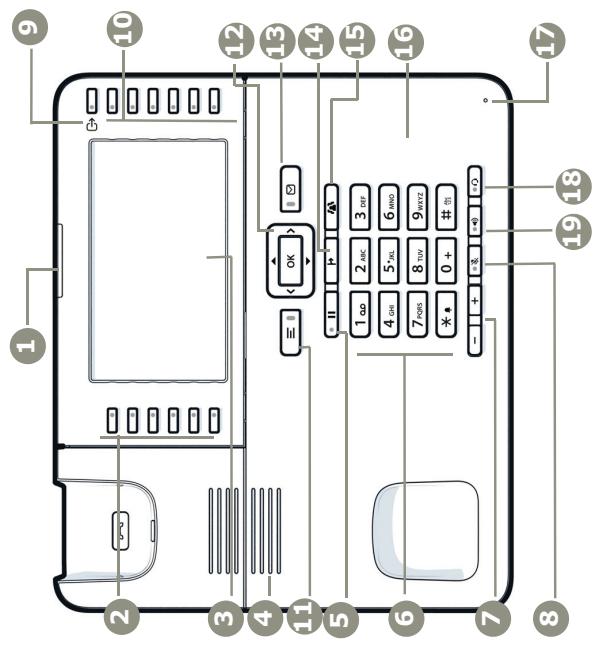
| Signalisierungs-LED | Notification LED | LED de notification | Notificatie LED | Notifica LED | LED de notificationsión | LED de notificationsión |
| 6 frei programmierbare Tasten | 6 free programmable keys | 6 Touches programmables | 6 vrij programmeerbare toetsen | 6 Tasti programmabili gran-tuits | 6 Teclas de programables Gratis | 6 Teclas programáveis gran-tuits |
| Display | Display | Afficheur | Display | Display | Display | Display |
| Lautspricher | Speaker | Haut-parleur | Luidspreker | Altoparlante | Altavoz | Atiflante |
| Halten | Hold | Mise en attente | Wachtstand | Mettere in attesa | Retener | Reter |
| Währistatur | Keypad | Clavier numérotation | Kiestoetsen | Tastierino Telefonico | Teclado de marca | Teclado de marca |
| Lautstärke | Volume | Volume | Geluidsvolume | Volume | Volumen | Volumen |
| Mikrofon aus/ein | Microphone off/on | Desactiver/Activer le micro | Microfoon ult/aan | Microfono Off/On | Desactivar/activar microfɔ-no | Desligar/ligjar microfónica |
| Abwesenheit/Anrufumlei-tung | Out-of-Office/Call Forwarding | Absent du bureau/Renvoi d'appel | Niet op Kantoor/oprepomleiding | Fuori dall'ufficio/Inoltro chiambata | Fuera de laOficina/Reenvio de llamadas | Fora do escritório/desvio de chamadas |
| 6 Softkeys | 6 Softkeys | 6 Touches programmables | 6 Softkeys | 6 Softkeys | 6 Tedas programables | 6 Teclas de função |
| Menu | Menu | Menu | Menu | menu | Menu | Menu |
| 5-Wege Navigator | 5-way navigator | Navigateur 5 sens | 5-weg navigator | Navigatore a 5 direzioni | Navegador de 5 vias | Navegador 5-viario |
| Voicemail | Voicemail | Messagerie vocale | Voicemail | Segreteria Telefonica | Mensaje de voz | Correio de voz |
| Transfer | Transfer | Transfert | Doorschakelen | Trasferimento | Transferrir | Transferrir |
| Konferenz | Conference | Conference | Conferentie | Conferenza | Conferencia | Conferencia |
| NFC | NFC | CCP | NFC | NFC | NFC | NFC |
| Mikrofon | Microphone | Microphone | Microfoon | Microfono | Microfono | Microfone |
| Headset ein/aus | Headset on/off | Aktiver/Desactiver le micro-casque | Headset aan/uit | Cuffa On/Off | Aktivar/desactivar casco Telefonico | Ligar/desligar auricular |
| Lautspricher ein/aus | Speaker on/off | Aktiver/Desactiver le haut-parleur | Luidspreker aan/uit | Altoparlante On/Off | Aktivar/desactivar altovoz | Ligar/desligar a atiflante |
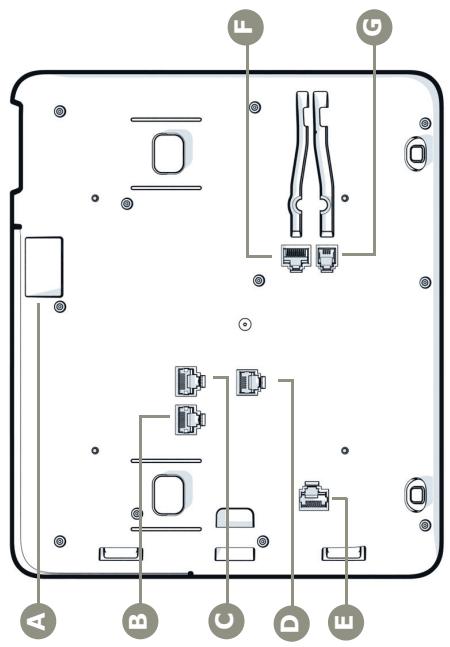
| USB-Schnittstelle | USB interface | interface USB | USB-interface | Interfaccia USB | Interfaz USB | Interface USB |
| Netwerk | Network | Réseau | Netwerk | Rete | Red | Rede |
| Computer | Computer | Ordinateur | Computer | Computer | Computadora | Computador |
| Stromversorgung | Power | Alimentation | Stroomvoziening | Alimentazione | Alimentación | Alimentação |
| Key Module | Key Module | Module de touches | Key Module | Key Module | Key Module | Key Module |
| Headset | Headset | Micro-casque | Headset | Auricolare | AuricULARs | Headset |
| Hörer | Handset | Combine | Handset | Microtelefono | AuricULAR | Auscultador |
Nnngonogggehagghgagaa
Wichtige Hinweise

Imitation and Quick Reference Luster Guide, revised instillation and de-stillation
Instalabhandending er beinopoe-gneueanwjng
Optionale Anschlüsse
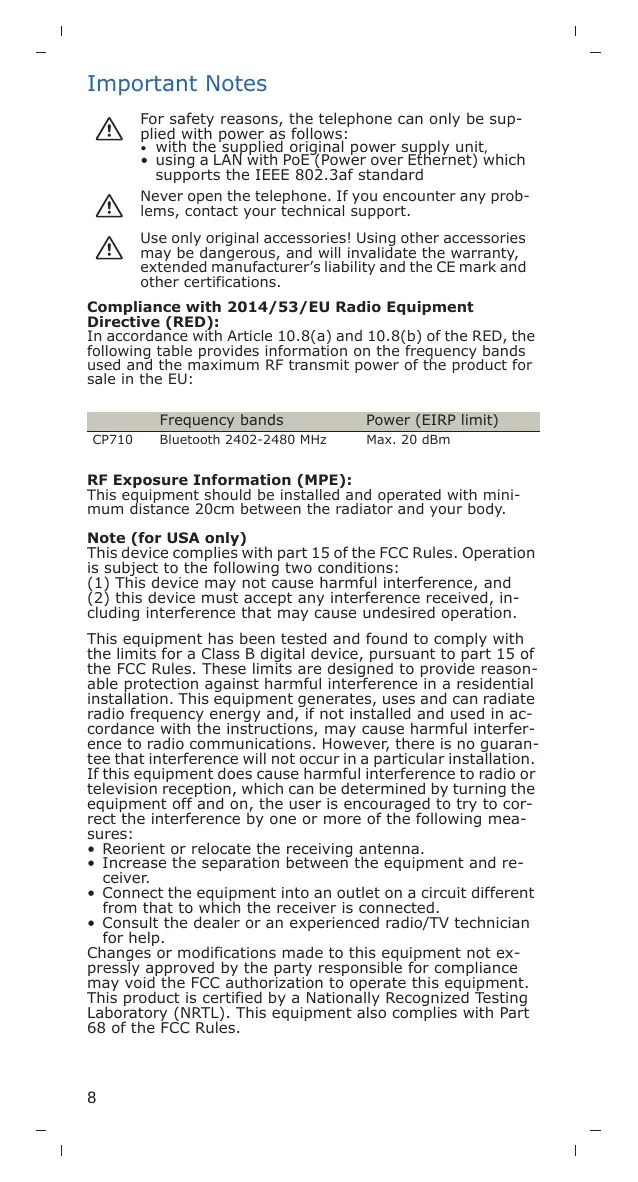
For safety reasons, the telephone can only be supplied with power as follows:
with the supplied original power supply unit,
using a LAN with PoE-Power over Ethernet) which supports the IEEE 802.3af standard

Never open the telephone. If you encounter any problems, contact your technical support.

Use only original accessories! Using other accessories may be dangerous, and will invalidate the warranty, extended manufacturer's liability and the CE mark and other certifications.
Compliance with 2014/53/EU Radio Equipment Directive (RED):
In accordance with Article 10.8(a) and 10.8(b) of the RED, the following table provides information on the frequency bands used and the maximum RF transmit power of the product for sale in the EU:
Frequency bands Power (EIRP limit)
CP710
Bluetooth 2402-2480 MHz
Max. 20 dBm
This equipment should be installed and operated with minimum distance 20cm between the radiator and your body.
Note (for USA only)
This device complies with part 15 of the FCC Rules. Operation is subject to the following two conditions:
(1) This device may not cause harmful interference, and (2) this device must accept any interference received, including interference that may cause undesired operation.
This equipment has been tested and found to comply with the limits for a Class B digital device, pursuant to part 15 of the FCC Rules. These limits are designed to provide reasonable protection against harmful interference in a residential installation. This equipment generates, uses and can radiate radio frequency energy and, if not installed and used in accordance with the instructions, may cause harmful interference to radio communications. However, there is no guarantee that interference will not occur in a particular installation. If this equipment does cause harmful interference to radio or television reception, which can be determined by turning the equipment off and on, the user is encouraged to try to correct the interference by one or more of the following measures:
- Reorient or relocate the receiving antenna.
- Increase the separation between the equipment and receiver.
- Connect the equipment into an outlet on a circuit different from that to which the receiver is connected.
- Consult the dealer or an experienced radio/TV technician for help.
Changes or modifications made to this equipment not expressly approved by the party responsible for compliance may void the FCC authorization to operate this equipment. This product is certified by a Nationally Recognized Testing Laboratory (NRTL). This equipment also complies with Part 68 of the FCC Rules.
This equipment complies with FCC radiation exposure limits set forth for an uncontrolled environment. This equipment should be installed and operated with minimum distance of 20cm between the radiator and your body. This transmitter must not be co-located or operating in conjunction with any other antenna or transmitter.
Maximum Transmission Power (FCC)
| Frequency bands | Power (EIRP limit) |
| CP710 | Bluetooth 2402-2480 MHz | Max. 20 dBm |
Note (for Canada only)
This product meets the applicable Innovation, Science and Economic Development Canada technical specifications. This device contains license-exempt transmitter(s)/receiver(s) that comply with Innovation, Science and Economic Development Canada's license-exempt RSS(s). Operation is subject to the following two conditions:
(1) This device may not cause interference.
(2) This device must accept any interference, including interference that may cause undesired operation of the device.
CAN ICES-3 (B)/NMB-3(B)
This product is certified by a Nationally Recognized Testing Laboratory (NRTL). This equipment also complies with Industry Canada CS-03.
This equipment complies with Innovation, Science and Economic Development Canada's RSS-102 radiation exposure limit set forth for an uncontrolled environment. This equipment should be installed and operated with minimum distance 20cm between the radiator & your body. This transmitter must not be co-located or operating in conjunction with any other antenna or transmitter.
Marks

Hereby, Unify Software and Solutions GmbH & Co. KG declares that the radio equipment type Open-Scape Desk Phone CP710 is in compliance with EU Directives 2014/53/EU and 2011/65/EU as well as the UK Radio Equipment Regulations 2017 and UK RoHS Regulations 2012.
The full text of the EU and UK declarations of conformity are available at the following internet address: http://wiki.unify.com.

All electrical and electronic products should be disposed of separately from the municipal waste stream via designated collection facilities appointed by the government or the local authorities. The correct disposal and separate collection of your old appliance will help prevent potential negative consequences for the environment and human health. It is a precondition for reuse and recycling of used electrical and electronic equipment. For more detailed information about disposal of your old appliance, please contact your city office, waste disposal service, the shop where you purchased the product or your sales representative. The statements quoted above are only fully valid for equipment which is installed and sold in the countries of the European Union and is covered by the directive 2012/19/EU. Countries outside the European Union may have other regulations regarding the disposal of electrical and electronic equipment.
Care and cleaning instructions
- Never spray liquids onto the telephone since any liquid penetrating the telephone can lead to malfunctions or destruction of the device.
- Any substances such as alcohol, chemicals, solvents or scouring agents should also be avoided since these may damage the surface.
- Clean the telephone with a soft cloth moistened with water.
Documentation on Internet
This and other documentation can be found on the Internet at: http://www.unify.com Support.
Technical notes, current information about firmware updates, frequently asked questions and lots more can be found on the web at: http://wiki.unify.com.
Package Content
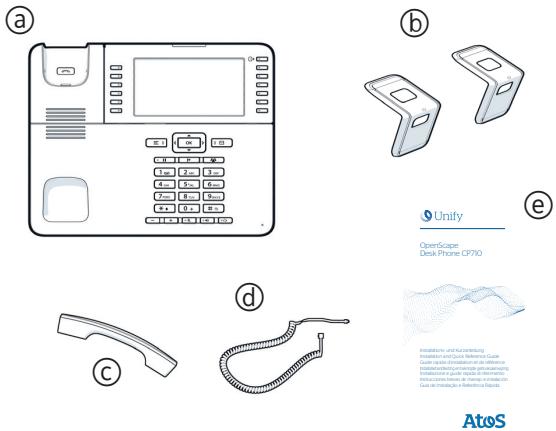
OpenScape Desk Phone CP710
⑥ Stands
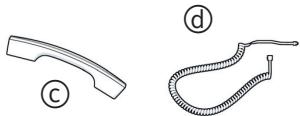
CHandset
Handset cable
Installation and Quick Reference Guide
Notes about Place of Use
- Operation of a SIP telephone is only permitted with WLAN or with indoor LAN cabling. The device shall be connected to the IP infrastructure using a shielded LAN cable: Cat-5 for 100 Mb/s or Cat-6 for 1000 Mb/s. The LAN cabling of the building shall ensure that the shield of this cable is grounded.
- The telephone should be operated in a controlled environment with an ambient temperature between 5^ and 40^ (41°F and 104°F).
- Do not install the telephone in a room where large quantities of dust accumulate; this can considerably reduce the service life of the telephone.
- Do not expose the telephone to direct sunlight or any other source of heat, as this is liable to damage the electronic equipment and the plastic casing.
- Do not operate the telephone in damp environments such as bathrooms.
Connect the Handset to the Telephone
See also overview on page 2.
- Insert the plug on the long end of the handset cable into the jack on the base of the telephone and press the cable into the groove provided.
- Insert the plug on the short end of the handset cable ④ into the jack on the handset ⑥ .
Installation of the telephone
See also overview on page 2.
Desk Installation
By mounting the stands on the telephone using the long or short end you can select between 22.5^ and 45^ tilt angle:
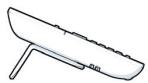
Long end: 22,5^
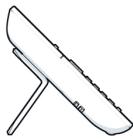
Short end: 45^
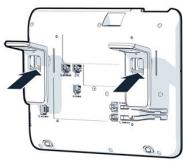
- Place the phone upside down on a soft surface and remove all cables from the phone except the handset cord ①
- Insert the stands on the base of the telephone as shown.
- Slide the stands until it locks into place.
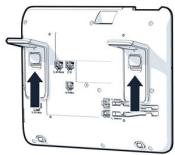
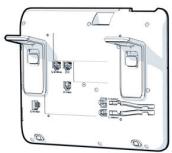
- If your LAN does not have PoE (Power over Ethernet; ask your administrator), then you need to use a power supply connected to the power jack D H.
- Connect the LAN cable with the jack on the base of the telephone and the wall jack.
Optional Connections
If desired, you can connect further devices to your phone (see also overview on page 2):
Connection to PC
Connection to Headset
E Connection to Key Module
If further settings are required for correct operation of the telephone, please contact your administrator.
Third-Party End User License Agreement
OpenScape Desk Phone CP710 Software
This product contains the OpenScape Desk Phone CP710 Software ("Software"), which is intellectual property of Unify Software and Solutions GmbH & Co. KG (hereinafter referred to as "Unify"), except where explicitly indicated otherwise.
The Software is protected by German copyright law, international copyrights, international treaties and all other applicable laws, and, save where contractually agreed otherwise, licensed to You under the terms of the Unify end user license agreement ("Unify EULA").
Open Source software used in the product
This product contains, among other things, embedded Open Source software developed by third parties. This embedded Open Source software is protected by copyright. Your right to use the Open Source software embedded in this product beyond the mere execution of the program is governed by the terms of the relevant Open Source license.
Your compliance with the Open Source license will entitle you to use the embedded Open Source software as provided for in the relevant Open Source license. In the event of a conflict between the Unified EULA and a contractual arrangement between You and Unify, the Open Source license terms shall prevail with respect to the embedded Open Source software portions of the Software.
The embedded Open Source software in this product is licensed to You royalty-free, i.e. no fees are charged for granting and exercising the licensed rights, whereas Unify may charge You for the reimbursement of costs incurred by Unify when providing the Open Source software to You.
Where required under the applicable Open Source licenses, you may obtain a physical copy of the relevant Open Source software components contained in this product and the applicable Open Source licenses, also including, where required, download-able source code, documentation and other supplementary information on media. Please contact the Unify headquarters to find out about how to obtain the media and about the applicable handling fees. Unify may also elect to provide the relevant information via a dedicated section of its website.
Please select or search for the applicable product(s) at http://wiki.unify.com.
Warranty regarding further use of the Open Source Software
Unify provides no warranty for the embedded Open Source software if it is used in any manner other than execution of the program as intended by Unify. Subject to any explicit contractual arrangement with Unify, the Open Source licenses applicable to the embedded Open Source software define the warranty, if any, from the authors or licensors of the Open Source software. Unify specifically disclaims any warranties for defects caused by altering any of the embedded Open Source software or the product configuration. You have no warranty claims against Unify in the event that the embedded Open Source software infringes the intellectual property rights of a third party. Technical support, if any, will be provided only for products which contain unmodified software.
Remarques importantes

Innovation and Quick Relevance Guide post-finstillation of alliance
- The application of the above-mentioned formulae to the equations (2) and (3) gives

Information and Use of Information
Information and Use of Information
Guide to Use of Information
Use of Information for the Patient
Information and Use of Information for the Patient
Use of Information for the Patient
Atos
Innovation 2016-2017 of the European Union
OpenScape Desk Phone CP710
Supporti
C Microtelefono
Cavetto del microtelefono
Installazione e guida rapida di riferimento
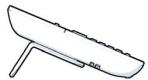
lungo termine: 22,5^
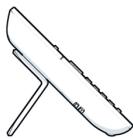
breve termini: 45^

OpertScape
Desk Phone CP710
Copyright © Unify Software and Solutions GmbH & Co. KG 12/2022
All rights reserved.
Reference No.: A31003-C1000-J116-2-6Z31_15-12-2022
The information provided in this document contains merely general descriptions or characteristics of performance which in case of actual use do not always apply as described or which may change as a result of further development of the products.
An obligation to provide the respective characteristics shall only exist if expressively agreed in the terms of contract. Availability and technical specifications are subject to change without notice.
Atos, the Atos logo, Atos|Syntel are registered trademarks of the Atos group. © 12/2022 Atos. Confidential information owned by Atos, to be used by the recipient only. This document, or any part of it, may not be reproduced, copied, circulated and/or distributed nor quoted without prior written approval from Atos.