 EasyManual
Solar Peak 300 - Portable power station ENERGIZER - Free user manual and instructions
Find the device manual for free Solar Peak 300 ENERGIZER in PDF.



User questions about Solar Peak 300 ENERGIZER
0 question about this device. Answer the ones you know or ask your own.
Ask a new question about this device
Download the instructions for your Portable power station in PDF format for free! Find your manual Solar Peak 300 - ENERGIZER and take your electronic device back in hand. On this page are published all the documents necessary for the use of your device. Solar Peak 300 by ENERGIZER.
USER MANUAL Solar Peak 300 ENERGIZER
Energizer Solar Peak 300 Portable Power Station
User Manual
Contents
Parameters 1
Safety Guidelines
Warning 2
Discard 3
User Guidelines
Product Overview 4
LCD Screen 6
How to Use 6
AC Charging 9
PV Charging 10
Car Charging 10
Constant Power 11
Energizer Solar Portable Power App 11
EPS Function 12
FAQ's 12
Error Messages & Solutions 13
What's in the box 15
Maintenance 15
Disclaimer 15
Langue française - Page 18 / Lengua española - Páginas 34 / Deutsche Sprache - Seite 50
Parameters
| General | |
| Net Weight | 4kg (8.8lbs) |
| Dimensions (W x H x D) | 248 x 164 x 150mm (9.7" x 6.4" x 5.9") |
| Battery Capacity | 204.8Wh 25.6V-, 8Ah |
| WiFi | Supported |
| Output (EU/UK/FR/AU/ZA) | |
| AC Output x 2 (Inverter mode) | Pure sine-wave, total 300W (peak 500W), 220-240V~(50/60Hz), 1.5A |
| AC Output (Bypass mode) | 220-240V~(50/60Hz), 300W Max., 1.5A |
| Output (US) | |
| AC Output x 4 (Inverter mode) | Pure sine-wave, total 300W (peak 500W), 120V~(60Hz), 3A |
| AC Output (Bypass mode) | 100-120V~(60Hz), 300W Max., 3A |
| Other Outputs | |
| USB-A x 2 | 5V-2.4A, 12W Max. |
| USB-C x 2 | 5/9/12/15V-3A, 20V-3.25A, 65W Max. |
| Car Charger | 12.6V-8A, 100W Max. |
- Inverter mode: the output AC power comes from the battery, not the grid.
- Bypass mode: the output AC power comes from the grid, not the battery.
| Input (EU/UK/FR/AU/ZA) | |
| AC Input Power | 550W Max., 3A |
| AC Input Voltage | 220-240V~(50/60Hz) |
| Input (US) | |
| AC Input Power | 550W Max., 6A |
| AC Input Voltage | 100-120V~(60Hz) |
| Other Inputs | |
| PV Charge | 12-24V=8A, 120W Max.. |
| Car Charging Input | 12V Battery Supported, 8A by default |
Parameters
| Input Charging | |
| AC Charging Power | 250W Max. |
| PV Charging Input | 120W Max. |
| Car Charging Input | 96W Max. |
| AC+PV Charging Power | 250W Max. |
| Battery | |
| Cell Type | Lithium Iron Phosphate Battery (LiFePO4) |
| Life Cycle | 3,000 cycles |
| Protection Type | Over temperature protection, low temperature protection, over discharge protection, over charge protection, over load protection, short circuit protection, over current protection |
| Operating Temperature | |
| Optimum Operating Temperature | 20°C ~ 30°C (68°F ~ 86°F) |
| Discharge Ambient Temperature | -20°C ~ 45°C (-4°F ~ 113°F) |
| Charge Ambient Temperature | 0°C ~ 45°C (32°F ~ 113°F) |
| Storage Ambient Temperature | -20°C ~ 45°C (-4°F ~ 113°F) |
*Whether the product can be charged or discharged is subject to the actual battery pack temperature.
Safety Guidelines
Warning
- Do not let a working power station be close to a heat source, such as a fire or a heater.
- Do not let the power station come into contact with any liquid.
- Do not use the power station in a strong electrostatic or strong magnetic field environment.
- Do not disassemble the power station in any way or pierce it with a sharp object.
- Do not use wires or other metal objects to short-circuit the product.
- Avoid stepping, sitting or climbing on the power station.
- Do not use parts or accessories that are not officially supplied. If a replacement is required, please contact Energizer Solar at www.energizensolar.com.
- When using the power station, please follow the temperature guidelines outlined in this user manual. Excessively high temperatures can lead to a risk of battery ignition, while excessively low temperatures will significantly compromise the power station's performance and may affect its normal operation.
- Do not place heavy objects on top of the power station.
- Do not forcibly stop the fan or expose the power station to unventilated or dusty environments while it's operating.
- Please avoid dropping and violent vibration. If severe impact happens, shut down the power station immediately. Please secure the power station during transportation to avoid vibration and impact.
-
If the power station accidentally falls into water, place it in a safe and spacious area, and maintain a safe distance until its completely dry. Even after the product has dried do not attempt to use the product again. Dispose of it properly according to the discard section in this user manual. If the power station is on fire, please use the recommended fire extinguishing methods in the following order: water or water mist, sand, fire blanket, dry powder, dioxide carbon fire extinguisher.
-
If the surface is dirty, clean it with a microfibre cloth.
- Handle the power station with care to prevent damage. In the event of a severe impact causing the power station to tip over and sustain significant damage, turn it off immediately. Place the power station in a well-ventilated area, away from flammable materials and people. Dispos of it in accordance with local laws and regulations.
- Keep the power station out of the reach of children and pets.
- Keep the power station in a dry and ventilated place.
- In humid environments, such as seaside locations or areas near water, it is advisable to use a moisture-proof bag with the power station. If you discover water inside the power station, refrain from using or starting it again. Take precautions to prevent electric shock before handling the power station. Place it in a safe, waterproof location and promptly contact customer service.
- It is not recommended to use the power station to provide power for safety-critical emergency medical equipment, such as medical-grade breathing machines (hospital version CPAP: Continuous Positive Airway Pressure) and artificial lungs (ECMO: Extracorporeal Membrane Oxygenation). However, it is suitable for powering a home version CPAP at home, which does not require continuous professional monitoring. Always follow your doctor's recommendations and consult Energizer Solar for any device usage restrictions. For general medical equipment, please monitor the power levels to ensure power does not run out.
- Power supplies generate electromagnetic fields that may interfere with implantable medical devices or the normal operation of personal medical devices, such as pacemakers, cochlear implants, hearing aids, and defibrillators.
- When the power station is connected to a refrigerator, it may automatically shut down because of the power fluctuation property of the refrigerator. When connecting the power supply to a refrigerator that stores medicine, vaccines or other valuable items, it is recommended to set the AC output to "Never off" in the Energizer Solar Portable Power App, so as to ensure continuous power. Users should pay attention to power consumption.
- During the push-pull movement of this product, it is strongly recommended to avoid placing other items on the power station.
Discard
- When conditions allow, ensure the battery is completely discharged before placing the power station in a designated battery recycling bin. The power station contains potentially hazardous batteries, so it is important not to dispose of them in regular waste bins. Refer to local laws and regulations for guidance on proper battery recycling and disposal procedures.
- If the battery cannot be fully discharged due to product malfunction, avoid placing it directly in the battery recycling bin. Instead, contact a professional battery recycling company for appropriate disposal.
- If the battery fails to restart after over-discharging, it should be safely disposed of as waste.
User Guidelines
Product Overview
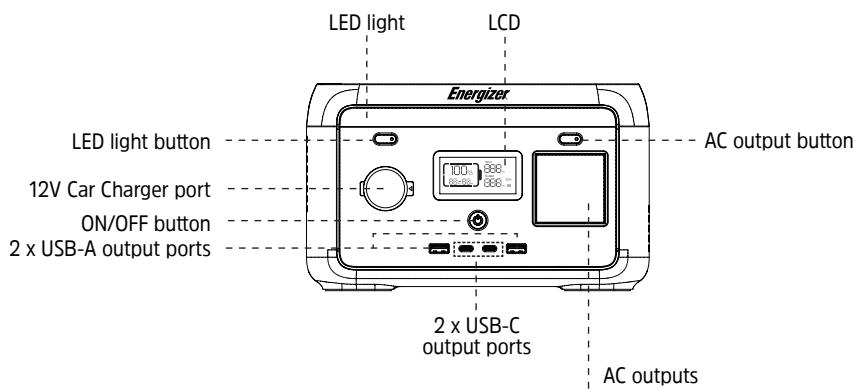

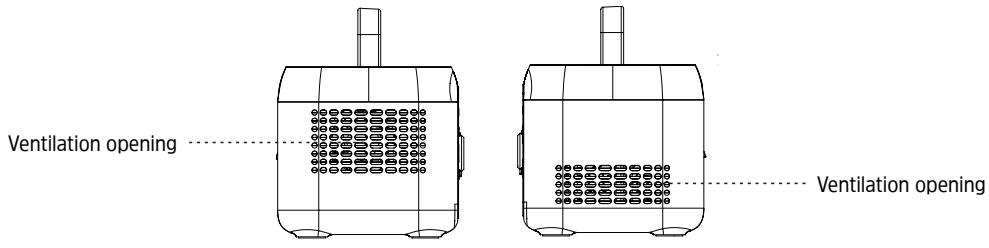
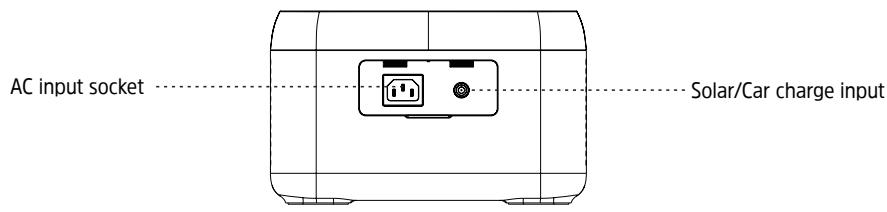
UK

US

EU

AU

FR

ZA
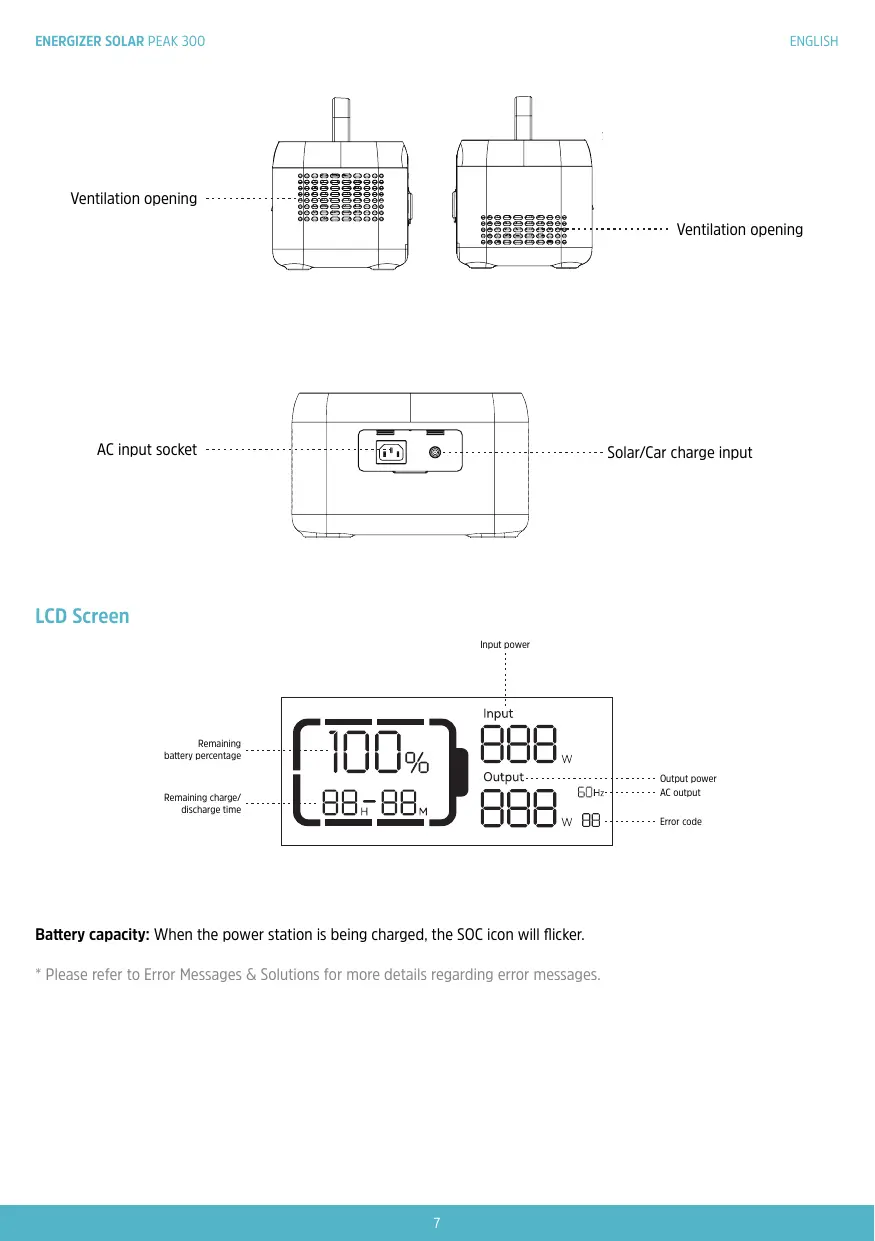
LCD Screen
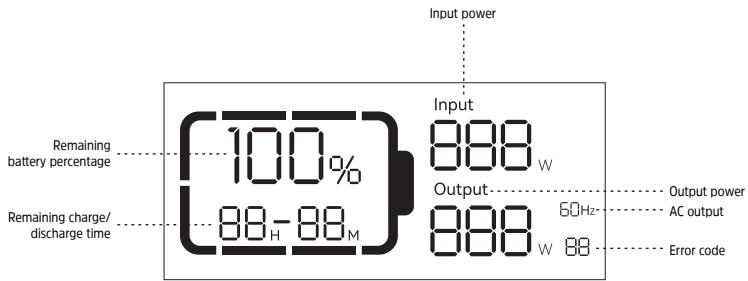
Battery capacity: When the power station is being charged, the SOC icon will flicker.
- Please refer to Error Messages & Solutions for more details regarding error messages.
Use
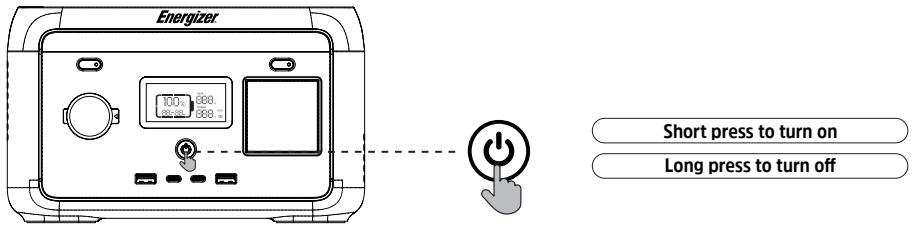
On and Off
- Press the main power switch to turn on the device, then the screen will be lit and the main power indicator will enter the slowly blinking light mode.
- If no operation is performed to the power station for 5 minutes, the power station will enter hibernation state and the LCD will automatically turn off. When there is load change or operation to the power station, the LCD screen will illuminate automatically. Press the main power switch to turn on or turn off the LCD.
Press and hold the main power switch to toggle the LCD on or off. - In the normal mode (the power is above 5% ), the default standby time of this product is 2 hours; when the AC output switch is not turned on, and there is no charge or discharge for 2 hours, the product will automatically shut down, and the standby time can be set it on the Energizer Solar Portable Power App; when the power is 5% or below, the product will be forced to enter the low power mode. In the case of no charge or discharge, the product will adjust the standby time according to the power and automatically shut down.
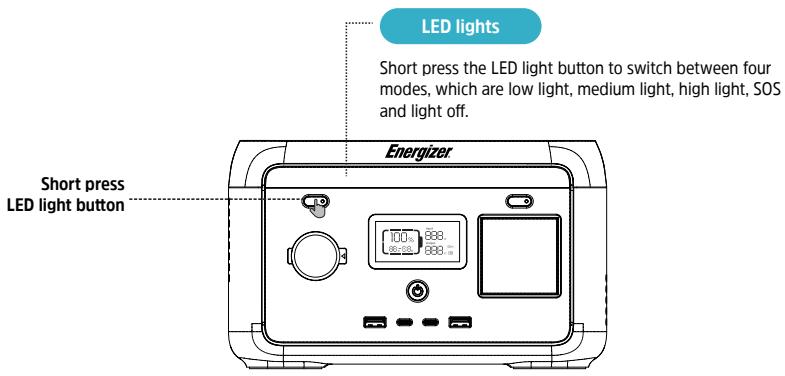
- In normal mode, long press the LED light button to exit the automatic shutdown setting, and the battery icon on the screen will flash. Long press again to enter the automatic shutdown setting, and the battery icon will not flash. The automatic shutdown setting is to protect the battery from low power, exiting this setting may damage the battery life, please use it with caution.
Note: With no AC input active, long press the above AC output button, you can switch the AC off-grid output frequency ( _inputOutput , _outputOutput ), long press 2s to switch, the AC output icon will flash 3 times after successful switching.
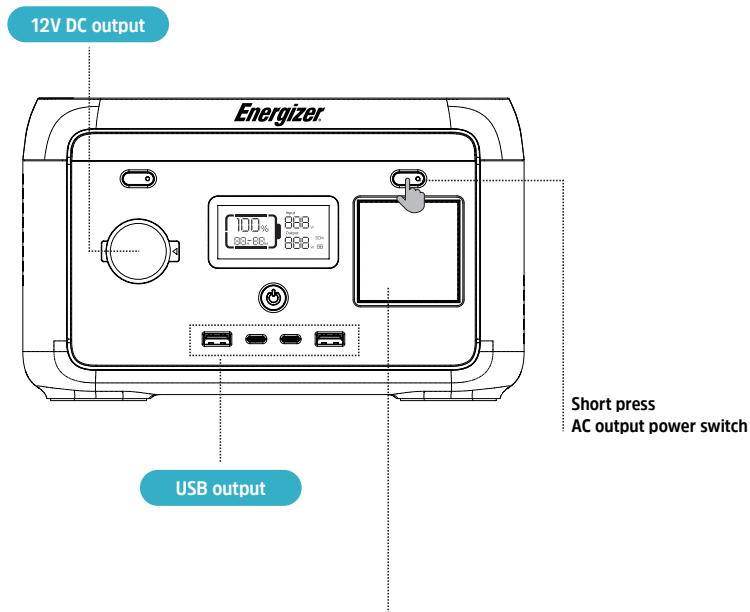
After the main power switch is turned on, press the 12V DC output power switch to enable the DC output port.
Press the 12V DC output power switch again to turn it off.
- When the 12V DC output power switch is turned on, power station does not shut down automatically.

UK

US

EU

AU

FR

ZA
AC output
After ensuring that the main power is turned on, short press the AC output power switch to turn on the AC output. Short press the AC output power switch again to turn it off.
- The default standby time of the AC output port is 1 hour. After 1 hour without any load on the AC output port of this product, the AC output power will be automatically turned off. In normal mode, long press the LED light button, the AC output power switch can exit the automatic shutdown setting, and the battery icon on the screen will flash. Long press again, the AC output power switch enters the automatic shutdown setting, and the battery icon does not flash.
- Long press the LED light button to exit the AC automatic shutdown setting: it is applicable to AC equipment below 10W and pulse working equipment.
- When the AC output is not in use, turn it off to save power consumption.
AC Charging
When the product is turned on, the default fast charging mode is working. If your product has a WiFi function, you can control the recharge rate through the Energizer Solar Portable Power App.
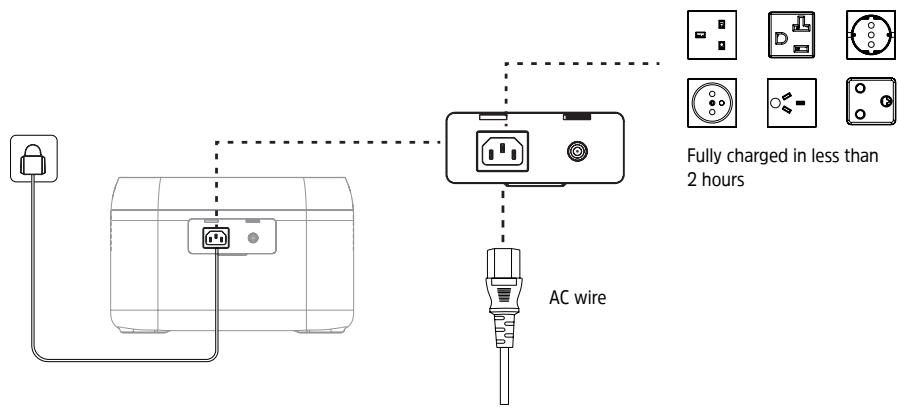
Please use the standard AC charging Cable for fast charging. AC Charging Cable should directly plug into 10A (or above) wall-mounted socket. We take no responsibilities for any damage caused by using unofficial AC charging cable, and other failures to follow instructions.
PV Charging
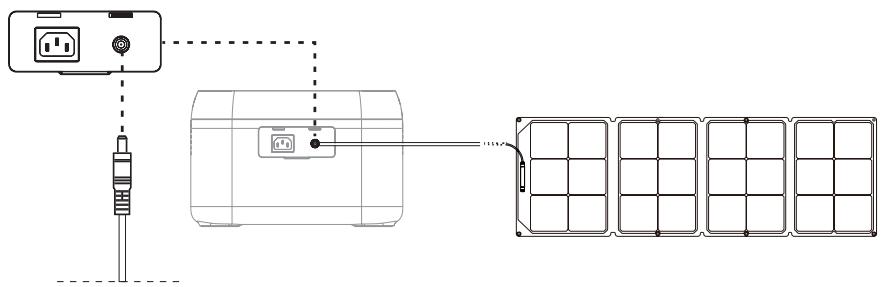
Solar panels can be used to charge the power station as shown in the above diagram
Charge the power station by solar panel.
*Solar charging cable (DC7909)
- Please follow the Energizer Solar Sunpack user manual to connect the solar panels.
- Before connecting the solar panel, check whether its output voltage is within the power station specifications to avoid damage to power station.
*The interface of this product is DC7909. If you need an adapter cable from MC4 to DC7909, please contact Energizer Solar at www.energizersolar.com on how to purchase.
Car Charging
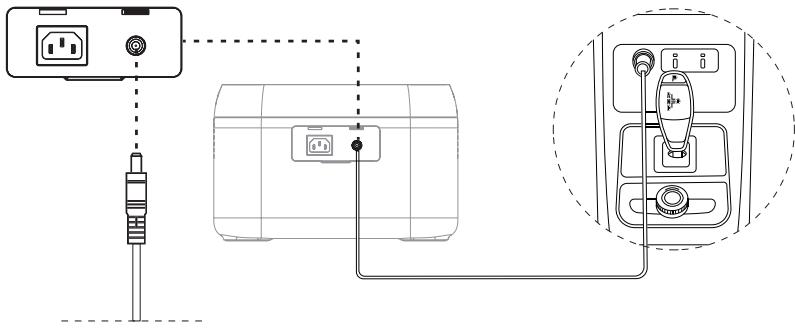
*Car charging cable (DC7909)
Power station can be charged by a car charging port. It should be charged after the car starts, so as to avoid the car battery loss and failure to start. At the same time, ensure good connection between the car charging port and cigarette lighter. We take no responsibilities for any loss caused by improper operation.
Constant power
- The constant power output function is not enabled by default, which can be turned on or off by Energizer Solar Portable Power App.
- In the following cases, constant power output function is not enabled:
(1) AC output turned on in charging status (bypass mode).
(2) Constant power output turned off.
- Constant power output function is more suitable for heater and motor instead of all electrical equipment. It is not suitable for some electrical appliances with voltage protection (such as precision instruments). Constant power output function application is subject to actual testing.
Energizer Solar Portable Power App
You are able to view information and data and control this product via the Energizer Solar Portable Power App. To download the app, search for [Energizer Solar Portable Power] in the Google App Store or Apple App Store. Once downloaded, create an account and register your product to manage and control how you use your Energizer Solar Portable Power Station. For WiFi connection instructions, visit www.energizersolar.com and go to the resources page.
EPS Function
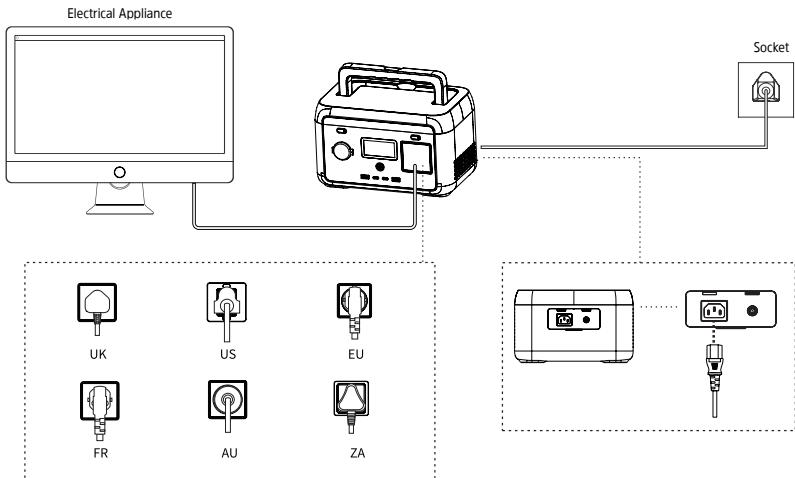
This product supports the EPS (emergency backup power) function. You connect the power grid and the AC input port of this product through the AC charging cable; Bypass mode (AC power comes from the grid, not the battery); when the grid suddenly loses power, the product can automatically switch to battery power supply mode within 10ms, at this time it is an inverter mode (AC power comes from the battery, not the grid). This function does not support OmS switching. Please do not connect it to devices that require high uninterrupted power supply, such as data servers and workstations, or use it after multiple tests to confirm whether it is compatible, and It is recommended to use only one device during use, and do not use multiple devices at the same time to avoid overload protection of the product. If the device does not operate normally or data is lost due to failure to follow the instructions, our company will not bear the corresponding responsibility.
FAQ's
- What kind of battery is used?
Lithium iron phosphate battery (LiFePO4).
- What equipment can be connected to the AC output ports?
The AC output has high rating power and maximum power, which enables it to supply power to most household appliances. Suggest check the equipment power prior to connecting and make sure power of all equipment lower than rated power.
- How to know the supply time?
Time shows in the LCD, which can be referred to for estimation for equipment with stable power consumption.
- How to know it is charging?
When in charge, the LCD shows remaining charging time. The SOC flickers, and input power is shown.
- How to clean the unit?
Clean the unit with a microfibre cloth.
- How to store the unit?
Turn it off, and keep it in a dry and ventilated place. Do not expose it close to water. For long-term storage, suggest discharge to 0% and charge to 100% every 3 months to extend the service life.
- Can it be taken on a plane?
No, the Energizer Solar Peak 300 does not comply with aviation standards.
Error Messages & Solutions
| Icon | Icon Characteristics | Fault Description | Solution |
| 02Error | Error code always on | Pressure difference is too large | Automatic recovery after fault clearing; 3 consecutive locks within a certain period of time, longer recovery time. |
| 04Error | Error code always on | Battery OTP (over temperature protection) fault | Shut down, after temperature recovery, rechargeable activation. |
| 05Error | Error code always on | Battery UTP (under temperature protection) fault | Shut down, after temperature recovery, rechargeable activation. |
| 06Error | Error code always on | OCP (over current protection) fault | Remove the over-power device, and it will automatically recover after the fault is cleared; if it is triggered continuously for 3 times within 1 minute, it will be locked, and the recovery time will be prolonged, and it can be recovered by powering on and off again. |
| 08Error | Error code always on | Abnormal precharge | Power on and off again to clear the fault. |
| 09Error | Error code always on | Battery under voltage fault | Repeated charging failures or failure to charge, please contact customer service. |
| 11Error | Error code always on | Abnormal INV battery voltage | Automatic recovery after the fault is cleared; if it is triggered 3 times within 1 minute, it will be locked, and the recovery time will be extended, and it can be recovered by powering on and off again. |
| 12Error | Error code always on | Grid voltage or frequency fault | The fault is cleared when the grid returns to normal. |
| 13Error | Error code always on | Abnormal INV BUS voltage | Automatic recovery after the fault is cleared; if it is triggered 3 times within 1 minute, it will be locked, and the recovery time will be extended, and it can be recovered by powering on and off again. |
| 14Error | Error code always on | Abnormal INV output | Automatic recovery after the fault is cleared; if it is triggered 3 times within 1 minute, it will be locked, and the recovery time will be extended, and it can be recovered by powering on and off again. |
| 15Error | Error code always on | INV discharge overload | Remove the over-power device, and it will automatically recover after the fault is cleared; if it is triggered continuously for 3 times within 1 minute, it will be locked, and the recovery time will be prolonged, and it can be recovered by powering on and off again. |
| 16Error | Error code always on | Charge overload | Automatic recovery after the fault is cleared; if it is triggered 3 times within 1 minute, it will be locked, and the recovery time will be extended, and it can be recovered by powering on and off again. |
| 17Error | Error code always on | INV Tz | Auto recover after fault is cleared. |
| 18Error | Error code always on | INV output short | Fault will be cleared after reboot. |
| 20 Error | Error code always on | MOSFET OTP fault | After removing the device and restarting, the fault is cleared. |
| 21 Error | Error code always on | Fan stop | Exclude the fan abnormality, turn on and off, contact after sales if still not fixed. |
| 22 Error | Error code always on | Discharge soft start fault | Auto recover after fault is cleared. |
| 23 Error | Error code always on | Charge soft start fault | Automatic recovery after the fault is cleared; if it is triggered 3 times within 1 minute, it will be locked, and the recovery time will be extended, and it can be recovered by powering on and off again. |
| 24 Error | Error code always on | MOSFET UTP fault | Automatic recovery after the product heats up. |
| 27 Error | Error code always on | PV hardware OCP fault | Remove PV charge, auto recover after connecting PV and turn on. |
| 28 Error | Error code always on | PV1 software OCP fault | Stop PV1 charging, auto recover after connecting PV and turn on. |
| 30 Error | Error code always on | Car charge output OCP fault | Turn off output, manual recover after fault is cleared. |
| 31 Error | Error code always on | PV output OVP (over voltage protection) fault | Removing the PV charging interface will automatically restore it after a certain period of time. |
| 32 Error | Error code always on | PV1 input OVP (over voltage protection) fault | Remove the PV charging interface for a certain period of time to automatically recover or check whether the PV output fuse is disconnected. |
| 35 Error | Error code always on | PV1 OTP fault | Stop PV1. Auto recover after fault is cleared. |
| 38 Error | Error code always on | Abnormal communication | Turn on and off, or change operation environment. Contact after sales if still not fixed. |
| 43 Error | Error code always on | Battery voltage is too low, The battery is broken | Contact after sales support. |
If there is a warning occurs during the use of this product, and the warning icon still does not disappear after restarting the device, please stop using it immediately (do not try to charge or discharge). If none of the above information can solve problem you encounter, please contact Energizer Solar at www.energizensolar.com
What's in the Box
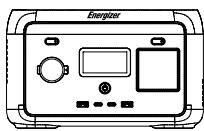
Power station
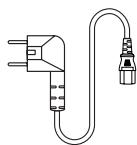
AC cable
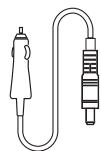
Car charging cable
Maintenance
It is recommended to use or store the power station between the optimum operating temperature range. Ensure it is kept away from water, heaters, and metal surfaces.
For long-term storage, charge and discharge every 3 months, i.e. discharge to 0% then charge to 100% .
For safety reasons, avoid storing the power station at temperatures above 45^ (113^) or below -20^ (4^) .
If the capacity is lower than 1% please charge to 60% . Long-term storage with serious power shortage will cause irreversible damage to the battery cells and shorten the service life of the product.
- If the battery capacity becomes critically low, and the device remains idle for an extended period, the product will enter deep sleep mode and can only be used again after being recharged.
Disclaimer
- The product features a built-in battery management system, which has various protection measures, including overcharge, overdischarge, overcurrent, short circuit, high and low temperature, and abnormal communication. During the use of this product, these protection mechanisms may activate and temporarily cause output interruption. Any potential loss stemming from accidental power interruptions while supplying power to specific equipment, such as medical devices or servers, is not the responsibility of Energizer Solar.
Before using the power station, please read this user manual to ensure understanding and proper use. After reading the user manual, please keep it safe for future reference. Improper operation may cause serious injury to yourself or others, or result in product damage and property loss. Once using the power station, you are deemed to have understood and accepted all terms and contents herein. Users are expected to take responsibility for their actions and any resulting consequences. Energizer Solar is not responsible for any losses that may occur if users do not adhere to the instructions in this user manual.
In compliance with laws and regulations, the company reserves the right of final interpretation of this document and all related documents of this product. Subject to update, revision or termination without prior notice, please visit www.energizensolar.com for the latest product information.
Contents
Paramètres 1
Application Energizer Solar Portable Power
- Sepossiblelevarenavion?
Energizer Solar Portable Power App 11
USV-Funktion 12
FAQ 12
Error Messages & Solutions 13
Lieferumfang 15
Wartung 15
Energizer Solar Portable Power App
This device complies with Part 15 of the FCC Rules. Operation is subject to the following two conditions:
(1)This device may not cause harmful interference.
(2)This device must accept any interference received, including interference that may cause undesired operation.
- Changes or modifications not expressly approved by the party responsible for compliance could void the user's authority to operate the equipment.
Note:This equipment has been tested and found to comply with the limits for a class B digital device, pursuant to Part 15 of the FCC Rules. These limits are designed to provide reasonable protection against harmful interference in a residential installation. This equipment generates uses and can radiate radio frequence energy and, if not installed and used in accordance with the instructions, may cause harmful interference to radio communications. However, there is no guarantee that interference will not occur in a particular installation. If this equipment does cause harmful interference to radio or television reception, which can be determined by turning the equipment off and on, the user is encouraged to try to correct the interference by one or more of the following measures:
Reorient or relocate the receiving antenna.
- Increase the separation between the equipment and receiver.
- Connect the equipment into an autlet on a circuit different from that to which the receiver is connected.
- Consult the dealer or an experienced radio/TV technician for help.
The device has been evaluated to meet general RF exposure requirement, This equipment should be installed and operated with a minumum distance of 20cm between the radiator and your body.
ISED Statement - ENGLISH
This device contains licence-exempt transmitter(s)/receiver(s) that comply with Innovation, Science and Economic Development Canada's licence-exempt RSS(s). Operation is subject to the following two conditions:
This device may not cause interference.
This device must accept any interference, including interference that may cause undesired operation of the device.
This equipment should be installed and operated with a minimum distance of 20~cm between the radiator and your body.
888 Prospect Street, Suite 200
La Jolla California 92037
+14242545344
Europe
The Black Church, St Mary's Place
Dublin D07 P4AX, Ireland
+35312548222
Australia
Level 35, 477 Collins St, Melbourne
Victoria 3000, Australia
+61 1300 757 827

energizensolar.com