 EasyManual
ENERGY E10 - Batteries ENERGIZER - Free user manual and instructions
Find the device manual for free ENERGY E10 ENERGIZER in PDF.



User questions about ENERGY E10 ENERGIZER
0 question about this device. Answer the ones you know or ask your own.
Ask a new question about this device
Download the instructions for your Batteries in PDF format for free! Find your manual ENERGY E10 - ENERGIZER and take your electronic device back in hand. On this page are published all the documents necessary for the use of your device. ENERGY E10 by ENERGIZER.
USER MANUAL ENERGY E10 ENERGIZER
(1616 NW, 84TH Ave. Miami, Florida U.S.A. 33126)
BAY AREA COMPLIANCE LABORATORIES CORP.
1274 Anvilwood Ave. Sunnyvale, CA 94089. USA
www.baclcorp.com
Phone: +1 408 732 9162 Fax: +1 408 732 9164
(1616 NW, 84TH Ave. Miami, Florida U.S.A. 33126)
BAY AREA COMPLIANCE LABORATORIES CORP.
1274 Anvilwood Ave. Sunnyvale, CA 94089. USA
www.baclcorp.com
Phone: +1 408 732 9162 Fax: +1 408 732 9164
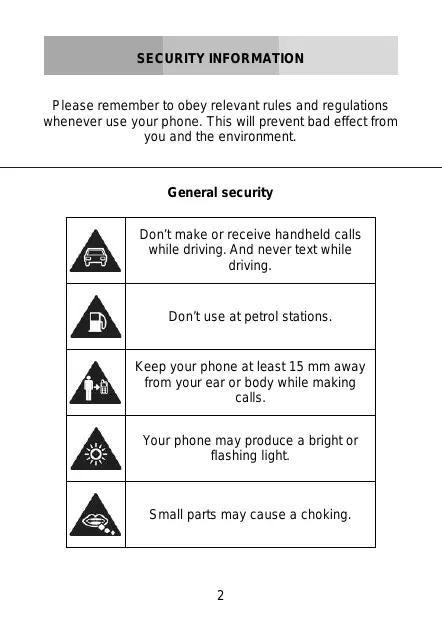
Please remember to obey relevant rules and regulations whenever use your phone. This will prevent bad effect from you and the environment.
General security
| Don't make or receive handheld calls while driving. And never text while driving. | |
| Don't use at petrol stations. | |
| Keep your phone at least 15 mm away from your ear or body while making calls. | |
| Your phone may produce a bright or flashing light. | |
| Small parts may cause a choking. | |
| Don't dispose of your phone in fire. | |
| Your phone can produce a loud sound. | |
| Avoid contact with anything magnetic. | |
| Keep away from pacemakers and other electronic medical devices. | |
| Avoid extreme temperatures. | |
| Switch off when asked to in hospitals and medical facilities. | |
| Avoid contact with liquids. Keep your phone dry. | |
| Switch off when told to in aircrafts and airports. |

| Don't take your phone apart. | |
| Switch off when near explosive materials or liquids. | |
| Only use approved accessories. | |
| Don't rely on your phone for emergency communications. | |
| Warning electrical hazard To avoid serious injury do not touch charger pins. Unplug the charger when not in use. To unplug a charger or an accessory, hold and pull the plug, not the cord. The power adaptor is the switch off device of the equipment. The wall power socket should be located near the equipment and easily accessible. |
Look at the adapter regularly, specifically at the plug and the layer to detect any damages. If the adapter is damaged, you can't use it until it's fixed.
Plug in the adapter to a power outlet which is easily accessible. Always unplug the adapter after using it.
Use only the adapter provided with the device.
Do not expose your device to direct sunlight, like on your car's dashboard, for example.
In case of overheating do not use the device.
Be careful when using the device while walking.
Do not subject the device to severe impact or drop it from high position, it could cause damages or malfunctions.
Do not disassemble, modify or fix the device by yourself.
To clean the device use a clean and soft rag. Do not use any chemical product or detergent.
This product is in strict accordance with the IP Code, International Protection Marking, IEC standard 60529, IP-67 dust-proof and drop tests.
However, the following situations may occur while using this phone:
- Intentional, excessive, and/or repeated impacts or abuse will cause wear and tear that may damage the phone's waterproof and/or dust-proof protection capabilities.
- Atmospheric pressure levels may mute the speaker. Resetting the battery cover, or opening and closing the USB door, will recover the speaker function.
- Immersing the phone in water may affect speaker and microphone functionalities. Functionality will recover after a period of time.
Learn about your mobile phone's layout, keys, display and icons.
Unpacking
Check the product box for the following items:
- Mobile phone
Battery - Travel adapter (charger)
USB cable - Headset
- User manual
- Quick start guide
The supplied accessories perform best for your phone.
Phone layout
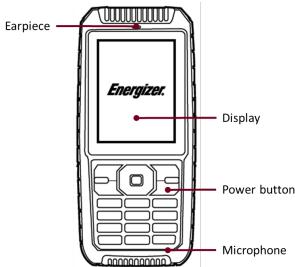
From the front view of your phone you will observe the following elements:
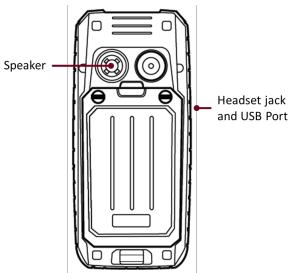
From the back view of your phone you will observe the following elements:
Keys
The following table offers you a quick description about the phone's keys:
| Key | Function |
| Function | Perform the action indicated in the bottom of the screen. |
| Navigation | In standby mode, you can access the user-defined functions, in menu mode, scroll through menu options. |
| Central Button | In standby mode, press and hold the button to turn on the flashlight, in menu mode, select the highlighted menu option or confirm an action. |
| Call | Open the list of recent calls or make a call to the displayed number. You can answer an incoming call. |
| Hang up | Ends a call or reject an incoming call. Hold down for 3 seconds to turn on / off the phone. |
| 1......0 | Enter numbers, text and / or special characters. |
Screen
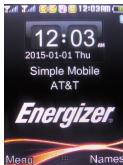
The screen of your mobile phone is designed as follows:
Icons
Learn about the icons that are displayed on the top of the screen, indicating the status of the phone:
| Icon | Function description |
| Represent current network signal. The more bars, stronger the signal. | |
| Battery status. More bars indicate more battery. | |
| Unread SMS | |
| Alarm set | |
| Bluetooth function activated | |
| Profile set to Silent Mode | |
| Profile set to Meeting Mode | |
| Profile set to Outdoor Mode | |
| Headset connected | |
| Roaming indicator |
Get started setting up your mobile phone for its first use.
Install the SIM card and battery
When you subscribe to a cellular service, you will receive a Subscriber Identity Module (SIM) card, with subscription details, such as your personal identification number (PIN) and optional services.
To install the SIM card and battery,
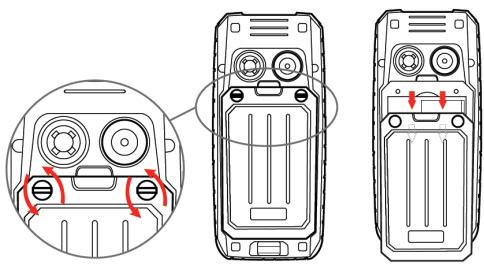
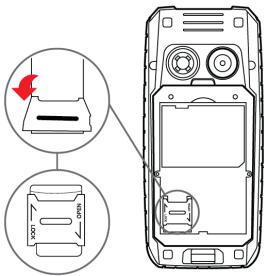
- Remove the battery cover.
- Insert the SIM card.
Your phone has 2 SIM card slots to allow you use 2 SIM cards and switch between them.
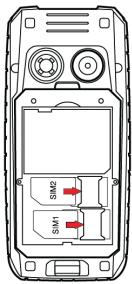
- Place the SIM card in the phone with the gold-colored contacts facing down.
-
Without inserting a SIM card, you can use your phone's non-network services and some menus.
-
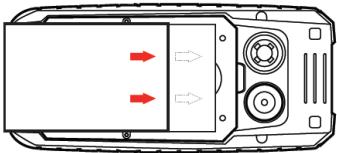
Insert the battery.
- Replace the battery cover.
Insert a memory card (optional)
To store additional multimedia files, you must insert a memory card.
-
Formatting the memory card on a PC may cause incompatibility with your phone. Format the memory card only on the phone.
-
Remove the battery cover.
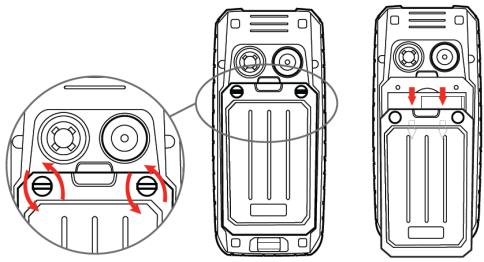
- Insert a memory holder with the label side facing up.
Learn how to perform basic operations of your mobile phone.
Turn your phone on and off
To turn your phone on,
- Long press the power button [ ]
- Type in your PIN number and press OK (if it is needed).
To shut down your phone, go to step 1 above.
Access menus and applications
To get access to the Menu and Applications,
To access your phone's menus,
- In Idle mode, press the left soft key < Menu > to access Menu mode.
- Use the Navigation key to scroll to a menu or option.
- Press < Select>, < OK>, or the Confirm key to confirm the highlighted option.
- Press
to move up one level; Press [ ] to return to Idle mode.
Use basic call functions
Learn to make or answer calls in this section
Make a call:
- In Idle mode, enter an area code and a phone number.
- Press [ ] to dial the number.
- To end the call, press [ ]
Answer a call:
- When a call comes in, press [ ]
- To end the call, press [ ]
Send and view messages
In this section, learn to send and view text (SMS).
To send a text message:
- In Menu mode, select Messaging Write message.
- Enter your message text.
- Press < Options > Send to and enter a destination number or select from Phonebook.
- Press < Options > Done.
- Press < Options > Send.
Add contacts
Learn the basics of using the phonebook feature.
Add a new contact:
- In Menu mode, select Phonebook Add new contact.
- Select the storage (phone, SIM1, or SIM2).
- Enter contact information.
- Press < Options > Save to add the contact to memory.
Find a contact
- In Menu mode, select Phonebook.
- Enter the first few letters of the name you want to find.
- Select the contact's name from the search list.
Once you have found a contact, you can call the contact by pressing [ ]
Listen to music
Learn how to listen to music via the music player or FM radio.
Listen to the FM radio:
- Plug the supplied headset into the phone's multifunction jack.
-
In Menu mode, select FM radio.
-
Press the Navigation down key to start the radio.
- Control the FM radio using the Navigation keys:
Listen to music files:
After transferring music files to the "My Music" folder of your phone or memory card,
- In Menu mode, select Multimedia Audio Player.
- Select a music category a music file.
- Control playback using the Navigation keys.
Browse the web
Learn to access your favorite web pages.
Browse web pages:
- In Menu mode, select Browser Internet service to launch your service provider's homepage.
- Navigate web pages using the Navigation keys.
Using the flashlight
To turn on or off the flashlight, press and keep pressing the 0 button for about 3 seconds.
Learn the basics to capture and view photos.
Capture photos
- In Menu mode, select Camera to turn on the camera.
- Aim the lens at the subject and make any adjustments.
- Press the Confirm key to take a photo. The photo is saved automatically.
- Press < Back> to take another photo (step 2).
View taken photos
Press the left soft key then choose Photos to access to the photos gallery quickly.
Camera options
Entering in the Camera options you will be able to configure the following options:
Camera settings:
Select a shutter sound every time you take a picture.
Change the exposure value to adjust the photo brightness.
Change the Anti-flicker value to eliminate the fluorescent effect on the photos.
Adjust the contrast to differentiate dark and light areas.
Modify the delay timer to take self-photos.
Change the continuous shot number to take a series of photos.
Change the anti-flicker value to adjust the fluorescent light effect on photos
Image settings:
You can change the image size.
You can adjust the image quality.
White balance:
Chose a color scheme according to the ambient.
Scene mode:
Allow you to select the night mode (extra light) or let the phone to choose the best mode.
Effect settings:
Add a color effect to the photos taken.
Storage:
Let you choose where to store the photos taken.
Learn the basics to configure your phone and connect to Internet.
Add a new connection
- In Menu mode, select Settings Connectivity Data account.
- Press < Options > then Add Data account.
- Set the parameters according to your carrier.
The basic parameters are:
Account name
APN
-Username
- Password
- SIM selection (if necessary)
Some carriers use Proxy Servers, refer to your carrier configuration for more information.
- Once the needed parameters are set, press < OK> and confirm the new connection pressing < Yes> .
To use the connection as default, press < Options > then Change default.
To add another connection, repeat all the steps.
Configure the browser
Once the connection is added, you need to configure the Internet browser:
- In Menu mode, select Services Internet service Settings Data account, select the SIM card (if necessary) and choose the connection created in the previous step.
Switch between carriers (SIM cards)
If you use multiple SIM cards and want to switch to another one, follow this steps:
- Configure the connection for both SIM cards (refer to "Add a new connection").
- In Menu mode, select Services Internet service Settings Select profile and choose SIM1 or SIM2 according to your necessities.
Is possible to select Always ask, then the browser will ask which SIM you want to use before start the Internet session.
Learn about your phone's ability to connect to other wireless devices for exchanging data.
Turn on the Bluetooth wireless feature
- In Menu mode, select Settings Connectivity Bluetooth.
- Select the option Power.
- Press the left soft key to turn it On.
- To allow other devices to locate your phone, scroll down to Visibility and press the left soft key to turn it On.
Find and pair with other Bluetooth enabled devices
- In Menu mode, select Settings Connectivity Bluetooth My device Search new device.
- Scroll to a device and press < Select>.
- Enter a PIN for the Bluetooth wireless feature or the other device's Bluetooth PIN, if it has one, and press OK>.
When the owner of the other device enters the same code or accepts the connection, pairing is complete.
Send data using the Bluetooth wireless feature.
- Select the file or item from one of your phone's applications that you want to send.
- Press < Options > Send | Via Bluetooth Select the device name then accept the file on the receiver.
Receive data using the Bluetooth wireless feature
- Enter or accept the PIN for the Bluetooth wireless feature and press < OK> (if necessary).
- Press < Yes> to confirm that you are willing to receive data from the device (if necessary).
Change the Bluetooth device name
- In Menu mode, select Settings Connectivity Bluetooth My name.
- Write the name you desire then press Options Done.
Choose the storage location
- In Menu mode, select Settings Connectivity Bluetooth Advanced Storage.
- Select Memory card if your phone have one inserted, otherwise select Phone.
EU WEEE
Information to consumers in application of EU WEEE.

This product is subject to European Union regulations that promote the re-use and recycling of used electrical and electronic equipment. This product required the extraction and use of natural resources and may contain hazardous substances. The symbol above, on the product or its packaging, indicates that this product must not be disposed of with your other household waste. Instead, it is your responsibility to dispose of your waste equipment by handling it over to a designated collection point for the recycling of waste electrical and electronic equipment.
The separate collection and recycling of your waste equipment at the time of disposal will help to conserve natural resources and ensure that it is recycled in a manner that protects human health and the environment.
For more information about where you can drop of your waste equipment for recycling, please contact your local city office, your household waste disposal service, or the store from which you purchased the product.
Recommendations:
- Do not disassemble, open or tear up the device or the batteries.
- Do not expose the product or the battery to heat or fire. Avoid storage the device directly to the sunlight.
- Do not short-circuit a battery. Do not stock batteries in a drawer where it could short-circuit between each other or get in contact by any other metallic objects.
- Do not cause mechanical shocks to batteries.
- In case of the leak, do not let the liquid get in contact with your eyes or skin. If that happens wash with clear water the affected zone and seek medical advice.
- Follow the marks plus (+) and minus (-) on the battery and the device and ensure that the use is correct.
- Do not use any accessories or batteries that are not made to be used with the device.
Monitor the use of a batteries by children. - Consult a doctor immediately in case of ingestion of an element or a battery.
Always buy the battery recommended by the manufacturer of the device. -
Always maintain the product and the battery clean and dry.
-
Wipe the terminals of the product or the battery, if it became dirty, with a clean and dry rag.
- It is necessary to charge the battery before its use. Always use the charger and read the manufacturer instructions or the manual of the device for the instructions regarding charging.
- Do not leave a battery charged when it's not going to be used.
- After long periods of storage, it may be necessary to charge and discharge the battery several times in order to achieve maximum performance.
Always keep the original documentation of the device, you might need it later for future reference. - If it's possible, take out the battery of the device when it's not used.
- Do not store your device in extremely hot or cold places like inside of a car during the summer. It might damage the device and cause explosion of the battery. It's recommended to use the device in a range of temperatures between 5^ and 35^ .
RADIO WAVES
Proof of compliance whit international standards (ICNIRP) or with European Directive 1999/5/EC (R&TTE) is required of all mobile phone models before they can be put on the market. The protection of the health and safety for the user any other person is an essential requirement of these standards or this directive.
THIS DEVICE MEETS INTERNATIONAL GUIDELINES FOR EXPOSURE TO RADIO WAVES
Your mobile device is a radio transmitter and receiver. It is designed not to exceed the limits for exposure to radio waves (radio frequency electromagnetic fields) recommended by international guidelines. The guidelines were developed by an independent scientific organization (ICNIRP) and include a substantial safety margin designed to assure the safety of all persons, regardless of age and health.
The radio wave exposure guidelines use a unit of measurement known as the Specific Absorption Rate, or SAR. The SAR limit for mobile devices is 2W / kg
Tests for SAR are conducted using standard operating positions with the device transmitting at its highest certified power level in all tested frequency bands.
Body-worn SAR testing has been carried out at a separation
distance of 1.0cm to meet RF exposure guidelines during body-worn operation, the device should be positioned at least this distance away from the body. If you are not using an approved accessory ensure that whatever product is used is free of any metal and that it positions the phone the indicated distance away from the body.
For more information you can go to www.energizeyourdevice.com
Additional information about electromagnetic fields and public health are available on the following site. http://www.who.int/peh-emf.
Your telephone is equipped whit a built-in antenna. For optimal operation, you should avoid touching it or degrading it.
As mobile devices offer a range of functions, they can be used in positions other than against your ear. In such circumstances the device will be compliant whit the guidelines when used with headset or USB data cable. If you are using another accessory ensure that whatever product is used is free of any metal and that it positions the phone at least 1.0cm away from the body.
LICENCES
The Bluetooth word mark and logos are owned by Bluetooth SIG, Inc. and any use of such marks by DDMBrands LLC and its affiliates is under license. Other trademarks and trade names are those of their respective owners.
RADIO WAVES
Proof of compliance whit international standards (ICNIRP) or with European Directive 1999/5/EC (R&TTE) is required of all mobile phone models before they can be put on the market. The protection of the health and safety for the user any other person is an essential requirement of these standards or this directive.
THIS DEVICE MEETS INTERNATIONAL GUIDELINES FOR EXPOSURE TO RADIO WAVES
Your mobile device is a radio transmitter and receiver. It is designed not to exceed the limits for exposure to radio waves (radio frequency electromagnetic fields) recommended by international guidelines. The guidelines were developed by an independent scientific organization (ICNIRP) and include a substantial safety margin designed to assure the safety of all persons, regardless of age and health.
EU Regulatory Conformance
Hereby, this device is in compliance with the essential requirements and other relevant provisions of Directive 1999/5/EC.
For the declaration of conformity, visit the Web site www.energizeyourdevice.com/certifications.
Notice: Observe the national local regulations in the location where the device is to be used. This device may be restricted for use in some or all member states of the European Union (EU)
Notes:
-
Due to the used enclosure material, the mobile phone shall only be connected to a USB Interface of version 2.0 or higher. The connection to so called power USB is prohibited.
-
The adapter shall be installed near the equipment and shall be easily accessible.
-
Do not use the mobile phone in the environment at too high or too low temperature, never expose the mobile phone under strong sunshine or too wet environment. The suitable temperature for the phone and accessories is -10^ - 55^
-
When charging, please place the phone in an environment that has a normal room temperature and good ventilation. It is recommended to charge the phone in an environment with a temperature that ranges from 5^ 25^ . Please ensure to use only the charger offered by the manufacturer. Using unauthorized charger may cause danger and violate the authorization of the phone and the guarantee article.
-
CAUTION: RISK OF EXPLOSION IF BATTERY IS REPLACED WITH AN INCORRECT TYPE. DISPOSE USED BATTERIES ACCORDING TO THE INSTRUCTIONS
-
Excessive sound pressure from earphones and headphones can cause hearing loss.
For more information
you
can
go
to
www.energizeyourdevice.com
Additional information about electromagnetic fields and public health are available on the following site.
http://www.who.int/peh-emf.
Your telephone is equipped whit a built-in antenna. For optimal operation, you should avoid touching it or degrading it.
As mobile devices offer a range of functions, they can be used in positions other than against your ear. In such circumstances the device will be compliant whit the guidelines when used with headset or USB data cable. If you are using another accessory ensure that whatever product is used is free of any metal and that it positions the phone at least 1.5cm away from the body.
LICENCES
Bluetooth SIG, Inc. owns the Bluetooth word mark and logos and any use of such marks by DDM Brands LLC and its affiliates is under license. Other trademarks and trade names are those of their respective owners.
Energizer
C€1313
CERTIFICATE OF CONFORMITY ENERGY 240
We, DDM BRANDS LLC
(1616 NW, 84TH Ave. Miami, Florida U.S.A. 33126)
Hereby declares that:
ENERGIZER complies with the standards and provisions of the directives. The certificate of conformity procedure defined in article IV of directive 1999/5/EC has been under the control of the following organization:
BAY AREA COMPLIANCE LABORATORIES CORP.
1274 Anvilwood Ave. Sunnyvale, CA 94089. USA
www.baclcorp.com
Phone: +1 408 732 9162 Fax: +1 408 732 9164
The full text of the certificate of conformity of the device is available upon request by mail at the following address: DDM BRANDS LLC - 1616 NW 84^TH Ave. Miami, Florida U.S.A. 33126.
2015/01/27
(Date)
| Maximum SAR for this model and conditions under which it was recorded: | |
| GSM 900 | 0.137 W/kg 10g Head SAR – 0.156 W/kg 10g Body SAR |
| GSM 1800 | 0.124 W/kg 10g Head SAR – 0.162 W/kg 10g Body SAR |
| WCDMA 900 | 0.086 W/kg 10g Head SAR – 0.105 W/kg 10g Body SAR |
| WCDMA 2100 | 0.077 W/kg 10g Head SAR – 0.127 W/kg 10g Body SAR |
During use, the actual SAR values for this device are usually well below the values stated above. This is because, for purposes of system efficiency and to minimize interference on the network, the operating power of your mobile device is automatically decreased when full power is not needed for the call. The lower the power output of the device, the lower its SAR value.
Please take time to read this important section.
FCC Caution
Any Changes or modifications not expressly approved by the party responsible for compliance could void the user's authority to operate the equipment.
Before a new model phone is available for sale to the public, it must be tested and certified to the FCC that it does not exceed the exposure limit established by the FCC. Tests for each phone are performed in positions and locations (e.g. at the ear and worn on the body) as required by the FCC.
This device complies with part 15 of the FCC Rules. Operation is subject to the following two conditions: (1) This device may not cause harmful interference, and (2) this device must accept any interference received, including interference that may cause undesired operation.
Note: This equipment has been tested and found to comply with the limits for a Class B digital device, pursuant to part 15 of the FCC Rules. These limits are designed to provide reasonable protection against harmful interference in a residential installation.
This equipment generates, uses and can radiate radio frequency energy and, if not installed and used in accordance
with the instructions, may cause harmful interference to radio communications. However, there is no guarantee that interference will not occur in a particular installation. If this equipment does cause harmful interference to radio or television reception, which can be determined by turning the equipment off and on, the user is encouraged to try to correct the interference by one or more of the following measures:
- Reorient or relocate the receiving antenna.
- Increase the separation between the equipment and receiver.
- Connect the equipment into an outlet on a circuit different from that to which the receiver is connected.
- Consult the dealer or an experienced radio/TV technician for help.

INFORMAÇAO DE SEGURANÇA
BAY AREA COMPLIANCE LABORATORIES CORP.
1274 Anvilwood Ave. Sunnyvale, CA 94089. USA
www.baclcorp.com
Phone: +1 408 732 9162 Fax: +1 408 732 9164
| Maximum SAR for this model and conditions under which it was recorded: | |
| GSM 900 | 0.137 W/kg 10g Head SAR – 0.156 W/kg 10g Body SAR |
| GSM 1800 | 0.124 W/kg 10g Head SAR – 0.162 W/kg 10g Body SAR |
| WCDMA 900 | 0.086 W/kg 10g Head SAR – 0.105 W/kg 10g Body SAR |
| WCDMA 2100 | 0.077 W/kg 10g Head SAR – 0.127 W/kg 10g Body SAR |
(1616 NW, 84TH Ave. Miami, Florida U.S.A. 33126)
Declaram ca:
BAY AREA COMPLIANCE LABORATORIES CORP.
1274 Anvilwood Ave. Sunnyvale, CA 94089. USA
www.baclcorp.com
Phone: +1 408 732 9162 Fax: +1 408 732 9164
IocTaeHa KaPta NaMeT (no 360p)
3a da cbxpaHnTE DoNbJHnTeHn MYJTmEeHn FauNoBe Tp6Ba Da noCTaBnTe KapTa NaMeT.
KoHnIgypnpaHe Ha 6pay3bpa
Cne KaTo Bpb3KaTa e Do6aBeHa e HynHo da KOHpIpypIpe INTePHeT 6pa7bpa:
- B pexim MeHIO n36pepe Ye cnyr NHTepHET ycnyr NaCTPOIKNI AkayHT 3a daHHN, n36pepe SIM kaptata (ako e Heo6xOJIMo) n 36pepe Bpb3kata, cb3daJeHa B npedXODHATA CTbTkA.
PpeoTbpaTaBaHe Ha 3ary6aTa Ha cnyx
Ima pncKObe 3a Heo6paTHMa 3ary6a Ha cnyxa, ako npMeMHnkbT, cnuuAknlte 3a yuH, BnCOKOROBOpTeiHTI INn CnuuAknlte ce n3non3Bat C BnCoka CnHa HA 3Byka. Perynnapte CnIATA Ha 3Byka Do HIOBO, KoEO He npedctabnlaBa onaHocCT. C TeueHne Ha BpeMeto, Bne moKe da npBnKHe TcMb Mo-BnCnKa CnHa Ha 3Byka, KOnTo ue n3rIeKa HopMaHa, Ho e BpEHa 3a BaWna Cnyx. Ako ycTeTb 6bpMHe EInn npRnpyuH erOBp, CbBETBaMe Bn Da ce KOHCytnPate CbC cneuaNtNtNo cnyxa. Konkoto noBnCoka e CnIATA Ha 3Byka, ToKoBa No-BnCok e pNCbT, Ye cnyxbT Bn MoKe da ce nobPeDn 6b30. CneuaNtNtNe Ioo cnXya npEnarat rCneHntre npenOpbk:
-OrpaHmte npolbIckTeHnOCTTa Ha I3NO3BaHe Ha BVCOKa CnHa 3BvKa B CnyuAkkTe, BVCOKOBOpTeN IIN CnuAalkata
- N36baIYe bYenuHabAHeto Ha cnIATA ha 3bYaKa, 3a da ce nokpke wUHa cpeA.
- Hamanete ciñnata ha 3bkyka, ako He yybaite xopata, KOITO roboport OKOto Bac.
PAДИNOВьЛНИ
I3NCKBa ce DoKa3aTeNCTBO 3a cbOTBETCTBHe C mKexyHapOnHnTE CTAndapTn (MexdyHapOnDa KOMNCs3A 3aunTa CpeSy HeNoHN3paUnTe NbChenH) INn C EbporeNcKATA nPeKNTBa 1999/5/EO (paDnHo-HabIruaHNOHO obOpUbaHe n DaJIeKocBo6UnTeHNO KpaJHo OobOpUbaHe) 3a BCMHKn MOdeIN Mo6bHn TeneOHH npedn da 6bDat nCHTaN Ha Na3apa. Ona3BaHeto Ha 3dpabeTo n Be3oNaCHocTtHa Notpe6bHeTNe I BcKo Dpyro Nlue e OCHOBn H3NCKBaHe Ha Te3n CTandaptn NnTn Tn3n NInpeKTNbA
TOBA YCTPOICTBO OTTOBAPRA HA MEXKUYHAPOHNITE YKA3AHNIA 3A IN3JIAGAHE HA PAIDIOBbJIHN
Baujeto MObInHO yCTPOcIbTO npEcdTAbRbA paJIO npedabaten I npHemNtK. To ePoeKTmuHO taka, ye Ha naHBnUbaa TaepaHHTNE CTOINOT3 a 3nlaHae Ha paADIOBbJIHn (paDIOHeCTOTHN eNEKTPOMarHITNI noneta), npenOpBuAHN OT MEXdYNaOPoHNTe Yka3AHINy. Yka3AHINra ta papaBoTeHOn OT He3aBNCIMa HayHu oprAn3aun (MeKDyNaOPHa KOMCIN3a 3aUnTa Cpeu HoiHnIpaAsITE NbYeHn) n BKLIOuBAT 3NaHTENeH pe3epB 3a Be3ONACHOCT, npDeH3aueH da rapANTIpa 6Be3ONACCHOTTA H BAChV XOpA, He3aBNCIMO OT TxAHATA Bb3pact N 3dPABOCLOBO CbCTOHNHE.
B yka3aHnTa 3a n3nparHe Ha paDIOOBbHNi ce n3nO3Ba MepHa eINHua 3a n3MepBaHe, IN3BeCTHa KaTO cneunPhiueH
KoepnIeHNT Ha nOflaHne HnIK Cπ.ΓaHnHata CTHOCT HA CKPi 3a MoBnHnY cTPOJcTa b 2 eBt/kr.
Tectobete 3a CKI ce npobexkat kato ce n3non3bat CTAndapHTNIE EKCNnOATAuOHNN N03nUn, KATO yctpoCTBTO Pnpaba C HAI-BNCOKOT CN rapaHTnpaHO HMBo HA MOUHCT HO BCNHKn MNTNBaHH YCCTOTHNJeHTN.
TecBaHeto Ha CKN OT rnaBata ce n3BpwaHa pataJeHIneHPOaSTcOHHne 10cM,3a Da OTOBpaH YaK3aAnHra T4a MIOueCToTHO 6bMbuaHe. Dkato Ce Hocn Do TJNTO YoCTPOIcTBOT P8bBa da 6bde NOCTABeHO Ha HAmanIO TOBA paSTcOHne O TjNTO.To.AKO He N3NON3BaTe OdoBePh Akcecoap, Ybepe tCe Ye BcEKN IpOdyKT, KOHTo CE N3NON3BA HMA MetaJIu N TeTepeOHt E NoCTABeHn HNOcOeHTo POaSTcOHne O TjNTO.To.
3a noBHe NnΦoPmaZMa M0KTe Da nocETHt e www.energizeyordeve.com
DombhHTENHn HINΦOPMaJNa 3a ENEKTPOMaHTHNITHe NOneta
MeI OeBCTeBHOTo 3dPabe MoKeTe Da Hamepnte Ha CneHATA
NHTEPHT cTpaHua http://www.who.int/peh-emf.
Bauinr Tenepon e obopydban c Brpadeha anthea.3a ONtImaHa pa60ta Tpa 3a n36raTe da JdoKocBaTe nnHnHAMaNBAte.
TbkyoMO6nHNHTe yctpoCTBa npednarotonmHabopOTfynHKuTN,Te mOrat Da bSdntnON3BAHN B dpytn no3nUINOCBeH Ta3n BOKTo E do yxOTO Bn. PnyakmbaO6cToTeNCTBA yctpoCTBTO Tce OTOBapna H yka3aHnraTa,AKO ce nON3Ba cbc CnyuaanKn INI USB Kaen.AKO nON3BATE dpyr Akcecoap,ybepeTe CE ye Bcekn pOdykt,KoITo Ce nON3Ba HMA MetanIn Ne TeNeFOHb tE
IOCTABEN Ha pa3CTOHNHe HAI-MANKO OT 1,0CM OT TANOTO.
OcbEN TOBA ce npenopbYBa da ce n3non3Ba Bb3MOXHO HaimHOrO cnUaANKaTc. Bbnpekn TOBA, Tp8Ba Da ce BHNABA To3N cIyauai, da ce IbpKIMoBnIHnTeIeΦoH Ha pa3CTOHeNe OT Kopema Ha bpeMeHHn JKeHH N MaIKn Ta3 Ha Deua nIOHOJI
CbpeMeHHata HayHa HnFopMaZna He NocOBya, ye 3nON3BaHTo Ha MObInHn TEfeOnHn Hana TaBcMaHe Ha npDn3aHm MEpKn. BbIpeKn TOBA, Tb KATO HKOn Ca 3aRpnKeHN 3a Bb3MOxHNTe PNCKOB, CbPbAHN C pTEKOMeHPaYNTopeBa HA TeneOHa, Nge n CbBETBAme Da n3nON3BaT cnyUanKaT, 3a Da DpbXat MObInHn TEfeOnHn HA pAcSTOrHne O TnabTa n TAnTO.
JINLIEH3I
Mapkata n lorata ha Bluetooth ca cobctbehoct ha Bluetooth SIG, Inc. n BCRAKO 3nOJ3BaHe Ha Te3n Mapkn OT DDMBrands LLC n HerOBITE napThbOpn OndexKn Ha JInceH3npaHe. Dpyr TpbROBCKn MapKn nTpbROCBn HAnMeHOBAHnra Ca Te3n Ha cbOTBeHTNHm IM npntexKeTenn.
PAДИNOВьЛНИ
Дokазатentьо 3a сьтотстбve c Мждуhalорнite CTANdapTN (ICNIRP) ИИС CBрОЕнckata Ди龟КТЯ经 1999/5/EO (R&TTE) eЗдынктелно 3a BCMHKМODEN MOБИнн Teleфони,праз DMORAT DA bSдAT nЧАТа Naэра. OnaЗванeto Ha 3dparBETOи CIRYHPoCHCTTA Ha notpebteileHa BCMHK OCTaHAnI Nua e OCHOBHO n3cCKBaHe Na Teu3 CTandapTN ИИС Ta3n DIPeKТЯ经
TO3N MOBUNIEH TEJIeFOH OTROBABHA MEXUYHAPOHNITE N3NCKBAHNY, CbBp3AHC IN3JIATAHETO HA PAJIO BbJINH
BauHrT MobInen TelecoH e paDInonpeDaBaten npaDInonpneMnK. ToI e npoeKtnpan Da He npEbnBaVa nparOBeTe 3a n3JaRaHe Ha paDIObBnHn (paDIOeCTOTHN enEkeTPOMAHnTHn NOeta), npenOPuBaHNn MekdyNapOdnHTe N3ckBaHn. N3ckBaHnTa ca cb3daEnn To HE3aBcIMMa HauHa oprAnh3aun (ICNIRP) IN BkLNouBAT 3NaHTeNo none Ha 6e3oanCHOct, npedHa3NaYeHO 3a OCHyrrBaHe 6e3oanCHOctHa BCWKn Xopa, He3aBcIMMo TO TxAHATA B3pact INI 3dPaBOCNOBHO CbCTOHNHe.
CbOTBETCTBnE C HOpMaTHBHTe N3NCKBaHnHa EC
C HAcTOrIeTo, TOBA UcTpoCTBO E B CbOTBeCTBNE CbC bCteBcHeNTe N3NCKBaHn I DpyrIne PnpINOKIMn paAnope6nHa NdupeKtBa 1999/5/EO.
3a DeKnapaunra Ta 3a CbOtBcTcBne, NocTeTe INItePHeT cTpaHnCATA www.energizeyourdevice.com/certifications.
3a6eKka: Cn3BaIte HaOnOHaHHTe I MeCTHHe p3aOpoeB6Ma H MaTeTO, KbTeO ce IpEbnKaJa yctpoiCTBO tao 4a BDe n3No3BaHO.ToBaYcTpoiCTBO MOKe da 6bDe orpaHmEHO 3a yOnTpe6a B HkON ININ BCNUKN DpKxABn-NeHKn HA EbponecknCsbO3(EC).
3a6eJexk:
- Popadni 3n0n3BaHnna MATEpnaI 3a 3arpaJxHeHne, MoBnIHnYrTenefoH TprBa 1a Ce CbBp3Ba cAmo C USB INHTpeFeC Bepcna 2.0 IIN NO-BvCoKa.CBp3BaHETO KbM T. Hap. 3axpaHaBauo USB e 3a6paHeHo.
AaanTebpTtPbBa Da bIe INctaIpanB 6bn30CTdo 0bOpDybaHToN da bIe NeCHO DOCTbEN.
-
He n3noI3BaIte MoBunHnIa TepeoH B cpea C npkeaIeHO BMcOka nnnpkeaIeHO NcKsA Temepatypa, HNkOra He n3laraiTe MoBunHnIa TepeoHa CINHa CbNHeBaCBETnHa nnnpkeaIeHO BnaXHa cpea. POnxodJaata TEMnepaTpya 3a TepeoHa anKececoapnte e -10°C-55°C.
-
Ito BpeMe Ha 3apeXdaHETO, MoJra, NocTabete TeneoHa B cPeDa, KOTo E C HOpMaHnA CtaHa TEMepaTpya N do6paB bENTINaUa. IpnOpbYuTeNHO e Da 3apeXdATE TeneoHa B cPeDa C t CtemPapTa, KOTo B apRyO at 5^ 25^. MoJa, yBepeTe Ce, Ye n3NoI3BaTe cAmO ZapIaNHO YCTPOINCTBO, npEIOJOeHO OT pOnI3BOUInTeJr. n3NoI3BaHETo Ha Hepa3peSeHo 3apIaNHO UCTPOINCTBO MOKe Da IdoBeJe DO OOnaCHOt HApUshaBe NapeSeHHeTO Ha TeneoHa N uNeHa 3a rapaHAnu.
-BHIMAHNE: PNCK OT EKCPIIO3NIA, AKO BATEPPIYTA
BbDE 3AMEHEA C HEINOJXOJNA. IN3XbBPIJYNE
IN3PIJ3BAHNTE BATEPIN B CbOTBETCTBNE C
INHCTPYKLI NTNE
- PtekomepHOto 3bYKOBO HnAraHrOte ON cNyuaNkIte MOKe da DoBeDe O 3aY6Ba Hc nyXa.
3a noBHe HnΦoPMaCn MOKTe Da nocETITE www.energizeyourdevice.com
BAY AREA COMPLIANCE LABORATORIES CORP.
1274 Anvilwood Ave. Sunnyvale, CA 94089. USA
www.baclcorp.com
Phone: +1 408 732 9162 Fax: +1 408 732 9164
PbHnTETKCT ha CePTINDKATA 3a CbOTBETCTMBE HA YCTOPOICTBOTe O HANHNO pNnONCKBAHE no noLaTaHa cneDnHa apec: DDM BRANDS LLC, 1616 NW, 84thAve, MaMmH, ΦΟρηριΑ, CAU 33126
2015/01/27
(DaTa)
| Мakсимлары SARстовOST (спелдikчима STOCH на постуше) за този мodyden и устовь, рди якову за пазимсан. | |
| GSM 900 | 0.137 W/kg 10g SAR о rnaвага - 0.156 W/kg 10g SAR о hocene do有很大лесуо |
| GSM 1800 | 0.124 W/kg 10g SAR o rnaвага - 0.162 W/kg 10g SAR or hocene do有很大лесуо |
| WCDMA 900 | 0.086 W/kg 10g SAR o rnaвага - 0.105 W/kg 10g SAR or hocene do有很大лесуо |
| WCDMA 2100 | 0.077 W/kg 10g SAR o rnaвага - 0.127 W/kg 10g SAR or hocene do有很大лесуо |
No npihni no bpeme H a hiN03aabe HeiCTBnENTHnRE SA TcOHOHTn 3a ToBa ictPOCTBO Ca OCTa NO tCtIOHnCTNE, NOOCHEHn NO-rope. Ta e kaka, SAZHTO a cIeHTA 3e eKIFTHIOH CT HOCTEMTA m MHNMMHnSAH h CMUYENHRTA bPxy MPeKATa, onePATHHATA MOUHCT HA BaTuEO MOpHHNOY CTOPTPOCTAB OMOTNATUHO c HAMARIAJ, KATO 3a o6dAHAHOe E hy HXNA pTbHa MOUHCT. KOJIKOTO No-HNKCA e IxOHDAA MOUHCT AO YCTPOHTBO, TONIOBA No-NHCKA e SAETORHOCTA.
MOna,OTdJeTe BpeMe Da npOyTeTe To3n BaKeH pa3deI.
PpeynpeXeHne FCC
(ΦeepaHa KOMcHn no KOMyHnKaunTe Ha CAU)
BcKa npOMHaH NmN MoDnMnKauin, KOtHO He ca Ia nHIO OoObpeHOn OT pOnu3BoDntEe, Ze doBeDat Do oBe3CuIbAbe Ha npABOTo HA nOtPe6BntEe da paobTu cOobpyDbaHeto.
Ппдд ду bde nucnat 3a npodaxka HoB moDen Tepefoh, ToT pyroBa da 6bde TcTeBAn H ceptniФицИран B cbOTBETCBe F CFC b YEberHne Ha TOBE Ta YToHЯMa Da npEbnI rpaHnUte, 3aJIOKeHN oT FCC. TcTeBote 3a Bcekn Tepefoh 6Mbat mBbPbUbaHn Ha peaJIHn pO3NiuN (HaprIMep Ha yXOTO INH Hocen BbPxy TANOTO) cNopeD n3NCKBaHnraTa Ha FCC.
Toba yctpoiBTO e npo3BedeHO cbfnaHc O nOTOBApHa
yact 15 ot o6unte npabnHa H FCC. Pnp yonTp6bata My
Baxkat cIeDhnte DBe yCIOBn: (1) Toba yctpoiCTBO He
tp6BaJa pnpuHnRA BpeHn 3a 3dpABeto EMNCn, n (2)
YctpoiCTBOTo TpRbBa Da moKe da FyHKUHOHpa DOpN NO
Bb3deEChTbeto HA HeKEnaHn YceTOTn.
3a6eJekka: yctpoiCTbOto e TectBaHO n OTOBAPn Ha CTOHOCHTme 3a KnaC B 3a eNkTOPOHO yctpoiCTBO cBfLACHO N3CKBAHnTAp Ha pa3dEN 15 Ha cTaHApTa FCC. Te3n N3CKBAHnIeJIaT da OCNpyr 3auNTa CpeSy BpeDn
CMyueHnB OobntabaHnTe OT Xopa NOMEeHn.
Toba yctpoiCTBO rHeepnua, h3nO3Ba mMOKe da nIbYBaBA padnoeCTOTHa eepnna, n, aKo He e nHCTanpaHOnu H nI3NO3BAHO cbfNcHIOH NcHTpyKUnITE, MOKe da pNCHM CmUeHN B padIOKOMyHMkaunite. DOpn npn npaBnHaTa My yonTOpe6 He e n3KnIOeHo da ce noRbET dINHHCn Cnuyan Ha TAKNA B CMUeHN. Ako YcToPCTBO TO pNCHM CmUeHN B padINO w/nn TeNEB3AnOHHH CNrHaN, KOEt MOKe Da 6bJe cTahAOBeHO Ype3 BKIOvBaHETo n k3KnOVAHETO Me, nTOpe6nTeRt Tp8Ba DA onITa da nOTCPaH, npednpMaHK eHDA ONcEHNTE MEPK:
-Ппес actpoBaHe Na aHTeHata Ил HeHOTO pemeCTBaHe.
- YBENIJIHABAHAE Ha pa3CTOHHETO MEJxu yCTPOJCTBOTO INPmEMNHkA.
- BknouBaHa Na yctOyIcbTOBn BO KOTAKT, KOITo E qaCT O tOENHa T a3a Hn pniEMHnA MPeKa.
-KohcyntiPanae c npOdaaba Na yctpoIeBTOIO nKbAINHnpanaR paMIO nIO TB TeXhNK 3a cbTeB.