USER MANUAL KEOR MULTIPLUG 600VA LEGRAND
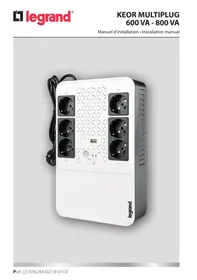
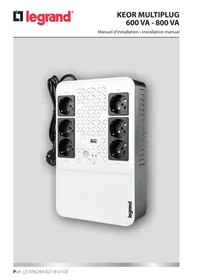
KEOR MULTIPLUG 600 VA - 800 VA
FR FRANÇAIS 3
EN ENGLISH 17
ITALIANO 31
DEUTSCH 45
ES ESPÁÑOL 59
RU PUCCKN 73
Table des matieres
1. Introduction 4
1.1 Use of the manual 18
1.2 Guarantee terms 18
1.3 Copyright 18
2. Safety and Operating Instructions 19
3. Installation 21
4. Operation 23
4.1 Overview 23
4.2 Start-up procedure 24
4.2.1 Normal mode 24
4.2.2 Cold start 24
4.3 Shutdown 25
4.4 LED and Alarm Indicators 25
5. Troubleshooting 26
6. Warehousing and dismantling 27
6.1 Warehousing 27
6.2 Dismantling 27
7. Technical specifications 28
Congratulations on your recent LEGRAND purchase!
! ATTENTION
It is necessary to read the whole manual carefully before doing any operation. Keor Multiplug must be used only in residential and commercial environments.
1.1 Use of the manual
The manual reflects the state of the art when the equipment was put onto the market. This publication conforms to the standards current on that date; the manual cannot be considered inadequate when new standards come into force or modifications are made to the equipment.
The version of the manual updated to its latest release is available on the Internet from the website http://www.ups.legrand.com
1.2 Guarantee terms
The terms of the guarantee may vary depending on the country where the UPS is sold. Check the validity and duration with LEGRAND's local sale representative.
The Manufacturer declines all indirect or direct responsibility arising from:
- failure to observe the installation instructions and use of the equipment which differs from the specifications in the manual;
- use by personnel who have not read and thoroughly understood the content of the manual;
- use that does not comply with the specific standards used in the country where the equipment is installed;
- modifications made to the equipment, software, functioning logic unless they have been authorized by the Manufacturer in writing;
- repairs that have not been authorized by the LEGRAND Technical Support Service;
- damage caused intentionally, through negligence, by acts of God, natural phenomena, fire or liquid infiltration.
1.3 Copyright
The information contained in this manual cannot be disclosed to third parties. Any partial or total duplication of the manual which is not authorized in writing by the Manufacturer, by photocopying or other systems, including by electronic scanning, violates copyright conditions and may lead to prosecution.
LEGRAND reserves the copyright of this publication and prohibits its reproduction wholly or in part without previous written authorisation.
2 Safety and Operating Instructions
This section contains important safety and operating instructions that should always be followed during the installation, use and maintenance of the UPS.
- This product should be installed in compliance with installation rules, preferably by a qualified electrician. Incorrect installation and use can lead to risk of electric shock or fire. Before carrying out the installation, read the instructions and take account of the product's specific mounting location. Do not open up, dismantle, alter or modify the device except where specifically required to do so by the instructions. All Legrand products must be opened and repaired exclusively by personnel trained and approved by Legrand. Any unauthorized opening or repair completely cancels all liabilities and the rights to replacement and guarantees. Use only Legrand brand accessories.
- Ensure that the mains supply voltage and frequency match those of the UPS (see the product label and the technical specifications on chapter 7).
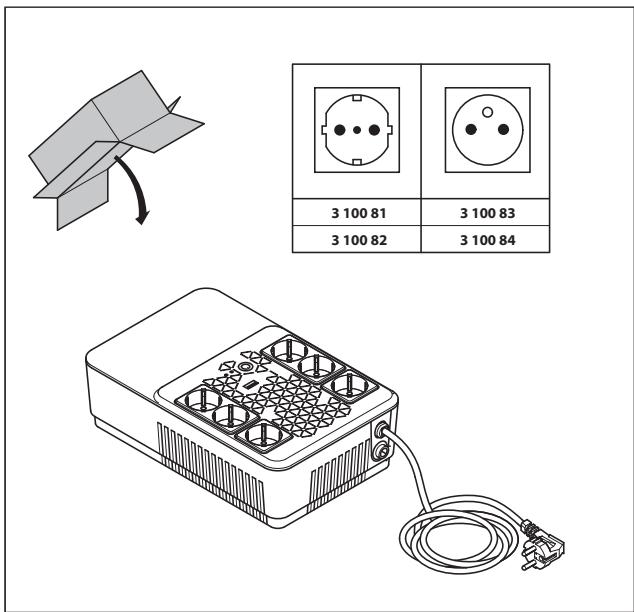
- If any visible damage is found on the product during the unpacking operation, do not install the UPS but repack the unit and return it to your reseller or distributor.
- Before operating the UPS or connecting any load equipment, ensure the UPS is connected to a properly grounded mains socket.
- The load applied must not exceed the one indicated on the type label of the UPS.
- The ON/OFF button of the UPS does not electrically isolate the internal parts. To isolate the UPS, unplug it from the mains power socket.
- Do not attempt to open or disassemble the UPS; there are no user replaceable parts. Opening the case will void the warranty and introduces the risk of electric shock even when the mains plug is disconnected.
- Since the non-detachable power supply cable acts as a separation device, the mains power supply socket shall be installed near the UPS and shall be easily accessible.
- In case of a mains power supply failure, do not unplug the power supply cable. Earth continuity must be ensured to the connected loads.
- Do not plug non-computer-related items such as medical, life-support and house electric equipments to the UPS output.
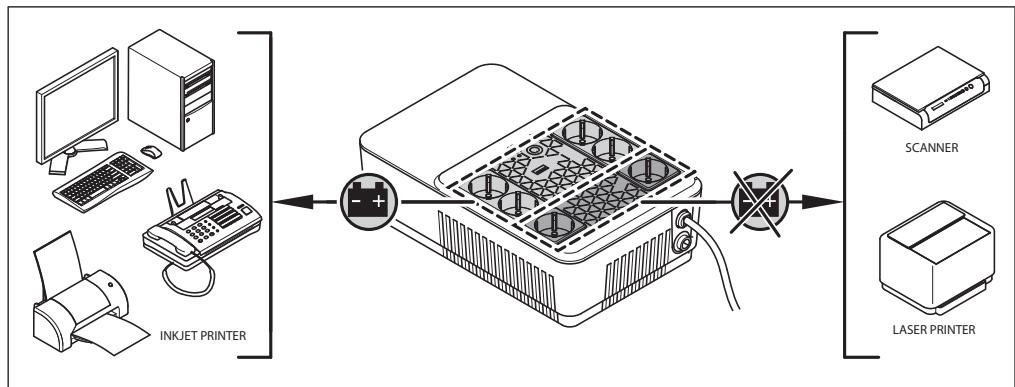
- Do not plug laser printers to the UPS back-up outputs because of their high start-up current.
- The UPS has its own internal energy source (batteries). If the UPS is switched on when no AC power is available, there is hazardous voltage at the output sockets.

The batteries inside the UPS are not user-replaceable. Servicing of batteries must be performed only by electrical hazard authorized personnel.
CAUTION: A battery can present a risk of electrical shock and burns by high short-circuit circuit current. Failed batteries can reach temperatures that exceed the burn thresholds for touchable surfaces. The following precautions should be observed when working on batteries:
a) Remove watches, rings or other metal objects.
b) Use tools with insulated handles.
c) Wear rubber gloves and boots.
d) Do not lay tools or metal parts on top of batteries.
e) Disconnect the charging source prior to connecting or disconnecting battery terminals.
f) Determine if battery is inadvertently grounded. If inadvertently grounded, remove source from ground. Contact with any part of a grounded battery can result in electric shock and burns by high short-circuit current.
The likelihood of such shock can be reduced if such grounds are removed during installation and maintenance (applicable to equipment and remote battery supplies not having a grounded supply circuit).
g) When replacing batteries, replace with the same type and number of batteries or battery packs.

CAUTION: Do not dispose of batteries in a fire. The batteries may explode.

CAUTION: Do not open or mutilate batteries. Released electrolyte is harmful to the skin and eyes. It may be toxic.

CAUTION: Risk of explosion if battery is replaced by an incorrect type. Dispose of used batteries according to the instructions.
- The UPS has dangerous high voltages on its input and output connections. Contact with these voltages may be life threatening.
- In case of emergency, immediately turn off the equipment and disconnect the power cord from the AC power supply to disable the UPS.
- Do not allow any liquid or any foreign object to enter the UPS.
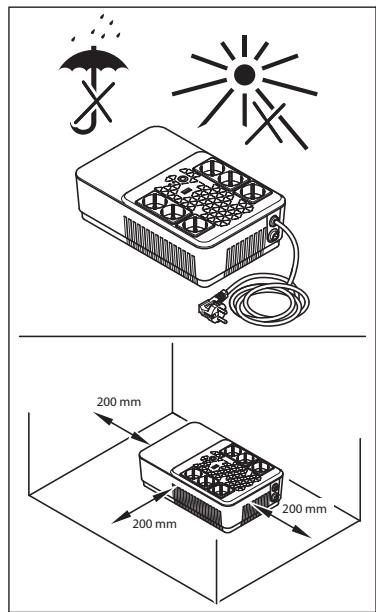
- The UPS is intended for indoor installation in a ventilated, controlled indoor environment with a range of temperature between 0^ (+32^) and +40^ (+104^) and non-condensing humidity < 95% .
- Do not install the UPS in locations with sparks, smoke and hazardous gas or where there is water and excessive humidity. Dusty, corrosive, and salty environments can damage the UPS.
- Do not plug the UPS input into its own output.
- Do not attach a power strip or surge suppressor to the UPS.
- Ensure that the cables connecting the loads to the UPS are not longer than 10 meters.
- Keep a clearance of 20~cm beyond the UPS rear panel. Avoid exposing it to direct sunlight or installing it near heat emitting appliances.
- Unplug the UPS prior to cleaning and do not use liquid or spray detergent.
- Do not place the UPS near equipments that generate strong electromagnetic fields and/or near equipments that are sensible to electromagnetic fields.
- The battery of the UPS should be recharged every 2-3 months if unused. To do so, connect the power cable to a suitable grounded mains socket.

WARNING
The UPS is a category C2 products according to the EN 62040-2. In a residential environment, the equipment may cause radio interference, in which case the user may be required to additional measures.
3 Installation
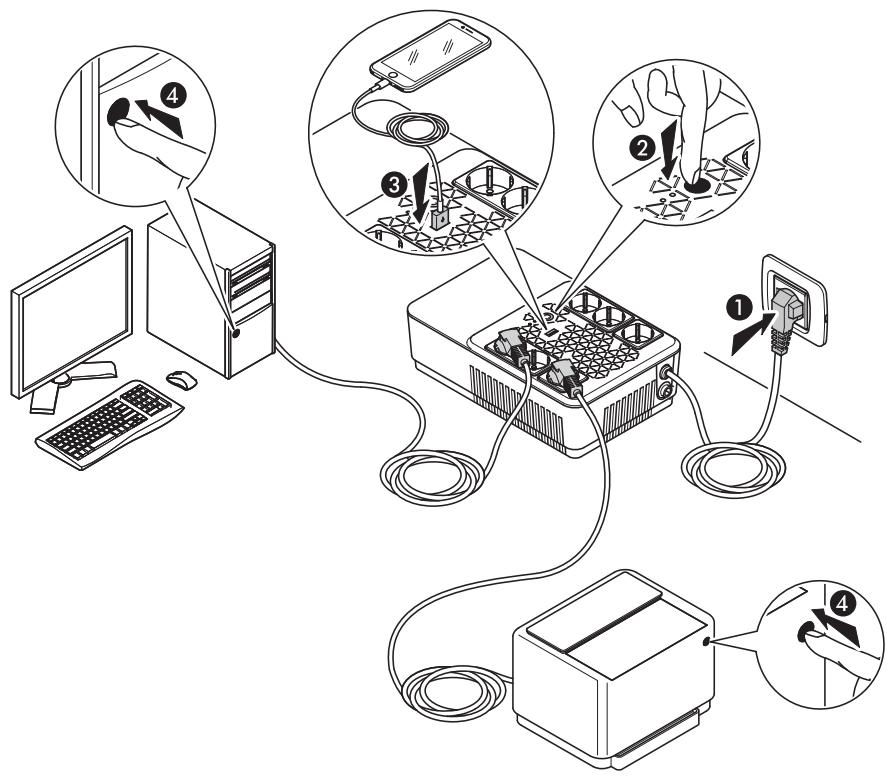
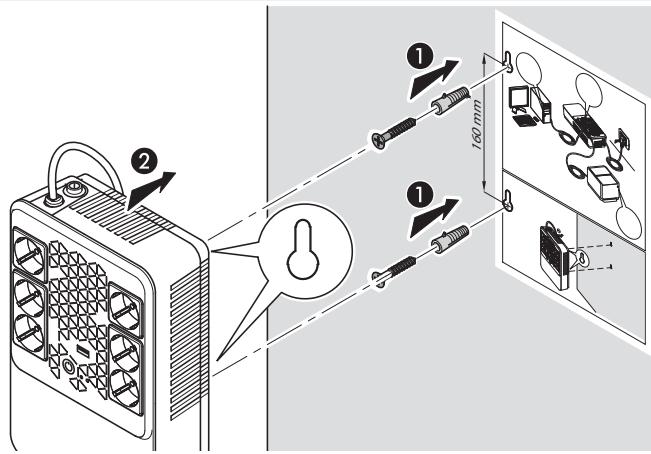
4 Operation
4.1 Overview
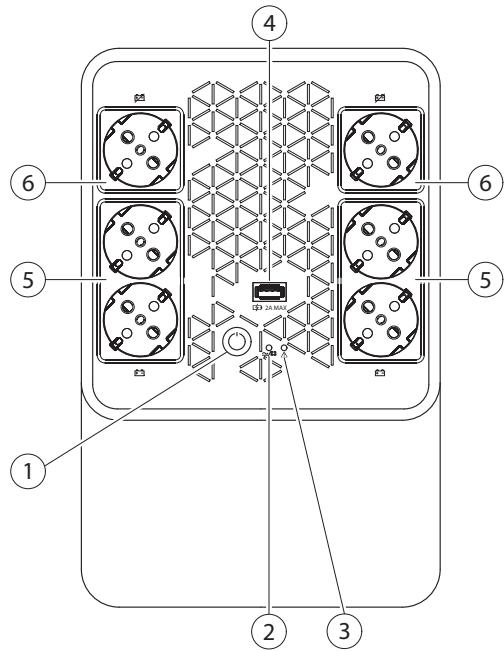
| ITEM | DESCRIPTION |
| ① | ON/OFF button |
| ② | Normal mode/Battery mode LED (blue) |
| ③ | Alarm LED (red) |
| ④ | USB recharge port |
| ⑤ | Back-up outlets |
| ⑥ | Overvoltage protected outlets (no back-up) |
4.2 Start-up procedure
4.2.1 Normal mode
- Ensure that the mains power supply to be used has a suitable voltage/frequency and an upstream protection rated at either 10A or 16 A.
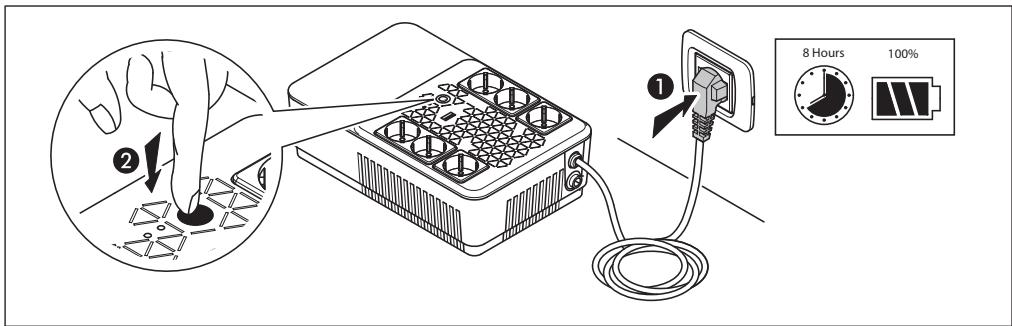
- Plug the UPS power cord into the mains power supply socket. The blue led blinks for an instant.
- The UPS recharges its battery each time it is connected to a mains power supply (even if it is powered down). In this stand-by condition, it is also possible to use the USB charger port. It is recommended to charge the battery at least 4 hours before connecting the loads.
-
Connect the loads to the output sockets. There are two different type of output sockets:
-
4 x back-up sockets: they are powered only when the UPS is on. If the mains power fail, the back-up sockets are battery powered.
- 2 x overvoltage protected sockets: they are powered also when the UPS is off. These sockets provide protection only from overvoltages. If the mains power fail, these sockets are not powered.
Ensure that the power of the loads can be managed by the UPS.
- Press the ON/OFF button to start-up the UPS and power the loads. The blue and red leds are lit for 3 seconds along with a 3 seconds long acoustic signal.
INDICATION
The UPS has the autorestart function. In case the mains power fail and the UPS reaches the end of the back-up time, the load is powered automatically when the mains power is back.
4.2.2 Cold start
- Make sure the internal battery is fully charged.
- Connect the loads in the back-up sockets.
- Press the ON/OFF button to start-up the UPS and power the loads. The blue and red leds are lit for 3 seconds along with a 3 seconds long acoustic signal. After that, the blue led blinks once and there are two beeps.
INDICATION
The output frequency is set to 50Hz
4.3 Shutdown
- Press and hold the ON/OFF button until the blue led turns off.
- The UPS stops powering the back-up outlets.
- Unplug the UPS from the mains power supply socket to stop powering also the overvoltage protected outlets.
4.4 LED and Alarm Indicators
| NORMAL MODE/BATTERY MODE LED | ALARMLED | ALARM | UPS STATUS |
| Steady | OFF | OFF | The UPS is operating in normal mode |
| LED blinking every 3 seconds | OFF | OFF | UPS operating in battery mode with battery status 40%-100% |
| LED blinking every 3 seconds | OFF | 1 beep every 10 seconds | UPS operating in battery mode with battery status 20%-40% |
| LED blinking every 2 seconds | OFF | 1 beep every 2 seconds | UPS operating in battery mode with battery status <20% |
| Steady | OFF | Intermittent | Overload in normal mode |
| OFF | Steady | Continuously sounding | UPS shutdown due to prolonged overload |
| Steady | Steady | 1 beep every 10 seconds | Battery fault |
| OFF | Steady | Continuously sounding | UPS fault (other than overload) |
| INDICATION | POSSIBLE CAUSE | SOLUTION |
| Alarm LED ON | UPS fault | Remove the loads from the UPS outlets. Turn off the UPS and disconnect it from the mains. Connect the UPS to the mains and turn on again. If the problem persists, contact the LEGRAND Technical Support Service. |
| Intermittent alarm sound with the UPS working in normal mode | Overload | Disconnect some non-critical loads from the UPS outlets until the overload ceases |
| The UPS doesn’t work in stored energy mode or the backup time is shorter than its intended performance | Low battery or battery fault | If the backup time remains unsatisfactory after 8 hours of battery charging, contact the LEGRAND Technical Support Service |
| The UPS is working normally but the loads are not powered | - | Check that all power cords are properly connected. If the problem persists, contact the LEGRAND Technical Support Service. |
| The UPS works on battery mode even though the mains power is available | The UPS fuse blew up | Replace the fuse with a new one (T5AL250V) |
| The mains power supply socket is not supplying power to the UPS | Check that the UPS works on another socket. If so, have the initial mains power supply socket checked by a qualified electrician. |
| Strange noise or smell | UPS fault | Shut down immediately the UPS. Unplug the UPS from the mains socket and contact the LEGRAND Technical Support Service. |
6.1 Warehousing
The UPS must be stored in an environment with a room temperature between +20^ (+68^) and +25^ (+77^) and humidity less than 95% (not condensing). The battery installed inside the UPS is lead/acid sealed and does not require maintenance (VRLA). The battery should be charged for 8 hours every 3 months by connecting the UPS to the mains supply socket. Repeat this procedure every two months if the storage ambient temperature is above +25^ (+77^) .

CAUTION
The UPS must never be stored if the battery is partially or totally discharged.
LEGRAND is not liable for any damage or bad functioning caused to the UPS by wrong warehousing.
6.2 Dismantling

DANGER
Dismantling and disposal operations may only be done by a qualified electrician. These instructions are to be considered indicative: in every country there are different regulations with regard to the disposal of electronic or hazardous waste such as batteries. It is necessary to strictly adhere to the standards in force in the country where the equipment is used.
Do not throw any component of the equipment in the ordinary rubbish.

Batteries must be disposed of in a site intended for the recovery of toxic waste. Disposal in the traditional rubbish is not allowed.
Apply to the competent agencies in your countries for the proper procedure.

WARNING
A battery may constitute a risk of an electric shock and high short-circuit current.
When working on batteries, the prescriptions indicated in chapter 2 are to be adhered to.
It is important to dismantle the various parts the UPS consists of. For these operations, Personal Protective Equipment must be worn.
Sub-divide the components separating the metal from the plastic, from the copper and so on according to the type of selective waste disposal in the country where the equipment is dismantled.
If the dismantled components must be stored before being properly disposed, be careful to keep them in a safe place protected from atmospheric agents to avoid soil and groundwater contamination.
For the disposal of electronic waste it is necessary to refer to the industry standards.

This symbol indicates that in order to prevent any negative effects on the environment and on people, this product should be disposed of separately from other household waste, by taking it to authorised collection centres, in accordance with the EU countries local waste disposal legislations. Disposing of the product without following local reg-
ulations may be punished by law. It is recommended to check that this equipment subject to WEEE legislations in the country where it is used.
| 3 100 813 100 83 | 3 100 823 100 84 |
| General characteristics |
| Nominal power (VA) | 600 | 800 |
| Active Power (W) | 360 | 480 |
| Technology | line interactive (VI) |
| Waveform | simulated sinewave (battery mode) |
| Transfer time | 2-6 ms (typical) |
| Input characteristics |
| Connection | non-detachable cable 3x0.75mm² with German/French standard plug |
| Rated voltage | 230 V |
| Range of voltage | 170 V - 280 V |
| Rated frequency | 50 / 60 Hz ± 5 Hz with auto-sensing |
| Rated current | 2.8 A | 3.5 A |
| Output characteristics |
| Outlets | 4 x CEE 7/3 with battery back-up and overvoltage protection(3 100 81 / 3 100 82)2 x CEE 7/3 with overvoltage protection(3 100 81 / 3 100 82)4 x CEE 7/5 with battery back-up and overvoltage protection(3 100 83 / 3 100 84)2 x CEE 7/5 with overvoltage protection (3 100 83 / 3 100 84)USB Type A Female / 5 V - 1 A |
| Rated voltage | 230 V ± 10% (battery mode) |
| Rated frequency | 50 / 60 Hz ± 1 Hz with auto-sensing (battery mode) |
| Efficiency | up to 98% |
| Overload capacity | From mains:automatic shutdown after 5 minutes with load>100%automatic shutdown after 5 seconds with load>120%immediate shutdown for shortcircuitFrom battery: immediate shutdown |
| Battery |
| Number of batteries | 1 |
| Battery type | lead-acid sealed without maintenance (VRLA) |
| Unitary capacity | 12 Vdc - 7.2 Ah |
| Rated Battery Voltage | 12 Vdc |
| Backup time | 10 min (calculated with one typical workstation) |
| Protection | against total discharge |
| Typical recharge time | 4-6 hours |
| Communication and management |
| Interface | one pushbutton and two LEDs |
| Alarms | Visual (LED), Audible (buzzer) |
| Protections | Against overload, overvoltage and short-circuitReplaceable input fuse (T5AL250V)BackfeedOvertemperature |
| Mechanical characteristics |
| Dimensions W x H x D (mm) | 190 x 89.5 x 296 |
| Net weight (kg) | 5 | 5,5 |
| Environmental conditions |
| Operating temperature | +0 °C to +40 °C+32 °F to +104 °F |
| Operating relative humidity | <95% (non-condensing) |
| Storage temperature | +20 °C to +25 °C+ 68 °F to +77 °F |
| Noise level at 1 m | < 40 dB |
| IP code | IP 20 |
| Reference directive and standards |
| Safety | 2014/35/EU DirectiveEN 62040-1 |
| EMC | 2014/30/EU DirectiveEN 62040-2 |
Indices
1. Introduzione 32

m = 311 ;
5. UcTpaHHe HEnCnpaBHOCTeI 82
6. XpaHHeHne n yTuInn3aun 83
6.1 Xpachenne 83
6.2Демонтах 83
7. Texhnueckne xapaKtepncnkn 84
POn3IpaBIAeM BAC c HeaBnM npNo6peTeHnEM npOyKuIN LEGRAND!

BHIMAHNE
Ipeed BbInonHeHem IIO6bIX pa60 TcneDyET BHIMaTeJIbHO 3yUHTb HAcTOnJUe peKOBoDCTOB. IN5P Keor Multiplug npedHa3HaueH dIpy npimHeHn ToIbKO B NOMEuHnx JINbIX n KOMMepueckx 3dAHn.
1.1 O daHHOM PykoOboCTBe
B PykoBoDCTBe onncaHO o6OpydoBaHne NO COCToHnIO Ha MOMENT erO BbIXoJa Ha pbIHOK. DAnHbI JOKymeHT COOTBeTCTByET CTaHdApTaM, JeINCTBYUoIM B TO Bpemr. PykoBOcTBo He MOKeT CUntAcbY UtpaTHBIm CIny BCJeDCTBHe BbIXoJa HObIx CTaHdApTOB IIN BHeCEHn I3MeHenn B o6OpydoBaHne.
Bercnny PykoBoDCTBa C HOBeiShmN O6HOBJIeHNrMa NocTyuHa Ha caIte http://www.upslegrand.ru
1.2 TapaHTnHbIe 06a3aTeNbCTBa
ГараHTинье 6OB3aTeNbCTBa MORYT BapbIpOBaTbC8A 3aBUNMOCTN O T cPaHbI, B KOTOPO 6bln npoan IV5П. Проверпе 6Obem n CpOKn DeiCTBnrg rapaHTn B MeCTHom ppeDCTaBnteJbCTBe LEGRAND.
ПюиЗВоДиТь OTKa3ыBaETСОТ ЛIOБОй KOCBEHNO ИИnpЯМО OTBETCTBEHHOCTN BCJIeDCTBVE:
-
Heco6nIOeHn yka3aHn IIO MOHTaJy u nCnoJIb3OBoHn O6OpyuOBAHn, xapaKTepeNCTNK KOtOpOro OTnuaIOTcR OT yka3aHHbIX B hAcToIeM PykoBOdCTBe;
-
ькплуатуиошпоганя посонл, He n3yubuim NactoJee PykoBoDCTBO;
-
экглуатуци С hapушеним HopMaTиBньIx ДOKум entOB CTpaHbl, B KOTopoI yCTaHOBJIeHO obopудованe;
-BHecenHnI3MeHeHnB O6OpUdObaHne, IporpamMHOe 06cepeHne n IJorNk y pa6oTbI, KOtOpbIe He 6bln pa3peSeHbI POn3BOIDTeJIeM B NcBmEHNO fOpMe;
-
peMOHTa, BbIOnJIeHHOrO He cIyJaMn CnyK6bl TeXHnuecko NpIePxxkN LEGRAND;
-
NOBpeJdeHn, INpuHHeHHbIX yMbIJIeHNO IIN IO XaIaNCTN, IOD Bo3JeCTBnEM O6cTOrTeNbCTB HeIpeOdoIIMo Cnbl, CTNXnHbIX 6eDCTBn, IONKapa IIN IONaDaHnJxNkOCTN.
1.3 ABTopckoe npaBO
PnubedeHnaBhactoJsemPykoOBDCTBeHHOpMaunHeDOnJHa6bItbDcTynHaTpeTbMnIzam.
UactuHoe nnnnoNHOe Bocnpoun3BeDeHne HactoJepo PykoOoCTBa nyTeM fOTOKOpOBaHnA,
cKaHIpOBaHn I npyUmN CnOc6aMn YBnEeTcHapuSeHnEM 3aKoHoDaTeNbCTBa o6 abTopcKOM
npabe N npceJeDuETcNo 3aKoHy.
KoMaHnIaLEGRANDЯBnEeTcO6NaTaTeMeA BTOpCKnx npaB n 3aIpeuaeT qacTuHoe nII IIOHoe Bocpon3BeHeNHe DaHHoro pyKOBoDCTBa 6e3 CBOero NcMbEmHO rpa3peWeHn.
2 Mepb6e30nacnoctn npaBnla pa6oTbI c n3deennem
B daHnom pa3dene coepkataa Baxhble yka3aHnno Meap 6e3oNaChOCTn npabuHa pa6bti c n3deHem, KOTOpbIe CJeDyET Co6NIODaTb npm MoHTaxe, NcNoJIb3OBAHn n o6ClyKbAHn N5Pi.
- Mohtax DaHHoro I3dJIeNIOJKeH BbIINOLHrTcB KBaJIINΦUncipOBaHHbIM 3JeKTPnKOM B COOTBeTCTBm C NHCtpyKcIeN IpOUN3BOJntEJI. HenpaBunlbHra YcTaHOBka MOpET npINBeCTN K OnaCHoCTn BO3rOpAHnI INI NopAxeHnI 3JeKTPnueckIM TOKOM. IpeE HauJIOM MOHTaxa BHNMaTeJbHO I3yUInTe DaHHbIe IHCTpyKcIeN U cNOBnI Ha MeCte YcTaHOBKn I3dJIeNIA. He BCKpbBaIte Kopnyc I He I3MeHnIte INI MoDfNcIpyIte I3dJIeN3a NcKLIouHeHem CnyaeB, yKa3aHHbIX B IHCTpyKcIeX. OTKpbBaTb n PEMONTIpOBaTb BCE I3dJIeNIA Legrand pa3peShaetc TOnbKO CneuAlnCTAm, POnTOBLeHHbIM u YpONHMOChEHHbIM KOMNaHnei Legrand. JIO6a HecaHKUIOHnpOBaHHa PA36OpKa I pMoHT I3dJIeNIA HeABTOPzOBaHHbIM nepCOHaJOM AByIeTc3aKOHbIM OCHOBaHnEM K PpeKaPeHnIO rapaHTNIHO o6cLyJxBaHnIA, peMOHTI INI 3aMeHbl. Pa3peShaetc NcPONb3OBA TbToBko akceccyapbl npON3BOvctBa Legrand.
- Y6eDITecb B TOM,чTo HAnpJxHHe N uactota 3JIeKTPocetN COOTBeTCTBYIOT yKa3aHHbIM Ha nacnpToTHo Ta6JIuChe IV5ПиВ TextHnuecknx XapakTepcntkax (cM. rnaBy 7).
- Пиообнаруженилюбого вдимого повржденья BO Врм распakови n3denя, He yctанавливайт eIbI, a zanakуite n Bo3ВразITE erO npodabuy nii nДСТРИБOTOPY.
- Ipeed nauajom pa60tbc IVbI nn noqkniuehenem liobn harpy3kn y6eintecb, yTO IVbI noqkliouen K npabunbHO 3a3emneHHo po3etke 3neKtpocTeN.
- Moцhoctb noqkIqueHHoH naRpy3kn He noJxHa npeBbIaTb mozhoctb IVbI, kOTopayka3aHa Ha nacnpToHn Ta6JIuKe Ha 3aDneH CTOpOHe n3dEIny.
KhoNka BKJI/OTKJI ha IV5n He Imeet ralbbaHuecko pa3Bra3Kn C BHyTpehHmN 3JeMeHTaMn 13dEInna. JIy n3OJauu N5Pi Heo6xOJMo OTCoeDINHT b erO OT 3JneKTpocETn, BByTaUmb shHyp PntTaHn y3 p03eTkn.
Kateropnueckn 3aippeaaetcBCKpbBaTb Kopnyc n pa36npaTb IV5P; OH He coepknt deTaeJe, 3ameHembix npb30BaTeJeM. BckpItne kopnyca Blueyet 3a co6oJ OTMeHy rapaHTnn N MoKeT npuBeCTN K nopaxeHHIO 3JIeKTpnueCKm TOKOM, daXe eCIn BuIIka shHypa NITaHn I3BLeyeHa n3 po3ETKn.
- Послъкдя-coeиненясэкгрocetю nCnoIb3yeTcHneOTcoeINHЯьмьOTИБПшурпитаня,Topo3ETkaэkeKtpocetnДOLJHapacnoIaratbcB HENOCpeDCTBeHHo6IIN3OCTNOTИБПи6bIbIerkoDocTyuna.
B cnuyae nCue3HOBeHnHa npXeHn 3NeKtpocTe H He BbHMaIte BnJIky hHpa nItaHn I3 po3eKn. CneDuYeTo6ecneuTb HnpepbIBHoCTb ceIN 3a3emLeHn Ira NIOkJIIOUeHHbIX Harpy3OK.
KbIxOyIbIaIpeaTaTPOJKJIouaTbJIIO6oeO6OpUoBaHne,HeOTHOcJIueeecKaKOMbIOTepHOMy: MeiunHckyo annapaTpy, cpeCTBa JxN3He06ecneueHn, 6bITOBbe 3JeKTPoPnp6opbl.
K BbIXOHyBIM po3eTkAm c 6aTapeHNoi PoIePxxKo 3aIpeUaTeCn POnKlHouaTb Ja3epHbIe IpnHTepbl, NocKoJIbKy OHI IMeIoT BbICOKn IyCKOBON TOK.
- IV5П Имeel co6ctBeeHbI nCTOChNk 3JIeKTPo3Heprn - aKKyMnyTOpHbIe 6aTapeI. EcIn IV5P BKNIOUeH, KOrJa HAnpJxKeHne B 3JIeKTPocETn OTCyTCTByET, To Ha erO BbIXoJax npICyTCTByET OnaCHOe HAnpJxKeHne.

Batape Bnytpn N5N He npedHa3NaYeHbI dny 3aMeHbI NOlb30BaTeJIeM.
O6cnykmbaTb 6aTapei pa3pe7aetcra Tolbko nepcoHaNy, IMeIoUeMy COOTBeTCTByUoIuI nnDOnyck no 3JIeKtpo6e30nacHoctn.

OCTOPOXHO: BaTapei npedctabIeT pIck C ToKn 3peHn IopaxHeN 3neKTpueckm TOKOM N KOPOTKOro 3ambikaHn. HeicnpaBhIe 6TaapeuMOryT hArpeBaTbcI Do TEMpeaTypbl, cnoc6Hoi Bbl3BaTb Oxor. Co6JIouaIte cIeNyUoIe Mepb IpeoctOpoxHoCTn npn 6baaeeHn C 6TaapeaMn:
Pro and Consumer Service
BP 30076-87002
LIMOGES CEDEX FRANCE
www.legrand.com