 EasyManual
ORAIN - Dehumidifier AIR AND ME - Free user manual and instructions
Find the device manual for free ORAIN AIR AND ME in PDF.



User questions about ORAIN AIR AND ME
0 question about this device. Answer the ones you know or ask your own.
Ask a new question about this device
Download the instructions for your Dehumidifier in PDF format for free! Find your manual ORAIN - AIR AND ME and take your electronic device back in hand. On this page are published all the documents necessary for the use of your device. ORAIN by AIR AND ME.
USER MANUAL ORAIN AIR AND ME
ACCESSIONE (NON INCLUS)
Thank you for having purchased Orain dehumidifier, an air and me product. We hope that it will bring you complete satisfaction and improve your indoor air quality.
As with all electrical appliances, it is important to maintain the appliance properly in order to avoid any damage or injury. Please read these instructions carefully before using the appliance and keep them for later reference. WAF-Direct refuses all liability for any damage that is caused by non-compliance with this instruction manual. The appliance should only be used in a domestic environment for the purposes described in this instruction manual. Using the appliance for other purposes or performing alterations to it can be dangerous for your health or even fatal.
IMPORTANT SAFETY INFORMATION
- Read all instructions carefully before using Orain.
- Any other use that is not recommended by the manufacturer may cause fire, power surge, or injuries to persons.
- Remove the packaging and check Orain for any damage. In case of doubt do not use it and contact your supplier.
- Do not let children play with any parts of the packaging.
- Before using Orain, check if the voltage indicated on the rating label corresponds with your electrical installation.
- Be particularly aware when Orain runs near children.
- Using extension cord could create overheat and cause a risk of fire.
- Do not disconnect the power cord from the power supply by pulling on it. Grip the plug and pull from the power socket.
- Do not insert any objects into Orain; it could cause electrical shocks or damages. Do not cover or put any objects on Orain that could prevent the air flow.
- Keep the air inlet/outlet away to any fabrics, wall or objects that could disturb the functioning.
- Orain is not conceived to be used in wet or damp places. Never use it if there is a possibility for it to fall into water.
- Leave at least 30cm of space on the back and sides of the product, and at least 50cm of space above the product when using.
-
Be sure to place and use the product on dry, flat and horizontal surface.
-
Do not use Orain outdoors.
- Always disconnect the product from the power source when moving it from one place to another.
- Keep the product clean and maintain it in good condition.
- Use recommended spare parts only (non-official parts may be dangerous, and will invalidate your warranty).
- Store Orain in a safe and dry place, out of range of children.
- If the supply cord is damaged, it must be replaced by the supplier; only qualified persons can do this repair.
- This product cannot be used by children less than 8 years old and persons with reduced physical, sensory or mental capabilities. Read carefully the user manual to use Orain in a safe way.

To prevent danger of electric shock, unplug when not in use and before cleaning. If the supply cord is damaged, it must be replaced by a qualified person in capacity to make the reparation.
DOMESTIC INJURY PREVENTION
The safety of this product conforms to the relevant norms and regulations in force in the EU.
For any further information, please visit our website: www.airandme.fr
Our customer service department is available at the following email address: info@airandme.fr
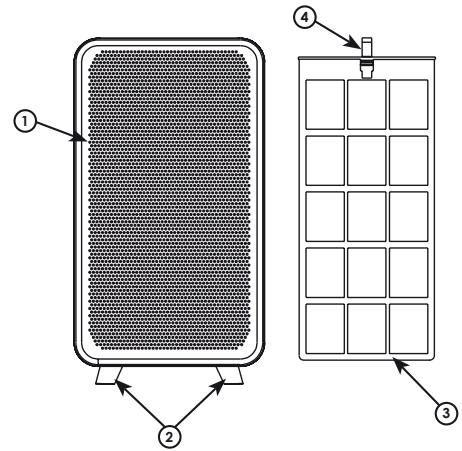
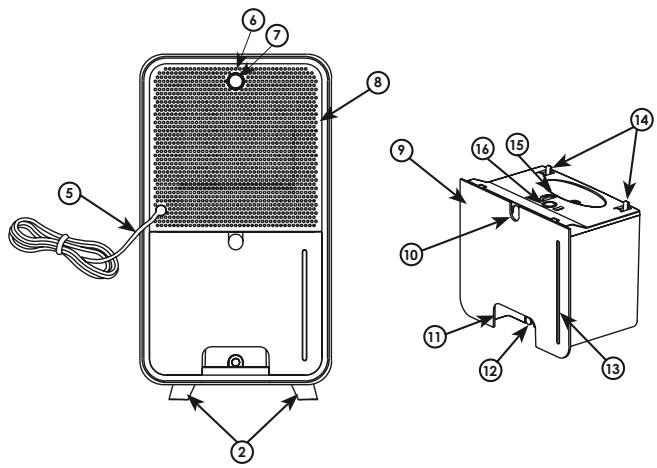
LEGEND
① Air inlet
(2) Feet
③ Pre-filter
④ Filter handle
⑤ AC power connector
Indicator
⑦ Power button
⑧ Air outlet
Water tank
Pump connector hole
Water tank handle
Drainage rubber plug
③ Water level window
14 Top buckle
15 Convex top
16 Floater
TECHNICAL DATA
Voltage 100-240 V
Product size 360 x 200 x 133 mm (H x W x D)
Net weight 2 kg
Speed 2
Power 40 W
Suitable for rooms up to 20m^2
Water tank capacity
Applicable temperature
Working capacity
2 kg
2
40W
20 m²
2L
15^ C - 35^ C
750ml/D (30°C, 80% RH)
OPERATING INSTRUCTIONS
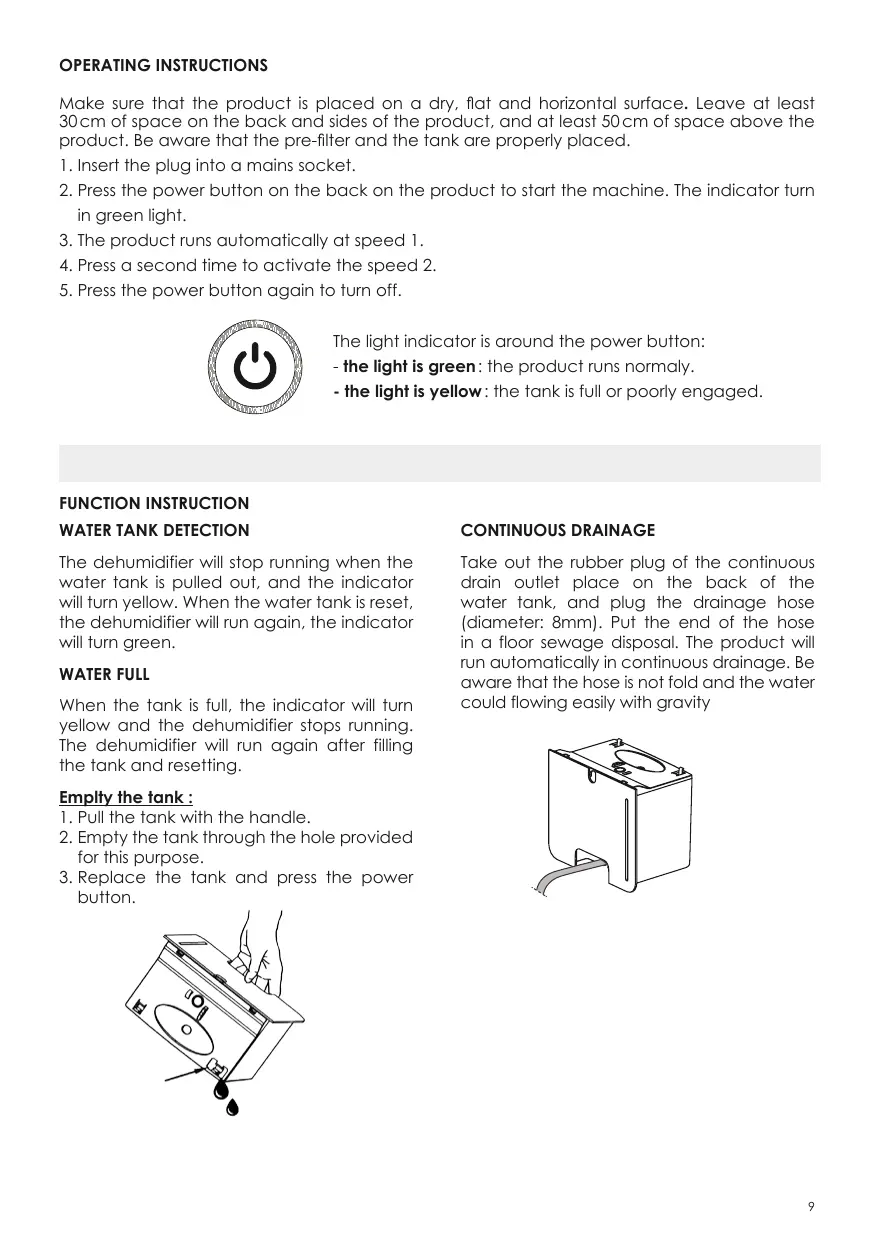
Make sure that the product is placed on a dry, flat and horizontal surface. Leave at least 30cm of space on the back and sides of the product, and at least 50cm of space above the product. Be aware that the pre-filter and the tank are properly placed.
- Insert the plug into a mains socket.
- Press the power button on the back on the product to start the machine. The indicator turn in green light.
- The product runs automatically at speed 1.
- Press a second time to activate the speed 2.
- Press the power button again to turn off.
The light indicator is around the power button:
- the light is green: the product runs normally.
- the light is yellow: the tank is full or poorly engaged.
FUNCTION INSTRUCTION
WATER TANK DETECTION
The dehumidifier will stop running when the water tank is pulled out, and the indicator will turn yellow. When the water tank is reset, the dehumidifier will run again, the indicator will turn green.
WATER FULL
When the tank is full, the indicator will turn yellow and the dehumidifier stops running. The dehumidifier will run again after filling the tank and resetting.
Empty the tank :
- Pull the tank with the handle.
- Empty the tank through the hole provided for this purpose.
- Replace the tank and press the power button.
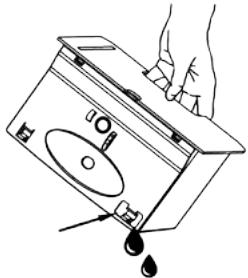
CONTINUOUS DRAINAGE
Take out the rubber plug of the continuous drain outlet place on the back of the water tank, and plug the drainage hose (diameter: 8mm). Put the end of the hose in a floor sewage disposal. The product will run automatically in continuous drainage. Be aware that the hose is not fold and the water could flowing easily with gravity
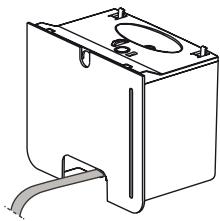
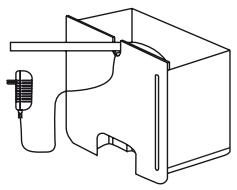
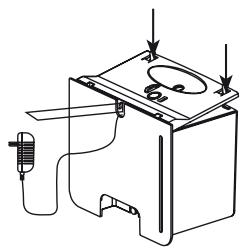
Orain have a lift pump hole evacuation (none included).
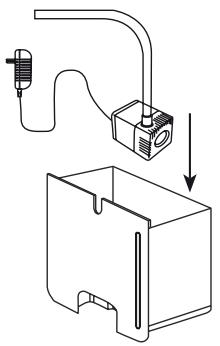
Open the tank, put the pump in it, place the hose and the power cord outside thanks to the hole evacuation. Replace the convex top before pushing the tank into the product.
CLEANING PRE-FILTER
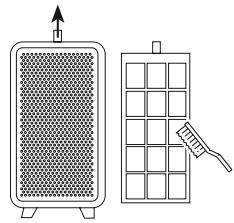
The pre-filter capture big dust and prolong the efficiency of the product. It's remended to clean it every months.
Pull the pre-filter handle to the top and remove it. Clean it with a soft brush before replace it.
AUTO DEFROST FUNCTION
The usage temperature of the dehumidifier is from 5^ to 50^ . It's important to noticed that when this function starts the efficiency is reduced. For optimal use make sure you have a temperature between 15^ and 35^ .
MAINTENANCE
- Ensure the machine is swich off and unplugged before maintenance.
- Do not immerse the machine in water or any liquid.
- Do not use abrasive, corrosive or flammable cleaners to clean any part of the product.
- Use a soft fabric to remove dust from the surface of the unit air inlet/outlet.
- Clear every mounth the tank with an appropriate cleaning product or white vinegar to avoid any limescale.
STORAGE
- Clean and empty the tank and assure that the product is completely dry.
- Never store the product with water on the tank to avoid any bacteria proliferation.
- The product needs to be protected to dust and storage in a dry and clean room.
NONE INCLUDED ACCESSORY
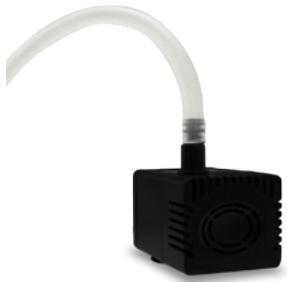
To remove the water on a raise evacuation you can add the air & me lift pump. Pump it up could remove 450L/h on a height of 3 meters. With its small size, it could be easily placed into the tank.
PUMP IT UP
www.airandme.fr
FAQ
| Situation | Reason | Solution |
| The product don’t work | > The socket is not correctly plugged. Is there a power outage. | > Plug correctly the socket with the right voltage. Avoid multi-taps. |
| > The home leakage switch or fuse cut off. | ||
| > The water tank is full. | > Empty the tank. | |
| > The water tank is not correctly placed. | > Push the tank in its right position. | |
| Decrease in performance of the product (less water in the tank) | > The pre-filter is dirty so that it blocks the airflow. | > Clear the pre-filter. |
| > The air inlet/outlet of the machine is blocked by something. | > Leave at least 30cm of space on the back and sides of the product, and at least 50cm of space above the product. | |
| > The temperature is too low. | > Under 15°C the product is in defrost function. The product could not works with its optimal capacity. | |
| > The humidity level is already low. | ||
| Significant noise | > There is anything stuck on the fan in the air outlet. | > Make sure that any objects could damage the fan. |
| > The machine have a functioning problem. | > Call your dealer for an after sale service. |
The appliances are under warranty for a 2-year period from the purchase date. The warranty covers all failures resulting from hidden manufacturing or raw material defects. This warranty does not cover failures or damages resulting from an inadequate setup or usage, or from the normal wear and tear of the product. Spare parts are also available for a period of 2 years after the date of purchase.
Air&me cannot be held liable in case of an inadequate or dangerous use of the products.
DEEE
Disposal of Electric and Electronic Equipment (Applicable in the countries of the European Union and other European countries with separate collection systems appropriate). This symbol on the product indicates that this product shall not be treated as household waste. It should be handed over to the applicable collection point for the recycling of EEE (Electrical and Electromagnetic Equipment). By ensuring this product is disposed of correctly, you will help prevent potential negative consequences for the environment and human health. The recycling of materials will help to conserve natural resources. For additional information about recycling of this product, please contact the municipality, the waste or the retailer.