PSP80 - PA speaker ONEARZ - Free user manual and instructions
Find the device manual for free PSP80 ONEARZ in PDF.



User questions about PSP80 ONEARZ
0 question about this device. Answer the ones you know or ask your own.
Ask a new question about this device
Download the instructions for your PA speaker in PDF format for free! Find your manual PSP80 - ONEARZ and take your electronic device back in hand. On this page are published all the documents necessary for the use of your device. PSP80 by ONEARZ.
USER MANUAL PSP80 ONEARZ
Please read this manual carefully before using the product for the first time.
GETTING STARTED
Thank you for your purchase. We hope that this product will bring you complete satisfaction. Please read this user 's manual carefully before using the product to make a correct use of the functions and know well about the system connection and usage. Please keep this manual in a safe place for future reference.
BOX CONTENT
Please make sure that the following items are in the packaging when you open it for the first time: PSP80 speaker - Micro-USB charging & AUX combo cable - Remote controller - Shoulder strap User manual (UK-FR-NL-SP).
SAFETY INSTRUCTIONS
Read the following recommendations before installing the speaker.
- Keep it dry and don't take it to damp places to avoid the product's internal circuit being affected.
- Keep the product away from direct sunlight or hot places. High temperatures will shorten the life of electronic devices, destroy the battery or distort certain plastic parts.
- Don't expose the product to extremely cold area. It may damage the internal circuit board.
- Don't try to disassemble the product as it may get damaged and the warranty will be cancelled.
- Don't let it fall down onto the floor or other hard surfaces. The internal circuit might get damaged.
- Don't use intensive chemical products or detergent to clean the product.
- Don't scratch the surface with sharp objects.
- Take care when charging the speaker, excessive prolonged charging can damage battery lifetime. Charge the speaker to full capacity when using for the first time.
- If does not use this speaker for long time, please charge at least once within one month, in order to prevent the lithium battery from causing and damaging because of excessive consumption.
- Do not play music at excessive levels as damage to hearing and/or equipment may result.
- Do not use outdoors in wet or in damp surroundings.

WARNING! KEEP BATTERIES OUT OF REACH OF CHILDREN.
Never allow children to replace button batteries on any device. Swallowing or placing inside any part of the body may lead to severe or fatal injuries in as little as 2 hours or less due to chemical burns and potential perforation of the oesophagus. If the battery compartment (if applicable) does not close securely, stop using the product and keep it away from children. If you suspect that batteries have been swallowed or placed in any part of the body, seek medical attention immediately.
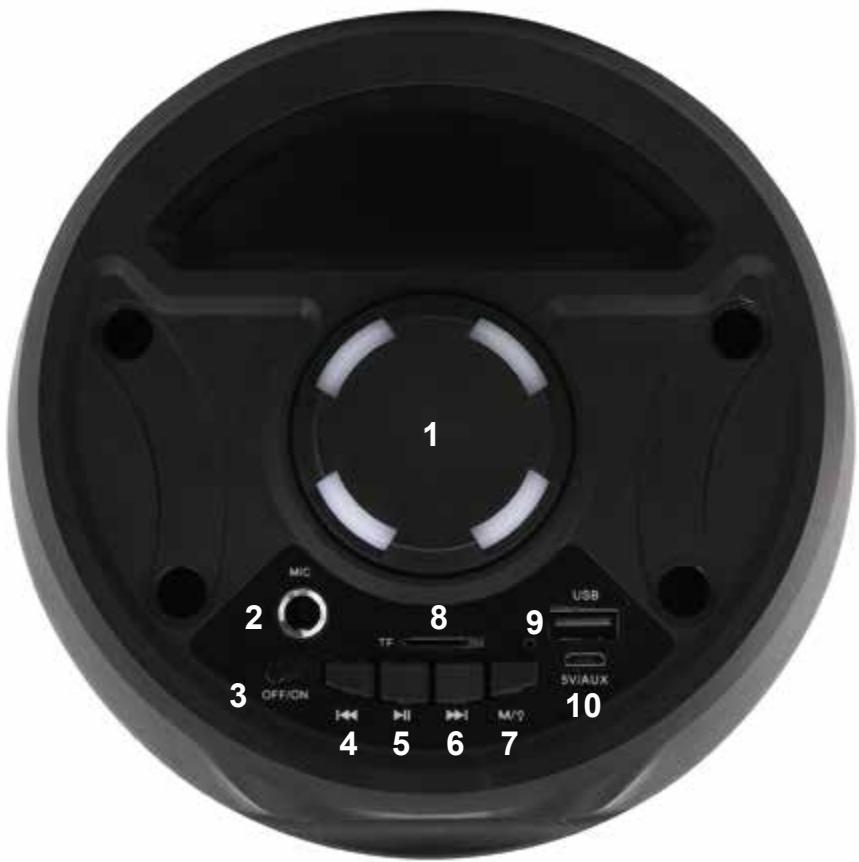
- Volume knob
- 6,3mm microphone input
- ON/OFF switch
- Previous song / Radio station
- Short press for Play / Pause Long press for radio searching
- Next song / Radio station
- Short press to switch Mode Long press to swicth ON/OFF the lights
- Micro SD card slot
- USB disk slot
- Charging & AUX input
DESCRIPTION OF THE REMOTE CONTROLLER
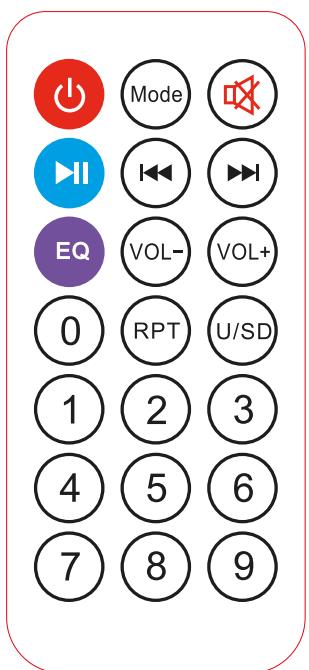
- Power: Press this button to turn ON or OFF the unit (the switch at the top of the unit must be on the ON position to allow this function)
- Mode: Press to toggle between sources BT/USB/ TF Card/LINE IN/FM radio
- Mute: Press this button to mute / unmute
- Play/Pause: Press this button to play or pause the track
- Previous Track: Select previous track in BT/USB/TF card modes - Long press for fast rewind
- Next Track: Select next track in BT/USB/TF card modes - Long press for fast forward
- EQ: Select your favorite style of playing music
- Volume -: Press this button to decrease the volume
- Volume+: Press this button to increase the volume
- 0-9: Select your track song from your USB disk or TF card
- RPT: Press to repeat the current selected song
- U/SD: Press to select playing from USB disk or from micro SD card
CHARGING THE BATTERY OF THE SPEAKER
Connect the USB connector of the micro USB cable supplied together with the product to one free USB port of the computer or to a USB wall charger (not included), and the other end to the micro-USB port (DC 5V) located on the top of the product. The LED charge indicator light will turn RED during charging. It will take around 2-3 hours for the lithium battery to be fully charged with a 5.0V - 1.5A USB charger. The red LED indicator light will turn OFF when the battery is fully charged.
Note:
- Please use the good quality USB charger to charge the speaker.
- We suggest you use a power adaptor with specification 5.0V / 1.5A.
- When speaker has low battery capacity, please charge the it immediately.
- The speaker can be charged by different charging current, if using the computer USB port to charge the speaker, the charging time will be longer as the charging current will be about 500mA only.
OPERATING INSTRUCTIONS
Power ON/OFF
Push the power switch to ON position to turn on the unit, or to OFF position to turn off the unit.
Wireless music mode
Wireless music pairing
- Turn ON the speaker, it will enter in wireless music mode (if not, use the Mode button on the back of the speaker or on the remote control)
- The LED display will show 'BT', and an indication tone will be heard. The speaker is now in pairing mode.
- Turn on the wireless audio on your Mobile Phone or Tablet or Computer, and search for new available devices.
- The Powerbox speaker will appear as "OEXT_PSP80". Select it from the list of available devices.
- If required, enter the password '0000' to confirm pairing.
- Once paired successfully, another indication tone will be heard.
- If you fail to pair it within a few seconds or you want to pair it with a new device, please repeat above steps.
Wireless music playing
Start to play music on the mobile or other music player devices, and speaker will play the selected music automatically.
You can control your music on your mobile device or with the buttons on the top panel of the speaker or with the remote control. See more details above in this manual.
TWS connection
If you have 2 same PSP80 speakers, you can connect it wirelessly and play the same music from one music player device with louder sound and stereo effect. Please follow the steps below for TWS setup.
- Please make sure that you were not already connected wirelessly to one of the 2 speakers. Discard this connection from your mobile device if you have been previously connected.
- Turn on both speakers
- Choose one speaker as master and quick press the Play/Pause button twice on the top panel.
- This speaker will search the other one and you will hear an indication tone when the pairing is successful.
- Search now for new wireless audio device on your mobile phone or other audio player and select "OEXT_PSP80" in the list of new available device. Select it to confirm the connection.
- You can now play music on your audio player and it will be streamed on both speakers at the same time.
- If you want to disable the TWS connection, quick press twice again the Play/Pause button on the master speaker.
Playing MP3 music from USB flash disks and Micro SD cards
- Turn on the speaker.
- Insert a USB flash drive into the USB slot or a Micro SD (TF) card into the Micro SD (TF) card slot accordingly. The speaker will start to play music automatically with LED display showing "USB" or "TF", and the playing time.
- The audio file format supported are MP3 and WMA.
- You can control your music with the buttons on the top panel of the speaker or with the remote control. See more details above in this manual.
Playing music from AUX input
- Turn on the speaker and press the mode button until the LED display shows "LINE".
- Plug the micro-USB port of the supplied combo cable into the DC5V/AUX port of the speaker.
- Plug the 3,5mm connector of this cable to the 3,5mm audio jack of the music player (such as mobile / tablet / MP3 player etc.).
- Select your favorite song on the source device to play it on the speaker.
Using a microphone
- Insert the 6.35mm plug of a microphone (not included) into the MIC INPUT of the speaker.
- Turn on the Microphone, and speak for microphone operation or sing for Karaoke operation.
- Your can adjust the volume of the microphone on the control panel of the speaker.
NOTE: When using a microphone, keep it at least 1 meter away from the speaker, because if it is too close, it may cause noisy sound and damage to the speaker.
FM radio
- Turn on the speaker and press the mode button until the prompt voice says "FM Mode".
- Long press the Play / Pause button and the speaker will search automatically for the available FM radio stations in your area, and will store it in its memory.
- Press the Next button▶▶ to access the next radio station saved in the memory. Long press this button to make a new search of the next available station.
- Press the Previous button to access the previous radio station saved in the memory. Long press this button to make a new search of the previous available station.
Activation and desactivation of LED lights in front of speaker
- Turn on the speaker. The lights will turn on automatically with the speaker as default mode.
- Long press the "Mode/Light" button on the control panel of the speaker to switch off the lights. Long press this button again to switch on the lights.
SPECIFICATIONS
Wireless audio specifications: V5.0
Wireless operation range: up to 10 meters in open space
Speaker driver: 4'' (102mm) x 2
Musical power: 80W Max.
Power Input: DC 5.0V --- 1.5A
Built-in Battery: 3.7V --- 1200mAh 4.44Wh
Charging Time: 2.5 hours (with a 5V 1.5A adapter)
Playing Time: around 5-6 hours at 60% volume
Controls: main volume, Play/Pause, Next/Prev, Mode selection
Support TWS (True Wireless Stereo) function
FM radio frequency range : 87.5- 108.0 Mhz
Max EIRP: +2dbm
Unit size: 160^160^385mm - Unit weight: 1500g
DISPOSAL OF ELECTRICAL & ELECTRONIC EQUIPMENT

This symbol on the product or on its packaging indicates that this product shall not be treated as household waste. Instead it should be taken to an applicable collection point for the recycling of electrical and electronic equipment. For more information please contact your local council or waste disposal service.
ABOUT THIS MANUAL
We strive to ensure that the information contained in this manual are as accurate as possible.
Changes may be made to the manual or the product without prior notice. The latest updates will be available on our website www.onearz.com.
Our company shall under no circumstances be held liable for injury or damage caused by errors or omissions in this manual.
©ON.EARZ 2023. All rights reserved. All brands and trademarks mentioned in this manual are the property of their respective owners.
EU DECLARATION OF CONFORMITY
We, A6 Europe s.a., established 127-129 rue Colonel Bourg, 1140 Brussels, Belgium
Declare under our own responsibility that the following equipment :
Brand : ON.EARZ
Item code : OEXT_PSP80
Product description : Wireless speaker
Complies to the essential provisions of the following EC Directive(s):
RED Directive: 2014/53/EU
LVD Directive: 2014/35/EU
EMC Directive: 2014/30/EU
RoHS Directive: 2011/65/EU, amendment 2015/863/EU
Date : March 2023
David Peroo, Product Manager
ENCEINTE POWERBOX PARTY PSP80
MANUEL D'UTILISATION


A PROPOS DE CE MANUEL
David Peroo, Product Manager
POWERBOX FEESTLUIDSPREKER PSP80
GEBRUIKERSHANDLEIDING

Maximale EIRP: +2dbm
Eenheitsmaat: 160^160^385mm - Eenheitsgewicht: 1500g
VERWIJDERING VAN ELEKTRISCHE EN ELEKTRONISCHE APPARATUUR

RoHS Directive: 2011/65/EU, amendment 2015/863/EU
Date : Maart 2023
David Peroo, Product Manager
ALTAVOZ DE FIESTA POWERBOX PSP80
MANUAL DE USUARIO


David Peroo, Product Manager