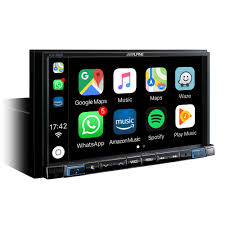
ILX-702D - Car stereo ALPINE - Free user manual and instructions
Find the device manual for free ILX-702D ALPINE in PDF.



| Product type | Multimedia car radio with touch screen |
| Brand | ALPINE |
| Model | ILX-702D |
| Screen size | 7 inches (diagonal) |
| Screen type | Transparent TN LCD, active TFT matrix |
| Screen resolution | 800 × 480 pixels |
| Number of pixels | 1,152,000 (800 × 480 × 3 RGB) |
| FM radio receiver | Range 87.5-108.0 MHz, sensitivity 8.1 dBf (0.7 μV/75 Ω) |
| AM radio receiver (MW/LW) | MW: 531-1602 kHz, LW: 153-281 kHz |
| DAB/DAB+/DMB receiver | Band III and Band L |
| Bluetooth connectivity | Hands-free and audio, up to 5 devices |
| USB port | USB 2.0, mass storage compatible, up to 1500 mA (CDP) |
| HDMI input | Yes, compatible with 720p/480p/480i/VGA |
| Apple CarPlay compatibility | Yes, via USB cable |
| Android Auto compatibility | Yes, via USB cable |
| Audio output power | 50 W × 4 (max.) |
| Preamp outputs | Front, rear, subwoofer (2 V/10 kΩ) |
| Supported USB audio formats | MP3, WMA, AAC, FLAC |
| Supported USB video formats | AVI, MKV, MP4 |
| Weight | Approx. 1.54 kg |
| Power supply | 12 V DC, negative ground |
| Operating temperature | -20°C to +60°C |
| Hands-free function | Yes, with built-in microphone |
| Audio settings | Equalizer, balance, fader, subwoofer |
Frequently Asked Questions - ILX-702D ALPINE
User questions about ILX-702D ALPINE
0 question about this device. Answer the ones you know or ask your own.
Ask a new question about this device
Download the instructions for your Car stereo in PDF format for free! Find your manual ILX-702D - ALPINE and take your electronic device back in hand. On this page are published all the documents necessary for the use of your device. ILX-702D by ALPINE.
USER MANUAL ILX-702D ALPINE
KPATKOE CIPABOYHOE PYKOBOJCTBO
SKROCONA INSTRUKCJA DLA UZYTKOWNIKA
Made for

iPodiPhone

Works with
Apple CarPlay

Bluetooth
androidauto
HOMI
HIGH-DEFINITION MULTIMEDIA INTERFACE

Digital Audio Broadcasting

Spotify

(X902D/X802D-U/INE-W710D Only)
MP3
AAC

Plays
Windows
MediaTM
Contents
WARNING 2
CAUTION 3
Getting Started 4
Favourite Function. 6
Registering Items 6
Android Auto (Optional) 7
Apple CarPlay (Optional) 7
Alpine Connect App (Optional) (X902D/X802D-U/INE-W710D only). 7
Radio/RDS Operation 8
DAB/DAB+/DMB Operation 9
USB Flash drive Operation (Optional) 10
HDMI Device (DVD Player) Operation (Optional) 11
iPod/iPhone Operation (Optional). 12
Hands-Free Phone Control 13
Map Functions (X902D/X802D-U/INE-W710D only) 14
Navigation Menu (X902D/X802D-U/INE-W710D only) 15
Setting a Destination (X902D/X802D-U/INE-W710D only) 16
Specifications 17
IMPORTANT
Please record the serial number of your unit in the space provided below and keep it as a permanent record.
SERIAL NUMBER:
ISO SERIAL NUMBER: AL
INSTALLATION DATE:
INSTALLATION TECHNICIAN:
PLACE OF PURCHASE:
For details on all functions, refer to the Owner's Manual stored in the supplied CD-ROM. (As it is data CD, the CD cannot be used for playing back music and images on the player.) If required, an ALPINE dealer will readily provide you with a print out of the Owner's Manual contained in the CD-ROM.
WARNING

WARNING
This symbol means important instructions. Failure to heed them can result in serious injury or death.
INSTALL THE PRODUCT CORRECTLY SO THAT THE DRIVER CAN NOT WATCH TV/VIDEO UNLESS THE VEHICLE IS STOPPED AND THE EMERGENCY BRAKE IS APPLIED.
It is dangerous for the driver to watch TV/Video while driving a vehicle. Installing this product incorrectly enables the driver to watch TV/Video while driving. This may cause a distraction, preventing the driver from looking ahead, thus causing an accident. The driver or other people could be severely injured.
DO NOT WATCH VIDEO WHILE DRIVING.
Watching the video may distract the driver from looking ahead of the vehicle and cause an accident.
DO NOT OPERATE ANY FUNCTION THAT TAKES YOUR ATTENTION AWAY FROM SAFELY DRIVING YOUR VEHICLE.
Any function that requires your prolonged attention should only be performed after coming to a complete stop. Always stop the vehicle in a safe location before performing these functions. Failure to do so may result in an accident.
DO NOT FOLLOW ROUTE SUGGESTIONS IF THE NAVIGATION SYSTEM INSTRUCTS YOU TO PERFORM AN UNSAFE OR ILLEGAL MANEUVER, OR PLACES YOU IN AN UNSAFE SITUATION OR AREA.
This product is not a substitute for your personal judgement. Any route suggestions by this system should never supersedes any local traffic regulations or your personal judgement or knowledge of safe driving practise.
KEEP THE VOLUME AT A LEVEL WHERE YOU CAN STILL HEAR OUTSIDE NOISES WHILE DRIVING.
Excessive volume levels that obscure sounds such as emergency vehicle sirens or road warning signals (train crossings, etc.) can be dangerous and may result in an accident. LISTENING AT LOUD VOLUME LEVELS IN A CAR MAY ALSO CAUSE HEARING DAMAGE.
MINIMIZE DISPLAY VIEWING WHILE DRIVING.
Viewing the display may distract the driver from looking ahead of the vehicle and cause an accident.
DO NOT DISASSEMBLE OR ALTER.
Doing so may result in an accident, fire or electric shock.
USE ONLY IN CARS WITH A 12 VOLT NEGATIVE GROUND.
(Check with your dealer if you are not sure.) Failure to do so may result in fire, etc.
KEEP SMALL OBJECTS SUCH AS SCREWS OUT OF THE REACH OF CHILDREN.
Swallowing them may result in serious injury. If swallowed, consult a physician immediately.
USE THE CORRECT AMPERE RATING WHEN REPLACING FUSES.
Failure to do so may result in fire or electric shock.
DO NOT BLOCK VENTS OR RADIATOR PANELS.
Doing so may cause heat to build up inside and may result in fire.
USE THIS PRODUCT FOR MOBILE 12V APPLICATIONS.
Use for other than its designed application may result in fire, electric shock or other injury.
MAKE THE CORRECT CONNECTIONS.
Failure to make the proper connections may result in fire or product damage.
BEFORE WIRING, DISCONNECT THE CABLE FROM THE NEGATIVE BATTERY TERMINAL.
Failure to do so may result in electric shock or injury due to electrical shorts.
DO NOT ALLOW CABLES TO BECOME ENTANGLED IN SURROUNDING OBJECTS.
Arrange wiring and cables in compliance with the manual to prevent obstructions when driving. Cables or wiring that obstruct or hang up on places such as the steering wheel, shift lever, brake pedals, etc. can be extremely hazardous.
DO NOT SPLICE INTO ELECTRICAL CABLES.
Never cut away cable insulation to supply power to other equipment. Doing so will exceed the current carrying capacity of the wire and result in fire or electric shock.
DO NOT DAMAGE PIPE OR WIRING WHEN DRILLING HOLES.
When drilling holes in the chassis for installation, take precautions so as not to contact, damage or obstruct pipes, fuel lines, tanks or electrical wiring. Failure to take such precautions may result in fire.
DO NOT USE BOLTS OR NUTS IN THE BRAKE OR STEERING SYSTEMS TO MAKE GROUND CONNECTIONS.
Bolts or nuts used for the brake or steering systems (or any other safety-related system), or tanks should NEVER be used for installations or ground connections. Using such parts could disable control of the vehicle and cause fire etc.
DO NOT INSTALL IN LOCATIONS WHICH MIGHT HINDER VEHICLE OPERATION, SUCH AS THE STEERING WHEEL OR SHIFT LEVER.
Doing so may obstruct forward vision or hamper movement etc. and results in serious accident.
CAUTION
This symbol means important instructions. Failure to heed them can result in injury or material property damage.
HALT USE IMMEDIATELY IF A PROBLEM APPEARS.
Failure to do so may cause personal injury or damage to the product. Return it to your authorized Alpine dealer or the nearest Alpine Service Centre for repairing.
HAVETHEWIRINGANDINSTALLATIONDONEBYEXPERTS.
The wiring and installation of this unit requires special technical skill and experience. To ensure safety, always contact the dealer where you purchased this product to have the work done.
USE SPECIFIED ACCESSORY PARTS AND INSTALL THEM SECURELY.
Be sure to use only the specified accessory parts. Use of other than designated parts may damage this unit internally or may not securely install the unit in place. This may cause parts to become loose resulting in hazards or product failure.
ARRANGE THE WIRING SO IT IS NOT CRIMPED OR PINCHED BY A SHARP METAL EDGE.
Route the cables and wiring away from moving parts (like the seat rails) or sharp or pointed edges. This will prevent crimping and damage to the wiring. If wiring passes through a hole in metal, use a rubber grommet to prevent the wire's insulation from being cut by the metal edge of the hole.
DO NOT INSTALL IN LOCATIONS WITH HIGH MOISTURE OR DUST.
Avoid installing the unit in locations with high incidence of moisture or dust. Moisture or dust that penetrates into this unit may result in product failure.
- The following screen examples of X902D/X802D-U/INE-W710D used in this manual are for reference only. They may differ from the actual screen displays.
Getting Started
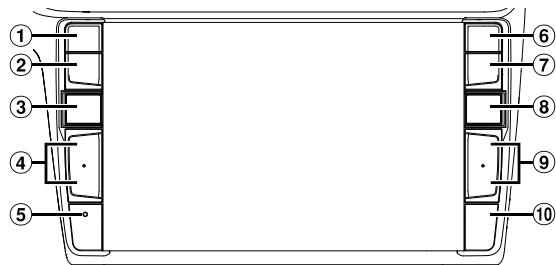
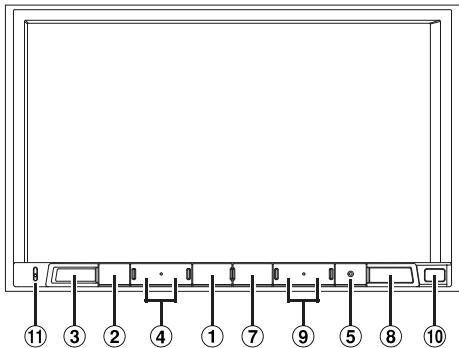
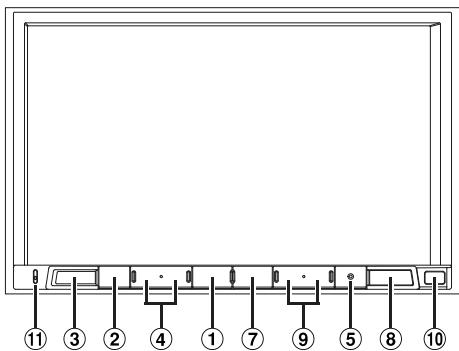
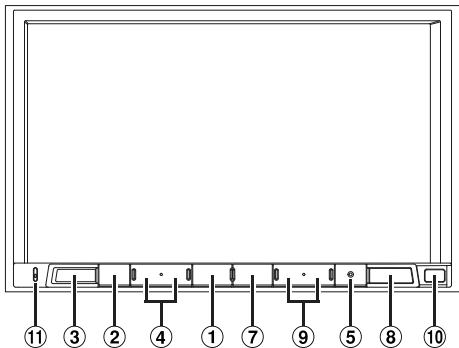
Location of Controls
The screen design used in the Owner's Manual may differ from the actual screen.
For X902D/ji902D
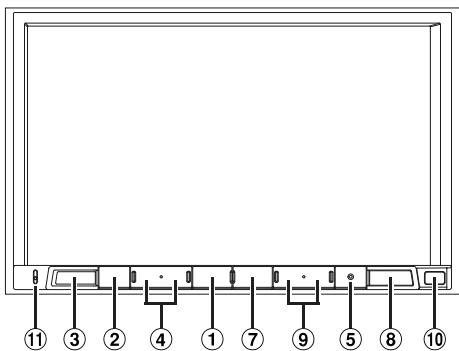
For X802D-U/INE-W710D/iLX-702D
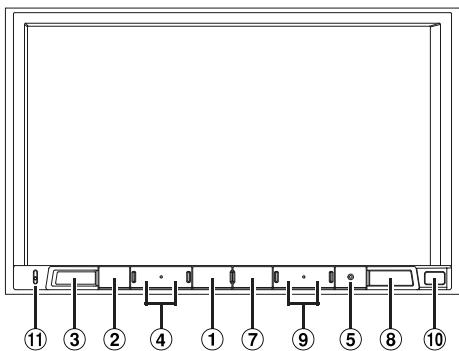
① or VOICE button
Depending on the connected smartphone, press to recall Siri function or voice recognition mode.
(2) (MUTE) button
Press to activate/deactivate the mute mode.
③ (AUDIO)/(Favourite) button
Displays the Audio/Visual screen. If the Audio/Visual screen is already displayed, changes the source. Press and hold for at least 2 seconds to recall the Favourite screen.
4 +/or / (UP/DOWN) button
Press to adjust the volume.
⑤ RESET switch
The system of this unit is reset.
(6) √(PHONE) button (X902D/i902D only)
Recalls the Phone Menu screen. Press to start a conversation when a call is incoming.
⑦ MENU/ (Power Off) button
Recalls the Menu screen. Press and hold this button for at least 5 seconds to turn the power off.
⑧ (NAV) button
For X902D/X802D-U/INE-W710D:
Recalls the navigation map screen. Press again to switch to Navigation menu screen. Press and hold this button for at least 2 seconds to change to Go Home route screen. (If Home is not set yet, it will change to the Home setting screen.) For details of navigation operations, refer to "Navigation System OM" in the CD-ROM. For i902D/iLX-702D: Recalls the connected smartphone's map screen. Depending on the smartphone, this function may not available.
9 1/1按钮
Press to seek up/down a station in radio mode or up/ down a track, chapter, etc., in other audio/visual sources.
Remote Sensor
Point the remote control transmitter towards the remote sensor within a range of 2 metres.
11 Microphone (X8
Used for Hands-free or Voice Control modes.
1 Turn the ignition key to the ACC or ON position.
The system is turned on.
2 Press and hold the MENU button for at least 5 seconds to turn the power off.
Switching the Audio Sources Screen to a Dedicated Screen
You can switch the Audio Sources screen to a dedicated screen by touching the icon on one of the four edges of the screen, or by swiping vertically or horizontally.
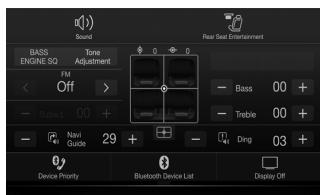
Shortcut Setup Screen
You can set the Sound Setup or Rear Seat Entertainment System.

Audio Sources Screen
(USB Audio)

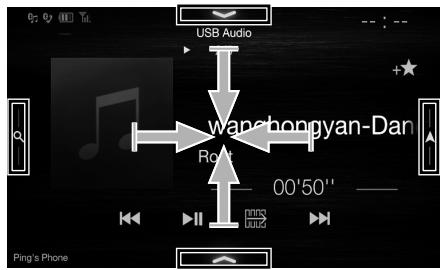
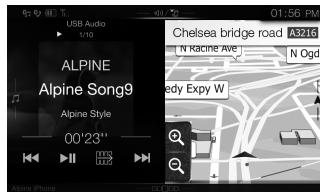
Dual Screen (X902D/X802D-U/INE-W710D only)
You can switch between the displayed screens on the Dual Screen.
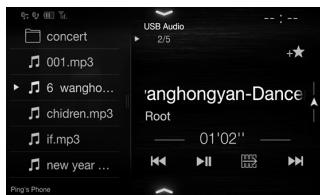
Preset button or Quick Search mode Screen*

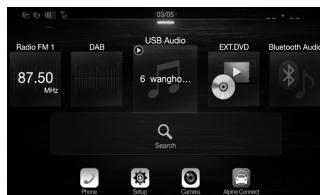
Menu Screen
You can make settings on the Menu Screen.
- The Search mode differs depending on the audio source. For details, see the operating instructions of the audio source.
Favourite Function
This unit enables you to recall functions easily by registering frequently used items such as the Audio source, the navigation search function, etc. to the Favourite screen. You can recall any of these items easily.
1 Press and hold the / ( Favourite) button for at least 2 seconds.
The Favourite screen is displayed.
Favourite screen example
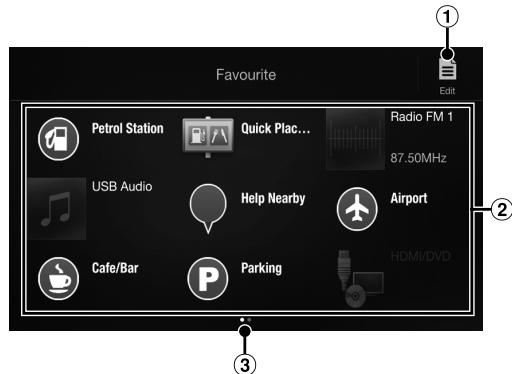
1 Changes to the Edit screen used for registering items or changing names.
② Favourite registration item
③ Indicates the location of the currently displayed Favourite screen.
Swipe to the left and right to change the pages. You can add up to 6 pages.
Owner's manual
Registering Items
Registering Items
1 Touch (Edit).
A checkbox is displayed on the upper left area of the registration icon and it changes to Edit mode.
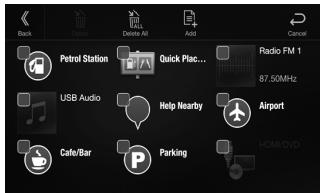
2 Touch [E] (Add).
The items to be added (categories) are displayed.
3 Touch the desired item to be added (category).
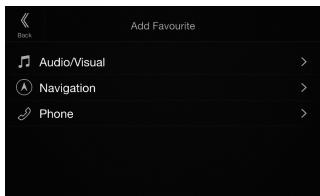
4 Choose the desired item to be added.
For details on the items to be added, refer to "Editing the Favourite Screen" in the Owner's Manual.
- You can add up to 54 items.
- You cannot register an item more than once.
5 After editing is complete, touch [Back).
6 After the caption for the confirmation is displayed, touch [OK].
7 Editing is complete and the screen switches to the Favourite screen.
- If you touch [ ] (Cancel) while editing, the screen switches to the previous Favourite Edit screen.
Android Auto (Optional)
Android Auto is designed to make it easier to use apps from your phone while you're on the road. Navigate with Google Maps, listen to playlists or podcasts from your favourite apps, and more. Download the Android Auto App from the Google Play store before continuing. Connect your Android compatible Phone to begin using Android Auto.
1 Press the MENU button.
The Menu screen is displayed.
2 Touch [Android Auto].
The Android Auto screen is displayed.
- For details operation of Android Auto, refer to "Android Auto" in the Owner's Manual (CD-ROM).
Owner's manual
Apple CarPlay (Optional)
Apple CarPlay (Optional)
Apple CarPlay is a smarter, safer way to use your iPhone in the car. Apple CarPlay takes the things you want to do with your iPhone while driving and puts them right on this unit. You can get directions, make calls, send and receive messages, and listen to music, all in a way that allows you to stay focused on the road. Just plug in your iPhone to this unit and go.
For details, refer to Owner's Manual (CD-ROM).
Press or VOICE to activate Siri function of the iPhone.
You can make a call, play music, etc., by using Siri function of the iPhone.
You can also control Apple CarPlay on touchscreen.
Owner's manual
Alpine Connect App (Optional) (X902D/X802D-U/INE-W710D only)
Alpine Connect App (Optional) (X902D/X802D-U/INE-W710D only)
Download an app that supports Alpine Connect to your smartphone, and you can operate it from the unit. Alpine Connect App is downloadable from Apple's App Store; the Android user can download it from Google Play. For details, consult your Alpine dealer. Before these operations, set Connectivity Setting or Alpine Connect to USB (iPhone) or Bluetooth (Android) depending on the connected Smartphone.
1 Launch Alpine Connect App.
2 Then connect the smartphone to this unit.
3 Press the MENU button.
The Menu screen is displayed.
4 Touch [Alpine Connect].
The Alpine Connect App select screen is displayed.
5 Select the desired App.
The selected App screen is displayed.
Spotify
Spotify is a music streaming distribution service not affiliated with Alpine. More information is available at http://www.spotify.com.
The Spotify application is available for iPhone and Android phones, please visit https://support.spotify.com/ for the latest compatibility information.
To enjoy Spotify as you drive, first download the Spotify app to your iPhone or Android device. You can download it on the iTunes App Store or Google Play™. Choose a free account or a paid Premium account, either in the app or at Spotify.com. A Premium account gives you more features, like offline listening.
- This product incorporates Spotify software which is subject to 3rd party licenses found here: www.spotify.com/connect/third-party-licenses.
- For information on the countries and regions where Spotify can be used, take a look at https://www.spotify.com/us/select-your-country/.
Owner's manual
Radio/RDS
Radio/RDS Operation
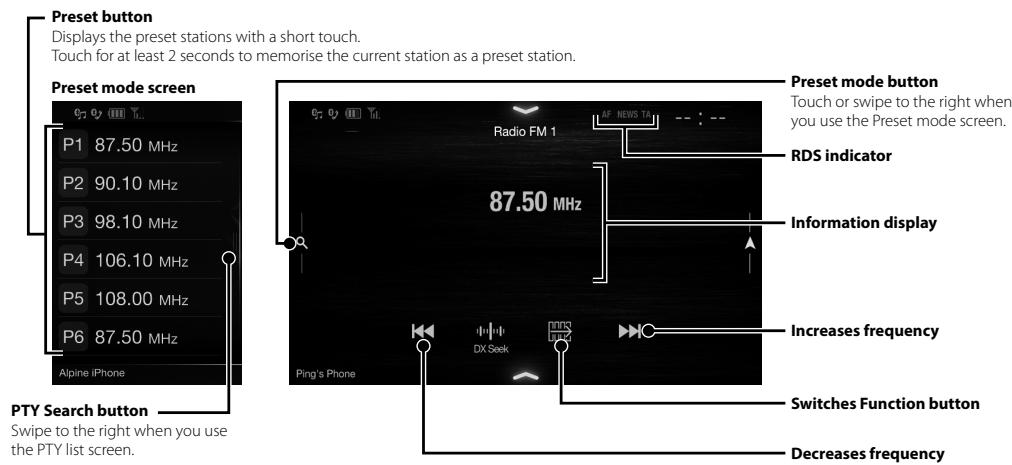
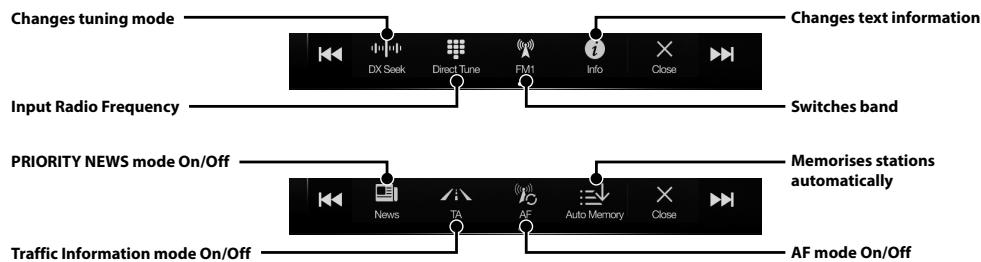
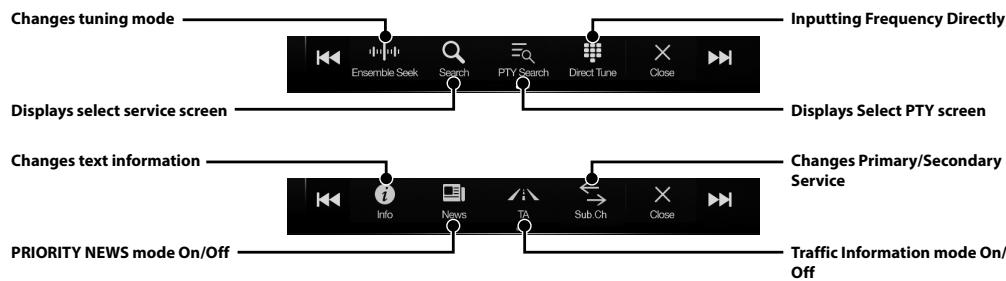
DAB/DAB+/DMB Operation
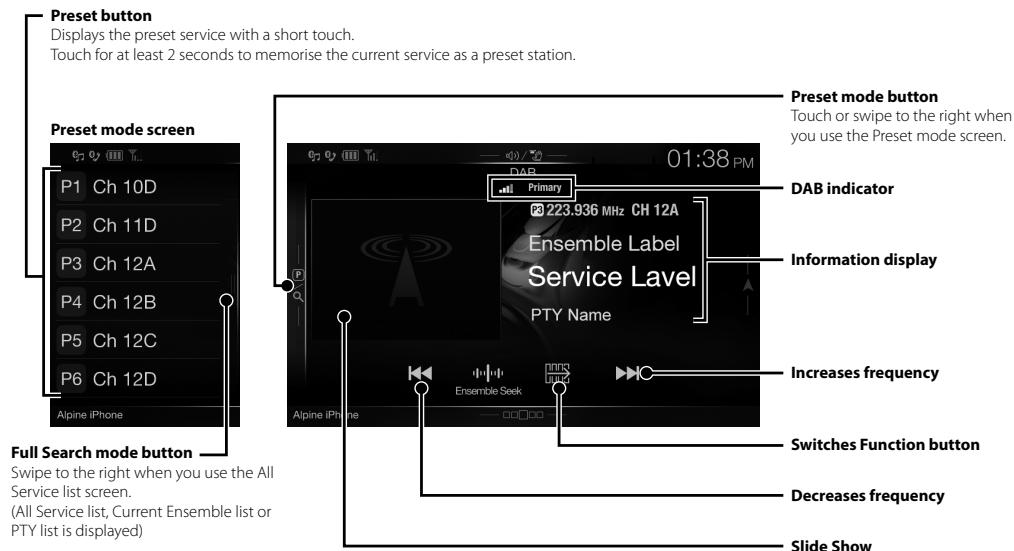
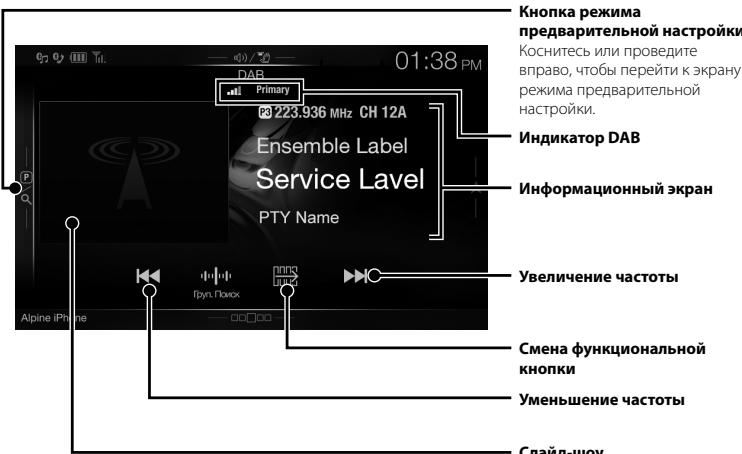
Slide Show
Displays the program information, artist photos, and advertisements that are synchronised with the Service component currently being received.*
- They may not be displayed, depending on the Service component currently being received.
USB Flash drive Operation (Optional)
You can play back music files (MP3/WMA/AAC/FLAC) and video files (AVI/MKV/MP4) stored in a USB flash drive on the internal player of this system.
USB Audio main screen example
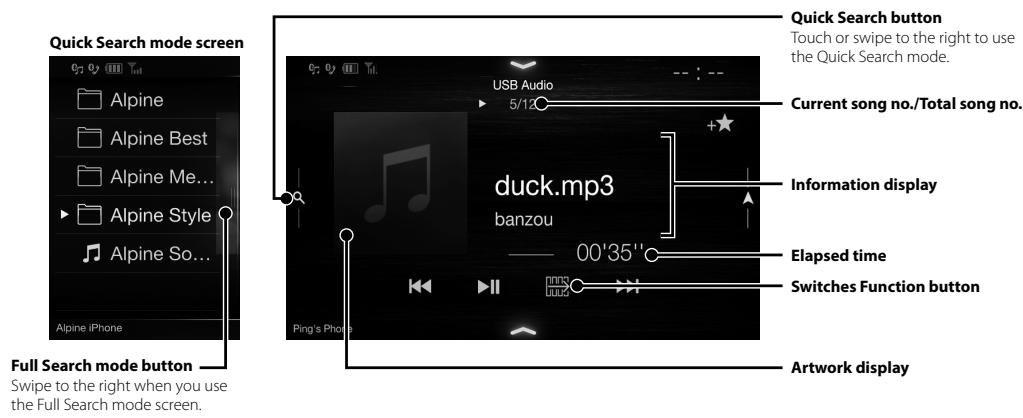
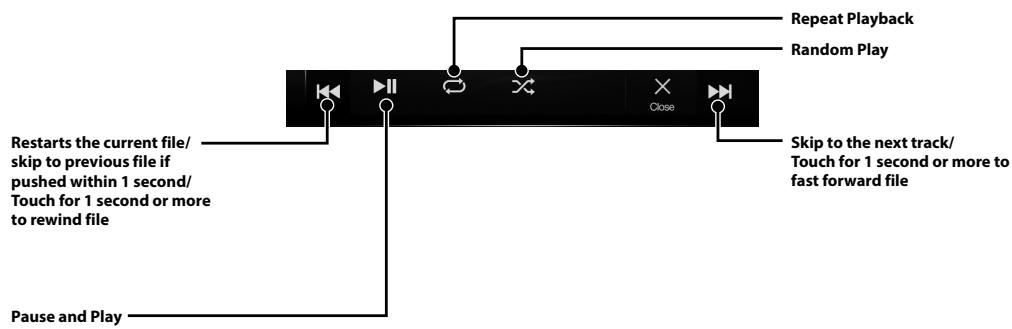
HDMI Device (DVD Player) Operation (Optional)
When you connect an optional DVE-5300 (DVD Player), you can operate it from the unit.
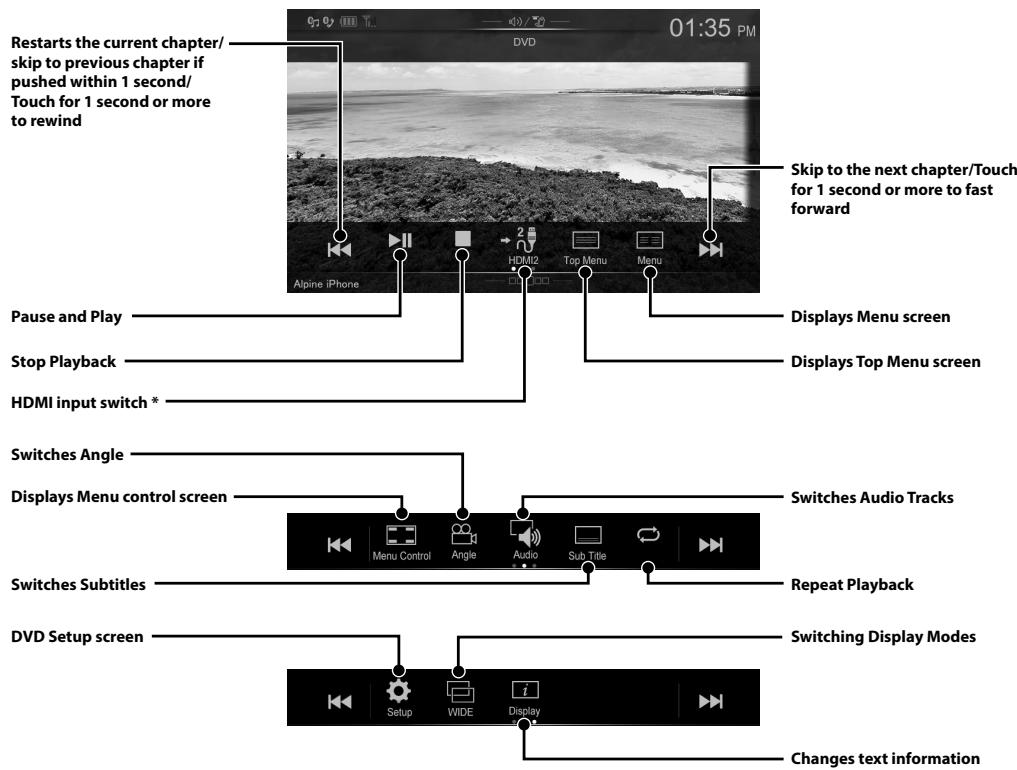
- If you connect an optional HDMI selector module, you can connect two HDMI devices. If the HDMI selector is set to "On" when two HDMI devices are connected, the HDMI input switch button is displayed. The displayed button differs depending on the settings and the HDMI input currently selected. For details, refer to "HDMI Setup" and "Setting the HDMI Selector On/Off" in the OWNER'S MANUAL (CD-ROM).
iPod/iPhone Operation (Optional)
A separately sold Lightning to USB cable (KCU-471i), etc., is required depending on the type of iPod/iPhone.
Audio mode
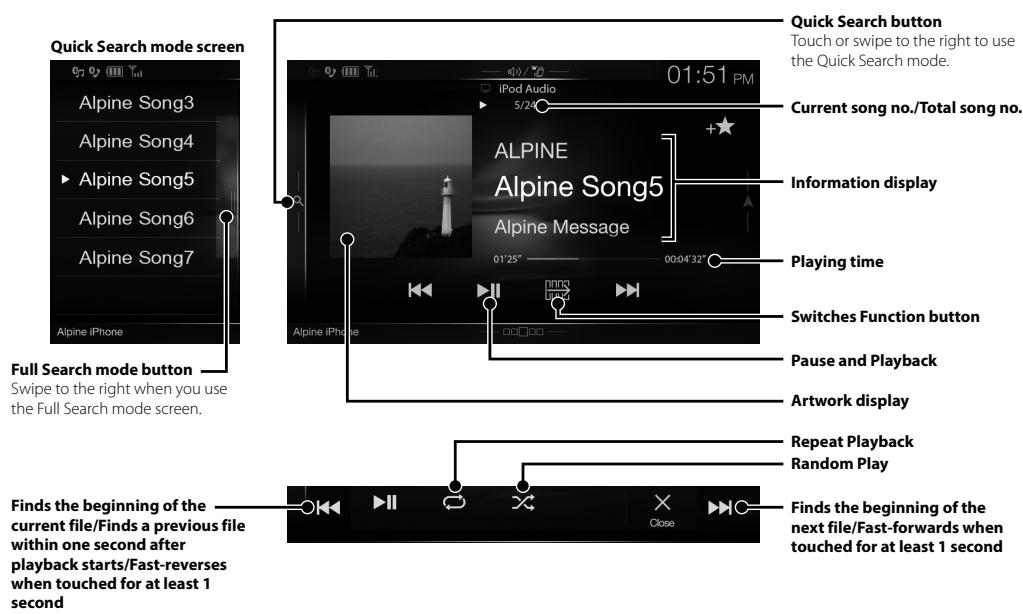
Searching for a Music File (Full Search Mode)
For example: Searching by Artist name
1 Touch [Artists] in the Full Search mode screen.
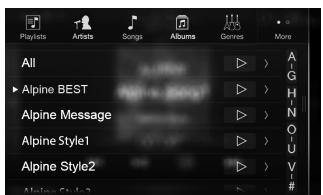
2 Touch the desired artist's name.
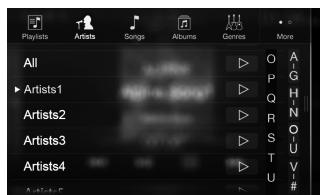
The Albums search screen of the selected artist is displayed.
Touching [▶] of the desired artist will play back all songs of the selected artist.
3 Touch the desired album's name.
All songs of the selected album are displayed.
Touching of the desired album will play back all songs of the selected album.
4 Touch the desired song's name.
The selected song is played back.
Hands-Free Phone Control
The unit can connect with up to two hands-free phones.
If you connect two hands-free phones to the unit, select "Hands-free Device Priority" in "Bluetooth Setup" to set the order of precedence. For details, refer to OWNER'S MANUAL in the AUDIO VISUAL SECTION (CD-ROM).
How to connect to a Bluetooth compatible device (Pairing)
1 Touch [Setup] button on the Menu screen.
![ALPINE ILX-702D - Touch [Setup] button on the Menu screen. - 1](/content/2019/10/325/images/952f86a4f98e60bb0077cd80a5854f6a7d385318ec9eba63dd783da668610ef2.jpg)
2 Touch [Bluetooth].
- Make sure the "Bluetooth" setting is "On" (☑).
3 Touch [Set Bluetooth Device].
![ALPINE ILX-702D - Touch [Setup] button on the Menu screen. - 2](/content/2019/10/325/images/aae83c5dc90b9b5a0f83c99993e21d63692ca0d3e3603ae6fd0ea8e535408f6c.jpg)
4 Touch [Q] to search for a new device.
![ALPINE ILX-702D - Touch [Setup] button on the Menu screen. - 3](/content/2019/10/325/images/3a41d99559691325e625b4e52a94c1146f323bb9ea591e0cb361bdbbac3d4d11.jpg)
5 Touch [] (Audio), [] (Hands-free) or [/] (Both) for the device you want to connect from the list.
Audio: Sets for use as an Audio device.
Hands-free: Sets for use as a Hands Free Device.
Both: Sets for use as both an Audio device and Hands Free Device.
6 When the device registration is complete, a message appears and the device returns to normal mode.
- You can register up to 5 Bluetooth compatible mobile phones.
- The Bluetooth registration process differs depending on the device version and SSP (Simple Secure Pairing). If a 4 or 6 character Passcode appears on this device, enter the Passcode using the Bluetooth compatible device. If a 6 character Passkey appears on this device, make sure the same passkey is displayed on the Bluetooth compatible device and touch "Yes."
Answering a Call
1 An incoming call triggers the ringtone and an incoming call display.
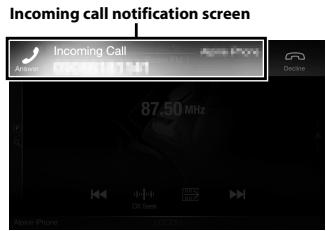
2 Touch incoming call notification screen.
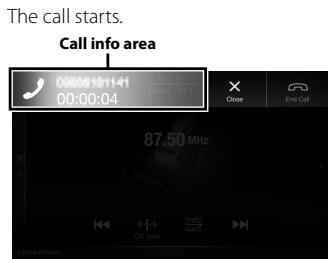
Touch the call info area during a call changes to the Phone Operation screen. Use this screen to adjust the speech volume, etc.
Hanging up the Telephone
1 Touch [O] (End Call).
The call finishes.
Map Functions (X902D/X802D-U/INE-W710D only)
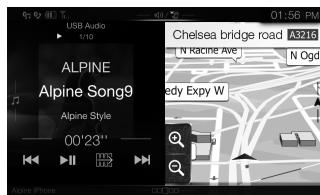
Below is an overview of different buttons and icons on the map display. For more detailed information about this screen, please see the Owner's Manual.
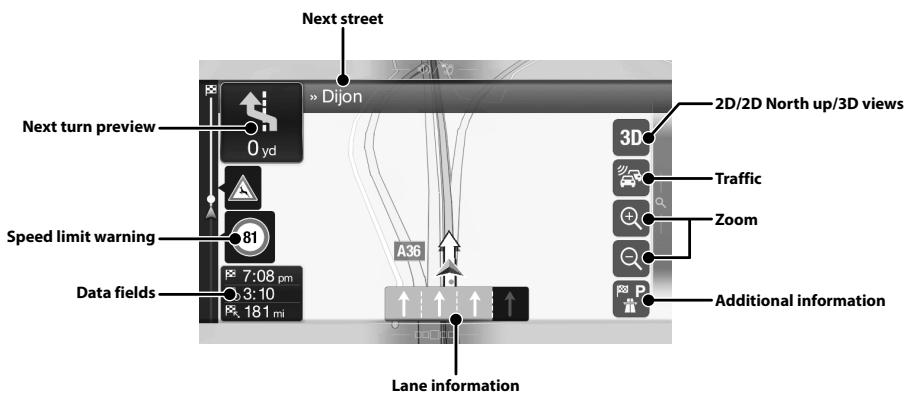
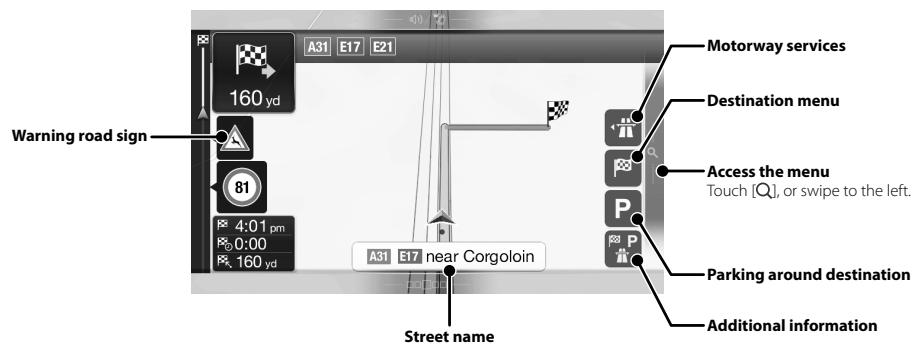
Navigation Menu (X902D/X802D-U/INE-W710D only)
To access the Navigation Menu, touch [Q] on the right edge of the map screen or swipe to the left. Alternatively, press the A button.
Multipoint Route
Build your route from one or more route points. You can also plan a route independently of your current GPS position by setting a new starting point.
New Rout
Select your destination by entering an address or its coordinate, or by selecting a Place, a Saved Location, or a Saved Route. You can also look up your recent destinations from the History. When Internet connection is available, the Online Search option can be a further help to find your destination.
Access the Map
Touch or swipe to the right.
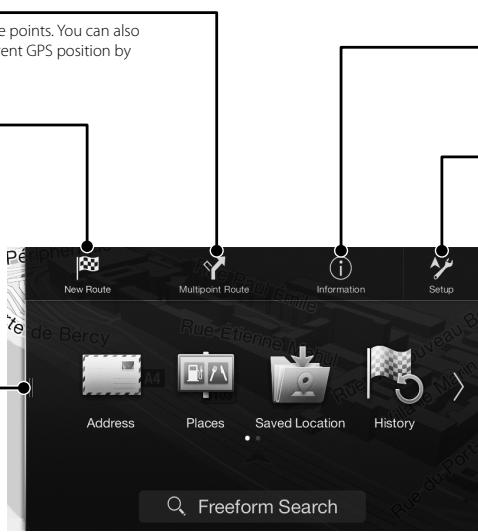
Information
Access additional options and check navigation-related information.
Setup
Customise the way the navigation software works.
Setting a Destination (X902D/X802D-U/INE-W710D only)
The following example describes how to search for a destination when choosing [Town/Postcode] from [Address].
- You can search and narrow down the Country/State by starting from [Country/State].
1 Touch [New Route] from the Navigation Menu.
2 Touch [Address].
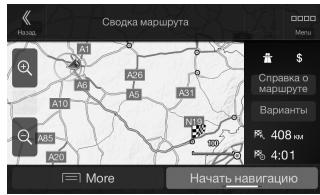
7 Touch [More] to modify the route parameters, or touch [Start Navigation] to start your journey.
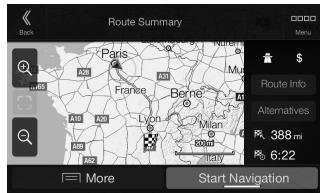
3 Touch [Town/Postcode].
4 Enter the town name or postcode.
- Touch to display the candidate list.
5 Enter the desired street name.
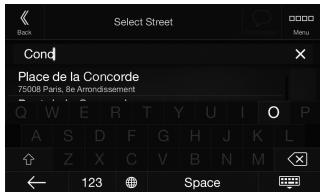
- Touch to display the candidate list.
6 Enter the house number or crossing street.
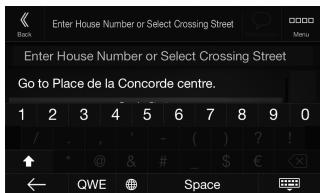
The route is calculated, and a map appears, showing the entire route. Here you can check route information and route alternatives.
Specifications
MONITOR SECTION
Screen Size
9" (X902D/i902D)
8"(X802D-U)
7"INE-W710D/iLX-702D)
LCD Type
Transparent type TN LCD
Operation System
TFT active matrix
Number of Picture Elements
1,152,000 pcs.
(800× 480× 3 RGB)
Effective Number of Picture Elements
99% or more
Illumination System
LED
FM TUNER SECTION
Tuning Range
87.5-108.0MHz
Mono Usable Sensitivity
8.1 dBf (0.7 V / 75 ohms)
50 dB Quieting Sensitivity
12 dBf (1.1 μV/75 ohms)
Alternate Channel Selectivity
80 dB
Signal-to-Noise Ratio
65 dB
Stereo Separation
35 dB
Capture Ratio
2.0 dB
MW TUNER SECTION
Tuning Range
531-1,602 kHz
Usable Sensitivity
25.1 V / 28 dBf
LWTUNERSECTION
Tuning Range
153-281kHz
Sensitivity (IEC Standard)
31.6 V/30 dBf
DAB SECTION
Tuning Range BAND III
174.93-239.2MHz
Tuning Range L-BAND
1,452.96-1,490.6MHz
Usable Sensitivity
-103 dBm
Signal-to-Noise Ratio
95 dB
Stereo Separation
85 dB
USB SECTION
USB requirements
USB 2.0
Max. Power Consumption
1,500 mA (CDP Support)
USB Class
USB (Mass Storage Class)
File System
FAT16/32
Number of Channels
2-Channels (Stereo)
Frequency Response*
5-20,000 Hz (±1 dB)
Total Harmonic Distortion
0.008% (at 1 kHz)
Dynamic Range
95 dB (at 1 kHz)
Signal-to-Noise Ratio
100dB
Channel Separation
85 dB (at 1 kHz)
*1 Frequency response may differ depending on the encoder software/bit rate.
HDMI SECTION
Input Format
720p/480p/480i/VGA
Output Format
480p
GPS SECTION
GPS Reception frequency
1,575.42±1 MHz
GPS Reception sensitivity
-130 dB max.
Bluetooth SECTION
Bluetooth Specification
Frequency band
Output Power
Profile
Bluetooth v3.0
2,402-2,480MHz
+4 dBm Max. (Power class 2)
HFP (Hands-Free Profile)
OPP (Object Push Profile)
PBAP (Phone Book Access Profile)
A2DP (Advanced Audio
Distribution Profile)
AVRCP (Audio/Video Remote
Control Profile)
SPP (Serial Port Profile)
GENERAL
Power Requirement
14.4VDC
(11-16 V allowable)
Operating temperature
-4°F to +140°F
(-20^ to +60^)
50W× 4
Maximum Power Output
2V/10k ohms (max.)
Audio output level
Preout (Front, Rear):
Preout (Subwoofer):
2V/10k ohms (max.)
1.54 kg (3 lbs. 6 oz) (X802D-U) 1.41
kg (3 lbs. 2 oz) (INE-W710D/
iLX-702D)
CHASSIS SIZE
Width
198 mm (7-13/16") (X802D-U) 178
mm (7") (INE-W710D/iLX-702D) 125
Height
mm (4-15/16") (X802D-U) 100 mm
(3-15/16") (INE-W710D/iLX-702D)
147 mm (5-3/4")
Depth
NOSE SIZE
Width
191 mm (7-1/2") (X802D-U)
171 mm (6-3/4") (INE-W710D/
iLX-702D)
121 mm (4-3/4") (X802D-U)
Height
96 mm (3-3/4") (INE-W710D/
iLX-702D)
19 mm (3/4")
Depth
- X902D/i902D is sized exclusively for a certain car model.
- Due to continuous product improvement, specifications and design are subject to change without notice.
-
The LCD panel is manufactured using an extremely high precision manufacturing technology. Its effective pixel ratio is over 99.99% . This means that there is a possibility that 0.01% of the pixels could be either always ON or OFF.
-
Windows Media, and the Windows logo are trademarks, or registered trademarks of Microsoft Corporation in the United States and/or other countries.
- Apple, iPhone, iPod, and iPod touch are trademarks of Apple Inc., registered in the U.S. and other countries. Apple CarPlay is a trademark of Apple Inc.
- Use of the Apple CarPlay logo means that a vehicle user interface meets Apple performance standards. Apple is not responsible for the operation of this vehicle or its compliance with safety and regulatory standards. Please note that the use of this product with iPhone, or iPod may affect wireless performance.
- "Made for iPod," and "Made for iPhone," mean that an electronic accessory has been designed to connect specifically to iPod, or iPhone, respectively, and has been certified by the developer to meet Apple performance standards. Apple is not responsible for the operation of this device or its compliance with safety and regulatory standards. Please note that the use of this accessory with iPod, or iPhone may affect wireless performance.
Android is a trademark of Google Inc. - The Android robot is reproduced or modified from work created and shared by Google and used according to terms described in the Creative Commons 3.0 Attribution Licence.
- SPOTIFY and the Spotify logo are among registered trademarks of Spotify AB.
- The Bluetooth® word mark and logos are registered trademarks owned by the Bluetooth SIG, Inc. and any use of such marks by Alpine Electronics, Inc. is under licence.
- The terms HDMI and HDMI High-Definition Multimedia Interface, and the HDMI Logo are trademarks or registered trademarks of HDMI Licensing, LLC in the United States and other countries.
- MPEG Layer-3 audio coding technology licensed from Fraunhofer IIS and Thomson. Supply of this product only conveys a licence for private, non-commercial use and does not convey a licence nor imply any right to use this product in any commercial (i.e. revenue-generation) real time broadcasting (terrestrial, satellite, cable and/or any other media), broadcasting/streaming via internet, intranets and/or other networks or in other electronic content distribution systems, such as pay-audio or audio-on-demand applications. An independent licence for such use is required. For details, please visit http://www.mp3licensing.com
- ©2006-2016 TomTom. All rights reserved. This material is proprietary and the subject of copyright protection, database right protection and other intellectual property rights owned by TomTom or its suppliers. The use of this material is subject to the terms of a license agreement. Any unauthorized copying or disclosure of this material will lead to criminal and civil liabilities.
About the Rules of Bluetooth Electromagnetic Radiation Regulation

Declaration of Conformity
Inhalt
Fur X802D-U/INE-W710D/iLX-702D
① Taste oder VOICE
Alpine Connect App (Option) (nur X902D/X802D-U/INE-W710D)
Alpine Connect App (Option) (nur X902D/X802D-U/INE-W710D)
7 Zoll (INE-W710D/jLX-702D)
LCD-Typ
Transparentes TN LCD
Funktionsprinzip
TFT-Aktivmatrix
Anzahl Bildelemente
1.152.000 Pixel
Effective Bildelemente
(800× 480× 3 RGB)
Beleuchtung
Mindestens 99%
UKW-TUNER
Empfangsbereich
87,5-108,0 MHz
1,41 kg (INE-W710D/iLX-702D)
GEHAUSEGRösSE
Breite
198 mm (X802D-U)
178 mm (INE-W710D/iLX-702D)
Höhe
125 mm (X802D-U)
Tiefe
100 mm (INE-W710D/ILX-702D)
VORSPRUNGGRÖSSE
Breite
191 mm (X802D-U)
171 mm (INE-W710D/ILX-702D)
Höhe
121 mm (X802D-U)
96 mm (INE-W710D/iLX-702D)
Tiefe
19 mm
About the Rules of Bluetooth Electromagnetic Radiation Regulation

Declaration of Conformity
Table des matieres
NE PAS COICER LES CABLES AVEC DES OBJECTS VOISINS.
Specification Bluetooth
Bluetooth v3,0
Gamm de fréquences
2.402-2.480MHz
Puisance de sortie
+4 dBm Max. (classe 2)
Profil
HFP (profil mains libres)
GENÉRALITÉS
Alimentation
14,4Vc.c.
(11-16V autorises)
1,41 kg (3 lbs. 2 oz) (INE-W710D/
iLX-702D)
DIMENSIONS DU CHÄSSIS
Largeur
198 mm (7 - 13/16") (X802D-U)
178 mm (7") (INE-W710D/ijLX-702D)
Hauteur
125 mm (4-15/16") (X802D-U)
100 mm (3 - 15/16") (INE-W710D/
iLX-702D)
Profondeur
147 mm (5-3/4")
DIMENSIONS DU NEZ
Largeur
191 mm (7 - 1/2") (X802D-U)
171 mm (6-3/4") (INE-W710D/
iLX-702D)
Hauteur
121 mm (4 - 3/4") (X802D-U)
96 mm (3 - 3/4") (INE-W710D/
iLX-702D)
Profondeur
19 mm (3 / 4^ )
About the Rules of Bluetooth Electromagnetic Radiation Regulation

Declaration of Conformity
Contenido
ADVERTENCIA 2
PRUDENCIA 3
Primeros pasos 4
Funcion Favoritos. 6
Registrar de elementos 6
Android Auto (optional) 7
Apple CarPlay (optional) 7
Alpine Connect App (optional) (X902D/X802D-U/INE-W710D solo). 7
Funcionamento de radio/RDS. 8
Funcionamento de DAB/DAB+/DMB. 9
Funcionamento de unidad flash USB (Optional) 10
Funcionamento del dispositivo HDMI (reproductor de DVD) (Optional) 11
Funcionamento de iPod/iPhone (Optional) 12
Control del téléphone manos libres. 13
Funciones de mapas (X902D/X802D-U/INE-W710D solo) 14
Menu de navigation (X902D/X802D-U/INE-W710D solo) 15
Establecer un destino (X902D/X802D-U/INE-W710D solo) 16
Especificaiones 17
IMPORTANT
Para X802D-U/INE-W710D/iLX-702D
① Botón o VOICE
⑤ Interruption RESET
Para X902D/X802D-U/INE-W710D:
Pantalla dual (X902D/X802D-U/ INE-W710D solo)
Alternatively, you can use the App Store to play on your device.
Manual de operación
Alpine Connect App (optional) (X902D/X802D-U/INE-W710D solo)
Alpine Connect App (optional) (X902D/X802D-U/INE-W710D solo)
USB (Mass Storage Class)
Sistema de ARCHivos
FAT16/32
Número de canales
2 canales (estereo)
1,41 kg (INE-W710D/iLX-702D)
TAMANO DEL CHASIS
Anchura
198 mm (X802D-U)
178 mm (INE-W710D/ILX-702D)
Altura
125 mm (X802D-U)
100 mm (INE-W710D/ILX-702D)
Profundidad
147 mm
96 mm (INE-W710D/iLX-702D)
Profundidad
19 mm
About the Rules of Bluetooth Electromagnetic Radiation Regulation

Declaration of Conformity
Sommario
Per X802D-U/INE-W710D/iLX-702D
① Tasto o VOICE
Per X902D/X802D-U/INE-W710D:
1,41 kg (INE-W710D/iLX-702D)
DIMENSIONI DEL TELAIO
Ampiezza
198 mm (X802D-U)
178 mm (INE-W710D/ILX-702D)
Altezza
125 mm (X802D-U)
Profondita
100 mm (INE-W710D/iLX-702D)
About the Rules of Bluetooth Electromagnetic Radiation Regulation

Declaration of Conformity
Innehåll
WARNING 2
FORSIKTIGT 3
Komma igang 4
INSTALLATIONSTEKNIKER:
INKÖPSSTÄLLE:
For X802D-U/INE-W710D/iLX-702D
① Knappen ™ller VOICE
For X902D/X802D-U/INE-W710D:
Visa navigationskartan
Tryckigenforattvaxlaillnavigeringsmenyskarmen.
7 tum (INE-W710D/iLX-702D)
LCD-typ
Genomskinlig typ TN LCD
Funktionsprincip
TFT aktiv matris
Antal bildelement
1 152 000 st.
Antal effektiva bildelement
(800× 480× 3 RGB)
Belysningssystem
99% ellier fler
LED
FM TUNER-AVSNITT
Inställningsområde
87,5-108,0 MHz
Total harmonisk distortion
0,008 % (vid 1 kHz)
Dynamiskt område
95 dB (vid 1 kHz)
Signal-brusforhallande
100dB
Kanalseparation
85 dB (vid 1 kHz)
Bluetooth-specification
Bluetooth v3.0
Frekvensomfang
2.402-2.480MHz
Uteffekt
+4 dBm Max. (effektklass 2)
Profil
HFP(Handsfree-Profil)
ALLMÄNT
Ingängsspänning
14,4V likspanning
(11-16V tillatet)
Drifttemperatur
-20°C till +60°C
Maximal uteffectt
4× 50W
1,41 kg (INE-W710D/iLX-702D)
CHASSISTORLEK
Bredd
198 mm (X802D-U)
Höjd
178 mm (INE-W710D/iLX-702D)
Djup
125 mm (X802D-U)
NOSSTORLEK
Bredd
191 mm (X802D-U)
Höjd
171 mm (INE-W710D/iLX-702D)
Djup
121 mm (X802D-U)
About the Rules of Bluetooth Electromagnetic Radiation Regulation

Declaration of Conformity
Inhoud
WAARSCHUWING. 2
OPGELET 3
Aan de slag 4
Alpine Connect App (Optioneel) (alleen X902D/X802D-U/INE-W710D) 7
Radio-/RDS-bediening 8
Alpine Connect App (Optioneel) (alleen X902D/X802D-U/INE-W710D)
Alpine Connect App (Optioneel) (alleen X902D/X802D-U/INE-W710D)
USB (Mass Storage Class)
Bestandssystem
FAT16/32
Aantal kanalen
2kanalen(stereo)
Frequentierresponds*1
5-20.000 Hz (±1 dB)
1,41 kg (INE-W710D/iLX-702D)
FRAMEFORMAAT
Breedte
198 mm (X802D-U)
Hoopte
178 mm (INE-W710D/iLX-702D)
Diepte
125 mm (X802D-U)
NEUSFORMAAT
Breedte
191 mm (X802D-U)
Hoopte
171 mm (INE-W710D/iLX-702D)
121 mm (X802D-U)
Diepte
96 mm (INE-W710D/iLX-702D)
19 mm
About the Rules of Bluetooth Electromagnetic Radiation Regulation

Declaration of Conformity
CopepxaHne
PPEyIpyKJdHNE 2
BHIMAHVE. 3
PpncTynar K pa6ote. 4
Функця"ИЗбраhhoe" 6
Добavenue элем entob 6
Android Auto (npno6peTaeTcra donoJIHnTeJbHo) 7
Apple CarPlay (πριοδρετατγάνοληνιθέλυ) 7
Прилобке Alpine Connect (принобразается доролитейно) (тлько X902D/X802D-U/INE-W710D) 7
Pa6oTa c paIIO/RDS. 8
Pa6ota c DAB/DAB+/DMB. 9
Pa6ota c Φλιδιν-нakούπεινιν USB (πριοσρεταετся дούοινινινηlbHo) 10
Pa6oTa c yctpoiCTbOM HDMI (DVD-npOInrgpbIbATEJIeM) (npNo6peTaETcay dOnoJIHnTeJIbHo). 11
Pa6ota c iPod/iPhone (npi06peTaetcI dOpOIHTeNbHO) 12
Функця телфona"Свобонные рук" 13
Функцин KapT (Толъко X902D/X802D-U/INE-W710D) 14
Mehu Haburaun (ToIbko X902D/X802D-U/INE-W710D) 15
UcTaHOBKa IyHKtA Ha3HaueHnra (ToIbKO X902D/X802D-U/INE-W710D). 16
Texnueckne xapaKtepcntuKn 17
BAKHO
3a\Pi\Pi\Pi\T e cepHbHb HOpem cBoero yCtpoIcTBa B IpeIOCTaBJIeHHOM JaIee MeTe N COxpaHnTe erO JIy DaIbHeIIeRrN CIOJIb3OBaHNJ.
CEPNHbH HOMEP:
CEPNHbH HOMEP ISO: AL
JATA YCTAHOBKN:
KTO YCTAHABJIINBAJI:
MECTO IPINOBPEHENIA:
Плрбун Ифорmaцио BCex Функuaя CM.В"PykoBODCTBE NOь3OBaTeЯ",ЗапсанHom Ha npinlaeMOM KOMNaKT-DINCKe.(Tak kak эTO Ифорmaционь CD-DINCK,ero HeNBJ3ИСПОЛБaTb Ддя BOCPON3BVEHnMy3bIKI NII INI3O6paJKeHn Ha npoiRpbBaTepe.) Ппн Heo6xOДIMOCTIn DINep ALPINE Bcerda CMOжETnpedocTaNtB Bam neaTHy BOcPINO "PykoBODCTBa NOь3OBaTeЯ", 3aINcaHHorO Ha KOMNaKT-DINCKe.
PNEyPPEXDEHNE
!PPEdYnPEJKeHNE
3TOT CUMBON 06O3Haayet BaxHbIe INHCTpyKcIIN.
IX Heco6bIoudeHne MoKeT npVBecTN K TpaBMe IINI
CmeptelbHomy NCxOyU.
YCTAHABINBAIte DAHHbI IPOJyKT TAKIM O6P3OM, YTObI BOJITeJIb HE MOF BUNETb 3KPAH, ECJIY ABTOMOBJHE OCTAHOBJIEN HE 3AJEICTBOBAH CTIOHOUYH TOPMO3.
IpocmToP BoJTeIeIeIeIeIeHIOHHbIX IpOgPamM HII BnEOB I pOIOECE CBOXEDHI ONaCen. HeIpaBnJIbY cTAYOBKa3 TOrO IpoIyKTA IHOBIOET BOITIEIIO IPOcMATPNBtB TeteNIOHNHBe I pOraPAMM M HII BnEOE B I pOIOECE BOKdHnI. 3TO MOKeT OTBLeB Y BoJTeIe O TYPABLHeN A bTOMoBIIeM I n PnBvCeTN K HeCuaCTHMy cNyAio. BoJTeIe HII Nn PaCCaJnpy MoYr TOnyuHTb CpeB3Hbte TpArBMn.
HE IPOCMATPMBAITE BUNDEO BO BPEM YNIPABLEHNEI ABOTMOBUIEME.
IIPC0MTOB VHIEO MOKET OTBNEB BOJNTER OT YPNABENHHA ABOMBMOHN I INPHECTN K HECVACTHOMY CUYTAO.
HE IPEIPIHUMAITE HUKAKMX DEJECTBNI, KOTOPbIE MOYT OTBJIeBb BAC OT bE3OIIACHOFO BOXdEHNA ABTOMOSUJIA.
JIO6bIeJeCTBnO,OTBLeKaUHHe BHHMaHHe Na IPOJOJIKNTeIbHbN CpOK,OJIJIHKM BYIIIOHNITCB TOIbKO IOcNE IOJIHO OCTAHOBKn. Ipeep BIIIOJIHNHEm TAKHX JeCTBnB BCEIa OCTaHaBJIbAte AeBTOMo6NbIB B 6eONACOM Mecte.HecOJIIOJEHne 3TOrO TpeOBAHnMoKet IIpNBcTN K aAbnH.
HE CLEJYTE PPEJIOXEHNIM MAPUPYTA, ECJIN HABITAUHOHHA CNCTEMA PPEJIOXHTB bIIOJHNTb HE63OTACHBI IIN 3APIEUCEHHBIMAHEBP, A TAKXE B CJUYAX, ECJIN PPEJIOXEHNBI MAPUPYT OKAKETC NOTEHUNBOHO ANACHBIM INI INPUBEETB OIACHYO 3OHY.
He cIeJyETIOJIHOCTbIyIOIaIATbCbHa na DAHnOe yCTPOIcTB0,3aMeHnM no C6CTBnEHmpeIeHHn.JIIObIe npEIOJKeHHn MapuTy aDHnOH CNCTbMy He IOJIKNH3aMeIaIbTIOIObIe MeCThMb IpabNtlaDpOkoHHo DBINKeHHn IIN co6CTBnEHoe peIeHHne N/IIIN 6e3OpaHcyo Mahepy BOXJEHHn.
IIOJDEPKJBAAITE FPOMKOCTb HA YPOBHE, IIO3BOJIJAIOUcEM CJIbIaHTb BHEUIHME 3BYKIN BO BPMEA DBIKEHN.
Upe3mepHO BbOcKHN yOboEH bTPOMKoTH, 3aTIyuaOuIeIN TaKe 3BvKn, KAc cNpHRe ABTOMOBnJIe ABAPHHOn CIIyXbIs H dOpOxHbIe IpydnpEnTeJIbHe NCHNAI (IPrN pepeCeeHHN J/ nJteR n T.I.D.) MOKET bBtB OAnChbIMn INPbNECTK aBAPHH. NCIOJIb3OBAHIE BbICOKOTO YPOBH N POMKOCT N ABTOMOBNIJE MOKET TAKKE BB3bIBATB DEPEKT CIYXA.
KAK MOXHO MEHbIe OTBIEKAITECb HA IPOCMOTP INCJIER BO BPEM BOJDEHNA.
IpocMToP ekpaHa MoKet OTBLeYb BODJIteJIOT YIpaBJIeHnA bTOMO6JIeM I npHBecTN K HecuactHOMy cIyauHO.
HE PA3bIPATb IN HE U3MEHArTb.
370MOTKeBbMbBaBbA BApHryu CnTayiHo, BO3rOpAHHe NII yIap 3aEKTpUeCKHM TKOM.
NCIOIb3OBATb TOLBko B ABTOMOSUJX C IINTAHNEM BOPTOBOY CETN+12 BOJIb N 3A3EMJIHEHMEM OTPMIATEJIbHORO IOJIIOCA HA KY3OB ABTOMOSUJIA.
(Bcnyae comHenn npokocnybtpyntcby cboero nIepa.)
Heco6bIHOeNE 3TO Tpe6OBOAHN MoKET PnHBCTN K Bo3NHKOBEHIO OTHJ N.T.I.
XPAHNTHE HEBOLIbIWe OBbEKtBI, TAKME KAK BATAPEI, B HEIOCTUYINbIX IJIY DEETMECTAX.
IIOtAHHe TAKHXO6bKTOB MOeT HaeCTH CepBe3HyTO TpABMy. EcIN pe6eHOK IIOrOTHIN IOoObHM IObTeK, HEmEJIeHNO ObaPHTecB K bpaY.
PPI 3AMEHE PIPENOXAHNTEJEI NCIOJIb3YJTE TOJIbKO AHAJIOTUNHbIE IIO HOMNHAJIY.
Heo6bIOJIeHNe 3TOE Tpe6OBAHnMOKJETPNIIEBcK BO30rpaHnIOI NOPAKeHINHO3JEKTPNVECKHMKOTOM.
HE 3AKPbIBAITE BEHTNUJIaLIOHHbIE OTBEPCTNIAI PAIMATOPA.
B IpoTHBHOM CNYae BO3MOKHeH NAPRb BHYTpReHHX DetAaIe, KOTOPK MOPTPNIpBCHNTK B O3OPIopAHHO.
NCIOJIb3yIe 3TOT NPOdyKT TOJIbKO JIA
ABTOMOBIEN C BOPTOBON CETbIO HAPRJXEHNEM 12 B.
HeipabHbHoe HIOIb3ObaHne MoKet IpiBecTH K B03rOpaHIO, IopApKeHHIO 3IEkTpueCKHM TOKOM HIN dpYHM TpaBMam.
BbINOJIHAYTE IPNABUNIbHbIE NOKJIIOUeynA.
HenpaJIbHOeIOKJIOJIouENHe MOKeT IINBECTI BOKTOPIAHOI NIOIPOBekENHOIPOyKTa.
IPEEDIOKJIIOUEHMEMIPOBOIOBOTCOEINHNTKA6EBTOTOTPILATEJBHOIIOJICA BATAPEI.
Heco6bIIOeHNHe 3TOrTO Tpe6oBaHHa MoKET PnBcTn K I npaJKeHHIO 3JIeKTHpueCKM ToKOM H N K TpaBMe BCJeCTBne KOpOTKOrO 3aMbKaHHa.
HE DONYCKAITE CIPETEHNA KABEJIEN C HAXOJIAIIMNCR PRAOM IPEDMETAMI.
PykoOCTBOIJIb3OBaTeTn
PpnoJoxeHne Alpine Connect (npno6peTaetc
ДОПОЛНИТЕЛБИ (TOЛькO X902D/X802D-U/INE-W710D)
Прилloxене Alpine Connect (прнобразетядополнтельно) (Толъко X902D/X802D-U/INE-W710D)
3aŋpy3nte Na cBoi smapTΦoH npilnojEne C noJdepeKko Alpine Connect n BbCmOjTe ynpabJIbIb Nc nmoosbu daHoro yctpoiCTBa. PnioJooHeine Alpine Connect moJHo 3aŋpy3ntb n3 mara3Ha Apple App Store; nolb3OBateN Android moryt 3aŋpy3ntb ero n3 Google Play. 3a doJopHnTeIbHO nHΦOpMaqnei o6paaiTecb K cBOemy dInlepy Alpine.
OTo6pa3ntc8KpaH MeHIO.
4 KocHmTecb [Alpine Connect].
OTo6pa3ntc3 ekpah Bb6opa npinloxeHnA Alpine Connect App.
5 Bb6epntTe Tpe6yemoe npnIOxehme.
OTo6pa3ntcTgEkaH BbI6paHHOro PrniloxeHn.
7-RU
Spotify
CepBn cnoTOKOBORO BOCnpOn3BedeHn My3bIKn SpOtfy He CBA3aH c KOMNaHnei Alpine. IOnoHNHeIbHbIe CBedeHn cm. Na Be6-caTe http://www.spotfly.com.
Для устюптс iPhone и Android pa3pa60taHo пиюжени Spotify. С蜱есни о coBmectIMOCTn сM. На веб-санч https://support.spotify.com/.
Ito6bI noJIb3OBAbTcB cepBvcomSpoty,BHauane 3aRpy3nteHa CBOe yCTpoiCTBO iPhone nn Android npInnoJxHeSpoty n3 OHnH-Mara3nHa iTunes App Store nIN Google PlayTM. B npInnoJxHeN nIN npI MHO be6-caITe spotfly.com Bb6epnte 6ecnlaTHyIO nIN npEmnaJIbHyIO (PnAthyIO) uYeTHyIO 3aIncb. IpemnaJIbNaHay yUeTHa 3aIncb IOndepKInBaET dONOpNHTeNbHbE fYHKcIM, HapnpimEp npocLyWBaHne 6e3 NoDKlOHeHn K cETn.
- Εmο u3dēnue codepμkum npoερaΜmHoe oecneuHene SpOfity, b omnoeHuu KOMopoZo deiCmByom npedcmaBHeHbIe mpeMbμu cmopohAm luεη3uu. O3NaKOMumbcra c Hμu moKHo ha cIeDyoue cmpaHue: www.spotify.com/connect/third-party-licenses.
- CmpaBtu pezuonb, 2e moKHO uCnoB3obam npOzpaMMoe oecneueHue Spotyf, nepeuucnbl ha be6-cmpaHue https://www.spotyf.com/us/select-your-country/.
PykoBoDCTBO noJIb3ObaTeNa
Pánuo/RDS
Pa6ota c paAnio/RDS
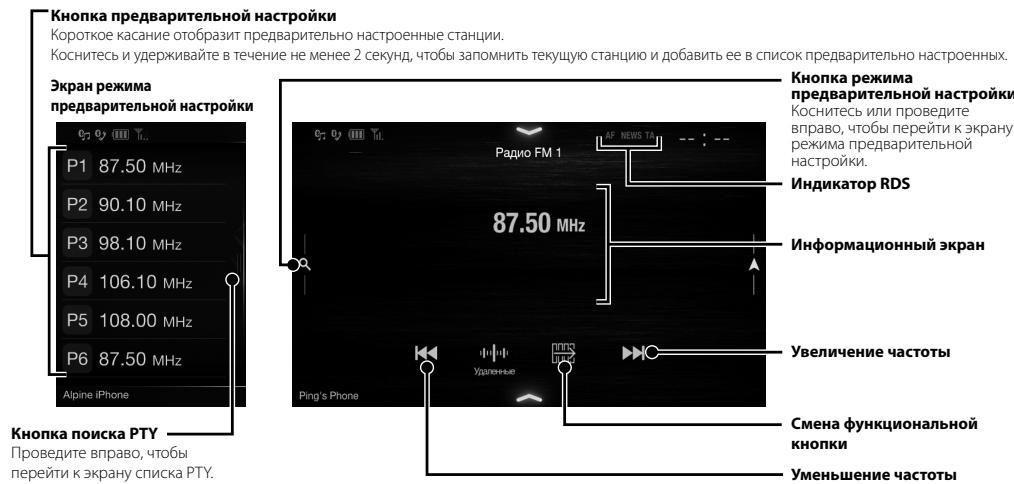
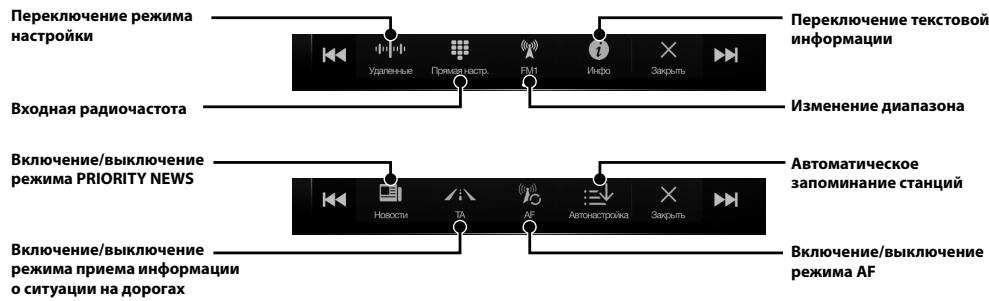
Pa6ota c DAB/DAB+/DMB
Khonka npedBapntelbHoi NaCTpoKN
Kopotkoe kacahne oTo6pa3nI ppeBaPteJIbHO hAcTpoEHHyO Cnyk6y.
KochnTecb n ydepXnBaIte B TeueHne He MeHee 2 cekyH, YTO6b3aOpMHnTB TekyuO Cnyx6y NdoabnBt eB CnCOK npedBaPntbHO HAcTPOEHbIX.
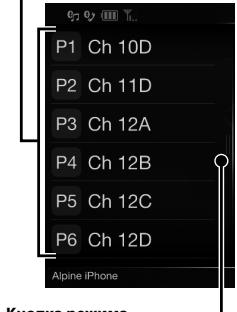
KpaH peKIMa npeBaBAPteBbHOA HcTPOKu
Khoinkapekma
pacwnpeHHoro noncka
PpOBeiTe BnPaB,TO6bI nepeTNI K
EkpaHy cnNcKa BCex Cnyx6
(OT06pa3ntcCnncOKBcex Cnyxk6
Tekyu n CnCOK uNn CnCOK PTY).
Khoinkapexkma
PpeBapntbHn HacTpoKn
KoCHNTecb nn npOBeDnTe
BnpaBO,TO6bI nepeeITN K3KpaHy
pekma ppeBaPteJIbHOI
HacTPOIKN.
HdMkaTOp DAB
HhopmaunHOHHb3KpaH
YBENUHNE YACTOTbl
Cmeha yHKnHOHaBHo
KHONK
YMeHbWeHne yactOTbl
CnaH-woy
OTo6paJaaetcHΦOpMaζηo
nporpamme,00torpaan
7 KocHTecb [More], yTo6bl n3MeHnTb napaMeTpbl MapwpTu, nn [Haayatb HauRauuio], yTo6bl hauaTb noe3dky.
3 KocHTecb [TopoIa/InHdeKc].
4 BBeDHTe Ha3BaHne ropoJa mnn nHndekC.
KoCHNTecb yTO6bl OTO6pa3ntb CnncOK IOXODAUXHnBaHn.
5 BBeDnTe HuxHoe Ha3BaHne yInuIcIb.
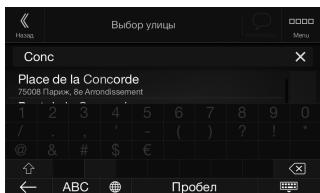
KoCHNTecb TTO6bI OTO6pa3ntb CnTCOK IOXODAUXHnBaHn.
6 BBeDHTe HOMep DoMa MIn NpeceKaIoUy oynu.
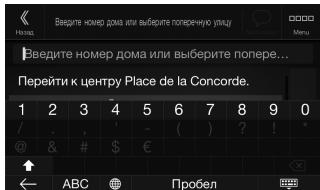
Mappyt 6ydt BvucnEn, n OTo6pa3ntc4 Kapta, noka3bBAIOUaB Becb Mappyt. Pocne 3TOrO MoXHO 6ydt npOBepNTuHΦopMauIO mappyTa n aIbTepHaTINBHe Ie MappytI.
TexHmYeecKneXapaKTepeuCTMKN
MOHUTOP
Pazmep ekpana
9" (X902D/i902D)
8"(X802D-U)
7" (INE-W710D/ilX-702D)
Tin LCD
npo3paHbI TIN TN LCD
Cnctema pa60tbi
akTINBHnA MaTpiuTa TFT
KolnuectBO 3JIeMeHToB N3O6paXeHnA
1152000 nikkenei
(800× 480× 3 (RGB))
Фaktnueckoe KOJIuYeCTBO 3JemeHTOB I3O6paXeHn
He MeHee 99%
CnCTema nOIOCBETKN
LED
FM-TIOHEP
Диапазоннадсторки
87,5-108,0M
Ioporobaa yBCTBNTIELBOCTb ODHORKaHana
8,1d5ΦBT(0,7MKB/75OM)
IoporobayyBCTbntbHoctb50dB
12DΦBΓ(1,1MKB/75OM)
136npatelbHOCTb aJIbTepeHaTINBHO KaHaa
80 dB
OTHOSEHNE CINHNAJ/7yM
65 dB
IpepexoHoe 3aTyxHaHne MeKd y KaHaJaMaMi Stereo
35 dB
Ko3ΦΦnUneHT 3axBaTa
2,0 dB
MW-TIOHEP
Диапазоннадосторкn
531-1602KfU
UyBCTBnTeJbHOCtB (ctaHdapt IEC)
31,6MKB/30ДБΦВT
DAB
IoporobayyBCTBnBHeHOCTb -103D6M
OTHOWeHne CnHn/whm 95d6
IpehexoHoe 3aTyxahne 85d6
Mexdy CtepeOKaHaJaMa
USB
Tpe6obAHnK USB
USB 2.0
MaKcImaJIbHaN IOTepeIeMaH MoUHocTb
1500 mA (noidepka CDP)
Klacc USB
USB (Knacc MaccobOy namrTn)
DaiIOBaaCnCTema
FAT16/32
KolnueCTBOKaHaIIOB
2 KaHana (CTepeo)
HacToTHaXapaKTepeNtKa*
UyBCTBNTeJIbHOCTb npneMa GPS
MaKc. -130 dB
Bluetooth
Texnueckne xapaKtepcntknu Bluetooth
Bluetooth Bepcun 2.1+EDR
ДианазончacterOT
2.402-2.480Mg
BbIXoHnHa MoUHOCtB
+4ДБММAKC.(КЛАССМОПHQCTN2)
PpoΦnB
HFP (npoΦnJIb rapHnTypbl)
Oblue
Iotppe6nma MOuHocTb
14,4 B noctoHHoro Toka
(Donyuckaetc11-16B)
Pa6o7aTe mTpepaTpya
OT - 20^ nO +60°C
MaKcImaJIbHaB BbIXOdHa MoUHOCtB
50BT×4
YpOBeHbBbIXoHOro ayDnOcRHaHa
PpeBapnteHbIy BbXoD (pOHT, TbIn):
2 B/10 KOM (MaKc.)
IpeBapntelbHbYbXoD (ca6Byep):
2 B/10 KOM (MAKc.)
Bec
1,54 Kr (X802D-U)
1,41 kr (INE-W710D/ijLX-702D)
PA3MEP KOPITYCA
UnpnHa
198 mm (X802D-U)
BbICota
178 mm (INE-W710D/iLX-702D)
InybHa
125 mm (X802D-U)
PA3MEP BbICTyIaIOUeN YACTN
UnpnHa
191 mm (X802D-U)
BbICota
171 mm (INE-W710D/jLX-702D)
Iny6nHa
121 mm (X802D-U)
Cpok cnjxkb-3 roda.
96 mm (INE-W710D/iLX-702D)
- Iocoum pa3mepam X902D/i902D noxdoum moIbko dnopeelenhou modeu aemomobua.
-
13-3a Henpepbibhzoo cocepueuencbobaunu npodykma e0 mexnueckue xapakmepucmuu u du3aun Mozym u3menymbc6e3 npebapumelbhozo ybeDomienu.
Ipanel LCD uzomoblena no c6epxmouho mexnoo. Koiuecmbo 3phiekmuibx nukecei npebuiaam 99,99% 3mo o3naaem, umo cyuecmayem beopmncmb nauiu 0,01% nukecei, komopbtece2da bkluenb unu bce2da bkiuonbe. -
Windows Media n norotin WindowsЯльnotc TOBAPbIMn 3HaKaAMn nIIN 3apeRiNCTpRuPoBaHHbIMn TOBAPbIMn 3HaKaAMn Microsoft Corporation B CLJAm n/ nII nDpyrInx CtpaHax.
- Apple, iPhone, iPod u iPod touch RNAIHOITc TOBapHbIMN 3HaKaAMn KOpnpaUM Apple Inc., 3apeINCTpIPoBAHHbIMN B CUSA n npynx cTpaHax. Apple CarPlay RNAIeTc TOBapHbIM 3HaKOM KOpnpaUM Apple Inc.
-ПrimenhenneIorotnnaAppleCarPlay03hauaet,чTo INHTeppeicNoIb3OBeTEnA BTOMO6NIA COOTBETCTBYET KcNPLyatauOnHbIM CTAnDaptAm Apple.KopnpaCnAeApple He Hecet OTBETCTBEHNOCTNa pa6oTy DAHNORO ABTOMO6NII INI ERO COOTBETCTBNE CTAnDaptAm 6e3OpaChOCTN INe peYJATINHBm HOpMaM.IMEteB BVNDy,уTO NcPONb3OBAHnE DaHNORO yCTpOuCTBa C iPhone nIi iPod moKet NOBJIaRb Ha pa6oTy 6ecnpoBOdHoi CBnI.
"Made for iPod" and "Made for iPhone" 03haot,уTo электорньй akcescyap pa3paobotan cneuaJIbHo Дя поdkюченя К усторCTby iPod и iPhone COBTETCTBENHO,И сеTpIuцPoBaH pa3paBOTcKOM КАУДОВLTBOРЯЮUsI KСЛПУATAUONHbIM СТандтам Apple.КорпорадаApple He Hecet OTBEtCTBENHOCTa pa6Oу DAHHORO yCTpoTcBAи ERO COOTBETCTBNE CTaHdaptam Be3oJnacHOCTn I peYyIaTINbHM HopmAM.ИмeTe B BVHy,уTO ИснОБЗOBaHne DAHHORO akcesCyap a iPod и iPhone моket noBIIЯТ ha pa6Oу BeCpnoBoDHOI CB83I.
Android KBJETC TOBAPHbIM 3HaKOM Google Inc. - Po60T Android Bocnpo3BedeH ININ IN3MeHEn IN3 co3dAnHO pa60tI, npdeOCTabJIeTcG Ogle IN cNOJb3yETcB C COOTBetCTBnC yCIOBnMn IInCeH3Nn aTpi6bucn Creative Commons 3.0.
- SPOTIFYилоготиn SpotifyявлготсаразерпстрированьIMToproвим МаркамSpotify AB.
CnoBecnbl3nKnILOrToTbbluBleetoothraBJIaOTc3apeNtprnpoBaHbIMTOBapHbIMn3HaKaMn Kopnpaunn Bluteoth SIG,Inc.nncnOblyOTcKopnpaueeAlpine Electronics,Inc. no nIucehnn. -
TepMNbHdMI n HDMl High-Definition Multimedia Interface, a Takke JorotnHDMI YBJIOTc ToBapMbIMn 3HaKaAMn KomnaHmHDMI Licensing LLC, 3apeNCTprnpoBaHbIMn B CUSA n dpyrnx ctpaHax.
-
Lluehen3na Ha texhnoIIOIO KOJnpOBaHnra 3byka MPEG Layer-3 nOnyeHa ot Fraunhofer IIS n Thomson. PnIOCTBKe 3TOro npOyKa TpeOCTABJIeTcL Hne3nHa NaCTHOE, HeKOMMepueckoe IcNpOB3OBAHnne iHe npEOCTABJIeTc Llue93nH n He NpOpa3yMeBAOTc KaKNe-JIb6PnBaVa HA cNpOB3OBAHnne daHORo npOyKa B CEJX KCMpeUeCKoR (t.e. dNn pOnyehn e np6bln) paNDObEuaHnRA B peAIBHom BpeMeHN (Ha3EMHoro, CpyTHNKOBoro, Ka6BeHoro u/INn INHOrO), IIwPOKO BeuAHn rINn NOTOKOBn pePeau nn DaHbIX uee3 INTEpHET, INTPacEtN u/INn INhle CetN INn dpyrme CETn pacnPedeJeHnra 3NeKToPHNO RODepKAnHn, TAKNE KAK pInIOJKeHnE 3BykBOCnpON3BeDeHnra 3a Plnaty INn nTO tpe6OBaHnIO. DnTaKoR NCpOB3OBAHn rTe6yETc OTdEBNaI NIIeHn. DnI ONyueHn DOponNHInTeBHO INΦopMaunn PoCeTIte Be6-caiT http://www.mp3licensing.com
- ©2006-2016 TomTom. All rights reserved. This material is proprietary and the subject of copyright protection, database right protection and other intellectual property rights owned by TomTom or its suppliers. The use of this material is subject to the terms of a license agreement. Any unauthorized copying or disclosure of this material will lead to criminal and civil liabilities.
OOO «KoMaHnBaBoHaH3a»
IHHopMaIaO cepBnChbIX cHTpax
docTyHa Ha caTe www.alpine.ru
About the Rules of Bluetooth Electromagnetic Radiation Regulation

Declaration of Conformity
CélaHO BЯnoHIN

Spistresci
Dla X902D/X802D-U/INE-W710D:
m = 311
owego
unpalcem
cy比我jca
acje
7 cali (INE-W710D/iLX-702D)
1,41 kg (INE-W710D/iLX-702D)
WYMIARY KORPUSU
Szerokosc
198 mm (X802D-U)
Wysokosc
178 mm (INE-W710D/iLX-702D)
Glebokosc
125 mm (X802D-U)
100 mm (INE-W710D/iLX-702D)
147mm
WYMIARY PLYTY CZOLOWEJ
Szerokosc
191 mm (X802D-U)
Wysokosc
121 mm (X802D-U)
96 mm (INE-W710D/iLX-702D)
Glebokosc
19 mm
WYLACZNY DYSTRYBUTOR
HORN DISTRIBUTION S.A.
UL. KURANTOW 34
02-873 WARSZAWA
TEL.: 0-22 331-55-55
FAX.: 0-22 331-55-00
WWW.ALPINE.COM.PL
Centralny Serwis:
About the Rules of Bluetooth Electromagnetic Radiation Regulation

Declaration of Conformity
ALPINE
ALPINE ELECTRONICS MARKETING, INC.
1-7, Yukigaya-Otsukamachi, Ota-ku,
Tokyo 145-0067, JAPAN
Phone: 03-5499-4531
ALPINE ELECTRONICS OF AMERICA, INC.
19145 Gramercy Place, Torrance,
California 90501, U.S.A.
Phone 1-800-ALPINE-1 (1-800-257-4631)
ALPINE ELECTRONICS OF AUSTRALIA PTY. LTD.
161-165 Princes Highway,
Hallam Victoria 3803, Australia
Phone 03-8787-1200
ALPINE ELECTRONICS GmbH
Alpine House Fletchamstead Highway,
Coventry CV4 9TW, U.K.
www.alpine.co.uk
ALPINE ELECTRONICS France S.A.R.L.
2-6-34, Takashima, Nishi-ku, Yokohama,
Kanagawa, Japan
Printed in Japan

- Contents
- IMPORTANT
- WARNING
- INSTALL THE PRODUCT CORRECTLY SO THAT THE DRIVER CAN NOT WATCH TV/VIDEO UNLESS THE VEHICLE IS STOPPED AND THE EMERGENCY BRAKE IS APPLIED.
- DO NOT WATCH VIDEO WHILE DRIVING.
- DO NOT OPERATE ANY FUNCTION THAT TAKES YOUR ATTENTION AWAY FROM SAFELY DRIVING YOUR VEHICLE.
- DO NOT FOLLOW ROUTE SUGGESTIONS IF THE NAVIGATION SYSTEM INSTRUCTS YOU TO PERFORM AN UNSAFE OR ILLEGAL MANEUVER, OR PLACES YOU IN AN UNSAFE SITUATION OR AREA.
- KEEP THE VOLUME AT A LEVEL WHERE YOU CAN STILL HEAR OUTSIDE NOISES WHILE DRIVING.
- MINIMIZE DISPLAY VIEWING WHILE DRIVING.
- DO NOT DISASSEMBLE OR ALTER.
- USE ONLY IN CARS WITH A 12 VOLT NEGATIVE GROUND.
- KEEP SMALL OBJECTS SUCH AS SCREWS OUT OF THE REACH OF CHILDREN.
- USE THE CORRECT AMPERE RATING WHEN REPLACING FUSES.
- DO NOT BLOCK VENTS OR RADIATOR PANELS.
- USE THIS PRODUCT FOR MOBILE 12V APPLICATIONS.
- MAKE THE CORRECT CONNECTIONS.
- BEFORE WIRING, DISCONNECT THE CABLE FROM THE NEGATIVE BATTERY TERMINAL.
- DO NOT ALLOW CABLES TO BECOME ENTANGLED IN SURROUNDING OBJECTS.
- DO NOT SPLICE INTO ELECTRICAL CABLES.
- DO NOT DAMAGE PIPE OR WIRING WHEN DRILLING HOLES.
- DO NOT USE BOLTS OR NUTS IN THE BRAKE OR STEERING SYSTEMS TO MAKE GROUND CONNECTIONS.
- DO NOT INSTALL IN LOCATIONS WHICH MIGHT HINDER VEHICLE OPERATION, SUCH AS THE STEERING WHEEL OR SHIFT LEVER.
- CAUTION
- HALT USE IMMEDIATELY IF A PROBLEM APPEARS.
- HAVETHEWIRINGANDINSTALLATIONDONEBYEXPERTS.
- USE SPECIFIED ACCESSORY PARTS AND INSTALL THEM SECURELY.
- ARRANGE THE WIRING SO IT IS NOT CRIMPED OR PINCHED BY A SHARP METAL EDGE.
- DO NOT INSTALL IN LOCATIONS WITH HIGH MOISTURE OR DUST.
- Getting Started
- Location of Controls
- For X902D/X802D-U/INE-W710D:
- Turn the ignition key to the ACC or ON position.
- Press and hold the MENU button for at least 5 seconds to turn the power off.
- Switching the Audio Sources Screen to a Dedicated Screen
- Favourite Function
- Registering Items
- Android Auto (Optional)
- Press the MENU button.
- Touch [Android Auto].
- Apple CarPlay (Optional)
- Alpine Connect App (Optional) (X902D/X802D-U/INE-W710D only)
- Spotify
- Radio/RDS Operation
- DAB/DAB+/DMB Operation
- USB Flash drive Operation (Optional)
- USB Audio main screen example
- HDMI Device (DVD Player) Operation (Optional)
- iPod/iPhone Operation (Optional)
- Audio mode
- Searching for a Music File (Full Search Mode)
- Touch the desired artist's name.
- Touch the desired album's name.
- Touch the desired song's name.
- Hands-Free Phone Control
- How to connect to a Bluetooth compatible device (Pairing)
- Touch [Setup] button on the Menu screen.
- Answering a Call
- An incoming call triggers the ringtone and an incoming call display.
- Touch incoming call notification screen.
- Hanging up the Telephone
- Touch [O] (End Call).
- Map Functions (X902D/X802D-U/INE-W710D only)
- Navigation Menu (X902D/X802D-U/INE-W710D only)
- Multipoint Route
- New Rout
- Access the Map
- Information
- Setup
- Setting a Destination (X902D/X802D-U/INE-W710D only)
- Specifications
- MONITOR SECTION
- FM TUNER SECTION
- MW TUNER SECTION
- LWTUNERSECTION
- DAB SECTION
- USB SECTION
- HDMI SECTION
- GPS SECTION
- Bluetooth SECTION
- GENERAL
- CHASSIS SIZE
- NOSE SIZE
- About the Rules of Bluetooth Electromagnetic Radiation Regulation
- Declaration of Conformity
- Inhalt
- Alpine Connect App (Option) (nur X902D/X802D-U/INE-W710D)
- UKW-TUNER
- GEHAUSEGRösSE
- VORSPRUNGGRÖSSE
- Table des matieres
- NE PAS COICER LES CABLES AVEC DES OBJECTS VOISINS.
- GENÉRALITÉS
- DIMENSIONS DU CHÄSSIS
- DIMENSIONS DU NEZ
- Contenido
- Para X802D-U/INE-W710D/iLX-702D
- ① Botón o VOICE
- ⑤ Interruption RESET
- Para X902D/X802D-U/INE-W710D:
- Alpine Connect App (optional) (X902D/X802D-U/INE-W710D solo)
- TAMANO DEL CHASIS
- Sommario
- Per X802D-U/INE-W710D/iLX-702D
- ① Tasto o VOICE
- Per X902D/X802D-U/INE-W710D:
- DIMENSIONI DEL TELAIO
- Innehåll
- For X802D-U/INE-W710D/iLX-702D
- FM TUNER-AVSNITT
- ALLMÄNT
- CHASSISTORLEK
- NOSSTORLEK
- Inhoud
- Alpine Connect App (Optioneel) (alleen X902D/X802D-U/INE-W710D)
- FRAMEFORMAAT
- NEUSFORMAAT
- CopepxaHne
- BAKHO
- PNEyPPEXDEHNE
- !PPEdYnPEJKeHNE
- YCTAHABINBAIte DAHHbI IPOJyKT TAKIM O6P3OM, YTObI BOJITeJIb HE MOF BUNETb 3KPAH, ECJIY ABTOMOBJHE OCTAHOBJIEN HE 3AJEICTBOBAH CTIOHOUYH TOPMO3.
- HE IPOCMATPMBAITE BUNDEO BO BPEM YNIPABLEHNEI ABOTMOBUIEME.
- HE IPEIPIHUMAITE HUKAKMX DEJECTBNI, KOTOPbIE MOYT OTBJIeBb BAC OT bE3OIIACHOFO BOXdEHNA ABTOMOSUJIA.
- HE CLEJYTE PPEJIOXEHNIM MAPUPYTA, ECJIN HABITAUHOHHA CNCTEMA PPEJIOXHTB bIIOJHNTb HE63OTACHBI IIN 3APIEUCEHHBIMAHEBP, A TAKXE B CJUYAX, ECJIN PPEJIOXEHNBI MAPUPYT OKAKETC NOTEHUNBOHO ANACHBIM INI INPUBEETB OIACHYO 3OHY.
- IIOJDEPKJBAAITE FPOMKOCTb HA YPOBHE, IIO3BOJIJAIOUcEM CJIbIaHTb BHEUIHME 3BYKIN BO BPMEA DBIKEHN.
- KAK MOXHO MEHbIe OTBIEKAITECb HA IPOCMOTP INCJIER BO BPEM BOJDEHNA.
- HE PA3bIPATb IN HE U3MEHArTb.
- NCIOIb3OBATb TOLBko B ABTOMOSUJX C IINTAHNEM BOPTOBOY CETN+12 BOJIb N 3A3EMJIHEHMEM OTPMIATEJIbHORO IOJIIOCA HA KY3OB ABTOMOSUJIA.
- XPAHNTHE HEBOLIbIWe OBbEKtBI, TAKME KAK BATAPEI, B HEIOCTUYINbIX IJIY DEETMECTAX.
- PPI 3AMEHE PIPENOXAHNTEJEI NCIOJIb3YJTE TOJIbKO AHAJIOTUNHbIE IIO HOMNHAJIY.
- HE 3AKPbIBAITE BEHTNUJIaLIOHHbIE OTBEPCTNIAI PAIMATOPA.
- NCIOJIb3yIe 3TOT NPOdyKT TOJIbKO JIA
- ABTOMOBIEN C BOPTOBON CETbIO HAPRJXEHNEM 12 B.
- BbINOJIHAYTE IPNABUNIbHbIE NOKJIIOUeynA.
- IPEEDIOKJIIOUEHMEMIPOBOIOBOTCOEINHNTKA6EBTOTOTPILATEJBHOIIOJICA BATAPEI.
- HE DONYCKAITE CIPETEHNA KABEJIEN C HAXOJIAIIMNCR PRAOM IPEDMETAMI.
- Прилloxене Alpine Connect (прнобразетядополнтельно) (Толъко X902D/X802D-U/INE-W710D)
- Pa6ota c paAnio/RDS
- Pa6ota c DAB/DAB+/DMB
- Khonka npedBapntelbHoi NaCTpoKN
- Khoinkapekma
- pacwnpeHHoro noncka
- Khoinkapexkma
- PpeBapntbHn HacTpoKn
- HdMkaTOp DAB
- HhopmaunHOHHb3KpaH
- YBENUHNE YACTOTbl
- Cmeha yHKnHOHaBHo
- KHONK
- YMeHbWeHne yactOTbl
- CnaH-woy
- TexHmYeecKneXapaKTepeuCTMKN
- MOHUTOP
- FM-TIOHEP
- MW-TIOHEP
- DAB
- USB
- Bluetooth
- Oblue
- PA3MEP KOPITYCA
- PA3MEP BbICTyIaIOUeN YACTN
- OOO «KoMaHnBaBoHaH3a»
- Spistresci
- Dla X902D/X802D-U/INE-W710D:
- WYMIARY KORPUSU
- WYMIARY PLYTY CZOLOWEJ
- WYLACZNY DYSTRYBUTOR
- ALPINE
Brand : ALPINE
Model : ILX-702D
Category : Car stereo