
LX2000 - Sound HP - Free user manual and instructions
Find the device manual for free LX2000 HP in PDF.



| Product type | Center speaker for home theater system |
| Brand | HP |
| Model | LX2000 |
| Category | Audio |
| Dimensions (W x H x D) | 45 x 15 x 20 cm (estimated) |
| Weight | 5 kg (estimated) |
| Power handling | 100 W RMS (estimated) |
| Impedance | 8 ohms |
| Sensitivity | 90 dB (estimated) |
| Frequency response | 60 Hz - 20 kHz (estimated) |
| Speaker type | Tweeter and woofer |
| Number of ways | 2-way |
| Connectors | Gold-plated binding posts, dual inputs with jumpers (bi-wiring possible) |
| Electromagnetic interference shielding | Yes |
| Recommended placement | Above or below the TV, front faces aligned |
| Finish | Wood-like veneer (estimated) |
| Removable grille | Yes |
| Maintenance | Soft dry cloth for the cabinet, low-power vacuum cleaner for the grille, no solvents |
| Bi-amping possible | Yes (remove jumpers) |
| Usage recommendation | Avoid amplifier with too low power to prevent distortion and damage to tweeters |
Frequently Asked Questions - LX2000 HP
User questions about LX2000 HP
0 question about this device. Answer the ones you know or ask your own.
Ask a new question about this device
Download the instructions for your Sound in PDF format for free! Find your manual LX2000 - HP and take your electronic device back in hand. On this page are published all the documents necessary for the use of your device. LX2000 by HP.
USER MANUAL LX2000 HP
JBL LX SERIES INSTRUCTION MANUAL
Congratulations on choosing JBL LX Series loudspeakers.
JBL LX series loudspeakers are designed using the technologies that have made JBL the world's most famous brand of loudspeakers.
Wherever loudspeakers are important, integral parts of musical performances - in opera houses, in football stadiums or at rock concerts - JBL is the loudspeaker brand of choice.
By using only the best available materials and devoting careful attention to details, JBL is certain that your JBL speakers will provide many years of excellent performance.
The instructions in this manual will help you realize the full potential of your loudspeakers.
PLACEMENT
JBL LX Series loudspeakers are designed to produce the best possible sound when located at some distance from walls and corners. Approximately 1 m is preferable. Placement in corners or close to walls will increase the amount of bass, but not necessarily the quality of the bass. If such placement is unavoidable it is recommended that you use the tone controls on your amplifier or receiver to reduce the bass.
The bookshelf-size loudspeakers should not be placed on the floor, but will greatly benefit from placement on an open, rigid stand 35-50 cm high, which will place the high frequency unit at ear level, which is important for the creation of the best possible stereo image. Placement of the speaker on a high quality stand will improve the accuracy of the bass, which again will lead to the most dynamic, expressive reproduction.
We strongly advise that you consult your JBL dealer for advice and demonstration.
Should you want to mount your JBL LX speaker on the wall, it is recommended to use a strong bracket. A distance of 2-4 cm from the wall will allow the rear panel mounted reflex port to work, while complete closing of the port will reduce the deepest bass.
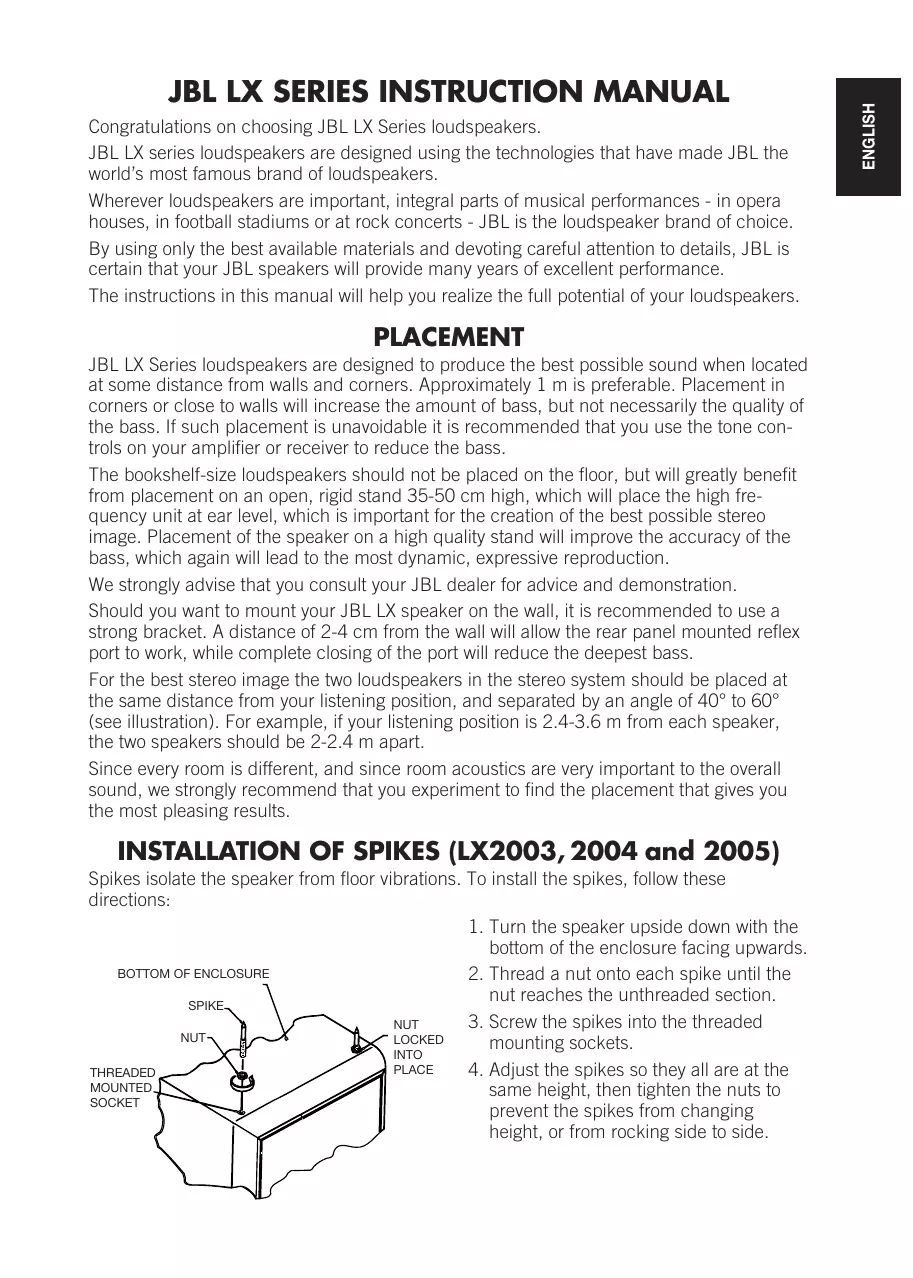
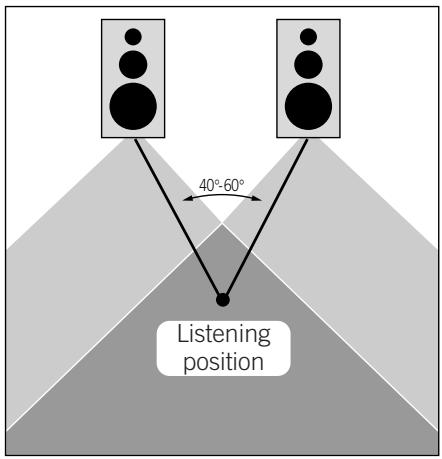
For the best stereo image the two loudspeakers in the stereo system should be placed at the same distance from your listening position, and separated by an angle of 40° to 60° (see illustration). For example, if your listening position is 2.4 - 3.6 m from each speaker, the two speakers should be 2 - 2.4 m apart.
Since every room is different, and since room acoustics are very important to the overall sound, we strongly recommend that you experiment to find the placement that gives you the most pleasing results.
INSTALLATION OF SPIKES (LX2003, 2004 and 2005)
Spikes isolate the speaker from floor vibrations. To install the spikes, follow these directions:
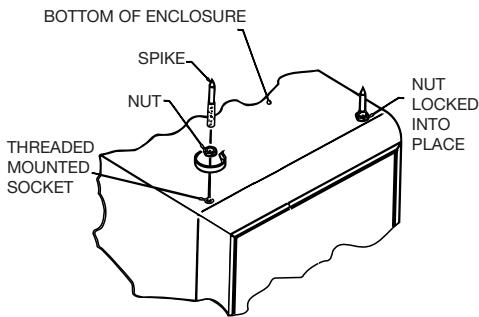
- Turn the speaker upside down with the bottom of the enclosure facing upwards.
- Thread a nut onto each spike until the nut reaches the unthreaded section.
- Screw the spikes into the threaded mounting sockets.
- Adjust the spikes so they all are at the same height, then tighten the nuts to prevent the spikes from changing height, or from rocking side to side.
CONNECTIONS
NOTE: LX2004 and LX2005 have dual pairs of gold-plated terminals. For normal connection with a single run of loudspeaker cable, the metal bars between the High and Low inputs MUST be in place. Connect cable only to the inputs marked High. For separate cable connections to the Low and High inputs, see next section BI-WIRING. Connect the loudspeakers to your amplifier or receiver using two-conductor insulated wire. We recommend 1.5 mm² wire as a minimum size for cable runs of up to 5 m. If your loudspeakers have to be placed at greater distance from your amplifier or receiver you should use heavier wire. Too thin wire or too long wire runs can result in the sound from
the loudspeaker being different than intended, but will not do any harm. We recommend that you consult your dealer, who will be happy to assist you in this matter.
For each channel, the red terminal on the loudspeaker should be connected to the red (+) loudspeaker terminal on the amplifier or receiver, and the black terminal on the loudspeaker to the black (-) loudspeaker terminal on the amplifier or receiver. Connecting the loudspeakers in this manner ensures that they will have the same polarity ("in phase"). Connecting the loudspeakers with different polarity will not damage them, but will result in less bass and a poor stereo image. This can be determined by listening to a solo voice: if the voice can be located in the space between the two loudspeakers, the speakers are connected with the same polarity. If not, the voice will sound diffuse and be difficult to place in the space.
Most two-conductor wire is color-coded or has a ridge on one of its insulating jackets, so that you can easily identify which wire is connected to which terminal.
When connecting more than one pair of loudspeakers to an amplifier or receiver consult your dealer or amplifier manufacturer to ensure that the resulting load can be handled safely.
BI-WIRING
LX2004 and LX2005 have dual pairs of gold-plated terminals and can be bi-wired. Before bi-wiring, ALWAYS remove the metal bars between the High and Low inputs. Bi-wiring will improve resolution and dynamics. For even greater improvement, you may use two amplifiers (bi-amping).
DANGER: LOW POWER
Generally, loudspeakers can withstand a great deal of power, as long as the signal is undistorted. You can safely use a power amplifier with a power rating greater than the loud-speaker's recommended power, as long as the amplifier is not driven beyond its limits.
When amplifiers are overdriven, they "clip" the signal, creating distortion which appears as a high frequency signal. These high frequency signals are directed to the high frequency transducer by the crossover network, thereby creating a dangerous condition for the smallest driver in the loudspeaker system.
The smaller the amplifier you use, the greater the danger of overdriving the amp, and consequently the greater the potential danger to the high frequency transducer.
Excessive boost of the tone controls of the amplifier or receiver can also aggravate the situation.
Always use an amplifier or receiver that will make your LX loudspeakers play reasonably loud and at the same time sound clean and undistorted.
LX2000 CENTER CHANNEL
For surround sound systems, the JBL LX Series includes a dedicated center channel loudspeaker. LX2000 Center is magnetically shielded for safe use near the picture tube and should be placed directly on top of or beneath the television set. The front edge of LX2000 Center should be on a line with the front edge of the television. LX2000 Center must be connected in phase to the amplifier/receiver, i.e. plus-to-plus and minus-to-minus, exactly like the left and right front loudspeakers.
GENERAL CARE
JBL LX Series loudspeaker systems are constructed of high quality MDF-board, superior to solid wood in its acoustic properties. They are built to give many years of trouble-free service, and do not require special attention.
Occasional dusting with a clean, soft cloth will maintain the original beauty of the finish. Furniture waxes, polishes or cleaners are not recommended.
The grille may be gently vacuumed, and stains can be removed with an aerosol cleaner, following the manufacturer's instructions. Never use any solvents to clean any part of the system.
SERVICE
Should your JBL LX Series loudspeaker ever need service, return it to the JBL dealer from whom it was purchased. If for some reason this is impractical, contact your local JBL distributor.
This loudspeaker conforms to all the relevant standards in the EMC Directive (89/336/EEC)
JBL Europe A/S

Steen Michaelsen
UBL
Brand : HP
Model : LX2000
Category : Sound