A11/800 - Headphones KYG - Free user manual and instructions
Find the device manual for free A11/800 KYG in PDF.



| Type | Circumaural Bluetooth headphone with active noise reduction |
| Weight | 250 g |
| Bluetooth version | 5.0 |
| Battery life (Bluetooth mode) | 40 hours |
| Battery life (ANC + cable mode) | 36 hours |
| Battery life (Bluetooth + ANC mode) | 19 hours |
| Charging time | 2 hours |
| Battery | 950 mAh lithium-ion |
| Wireless range | 10 meters |
| Bluetooth profiles | A2DP, AVRCP, HSP, HFP |
| Audio codecs | AAC, SBC, aptX, aptX-LL, CVC |
| Speaker size | 40 mm |
| Impedance | 32 ohms |
| Sensitivity | 100 ± 3 dB |
| Frequency response | 20 Hz - 20 kHz |
| Active noise reduction | Yes, hybrid active |
| Sound modes | ANC, Ambient, Awareness |
| Touch controls | Yes |
| Voice assistant | Google Assistant, Siri |
| NFC | Yes |
| Connectors | USB-C (charging), 3.5 mm jack (audio) |
| Multipoint connection | Yes, up to 2 devices |
| Proximity sensor | Yes (auto-pause) |
| Cleaning | Soft dry cloth, no solvents |
| Included accessories | USB-C cable, 3.5 mm audio cable with mic, carrying case, manual |
Frequently Asked Questions - A11/800 KYG
User questions about A11/800 KYG
0 question about this device. Answer the ones you know or ask your own.
Ask a new question about this device
Download the instructions for your Headphones in PDF format for free! Find your manual A11/800 - KYG and take your electronic device back in hand. On this page are published all the documents necessary for the use of your device. A11/800 by KYG.
USER MANUAL A11/800 KYG
Bluetooth Active Noise Cancelling Headphones

Kygo Life unites my love of music with modern Scandinavian design. The aim is to develop top-quality audio equipment that sounds amazing and looks great. Future classics that capture the euphoric feeling of my music.
Like my approach to everything, Kygo Life is driven to continually improve. So, as each product evolves it embraces the latest technology and focuses on perfecting the details until I'm absolutely happy the end result is the best it can be.
I hope that by creating new and inspiring audio experiences, you'll enjoy listening to your favourite tunes even more.

KYRREGORVELL-DAHLL
Creative Director, Kygo Life
Getting Started
Thank you for choosing Kygo A11/800 Bluetooth Noise-Cancelling headphones. Before you start using them, you should read this manual to familiarise yourself with the Bluetooth functions of your mobile phone or other devices.
Precautions
- Please follow the instructions given in this manual carefully to ensure your safety. Before using Kygo A11/800 headphones, we would strongly encourage you to read this user manual.
- Pay particular attention to any edges, uneven surfaces, metal parts, accessories and packaging to avoid any possibility of injury.
- Do not dismantle, repair or modify this product; any fire, electric shocks or other product damage caused by this are not covered under warranty.
- Do not use any solvents or volatile liquids to clean your Kygo A11/800 headphones.
- Do not use your Kygo A11/800 headphones in hazardous situations.
- Do not use any charging cables other than the one provided in the box to charge your headphones.
- Always charge your headphones if they have not been used for more than 12 months.
Precautions
This device complies with Part 15 of the FCC rules. Operation is subject to the following two conditions: (1) this device may not cause harmful interference, and (2) this device must accept any interference received, including interference that may cause undesired operation.
The manufacturer is not responsible for any radio or TV interference caused by unauthorized modifications or change to this equipment. Such modifications or change could void the user's authority to operate the equipment.
This equipment has been tested and found to comply with the limits for a Class B digital device, pursuant to part 15 of the FCC Rules. These limits are designed to provide reasonable protection against harmful interference in a residential installation. This equipment generates, uses and can radiate radio frequency energy and, if not installed and used in accordance with the instructions, may cause harmful interference to radio communications. However, there is no guarantee that interference will not occur in a particular installation. If this equipment does cause harmful interference to radio or television reception, which can be determined by turning the equipment off and on, the user is encouraged to try to correct the interference by one or more of the following measures:
Reorient or relocate the receiving antenna.
- Increase the separation between the equipment and receiver.
- Connect the equipment into an outlet on a circuit different from that to which the receiver is connected.
Consult the dealer or an experienced radio/TV technician for help.
Precautions
The device can be used in portable exposure condition without restriction.
The device has been evaluated to meet general RF exposure requirement.
This equipment complies with FCC's RF radiation exposure limits set forth for an uncontrolled environment. This device and its antenna(s) must not be co-located or conjunction with any other antenna or transmitter.
Features
- Bluetooth 5.0
- Hybrid Active Noise Cancelling
- Qualcomm® aptXTM audio technology
- SBC and AAC® audio technology
- Awareness & Ambient modes
- Clear HD voice
- Proximity sensor
- Touch control
- Voice assistant - compatible with Google Assistan and Siri
- NFC
- 3.5mm music line-in function
- Supports connection with 2 phones or devices
General Function
| Operation | LED indication |
| Power on | Blue LED flashes 2 times |
| Power off | Red LED flashes 2 times |
| Pairing | Red LED & Blue LED flash alternately |
| Standby | Blue LED flashes 3 times in 5 seconds |
| Incoming call | Blue LED flashes continuously |
| Low battery | Red LED flashes 2 times every 2 seconds |
| Charging | Red LED stays lit during charging Blue LED stays lit once charging is complete |
General Function
| Operation | LED indication |
| ANC mode | White LED stays lit |
| Ambient mode | White LED flashes once every second |
| Awareness mode | White LED flashes once every 0.5 seconds |
Awareness Mode
Cancels 50% of ambient noise, while letting in 100% of human voices.
Ambient Mode:
Lets in 100% of human voices and surrounding sound in your environment.
Basic Buttons Operation
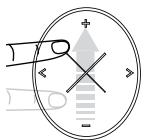
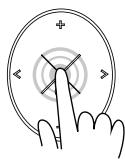
Volume Up:
Slide finger from "-" to "+" to increase volume step by step.
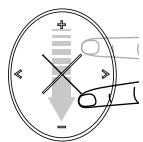
Volume down:
slide the finger from ^+ to - to decrease volume
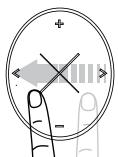
Previous track:
slide the finger from >> to << to go to the previous track.
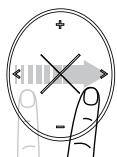
Next Track:
slide the finger from "
Play/Pause:
OPTION 1: click on the touch panel to pause music, press again to restart.
OPTION 2: press the multifunction button once, press again to restart.
Basic Buttons Operation
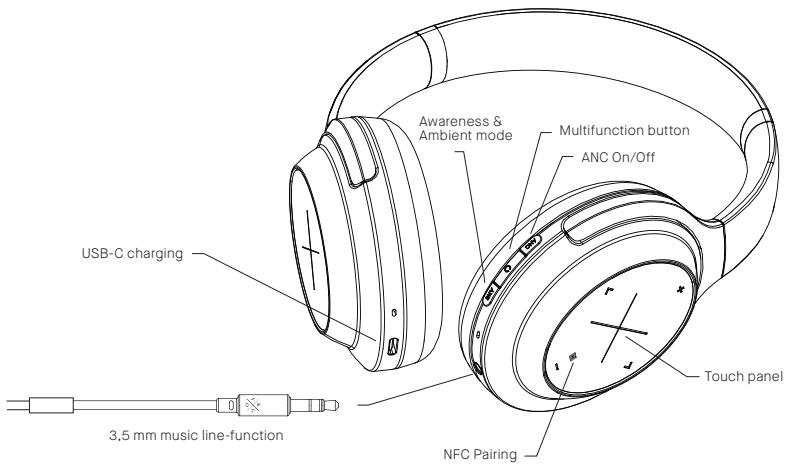
Power on: Press the multifunction button for 2 seconds. When the blue LED blinks 2 times, the headphones are turned on.
Power off: Press the multifunction button for 3 seconds. The red LED will flash twice to indicate that the headphones are turned off.
Volume up: slide the finger from “-” to “+” to increase volume.
Volume down: slide the finger from "+" to -" to decrease volume
Previous track: slide the finger from >^ to < ^ to go to the previous track.
Next Track: slide the finger from "
Play/Pause:
OPTION 1: click on the touch panel to pause music, press again to restart.
OPTION 2: press the multifunction button once, press again to restart.
3.5mm music line-in function: Connect audio line-in cable to 3.5mm audio jack for wired music. (Phone call function can still be used in this mode). Before connecting your audio line, please ensure that the headphones are powered OFF.
- Connect the 3.5mm audio cable to the headphone and audio player.
- Adjust volume of the audio player or music player to reach the desired level
Basic Buttons Operation
Activate Voice assistant:
OPTION 1: double click on the touch panel, and then say the hotwords "Ok Google"/"Hey Google"/"Hey Siri".
OPTION 2: double click on the multifunction button.
Proximity sensor: the music will automatically play/pause when you put on or take off your headphones. If headphones are left paused or unused, they will automatically turn off after 1 hour.
Noise-Cancelling: press the ANC button once to turn on noise-cancelling. Press again to turn it off.
Awareness and Ambient modes: press the AWS button once to turn on Ambient Mode. Press again to turn on Awareness Mode. Press a third time to turn it off
Battery status: You can check the battery status of your headphones in the Kygo Sound App. When connected to iOS devices, the headphone's battery status is displayed in the top right corner of the screen.
Delete Pairing record: press the ANC and AWS buttons simultaneously for 3 seconds. The red LED will light for 1 second, and the headphones will enter pairing mode.
3,5 mm Audio Cable
When connected to your audio cable, the headphones will automatically be powered off, but you can still listen to music or make phone calls.
- Connect the 3.5mm audio cable to the headphone and device.
- Press the button once to pause/play music.
- Press 2 times to skip a track
- Press 3 times to go to the previous track.
- Control the music volume directly on your device.
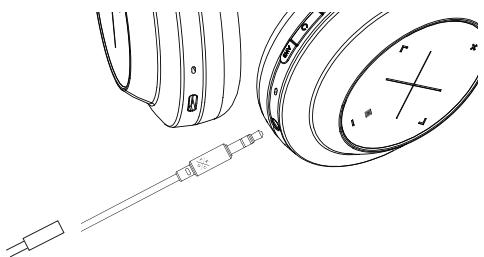
You can still use the noise cancelling and awareness functions with the 3.5mm audio jack cable, as long as the headphones are not out of power. The prompt tone is not active when the headphones are used with the audio cable. The LED light will indicate which mode is activated.
Pairing phone or devices:
Make sure the headphones are powered OFF.
Press and hold the multifunction button for 5 seconds.
The red and blue LEDs will blink, and you will hear a smart voice saying that the headphones are in pairing mode.
- Activate the Bluetooth function on your phone or device and select Kygo A11/800 to connect.
Reconnect the last paired device:
Press the multifunction button for 2 seconds. The headphones will enter repair mode and search for the last connected device. If it isn't connected within 10 seconds, the headphones will enter regular pairing mode.
Pairing with two phones or other devices at the same time
- Pair with the "A" phone successfully, then turn off the headphones.
- Follow the same procedure with "B" phone.
- Then power off the headphones again.
- Power up headphones again. They will automatically connect to phone "B" (the last one connected) and then check "found devices" on phone "A" and select Kygo A11/800 to connect.
Pairing to a phone with NFC function
- Make sure the NFC function on your device is activated.
- Turn on your Kygo A11/800 headphones.
- Put your device's NFC zone near the right side of your Kygo A11/800 headphones.
- If your phone asks you to confirm the connection, press YES.
Dissconnect Bluetooth
- Press the multifunction button for 1 second. The headphones will disconnect from the device and re-enter pairing mode.
Sound quality
Sound quality with AAC®
Sound quality with Qualcomm® aptXTM
The headphones can connect wirelessly to any enabled devices. These technologies improve Bluetooth streaming quality and deliver CD-quality sound.

Qualcomm aptX Low Latency
Qualcomm aptX is a product of Qualcomm Technologies, Inc. and/or its subsidiaries.
Qualcomm is a trademark of Qualcomm Incorporated, registered in the United States and other countries, aptX is a trademark of Qualcomm Technologies International, Ltd., registered in the United States and other countries
Kit Contents
1× Kygo A11/800 Stereo headphones
1×USB-CCharging cable
1× 3.5mm Audio cable with mic
1 × Headphone travel case
1×User manual
1 × Warning sheet
Specifications
Bluetooth version: 5.0
Battery: 950 mAh
Battery life (Bluetooth mode): 40 hrs
Battery life (cabled ANC mode): 36 hrs
Battery life (Bluetooth + ANC mode): 19 hrs
Charging time: 2 hrs
Wireless range: 10 m
Bluetooth Profiles: A2DP/AVRCP/HSP/HFP
Audio codec: AAC, SBC, aptX and aptX-LL, CVC
Driver Size: 40mm
Impedance: 32Ω
Sensitivity: 100± 3dB
Frequency response: 20Hz-20kHz
Weight: 250g
Dimensions: L 160W 80H 192mm
Erste Schritte
Qualcomm aptX Low Latency
Qualcomm aptX is a product of Qualcomm Technologies, Inc. and/or its subsidiaries.
Qualcomm is a trademark of Qualcomm Incorporated, registered in the United States and other countries, aptX is a trademark of Qualcomm Technologies International, Ltd., registered in the United States and other countries
Lieferumfang
Qualcomm aptX Low Latency
Qualcomm aptX is a product of Qualcomm Technologies, Inc. and/or its subsidiaries.
Qualcomm is a trademark of Qualcomm Incorporated, registered in the United States and other countries, aptX is a trademark of Qualcomm Technologies International, Ltd., registered in the United States and other countries
Inhoud verpakking
1 x Kygo A11/800 stereo-koptelefoon
1xUSB-C-opleadkabel
1× 3,5mm audiokabel met microfoon
Qualcomm aptX Low Latency
Qualcomm aptX is a product of Qualcomm Technologies, Inc. and/or its subsidiaries.
Qualcomm is a trademark of Qualcomm Incorporated, registered in the United States and other countries, aptX is a trademark of Qualcomm Technologies International, Ltd., registered in the United States and other countries
Dimensions: L 160 x I 80 x *H 192 mm
Introduzione
Qualcomm aptX Low Latency
Qualcomm aptX is a product of Qualcomm Technologies, Inc. and/or its subsidiaries.
Qualcomm is a trademark of Qualcomm Incorporated, registered in the United States and other countries, aptX is a trademark of Qualcomm Technologies International, Ltd., registered in the United States and other countries
Raggio wireless: 10 m
Profili Bluetooth: A2DP/AVRCP/HSP/HFP
Codec audio: AAC, SBC, aptX and aptX-LL, CVC
Dimensioni driver: 40 mm
Impedenza: 32Ω
Qualcomm aptX Low Latency
Qualcomm aptX is a product of Qualcomm Technologies, Inc. and/or its subsidiaries. Qualcomm is a trademark of Qualcomm Incorporated, registered in the United States and other countries, aptX is a trademark of Qualcomm Technologies International, Ltd., registered in the United States and other countries
Autonomía (modo cable ANC): 36 horas
Autonomía (modo Bluetooth + ANC): 19 horas
Qualcomm aptX Low Latency
Qualcomm aptX is a product of Qualcomm Technologies, Inc. and/or its subsidiaries. Qualcomm is a trademark of Qualcomm Incorporated, registered in the United States and other countries, aptX is a trademark of Qualcomm Technologies International, Ltd., registered in the United States and other countries
Alcance wireless: 10 m
Perfis Bluetooth: A2DP/AVRCP/HSP/HFP
Codec audio: AAC, SBC, aptX e aptX-LL, CVC