IS2565BLB - Steam generator DARRY BRAUN - Free user manual and instructions
Find the device manual for free IS2565BLB DARRY BRAUN in PDF.



User questions about IS2565BLB DARRY BRAUN
0 question about this device. Answer the ones you know or ask your own.
Ask a new question about this device
Download the instructions for your Steam generator in PDF format for free! Find your manual IS2565BLB - DARRY BRAUN and take your electronic device back in hand. On this page are published all the documents necessary for the use of your device. IS2565BLB by DARRY BRAUN.
USER MANUAL IS2565BLB DARRY BRAUN
Register your product
www.braunhousehold.com/register
Deutsch 7
English 9
Français 12
Espanol 15
Portugues 18
Italiano 21
Nederlands 23
Dansk 26
Norsk 29
Svenska 31
Suomi 34
Polski 36
Český 39
Slovenský 42
Magyar 44
Hrvatski 47
Slovenski 50
Türkce 53
Româna (RO/MD) 55
Eληνικα 58
Ka3ak 61
Pycckn 65
ykpaiHcbka 68
73
Für Demo-Videos scanners Sie den folgenden QR-Code
For demo videos scan the following QR code
Pour les videos de démonstration, scanze le code QR suivant
Para videos de demostración escanee el siguientes número QR
Para videos de demonstração, digitalize o segunte)córgo QR
Per i video dimostrativi scansiona il seguente codice QR
Scan voor demovideo's de volgende QR-code
Scan after følgende QR-kode til demo-videoer
For demovideoer skann falgende QR-kode
Skanna följande QR-kod for demovideor
Skannaa demovideoita varten seuraava QR-koodi
Tia 6okuaotika biVTe oapwTe tvakolouo Komega QR
W przypadku filmów demonstrczyjnych zeskanuj nastepujucy kod QR
Uukazkovych videinaskenujtesnasledujici QR kód
U demo videi naskenujte nasledujuci QR kód
Bemutató videók eseten olvassa be a következő QR-kódot
Za demonstracijski videozapise skenirajte sljedeci QR k od
Za predstavitvene videoposnetke skenirajte naslednjo kodo QR
Demo videolar污染防治QR kodunu tarayin
Pentru videoclipurile demo, scanati urmatorul cod QR
Дя demOHCTpaUHOHHbIX BnDEOpOJIKNOB OTckaHpyTe cIeNyUoUoi QR-KoI
Демо-бeнелер ушин келесi QR Кobин сkaнерлз
Дя demohctpaizhiHx Biéo cKahyTe HaCTyHnI QR-koD
ylll aaywai ayaiyawj jao gwl . aagggl ydlal glbaal
Copyright 2022. All rights reserved
De'Longhi Braun Household GmbH
Carl-Ulrich-StraBe 4
63263 Neu-Isenburg/Germany

DEitte lessen Sie die Sicherheitshinweise (separate Broschüre) sorgfältig und vollständig, bevor Sie das Gerät in Betriebnehmen.
EN Please read safety instructions (separate booklet) carefully and completely before using the appliance.
FR Veuillez dire attentivement l'intégrality des instructions de sécurité (livret séparé) avant d'utiliser l'appareil.
ES Lea Completely las instrucciones de seguridad (manual separado) con atencion antes de utiliser el aparato.
PT Leia as instruções de segurança (folheto separado) atentamente e por completeness outilizar o aparelho.
IT Si prega di leggere attendamente ed integralmente le istruzioni di sicurezza (libretto separato) prima di utilizzare l'apparecchio.
NL Lees de veiligheidsaanwijzingen (afzonderlijk boekje) aandachtig en volledig voordat u dit product gebruikt.
DK Laes sikkerhedsinstruktionerne (separat hæfte) omhyggeligt og fuldstændigt, før apparatet bruges.
NO Les alle sikkerhetsanvisingene grundig før du tar i bruk apparatet.
SE Lásigen sakerhetsanvisingarna (separat háfte) noggrant innan du använder apparaten.
FI Lue turvallisuusohjeet (erillinen kirjanen) huolella kokonaan ennen laitteen käyttoä.
PL Przed uzyciem urzadzenia prosze uwaznie przycieczytać instrukcje bezpieczność (osobna broszura).
CZ Přečěte si pečílive a kompletně bezpečnostníPokyny (samostnatá brožura) prěd použitím přistroje.
SK Kym začnete spotrebič používat, dōkladne si prešudujte bezpečnostnéPokyny (samostatnébrožúka).
HU Kérjuk, hovy a keszülék használata elott olvassa vegig figyelmesen a biztonságiutasításokat (kūlön füzet).
HR Molimo vas da prije početka korištenja ureža pažljivo i u cijelosti pročitate sigurnosne upute (posebna knjižica).
SL Pred napravo začnete uporabljati, pozorno in v celoti preberite navodila (ločena knjižica).
TR Cihazi kullanmadan once luffen guvenlik talimatlarini dikkatle ve tamamen okuyun (ayri kitapcik).
RO Vá rugám sá citiţu cu atentieși in intregime instrucțiunile de siguranta (broşură separată) înte de a Utiliza aparatul.
GR MeIeTnOte ME npooox nOeC Tc OoNyieC aopaaEiaC (ExwpiTo foAaIaio) npotou XpnoaipoiNaTe Tn ouakvun.
KZ AcnantbI KOndaHapdbH aJbHda Kayinci3ik 6oBbHwa HcaynapdbI (6eJIek KITaHwa) 3eiH KObbl TyeJIeN OKbIN WbIFbHbI3.
RU Ipeed nCnoIb3OBAHnem npnbopa BnIMaTeIbHO nOJIHoCTbIO npOHTnTe IHCTpyKcMn IO TeXnKe 6e3oNaChOCTn (OTdIeBna 6poUopa).
UA Ipeed BnKOpncTaHHaM npucTroIO yBaXHO Ta nobHicTIO npouHTaIe IHCTpyKcIIO 3 TexHIkN 6e3neKn (okpemy bpoushpy).
AR. jglall plxulj kJLk JkWg ayu (Jauia u) jlll claioo
A
B
Steam Button

First use
30 sec
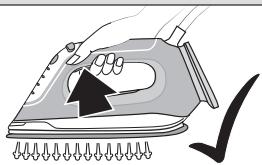
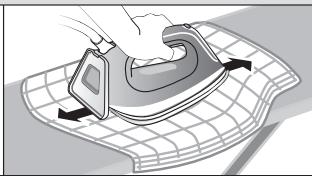
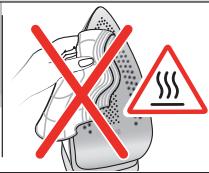
C
D
E
F
Deutsch
Vor dem Gebrauch
Please read instructions carefully and completely before using the appliance.
Caution: Due to the high power of this appliance please make sure that your mains supply is sufficient. Please contact your local electric power company to make sure that the so called mains impedance is not higher than 0,404 Ohm.
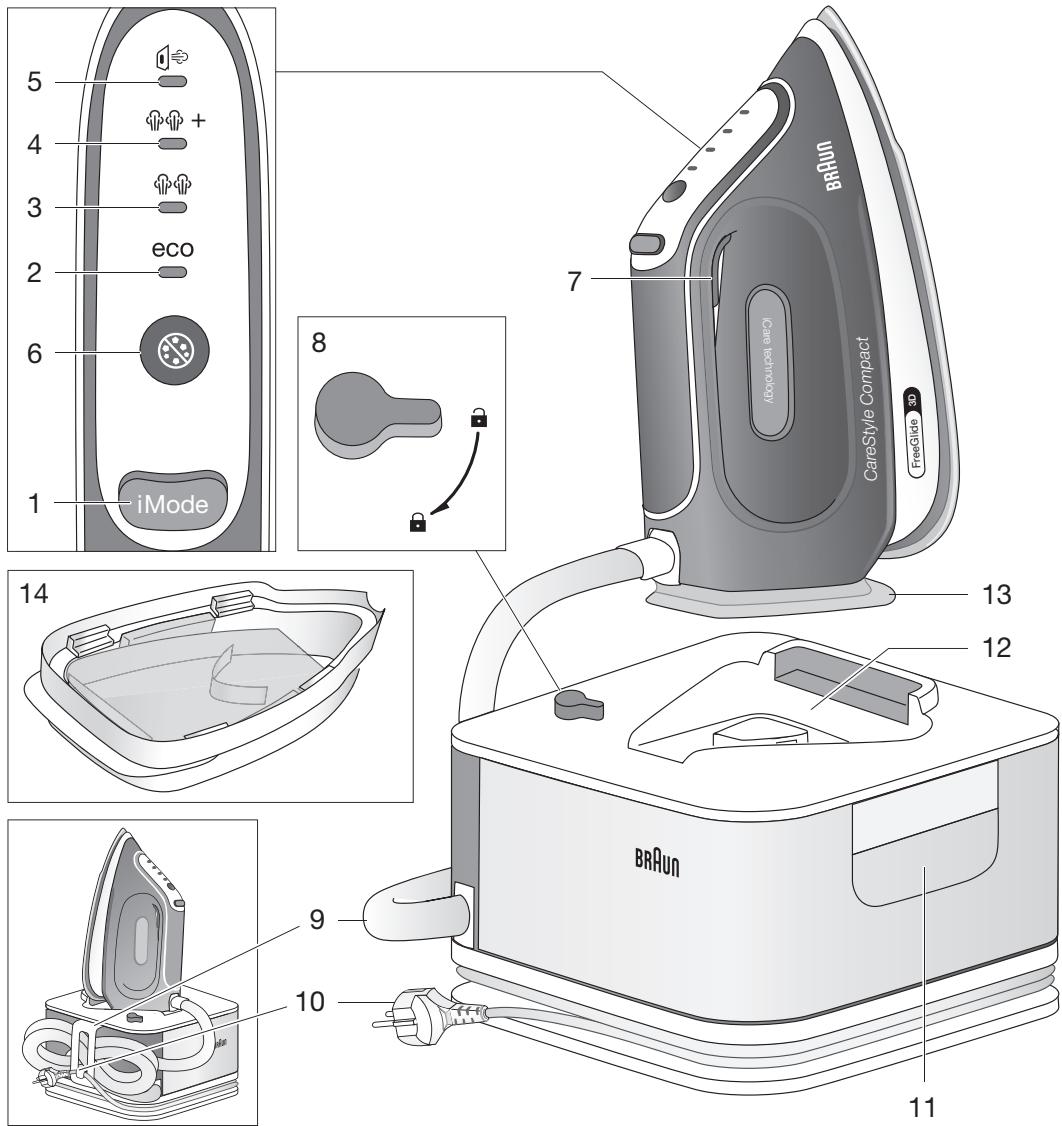
Description
1 Mode button
2 Eco mode indicator
3 iCare mode indicator
4 Turbo mode indicator
5 Vertical refresh mode indicator
6 Clean button/Clean system LED
7 Steam button
8 Lock system
9 Double cord/Storage
10 Power cord/Storage
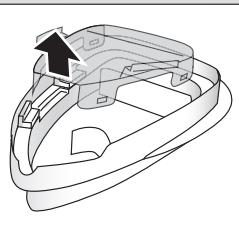
11 Removable water tank
12 Iron rest
13 Heel rest
14 Cleaning vessel
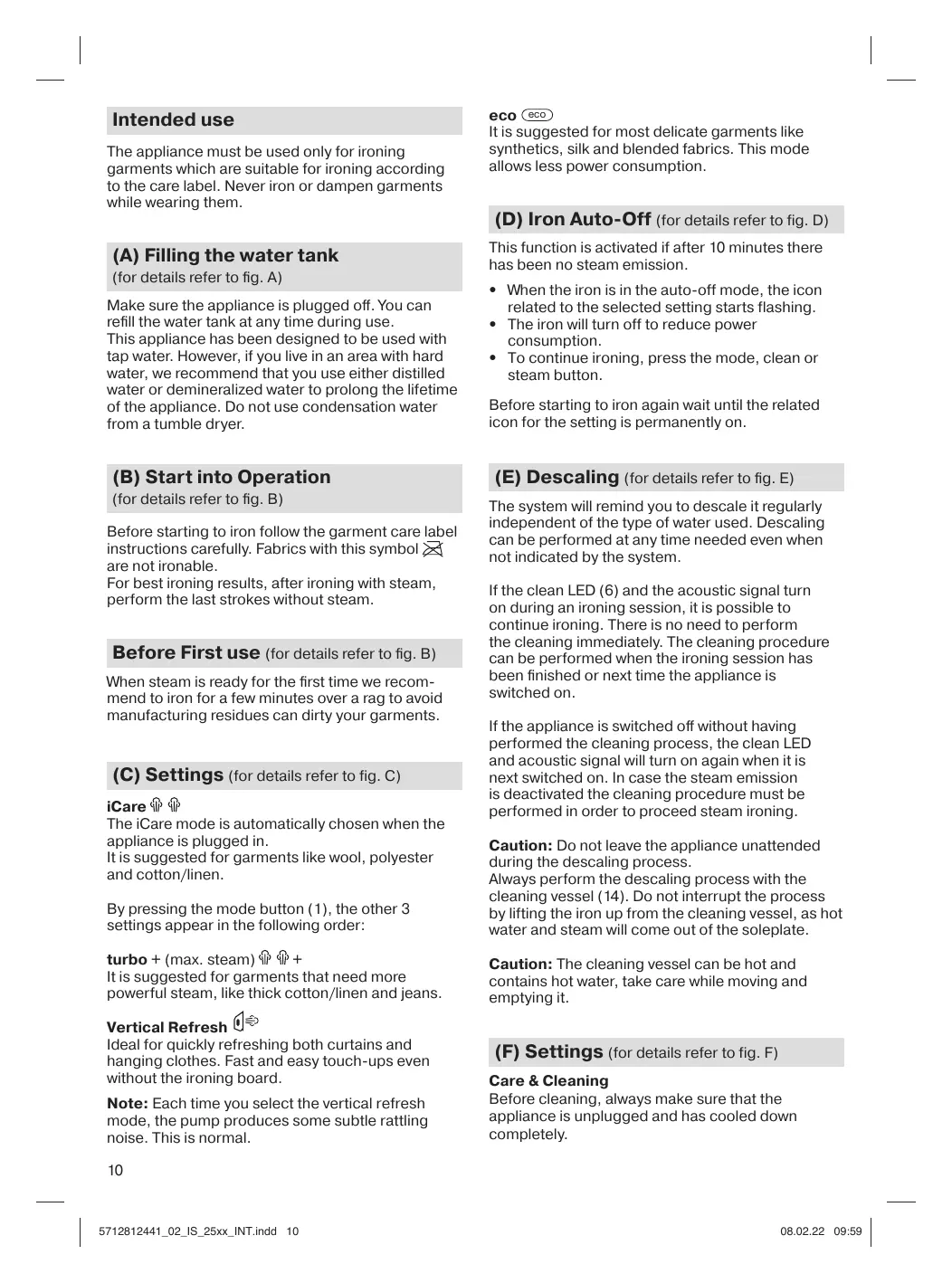
Intended use
The appliance must be used only for ironing garments which are suitable for ironing according to the care label. Never iron or dampen garments while wearing them.
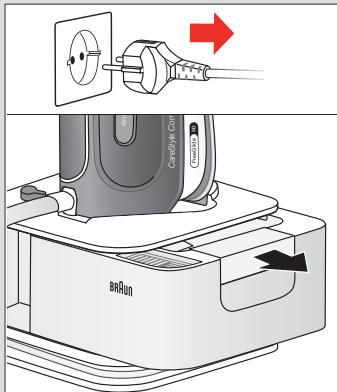
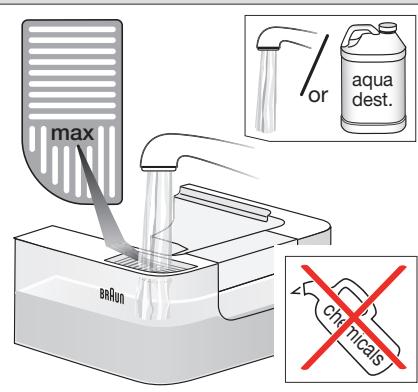
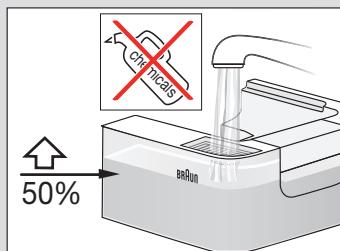
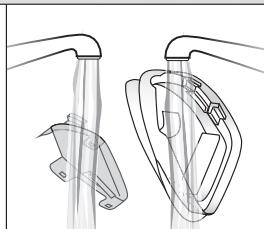
(A) Filling the water tank
(for details refer to fig. A)
Make sure the appliance is plugged off. You can refill the water tank at any time during use.
This appliance has been designed to be used with tap water. However, if you live in an area with hard water, we recommend that you use either distilled water or demineralized water to prolong the lifetime of the appliance. Do not use condensation water from a tumble dryer.
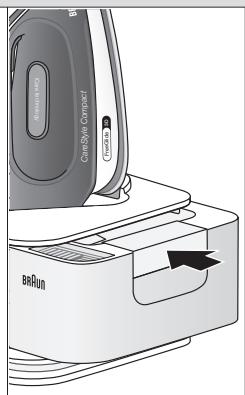
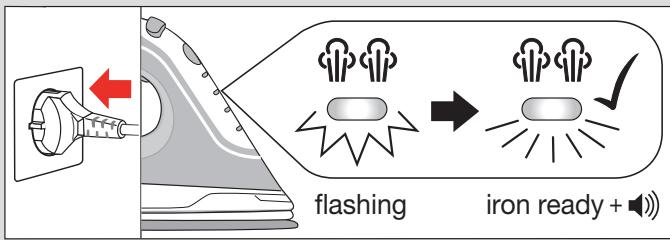
(B) Start into Operation
(for details refer to fig. B)
Before starting to iron follow the garment care label instructions carefully. Fabrics with this symbol × are not ironable.
For best ironing results, after ironing with steam, perform the last strokes without steam.
Before First use (for details refer to fig. B)
When steam is ready for the first time we recommend to iron for a few minutes over a rag to avoid manufacturing residues can dirty your garments.
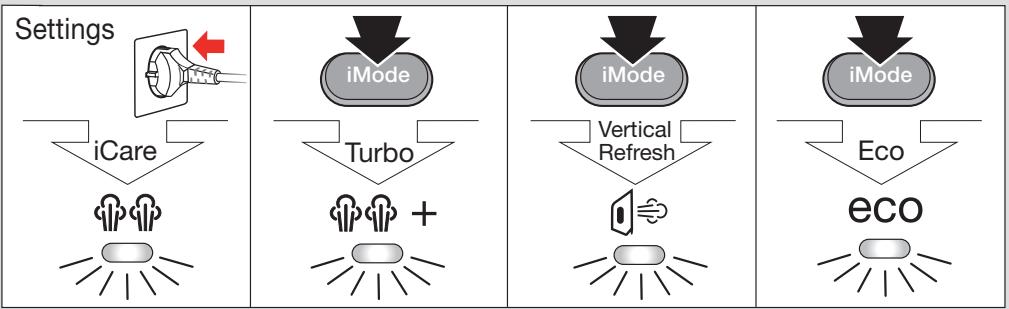
(C) Settings (for details refer to fig. C)
iCare
The iCare mode is automatically chosen when the appliance is plugged in.
It is suggested for garments like wool, polyester and cotton/linen.
By pressing the mode button (1), the other 3 settings appear in the following order:
turbo + (max. steam)
It is suggested for garments that need more powerful steam, like thick cotton/linen and jeans.
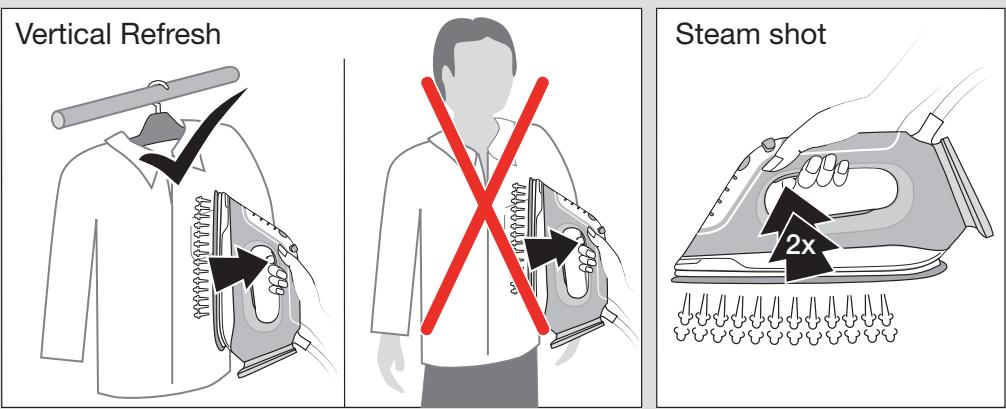
Vertical Refresh
Ideal for quickly refreshing both curtains and hanging clothes. Fast and easy touch-ups even without the ironing board.
Note: Each time you select the vertical refresh mode, the pump produces some subtle rattling noise. This is normal.
eco
It is suggested for most delicate garments like synthetics, silk and blended fabrics. This mode allows less power consumption.
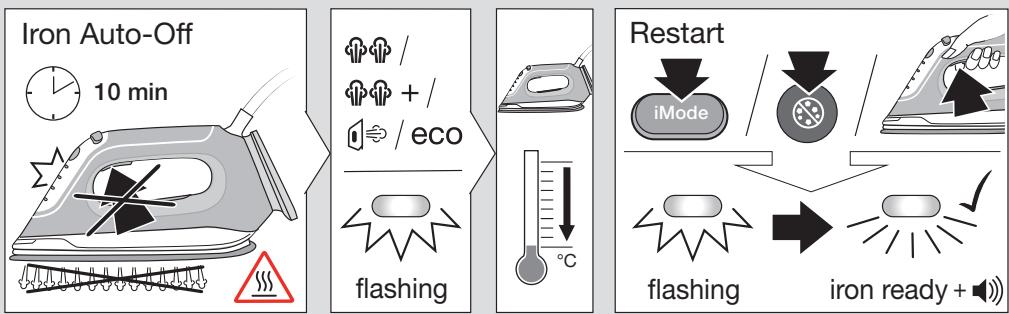
(D) Iron Auto-Off (for details refer to fig. D)
This function is activated if after 10 minutes there has been no steam emission.
- When the iron is in the auto-off mode, the icon related to the selected setting starts flashing.
- The iron will turn off to reduce power consumption.
- To continue ironing, press the mode, clean or steam button.
Before starting to iron again wait until the related icon for the setting is permanently on.
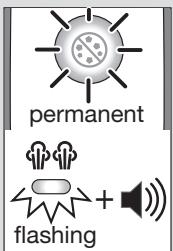
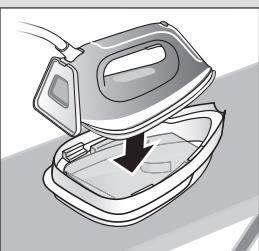
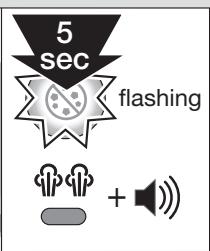
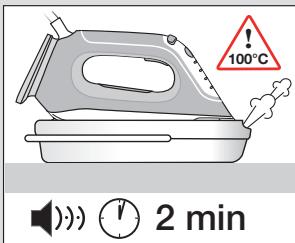
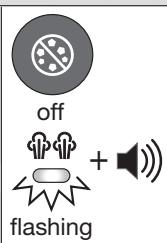
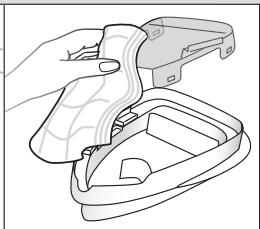
(E) Descaling (for details refer to fig. E)
The system will remind you to descale it regularly independent of the type of water used. Descaling can be performed at any time needed even when not indicated by the system.
If the clean LED (6) and the acoustic signal turn on during an ironing session, it is possible to continue ironing. There is no need to perform the cleaning immediately. The cleaning procedure can be performed when the ironing session has been finished or next time the appliance is switched on.
If the appliance is switched off without having performed the cleaning process, the clean LED and acoustic signal will turn on again when it is next switched on. In case the steam emission is deactivated the cleaning procedure must be performed in order to proceed steam ironing.
Caution: Do not leave the appliance unattended during the descaling process.
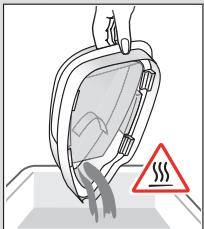
Always perform the descending process with the cleaning vessel (14). Do not interrupt the process by lifting the iron up from the cleaning vessel, as hot water and steam will come out of the soleplate.
Caution: The cleaning vessel can be hot and contains hot water, take care while moving and emptying it.
(F) Settings (for details refer to fig. F)
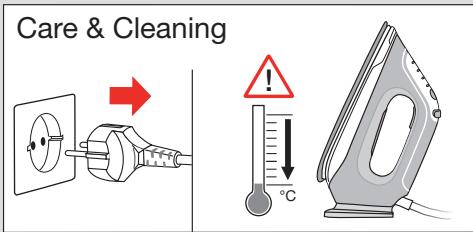
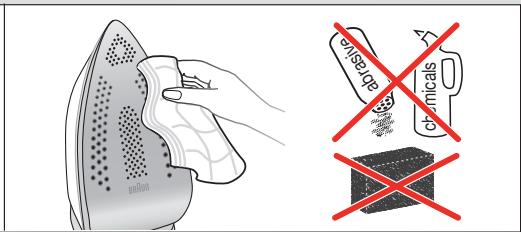
Care & Cleaning
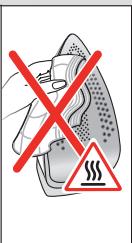
Before cleaning, always make sure that the appliance is unplugged and has cooled down completely.
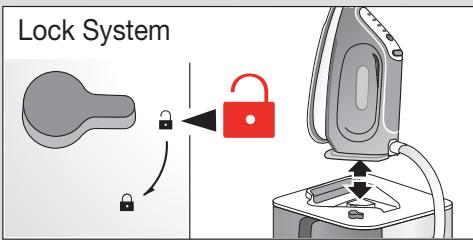
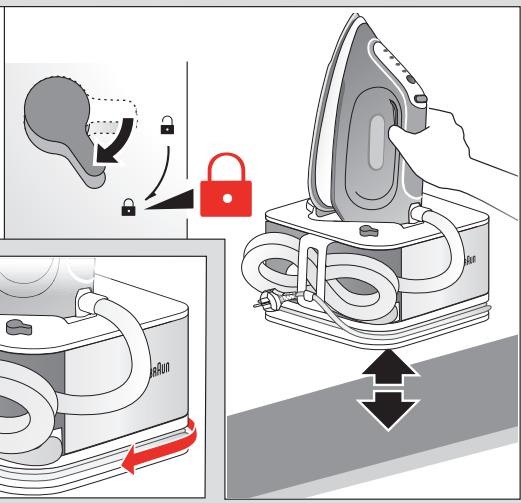
Lock System
The appliance is equipped with a lock system (8) for convenient transportation and easy storage. It is possible to lift and carry the appliance on the handle of the locked iron.
NOTE: Before transportation make sure the iron is properly locked and has cooled down completely.
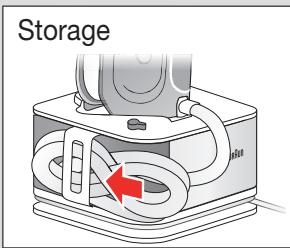
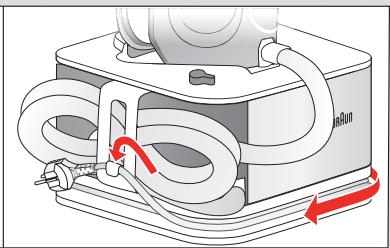
Storage
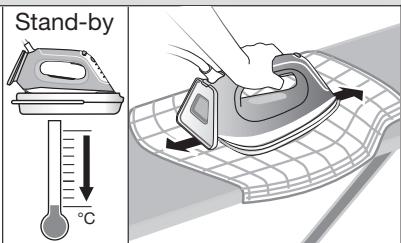
Unplug and let the appliance cool down (the soleplate is hot) before winding the cords for storage (9,10).
Warranty and Service
For detailed information see separate warranty and service leaflet or visit www.braunhousehold.com .
For UK Only
Guarantee Information
All Braun Household products carry a minimum guarantee period of two years. The rights and benefits under this guarantee are additional to your statutory rights which are not affected.
Please keep your receipt as this will form the basis of your guarantee.
In the unlikely event of a breakdown you have access to professional help from our team simply by calling: 0345 222 0458
For service in the Republic of Ireland please call: 012475471
Braun Household undertakes within the specified period to repair or replace any part of the appliance, free of charge (with the exception of any glass or porcelain-ware incorporated in the product) found to be defective provided that;
We are promptly informed of the defect.
- The product is used and maintained in accordance with the User Instructions.
- The appliance has not been altered in any way or subjected to misuse or repair by a person other than an authorised service agent for Braun Household.
- No rights are given under this guarantee to a person acquiring the appliance second hand or for commercial or communal use.
- Any repaired or replaced appliance will be guaranteed on these terms for the unexpired portion of the guarantee.
- The need for repair has not been caused by insufficient aftercare or cleaning: or damage caused by the chemical or electrochemical effects of water.
Under no circumstances shall the application of this guarantee give rise to the complete replacement of the appliance or entitle the consumer to damages.
Braun Household, New Lane, Havant, Hampshire PO9 2NH
www.braunhousehold.co.uk
Thank You for choosing Braun. We are confident that you will get excellent service from this product.
TO IMPROVE YOUR EXPERIENCE
Register now at www.braunhousehold.co.uk
By registering we may send you from time to time details on exclusive offers, promotions, recipes and inside tips.
Troubleshooting guide
| PROBLEM | POSSIBLE CAUSE | SOLUTION |
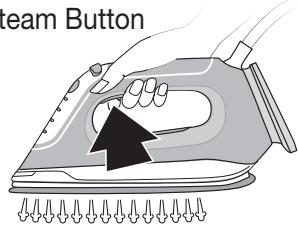
| The iron does not produce any steam | When starting your ironing session, the steam button has not been pressed long enough | Press and hold the steam button until steam comes out. It may take up to 30 seconds until steam comes out |
| There is not enough water in the water tank | Fill the water tank | |
| If the clean system LED turns on, the steam function has been disabled until you have performed the cleaning process | Perform the cleaning process (see dedicated chapter) | |
| The iron is heating up | When the selected mode indicator LED is flashing, the iron is heating up; during this phase the steam function is disabled. Wait until the LED turns permanently on. | |
| During steam emission the system produces a pumping noise associated with vibrations | If the water tank is full – this is normal working condition | No action required |
| The water tank is empty | Switch off the system, unplug and fill the water tank. Press the steam button until the steam comes out. | |
| Water droplets come out of the soleplate | Steam condenses into water in the hose when you use steam for the first time or have not used it for a long time | This is normal. Hold the iron away from the garment and press the steam button. Wait until steam instead of water comes out of the soleplate |
| The water tank is empty | Unplug and fill the water tank. | |
| During ironing white particles and impurities are coming out of the soleplate | Your tap water is very hard | If your tap water is hard we recommend you use either distilled water or demineralized water |
| Impurities of chemicals present in the water have deposited in the steam vents and/or soleplate | Perform the cleaning process regularly even if not required by the system (see dedicated chapter) | |
| Water flushes out of the soleplate | The cleaning process has been activated accidentally. | Switch off the appliance and unplug. Put the iron on the cleaning vessel, switch on and perform the cleaning process completely (see dedicated chapter) |
| The first time the appliance is turned on, you notice smoke/smell | Some parts have been treated with sealer / lubricant which evaporates the first time the iron heats up | This is normal and will stop after the iron has been used a few times. If the smoke/smell is still present after turning off and cooling down, contact an authorized Braun Customer Service |
| All LEDs are flashing | System error | Unplug the system, plug in again. If the problem is still present unplug immediately and contact an authorized Braun Customer Service |
Français
Avant utilisation
(A) Cy KyraTbIH bIdbicKa cy ToTbipy
(TonbIK mJIImeTTI A-cyeTTEH KapaHb3)
AcnantbH,po3eTkaaHcYbipbIfaHbHaKe3
Ke3
yakltTa cy caytBHa cy Kyoifa 6oJaBbl.
ByacnKbOp cybMeH naJdaHaBlaTbH
etin XacaIaHa. DeReHMeH, ereep ci TpaTbH
aMakTaFbCy KepMeK 6oLca, He Ta3apTbIfaH
cyDbHe 6oIMaca MNhepaCbI3dAHybIpbIfaH cydb
naJdaHaFaH dypbc. Kip KeNTipeiH MaunHaDa
KInHaIFAH Cydb KOJaHa6aHb3.
(B) Icke Kocy
(Tonbik maniMeTti B-cypeTtEn KapaHb3)
YtKteyre kipicnc 6ypbH KNIMdi Kytin YcTay 60bIHwa Hcyckaynapdb3eIN KObIN OKbIHbI3.
Taehen TaHbAcbl 6ap MaTaIapDbI yTikTeyre 60MaJdbI.
YtikTey HtixkeCi 6apbIHsa KaKcbI BoIybl YUH 6ymen YtIKTeRHeHH KeiH COHfbl BiPHeWe pet YtIKNeH 6yCbI3 6acIHbI3.
Bipinshi peT KoIdaHap anIbIHda
(TonbIK MAnimetTi B-cypetTeH KapaHbI3)
Bipinpiet6ydaBH6oJFaHda,KnIMdi yTKTih 3aybTTah KaJIbIN KOIFAH KaIbIbIKTapbl 6blfAmac yuHbipHeMe MNHyT 6ip uSybepeKti yTKteydi YCbHaMbI3.
(C) Пара метрлес.
(Tonbik maniimetti C-cypetteh kapaHb3)
iCare
Acnan TokKa KocbIFaH Ke3Je iCare pekMiaBTOMaTbI TpyDe TaHaIaNbI.
XyH, NOJIncTeP XHe MaKTaIaH XacalFaH
3aTTapDbI YtIKTeYre KOJaIJbI.
Pexm Tymecin (1) 6acy apkblb baca 3napameTpMbHa peTneHKeipHei:
$$ \text {t u r b o} + (\mathrm {e h} \kappa \mathrm {e n} \delta \mathrm {y}) \hat {\text {i}} \hat {\text {i}} + $$
MaKaTb/3bIbIpXaHeJxHcN CnraKtbl KyUti 6yDbI KaKeTeTeIH MaTePnaIapDaH KacalFaH 3aTTapDbI YTkTeYre KolaJIbI.
TiriHeH xHaHany
Pepdenepe Meiinyi KIM-KeweKTI Xbldam KaHaiay yuH acA KOaIbI. YtikTeyre apHaJFaH TaKaTaN3-aK Te3 epi OHa JxHaIaN IbIfaBl.
Eckeptne: TirinH kHaJaiy pexnmi TaHdaIFaH caBbIH COPfblaH 60JIMaIbI DblHbIPJaFaH Dbl6bIC IbIFaIb.I. ByI KaIbITbI KaFdai.
eco
CInTeTnKa, xieKxHe apanac MaepnaIap
CnKtbl H3iK 3aTTapbl YTIkTEyRe KOaJIbI.
ByI pexmme Kyat yHemdey MymkiHdiri 6ap.
(D) ABTomattbI Tpyne eWsy fynucraCbI
(Tonbik mamimetti D-cypetteh kappaHb3)
Erep 10 MmHyTTaH KeiH 6y 8y 8kna, oCbI yHKuia icke Kocbla.
- Ytik abTOMaTTb eUipy pexMIMHe TpyFaHda, TaHdaJIFaH npaMeTpRe KaTbICTb 6eIiWe XblblkTaBactaIbI.
KyaT TybHy KelemiH a3aTu yuH iYytek eWede.i
YtikTeydiXaIFaTbIpy yuH pexnM, Ta3aIay Hemece 6y TuImeciH baCbHb3.
KaTatah ytiKteyre kipicnc 6bpyH npapameTpRe KaTbictb 6enIwe y3dkci3 xahfauha Kytih3.
(E) Θκτι κετίργ
(TonbIK MəniMeTTi E-cypTeH KapaHb3)
KaHda cybIH naIaHaHbIaTbIbHa KaPamacTaH,
KyHe OHbYHEMI KaKTaH Ta3apTbIN OTbIPy KepeKtirIH
eciH3re canaDb. Kye TaPabIHAN Kepcetimme
de, KaKTaH Ta3apTydb Kepek 6oJFaHda Ke3 KeIReH
yaKbITa icKe acbipyfa 6oJaB.
Erep yiktey 6apbicbHnda ta3anay 7aMb (6)
xane dbibctbk 6eIrli icke Kocblca, ytkteyi
xanfaTbpyfa 6oana. Ta3anaydBi Depey icke
acbyp KaKet Emec. Ta3anay npoceypacih
ytkteyi aaytaFaHHaKeIH HeMece acnantbl
keleci Xolbl TOKKa KockaHa Ke3de icke acbpyfa
6oana.
Erep Ta3anaybI icKe acbIpMaCTaH acbTbI TOKtaH cybPbN KOJcA, OHb KeLeci XoJIbTOKKa KOCKaH Ke3Je, Ta3anay WamBm MeN bIbCTbIK 6eJIr KaItaHaI cKe KocBnaMb. By IbIFbIybl TOKtaFaH XaJaDa, 6ymEn YtIKTeYre Kipicy yuIm Ta3anay npOeDypacbIH icKe acbpy kaxet BoJaB.
A6aB 60bHb3: KaKaTaN Ta3apTy 6apbICbIHda acnTbHa3apDaN TbIC KaJbIpyFa 6OImaHbI.
KaTah Ta3apTydbI ċpkaaHdTa 3aJaiay caytBtHbH (14) kEmerIme Icke acbipy KepeK. YtKiTi Ta3aJaiy CaytBtHaH XOFapBi KETepy apkbl Ta3aJaiy y3iN Tactayfa 6oJMaJbI, c6e6i YtKiTH Ta6aHbHaH bICTIK Cy MeH 6y UbIfybl MymkiH.
A6aB 60JIbIbI3: Ta3aIay CayIbI bIcTbIK, 6OJIybl MyMKiH XJHe OHJa bIcTbIK Cy 6OJIaIbI, OHbl KO3FaFaH XJHe 6OcaTkaH Ke3Ie caK, 6OJIbIbI3.
(F) Ytikterehhen KeiH
(Tonbik MəniMeTTi F-cpeTtEn KapaHb3)
Kytin yctay khe Ta3aay
Ta3anap anIbIHda yHemki KpyblfblHIn, eHipjin, Kyat Ke3iHeAxxblpaTbJbIN, TOnblK CyblFaHbHa Ke3KeTkiin aIbHbI3.
Bekity kyneci
Tacbimaiy bHfainbI epi caKtayfa OHaB 6Olybl yuih acn an bekiTkiw JyHemeH (8)XkapAeTalFaH. AcnantbI bekiTilre H YtIKTH TTKacbHaH YCTan KTepeyRe Hemece aIbIn Xypyre BoImaiDbI.
ECKEPTNE:TacbImaIaydaH6pybIH YtIKTH, dypbic 6ekitirHe He Xane a6deh cyfaHaHa Ka3 keTki3iH3.
CaKrayFa KOIO
TOkTaH cybIpbHbI3 Da, CbIMDbI CaKtayFa KOIO yUJIH opayan (9, 10) 6ypbIH acnAn cyfHaHua Kytih3 (YtIKTH TaBaHbI bICTbIK 6oJaB).
KenildkxəHe Kbl3MeT KepceTy
Erjkei-TejkeiaknapaTbI 6eKe Keninik XHe Kbl3Met KepceTy npakAscbHda KaapHb3 Hemece www.braunhousehold.com caItbHa KipiH3.
山bifapblifaH Xblbl
LbIfapbIiFaH XbIbIH 6eIriEny yuH 6yIbIM TaKaTaAsCbIH DaIbI 5-caHbIK IbIfApUbI KoDbIH KapaHbI. IbIfApUbI KoDbIHbIH 6ipHni CaHb IbIfapHaXbIbIH coHbI caHbIH 6iJdipei.KeNeci 2 caHdp IbIfApHaXbIbIH KyHTi3eJIk anTa caHbIH 6iJdipei.An coHbI 2 caHdap 1992 XbIbAH 6Bactan abTomatbl Tpyde ecenTeJIreH 6acbIn IbIfAp Mep3imH 6iJdipei. MbCaIbI:30421-BybIM 2013 XbIbIHbIH 4 anTacbIHda IbIfApUbIFaH.
EAC
| Ylrgi | IS 2561, IS 2565, IS 2577 |
| Kephey | 220 - 240 B |
| Герц | 50-60 Гι |
| Ватт | 2400 Вт |
| СаCompatibility | Температура: +5 °C жени +45 °C ылгалдьлбк: <80% |
KbTaJaXacJFaH
Дeюнги Бpayн XaycxonД Г6X
FepMaHn3aHdbI eHdipyu:
Денин Бpayн XaycxoДгм6X
KapJI-ynpux-山tpacce H
63263 Hoi-Im3eH6ypr
BvibMbIcKe NaIaIaNHy HcayIbIbHa Caikec 3MaKcTaBHJa NaIaIaNHy Kepek. BvibMHbIH KbI3MeT Mep3iM TybHbIfa CaTbJFaH KYHHe6bactan 2XblDb KypaNbI.
UmmopTep:
MockBa KaIacbI, CyueBcKaeKweci,
27/3-γ(27-γ,3-kypbblbIM)
TeN. +7 (495) 781-26-76
CaKtany MEP3imi: LekTeJmereH
Abyny kzaqdaanapbI: KOpIaFaH opTaHbI KOpFay TaIanTapbHa Ceykec
TacbMaIay XaFdaJIapbl: TacbMaIay Ke3iHne KylAByI anyFa HemeCe 7amaDaH TbIC 7aKanTyfa 60JMaIbI.
Caty kafdainapb: Caty kafdaJnapbH eHdipywi Kepcetneren, bipak Onap JepriikTi, MemnekeTTiK XHe XaIbIkapabIK epexeJep MeH cTaNapTTapFa caN 6OlyfTa Tnic
Ehdpuyi3aybIT:
De'Longhi Braun Household GmbH,
Carl-Ulrich-Strasse 4,
63263 Neu Isenburg, Germany
| AKAYIbIK | БИКТМАЛ СЕБЕЛ | WEUIMI |
| A顺序列的68号 | Ytiktey ceanbHбactaraH ke3de6by tynmeci keTkilikti yaKbItka6acblmafan | Бу тумесin 68у stbkkansha 6acblnyctan TpybHb3.Бу stbkkan7a30 cekyndka deiH yakbIt ketyiMymkin |
| Cy cayltbHdaftb cydbHmellepejxetkiliikci3 | Cy cayltbHa cy Kdy | |
| Erep ta3aIay jyueceinih shambyxahca, 68 by fynkCzraBcTa3aIay ickeacbplmaT pybIn eHipiliren | Ta3aIay npoeedypacbH icke acbipy (apnaIb TaaydbI kapaHb3) | |
| Ytik kb3bIg KeTeDi | TaHdalfanr peximmmHdkaTOpbIaMbMyxbIbIKTaTyrFaKe3deVytkBb3aDb;ocbke3de6byfynkCzraCbIaxbIpTaYbIb6OlaDb.IShamby 3dikci3 xanfahan kaTin3. | |
| By 68kbIbIN XaTKANK3eDe JyueJedENdiPirIe6baiLbHbICTbI copaTbFAn DbIbIC ShbIFAdI | Erep cy cayltbTOJIb6oJc - 6yJKalbITb JxMlbIC KyI | EuTHe iCTeydIn KepeRi JoxK, |
| Cy cayltb6ocan KaIFan | XyIeHIn ToBbH eWipin, po3eTKaDAnhcybIbHb3 da, cy cayltbHa cyKyIbHb3. By 68kbIbHN6 By 68kbKan7a 6by Tymecin6acbIn TpybHb3. | |
| Ytik TabaHbIHaNCHyamblapbIbIfaDbI | ByIb alfau pet naIadanaH6aTcAHaJa Hemece onb ly3ak yakbIT6bIbKOlaHb6aFAnDa, KhybipseKTeJxHAlFAN 6by cyfa aiHaIadbl | By IaNbIbTI JxAFdain YtikTknMHeNAbcIcTAYbIbIN, 6by Tymecin6acbHb3. Ytik TabaHbHaN CHyblnOPbHa 6by 68kbKan7a KyTe Tpyi |
| Cy cayltb6ocan KaIFan | XyIeHIn ToBbH eWipin, po3eTKaDAnh cybIbHb3 da, cy cayltbHa cyKyIbHb3. | |
| YtikTey 68abScbHdAByIbTIn TabaHbIHaNak TynipSckter MeKNOKcbIK ShbIFAdI | Ky6bIpDAn aFaTbH cy TbIM KePMeK | Erep KBybip cybIe KepMeK bOJcNa, He ta3aPbIaHaN cydbI He bOJMaCaMinhepaIcbl3dAnDbpIbFaN CdbI NaIaIaHaHydbI yCbHbMl3 |
| CydaIb XIMIAJIbK 3aTKeTepdI INKCSbIFb 6by 68bIFaTbH TceKTEpre JxHe (Hemece) yIcIKIn TbaHbHa igeReDi | XyIe tapaBbHaN TalaIe tEtImece De,ta3aIay npoeDypacbH yHemi ickeacbpy | |
| Ytik TabaHbIHaN CHyamblapaIbI | Ta3aIayФyHKZIaRc6eDcok ickeKOSbIbIN KeTKeH | AcpanTb Ewipin, po3eTKaDAn h aIaCbHcybIbH3. YtikTi TaaIaay caybITbHa KOyIbHb3 da, TOKKa KocbIn, TaaIaay npoeDypacbH TOLbIK icke acbipy (apnaIb TaaydbI kapaHb3) |
| A顺序列的68kbIaHaeFANK3eDe,TyIbH/niC 68kbIaHbIb BaimaIaIaIb | YtikTIn KeBip 6eIeKTePeiTbIb3daBbI MATEPMAJdApMeH/MaiIaPmeH eHdJIreH, CONbIKTaN yIc6bIaII pet KocbIaHaDa coI 3aTAPab 6byaHbIn 68bIaFlaBl | ByIaKbIbTI JxAFdain JxHe Vtik6ipHee pet KOndaHbIaFHHaN KeiHToKdTaIb. Erep acnan eWipin, cybFAHbHaN KeiH DeTytI/H niC 68kbIaHa, Braun TytbHbIbIaPaF KaI3Meti KepSety opTalbIFbHa xaBapIaCy |
| LIIamdarpbIH6apbIbIbXbIbJIbIKtan TYP | XyIe KateJIiri. | YtikTi TOKTaH cybIPbHb3 da, TOKKaKaIaTkoBbH3. Erep 6yI mcesJeIi de IeWIIImee, acpantbI dupey eupipin, Braun TytbHbIbIaPaIbIb KoIaDay oTalbIFbHa xaBapIaCy |
Pycckn
PykoBOCTBO no 3KcnIyatauIN
IpeedncnoJb3ObaHneM
Ipeed nCIOJIb3OBAHnEM npB6opa BHIMaTeJbHO IONHOCTbIO pOHTNTe INHCTpyKcIO.
OcToPOxHo! NocKoJIbKy DaHHOe yCTPoIcTB O6IaJaT BbICOKo MOuHOCTbI, y6eIITecb, YTO Ba7a 3JIeKTPnueCKa CETb MoXeT OBeCneHTb IODaCy COOTBcTCTByIOUeB BIXoHDH MOuHOCTN. CB8JNTecb C MeCTHO JIeKTPo3HePretNUeCKo KOMpaHNei U6eIITecb, YTO BHyTppeHHee COIpOTnBJIeHne 3JIeKTPnueCKo CETn He npeBbIHaet 0,404 Om.
OnncanHe
1 KhoNka Mode (PeknM)
2 INHdikatoppekimaEco
3 INHdkaTOp pexIma iCare
4 INHДИКaTOp pexIma Turbo
5 INHДИКaTOPpeXIMa BepTnKaIbHOrO OCBEXEHNIA
6 KhoNka OuNCTKN/CBEToNDIOID CNTeMbI OUNCTKN
7 KhoNka noDaun npa
8 CnCTemaФИКСAUIN
9 DBoHOn Ka6eJIb/MecTo IJxpaHeHHa
10 Ka6eIb nITaHnIy/MecTo dIy xpaHeHHa
11 CbemHbpe3epByapIJRAOdbI
12 PlaTΦopMaДЯуTIOra
13 3aHnra nOCTaBka
14 Pe3epByap dIa OunCTK
ZeJeBoe Ha3NaueHne
IoiIroTOBka K nepbOMy nCNoJIb3OBAHnIO
Ipeep oucckoBcegda cneJeYyOCTOBepuTbcB T TOM, yTO np6Op BbIKJIOUeH, OTKJIIOUeH OT CeTN I NOJIHOCTbIO OCTbl.
CnCTemaФнкали
TapaHTnI nO6cLyKuBaHne
PykoBoDCTBO no yctpaHnIO HncnpaBHOCTe
(D) Pexum aBtOMaTHOFO BUMKHeHH
npaackn (noippo6nuii niv. ha maJ. D)
LcIyHKJiaakTNByEeTbC8yBnAnkyBiCyTHOCTi noaHnapnpotraom10xBNINH.
Koln npacka nepe6yBaE b pexmMi aBTOMATNHO BUMKHeHH, 3NaUOK, 10 BiHOCITbC4 Do BiNIOBIDHO HaIaHTyBaHH, NOuHaE 6nIMaTI.
- Ppacka BmKHeTbC, 063MeHUnTIcNoXuBaHHeNEKTPoeHeprii.
- Κιός προύθουνχητη πράγυbaHHa, haTικίΤb Na KHOΠΚΥ Bιδόρу pεχιΜγ, ΜουημεΗΝΑ δό Ποῦαί παρι.
Ipeed noatkom npacybHaHc cnld 3auekaTn, DOKN 3HaOH, LIO BIDHOCTbCg DO BiINOBiHDHO HanaSTyBaHH, NOHNE NOCTiHO CBITNTICr.
(E) BvdaJIeHHaKIny
yS1 yS2S 1! gTc0i jll wlll wgo goggll lss
jlll jlll jll

gogaa
aaii. aiee aaii j 1
.
jai jgaoaill a baii g o g yuoygaiyogai yjgabdo
aaii iia aaiii aabaii ulgai aasall
eco
aLb0sll slll Jao aLwos 5yll slll g oag llg yog
Jao aLg aLs dyluoy lgl y aagabzall aasol yg rny
(D)
10 12
jlll lllllllllllllllllllllllllllllll
aagaae
.
.
1u 1
= = 35
(EJJI JUOLAJUJUJU)
LED aJ 1 J 1 J 1 J 1 J 1 J 1 J 1 J 1 J 1 J 1 J 1 J 1 J 1 J 1 J 1 J 1 J 1 J 1 J 1 J 1 J 1 J 1 J 1 J 1 J 1 J 1 J 1 J 1 J 1 J 1 J 1 J 1 J 1 J 1 J
july 1dolgo
.1uJl jLj aLsc 1i jg jgljgljy
gbls y. aill sleg plauw wu wuyll alj! aolos olal jol 10 g jllg jllw slall jy. aill sleg no oxlkall gej aolso
.oo
#
glljj 1
Eco g 2
iCare 3
Turbo 4
5
aBbI LED //6 6
7^
jul 8
9g = 0 y = 12x + 1
jduo/daIbll 10
aJyU UJIU OJIU JIJ 11
olsooll 12
13
14
gaaol pluxwyl
aalalaa aalaa aalaa aalaa
1.16, 0.85,0.74, 0.34
(BJgllgJ, Jzolaljoojol)JgJl pluwrll
a aee
gaiil laiy slyo ggl