FE-120X - Digital Camera OLYMPUS - Free user manual and instructions
Find the device manual for free FE-120X OLYMPUS in PDF.



User questions about FE-120X OLYMPUS
0 question about this device. Answer the ones you know or ask your own.
Ask a new question about this device
Download the instructions for your Digital Camera in PDF format for free! Find your manual FE-120X - OLYMPUS and take your electronic device back in hand. On this page are published all the documents necessary for the use of your device. FE-120X by OLYMPUS.
USER MANUAL FE-120X OLYMPUS
Step 3 - REVIEW OR ERASE A PICTURE 7
Step 4 - TRANSFER IMAGES. 8
BASIC OPERATION 10
Shooting tips 10
Power save feature 10
Mode dial. 11
Shooting mode buttons. 12
SCENE modes 13
Macro mode 13
Self timer 14
Flash modes 14
MENUS AND SETTINGS. 15
Top menu 15
Erase all pictures. 15
Select a language 16
Monitor symbols & icons 16
Thumbnail (Index) display 18
CONNECTING THE CAMERA 19
Direct printing (PictBridge) 19
OLYMPUS MASTER SOFTWARE 21
SPECIFICATIONS 22
SAFETY PRECAUTIONS 24
Before using your camera, read this manual carefully to ensure correct use.
■ We recommend that you take test shots to get accustomed to your camera before taking important photographs.
Please observe the safety precautions at the end of this manual.
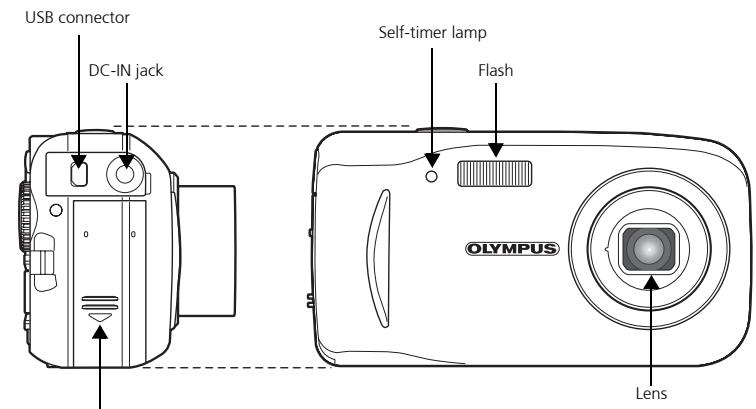
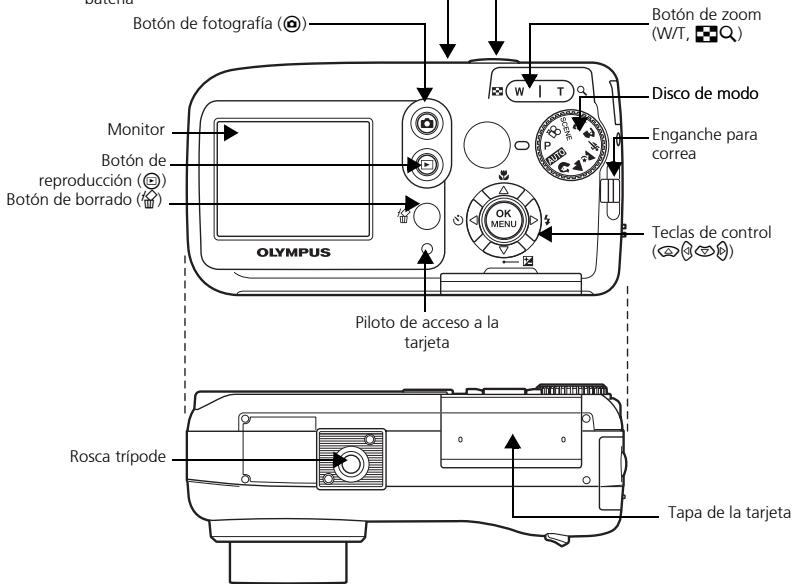
CAMERA DIAGRAM
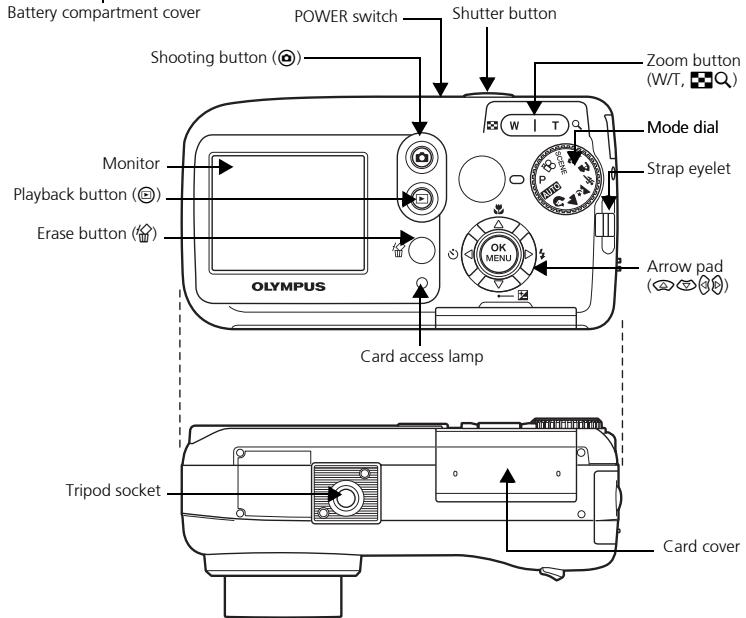
BEFORE YOU BEGIN
Gather these items (box contents)
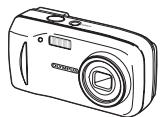
Digital Camera
Strap

xD-Picture Card
AA (R6) Batteries (two)
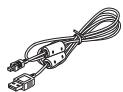
USB Cable

OLYMPUS Master software CD-ROM
This box also contains: Advanced Manual (CD-ROM), Basic Manual (this manual), Warranty card, Registration card. Contents may vary depending on purchase location.
1 GETTING STARTED
a. Attach the strap
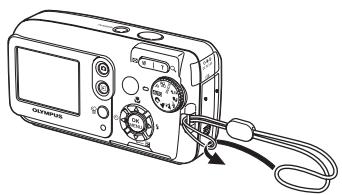
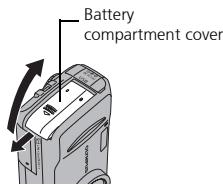
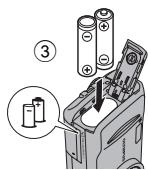
b. Insert the batteries
② Lift
① Slide
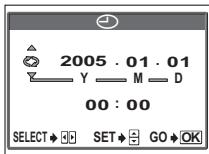
c. Set the date and time
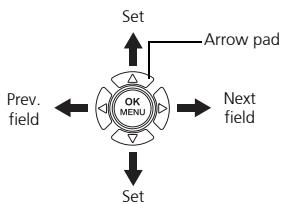
① Set the mode dial to AUTO and turn the camera on. Then press button and select

(2) Press / to select item. Press / to select next field.
POWER

2 TAKE A PICTURE
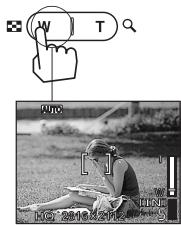
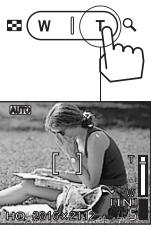
a. Zoom
Zoom out:
Zoom in:
En
or
b. Focus
① Using the monitor, place the AF target mark over your subject.
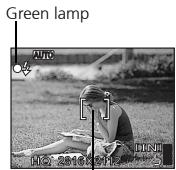
AF target mark
(Half-pressed)

Shutter button
② Press and hold the shutter button halfway to lock focus. The green lamp indicates focus is locked.
c. Take the picture
(Pressed completely)

Shutter button
Press the shutter button completely to take the picture.
3 REVIEW OR ERASE A PICTURE
a. Press
The last picture taken will be displayed.
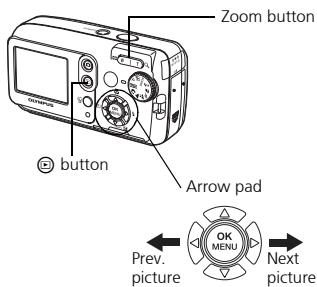
b. Take a closer look
Press w|r to zoom in or out. Press 空 / 空 or 8/8 to scroll around.
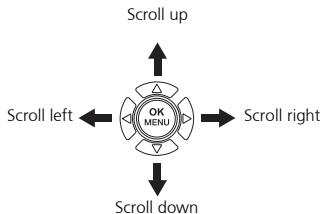
Press button to return to shooting mode.
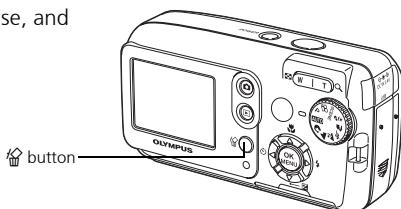
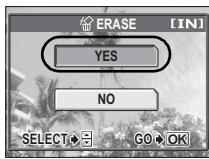
c. To erase a picture
① Display the picture you want to erase, and press the button.
② Press 1 / 2 to select [YES], and press button. The picture is permanently deleted.
4 TRANSFER IMAGES
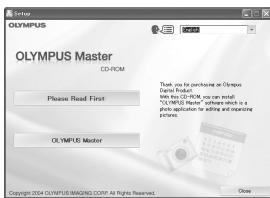
a. Install the software
① Insert the OLYMPUS Master CD-ROM provided into the CD-ROM drive.
② Windows: Click the "OLYMPUS Master" button. Macintosh: Double-click the "Installer" icon.
③ Simply follow the on-screen instructions.
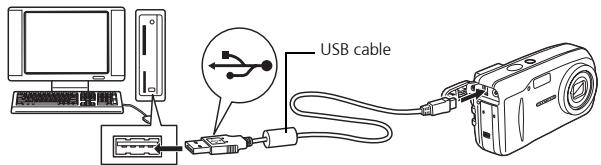
b. Connect the camera to the computer
① Connect the camera and computer using the USB cable (included). The monitor will turn on automatically.
② Press / to select [PC] and press the button.
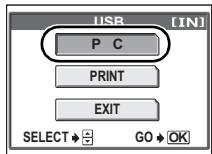
Your PC will now recognize your camera as a removable storage drive.
c. Transfer images to the computer
① With the camera now connected, open OLYMPUS Master. The transfer window should appear.
(2) Select the images you want to transfer, and click the [TRANSFER IMAGES] button.
If the transfer images window does not automatically appear:
a. Click the "Transfer Images" icon.
b. Click the "From Camera" icon and then click [TRANSFER IMAGES].
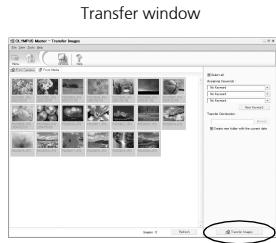
Transfer images button
Note
For more details on using the OLYMPUS Master software, please refer to the (electronic) Reference Manual located in the OLYMPUS Master folder on your hard drive. Additionally, you may refer to the "Help" file in the OLYMPUS Master software.
BASIC OPERATION
Shooting tips
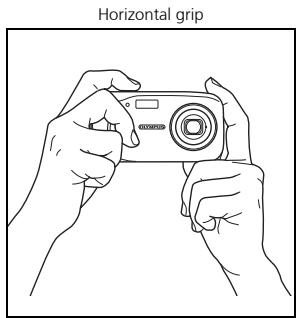
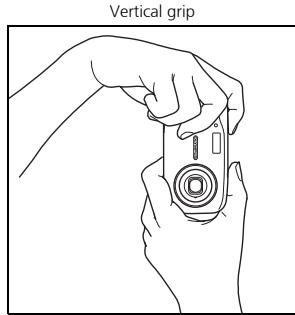
Pictures may appear blurred as the result of moving the camera while the shutter button is being pressed.
To prevent the camera from moving, hold the camera firmly with both hands while keeping your elbows at your sides. When taking pictures with the camera in the vertical position, hold the camera so that the flash is positioned above the lens. Keep your fingers and the strap away from the lens and flash.
Power save feature
To save battery power, the camera automatically enters to the sleep mode and stops operating if not used for 3 minutes. The monitor switches off automatically. Press the shutter button, or to turn the monitor on.
If the camera is not operated for 4 hours after the camera enters sleep mode, it automatically retracts the lens and turns off. To resume operation, turn on the power again.
Mode dial
This camera features a mode dial for selecting the camera's shooting mode. You may change shooting modes at any time.
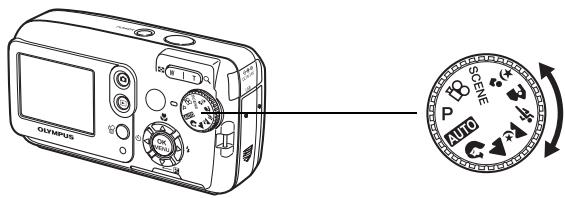
| P | Suitable for general situations. |
| AUTO | Takes pictures in full auto. |
| ♀ | Suitable for taking portrait-style pictures. |
| ▲ | Suitable for taking pictures of landscapes. |
| ♂ | Suitable for taking pictures at night. |
| ♀♀ | Suitable for taking moving subjects. |
| A | Suitable for taking your subject in front of a landscape. |
| ♂ | Suitable for taking your subject in front of a night scene. |
| SCENE | This function allows you to select from 10 situation-related modes set to the shooting conditions. |
| ◎ | Records movies. |
Shooting mode buttons
While in shooting mode, use these buttons for quick access to some of the more commonly used features.
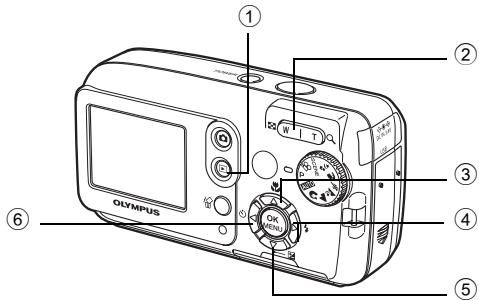
① (Playback) button
Enables playback mode
② Zoom button
W: For wide-angle photography
T : For telephoto photography
(3) Macro) button
Enables macro mode or super macro mode
④ (Flash mode) button
For selecting the flash mode
(Exposure compensation) button
For making fine changes to the exposure setting
(Self-timer) button
Switches the self-timer mode on/off
SCENE modes
1 Set the mode dial to SCENE and press OK and select [SCENE SELECT].
2 Press or to select a scene mode and press OK.
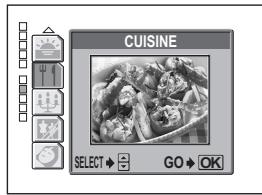
Scene mode descriptions
SELF PORTRAIT
- FIREWORKS
BEHIND GLASS
- INDOOR
- SUNSET
- AVAILABLE LIGHT PORTrait
BEACH
CUISINE
SNOW
CANDLE
Macro mode
This mode lets you shoot from as close as 20~cm / 7.9 to your subject (when the optical zoom is at the greatest wide-angle).
This mode lets you shoot from as close as 2cm / 0.8 to your subject. In the [s] mode, normal shooting is also possible, but the position of the zoom is fixed automatically and cannot be adjusted.
1 Press
- The macro settings screen is displayed.
2 Select [or, and press
Self timer
1 Press 念
- The self-timer settings screen is displayed.
2 Select [ON], and press OK.
3 Press the shutter button fully to take the picture.
- The self-timer lamp lights for approximately 10 seconds after the shutter button is pressed, then starts blinking. After blinking for approximately 2 seconds, the picture is taken.
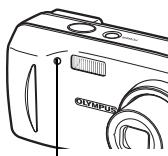
Self-timer lamp
Flash modes
1 Press
- The flash mode setting screen is displayed.
2 Press / to select the flash mode, and press OK.
3 Press the shutter button halfway.
- When the flash is set to fire, the mark lights steadily.
4 Press the shutter button fully to take the picture. Flash working range:
W (max.): Approx. 0.2 m to 3.7 m (0.7 ft. to 12.1 ft.)
T (max.) : Approx. 0.6 m to 2.1 m (2.0 ft. to 6.9 ft.)
| Icon | Flash mode | Description |
| No indication | Auto flash | The flash fires automatically in low light or backlight conditions. |
| Red-eye-reduction flash | The red-eye reduction flash mode significantly reduces this phenomenon by emitting pre-flashes before firing the regular flash. | |
| Fill-in flash | The flash fires regardless of the available light. | |
| Flash off | The flash does not fire even in low light conditions. |
MENUS AND SETTINGS
Top menu
1 Press OK.
- The top menu is displayed.
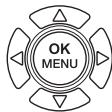
2 Use the arrow pad and OK to navigate and select items.
Top menu in P mode
This refers to the arrow pad (四)
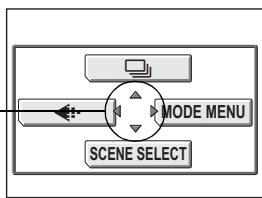
Image quality
Choose from several different image quality modes and resolutions.
Sequential shooting
Takes still pictures in succession. The focus, exposure, and white balance are locked at the first frame.
SCENE SELECT
This function allows you to select from 10 situation-related modes set to the shooting conditions.
MODE MENU
Contains language selection, start up options, date and time, format/erase.
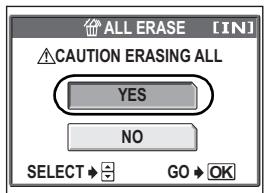
Erase all pictures
1 While in playback mode, press OK and select [MODE MENU] > [MEMORY (CARD)] > [ALL ERASE].
2 Select [YES], and press OK.
- All the pictures are erased.
Select a language
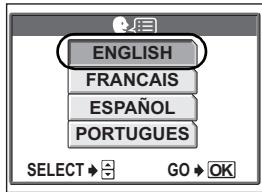
You can select a language for on-screen display. Available languages vary depending on the area where you purchased this camera.
1 Press OK and select [MODE MENU] > [SETUP] > [ ]
2 Select a language and press OK
Monitor symbols & icons
Monitor - shooting mode
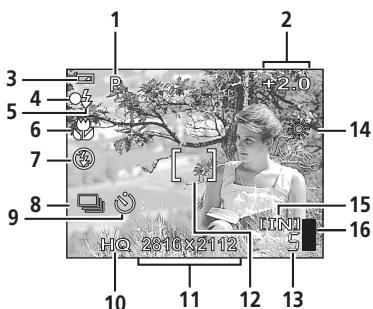
Still picture
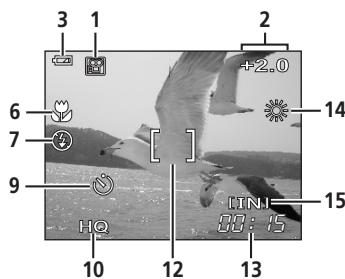
Movie
| Item | Indications | |
| 1 | Shooting mode | P, AUTO, ☑, ☑, ☑, ☑, ☑, ☑, ☑ |
| 2 | Exposure compensation | -2.0 – +2.0 |
| 3 | Battery check | ☐ = full power, ☐ = low power |
| 4 | Green lamp | O = Auto Focus Lock |
| 5 | Flash stand-by Flash charge | (Lights) (Blinks) |
| 6 | Macro mode Super macro mode | s |
| 7 | Flash mode | , , , |
| 8 | Sequential shooting | |
| 9 | Self-timer | |
| 10 | Record mode | SHQ, HQ, SQ1, SQ2, SQ |
| 11 | Image size | 2816 × 2112, 1600 × 1200, 640 × 480 |
| 12 | AF target mark | [ ] |
| 13 | Number of storable still pictures | 5 |
| Remaining recording time | 00:15 | |
| 14 | White balance | , , , , , |
| 15 | Memory | [IN] (internal memory), [xD] (card) |
| 16 | Memory gauge | , , , , , (cannot take pictures) |
Monitor - playback mode
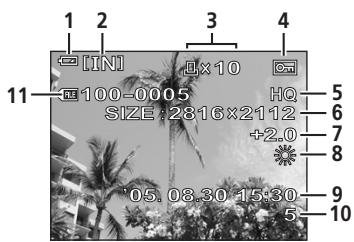
Still picture
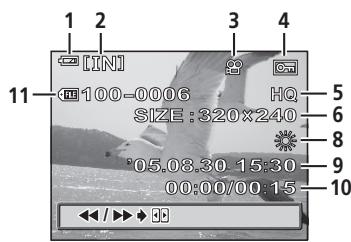
Movie
Monitor - playback mode continued...
| Item | Indications | |
| 1 | Battery check | = full power, = low power |
| 2 | Memory | [IN] (internal memory), [xD] (card) |
| 3 | Print reservation/ number of prints | ×10 |
| Movie | ||
| 4 | Protect | |
| 5 | Record mode | SHQ, HQ, SQ1, SQ2, SQ |
| 6 | Image size | 2816 × 2112, 1600 × 1200, 640 × 480, 320 × 240 |
| 7 | Exposure compensation | -2.0 – +2.0 |
| 8 | White balance | WB AUTO, 15:30 |
| 9 | Date and time | '05.08.30 15:30 |
| 10 | Frame number | 5 |
| Playing time/Total recording time | 00:00/00:15 | |
| 11 | File number | 100 – 0005 |
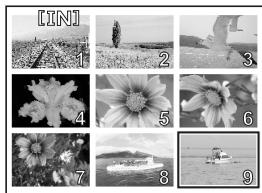
Thamburger (Index) display
This function lets you show several pictures at the same time on the monitor.
When reviewing your images, press the zoom button toward W (■) to switch to the thumnail (index) display.
- Use the arrow pad to select the picture.
- To return to the single-frame playback, press the zoom button toward T (Q).
CONNECTING THE CAMERA
Direct printing (PictBridge)
Using the provided USB cable, you may connect your camera directly to a PictBridge compatible printer such as the Olympus P-11 to make prints.
1 Connect one end of the provided USB cable into the camera's USB connector and the other end into the printer's USB connector.
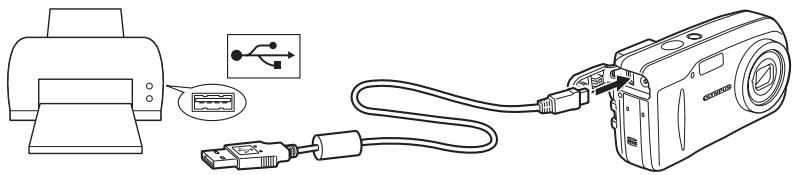
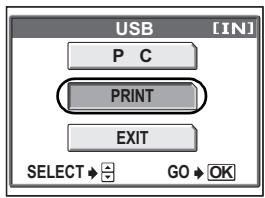
2 Select [PRINT] on the camera's monitor and press OK.
After the [ONE MOMENT] screen closes, the camera and printer are connected.
Direct printing (PictBridge) continued...
3 Use the arrow pad to select images and make prints.
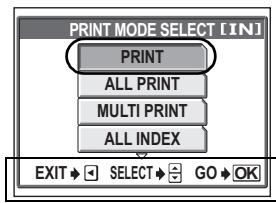
Follow the operation guide displayed here.
ALL PRINT
Prints the selected picture.
Prints all the pictures stored in the internal memory or card.
MULTI PRINT
Prints one picture in multiple layout format.
ALL INDEX
Prints an index of all the pictures stored in the internal memory or card.
PRINT ORDER
Prints the pictures according to the print reservation data in the internal memory or card. If no print reservations have been made, this option is not available.
OLYMPUS MASTER SOFTWARE
OLYMPUS Master Software: Use this software to download pictures from the camera, view, organize, retouch, e-mail and print your digital photos and movies and more! This CD also contains the complete software User's Manual in Adobe Acrobat (PDF) format.
System requirements
| OS | Windows 98SE/Me/2000Professional/XP or Mac OS X (10.2 or later) |
| CPU | Pentium III 500MHz / Power PC G3 500 MHz or later |
| RAM | 128MB or more (at least 256MB is recommended) |
| Hard Disk | 300MB or more |
| Connection | USB port |
| Monitor | Windows : 1,024 × 768 pixels, 65,536 colors or more Macintosh : 1,024 × 768 pixels, 32,000 colors or more |
For the latest support information, visit the Olympus website (http://www.olympus.com/ digital)

User Registration
Register your camera when you install OLYMPUS Master to activate your warranty, receive notifications of software and camera firmware updates, and more.
SPECIFICATIONS
Camera
Product type
Recording system
Still picture
Applicable standards
Movie
Memory
Image size
No. of storable pictures (when using the 32 MB xD-Picture Card)
No. of effective pixels Image pickup device
Lens
Photometric system
Shutter speed
Shooting range
Monitor
Auto focus
Outer connector
Automatic calendar system
: Digital camera (for shooting and displaying)
: Digital recording, JPEG (in accordance with Design rule for Camera File system (DCF))
: Exif 2.2, Digital Print Order Format (DPOF), PRINT Image Matching III, PictBridge
QuickTime Motion JPEG support
: Internal memory xD-Picture Card (16 MB - 1 GB)
2,816 × 2,112 pixels (SHQ)
2,816 × 2,112 pixels (HQ)
1,600 × 1,200 pixels (SQ1)
640 × 480 pixels (SQ2)
Approx. 7 frames (SHQ)
Approx. 21 frames (HQ)
Approx. 64 frames (SQ1)
Approx. 331 frames (SQ2)
: Approx. 6,000,000 pixels
: 1/2.5" CCD solid-state image pickup, 6,370,000 pixels (gross)
: Olympus lens 6.3 to 18.9 mm, f2.8 to 4.9 (equivalent to 38 to 114 mm on a 35 mm camera)
: Digital ESP metering
: 4 to 1/2,000 sec.
0.5 m (1.6 ft.) to (W), 0.9 m (3.0 ft.) to (T) (normal)
0.2 m (0.7 ft.) to (W), 0.6 m (2.0 ft.) to (T) (macro mode)
: 1.8" TFT color LCD display, 85,000 pixels
: Contrast Detection Method
: DC-IN jack, USB connector
: 2005 up to 2099
Operating environment
Temperature
: 0^ to 40^ (32°F to 104°F) (operation)/ -20°C to 60°C (-4°F to 140°F) (storage)
Humidity
: 30% to 90% (operation)/ 10% to 90% (storage)
Power supply
: Two AA (R6) Oxyride batteries, two alkaline batteries or two NiMH batteries/One lithium battery pack (CR-V3)/ Olympus AC adapter (optional)
Dimensions
106 mm (W) × 56 mm (H) × 36 mm (D)
(4.2" × 2.2" × 1.4") excluding protrusions
Weight
: 140 g (0.3 lb.) without battery and card
Design and specifications subject to change without notice.
xD-Picture Card
Memory type
NAND flash EEP-ROM
Operating environment
Temperature
: 0^ to 55^ (32^ to 131^) (operation)/ -20^ to 65^ (-4^ to 149^) storage)
Humidity
: 95% or lower
Power
: 3V (3.3V)
Dimensions
: 20× 25× 1.7mm (0.8^ × 1.0^ × 0.1^ )
SAFETY PRECAUTIONS

CAUTION
RISK OF ELECTRIC SHOCK DO NOT OPEN

CAUTION: TO REDUCE THE RISK OF ELECTRICAL SHOCK, DO NOT REMOVE COVER (OR BACK). NO USER-SERVICEABLE PARTS INSIDE. REFER SERVICING TO QUALIFIED OLYMPUS SERVICE PERSONNEL.


DANGER
An exclamation mark enclosed in a triangle alerts you to important operating and maintenance instructions in the documentation provided with the product.

WARNING
If the product is used without observing the information given under this symbol, serious injury or death may result.

CAUTION
If the product is used without observing the information given under this symbol, injury or death may result.
WARNING!
TO AVOID THE RISK OF FIRE OR ELECTRICAL SHOCK, NEVER DISASSEMBLE EXPOSE THIS PRODUCT TO WATER OR OPERATE IN A HIGH HUMIDITY ENVIRONMENT.
General Precautions
Read All Instructions — Before you use the product, read all operating instructions. Save all manuals and documentation for future reference.
Cleaning — Always unplug this product from the wall outlet before cleaning. Use only a damp cloth for cleaning. Never use any type of liquid or aerosol cleaner, or any type of organic solvent to clean this product.
Attachments — For your safety, and to avoid damaging the product, use only accessories recommended by Olympus.
Water and Moisture — For precautions on products with weatherproof designs, read the weatherproofing sections.
Location — To avoid damage to the product mount the product securely on a stable tripod, stand, or bracket.
Power Source — Connect this product only to the power source described on the product label.
Lightning — If a lightning storm occurs while using an AC adapter, remove it from the wall outlet immediately.
Foreign Objects — To avoid personal injury, never insert a metal object into the product.
Heat — Never use or store this product near any heat source such as a radiator, heat register, stove, or any type of equipment or appliance that generates heat, including stereo amplifiers.
Handling the Camera
WARNING
- Do not use the camera near flammable or explosive gases.
-
Do not use the flash on people (infants, small children, etc.) at close range.
-
You must be at least 1 m (3 ft.) away from the faces of your subjects. Firing the flash too close to the subject's eyes could cause a momentary loss of vision.
-
Keep young children and infants away from the camera.
-
Always use and store the camera out of the reach of young children and infants to prevent the following dangerous situations which could cause serious injury:
-
Becoming entangled in the camera strap, causing strangulation.
- Accidentally swallowing the battery, cards or other small parts.
- Accidentally firing the flash into their own eyes or those of another child.
-
Accidentally being injured by the moving parts of the camera.
-
Do not look at the sun or strong lights with the camera.
- Do not use or store the camera in dusty or humid places.
- Do not cover the flash with a hand while firing.
CAUTION
-
Stop using the camera immediately if you notice any unusual odors, noise, or smoke around it.
-
Never remove the batteries with bare hands, which may cause a fire or burn your hands.
-
Never hold or operate the camera with wet hands.
-
Do not leave the camera in places where it may be subject to extremely high temperatures.
-
Doing so may cause parts to deteriorate and, in some circumstances, cause the camera to catch fire. Do not use the charger or AC adapter if it is covered (such as a blanket). This could cause overheating, resulting in fire.
-
Handle the camera with care to avoid getting a low-temperature burn.
-
When the camera contains metal parts, overheating can result in a low-temperature burn. Pay attention to the following:
-
When used for a long period, the camera will get hot. If you hold on to the camera in this state, a low-temperature burn may be caused.
-
In places subject to extremely cold temperatures, the temperature of the camera's body may be lower than the environmental temperature. If possible, wear gloves when handling the camera in cold temperatures.
-
Be careful with the strap.
-
Be careful with the strap when you carry the camera. It could easily catch on stray objects – and cause serious damage.
SAFETY PRECAUTIONS continued...
Battery handling precautions
Follow these important guidelines to prevent batteries from leaking, overheating, burning, exploding, or causing electrical shocks or burns.

DANGER
- Use only the Olympus brand NiMH batteries and fitting charger.
- Never heat or incinerate batteries.
- Take precautions when carrying or storing batteries to prevent them from coming into contact with any metal objects such as jewelry, pins, fasteners, etc.
- Never store batteries where they will be exposed to direct sunlight, or subjected to high temperatures in a hot vehicle, near a heat source, etc.
- To prevent causing battery leaks or damaging their terminals, carefully follow all instructions regarding the use of batteries. Never attempt to disassemble a battery or modify it in any way, by soldering, etc.
- If battery fluid gets into your eyes, flush your eyes immediately with clear, cold running water and seek medical attention immediately.
- Always store batteries out of the reach of small children. If a child accidentally swallows a battery, seek medical attention immediately.

WARNING
- Keep batteries dry at all times.
- To prevent batteries from leaking, overheating, or causing a fire or explosion, use only batteries recommended for use with this product.
- Never mix batteries (old and new batteries, charged and uncharged batteries, batteries of different manufacture or capacity, etc.).
- Never attempt to charge alkaline, lithium or CR-V3 lithium battery packs.
- Insert the battery carefully as described in the operating instructions.
- Do not use batteries if their body is not covered by the insulating sheet or if the sheet is torn, as this may cause fluid leaks, fire, or injury.

CAUTION
- Do not remove batteries immediately after using the camera. Batteries may become hot during prolonged use.
- Always unload the battery from the camera before storing the camera for a long period.
- The following AA (R6) batteries cannot be used.

Batteries whose bodies are only partially or not at all covered by an insulating sheet.

Batteries whose terminals are raised, but not covered by an insulating sheet.

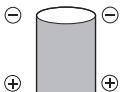
Batteries whose terminals are flat and not completely covered by an insulating sheet. (Such batteries cannot be used even if the terminals are partially covered.)
- If NiMH batteries are not charged within the specified time, stop charging them and do not use them.
- Do not use a battery if it is cracked or broken.
- If a battery leaks, becomes discolored or deformed, or becomes abnormal in any other way during operation, stop using the camera.
- If a battery leaks fluid onto your clothing or skin, remove the clothing and flush the affected area with clean, running cold water immediately. If the fluid burns your skin, seek medical attention immediately.
- Never subject batteries to strong shocks or continuous vibration.
SAFETY PRECAUTIONS continued...
For customers in North and South America
For customers in USA
Declaration of Conformity
Model Number : FE-120/X-700
Trade Name : OLYMPUS
Responsible Party : OLYMPUS IMAGING AMERICA INC.
Address : Two Corporate Center Drive, P.O. Box 9058, Melville, NY 11747-9058 U.S.A.
Telephone Number : 1-631-844-5000
Tested To Comply With FCC Standards
FOR HOME OR OFFICE USE
This device complies with Part 15 of the FCC rules. Operation is subject to the following two conditions:
(1) This device may not cause harmful interference.
(2) This device must accept any interference received, including interference that may cause undesired operation.
For customers in Canada
This Class B digital apparatus meets all requirements of the Canadian Interference-Causing Equipment Regulations.
Trademarks
- IBM is a registered trademark of International Business Machines Corporation.
- Microsoft and Windows are registered trademarks of Microsoft Corporation.
- Macintosh is a trademark of Apple Computer Inc.
- xD-Picture Card™ is a trademark.
- All other company and product names are registered trademarks and/or trademarks of their respective owners.
- The standards for camera file systems referred to in this manual are the "Design Rule for Camera File System/DCF" standards stipulated by the Japan Electronics and Information Technology Industries Association (JEITA).
MEMO
SOMMAIRE
L'APPAREIL EN ILLUSTRATIONS 31
AVANT DE COMMENCER 32
MISE EN ROUTE 33
Étape 1 - MISE EN ROUTE 33
Étape 2 - PRENDRE UNE PHOTO 34
Étape 3 - VÉRIFIER OU EFFACER UNE PHOTO 35
Étape 4 - TRANSFERT D'IMAGES. 36
FONCTIONNEMENT DE BASE 38
4 TRANSFERT D'IMAGES
IMPR MULT INDEX TOUT
DEMANDE D'IMPRESSION
Paso 4- TRANSFIERA IMAGENES 64
DIAGRAMA DE LA CÁMARA
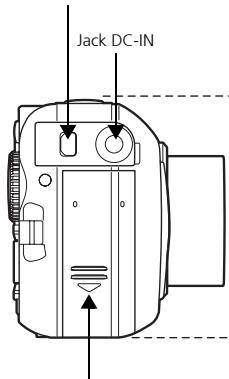
Conector USB
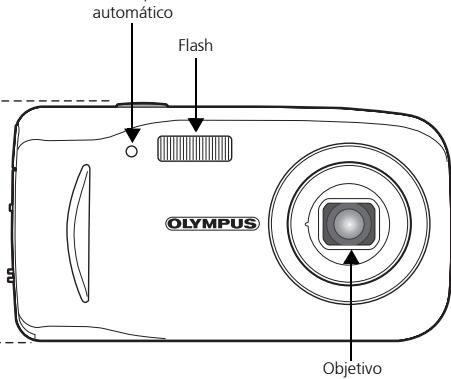
LED del disparador
Tapa del compartmentido de la bateria
ANTES DE EMPEZAR
DIAGRAMA DA CÁMARA 87
ANTES DE COMEÇAR 88
PARACOMECAR 89
Passo 1 - PARA COMEÇAR 89
Passo 2-FOTOGRAFE 90
Passo 3 - REVEJA OU APAGUE UMA IMAGEM. 91
Passo 4-TRANSFIRA IMAGENS 92
OPERATIONS BASICAS 94
Apagar todas as imagens 99
3 REVEJA OU APAGUE UMA IMAGEM
a. Carregue em
Apagar todas as imagens
Shinjuku Monolith, 3-1 Nishi-Shinjuku 2-chome, Shinjuku-ku, Tokyo, Japan
OLYMPUS IMAGING AMERICA INC.
Two Corporate Center Drive, P.O. Box 9058, Melville, NY 11747-9058, U.S.A. Tel. 631-844-5000
Technical Support (USA)
24/7 online automated help: http://www.olympusamerica.com/support
Phone customer support: Tel. 1-888-553-4448 (Toll-free)
Our phone customer support is available from 8 am to 10 pm
(Monday to Friday) ET
E-Mail: distec@olympus.com
Olympus software updates can be obtained at: http://www.olympus.com/digital
OLYMPUS IMAGING EUROPA GMBH
Premises: Wendenstrasse 14-18, 20097 Hamburg, Germany
Tel: +49 40-23 77 3-0 / Fax: +49 40-23 07 61
Goods delivery:Bredowstrasse 20,22113 Hamburg,Germany
Letters: Postfach 10 49 08, 20034 Hamburg, Germany
European Technical Customer Support:
Please visit our homepage http://www.olympus-europa.com
or call our TOLL FREE NUMBER*: 00800 - 67 10 83 00
for Austria, Belgium, Denmark, Finland, France, Germany, Italy, Luxemburg, Netherlands, Norway,
Portugal, Spain, Sweden, Switzerland, United Kingdom
- Please note some (mobile) phone services/provider do not permit access or request an additional
prefix to +800 numbers.
For all not listed European Countries and in case that you can't get connected
to the above mentioned number please make use of the following
CHARGED NUMBERS: +49 180 5 - 67 10 83 or +49 40 - 237 73 899
Our Technical Customer Support is available from 9 am to 6 pm MET (Monday to Friday)
2005 OLYMPUS IMAGING CORP.
Printed in Japan
1AG6P1P2739--