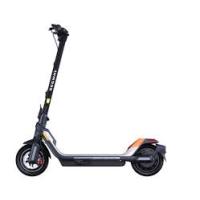
SEGWAYTROTTINETTEP65EE - Scooter DARRY - Free user manual and instructions
Find the device manual for free SEGWAYTROTTINETTEP65EE DARRY in PDF.



| Product type | Foldable electric scooter |
| Brand | DaRry (Segway-Ninebot) |
| Model | Segway KickScooter P65U (SEGWAYTROTTINETTEP65EE) |
| Dimensions (unfolded) | 1190 x 684 x 1214 mm |
| Dimensions (folded) | 1190 x 684 x 567 mm |
| Net weight | 26.9 kg |
| Maximum load | 120 kg |
| Recommended age | 18 to 60 years |
| Required height | 160 to 200 cm |
| Maximum speed | 35 km/h |
| Average range | 65 km |
| Maximum slope | 22% |
| Battery | Lithium-ion 46.8 V, 561 Wh, 12 Ah |
| Charging time | Approximately 4 hours |
| Motor | BLDC motor, rated power 500 W, max 980 W |
| Tires | Self-sealing tubeless tires of 10.5 inches |
| Brakes | Disc brake + electric brake |
| IP rating | IPX5 |
| Operating temperature | -10 to 40 °C |
| Speed modes | WALK, ASSIST, PARK, ECO, DRIVE, SPORT |
| Connectivity | Bluetooth, Segway-Ninebot app, NFC |
| Certifications | ANSI/CAN/UL-2272, battery UN/DOT 38.3 |
Frequently Asked Questions - SEGWAYTROTTINETTEP65EE DARRY
User questions about SEGWAYTROTTINETTEP65EE DARRY
0 question about this device. Answer the ones you know or ask your own.
Ask a new question about this device
Download the instructions for your Scooter in PDF format for free! Find your manual SEGWAYTROTTINETTEP65EE - DARRY and take your electronic device back in hand. On this page are published all the documents necessary for the use of your device. SEGWAYTROTTINETTEP65EE by DARRY.
USER MANUAL SEGWAYTROTTINETTEP65EE DARRY
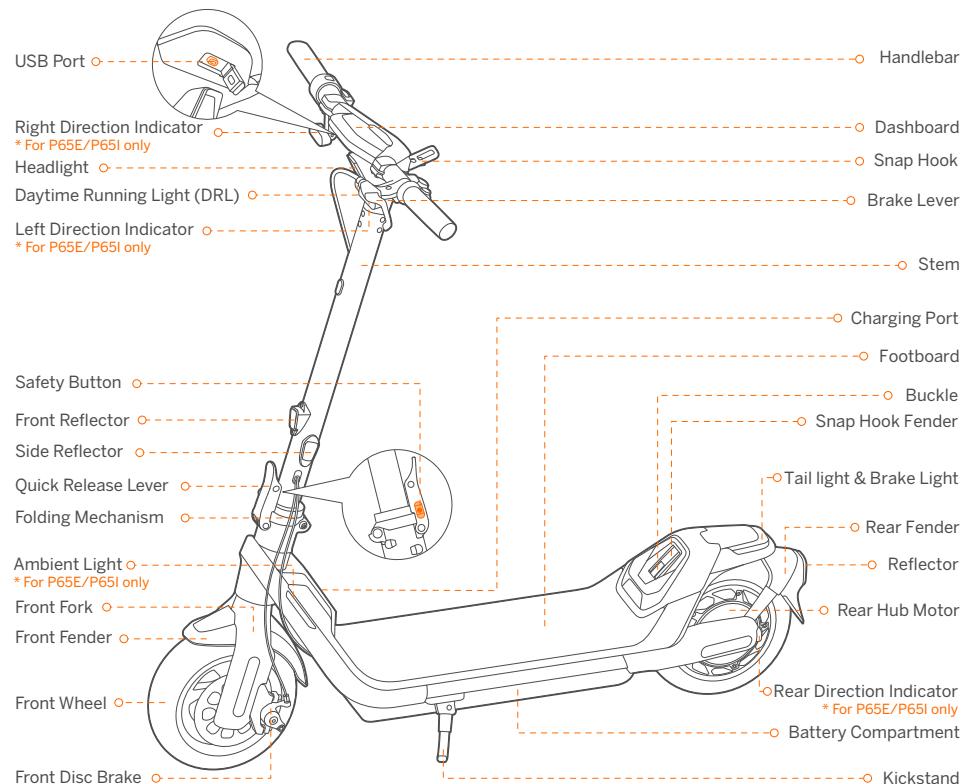
- Diagram and Functions 01
- Specifications 05
- Common Failures 07
4.Certifications 08 - Trademark 09
Diagram and Functions
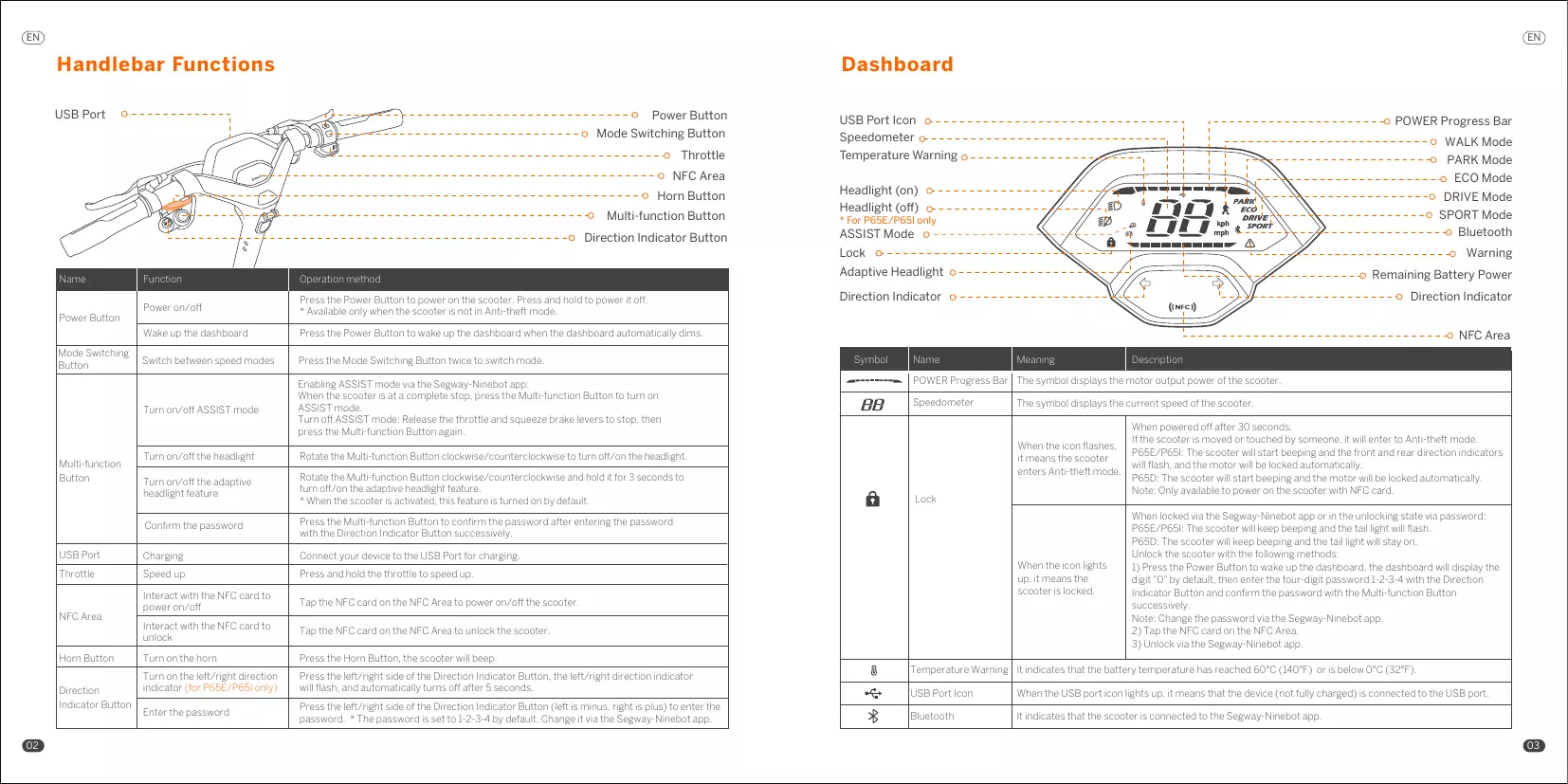
Handlebar Functions
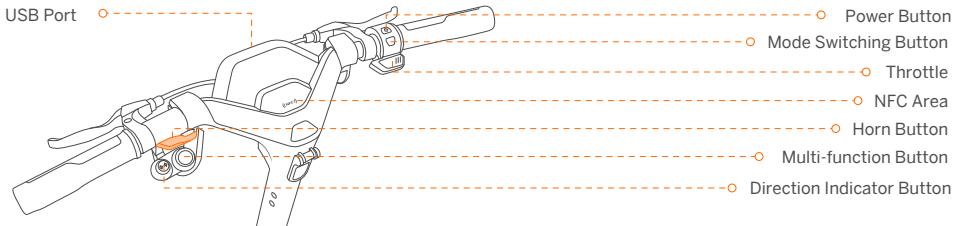
| Name | Function | Operation method |
| Power Button | Power on/off | Press the Power Button to power on the scooter. Press and hold to power it off. * Available only when the scooter is not in Anti-theft mode. |
| Wake up the dashboard | Press the Power Button to wake up the dashboard when the dashboard automatically dims. | |
| Mode Switching Button | Switch between speed modes | Press the Mode Switching Button twice to switch mode. |
| Multi-function Button | Turn on/off ASSIST mode | Enabling ASSIST mode via the Segway-Ninebot app: When the scooter is at a complete stop, press the Multi-function Button to turn on ASSIST mode. Turn off ASSIST mode: Release the throttle and squeeze brake levers to stop, then press the Multi-function Button again. |
| Turn on/off the headlight | Rotate the Multi-function Button clockwise/counterclockwise to turn off/on the headlight. | |
| Turn on/off the adaptive headlight feature | Rotate the Multi-function Button clockwise/counterclockwise and hold it for 3 seconds to turn off/on the adaptive headlight feature. * When the scooter is activated, this feature is turned on by default. | |
| Confirm the password | Press the Multi-function Button to confirm the password after entering the password with the Direction Indicator Button successively. | |
| USB Port | Charging | Connect your device to the USB Port for charging. |
| Throttle | Speed up | Press and hold the throttle to speed up. |
| NFC Area | Interact with the NFC card to power on/off | Tap the NFC card on the NFC Area to power on/off the scooter. |
| Interact with the NFC card to unlock | Tap the NFC card on the NFC Area to unlock the scooter. | |
| Horn Button | Turn on the horn | Press the Horn Button, the scooter will beep. |
| Direction Indicator Button | Turn on the left/right direction indicator (for P65E/P65I only) | Press the left/right side of the Direction Indicator Button, the left/right direction indicator will flash, and automatically turns off after 5 seconds. |
| Enter the password | Press the left/right side of the Direction Indicator Button (left is minus, right is plus) to enter the password. * The password is set to 1-2-3-4 by default. Change it via the Segway-Ninebot app. |
Dashboard
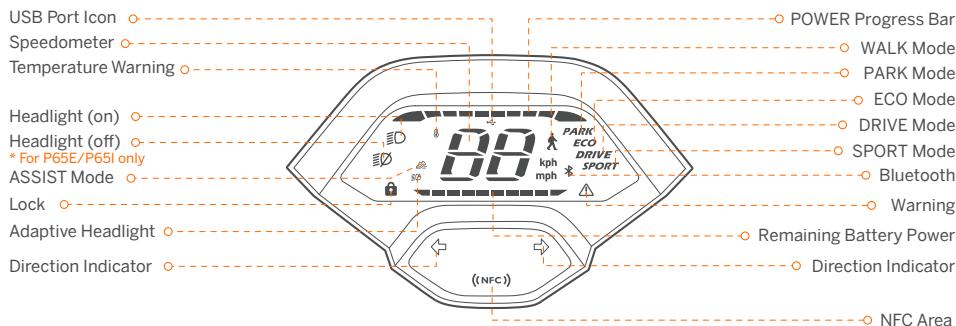
| Symbol | Name | Meaning | Description |
| Power Progress Bar | The symbol displays the motor output power of the scooter. | ||
| Speedometer | The symbol displays the current speed of the scooter. | ||
| Lock | When the icon flashes, it means the scooter enters Anti-theft mode. | When powered off after 30 seconds: If the scooter is moved or touched by someone, it will enter to Anti-theft mode. P65E/P65I: The scooter will start beeping and the front and rear direction indicators will flash, and the motor will be locked automatically. P65D: The scooter will start beeping and the motor will be locked automatically. Note: Only available to power on the scooter with NFC card. | |
| When the icon lights up, it means the scooter is locked. | When locked via the Segway-Ninebot app or in the unlocking state via password: P65E/P65I: The scooter will keep beeping and the tail light will flash. P65D: The scooter will keep beeping and the tail light will stay on. Unlock the scooter with the following methods: 1) Press the Power Button to wake up the dashboard, the dashboard will display the digit "0" by default, then enter the four-digit password 1-2-3-4 with the Direction Indicator Button and confirm the password with the Multi-function Button successively. Note: Change the password via the Segway-Ninebot app. 2) Tap the NFC card on the NFC Area. 3) Unlock via the Segway-Ninebot app. | ||
| Temperature Warning | It indicates that the battery temperature has reached 60°C (140°F) or is below 0°C (32°F). | ||
| USB Port Icon | When the USB port icon lights up, it means that the device (not fully charged) is connected to the USB port. | ||
| Bluetooth | It indicates that the scooter is connected to the Segway-Ninebot app. | ||
| A | Adaptive Headlight | When the icon flashes, it means the Adaptive headlight feature is turned on. | When this feature is turned on, the headlight will work automatically to adapt to a variety of situations and conditions and help illuminate the way. |
| A | Warning | The symbol indicates that the scooter has detected an error. The error code will display on the dashboard. Please contact the after-sales service for repair. | |
| - | Remaining battery power | The symbol displays the remaining battery power in battery bar. | |
Speed Modes Introduction
| Mode/model | P65E(Speed limit) | P65D(Speed limit) | P65I(Speed limit) | Switching methods |
| (WALK) | 3-5 km/h(1.9-3.7 mph) | 3-5 km/h(1.9-3.7 mph) | 3-5 km/h(1.9-3.7 mph) | Enable/Disable WALK mode via the Segway-Ninebot app.Note: The headlight and tail light are always on in WALK mode. |
| (ASSIST) | 3-5 km/h(1.9-3.7 mph) | 3-5 km/h(1.9-3.7 mph) | 3-5 km/h(1.9-3.7 mph) | Enabling ASSIST mode via the Segway-Ninebot app:When the scooter is at a complete stop, press the Multi-functionButton to turn on ASSIST mode.Note: When turned on, the scooter will beep once and the front andrear direction indicators will flash once.Turn off ASSIST mode:Release the throttle and squeeze brake levers to stop, then press theMulti-function Button again. |
| ECO | 11.2 mph(18 km/h) | 11.2 mph(18 km/h) | 11.2 mph(18 km/h) | Press the Mode Switching Button twice. |
| DRIVE | 12.4 mph(20 km/h) | 12.4 mph(20 km/h) | 12.4 mph(20 km/h) | Press the Mode Switching Button twice. |
| SPORT | 15 mph(25 km/h) | 12.4 mph(20 km/h) | 12.4 mph(20 km/h) | Press the Mode Switching Button twice. |
Specifications
| Item | Parameter | |||
| Product | Name | Segway KickScooter | ||
| Model | P65E | P65D | P65I | |
| Length × Width × Height | Approx. 1190 × 684 × 1214 mm (46.9 × 26.9 × 47.8 in) | |||
| Folded: Length × Width × Height | Approx. 1190 × 684 × 567 mm (46.9 × 26.9 × 22.3 in) | |||
| Net Weight | Approx. 26.9 kg (59.3 lbs) | |||
| Rider | Max. Payload | 120 kg (265 lbs) | ||
| Recommended Age | 18–60 years old | |||
| Required Height | 160–200 cm (5'2"–6'6") | |||
| Machine | Wheelbase | 903 mm (35.6 in) | ||
| Ground Clearance | 79 mm (3.1 in) | |||
| Max. Speed | Approx. 25 km/h (15.5 mph) | Approx. 20 km/h (12.4 mph) | ||
| Typical Range[1] | Approx. 65 km (40.4 miles) | |||
| Max. Slope | Approx. 22% | |||
| Traversable Terrain | Bicycle lanes, parks, campuses and most of the flat road conditions and typical Belgian roads | |||
| Operating Temperature | -10 to 40°C (14 to 104°F) | |||
| Storage Temperature | -10 to 50°C (14 to 122°F) | |||
| IP Rating | IPX5 | |||
| Duration of Charging (single) | Approx. 4 h | |||
| Battery | Model | NCAF4813A/NCAF4812D | ||
| Nominal Voltage | 46.8 V --- | |||
| Max. Charging Voltage | 54.6 V --- | |||
| Nominal Energy | 561 Wh | |||
| Nominal Capacity | 12 Ah | |||
| Charging Ambient Temperature | 0 to 45°C (32 to 113°F) | |||
| Battery Management System | Over-heating, short circuit, over-current, over-discharge and over-charge protection | |||
| Motor | Motor Type | Brushless DC (BLDC) motor | ||
| Nominal Power | 0.5 kW, 500 W | |||
| Max. Power | 0.98 kW, 980 W | |||
| Charger | Input Voltage | 100–240 V ---2A | ||
| Max. Output Voltage | 54.6 V --- | |||
| Output Power | 0.1 kW, 160 W | |||
| Item | Parameter | |
| Charger | Rated Output | 53.5 V==3A |
| Type | Built-in | |
| Model | NBW54D603D0D | |
| Tire | Type | 10.5-inch Self-sealing tubeless tires |
| Tire Pressure | 30-35 psi | |
| Material | Rubber | |
| Others | Speed Modes | WALK mode, ASSIST mode, PARK mode, ECO mode, DRIVE mode and SPORT mode |
| Brake System | Disc brake & Electric brake |
[1]: Typical Range: tested while riding with a full battery, 165 lbs (75 kg) load, 77ircF (25°C), at the speed of 9.9 mph (16 km/h) on average on pavement.
* Some of the factors that affect range include speed, number of starts and stops, ambient temperature, etc.
3 Common Failures
| Error code | Possible causes |
| 10 | BLE Bluetooth communication error |
| 11 | Motor 1A phrase current sampling failure |
| 12 | Motor 1B phrase current sampling failure |
| 13 | Motor 1C phrase current sampling failure |
| 14 | Throttle Hall sensor abnormality |
| 15 | Brake Hall sensor abnormality |
| 18 | Hall sensor abnormality |
| 21 | BMS communication error |
| 22 | BMS password error |
| 23 | BMS default serial number |
| 24 | System voltage detection abnormality |
| 26 | Flash storage error |
| 27 | Control board password error |
| 28 | Motor MOS driver upper bridge short circuit |
| 29 | Motor MOS driver lower bridge error |
| 31 | Program skip error |
| 35 | Vehicle default serial number |
| 39 | Battery temperature sensor error |
| 41 | Direction indicators abnormality |
| 42 | Headlight abnormality |
| 45 | Abnormal bus current op-amp circuit |
4 Certifications
This product is certified to ANSI/CAN/UL-2272 by CSA Group.
The battery complies with UN/DOT 38.3.
The battery complies with ANSI/CAN/UL-2271.
European Union Compliance Statement
Information on Disposal for Users of Waste Electrical & Electronic Equipment

This symbol on the product or on its packaging indicates that used electrical and electronic products should not be mixed with unsorted municipal waste. For proper treatment, it is your responsibility to dispose of your waste equipment by arranging to return it to designated collection points.
Disposing of this product correctly will help save valuable resources and prevent any potential negative effects on human health and the environment, which could otherwise arise from inappropriate waste handling.
Penalties may be applicable for incorrect disposal of this waste, in accordance with your national legislation.
Please contact your local authority for further details of your nearest designated collection point.
Battery recycling information for the European Union

This symbol means that batteries and accumulators, at their end-of-life, should not be mixed with unsorted municipal waste. Your participation is an important part of the effort to minimize the impact of batteries and accumulators on the environment and on human health. For proper recycling you can return this product or the batteries or accumulators it contains to your supplier or to a designated collection point.
Disposing of this product correctly will help save valuable resources and prevent any potential negative effects on human health and the environment, which could otherwise arise from inappropriate waste handling.
Penalties may be applicable for incorrect disposal of this waste, in accordance with your national legislation. There are separate collection systems for used batteries and accumulators.
Please, dispose of batteries and accumulators correctly at your local community waste collection/recycling center.
Radio Equipment Directive
Ninebot (Changzhou) Tech Co., Ltd. hereby declares that the product listed in this section comply with the essential requirements and other relevant provisions of the Radio Equipment Directive 2014/53/EU.
Restriction of the use of certain hazardous substances (RoHS) Directive
Ninebot (Changzhou) Tech Co., Ltd. hereby declares the whole product including parts (cables, cords, and so on) meets the requirements of RoHS Directive 2011/65/EU and amendment Commission Delegated Directive (EU) 2015/863 on the restriction of the use of certain hazardous substances in electrical and electronic equipment ("RoHS recast" or "RoHS 2.0").
Machinery Directive
Ninebot (Changzhou) Tech Co., Ltd. hereby declares that the product listed in this section comply with the essential requirements and other relevant provisions of the Machinery Directive 2006/42/EC.

EU Authorised Representative:
Segway-Ninebot Europe
Dynamostraat 7, 1014 BN Amsterdam, The Netherlands.
Ninebot (Changzhou) Tech Co., Ltd. hereby declares that the product model: P65E, P65D, P65I comply with the essential requirements and other relevant provisions of the Radio Equipment Directive 2014/53/EU, the machinery directive 2006/42/EC, and the RoHS Directive 2011/65/EU and amendment Commission Delegated Directive (EU) 2015/863.
The declaration of conformity can be viewed at the following address: http://eu-en.segway.com/support-instructions
UK Compliance Statement
Radio Equipment Regulations 2017
Ninebot (Changzhou) Tech Co., Ltd. hereby declares that the product listed in this section comply with the essential requirements and other relevant provisions of Radio Equipment Regulations 2017.
The Restriction of the Use of Certain Hazardous Substances in Electrical and Electronic Equipment Regulations 2012
Ninebot (Changzhou) Tech Co., Ltd. hereby declares the whole product including parts (cables, cords, and so on) meets the requirements of The Restriction of the Use of Certain Hazardous Substances in Electrical and Electronic Equipment Regulations 2012.
Supply of Machinery (Safety) Regulations 2008
Ninebot (Changzhou) Tech Co., Ltd. hereby declares that the product listed in this section comply with the essential requirements and other relevant provisions of The Safety of Supply of Machinery (Safety) Regulations 2008.

UK Authorised Representative:
UKCA Experts Ltd.
Dept 302, 43 Owston Road Carcroft, Doncaster, DN6 8DA, United Kingdom
Ninebot (Changzhou) Tech Co., Ltd. hereby declares that the product model: P65E complies with the essential requirements and other relevant provisions of the Radio Equipment Regulations 2017, Supply of Machinery (Safety) Regulations 2008 and the Restriction of the Use of Certain Hazardous Substances in Electrical and Electronic Equipment Regulations 2012.
The declaration of conformity can be viewed at the following address: www.segway.com
5 Trademark
Segway and the Rider Design are the trademarks of Segway Inc.; Android is the trademark of Google Inc., App Store is a service mark of Apple Inc. The respective owners reserve the rights of their trademarks and copyrights, etc. referred to in this manual.
We have attempted to include descriptions and instructions for all the functions of the KickScooter at the time of printing. However, due to constant improvement of product features and changes of design, your KickScooter may differ slightly from the one shown in this document. Visit the Apple app Store (iOS) or the Google Play Store (Android) to download and install the Segway-Ninebot App. Please note that there are multiple Segway and Ninebot models with different functions, and some of the functions mentioned herein may not be applicable to your unit. The manufacturer reserves the right to change the design and functionality of the KickScooter product and documentation without prior notice.
(※The Segway-Ninebot App can support KickScooter with built-in Bluetooth)
© 2022 Ninebot (Beijing) Tech Co. Ltd. All rights reserved.
Table des matieres
Amsterdam, The Netherlands
Amsterdam, The Netherlands
BN Amsterdam, The Netherlands
Amsterdam, The Netherlands
Amsterdam, The Netherlands

- Diagram and Functions
- Handlebar Functions
- Dashboard
- Common Failures
- Certifications
- European Union Compliance Statement
- Information on Disposal for Users of Waste Electrical & Electronic Equipment
- Battery recycling information for the European Union
- Radio Equipment Directive
- Restriction of the use of certain hazardous substances (RoHS) Directive
- Machinery Directive
- UK Compliance Statement
- Radio Equipment Regulations 2017
- Supply of Machinery (Safety) Regulations 2008
- Trademark
- Table des matieres
Brand : DARRY
Model : SEGWAYTROTTINETTEP65EE
Category : Scooter