
MCR-N8Z70D - HiFi system YAMAHA - Free user manual and instructions
Find the device manual for free MCR-N8Z70D YAMAHA in PDF.



| Product Type | Compact HiFi system with network CD player and built-in amplifier |
| Model | YAMAHA MCR-N8Z70D (set including CD-NT670D and amplifier) |
| Dimensions (W × H × D) | 314 × 70 × 342 mm |
| Weight | 3.3 kg (amplifier) |
| Power supply | 220–240 V AC, 50/60 Hz |
| Power consumption | 28 W (A-670) / 30 W (A-U670); standby 0.5 W |
| Output power | 65 W + 65 W (A-670) / 70 W + 70 W (A-U670) at 6 Ω |
| Supported audio formats (CD) | CD audio, CD-R/RW (MP3/WMA) |
| Supported audio formats (USB/Network) | MP3, WMA, FLAC, WAV, AAC, ALAC, DSD (via USB) |
| Network connectivity | Wi-Fi (2.4 GHz), Ethernet, Bluetooth, AirPlay, MusicCast multiroom |
| Radio | FM, DAB+ (on CD-NT670D) |
| Audio inputs | AUX (RCA), optical (DIGITAL IN), USB (Type A for devices), USB (Type B for PC) |
| Audio outputs | ANALOG OUT (RCA), headphone (6.35 mm jack) |
| Special functions | Random/repeat play, station presets, favorites, sleep timer |
| Included accessories | Remote control, FM antenna, DAB/FM antenna (depending on version), stereo RCA cable, batteries, MusicCast setup guide |
| Maintenance and cleaning | Use a dry, clean cloth. Do not use chemical solvents. |
| Safety | Class 1 laser (do not open), do not expose to water, minimum ventilation (top 10 cm, sides 6 cm) |
| Replacement parts and repairability | Contact a Yamaha authorized service center for any repairs. Do not attempt to modify or repair yourself. |
| General information | MusicCast compatibility, dedicated app for iOS/Android, firmware update via network or USB |
Frequently Asked Questions - MCR-N8Z70D YAMAHA
User questions about MCR-N8Z70D YAMAHA
0 question about this device. Answer the ones you know or ask your own.
Ask a new question about this device
Download the instructions for your HiFi system in PDF format for free! Find your manual MCR-N8Z70D - YAMAHA and take your electronic device back in hand. On this page are published all the documents necessary for the use of your device. MCR-N8Z70D by YAMAHA.
USER MANUAL MCR-N8Z70D YAMAHA
Balayage initial...29
Syntonisation de stations DAB....29
Prérglage de stations DAB……30
Selection des stations DAB prerégles30
15 DISPLAY (P.38)
16 HOME (P.24,35)
SLEEP (P.42)
| 174.928/5A | 176.640/5B | 178.352/5C | 180.064/5D |
| 181.936/6A | 183.648/6B | 185.360/6C | 187.072/6D |
| 188.928/7A | 190.640/7B | 192.352/7C | 194.064/7D |
| 195.936/8A | 197.648/8B | 199.360/8C | 201.072/8D |
| 202.928/9A | 204.640/9B | 206.352/9C | 208.064/9D |
| 209.936/10A | 211.648/10B | 213.360/10C | 215.072/10D |
| 216.928/11A | 218.640/11B | 220.352/11C | 222.064/11D |
| 223.936/12A | 225.648/12B | 227.360/12C | 229.072/12D |
| 230.784/13A | 232.496/13B | 234.208/13C | 235.776/13D |
| 237.488/13E | 239.200/13F |
DLS (Dynamic Label Segment)
ENSEMBLE
D Prérglage de stations FM
PService (Program Service)
Digital Audio Broadcasting

(Pour CD-NT670D)
(http://download.yamaha.com/sourcecodes/musiccast/).
WindowsTM
- Install the speakers in a cool, dry, clean, stable and horizontal place.
- To avoid electric shock, fire, injury, damage to the speakers, and discoloration of the cabinet, install away from windows, heat sources, sources of excessive vibration, dust, moisture, cold, rain, water, falling objects, noise sources (transformers, motors, etc.) and direct sunlight.
- Do not insert a hand or object into the port or pick up the speaker by holding the port, as it may cause personal injury or damage to the speaker.
- Any time you note distortion, reduce the volume control on your amplifier to a lower setting. Never allow your amplifier to be driven into "clipping". Otherwise the speakers may be damaged.
- When using an amplifier with a rated output power higher than the nominal input power of the speakers, care should be taken never to exceed the speakers' maximum input.
- Do not attempt to clean the speakers with chemical solvents (ex.alcohol or thinners etc.); this might damage the finish. Use a clean, dry cloth.
- Do not attempt to modify or fix the speakers. Contact qualified Yamaha service personnel when any service is needed. The cabinet should never be opened for any reasons.
- Secure placement or installation is the owner's responsibility. Yamaha shall not be liable for any accident caused by improper placement or installation of speakers.
ACCESSIONS
Check that the following items are included.
Speaker cable (2m) x 2 /Grille x 2 /Non-skid pads (8 pcs.) x 1
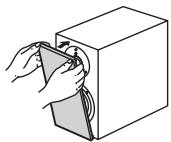
ATTACHING THE GRILLE
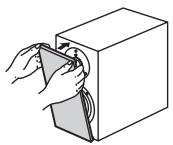
The speaker and the grille are packed separately. To attach the grille, line up the projections (magnets) on the reverse side of the grille with their corresponding screw heads on the speaker.
Note
When the grille is removed, be sure not to touch the speaker units with your hands or to exert excessive force with tools.
CONNECTION TO YOUR AMPLIFIER
BEFORE MAKING CONNECTIONS, MAKE SURE THAT THE AMPLIFIER IS SWITCHED OFF.
See page 1 for the connection method.
- Place the speakers on a sturdy, vibration-free surface.
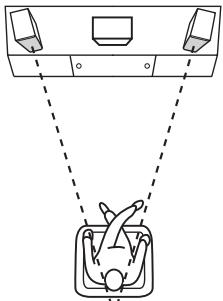
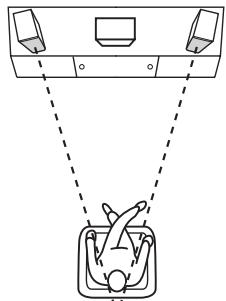
- Better stereo images will be obtained when the speakers are slightly angled in towards the listening position.
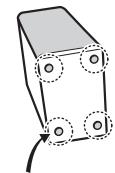
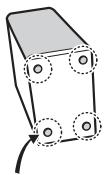
- When placing the speakers on a flat surface, affix the included non-skid pads to the corners of the speaker undersides, as shown. The pads will prevent the speaker from moving around.
Non-skid pads
Note
Placing this unit too close to a CRT TV set might happen impair picture color or create a buzzing noise. Should this happen, move the speaker away from the TV set.
SPECIFICATIONS
NS-BP401
Type 2-way bass-reflex speaker system
Non-magnetic shielding type
Driver. 13 cm (5-1/4") cone woofer
3cm (1-1/4") soft dome tweeter
Impedance. 6Ω
Frequency response. 50Hz to 40kHz (-10 dB)
100kHz (-30 dB)
Nominal input power 60 W
Maximum input power 120 W
Sensitivity. 85 dB/2.83 V/m
Crossover frequency 3 kHz
Dimensions (W× H× D) 176x310x327 mm
(6 - 7 / 8^ × 12 - 1 / 4^ × 12 - 7 / 8^ )
Weight. 5.9 kg (13 lbs.)
NS-BP301
Type 2-way bass-reflex speaker system
Non-magnetic shielding type
Driver. 13 cm (5-1/4") cone woofer
3cm (1-1/4") soft dome tweeter
Impedance 6Ω
Frequency response . 55 Hz to 40kHz (-10 dB)
100kHz (-30 dB)
Nominal input power. 60 W
Maximum input power 110 W
Sensitivity. 85 dB/2.83 V/m
Crossover frequency. 4 kHz
Dimensions (W× H× D) 176x310x297 mm
(6 - 7 / 8^ × 12 - 1 / 4^ × 11 - 3 / 4^ )
Weight. 4.6 kg (9.9 lbs.)
- Specifications are subject to change without notice due to product improvements.
- Care should be taken not to exceed the input power values noted above.
PRECAUTIONS
MepblnpedoctoPOXHOCTN
YctaHaBJIHBAIte KOJIIOHKN B IPOXJaIHOM, CyXOM, YNCTOM NOMEIIeHH Ha yCTOuHBOI rOpH3OHTaJIbHOI IOBepxHOCTH.
Bo H36eKaHHe IopajKeHH NJIeKTPnuecKm TOKOM,IOJkaPa, IOnuyeHHa TpaBMbI,IOBpeKJedHHa KOJIOHOK H O6ecUBeHuBaHHa KOpHyca UCTaHaBJIHBaHTe KOJIOHK NIOJaJIbIIE OT OKOH, HTOCHNtIKoTEnIJa, Ype3MePHoB Bn6paHH, IIbIIH, BJaRn, XOJOHN HTOCHNtIKoIbMaYMa (TpacHcΦopMaTOpOB, DBHrAteJeH N.T.I), B MeCtAx, HeOCTyINbIX DIA JIOJkD, BOJbI, PpIMORO COJIHeuHOrO CBeta, H630PiAcBbIX C TOHKn 3peHHa BO3MOKHOCTH IIaDeHHa KaKOJIOHH dpyTHX IIpeIMETOB.
He IpiocobbIaIte pyKn HJIINpyTHe IpeImeTbI B OTBepCTHe, He IIIOHNMaIte KOJIOHKn 3a 3TO OTBepCTHe -3TO MOKeT CTAb IIpHInHO TpaBMnPOBaHHaH NII INOBpeINTb KOJIOHKn.
BcIyuee NCKaKeHn 3ByuHaHn IIOHN3bTe yPoBeHb rPOMKoCTn Ha ycHInTeJe. He IOnyckaJte "Cpe3aHn" 3Byka ycINHTeJeM. B IpOTHBOM cIyuee 3To MOKeT cTaB IIpNHHOI NOBpeKDeHHN KOJOHOK.
-Пин Испльзовануу ychinteяс c HOMHальбоу BbIXOДHOI MOIshOCtBO, IpeBbIIaOIOJI e HOMHnaIbHyU BXOINYIO MOIIHOCTb KOJOHOK, HeO6XoIIMO cJIeINTb 3a HeIpeBbIIIEHHEM MAKcHMaJIbHOI BXOJHOI MOIIHOCTn KOJOHOK.
He IIbTaIteCb OUHCTHTB KOIOHN C IIMOOnbIO XHMuecKHX pactBOPHTeJIe (HaIIpHMeP, cIIpTra IIIN pA36aBHTeJIe H np.); 30To MOKET IOBpeHTb IOKpbIthe. IcIIoJIb3yIte YIcHTyIO cyXIO TkaHB.
HeIbTaIteCb MoINHΦHINPOBaT b INH YHHHT b KOIOHKn. Ipn Heo6XoHIMocTH o6pATTeCb K KBaINHΦHINPOBaHHomO cOTpydNHc cepBnCHoro ΒeHTpa YamaHa. Hn B KoEM cJIyueh He cJIeJyET OKbPaBtK KopHyc aIInapara.
OTBETCTBEHHOCb 3a 6e30nacHOcTb pa3MeueHnI yctahOBky Hecet BJaadeJeC. KomnaHnYamaHa He HecET OTBETCTBEHHOCb 3a KaKne-JIn6o HecuactThbIe Cnyan, Bbl3BaHbNHe HFaJnxAaUM pa3MeueHnEM nIyCTAHOBKO DnHaMnKOB.
AKCECCYAPbl
Y6eIHTecb HauJIHcHH B KOMIIJEKTe IocTaBKn CJIeIyHOIIHX JETaJIeI.
Ka6eJIb KOJIOHKn (2M)× 2 / PeIIeTka× 2 / pO T H B O C K O J I b3A I I I eIIOyIeUKN (8III.)× 1
3AKPENJIEHNE PEWETKA
Peiietka 3anaKoBaHa OTeJIbHo OT akyctHueckOINCTeMbI. YTo6bI
yctaHOBHTb peIIeTKa, coBMcTeHTe
BbIcTpyaIOUHne HaCTH (MaHHTbI)Ha 3a,IaHeuactnpeHETka C
COOTBETCTBYIOUHMN FOJIOBKAMN BHITOB Ha akyCTHueCKO CHCTeMe.
PpimechaHne
He kacaItecb yacteKoIohKn pykamn He npnilaraTe DOIOJIHNTeBbHbIX ycHnn npn pa6ote HNCTpymEnTaMn C KOIOHKo CO CHaToPpeStKa.
ПОДКЛIOЧЕНЕ K YСИNTELILO
NEPED BbINOJIHEHEM IOKNIQUEHEN YBEI NTECB B TOM, YTO YCNJI NTJIO OTKNIOUH.
TuKacaeTcMeToJaIOKJIIOUeHn,cm. cTp.1.
PA3MELSEHNE KOJIOHOK
- YctaHabJIbBaIte DHHaMHKN Ha yctoYHBOH HeBn6pHpyIOe HOBepXHOCTH.
- Hannyiiee KaeeCTBO cTepe03ByuHaHHIOCTHraetcB Clyae yctAHOBKN KOJIOHOK IOJ HeKOTOpbIM yTJOM K paCIOJOKeHHIO CNYIATEJI.
- IIpn pa3MeIeHHN KOJIOHOK Ha IIIOCKOH IOBepxHocTH
- IIINKpeINHe IIpIIaIaAeMBIE IIPOTHBOCKOIL3aIIINe IIOyIeUKN B
- YIJIAX HA INKHeII NaHEIIH KOJIOHNK, KAK IIOKA3aHO. IIOyIeUKN
- 6dYt IIpenIaTCTBOBATb CMeIeHHIO KOJIOHNK.
npotnBOckOJIb3aUne nOdyuCheK
Примechаиме
PacnoIoxHeH daHHoro yctpoNCTBa cInuKOM 6n3KO K 3JT-TeBn3Opy MoKet yxduNTb CBETHOCTb N3O6paKeHn HIN Bb13BaTb NOBJIeHne MepcaUoJnx NOMex. B TAKOM cnUye yCTaHOBtE KOLOHKn NoaJIbwe OT TeBn3Opa.
TEXHnueCKne XAPAKTEPNCNTIKN
NS-BP401
TII 2-IOJIOchA aKcyTHuecka cnCTeMa c pOHTaJIbHbIM OTpaKeHHem 3ByKOBoI BOJIHbI
3KpaHHpOBaHHe HemaHHTbIMMaTepeHaJiamn
FIOIBKa.... HN3KoYacTOTbHd INHAMNK KynioIOO6pa3HO TnIIa
Диаметром 13сM
BbICOKOaCTOTHbI DHHAMHK C MRAKHM KYIOJOM DHAMeTpOM 3cm
HmpeJanC 6OM
YacToTHbIe xapaKTepeHcTKn .OT 50 _II do 40 _II (-10 JB)
100kΓ(-30πB)
HOMHaJIbHaB BXOJHa MoIHOCTb 60BT
MaKcHMaJIbHaB BXOHaBa MOIuHOCTb 120BT
UyBCTBHTeJIbHOCTb 85 JB/2,83 B/M
Yactota KpoccoBepob. 3K
a 176×310×327MM
Bec. 5,9 K
NS-BP301
TП 2-ПОЛСЧА Akуctиpeckа снстema c ФрпгТаьБьМОТражehнem 3BYKOBоВ BOJIHБ
3KpaHHpOBaHHe HemaHHTbIMMaTepeHaJiamn
ToIOBka..... HN3KoOaCTOTHbI DnHaMHK KynIOO6pa3HOrTOIIa
Диаметром 13сM
BbICOKOaCTOTHbI INHaMHK C MRAKHM KYIOJOM DnAmEtpom 3cm
HmpeIaHc .6OM
YacToTHbIe xapaKTepeHcTHKn .OT 55 _II Do 40 _II (-10 JB)
100kΓu(-30πb)
HomHaJIbHaB BXOJHnA MoIIOHocTb 60BT
MaKcHMaJIbHaB BxOJHa MoIHOCTb 110BT
UyBCTBHTeJIbHOCTb 85 JB/2,83 B/M
Uactora KpoccoBepob. 4K
ΓaδapntbI (III × B × Γ) 176 × 310 × 297 MM
Bec. 4,6 K
- Bpe3yJIbTaTe ycoBepHHeCTBOBaHHn H3JeJInaTexHHueckHe xapaKTePrcHTKN MOrY n3MeHЯTbC8e3 IIpeJbapHTeJIbHorO yBeIOMJIeHHN.
- Heo6xOДHMo CJIeIITb 3a HEnpeBbIⅢeHHeM BbIⅢeYkaAHHbIX 3HaueHn BXoHOr MOIHOCTN.
| Important Notice: Guarantee Information for customers in EEA* and Switzerland | English |
| For detailed guarantee information about this Yamaha product, and Pan-EEA* and Switzerland warranty service, please either visit the website address below (Printable file is available at our website) or contact the Yamaha representative office for your country. * EEA: European Economic Area | |
| Remarque importante: informations de garantie pour les clients de l'EEE et la Suisse | François |
| Pour des informations plus détaillées sur la garantie de ce produit Yamaha et sur le service de garantie applicable dans l'ensemble de l'EEE ainsi qu'en Suisse, consultez notre site Web à l'adresse ci-dessous (le fichier imprimable est disponible sur notre site Web) ou contactez directement Yamaha dans votre pays de résidence. * EEE : Espace Economique Européen | |
| Wichtiger Hinweis: Garantie-Information für Kunden in der EWR* und der Schweiz | Deutsch |
| Für{nahere Garantie-Information über ceses Produkt von Yamaha, sowie über den Pan-EWR*- und Schweizer Garantieservice, besuchen Sieitte entweder die folgend angegebene Internetadresse (eine druckfähige Version befindet sich auch auf unserer Website), oder wenden Sie sich an den für Ihr Land zuständigen Yamaha-Vertrieb. *EWR: Europäischer Wirtschaftsráum | |
| Aviso importante: información sobre la garantía para los pacientes del EEE* y Suiza | Espanol |
| Para una información detallada sobre este producto Yamaha y sobre el soporte de garantía en la zona EEE* y Suiza, visite la direction web que se incluye más bajo (la version del archivo para imprintir esta disponible en我们的址 web) o pángase encontacto con elrepresentante de Yamaha en su País. * EEE: Espacio Económico Europeo | |
http://europe.yamaha.com/warranty/
(FONCTION USB DAC) (A-U670 uniqueness) 8
RéGLAGE DU SON SOUHAITE (A-U670 uniquement) 10
ENCLENCHEMENT AVEC UN LECTEUR DE CD RÉSEAU 10
① Touche (Alimentation)
① Prise USB DAC (Type B) (A-U670 uniquement)
Pour raccorder un PC (E5 page 5).
(2) Prises ANALOG IN
USB DAC (A-U670 uniqueness)
Home Audio Network with MusicCast
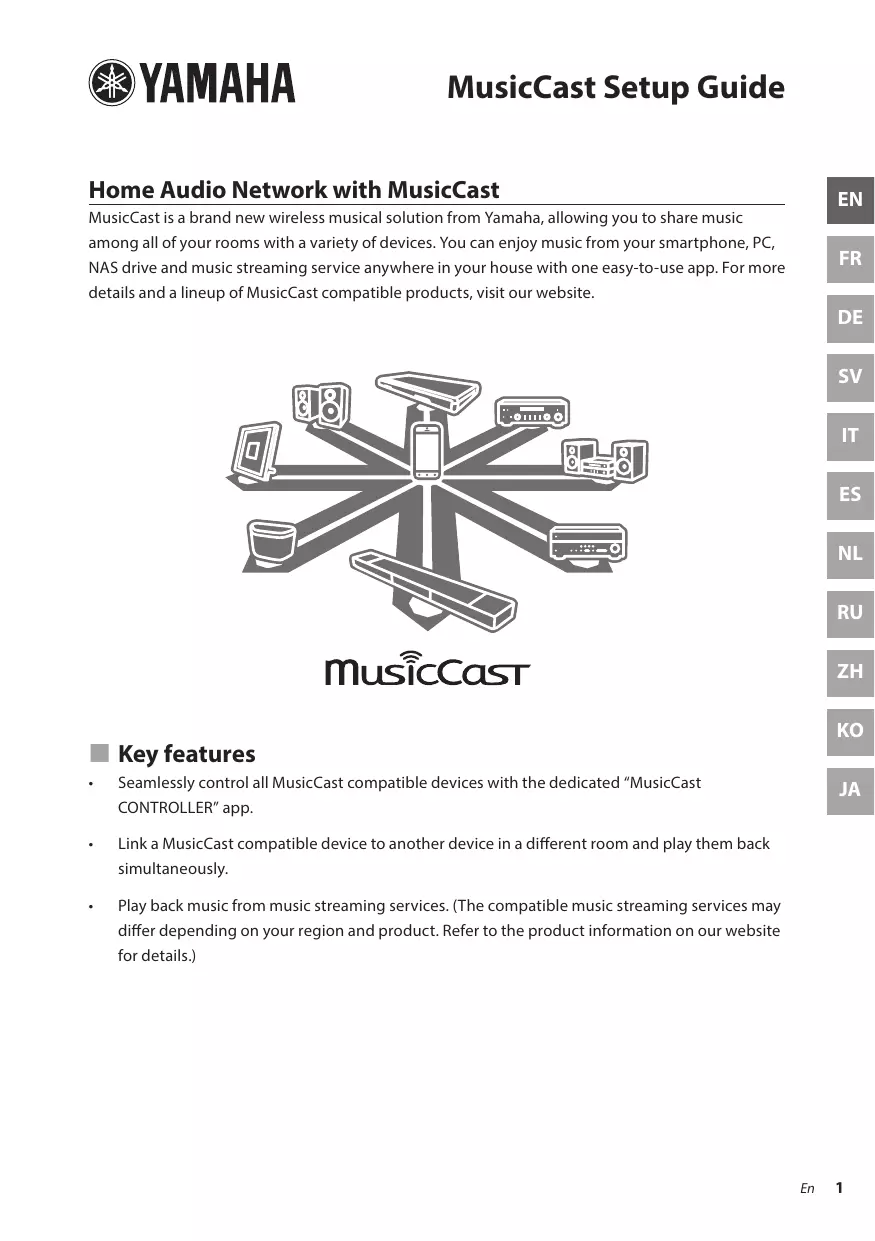
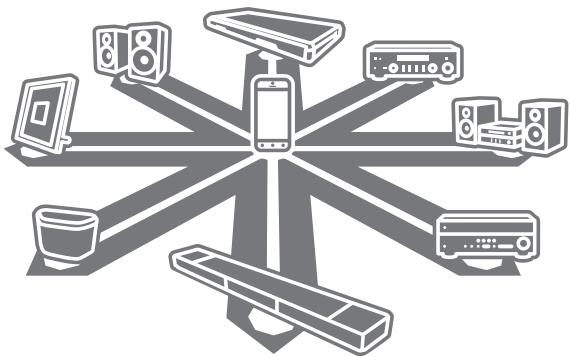
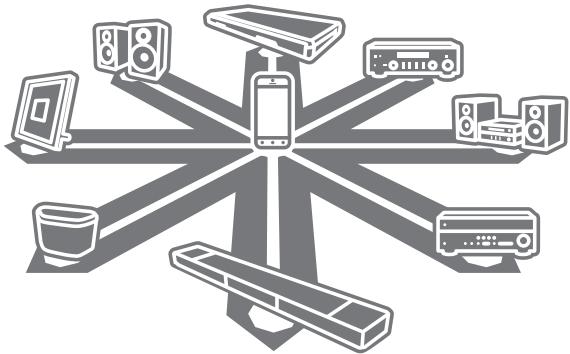
MusicCast is a brand new wireless musical solution from Yamaha, allowing you to share music among all of your rooms with a variety of devices. You can enjoy music from your smartphone, PC, NAS drive and music streaming service anywhere in your house with one easy-to-use app. For more details and a lineup of MusicCast compatible products, visit our website.
MusicCast
Key features
- Seamlessly control all MusicCast compatible devices with the dedicated "MusicCast CONTROLLER" app.
- Link a MusicCast compatible device to another device in a different room and play them back simultaneously.
- Play back music from music streaming services. (The compatible music streaming services may differ depending on your region and product. Refer to the product information on our website for details.)
Preparation of the devices
Mobile device (smartphone, etc.)

To use the network features on the MusicCast compatible device, you need the dedicated app "MusicCast CONTROLLER" for the operation. Search for the free app "MusicCast CONTROLLER" on App Store (for iOS devices) or Google Play (for Android devices) and install it to your device.
For details, refer to the instructions for this app in each store.
Connect the mobile device in which MusicCast CONTROLLER has been installed to the wireless router in your home.
If your router supports multiple SSID's (network names), connect the mobile device to the first access point ("SSID 1", etc.)
Setting of the devices and playback
Create the following network (MusicCast Network) using the MusicCast CONTROLLER app.
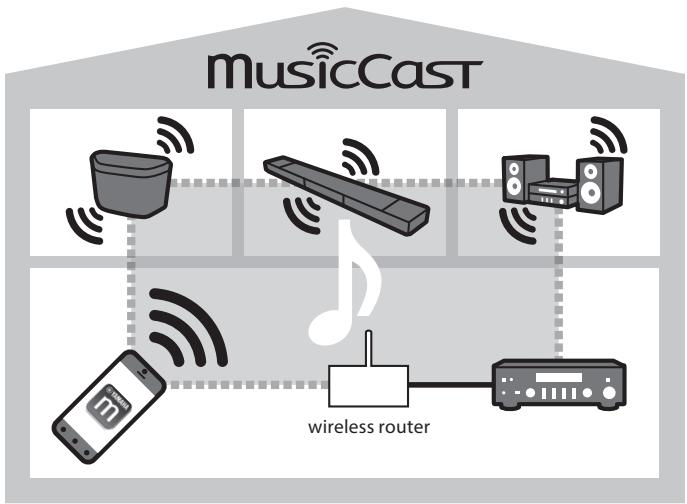
1 Turn on the MusicCast compatible device.
2 Tap the MusicCast CONTROLLER app icon on your mobile device and tap "Setup."
Tip
If you have already connected a MusicCast compatible device to the network, tap "Settings" and then "Add New Device."
3 Operate the MusicCast CONTROLLER app following the onscreen instructions, then press and hold the CONNECT button of the MusicCast compatible device (or the remote control) for three seconds.
Refer to the Owner's Manual of each MusicCast compatible device for the CONNECT button.


4 Set up the network
Operate the MusicCast CONTROLLER app following the onscreen instructions to set up the network.
5 Operate the MusicCast CONTROLLER app to playback.
Tip
- If you want to install a MusicCast compatible device to a location that is out of range of the wireless router, connect another MusicCast support device to the router with a network cable to extend the range (Extend mode).
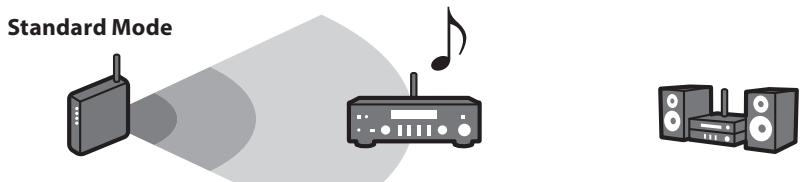
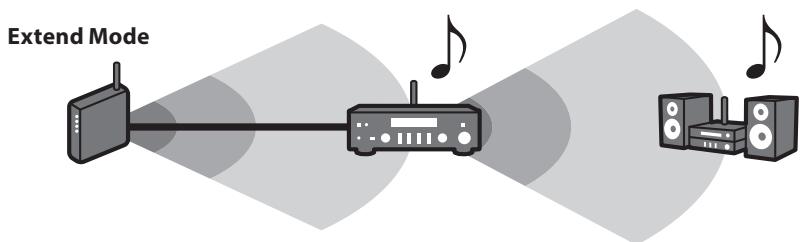
- Depending on where it is placed, the MusicCast compatible device may not be able to play back a high-resolution audio source. In this case, connect the device directly to the router with a network cable.
Troubleshooting
Refer also to the troubleshooting section in the relevant Owner's Manual for the MusicCast compatible device.
| Problem/Cause | Remedy |
| No sound from the MusicCast compatible device. | |
| The device is turned off. | Turn on the device. |
| Enable network standby on the device. | |
| The device is not connected to the MusicCast network. | Connect the device with the MusicCast CONTROLLER app. |
| Cannot make the connection settings on the MusicCast app. | |
| The mobile device is not connected to the wireless router at your home. | Connect the mobile device to the wireless router and start the MusicCast CONTROLLER app. |
| Disable the cellular data transmission. | |
| The MusicCast compatible device is turned off. | Turn on the MusicCast compatible device. |
| Enable network standby on the device. | |
| Cannot connect to the network. | |
| The network parameters (IP address) have not been obtained properly. | Enable the DHCP server function on your router. |
| The setting of the wireless router has been changed. | Connect all MusicCast compatible devices to the network with the MusicCast CONTROLLER app. |
| The MusicCast CONTROLLER app cannot detect a MusicCast compatible device. | |
| The mobile device is not connected to the wireless router at your home. | Connect the mobile device to the wireless router, and set the MusicCast compatible device with the MusicCast CONTROLLER app again. |
| The MusicCast compatible device is turned off. | Turn on the device. |
| Enable network standby on the device. | |
For further information, please visit our website:
http://www.yamaha.com/musiccast/
MusicCast is a trademark or registered trademark of Yamaha Corporation.
Android and Google Play are trademarks of Google Inc.
iPhone, iPad and AirPlay are trademarks of Apple Inc., registered in the U.S. and other countries.
Appareil mobile (smartphone, etc.)

http://www.yamaha.com/musiccast/
http://www.yamaha.com/musiccast/
Mobil enchet (t.ex. smartphone)

http://www.yamaha.com/musiccast/
http://www.yamaha.com/musiccast/
http://www.yamaha.com/musiccast/
MusicCast es unamarcacommercial o unamarcacomercial registrada de Yamaha Corporation.
Android y Google Play son marcas commerciales de Google Inc.
http://www.yamaha.com/musiccast/
PoiroTOBka yCTpoiCTB
Mo6nIbHbIe yCtpoiCTBa (cMapTfohbl n T. d.)

Чтоби Incпльбовс сеевы Функши устpoисва, сobмecшимо r c MusicCast, trpe6уетс спесиальhoe пиложене MusicCast CONTROLLER. Нади te 6ecпа thoe пиложене MusicCast CONTROLLER в магазин e App Store (дя устpoисв на пафорme iOS) и Google Play (дя устpoисв на пафорme Android) и установite erо на устpoисв.
http://www.yamaha.com/musiccast/
MusicCast YBJIeTcT OBaHbIM 3HaKOM IINI 3apeNCTpnpoBaHHbIM TOBaHbIM 3HaKOM KopnpaCmYama.
Android n Google Play yBnIOTc TobapHbIMn 3HaKamn Google Inc.
iPhone, iPad n AirPlay yBnIOTc TOBaPbIMn 3HaKaAMn Apple Inc., 3apeNCTpnpoBaHbIMn B CSHA n pyuXn cTpaHax.
http://www.yamaha.com/musiccast/
MusicCast是Yamaha的非通用末音承樂樂組元以大音高音,本音不通过音高音的音高音的音高音的音高音的音高音的音高音的音高音的音高音的音高音的音高音的音高音的音高音的音高音的音高音的音高音的音高音的音高音的音高音的音高音的音高音的音高音的音高音的音高音的音高音的音高音的音高音
MusicCast
#
http://www.yamaha.com/musiccast/
MusicCast是Yamaha Corporation的上部还是下部
- D Prérglage de stations FM
- WindowsTM
- ACCESSIONS
- ATTACHING THE GRILLE
- Note
- CONNECTION TO YOUR AMPLIFIER
- BEFORE MAKING CONNECTIONS, MAKE SURE THAT THE AMPLIFIER IS SWITCHED OFF.
- SPECIFICATIONS
- NS-BP401
- NS-BP301
- PRECAUTIONS
- MepblnpedoctoPOXHOCTN
- AKCECCYAPbl
- 3AKPENJIEHNE PEWETKA
- PpimechaHne
- ПОДКЛIOЧЕНЕ K YСИNTELILO
- PA3MELSEHNE KOJIOHOK
- Примechаиме
- TEXHnueCKne XAPAKTEPNCNTIKN
- http://europe.yamaha.com/warranty/
- USB DAC (A-U670 uniqueness)
- Home Audio Network with MusicCast
- Key features
- Preparation of the devices
- Mobile device (smartphone, etc.)
- Setting of the devices and playback
- Tip
- Troubleshooting
- Appareil mobile (smartphone, etc.)
- Mobil enchet (t.ex. smartphone)
- PoiroTOBka yCTpoiCTB
- Mo6nIbHbIe yCtpoiCTBa (cMapTfohbl n T. d.)
- http://www.yamaha.com/musiccast/
- #
Brand : YAMAHA
Model : MCR-N8Z70D
Category : HiFi system