USER MANUAL HBW5719E HAIER
PRODUCT DESCRIPTION
USE
Use 3 Customized temperature 4 Super Cool function 4 Super Freeze function 5 Eco mode 5 Holiday function 6 Defrosting 6 Demo mode 6 WI-FI USE 7 In app pairing procedure 7 Step 1 7 Step 2 7 Step 3 7 Wi-Fi Use 8
PRODUCT DESCRIPTION
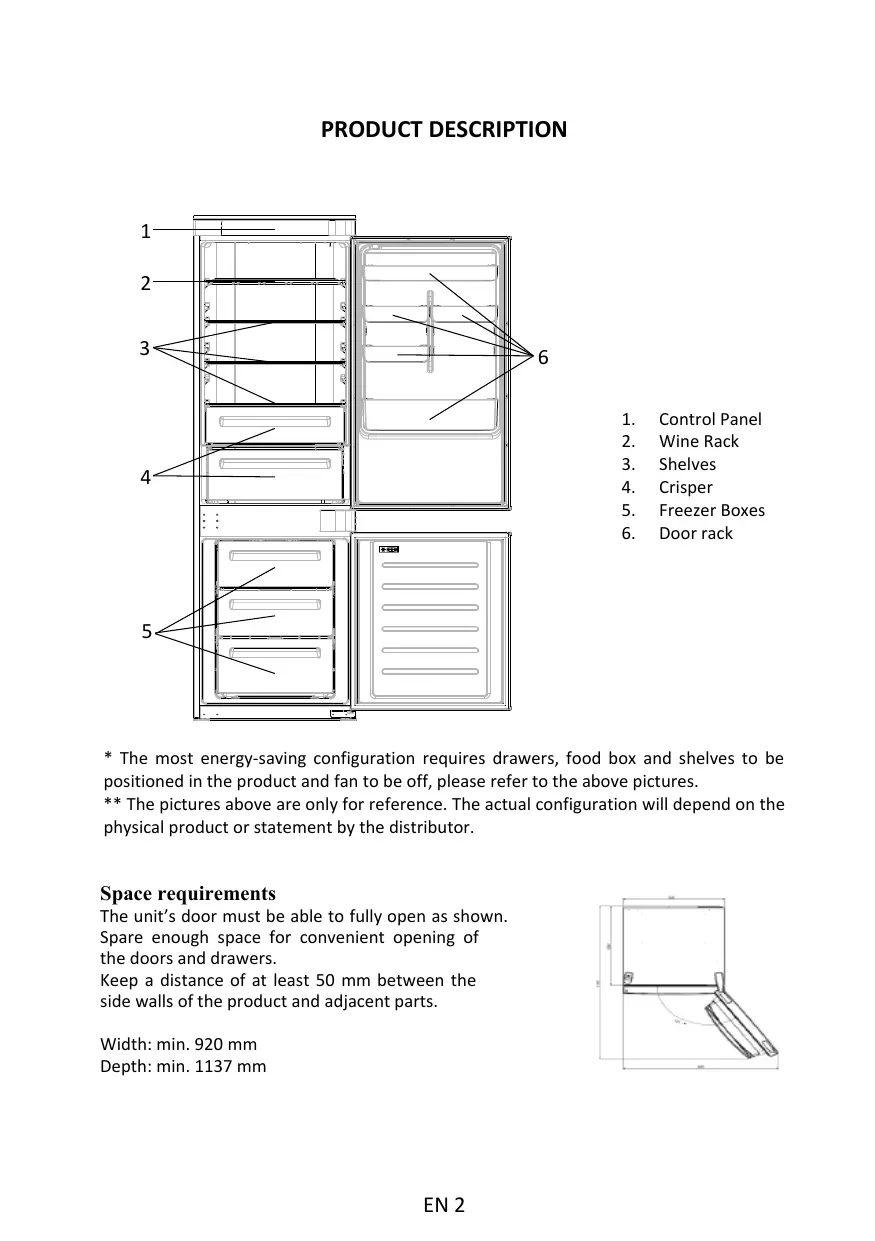
- Control Panel
- Wine Rack
- Shelves
- Crisper
- Freezer Boxes
- Door rack
- The most energy-saving configuration requires drawers, food box and shelves to be positioned in the product and fan to be off, please refer to the above pictures. ** The pictures above are only for reference. The actual configuration will depend on the physical product or statement by the distributor.
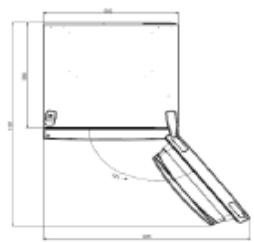
Space requirements
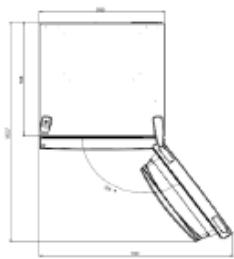
The unit's door must be able to fully open as shown.
Spare enough space for convenient opening of the doors and drawers.
Keep a distance of at least 50 mm between the side walls of the product and adjacent parts.
Width: min. 920 mm
Depth: min. 1137 mm
USE
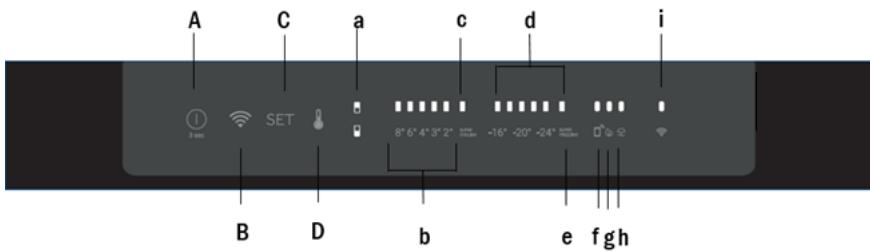
A. ON/OFF key, used to switch on/off the appliance B. Wi-Fi key, used to switch on/off the Wi-Fi C. SET key, used to select the special functions (Eco and holiday) D. TEMP key, used to select the fridge and freezer temperature
a. Fridge/freezer area icon, shows which compartment of the appliance is selected b. Fridge temperature levels, show which is the selected temperature c. Super Cool icon, shows if the Super Cool function is activated d. Freezer temperature levels, show which is the selected temperature in the freezer e. Super Freeze icon, shows if the Super Freeze function is activated f. Customized temperature icon, shows if the temperature has been selected by app g. Eco mode icon, shows whether the eco mode is activated h. Holiday function icon, shows whether the holiday function is activated i. Wi-Fi icon, shows whether the Wi-Fi is working and the appliance is connected
Use
- Plug in the appliance and it automatically turns on.
- The temperature will automatically be set at 4°C in the fridge and -18°C in the freezer.
NOTE: wait at least 2/3 hours before putting food in the appliance, so as to ensure the temperature inside the fridge.
- To change the temperature, press the TEMP key for 5 seconds, an acoustic signal is made and the icon of the selected compartment (fridge or freezer) as well as all the temperature LEDs of the corresponding compartment turn on for 2s, after 2s the selection of the compartment is confirmed. With the selected compartment icon on, quick press the TEMP key to change the temperature. When the setting increases, the corresponding LED light will turn on. An acoustic signal is made every time the TEMP key is pressed and the temperature is changed, after 5 seconds the selection is confirmed. After 30s without operation the fridge/freezer icons and the LEDs of the selected temperatures turn off. When the TEMP key is touched again, the icon of the last selected (fridge or freezer) turns on. In case of power loss, the last cooling level set will be restored. To restore the default setting, keep pressed the door switch inside the
refrigerator and simultaneously press the ON/OFF key for 5 seconds.
- Under normal operating conditions (in spring and autumn), it is recommended to set the temperature at 4°C. In summer when the ambient temperature is high, it is recommended to set temperature at 6~8°C, so as to guarantee the fridge and freezer temperatures and reduce the refrigerator continuous running time; and in winter when the ambient temperature is low, it is recommended to set temperature at 3~4°C to avoid frequent start/stop of the refrigerator.
Customized temperature
From the app it is possible to customize the temperature for both fridge and freezer. The temperature can be set with 1°C sensitivity. It is possible to select a temperature from 2°C to 8°C in the fridge, and from -16°C to -24°C in the freezer.
When the temperature is selected by the app, the customized temperature icon turns on, while all the temperature LED lights of the affected compartment are turned off (i.e. if the refrigerator temperature is selected from the app, LEDs from 2°C to 8°C are turned off. If the freezer temperature is selected from the app, LEDs from -16°C to -24°C are turned off).
If only a single area (freezer or fridge) has the customized temperature, the temperature selection of the other area is not changed and the LED light of the selected temperature of that area remains on. An acoustic signal is made every time the temperature is changed.
Super Cool function
It is suggested to switch on the Super Cool function if a large quantity of food should be stored (for example after the purchase). The Super-Cool function accelerates the cooling of fresh food and protects the goods already stored from undesirable warming. When the function is activated, the temperature of the fridge is automatically set at 2°C.
How to use the Super Cool function:
- The function can be activated by long pressing TEMP key to select the fridge compartment, and then quick pressing the TEMP key until the Super Cool icon led is turned on, or it can be turned on from the app. When the function is activated, the Super Cool LED is always ON. To exit the Super Cool function, press the TEMP key or turn it off from the app. The Super Cool function automatically ends when the function has lasted for more than 12 hours.
- When the Super Cool ends, the icon of the control panel is switched off and the previously set cooling level is restored.
Note: Super Cool and Super Freeze function can not be activated simultaneously.
Super Freeze function
The super freezing function accelerates the freezing of fresh food and protects the goods already stored from undesirable warming. If a large amount of food has to be freeze, it is recommended to set the Super-Freeze function on 24h before the usage. When the function is activated, the temperature is automatically set at -28 °C.
How to use the Super Freeze function:
- The function can be launched by long pressing TEMP key to select the freezer compartment, and then quick pressing TEMP key until the Super Freeze icon led is turned on, or it can be turned on from the app. When the function is activated, the Super Freeze LED is always ON.
- To exit the Super Freeze function, press the TEMP key or turn it off from the app.
- The Super Freeze function automatically ends when the function has lasted for more than 50 hours.
- When the Super Freeze ends, the icon of the control panel is switched off and the previously set freezing level is restored.
Note: Super Cool and Super Freeze function can not be activated simultaneously.
Eco mode
The Eco mode can be activated to optimize the performance of the appliance, whereas obtaining the best food storage. The Eco mode will automatically set the temperature at 4°C in fridge and at -18°C in the freezer.
How to use the Eco mode:
- The function can be activated from control panel by pressing the "mode" key until the Eco mode icon turns on (an acoustic signal confirms the selection), or by selecting the function from the app. When the function is activated, the Eco mode icon is always ON.
- To exit the Eco turn it off from the app or chose another function from the control panel.
- When the Eco Mode ends, the icon of the control panel is switched off and the previously set cooling levels are restored.
Holiday function
The Holiday function can be used to reduce the energy consumption of the appliance, when it is not used regularly. When the function is on, the LED lights will be off (even if the door is open) and the fridge will work on low power consumption mode, whereas the freezer will keep working normally.
How to use the Holiday function:
- The function can be activated from control panel by pressing the "mode" key until the Holiday icon turns on (an acoustic signal confirms the selection), or by selecting the function from the app. When the function is activated, the Holiday icon is always ON.
- To exit the Holiday function, turn it off from the app or chose another function from the control panel.
- When the Holiday function ends, the icon of the control panel is switched off and the previously set cooling levels are restored.
Defrosting
The defrosting of the refrigerator and freezer compartments is done automatically: no manual operation is needed.
HCS
When a certain moisture level is reached, the HCS filter fibers open, causing moisture to decrease, and then close again.
Demo mode
To enter the demo mode, with the display unlocked, keep pressed the Wi-Fi key (B) and press the MODE key (C) 5 times within 5 seconds. To exit the demo mode, perform the same operation or power off the refrigerator.
Error Codes
Communication error
If the lights in the fridge turn on sequentially, it means there has been a communication error between the main control board and the display board. Please, contact the technical assistance to help solve the problem.
Fan
If the lights in the fridge flash simultaneously, it means the fan is not working properly. Please, contact the technical assistance to help solve the problem.
WI-FI USE
In app pairing procedure
Step 1
Download the hOn app on the stores


Step 2
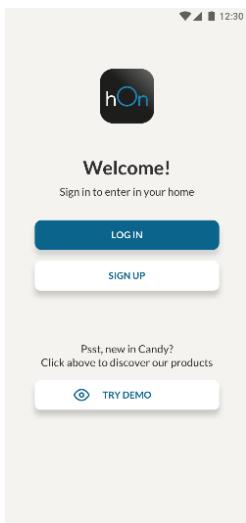
- Create your account on the hOn App or log in if you already have an account.
Step 3
- Follow the pairing instructions in the hOn App.
Wi-Fi Use
To activate the Wi-Fi, long press the Wi-Fi key for 2 seconds. The Wi-Fi icon will turn on and an acoustic signal will be made.
If the Wi-Fi has not been configured yet, when the refrigerator turns on, it will automatically enter the configuration mode and keep this status for 30 minutes. To use the configuration mode:
- Press the Wi-Fi key for 2 seconds. The refrigerator enters the Wi-Fi configuration mode and an acoustic signal is made. The Wi-Fi icon starts blinking.
- Follow the in-app instructions to configure the Wi-Fi (see above).
- Once the Wi-Fi is configured and the connection is established, the Wi-Fi icon is on and fixed.
- After 30 minutes without performing any operation, the Wi-Fi will automatically exit the configuration mode.
- If the Wi-Fi has already been configured, it will automatically reconnect according to the configuration information.
To reset the Wi-Fi, long press the Wi-Fi key and the Mode key for 2 seconds. The Wi-Fi is reset and an acoustic signal is made. After this, the Wi-Fi will automatically enter the configuration state (the Wi-Fi icon will start blinking again).
To turn off the Wi-Fi, press the Wi-Fi key for 3 seconds.
Radio-module - Technical data
| Frequency rate (OFR) | 2400 MHz-2843.5 MHz |
| Channel frequencies | 2412...2472 MHz(step size 5 MHz) |
| Maximum power(EIRP) | 100 mW |
The radio equipment type is in compliance with Directive 2014/53/EU.
Summary
Download on the App Store

EXPLORE IT ON AppGallery
Step 2
Download on the App Store

EXPLORE IT ON AppGallery
Step 2
Download on the App Store

EXPLORE IT ON AppGallery
Step 2
Download on the App Store

EXPLORE IT ON AppGallery
Step 2
PRODUCT DESCRIPTION 98
USE 99
In the pairing procedure
Step 1
Download on the App Store

EXPLORE IT ON AppGallery
Step 2
- Create your account in the hOn app or log in if you already have an account
Step 3
- Follow the pairing instructions in the hOn app
Using Wi-Fi
To activate Wi-Fi, press and hold the Wi-Fi button for 2 seconds. The Wi-Fi icon will activate and a sound signal will be emitted.
Download on the App Store

EXPLORE IT ON AppGallery
Step 2
- Create your account in the hOn app or log in if you already have an account
Step 3
Yak BnKOpNCToBvBaTn 0yHkCiiHO Holiday:
gall jn nn nnnn gdllllgl dllllll lllllll 1
a a a a a a a a a a a a a a a a a a a a a a a a a a a a
aai jiei jie jie jie jie jie jie jie jie jie jie jie
oJiaaiol 0jlll a jzj 1a 1i 1i 1i 1i 1i
"Super Cool Super Cool
aall 8o jlll l aol al 80
Super Freeze Super Freeze
ailll aalw yjll lal jy jn 111 111 111 111 111 111
y 1u 1u u u u u u u u u u u u u u u u u u u u u u u u u u u u u u u u u
aai jjaiybjg 1o cui yjaiy jao
Jia jie jie jai Wi-Fi 45615 la wu,Wi-Fi ja J
1
y
18 4 2 2 2
a 2 + a 3 + a4 = 6 ②
1


2 2
•
30
Wi-Fi for you.
Wi-Fi and Wi-Fi for you.
Wi-Fi for Wi-Fi
Wi-Fi 30
.
3 3 Wi-Fi 15
a-0