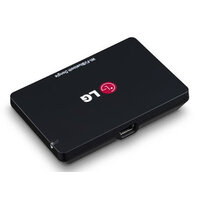
AN-WF500 - Remote control accessory LG - Free user manual and instructions
Find the device manual for free AN-WF500 LG in PDF.


| Product Type | Wi-Fi and Bluetooth Adapter |
| Brand | LG |
| Model | AN-WF500 |
| Compatibility | Some LG TVs (LB, UB, PB series, etc.) and soundbars with Audio Sync logo |
| Dimensions (L x H x D) | 64 mm x 43.1 mm x 11 mm |
| Weight | 21.46 g |
| Power Consumption | TX: 560 mA, RX: 250 mA |
| Interface | USB 2.0 |
| Wireless Security | WEP 64/128 bits, WPA, WPA2, TKIP, AES, WPS |
| Operating Temperature | 0°C to 60°C |
| Storage Temperature | -20°C to 60°C |
| Wi-Fi Standards | IEEE 802.11a/b/g/n |
| Wi-Fi Frequency Bands | 2.4 GHz and 5 GHz |
| Bluetooth Version | Bluetooth 3.0 |
| Max Wi-Fi Output Power (EU) | 802.11a: 13.5 dBm, 802.11b: 15.5 dBm, 802.11g: 14 dBm, 802.11n (2.4 GHz): 14.5 dBm, 802.11n (5 GHz): 13.5 dBm |
| Care and Cleaning | Wipe with a dry cloth; do not use thinner, alcohol, or benzene |
| Safety | Do not disassemble, do not wet, do not pull the cable |
| Spare Parts and Repairability | Not user-repairable; contact LG customer service |
| Warranty | 1 year (2 years in Europe) |
| Usage | Indoor only |
Frequently Asked Questions - AN-WF500 LG
User questions about AN-WF500 LG
0 question about this device. Answer the ones you know or ask your own.
Ask a new question about this device
Download the instructions for your Remote control accessory in PDF format for free! Find your manual AN-WF500 - LG and take your electronic device back in hand. On this page are published all the documents necessary for the use of your device. AN-WF500 by LG.
USER MANUAL AN-WF500 LG
Wi-Fi/Bluetooth Dongle
Please read this manual carefully before operating your set and retain it for future reference.
AN-WF500
TABLE OF CONTENTS
3 ENGLISH
7 中国
11 日本語
15 FRANÇAIS
19 DEUTsCH
23 简体中文
26 繁體中文
30 B-PORTUGUES
34 ITALIANO
38 Pycckn
42 ESPANOL
46 REGULATIONS
66 AUSTRAIA&NEW ZEALAND WARRANTY
WARNING
- This product contains chemicals known to the State of California to cause cancer and birth defects or other reproductive harm. Wash hands after handling.
PREPARATION
Product handling
- Do not let the product get wet. Liquid getting into the product could cause a short circuit.
- Wipe the product gently with a dry cloth to remove any dust or dirt. If the product is very dirty, spray a mild detergent on the cloth first.
- Do not clean with thinner, alcohol, benzene or any other volatile agent.
These may damage the product's surface or affect its operation.
- Do not disassemble, repair or alter the product. Incorrect disassembly may cause a fire, electric shock, or injury.
- Do not pull on the cable.
Installation Instructions
Make sure you have enough space for connections when installing the product.
- Do not install in a dusty, dirty, or moist area.
- Do not install in direct sunlight or near a heat source.
- Magnetic objects, such as speakers, may interfere with the product's operation.
- Install the product in a place with moderate temperature and humidity. The recommended temperature range is 0^ to 60^ .
- Strong electromagnetic waves from other devices could interfere with the product's operation.
- Remove all the protective plastic bags (vinyl) before use.

NOTE
-
The AN-WF500 is a Wi-Fi & Bluetooth adapter that can be used with certain LG TVs. And Compatible devices include sound bars and LG headsets. The following model lines are available:
-
LED LCD TV: LB49, LB57, LB58, LB61, LB63, LB65, UB83 series
Plasma TV:PB66 series - Sound bar: NB55, NB45, NB35, NB25, NB343, LAP3(2)4, LAP440W *Sound Bar with the Sound sync logo can be connected wirelessly
- Docking/Portable speaker : ND86(5)30, ND56(5)30, NP66(5)30
- Headset: HBS-700, HBS-730
- Every model line listed is not available in every country.
Available models are subject to change without notice. - This product comes with a one year warranty (Europe 2 years). If it proves to be defective in material or workmanship under normal use, during the warranty period, please contact the retailer where you purchased it. This warranty is good only to the original purchaser of the product and effective only in local area.
Unpacking

Dongle

Velcro

Cable

Owner's manual
Installing the Wi-Fi/Bluetooth Dongle
1 Attach the Wi-Fi/Bluetooth Dongle to the TV using the Velcro fastener and then connect the dongle to the USB port of the TV using the USB cable.
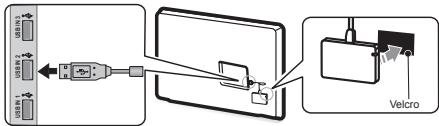
2 Check to see if the Wi-Fi/Bluetooth Dongle is inserted correctly. The LED indicator should be facing up.
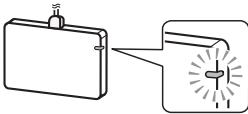

NOTE
For detailed network connection, please refer to your LG TV's manual.
- If the dongle is not attached to the specified location, it may disconnect the network.
- Other wireless devices close to the TV may disrupt communication.
TROUBLESHOOTING
| Problem | Solution |
| The network is not connected (no network detected). | ·Confirm that the LED indicator on the Wi-Fi/Bluetooth Dongie is turned on. ·Confirm that the router is working properly. |
| The network connection speed is too slow. | ·Check if there are other wireless devices near the TV set. ·Set the wireless router band to 5 GHz before using it. (5 GHz is recommended.) |

NOTE
Data transmission speed varies depending on the network's physical environment setting.
PRODUCT SPECIFICATIONS
Product specifications may be changed without prior notice due to upgrade of product functions.
| Models | AN-WF500 | |
| Dimensions (W x H x D) | 64 mm x 43.1 mm x 11 mm | |
| Weight | 21.46 g | |
| Power consumption | TX: 560 mA RX: 250 mA | |
| Interface | USB 2.0 | |
| Security | 64 / 128 bit WEP, WPA, WPA2, TKIP, AES, WPS | |
| Environmental conditions | Operating temperature | 0 °C ~ 60 °C |
| Storage temperature | -20 °C ~ 60 °C | |
WIRELESS SPECIFICATIONS
| Wireless LAN module | ||
| Country | Europe / CIS / Africa / Middle East / Oceania / Asia (Except Hong Kong / Taiwan / Japan / China / Korea) | America |
| Standard | IEEE 802.11a/b/g/n | IEEE 802.11a/b/g/n |
| Frequency range | 2400 to 2483.5 MHz5150 to 5250 MHz5725 to 5850 MHz(for Non EU) | 2400 to 2483.5 MHz5150 to 5250 MHz5725 to 5850 MHz |
| Output power (Max.) | 802.11a: 13.5 dBm802.11b: 15.5 dBm802.11g: 14 dBm802.11n - 2.4 GHz: 14.5 dBm802.11n - 5G Hz: 13.5 dBm | 802.11a: 16.5 dBm802.11b: 18.5 dBm802.11g: 14.5 dBm802.11n - 2.4 GHz: 14 dBm802.11n - 5 GHz: 16.5 dBm |
| * Because band channel used by the country could be different, the user can not change or adjust the operating frequency This product is set for the regional frequency table.* This device should be installed and operated with minimum distance 20 cm between the device and your body. And this phrase is for the general statement for consideration of user environment. | ||
| Bluetooth module | ||
| Standard | Bluetooth Version 3.0 | |
| Frequency range | 2400 to 2483.5 MHz | |
| Output power (Max.) | 10 dBm or Lower | |
#
郑普
KK-TeneBn3Opb c LED-noCbeTko: cepu LB49, LB57, LB58, LB61, LB63, LB65, UB83
-ПлайзMeHHbIte TelenBn3Opbl: capna PB66
3-yyokobae nahané; NB55, NB45, NB35, NB25, NB43, LAP3(2), LAP40W (Sound 1), and the chondrocyte (Sound 2) (Sound 3) (Sound 4) (Sound 5) (Sound 6) (Sound 7) (Sound 8) (Sound 9)
-
DOK-CTaHmH/OpTaTnBhIe DnHaMnK : ND86(5)30, ND56(5)30, NP66(5)30
-
TapHnTpyb: HBS-700, HBS-730
-
Yka3aHHbI MoeBbHbI prd DOCTyneH He BO BCEx CTpaHax.
Cnncokdoctynbix moenMeKet 6bIb n3MeHHe 6e3 npedBapntelhoro yBeDMneHRA.
Ha Dainhoe hainede napocrtpctahreerapnraa raphanr cnpokom odn rnaq (2 rana d Ebojri).PiO thopabxeyhck TeHXeKecbOe KefEHTA nn pnoBmepHn rnpo HnmaHOBn HnBnO.
HnBnO 100000000000000000000000000000000000000000000000000000000000000000000000000000000000000
Pacnakobka

AnnapaTHbI KIIIOH

"Jinyuka"

ka6eJb

PykoBOCTBO nolb30BaTeJIa
YcTaHOBKa Wi-Fi/Bluetooth aanTep
1 ItodocdoHnntte Wi-Fi/Bluetooth aadantrep K TeneB3x0p C noTmouhoo "TINyNtHa", 3atet nKnoDcoHntoe aadantrep K USB-notrep K TeneB3x0p C noTmouhoo USB-kabEna.
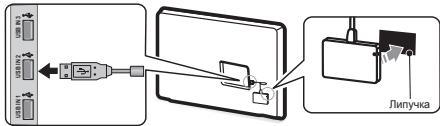
26JyIaTeBc, 30 Wi-Fi/Bluetooth adantrep bCTanen n pRaBnHIO. CBeTOnIOdNhy INdkatopdoJbnKhen 6b8 cyeBxq.
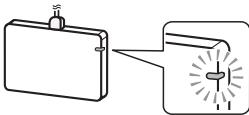
ПРИМЕЧАНЕ
- Podop6hyo Hnctpykui no nokkuiohenei cetn cm. pykoobdctbo noh30aebertae Tenebxa3O LGP.
- Ecnn aandTep He nooknoe H By Kyhhb pa3bem, 3TO MOKET PnIBECTK OTKnIOHEMIOOT CetN.
Дулгеси Срсоведучу сухотрибая раложонкимьдь ВБлини OTешипьзова мordу вит新股н. <|im_start|>assistant Таюн STAN <|im_start|>assistant Таюн STAN
YCTPAHEHNE HENCINPABHOCTE
XAPAKTEPNUCTKNU YCTPOUCTBA
XaBapKTeRnH3N3EeM08Syb3H3MeHHeB 5Be pReDApRrTeBHOYBEyODMENHBA C BcB3m C moDfA3HsuehФyHnue TcyoPCTBa.
| Mоděné | AN-WF500 | |
| Раширу (Ш. x B. x Г) | 64 mm x 43.1 mm x 11 mm | |
| Bec | 21.46 g | |
| Поггблгемая мошноctь | TX: 560 mA RX: 250 mA | |
| Интерсíс | USB 2.0 | |
| Бezonaцhoctь | 64 / 128 bit WEP, WPA, WPA2, TKIP, AES, WPS | |
| Ус�овая оружackося среда | Равочая temnéразуа | 0 °C ~ 60 °C |
| Temnéразуа харенья | -20 °C ~ 60 °C | |
TEXHUYECKNEX XAPAKTEPNCIKI BECIPPOBODHO AADANTEPA
Federal Communications Commission (FCC) Statement
You are cautioned that changes or modifications not expressly approved by the part responsible for compliance could void the final approval. This equipment has been tested and found to comply with the limits for a Class B digital device, pursuant to part 15 of the FCC rules. These limits are designed to provide reasonable protection against harmful interference from the equipment. The equipment generates, uses and can radiate radio frequency energy, and if not installed and used in accordance with the instructions, may cause harmful interference to radio communications. If the equipment is not able to generate interference will not occur in a particular installation. If this equipment does cause harmful interference to radio or television reception, which can be determined by turning the equipment off and on, the user is encouraged to try to avoid the possibility of interference by one or more of the following measures:
- Reorient or relocate the receiving antenna.
-
Re-translation between the equipment and receiver.
-
Connect the equipment into an outlet on a device that is connected from that to which the receiver is connected.
-Consult the dealer or an experienced radio/ TV technician for help.
This device complies with Part 15 of the FCC Rules. Operation is subject to the following requirements:
1) this device may not cause harmful interference, and
2) this device must accept any interference received, including interference that may cause undesired operation of the device of the device.
FCC Caution
Any changes or modifications not expressly stated in the legend of this work are subject to the terms of the copyright. This work could not void the user's authority to operate this equip-
ment and For indoor use only, use outdoors or in other modes not covered by this manual. The user should be aware that the user's right to use the user authority to use the product. Specifically, within the 5.15-5.25 GHz band, U-NiI device is restricted to indoor operations to reduce any interference for successful interference to co-channel MSS operations.
FCC RF Radiation Exposure Statement: This equipment complies with FCC radiation exposure limits set forth for an uncontrolled environment. End users must follow the specific operating instructions for satisfying RF exposure compliance.
COFETEL (MEXICO)
Industry Canada Statement:
This device complies with RSS-210 of the Industry Canada Rules. Operation is subject to the following two conditions:
1) this device may not cause interference and
2) this device must accept any interference, including interference that may cause the device to be affected.
operation of the device.
IC Radiation Exposure Statement:
This equipment complies with IC radiation exposure limits set forth for an uncontrolled environment.
NOTE: THE MANUFACTURER IS NOT RESPONSIBLE FOR ANY RADIO OR TV INTERFERENCE CAUSED BY UNAUTHORIZED MODIFICATIONS TO THIS EQUIPMENT. SUPPLEMENTAR INFORMATION COULD Void THE USER'S AUTHORITY TO OPERATE THE EQUIPMENT.
Russia, Belarus, Kazakhstan

EU Conformity Notice:
C€0197①
LG Electronics hereby declares that this product is in compliance with the essential requirements and other relevant provision of following Directives.
RATTE Directive 1999/EC/58/2007
RTHS Directive 1999/EC/58/2007
RoHS Directive 2011/65/EU/2007
This device is a 2.4 GHz and 5 GHz wideband transmission system, intended for use in all EU member states and EFTA countries, with a bandwidth restriction for 5GHz band. (S150 - S250MHz)
This device should be installed and operated with minimum distance 20~cm between the device and your body. And this phrase is for a general statement for consideration of user environment.
European representative (where to request the complete Declaration of config affinity): LG Electronics Inc. Krigsman 1-1186 DM Amstelveen, The Netherlands
[DEUTsCH]
Directive 2004/108/CE EMC
Directive RoHS 2011/65/EU
Ta tapamravu ploptiya aumopovoyanov, 1000000000000000000000000000000000000000000000000000000000
EupiatkoK, amyrodopouros; M. A. K. D. L. G. S. P. R. 1-1186 DM; Amstelveen, OA/kvAa
RHTTE-directivity 1999/5/ECE 2000
RHTTE-Indirectivity 2001/6/ECE
RoHS-directivity 2011/6/ECE
JapancbthR&TE,1999/5/CC 2000
JapancbthR&TE,2001/6/5/8
JapancbthRoHS,2011/8/5/8
OncHinai Buhne npOydtKnDnBIOBAtokobochOBHMBIOMRBAK3AHHXApDEKTH
Yibnohbaekhae 606a b Ceyon
Yibnohbaekhae 606b b Ceyon 1-188 DM Amstelveen, Higuenpaia
Pn3HAnEO HnneIe IyBnOPKCTAHNR B nppmUHeHI.
WEEE


[English]
Disposal of your old appliance
1 When this crossed-out wheeled bin symbol is attached to a product it means the product is covered by the European Directive 2002/96/EC.
2 All electrical and electronic products should be disposed of separately from the municipal waste stream through designated collection facilities appointed by your government or your local authorities.
3 The correct disposal of your old appliance will help prevent potential negative consequences for the environment and human health.
4 For more detailed information about disposal of your old appliance, please contact your city office, waste disposal service center where you purchased the product.
[FRANÇAIS]
Disposal of your appliance The symbol indicating separate collection for electrical and electronic equipment consists of the crossed-out wheeled bin.
Ukraine Restriction of Hazardous Substances
The equipment complies with requirements of the Technical Regulation, in terms of the following criteria for the use of certain dangerous substances in electrical and electronic equipment.
The marking and certifications
(1) Malaysia SIRIM sticker
Place SIRIM
label here
(2) Israel
MoC: 51-40411
MoC: 51-40622
(3) Oman
OMAN - TRA
TA-R/1533/13
D090016
(4) Singapore
Complies with IDA Standards DB102260
(5) ICASA (SOUTH AFRICA)

TA-2013/1833
APPROVED
(6) Philippines

NTC
Type Approved
No: ESD-1308128C
(7) Brazil
(8) UAE
AUSTRALIA & NEW ZEALAND
For warranty service, please keep this warranty certificate and your receipt to validate proof of purchase.
TELEVISION ACCESSORIES MANUFACTURER'S WARRANTY
Subject to the terms below, LG Electronics Australia Pty Ltd (LG) will, for one (1) year from date of purchase, authorise a free of charge repair or replacement (at LG's discretion) of your LG television accessory if, in LG's opinion, it needs repair because of a manufacturing or materials defect appearing and notified to LG in accordance with this warranty, within such period.
This LG manufacturer's warranty only applies to service within Australia and New Zealand to units purchased within Australia and New Zealand. This warranty is not transferable and applies to the original purchaser only. No LG employee, product retailer or Authorised Service Centre has authority to vary the terms of this warranty. Goods presented for repair may be replaced by refurbished goods of the same type rather than being repaired. Refurbished parts may be used to repair the goods.
PLACE OF SERVICE
Repairs under the terms of this warranty will be conducted at an LG Authorised Service Centre. Transportation costs to and from the Service Centre are not covered by this Warranty. Service Centers are open during normal business hours, Monday to Friday. LG's Authorised Service Centre may charge an additional fee for service outside these hours.
WHAT THIS WARRANTY DOES NOT COVER
This LG manufacturer's warranty does not cover:
- Maintenance, repair or replacement of parts or consumables due to normal wear and tear.
Repair of cosmetic or physical damage. - Accident, neglect, misuse or Act of God.
- Alterations or repairs made by someone other than an LG Authorised Service Centre.
- Unauthorised modifications or other acts, including spills of food or liquid or water (liquid ingestion), or external interference which is not a manufacturing or material fault.
- Use of the product beyond its intended purpose or in manner that does not comply with the user instructions.
- Damage or defects caused by use of or in connection with accessories, software and/or services not manufactured, supplied or authorised by LG.
OTHER RIGHTS
The benefits given by this LG manufacturer's warranty are additional to other rights and remedies that you may have under law.
Australian customers: Our goods come with guarantees that cannot be excluded under the Australian Consumer Law. You are entitled to a replacement or refund for a major failure and for compensation for any other reasonably foreseeable loss or damage. You are also entitled to the same benefits as you receive in the event that if the goods fail to be of acceptable quality and the failure does not amount to a major failure.
HOW TOCLAIM
To make a claim against this manufacturer's warranty, you must contact LG within one (1) year of purchase on:
| By telephone | By post (Australia Only): |
| Australia | Warranty Claims |
| 1300 LG CARE (1300 542 273) 7 Days, 7am-7pm | LG Electronics Australia |
| New Zealand | PO Box 212 |
| 0800 LG CARE (0800 542 273) 7 Days, 9am-9pm | Horsley Park NSW 2175 |
When contacting LG for assistance please provide your name and address, model number, phone number, email address, and a complete description of the problem. This information will help LG provide fast assistance.

LG Electronics Australia Pty Ltd (ABN 98 064 531 264)
2 Wonderland Drive, Eastern Creek NSW 2766
Australia

LG
Life's Good