
DBK6980HG - Range hood AEG-ELECTROLUX - Free user manual and instructions
Find the device manual for free DBK6980HG AEG-ELECTROLUX in PDF.
 FR
FR
 AR
AR
 BG
BG
 CS
CS
 DA
DA
 DE
DE
 EL
EL
 EN
EN
 ES
ES
 ET
ET
 FI
FI
 HU
HU
 IT
IT
 KK
KK
 LT
LT
 LV
LV
 MK
MK
 NL
NL
 NO
NO
 PL
PL
 PT
PT
 RO
RO
 RU
RU
 SK
SK
 SL
SL
 SQ
SQ
 SR
SR
 SV
SV
 TR
TR
| Brand | AEG-ELECTROLUX |
| Model | DBK6980HG |
| Product type | Range hood |
| Number of speeds | 4 speeds + Boost |
| Boost function | Maximum speed for 5 minutes, then returns to previous speed |
| Breeze function | Minimum speed for 60 minutes, automatic shutdown |
| Hob^2 Hood function | Automatic connection with compatible cooking hob |
| Lighting | LED, adjustable intensity |
| Control type | Touch |
| Grease filter | Washable, dishwasher safe (low temperature cycle) |
| Charcoal filter | Replaceable, lifespan 4 to 6 months |
| Filter notification | Filter cleaning/replacement reminder |
| Power supply | 220-240 V, 50 Hz |
| Installation type | Built-in or chimney (according to installation manual) |
| Main material | Stainless steel (estimated) |
| Maintenance | Monthly cleaning of grease filters |
| Spare parts | Use only original parts |
| Repairability | LED replacement by a technician; authorized service recommended |
| Safety | Refer to installation manual for instructions |
| Certification | CE |
Frequently Asked Questions - DBK6980HG AEG-ELECTROLUX
User questions about DBK6980HG AEG-ELECTROLUX
0 question about this device. Answer the ones you know or ask your own.
Ask a new question about this device
Download the instructions for your Range hood in PDF format for free! Find your manual DBK6980HG - AEG-ELECTROLUX and take your electronic device back in hand. On this page are published all the documents necessary for the use of your device. DBK6980HG by AEG-ELECTROLUX.
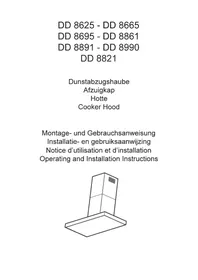
USER MANUAL DBK6980HG AEG-ELECTROLUX
natural_image
Simple line drawing of a kitchen chimney with three dots on the base (no text or symbols)PËRMBAJTJA
- INFORMACIONI I SIGURISË DHE INSTALIMI....2
- PËRSHKRIM I PRODUKTIT....3
- PËRDORIMI I PËRDITSHËM.... 3
- KUJDESI DHE PASTRIMI....5
- ÇËSHTJE QË LIDHEN ME AMBIENTIN....6
PËR REZULTATE PERFEKTE
2. PËRSHKRIM I PRODUKTIT
natural_image
Diagram of a multi-panel electronic device with mounting holes and vertical dashed lines indicating alignment (no text or symbols)natural_image
Diagram of a solar panel with two arrows indicating direction, no text or symbols presentnatural_image
Diagram of a rectangular frame with vertical supports and upward arrows indicating movement or force, no text or symbols present.natural_image
Diagram of a solar panel with two arrows indicating direction, no text or symbols present3. SVAKODNEVNA UPORABA
3.1 Uporaba nape
natural_image
Diagram of a multi-tiered electronic device with mounting holes and vertical arrows indicating direction (no text or symbols)- Očistite filtre pomoću spužve s neabrazivnim deterdžentima ili u perilici posuđa.

natural_image
Diagram of a solar panel with two arrows indicating direction, no text or symbols present- Lagano nagnite prednji dio filtra prema dolje, a zatim ga povucite.
- Da biste instalirali novi filtar, izvršite iste korake obrnutim redoslijedom. U svakom slučaju, potrebno je zamijeniti filtre najmanje svaka četiri mjeseca.
4.4 Zamjena žarulje
Ovaj uređaj opremljen je LED žaruljom. Ovaj dio može zamijeniti samo tehničar. U slučaju bilo kakve neispravnosti, pogledajte "Servis" u poglavlju "Sigurnosne upute".
simbolom 🚙 ne bacajte zajedno s kućnim otpadom. Proizvod odnesite na lokalno reciklažno mjesto ili kontaktirajte nadležnu službu.
OBSAH
- BEZPEČNOSTNÍ INFORMACE A INSTALACE.... 18
- POPIS SPOTŘEBIČE....19
- DENNÍ POUŽÍVÁNÍ....19
- ČIŠTĚNÍ A ÚDRŽBA....21
- POZNÁMKY K OCHRANĚ ŽIVOTNÍHO PROSTŘEDÍ......22
PRO DOKONALÉ VÝSLEDKY
natural_image
Diagram of a multi-panel electronic device with mounting holes and vertical dashed lines indicating alignment or positioning (no text or symbols)natural_image
Diagram of a solar panel with two arrows indicating direction, no text or symbols presentnatural_image
Diagram of a rectangular device with vertical supports and upward arrows indicating motion or force, no text or symbols present.natural_image
Diagram of a solar panel with two arrows indicating direction, no text or symbols presentnatural_image
Diagram of a rectangular frame with vertical supports and upward arrows indicating force or movement (no text or symbols)natural_image
Diagram of a grid with arrows indicating direction, no text or symbols presentThank you for choosing this AEG product. We have created it to give you impeccable performance for many years, with innovative technologies that help make life simpler – features you might not find on ordinary appliances. Please spend a few minutes reading to get the very best from it.
Visit our website to:

Get usage advice, brochures, trouble shooter, service and repair information:
www.aeg.com/support

Register your product for better service:
www.registeraeg.com

Buy Accessories, Consumables and Original spare parts for your appliance:
www.aeg.com/shop
CUSTOMER CARE AND SERVICE
Always use original spare parts.
When contacting our Authorised Service Centre, ensure that you have the following data available: Model, PNC, Serial Number.
The information can be found on the rating plate.
⚠ Warning / Caution-Safety information
i General information and tips
Environmental information
Subject to change without notice.
1. SAFETY INFORMATION AND INSTALLATION

WARNING!
Refer to the separate Installation Instructions booklet for Safety Information and Installation. Read carefully the Safety chapters before any use or maintenance of the appliance.
2. PRODUCT DESCRIPTION
2.1 Control panel overview

| Function | Description | |
| 1 | On / Off | Turns the hood on and off. |
| 2 | First speed | The motor switches to first speed level. |
| 3 | Second speed | The motor switches to second speed level. |
| 4 | Third speed | The motor switches to third speed level. |
| 5 | Maximum speed | The motor switches to maximum speed level. |
| 6 | Speed boost | The motor switches to maximum speed level. After 5 minutes the appliance returns to previous setting. |
| 7 | Breeze | The hood operates on the lowest speed. After 60 minutes the appliance turns off. |
| 8 | Filter notification | Reminds to change or clean the charcoal filter and clean the grease filter. |
| 9 | Hob ^2 Hood | Indicator of the function to control hood from hob. |
| 10 | Lamp | Turns the lights on and off. |
3. DAILY USE
3.1 Using the hood
Check the recommended speed according to the table below.
| [5w0-1] | While heating up food, cooking with covered pots. |
| [6x0-1] | While cooking with covered pots on multiple cooking zones or burners, gentle frying. |
| [6x2-1] | While boiling and frying big quantities of food without a lid, cooking on multiple cooking zones or burners. |
| [7p3-1] and [IMAGE] | While boiling and frying big quantities of food without a lid, big humidity. |

Refreshes the air in kitchen after cooking at a very low noise level. It can be activated and de-activated by touching the symbol. The function turns off automatically after 60 minutes. Use after cooking only.
It is recommended to leave the hood operating for approximately 15 minutes after cooking.
The control Panel is a sensor field. Touch the symbols for 1 second to activate the functions.
To operate the hood:
- Turn on the appliance by pressing the Ⓘ symbol.
You can now activate the functions. - To activate the function touch the symbol.
- If needed, touch the light symbol to illuminate the cooking surface. To change the light intensity touch and hold the symbol again.
To turn off the appliance press the ① symbol again.
3.2 Hob ^2 Hood function
It is an automatic function which connects the hob with a hood. Both the hob and the hood have an infrared signal communicator. Speed of the fan is defined automatically on basis of mode setting and temperature of the hottest cookware on the hob. You can also operate the fan using the hob manually. The function can be activated from panel of the hob.

For more information how to use the function refer to the hob user manual.
3.3 Activating Maximum Motor Speed
When you touch 🎨, the Maximum Motor Speed starts to operate for 8
minutes. After that time, the appliance returns to its previous speed settings.

When the function is turned on, additional touch on 🌿 does not have any effects.
3.4 Filter notification
Filter alarm reminds to change or clean the charcoal filter and clean the grease filter. The filter indicator is turned on for 30 seconds if the grease filter must be cleaned. The filter indicator flashes for 30 seconds if the charcoal filter must be replaced or cleaned.

Refer to cleaning the grease filter in care and cleaning chapter.

Refer to cleaning the charcoal filter or replacing the charcoal filter in care and cleaning chapter.
To reset the function touch Ⓗ for 3 seconds.
To activate or deactivate function:
- Switch on the control panel.
- Make sure that the icons are turned white.
-
To activate function touch 🎨 for 3 seconds.
If the function is activated, the filter icon ● flashes five times. -
To deactivate function touch 🎨 for 3 seconds.
If the function is deactivated, the filter icon Ⓗ flashes three times.
4. CARE AND CLEANING
4.1 Notes on cleaning
 Cleaning Agents Cleaning Agents | Do not use abrasive detergents and brushes.Clean the surface of the appliance with a soft cloth with warm water and a mild detergent. |
| After cooking some parts of appliance can get hot. To avoid stains appliance must be cooled down and dried with clean cloth or paper towels. | |
| Clean stains with a mild detergent. | |
 Keep the hood clean Keep the hood clean | Clean the appliance and grease filters each month. Clean the interior and grease filters carefully from fat. Fat accumulation or other residue may cause fire.Follow the instructions for cleaning the accessories when filter notification is on. Refer to Filter notification in daily use chapter. |
| Grease filters can be washed in a dishwasher.The dishwasher must be set to a low temperature and a short cycle.The grease filter may discolour, it has no influence on the performance of the appliance. | |
 Charcoal filter Charcoal filter | The time of saturation of the charcoal filter varies depending on the type of cooking and the regularity of cleaning the grease filter. The activated charcoal filter is not washable, cannot be regenerated and must be replaced approximately every 4/6 months of operation, or more frequently for particularly heavy usage. |
4.2 Cleaning the grease filter
Filters are mounted with the use of clips and pins on the opposite side.
To clean the filter:
- Hold the panel on the sides and push it back (1).
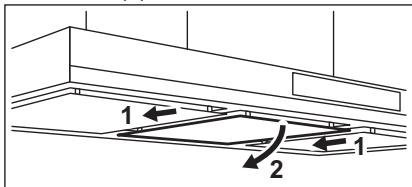
- Slightly tilt the front of the filter downwards (2), then pull.

Be careful! Filter is protected by chain upon accidental collapse. Dismount the chains before cleaning the filters.
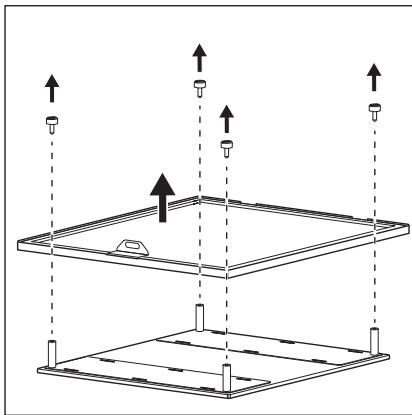
- Disassemble the filter by removing the screws on top of the filter.
natural_image
Diagram of a multi-panel installation with upward arrows indicating movement or force, no text or symbols present- Clean the filters using a sponge with non abrasive detergents or in a dishwasher.

The dishwasher must be set to a low temperature and a short cycle. The grease filter may discolour, it has no influence on the performance of the appliance.
- To mount the filters back follow the first two steps in reverse order. Repeat the steps for all filters if applicable.
4.3 Replacing the charcoal filter

WARNING!
The charcoal filter is non-washable!
5. ENVIRONMENTAL CONCERNS
Recycle materials with the symbol 📋. Put the packaging in relevant containers to recycle it. Help protect the environment and human health by recycling waste of electrical and electronic appliances. Do not dispose of
To replace the filter:
- Remove the grease filters from the appliance.
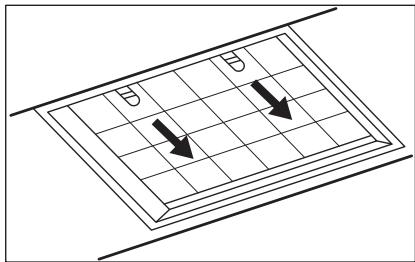
Refer to "Cleaning the grease filter" in this chapter. - Pull the tabs towards the bottom part of the filter.
natural_image
Diagram of a solar panel with two arrows indicating direction, no text or symbols present- Slightly tilt the front of the filter downwards, then pull.
- To install a new filter, perform the same steps in reverse order.
In any case, it is necessary to replace the filters at least every four months.
4.4 Replacing the lamp
This appliance is supplied with a LED lamp. This part can be replaced by a technician only. In case of any malfunction refer to "Service" in the "Safety Instructions" chapter.
appliances marked with the symbol 📄 with the household waste. Return the product to your local recycling facility or contact your municipal office.
SISUKORD
- OHUTUSINFO JA PAIGALDAMINE....39
- TOOTE KIRJELDUS....40
- IGAPÄEVANE KASUTAMINE....40
- PUHASTUS JA HOOLDUS....42
- JÄÄTMEKÄITLUS....43
PARIMATE TULEMUSTE SAAVUTAMISEKS
natural_image
Diagram of a multi-tiered electronic device with mounting holes and vertical arrows indicating direction (no text or symbols)natural_image
Diagram of a rectangular frame with vertical supports and upward arrows indicating movement or force, no text or symbols present.natural_image
Diagram of a grid with arrows indicating direction, no text or symbols presentnatural_image
Diagram of a rectangular frame with vertical supports and upward arrows indicating movement or force, no text or symbols present.natural_image
Diagram of a solar panel with two arrows indicating direction, no text or symbols presentnatural_image
Diagram of a multi-tiered storage or mounting structure with vertical supports and upward arrows indicating movement (no text or symbols)natural_image
Diagram of a solar panel with two arrows indicating direction, no text or symbols presentnatural_image
Symbol of a trash bin crossed with a diagonal line, representing no waste or discharge (no text or labels)natural_image
Recycling symbol with three arrows forming a triangle (no text or labels)natural_image
Diagram of a rectangular frame with vertical supports and upward arrows indicating motion or force, no text or symbols present.natural_image
Diagram of a grid with two arrows pointing downward, no text or symbols presentnatural_image
Diagram of a multi-tiered storage unit with upward arrows indicating flow or movement (no text or symbols)natural_image
Diagram of a grid with arrows indicating direction, no text or symbols presentnatural_image
Diagram of a multi-tiered storage unit with vertical supports and upward arrows indicating movement or force (no text or symbols)natural_image
Diagram of a multi-tiered storage unit with vertical supports and upward arrows indicating movement (no text or symbols)natural_image
Diagram of a multi-panel electronic device with mounting holes and vertical dashed lines indicating alignment or positioning (no text or symbols)natural_image
Diagram of a solar panel with two arrows indicating direction, no text or symbols presentnatural_image
Diagram of a multi-tiered electronic device with mounting holes and vertical arrows indicating direction (no text or symbols)natural_image
Diagram of a solar panel with two arrows indicating direction, no text or symbols presentnatural_image
Diagram of a rectangular frame with vertical supports and upward arrows indicating force or movement (no text or symbols)natural_image
Diagram of a solar panel with two arrows indicating direction, no text or symbols presentnatural_image
Diagram of a multi-tiered storage unit with vertical supports and upward arrows indicating movement or force (no text or symbols)natural_image
Diagram of a solar panel with two arrows indicating direction, no text or symbols presentnatural_image
Diagram of a multi-tiered storage or mounting structure with vertical supports and upward arrows indicating movement (no text or symbols)natural_image
Diagram of a grid with two arrows pointing downward, no text or symbols presentnatural_image
Diagram of a multi-tiered rectangular platform with vertical supports and upward arrows indicating movement or force (no text or symbols)natural_image
Diagram of a grid with two arrows pointing downward, no text or symbols presentnatural_image
Diagram of a multi-tiered rectangular frame with vertical supports and upward arrows indicating movement or force (no text or symbols)natural_image
Diagram of a solar panel with two arrows indicating direction, no text or symbols presentnatural_image
Diagram of a multi-tiered electronic device with mounting holes and vertical supports, no text or symbols presentnatural_image
Diagram showing two arrows pointing downward on a grid-patterned rectangular panel (no text or symbols)natural_image
Diagram of a multi-tiered storage unit with upward arrows indicating flow or movement (no text or symbols)natural_image
Diagram of a solar panel with two arrows indicating direction, no text or symbols presentnatural_image
Diagram of a multi-tiered electronic device with mounting holes and vertical arrows indicating direction (no text or symbols)natural_image
Diagram of a solar panel with two arrows indicating direction, no text or symbols presentnatural_image
Diagram of a multi-tiered storage or mounting structure with vertical supports and upward arrows indicating movement (no text or symbols)- Rahlo nagnite sprednji del filtra navzdol, nato povlecite.
- Za namestitev novega filtra ponovite iste korake v obratnem zaporedju.
V vsakem primeru je treba filtre zamenjati vsaj na štiri mesece.
4.4 Zamenjava žarnice
natural_image
Diagram of a multi-tiered storage unit with mounting holes and vertical supports, no text or symbols presentnatural_image
Diagram of a grid with two arrows pointing downward, no text or symbols presentreparationsinformation:
www.aeg.com/support
natural_image
Diagram of a multi-panel installation with upward arrows indicating movement or force, no text or symbols presentnatural_image
Diagram of a solar panel with two arrows indicating direction, no text or symbols presentnatural_image
Diagram of a rectangular device with multiple supports and upward arrows indicating motion or force directions (no text or symbols)natural_image
Diagram of a solar panel with two arrows indicating direction, no text or symbols presentnatural_image
Diagram of a grid with arrows indicating direction, no text or symbols present5. المخاوف البيئة
natural_image
Diagram of a multi-tiered storage or mounting structure with vertical supports and upward arrows indicating movement (no text or symbols)ت Winning Words by thinking about the purpose of getting a new person.
بعد الطهي فقط.

- PËRMBAJTJA
- PËR REZULTATE PERFEKTE
- PËRSHKRIM I PRODUKTIT
- SVAKODNEVNA UPORABA
- Uporaba nape
- Zamjena žarulje
- OBSAH
- PRO DOKONALÉ VÝSLEDKY
- CUSTOMER CARE AND SERVICE
- SAFETY INFORMATION AND INSTALLATION
- WARNING!
- PRODUCT DESCRIPTION
- Control panel overview
- DAILY USE
- Using the hood
- To operate the hood:
- Hob 2 Hood function
- Activating Maximum Motor Speed
- Filter notification
- To activate or deactivate function:
- CARE AND CLEANING
- Notes on cleaning
- Cleaning the grease filter
- To clean the filter:
- Replacing the charcoal filter
- ENVIRONMENTAL CONCERNS
- Replacing the lamp
- SISUKORD
- PARIMATE TULEMUSTE SAAVUTAMISEKS
- Zamenjava žarnice
- المخاوف البيئة
Brand : AEG-ELECTROLUX
Model : DBK6980HG
Category : Range hood