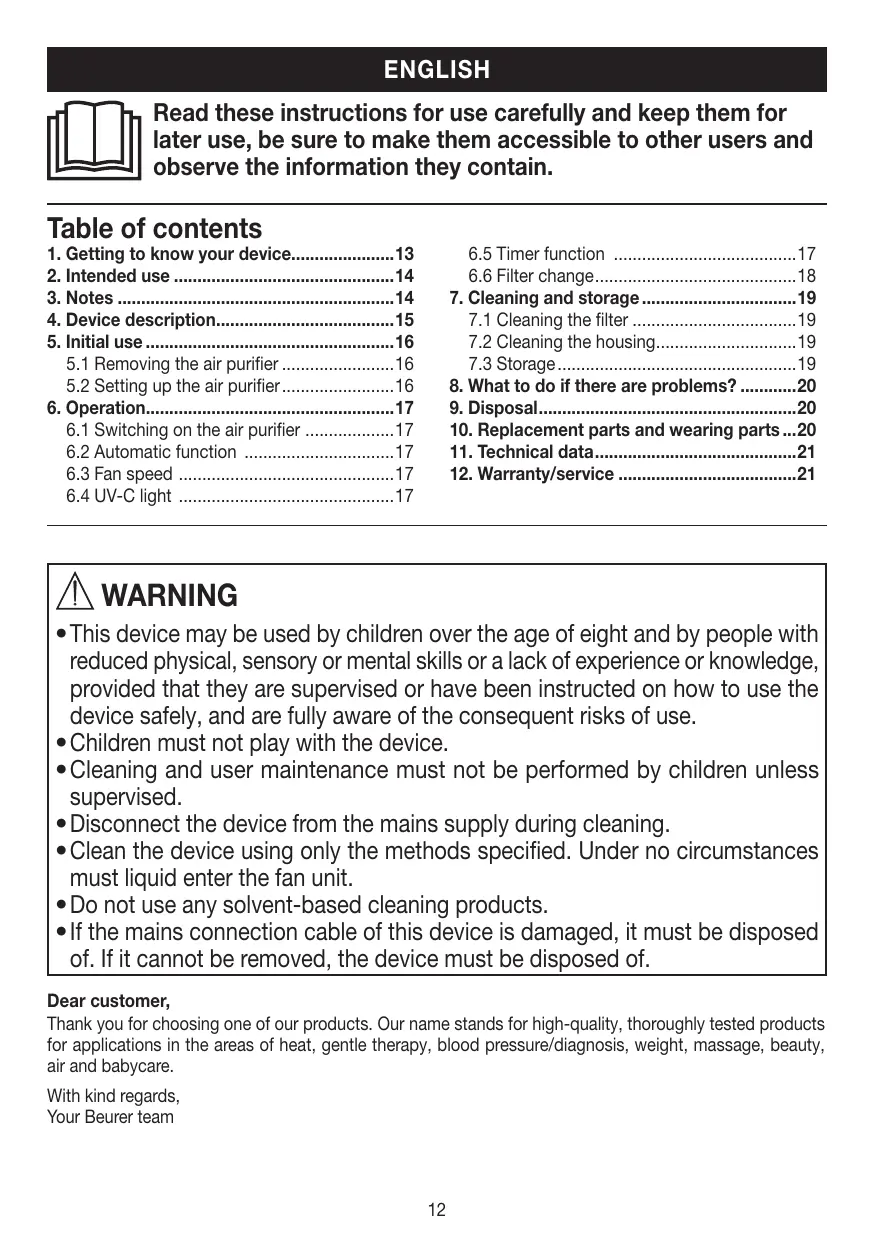
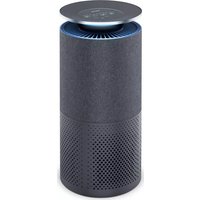
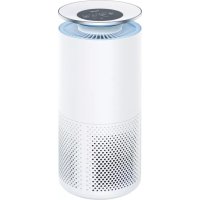
USER MANUAL LR 300 BEURER
natural_image
White beurer appliance with control buttons and indicator lights (no visible text or symbols on body)
text_image
QR code image containing encoded data, no visible human-readable text
EN Air purifier
Instructions for use .... 12
text_image
Exploded view diagram of a device with numbered parts for identification
text_image
REPLACE FILTER
2H 4H 8H
1
AUTO
3
UV-C
4
5
natural_image
White rectangular electronic device with open lid and internal compartments, labeled with arrows 1 and 2 (no text or symbols on the device itself)
natural_image
Interior view of a white electronic device casing with black panel and control buttons (no visible text or symbols)
natural_image
Exterior view of a white electronic device casing with black panel and control buttons (no text or symbols visible)
text_image
REPLACE FILTER
AUTO
UV-C
4H 8H
Table of contents
- Getting to know your device....13
- Intended use ....14
- Notes ......14
- Device description....15
- Initial use....16
5.1 Removing the air purifier 16
5.2 Setting up the air purifier....16
- Operation....17
6.1 Switching on the air purifier 17
6.2 Automatic function .....17
6.3 Fan speed 17
6.4 UV-C light 17
6.5 Timer function 17
6.6 Filter change....18
- Cleaning and storage....19
7.1 Cleaning the filter 19
7.2 Cleaning the housing....19
7.3 Storage....19
-
What to do if there are problems? ......20
-
Disposal....20
-
Replacement parts and wearing parts ...20
-
Technical data....21
-
Warranty/service 21

WARNING
- This device may be used by children over the age of eight and by people with reduced physical, sensory or mental skills or a lack of experience or knowledge, provided that they are supervised or have been instructed on how to use the device safely, and are fully aware of the consequent risks of use.
- Children must not play with the device.
- Cleaning and user maintenance must not be performed by children unless supervised.
- Disconnect the device from the mains supply during cleaning.
- Clean the device using only the methods specified. Under no circumstances must liquid enter the fan unit.
- Do not use any solvent-based cleaning products.
- If the mains connection cable of this device is damaged, it must be disposed of. If it cannot be removed, the device must be disposed of.
Dear customer,
Thank you for choosing one of our products. Our name stands for high-quality, thoroughly tested products for applications in the areas of heat, gentle therapy, blood pressure/diagnosis, weight, massage, beauty, air and babycare.
With kind regards,
Your Beurer team
Included in delivery
- 1x air purifier
- 1x combi filter (activated carbon/EPA filter class E 12)
- 1x pre-filter
- 1 x set of instructions for use
Signs and symbols
The following symbols appear in these instructions for use:
 | WARNINGWarning instruction indicating a risk of injury or damage to health |
 | IMPORTANTSafety note indicating possible damage to the device/accessory |
 | NoteNote on important information |
 PAP PAP | Dispose of packaging in an environmentally friendly manner |
1. Getting to know your device
Humans spend a large proportion of their time indoors. The air indoors is often polluted with dust particles, pollen, animal hair, odours, harmful gases as well as various bacteria and viruses. The LR 300 air purifier cleans the ambient air using a three-layered filter system and an in-built UV-C light.
The LR 300 air purifier
- Filters air with a combi filter (activated carbon filter against harmful gases and unpleasant odours, EPA filter E 12 against particles such as bacteria, viruses, mites, pollen and fine dust)
- Has an in-built UV-C light (to kill germs)
- Operates quietly with three output levels
- Has a timer function (two, four or eight hours)
- Suitable for rooms up to 35m^2 in size
- Energy-saving
- Switches off automatically when the housing cover is removed.
Principle of air cleaning
- The air purifier's fan sucks in the contaminated air.
- The pre-filter filters larger particles such as dust, dirt and hairs.
- Next, the activated carbon filter filters formaldehyde, benzene and other poisonous gases and odours out of the ambient air.
- Lastly, the EPA filter filters out small particles such as pollen, bacteria or viruses.
- The switchable UV-C light inside the housing eliminates germs and odours (caused by animals, cooking or tobacco smoke).
- The cleaned air is emitted into the ambient air via the air outlet on top of the air purifier.

The EPA E 12 filter has a filter performance of ≥ 99.5% . That means that 99.5% of particles (e.g. bacteria, viruses and fine dust) can be filtered out.
Contaminated, unfiltered air can have the following effects:
- Infections and respiratory diseases are more likely to occur
- Damage to health through harmful gases
2. Intended use
This air purifier is intended exclusively for cleaning the air indoors.

WARNING
If you suffer from severe respiratory or lung disease, consult your doctor before using the air purifier.
This device must only be used for the purpose for which it was designed and in the manner specified in the instructions for use. Improper use can be dangerous. The manufacturer is not liable for damage resulting from improper or careless use.
3. Notes
Read the notes carefully! Non-observance of the following information may result in personal injury or material damage.

WARNING
Keep packaging material away from children to avoid danger of suffocation.
Electric shock

WARNING
As with every electrical device, use this air purifier carefully and cautiously, in order to avoid hazards due to electric shock.
- Therefore, observe the following instructions for use:
- do not operate the device at voltages other than those indicated on the device (the type plate is located underneath the device)
– never if it or its accessories show visible signs of damage
– not during a thunderstorm
- In the event of defects or operational faults, switch the device off immediately and disconnect it from the mains socket. Do not pull on the mains cable or on the device to disconnect the plug from the socket. Never hold or carry the device by the mains cable. Keep the cables away from hot surfaces.
- Always switch off the device before disconnecting it from the mains.
- Never disconnect the mains plug with wet or damp hands.
- Keep the device away from sources of heat as the housing could melt and trigger a fire.
- Ensure that the openings of the device and the mains cable do not come into contact with water, steam or other liquids.
- Do not use the device in close proximity to flammable or explosive gas mixtures.
- Never reach for a device that has been submerged in water. Disconnect it from the mains plug immediately.
- Do not use the device if it or its accessories are visibly damaged.
Repairs

WARNING
- Only specialist personnel may perform repairs on electrical devices. Improper repairs may subject users to considerable danger. For repairs, please contact Customer Services or an authorised retailer.
- Do not open the fan unit.
Risk of fire

WARNING
There is a risk of fire if the device is used improperly or these instructions for use are ignored.
Therefore, observe the following instructions for using the air purifier:
- Never use underneath a cover, such as a blanket, pillow etc.
- Never use near petrol or other highly flammable substances.
Handling

IMPORTANT
The device must be switched off and disconnected from the mains after every use and before cleaning.
- Do not place any objects in device openings or in rotating parts. Ensure that the moving parts can move freely at all times.
- Do not place any objects on the device.
- Do not expose the device to high temperatures.
- Protect the device against sunlight and impacts and do not drop it.
- Never shake the device.
- Place the device on a firm, level and water-resistant surface.
4. Device description
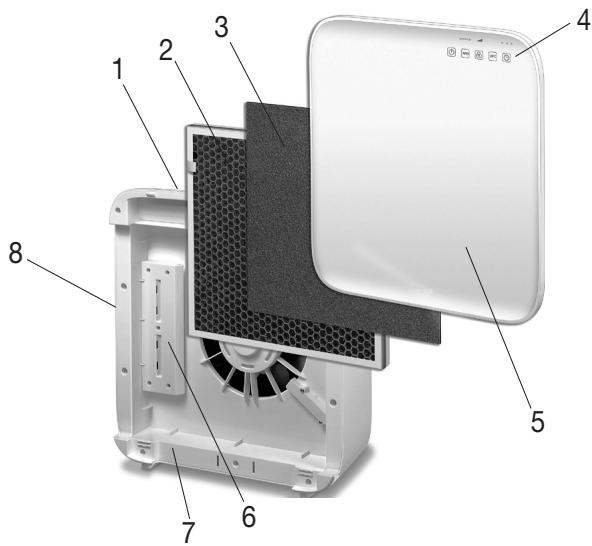
text_image
Exploded view diagram of a device showing numbered components for assembly or maintenance reference.
| 1. Air outlet | 5. Housing cover |
| 2. Combi filter (activated carbon filter/EPA filter E 12)Activated carbon filter: To counter harmful gases and unpleasant smellsEPA filter E 12: Filters particles such as bacteria, viruses, mites, pollen and fine dust | 6. UV-C lightEliminates germs and odours (caused by animals, cooking or tobacco smoke) inside the housing |
| 3. Pre-filterFilters coarse dust and dirt, such as hairs | 7. Housing |
| 4. Control panel | 8. Air inlet |
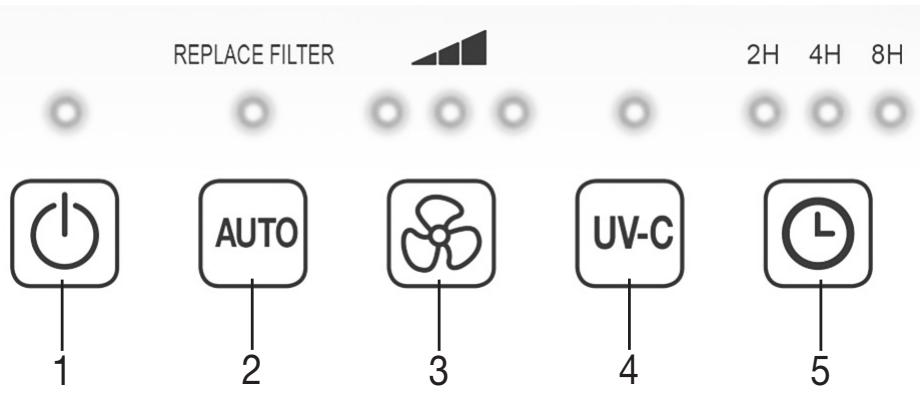
text_image
REPLACE FILTER
2H 4H 8H
1
AUTO
3
UV-C
4
5
| 1 ON/OFF buttonSwitches the device on/off | 4 UV-C light buttonUV-CSwitches the UV-C light on/off |
| 2 AUTO buttonAUTOActivates the automatic function (fan speed automatically adapts to the ambient air quality and the LED is lit continuously). If the light below "Replace Filter" is flashing, change the filter. After changing the filter, hold down the AUTO button to reset the automatic counter for the filter change. | 5 TIMER buttonThe air purifier features a timer function that you can use to determine the number of hours the air purifier should run for before it automatically switches itself off. The air purifier has three timer periods: 2H (two hours), 4H (four hours) and 8H (eight hours). |
| 3 FAN SPEED buttonThe air purifier has three fan speeds: (low), (medium) and (high). | |
5. Initial use
5.1 Removing the air purifier
- Open the cardboard packaging.
- Remove the device from the top of the box without opening the film bag.
- Now remove all plastic films. Remove the combi filter from the device (see "Filter change" section) and take it out of the plastic film. Then re-insert the combi filter into the device.
- Check the device, mains plug and cable for damage.
5.2 Setting up the air purifier
- Place the air purifier on a firm, level surface to prevent vibrations and noise.

IMPORTANT
If you wish to reposition the air purifier, only carry it by the handle on the rear of the device.
- Set up the air purifier in such a way that provides 30 cm clearance on all sides.
- Make sure that the air inlet and air outlet are never blocked.
6. Operation
6.1 Switching on the air purifier
- Always follow the instructions in chapter "5 Initial use".
- Insert the mains plug into the socket. Ensure that the cable does not pose a trip hazard.
- Press the ON/OFF button (☐) to switch on the air purifier.

Note
When the air purifier is used for the first time it is set to the middle fan speed.
6.2 Automatic function AUTO
The air purifier has an automatic function. When the automatic function is switched on, the fan speed automatically adapts to the ambient air quality. This means that, the poorer the quality of the ambient air, the higher the fan speed automatically set by the air purifier.
- To switch on the automatic function, press the AUTO button while the air purifier is switched on (AUTO). As soon as the automatic function is active, a light goes on above the AUTO button.
- Press the AUTO button (AUTO) again to switch off the automatic function. The light above the AUTO button goes out.

Note
If the light above the AUTO button is flashing, you must replace the filter. To do this, follow the instructions in the "Filter change" section.
6.3 Fan speed

The air purifier has three fan speeds: ▲ (low), ▲ (medium) and ▲ (high).
- To switch between the individual fan speeds, press the fan speed button ⚙. The fan speed that is currently set lights up on the control panel.
6.4 UV-C light

The UV-C light eliminates germs contained in the air. Here the UV-C light activates titanium oxides that break down the foul-smelling odour molecules (caused by tobacco smoke, cooking smells or animals).
- To switch on the UV-C light, press the UV-C button on the air purifier while it is switched on (uv-c). As soon as the UV-C light is active, a light goes on above the UV-C button.
- Press the UV-C button (uv-c) again to switch off the UV-C light. The light above the UV-C button goes out.
6.5 Timer function
The air purifier features a timer function that you can use to determine the number of hours the air purifier should run for before it automatically switches itself off. The air purifier has three timer periods: 2H (two hours), 4H (four hours) and 8H (eight hours).
- To switch between the individual timer periods, press the TIMER button (☐) The TIMER period that is currently set lights up on the control panel. The air purifier will now automatically switch off after the set number of hours has passed.
- To switch off the timer, repeatedly press the TIMER button (☐), until the light above the TIMER button goes out. The air purifier now cleans continuously.
6.6 Filter change
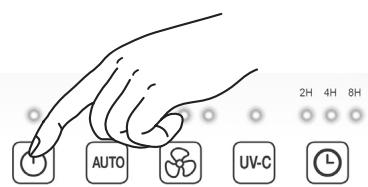
The three-layered filter should be replaced with a new one after 4320 operating hours. After 4320 operating hours, a blue LED flashes above the AUTO button. To change the filter, proceed as follows:
text_image
AUTO
UV-C
2H 4H 8H
- Press the ON/OFF button to switch off the air purifier, and unplug it from the socket.
natural_image
White open refrigerator with gray interior and two arrows pointing to the front panel (no text or symbols visible)
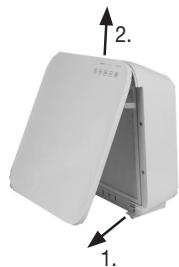
- Remove the housing cover as shown (magnetic fastening). Firstly detach the magnetic fastening at the bottom, and then at the top.
natural_image
Exterior view of a white electronic device casing with black insulation and mounting brackets (no text or symbols visible)
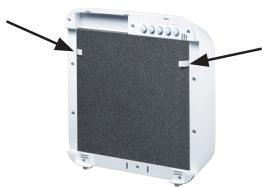
- Pull out the pre-filter. Now, to pull out the combi filter, pull carefully on the side tabs.
natural_image
Exterior view of a white electronic device casing with black panel and control buttons (no text or symbols visible)
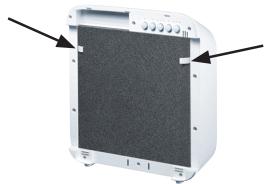
- Insert a new combi filter. To insert the combi filter correctly, align it with the side tabs as shown. Position the pre-filter above it.
text_image
1.
2.
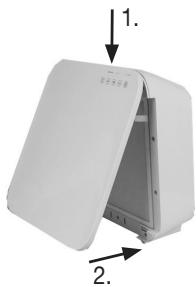
- Re-insert the housing cover as shown until you see and hear it click into place (magnetic fastening). First attach the magnetic fastening at the top, and then at the bottom.
text_image
REPLACE FILTER
AUTO
UV-C
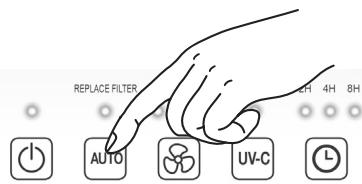
- Insert the mains plug into the socket. Ensure that the cable does not pose a trip hazard. Press and hold the AUTO button (AUTO) for five seconds. The operating hours counter now resets to 0.
If you wish to change the combi filter at specific personal intervals (e.g. every six months), there is a sticker on the upper edge of the combi filter on which a date can be entered.
7. Cleaning and storage

WARNING
Before cleaning, always ensure that the mains plug of the air purifier has been properly disconnected.
7.1 Cleaning the filter
Regular cleaning of the filter (once a month) is a prerequisite for hygienic and fault-free operation.
- Clean the three-layered filter using the brush attachment of a vacuum cleaner. To carry out a thorough clean, pull out the pre-filter and clean the activated carbon filter located behind it and the EPA filter located at the rear, also using the brush attachment from a vacuum cleaner. Then replace the pre-filter on the EPA filter.
| Activated carbon filter | EPA filter E 12 |
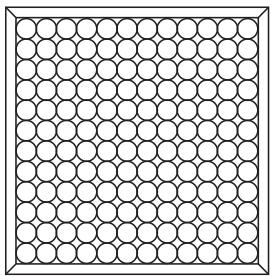 | 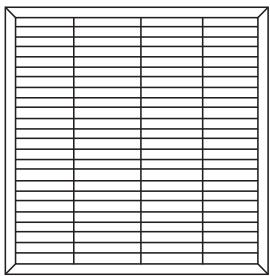 |
| Front | Rear |

IMPORTANT
The three-layered filter should be changed after 4320 operating hours (see "Filter change" section). The three-layered filter cannot be washed.
7.2 Cleaning the housing
Clean the housing of the air purifier with a damp cloth (water or a mild cleaning solution). When cleaning, do not use any solvents or other aggressive or abrasive cleaning agents, as the surface may become damaged.
7.3 Storage
If you do not plan to use the device for a long period of time, we recommend that you clean it and store it in the original packaging in a dry environment, ensuring it is not weighed down by additional items.
8. What to do if there are problems?
| Problem | Cause | Solution |
| The air purifier will not switch on | The housing cover is not correctly installed. | Ensure that the housing cover is correctly installed. |
| The three-layered filter is not correctly inserted. | Ensure that the three-layered filter is correctly inserted. |
| The mains part plug is not plugged in. | Plug the mains part plug into a suitable socket. |
| Insufficient passage of air | The filters are dirty | Clean the filters (see "Maintenance and cleaning" section). |
| The air intake/air outlet is blocked. | Ensure that the air intake/air outlet is not blocked. |
| Air cleaner is very loud | There is a foreign body in the air intake/air outlet. | Remove the foreign body from the air intake/air outlet. |
| The filters are clogged. | Clean the filters (see "Maintenance and cleaning" section). |
| The filters are not correctly inserted. | Insert the filters correctly. |
| The air purifier is positioned on an uneven surface. | Position the air purifier on a level surface. |
9. Disposal
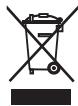
For environmental reasons, do not dispose of the device in the household waste at the end of its useful life. Dispose of the unit at a suitable local collection or recycling point. Dispose of the device in accordance with EC Directive – WEEE (Waste Electrical and Electronic Equipment). If you have any questions, please contact the local authorities responsible for waste disposal.
10. Replacement parts and wearing parts
Replacement parts and wearing parts are available from the corresponding service address (according to the service address list). Please state the corresponding order number.
| Designation | Item number and/or order number |
| Pre-filter, combi filter (EPA + activated carbon) | 660.12 |
11. Technical data
| Model | LR 300 |
| Mains voltage | See type plate on the device |
| Output | 50 W |
| Dimensions (L x W x H) | 324 x 162 x 409 mm |
| Weight when empty | 4.5 kg |
| UV light | Wave length 254 nm; service life approx. 20,000 hours |
| Suitable for rooms | approx. 35 m^2 |
| Permissible operating conditions | +5°C to +40°C, ≤ 90% relative humidity (non-condensing) |
| Protection class | Protection class II / [☐] |
12. Warranty/service
In case of a claim under the warranty please contact your local dealer or the local representation which is mentioned in the list “service international”.
In case of returning the unit please add a copy of your receipt and a short report of the defect.
The following warranty terms shall apply:
- The warranty period for BEURER products is either 3 years or- if longer- the country specific warranty period from date of Purchase.
In case of a warranty claim, the date of purchase has to be proven by means of the sales receipt or invoice.
-
Repairs (complete unit or parts of the unit) do not extend the warranty period.
-
The warranty shall not be valid for damages because of
a. improper treatment, e.g. nonobservance of the user instructions.
b. repairs or tampering by the customer or unauthorised third parties.
c. transport from the manufacturer to the consumer or during transport to the service centre.
d. The warranty shall not be valid for accessories which are subject to normal wear and tear (cuff, batteries etc.).
- Liability for direct or indirect consequential losses caused by the unit are excluded even if the damage to the unit is accepted as a warranty claim.
FRANÇAIS

text_image
Exploded view diagram of a device with numbered parts for identification
text_image
REPLACE FILTER
2H 4H 8H
1
AUTO
3
UV-C
4
5
natural_image
White open electrical enclosure with two arrows labeled 1 and 2 pointing to its interior (no text or symbols on the device itself)
natural_image
Exterior view of a white electronic device casing with black insulation and mounting holes (no text or symbols visible)
natural_image
Exterior view of a white electronic device casing with black insulation and control panel (no text or symbols visible)
text_image
REPLACE FILTER
AUTO
UV-C
4H 8H
text_image
Exploded view diagram of a device with numbered parts for identification
text_image
REPLACE FILTER
2H 4H 8H
1
AUTO
3
UV-C
4
5
natural_image
White rectangular electronic device with open lid and internal compartments, labeled with arrows 1 and 2 (no text or symbols on the device itself)
natural_image
Interior view of a white electronic device casing with black panel and control buttons (no visible text or symbols)
natural_image
White electronic device casing with black panel and control buttons, no visible text or symbols
text_image
REPLACE FILTER
AUTO
UV-C
4H 8H
text_image
Exploded view diagram of a device with numbered parts for identification
text_image
REPLACE FILTER
2H 4H 8H
1
AUTO
3
UV-C
4
5
natural_image
White open electrical enclosure with two arrows indicating directional movement (no text or symbols)
natural_image
Exterior view of a white electronic device casing with black insulation and mounting holes (no text or symbols visible)
natural_image
Exterior view of a white electronic device casing with black panel and control buttons (no text or symbols visible)
text_image
REPLACE FILTER
AUTO
UV-C
text_image
Exploded view diagram of a device showing numbered components for assembly or maintenance reference.
text_image
REPLACE FILTER
2H 4H 8H
1
AUTO
3
UV-C
4
5
natural_image
White open refrigerator with gray interior and two arrows pointing to the front panel (no text or symbols visible)
natural_image
Interior view of a device casing with black panel and control buttons (no visible text or symbols)
natural_image
Exterior view of a white electronic device casing with black insulation and mounting brackets (no text or symbols visible)
text_image
REPLACE FILTER
AUTO
UV-C
4H 8H
text_image
Exploded view diagram of a device with numbered parts for identification
text_image
REPLACE FILTER
2H 4H 8H
1
AUTO
3
UV-C
4
5
natural_image
White rectangular electronic device with open lid and internal compartments, labeled with arrows 1 and 2 (no text or symbols on the device itself)
natural_image
Exterior view of a white electronic device casing with black insulation and mounting holes (no text or symbols visible)
natural_image
Exterior view of a white electronic device casing with black insulation and mounting holes (no text or symbols visible)
text_image
REPLACE FILTER
AUTO
UV-C
4H 8H
text_image
Exploded view diagram of a device showing numbered parts from top to bottom, likely for assembly or labeling purposes.
text_image
REPLACE FILTER
2H 4H 8H
1
AUTO
3
UV-C
4
5
natural_image
White rectangular electronic device with open lid and internal compartments, labeled with arrows 1 and 2 (no text or symbols on the device itself)
natural_image
Exterior view of a white electronic device casing with black insulation and mounting brackets (no text or symbols visible)
natural_image
Exterior view of a white electronic device casing with black insulation and mounting holes (no text or symbols visible)
text_image
REPLACE FILTER
AUTO
UV-C
4H 8H