
DW-215E - Air purifier HONEYWELL - Free user manual and instructions
Find the device manual for free DW-215E HONEYWELL in PDF.



| Product type | Air purifier |
| Model | DW-215E (Air Genius 5) |
| Brand | Honeywell |
| Dimensions (L x W x H) | Approximately 36 x 20 x 58 cm |
| Weight | Approximately 5.5 kg |
| Power supply | 220-240 V, 50 Hz |
| Power consumption | 50 W (max) |
| Noise level | 25-55 dB (depending on speed) |
| Recommended treatment area | Up to 40 m² |
| Max airflow | 200 m³/h |
| Filtration technology | Washable pre-filter + HEPA filter + Activated carbon filter |
| Number of speeds | 3 speeds + sleep mode |
| Main functions | Air purification, air quality sensor, timer, night mode |
| Filter replacement indicator | Yes, indicator light |
| Maintenance and cleaning | Clean the pre-filter every month, replace the HEPA/carbon filter every 6 to 12 months |
| Safety | Automatic shut-off in case of tipping, child lock |
| Spare parts and repairability | Replacement filter HRF-AP1 (HEPA + carbon), washable pre-filter |
| General information | 2-year warranty, Honeywell customer service |
Frequently Asked Questions - DW-215E HONEYWELL
User questions about DW-215E HONEYWELL
0 question about this device. Answer the ones you know or ask your own.
Ask a new question about this device
Download the instructions for your Air purifier in PDF format for free! Find your manual DW-215E - HONEYWELL and take your electronic device back in hand. On this page are published all the documents necessary for the use of your device. DW-215E by HONEYWELL.
USER MANUAL DW-215E HONEYWELL
IFD® FILTER REPLACEMENT INSTRUCTIONS
PRE-FILTER REPLACEMENT INSTRUCTIONS
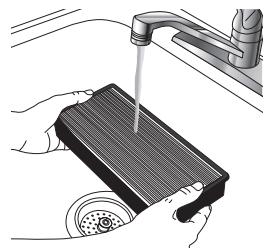
CLEANING THE IFD® FILTER
Fig. 11
GB AIR GENIUS 5 PURIFIER
HFD323E
IMPORTANT SAFETY INSTRUCTIONS
Read through all the instructions before starting to use the appliance. Keep this manual in a safe place for future reference.
These instructions are also available on our website. Please visit www.hot-europe.com.
WARNING:
- This appliance must only be operated as instructed in this user manual.
WARNING: Prior to cleaning or other user maintenance, the appliance must be disconnected from the mains supply. - This appliance can be used by children aged from 8 years and above and persons with reduced physical, sensory or mental capabilities or lack of experience and knowledge if they have been given supervision or instruction concerning use of the appliance in a safe way and understand the hazards involved.
- Children shall not play with the appliance.
- Cleaning and user maintenance shall not be made by children without supervision.
-
If the supply cord is damaged, it must be replaced by the manufacturer, its service agent or similarly qualified persons in order to avoid a hazard.
-
This appliance requires regular cleaning. Refer to the CLEANING instructions provided.
- Do not expose the air purifier to rain, or use near water, in a bathroom, laundry area or other damp location.
- The air purifier must be used in an upright position.
- Do not allow foreign objects to enter air inlet or outlet grilles as this may cause electric shock or damage to the air purifier.
- Unwind the power cord completely. Failure to do so could cause overheating and possible fire hazard.
- Do not tug at the power cord to disconnect the plug. Do not touch the power cord with wet hands. Do not remove the power plug from the power socket while the product is in use.
- Do not use accessories, spare parts or components supplied by other manufacturers, and that are not designed for use with this appliance.
Always switch the appliance off and disconnect the power plug from the power socket when the appliance is not in use or during transport. - Do not use this appliance if it is damaged or shows any signs of possible damage or if it is not functioning properly. Disconnect the power plug from the power socket.
COMPONENTS (See page 2)
-
FrontGrille
-
Control Panel
A. On / standby
B. Timer
C. Purification Level
D. Oscillation
E. Light
F. Filter Reset Button
G. Filter Status Indicator
- Rear Grille
- Pre-filter
- Permanant Washable ifD® Filter
- Optional odour reducing K pre-filter
CONTROL PANEL
| Symbol | Function |
| ① | ON / standby |
| ① | Auto-off Timer: 2, 4, 6, 8, 10 or 12 hours |
| Purification level: 5. Max Cleaning 4. Allergen Reduction Setting 3. General Cleaning Setting 2. Germ Reduction Setting 1. Sleep/quiet setting | |
| Accent light indicator | |
| Oscillation button | |
| Filter status indicator |
SET-UP
- Select a firm, level and flat location. For best airflow, locate the unit 1 meter (36 In) from any wall or furniture.
- When operating, large volumes of air are drawn toward the air cleaner. Surrounding areas should be cleaned and/or vacuumed frequently to prevent build-up of dust and other contaminants. This may also help prolong the life of the filter. If the unit is placed on a light colored carpet, a small mat or rug should be used underneath to prevent permanent staining. This is especially important in homes with contamination from smoking or fireplaces.
FIRST TIME USE
The ifD Filter, the permanent washable pre-filter and the optional K pre-filter are supplied within the air purifier. New air purifiers have their filters wrapped to ensure purity, and are labeled to help identify the proper replacement filter.
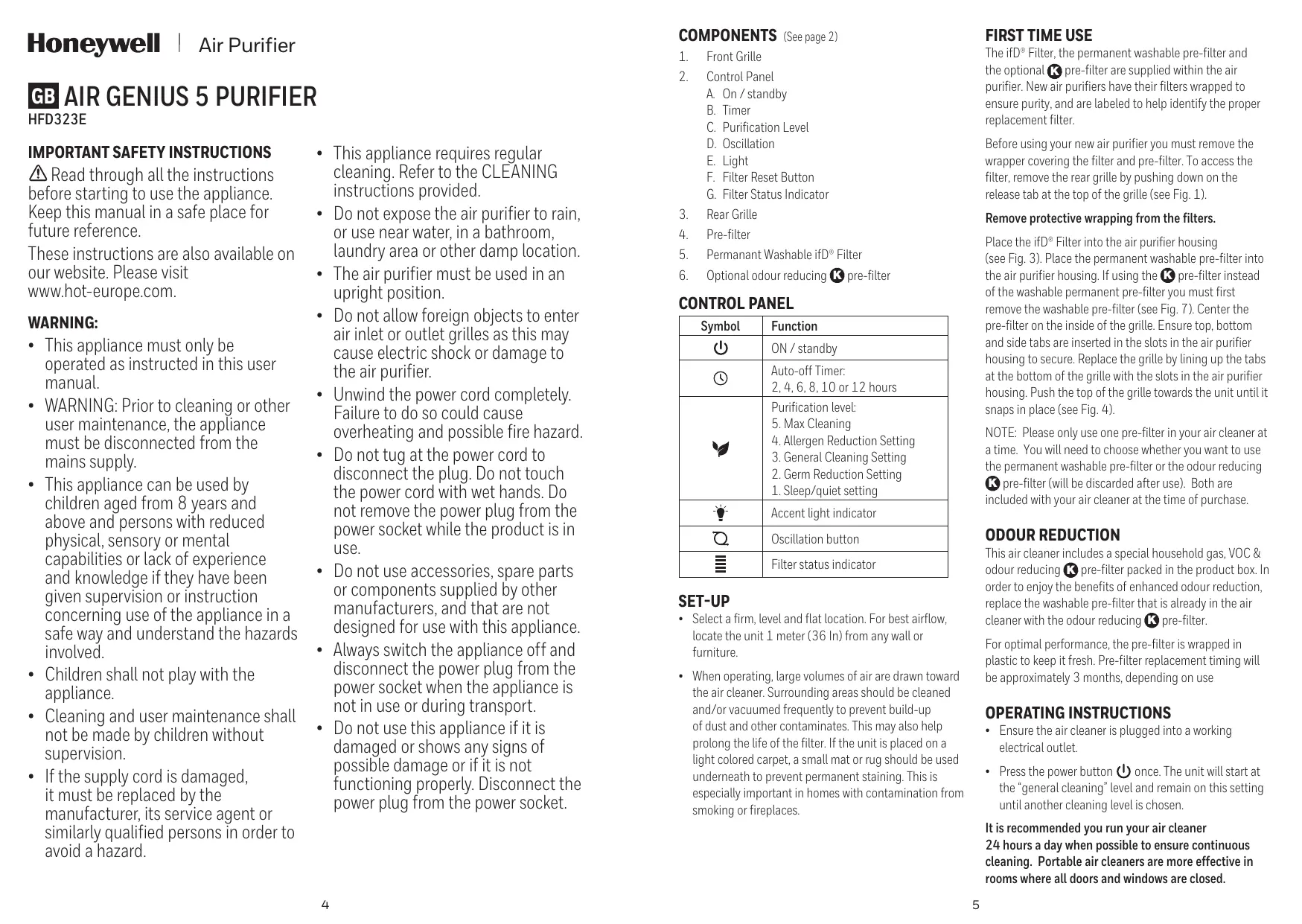
Before using your new air purifier you must remove the wrapper covering the filter and pre-filter. To access the filter, remove the rear grille by pushing down on the release tab at the top of the grille (see Fig. 1).
Remove protective wrapping from the filters.
Place the ifD® Filter into the air purifier housing (see Fig. 3). Place the permanent washable pre-filter into the air purifier housing. If using the K® pre-filter instead of the washable permanent pre-filter you must first remove the washable pre-filter (see Fig. 7). Center the pre-filter on the inside of the grille. Ensure top, bottom and side tabs are inserted in the slots in the air purifier housing to secure. Replace the grille by lining up the tabs at the bottom of the grille with the slots in the air purifier housing. Push the top of the grille towards the unit until it snaps in place (see Fig. 4).
NOTE: Please only use one pre-filter in your air cleaner at a time. You will need to choose whether you want to use the permanent washable pre-filter or the odour reducing
K pre-filter (will be discarded after use). Both are included with your air cleaner at the time of purchase.
ODOUR REDUCTION
This air cleaner includes a special household gas, VOC & odour reducing K pre-filter packed in the product box. In order to enjoy the benefits of enhanced odour reduction, replace the washable pre-filter that is already in the air cleaner with the odour reducing K pre-filter.
For optimal performance, the pre-filter is wrapped in plastic to keep it fresh. Pre-filter replacement timing will be approximately 3 months, depending on use
OPERATING INSTRUCTIONS
- Ensure the air cleaner is plugged into a working electrical outlet.
- Press the power button once. The unit will start at the "general cleaning" level and remain on this setting until another cleaning level is chosen.
It is recommended you run your air cleaner 24 hours a day when possible to ensure continuous cleaning. Portable air cleaners are more effective in rooms where all doors and windows are closed.
CONTROLS
AUTO-OFF TIMER BUTTON
Push this button if you would like your air cleaner to run and then automatically shut-off after a certain amount of time (choose from between 2, 4, 6, 8, 10 and 12 hours). This is convenient if you would like your air cleaner to run during the night but then shut-off automatically in the morning (choose the 8 or 10 hour setting).
Your air cleaner will start off on the General Cleaning setting each time you turn your air cleaner on.
Level 5 - Max
Best for power cleaning the air when unpleasant odours are noticeable, your room is particularly dusty or you can sense that airborne particles are present. This setting cleans the air the fastest of all the settings and circulates the air frequently in a room.
Level 4 - Allergen
This setting makes the air cleaner perform at the proper level for reducing many types of airborne allergens. It ensures the allergen capturing efficiency and rate is best for the particle sizes being captured. Best for fighting airborne allergens during high allergen season, particularly in the spring and fall to help reduce airborne pollen. Also great for year-round reduction of pet dander allergens.
Level 3 - General
Best for General Cleaning. Use this setting to help reduce airborne dust and smoke particles, like those from cooking or tobacco smoke.
Level 2 - Germ
This setting slows down air movement so airborne microscopic germs are most effectively captured in the filter. Germs, like certain bacteria and viruses, can be much smaller than other airborne particles or organisms. Giving the germs more time to dwell in the filter increases the filtration efficiency. This setting can be used during cold and flu season to help reduce certain germs from the air that passes through the filter.
Level 1 - Sleep
Best for ultra quiet operation, perfect for nighttime use when sleeping.
FILTER STATUS AND CHECK FILTERS BUTTON
Allows you to monitor how dirty your filter is getting. When it is time to check and clean the filter, an indicator will illuminate notifying you that it is time to check the
filters. When this light comes on, you will need to clean your primary ifD® Filter and clean or replace your pre-filter. (See Filter Cleaning instructions). After you have cleaned or replaced the filters, press the Filter Reset Button until the light goes off.
ACCENT LIGHT INDICATOR
Your air cleaner features a soft accent light at the bottom of the unit that provides a nice glow around the base. You can choose to operate your unit with or without this accent light turned on. If you want to use the light feature, you can choose from between a low or high light level.
OSCILLATE BUTTON
Press this button if you want your air cleaner to gently rotate from side to side.
This will help increase circulation in the room. The oscillation feature is activated by pressing the Oscillation button
Press the oscillation button or 'Tap' the oscillation symbol once to turn the feature on, and then again to turn it off.
TIMER
The timer option on the left of the control panel allows you to select how long the unit will run before it turns off automatically.
- 'Tap' the Timer symbol ① to shift through the options. When pressed the time will move to the next highest setting until it is on '12' (which means it will stay on for 12 hours and then shut-off). If you press the Timer button while it is on '12' the timer option will turn off and the unit will run continuously. If you 'tap' it again, it will start back at '2'.
- Cycle through the hour options until the LED light is illuminated behind the number of hours you want the unit to operate for. If the Auto-off Timer is not illuminated, the air purifier will run continuously.
ELECTRONIC FILTER CHANGE REMINDER
This model air cleaner has an electronic filter check to remind you when to check the washable ifD® Filter based on the air purifier's hours of use.
- When the ifD® Filter need to be cleaned, the LED light 'bar' will remain full and the light will be illuminated until it is RESET. You may unplug the air cleaner without interrupting the filter check.
- You should periodically check the filter. Depending on operating conditions, the filters should be cleaned at least once every three months.
TO RESET EITHER ELECTRONIC FILTER CHECK
- When the status indicator light remains on, it is time to check/clean the ifD® Filter and reset the status indicator, if needed.
After the filters have been cleaned and placed back in the unit (dry), you will want to reset the indicator. To do this, 'touch' the 'OK' button for 3 or more seconds until the status indicator is not illuminated.
FILTER REMOVAL (See page 3)
CAUTION: Turn off the unit and wait 60 seconds before removing the grille to clean filters.
The ifD Filter is supplied within the air cleaner.
- Turn-off the air cleaner. Wait 60 seconds and unplug the unit before removing the grille. While pressing down on the notch along the rear grille, pull the grille down and towards you and remove it (see Fig. 1). Gently push along the edge of the filter frame and pull forward.
- Place back into the air cleaner housing and snap filter grille back into place.
NOTE: If the odour reducing K pre-filter is used in lieu of the permanent washable pre-filter, it will need to be replaced approximately every 3 months.
CLEANING THE IFD® FILTER
The ifD® filters should be cleaned approximately once every 3 months.
After removing the ifD® Filter from the air purifier, follow the steps below to wash the ifD® Filter.
Rinsing:
- Rinse the filter with clean tap water.
If the filter still appears dirty, proceed to "Washing," otherwise proceed to "Drying."
Washing:
- Turn the power off and unplug the air purifier.
- Remove the ifD Filter from the unit.
- Fill a sink with lukewarm water and add a few drops of mild dish soap.
- Gently swish the filter in the soap solution to clean.
- Soak the filter for 2-3 minutes. Do not leave for an extended period of time.
- Rinse the filter with clean tap water (Fig. 11).
Drying:
- Shake the filter to remove any excess water.
- Place the filter with the honeycomb side down on a plush towel.
Note that the filter may still be discolored even after washing. This is acceptable and will not affect performance. - Allow the ifD® Filter to dry for a few hours or overnight.
- When the ifD® Filter is completely dry, place back into the air purifier.
CAUTION:
- Never place a wet ifD® Filter in your air purifier.
- The ifD® Filter is NOT dishwasher safe. Do not place the ifD® Filter in a dishwasher or subject it to other extreme hot water conditions.
- Do not use any solvents, strong cleaning agents or flammable liquids to clean the ifD® Filter.
MAINTAINING YOUR WASHABLE PRE-FILTER
The pre-filter helps pick up large airborne particles that enter the rear grille. This pre-filter can be periodically removed and shaken to clean it. Alternatively, it can be rinsed by hand under warm water. Let the pre-filter air dry completely before inserting back into the grille.
OPTIONAL: Changing the Odour Reducing Pre-Filter
If you have chosen to use the optional odour reducing pre-filter, it will lose its effectiveness for odour adsorption over time and will need to be replaced.
If using the odour reducing pre-filter, it is recommended that you store the original washable prefilter in the event that you decide to use it in the future.
To insert it into the unit, simply place securely into the rear grille in lieu of standard pre-filter.
NOTE: The odour reducing K pre-filter is not washable.
INSTALLATION INSTRUCTIONS FOR THE ODOUR REDUCING PRE-FILTER (See page 3)
Air purifier should be turned OFF, and unplugged prior to replacing/inserting pre-filters.
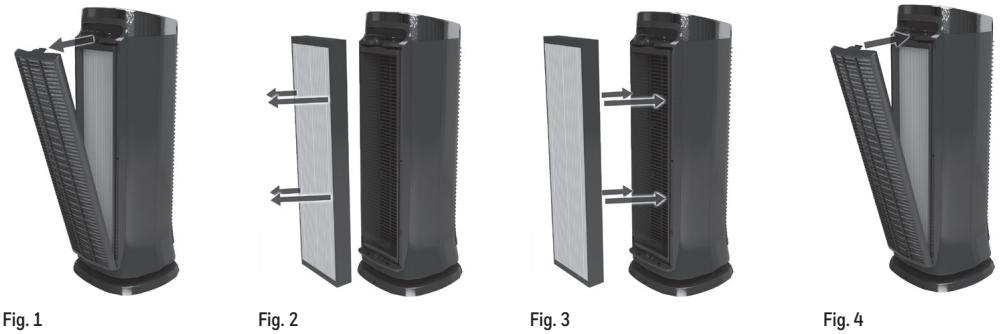
- Remove the rear grille by pushing down on the release tab at the top of the grille (see Fig. 5).
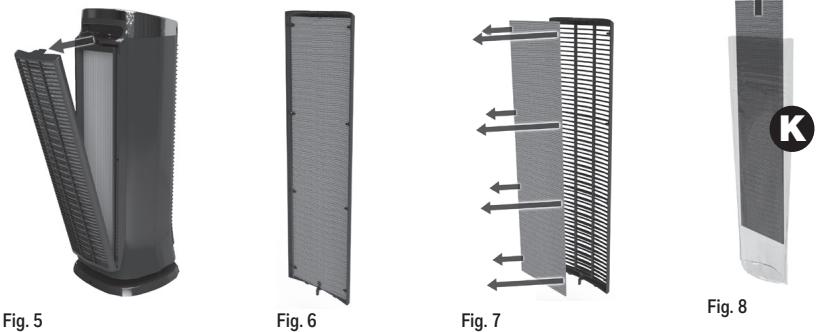
- If using the odour reducing K pre-filter instead of the washable permanent pre-filter you must first remove the washable pre-filter (see Fig. 7).
- Remove protective wrap/plastic bag from new pre-filter (see Fig. 8).
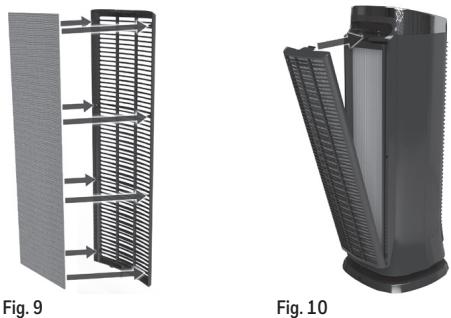
- Center the K pre-filter on the inside of the grille, and push edges under retention tabs so that pre-filter is secured in place (see Fig. 9).
- Re-install the rear grille by inserting the lower tab of the grille into the tab slot near the bottom of the air purifier. Push the top into place until you hear an audible click (see Fig. 10).
- Plug unit back in and press the Power button.
REPLACEMENT FILTER
Optional K Household Gas, VOC & Odour Reducing PreFilter: HRF-K2E
CLEANING AND STORAGE
We recommend that you clean the air purifier at least once every 3 months and before extended storage.
Use only a dry cloth to wipe the external surfaces of the air purifier.
DO NOT USE WATER, WAX POLISH, OR ANY CHEMICAL SOLUTION.
DISPOSAL

This appliance complies with EU legislation in 2012/19/EU on end of life recycling. Product
showing the 'Crossed Through' wheeled bin symbol on either the rating label, gift box or instructions must be recycled separately from household waste at the end of their useful life.
Please DO NOT dispose of appliance in normal household waste. Your local appliance retailer may operate a 'take-back' scheme when you are ready to purchase a replacement product, alternatively contact your local government authority for further help and advice on where to take your appliance for recycling.
GUARANTEE
Please read all instructions before attempting to use this device. Please retain the receipt as proof of and date of purchase. The receipt must be presented when making any claim within the relevant guarantee period. Any claim under the guarantee will not be valid without a proof of purchase.
Your device is guaranteed for three Years (3 Years) from date of purchase.
This guarantee covers defects in materials or workmanship that occur under normal use; defective devices meeting
these criteria will be replaced free of charge.
The guarantee DOES NOT cover defects or damage resulting from abuse or failure to follow the user instructions. The guarantee becomes void if the device is opened, tampered with or used with other parts or accessories, or if repairs are undertaken by unauthorised persons.
Accessories and consumables are excluded from any warranty.
For support requests, please visit www.hot-europe.com/support or find service contact information at the end of this owner's manual.
This Guarantee is applicable to Europe, Russia, Middle East and Africa only.
UK Only: This does not affect your consumer statutory rights.
The LOT and SN of your device are printed on the rating label on the packaging of the product.
CONDITION OF PURCHASE
As condition of purchase the purchaser assumes responsibility for the correct use and care of this product according to these user instructions. The purchaser or user must himself or herself decide when and for how long this product is in use.
WARNING: IF PROBLEMS ARE WITH THIS PRODUCT, PLEASE OBSERVE THE INSTRUCTIONS IN THE GUARANTEE CONDITIONS. DO NOT ATTEMPT TO OPEN OR REPAIR THE PRODUCT YOURSELF, AS THIS COULD LEAD TO TERMINATION OF THE GUARANTEE AND CAUSE DAMAGE TO PERSONS AND PROPERTY.
This product carries the CE mark and is manufactured in conformity with the Electromagnetic Directive 2014/30/EU, the Low Voltage Directive 2014/35/EU and the RoHS Directive 2011/65/EU.
Technical modifications reserved
HFD323E
230V\~50Hz 58W
DE AIR GENIUS 5 LUFTREINIGER
HFD323E
INHANKATOP HANPABJIENHHO OCBESEHENI
BaaO uOHTeIb Bo3dyxa IMeET yHKnUIO MAKkOro HapPaBHeHHoro OCBSeHnra B DAnHne pnp6op, KOtbpI oOecneuBaET nprrAthoe CBeueHne BOKpy OCHOBaHn. Bbl MoKTe BblpaTb, 6ydt Nl BaI np6Op pa60TaT b CKNIOeHNbIM HApPaBHeHHbM OCBSeHnem MII 6e3 Hero.EcIN Bbl XOTte ICNpNb3OBaTb yHKNUIO NOCDBeTKBbl MoKTe BblpaTb CNlbHbN INI cna6bIyypOBeH IOCDBeTKN.
KHOIIKA OCUINJIARUIN
HaxMMte 3Ty KHNKy,ecnXoTNe,TeO6bI ONUCTInTeIb BO3dYxa MRAKO BpaauCAI N3 CTOPOHb I CTOPOHy.
3To NOMOKeT YBEnuHtB UPKyIaIIO B KOMHaTe. OyHKUaOCuINJIaIaN aKTHINbpyTCa HkaTaNMeH Na KHONky
HaxMMTe Ha KONKy Oc qnJIaIyra] mIIN OoIN pa3 enKNHTe nCMBOly OCuINJIaIyIN dIy BkInOueHna daHHoI yHKUIN, a 3aTeM CHOBaOTKJIOHTe eN.
TAYMEP
Onuia TaMepa C IeB0I CTOpHbI NaHEnI ynpaBnEHnIO3BOJAEt BAM Bb6ipab, B TeueHne KaKOro BpeMeH arperat 6ydet pa60taTb do ABToMaTmueCKOrO OTKJIHOeHnI.
Длгаяпеклоченя орцш сальнoly «Таимер» ① .При нажати Вразмь 6удET yBENHINbATcBdo cneDyIOse caMoI BbICOKои hAcTpoKIn, nOKA He DoIyEt Do «12» (ETO 3NaHT, YTO np6Op 6удET pa6OtaTB TceHene 12 YacOB, a 3aTeM OTKnIOUChTcA).ЕслБынхMete KhoNky TaIMep, nOKA OH HaxOJITcHЯ «12»,Таймер OTKIOUChTcA, apn6Op 6удET HENpePBbHO p6OtaTB.ЕслБые uep pasнхmete kHONky, OH ChOBA 3aNyCTtCHa «2»
- JIcTaiTe OIcHn BbIbopa BpeMeHn, NOKa CBTeOIOIDHb INDnKaTOp He 3aRopITcra 3a TEM UcNtOM, KOTOpoe Bbl XOTNe BbIbapb. EcIN TaIMep ABOTMaTHeCKoTO OTKJIoueHEn He TOpNT, OUcHtIeJIb BOzdyxa 6byet paobotab HenpepbIBHO.
OuNCTKA OuJIbTPA IFD
ФиьтbpifD" cneуet uctntb, npu6n3ntelbno, odin pa3 B 3 mecua.
ДяочICTKФильтpaifD
Iocne I3BNeueHnIe 0nIbTp aIfD" uOCHNTeINBaO3dYxa BbIOJIHnTe npBBeEHnIbe HnHexeWan, YTObbl pOMbIbTb 0nIbTp ifD".
OnolackBaHne:
- OnonochinteфnBtpBvCTOnTnpOTouHNO BoJe.
EcnnФиьтпо-нржсмуВыглдИтграЗHM,BbIOnJIHNTe «ПомьБКУ》,a3aTeMпeерДИТК«Сушke».
IpMbIBKa:
- BbKIOUOHTe pIb6Op N BbITaIHTe BUNKy IV3 PO3ETKN.
- N3BVeKInTe ΦnIbTp ifD" n3 npI6oopa.
HanoHNHe pakoBHy tenIIO BODI IN doBaBte HeckoJIbKO Kaenb MArKOrO MOUeTo CpeCTBA. - AkkypatNo npoNoIoUnte fMbTp B MbIbHOM pactBope nOuHCTKN.
3aMOnUte pIJIbTp Ha 2-3 MmHyTb. He octablaIe B paCTBope Ha npdoJIXKITelbHoe Bpem. - Oποιοchnite φπιλτυρεν Φικτόθη προτουύην Μοῦς (Pnc. 11).
CyuKa:
- Notparcnte fIbTp, TTObIyUaJIbTb IuHIOBDOY.
- Пложипсфьлбт поись CTуктуров Bнз На Маробoe плOTeHц.
- PpIMMtke K CBeDeHnIO, YTo ΦIINbTp MoKet No-mpExHemMy 6bITb 06ecuBceHHeBIM DaXe NocE IpombIBKn. 3To DonyUcKaETcN He BInueRHa erO 3ΦΦeKTNBHOCTb.
ДаиTeФильтурifD®порсхутьВТeчЕнеHECKOLbKINxЧaСOBИЛHOTy.
KordaФиньтфID®олноctьвБуICOXHET,yCTaHOBHTeeroHa3aD B OYCHNTENB BO3ДУXA.
\PIEDyIIPEXDEHNE:
3aepaaetcyaTahabnBaTbMOKpbIΦIbTp ifD OuchTeJIb Bo3dYa.
ΦnIbTp ifD'HEIb3MByMbTbBnocydomoeyHmMaunHe.KeIaJnte ΦnIbTp ifD' B nocydomoeyHmMaunHy n He noDBepraTe erO BO3dEiCTBnO npTyHX 3KCTpeMaJIbHbX yCIOBn B VBe TOpRaeN BObl.
ДляочсTKФиьтpa ifD"нельзЯСпОЛьЗВаТь paCTBOPITeN, CИЛБHIE YICHTЯПЕ cpeCTBa IIN BOCIIПамЕХЮПЕССКИДКOSTM.
YXOJ 3A ΦNJIbTPOM IPEДВAPNTJIbHON OUHCTKN, KOTOPbIM MOxHO MbITb
ФиьтnpeДВapITeHbOuOCTKnIOMorAet3aJepXINBaTbKpyNHbYe aCTMlb, B3BeWeHbBvBO3dyXe, KOTOpbIeN0aJaIOrHa3aHIOU peWETky.ДанньФиьтnpeДВAPITeHbOuOCTKnMOket nepiOnDUnecckCNIMaTbCnBCTpXmBaTcIЯОuCTKn.Takkeero MoxHNoPombIbTaBByuHyTOI TeNIOIBoIo.IpeE yCTaHOBkoI Ha3aD BPwETky DaJIteФиьTp npeДВapITeHbOuOCTKn PONHOCTbO BblCOxHYtB.
ONIQUHOJIbHO:3aMeHaΦnIbTpra npeDbapntelbHOn OuNCTKN, COKpaauoJero 3aapanx
EcnBbpeunnncnonb3oBaTbdoonHntbHybΦnltpnpedBapntelhnoOCTKN,COKpaiaouuim3aapanx,CTeEHMeBVPemH er0 0fkeKTINBOCTb nIooJeHHN 3aapanXOB TepreTCa, INOTpebyetcraero3aMeHa.
PnIN cnoJb3oBAHm nIbItpa npEdBapntBHO OH OcNCTKN K COKpaauOeero 3aapanx, peKOMeHdyetcXpaHHT oPHINHaBbHbI pIpeBDAPNTBHO OH OcNCTKN, KOToPi MOxHO MbITb, Ha CnyaH, eCN Bb peWInTE nCNOJIb3oBaT b erO b6yduiem.
Дл.TTO,уTObI yctaHOBITb erO b npi6Op, npocTo aKKypaTHO BCTaBtfe ΦINbTpB 3aDHHo peWetky BMcTo CTaHapTHOro fInbTpApnpedBaPHTbH OCHTKn.
RENGÖRNING OCH FÖRVARING
Cyprus Northern region
+0392 22 72 367
Czech Republic
+420(0)225439769
Denmark
+4535158040
Finland
+358(0)981710014
France
+33 (0) 185148095
Germany
Western Region - Jeddah
+966(0)22565555
Central Region - Riyadh
+966(0)12886808
Eastern Region -
Al-Khobar
+966(0)38940555
South Region - Abha
+966(0)72376062
Slovakia
+421 25011 2115
Slovenia
+386 (01) 888 86 74
South Africa
+27(0)110891200
Spain
+34913754176
Sweden
+46(0)851993097
Switzerland
+41 (0) 225675200
Tunisia
+21671716880
Turkey
+902163372255
UAE
+97143534506
United Kingdom/Ireland
+44 (0) 115 965 7449

Kaz Europe Sàrl
Place Chauderon 18
CH-1003 Lausanne
Switzerland
© 2018 All rights reserved.
www.hot-europe.com


Made and printed in China
Honeywell is a trademark of Honeywell International Inc., used under license by Helen of Troy Limited.
Honeywell International Inc. makes no representation or warranties with respect to this product.
The ifD® trademark is used under license from Darwin Technology International LTD.
HFD323E
05MAR18
P/N:A002224RO