PASTAMAKER HR2334/12 - VIVA COLLECTION HR2334 - Pasta machine PHILIPS - Free user manual and instructions
Find the device manual for free PASTAMAKER HR2334/12 - VIVA COLLECTION HR2334 PHILIPS in PDF.


| Product type | Pasta maker |
| Brand | Philips |
| Model | PASTAMAKER HR2334/12 - VIVA COLLECTION HR2334 |
| Dimensions (L x W x H) | 350 mm x 135 mm x 287 mm |
| Net weight | 4.7 kg |
| Motor power | 150 W |
| Rated voltage | 220-240 V (50 Hz) |
| Maximum flour capacity | 400 g |
| Main functions | Mixing, kneading, extrusion of fresh pasta |
| Included shape discs | Spaghetti, Fettuccine, Penne, Lasagne/Ravioli |
| Cleaning | Removable parts dishwasher-safe (max 60°C), main unit wipe with a dry cloth |
| Safety | Safety lid lock preventing operation if not properly closed |
| Included accessories | Flour cup, measuring cup, cleaning brush, flat cleaning tool, recipe book |
| Warranty | 2 years |
Frequently Asked Questions - PASTAMAKER HR2334/12 - VIVA COLLECTION HR2334 PHILIPS
User questions about PASTAMAKER HR2334/12 - VIVA COLLECTION HR2334 PHILIPS
0 question about this device. Answer the ones you know or ask your own.
Ask a new question about this device
Download the instructions for your Pasta machine in PDF format for free! Find your manual PASTAMAKER HR2334/12 - VIVA COLLECTION HR2334 - PHILIPS and take your electronic device back in hand. On this page are published all the documents necessary for the use of your device. PASTAMAKER HR2334/12 - VIVA COLLECTION HR2334 by PHILIPS.
USER MANUAL PASTAMAKER HR2334/12 - VIVA COLLECTION HR2334 PHILIPS
natural_image
Exterior view of a Philips electric vacuum cleaner with visible internal components (no text or symbols on the device itself)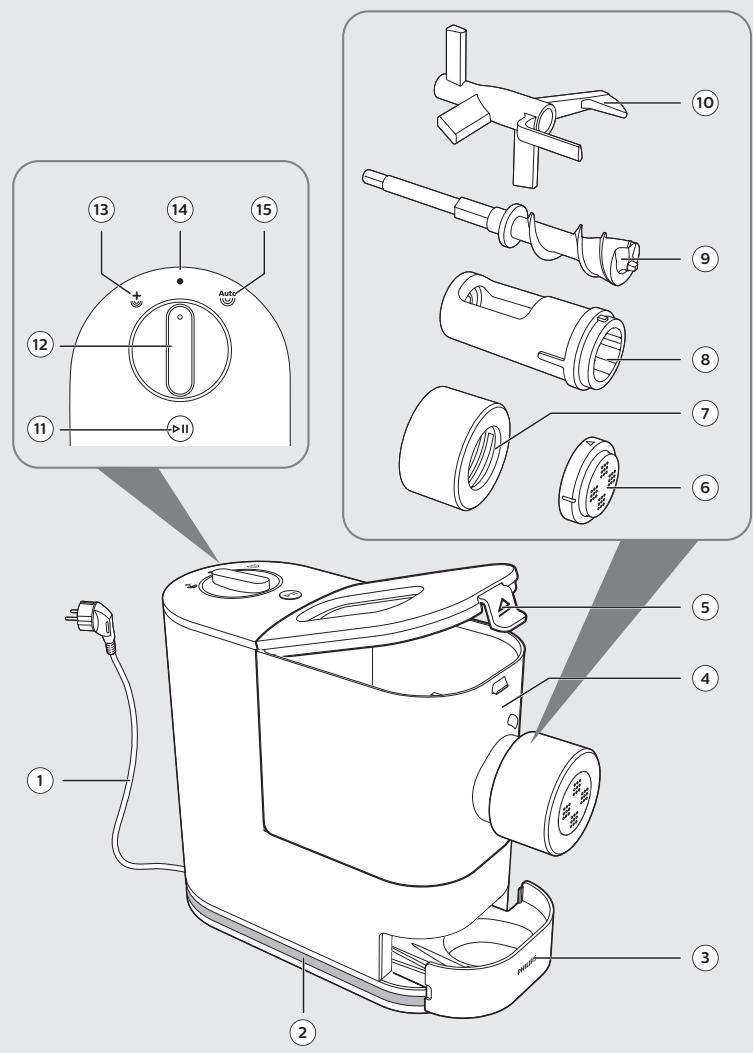
Table of Contents
Introduction 6
Product information 6
What's in the box 7
Overview 7
Disassembling and cleaning before first use 8
Assembling 10
Using the Pasta maker 13
Cleaning 21
Storage 23
Troubleshooting 24
Introduction
Congratulations on your purchase, and welcome to Philips!
To fully benefit from the support that Philips offers, register your product at www.philips.com/welcome.
Read this user manual carefully before you install and use the appliance.
Save it for future reference.
Product information
| Model | HR2333/12, HR2334/12HR2345/29, HR2345/39 |
| Motor power | 150W |
| Rated voltage | AC220-240V (50Hz) |
| Dimensions (L x W x H) | 350 mm x 135 mm x 287 mm |
| Net weight | 4.7 kg |
- For rated voltage and frequency information, refer to the type plate on the product. Product information is subject to change without prior notice.
| Abbreviations |
| g = grams |
| ~ = approximately |
| ml = milliliters |
| mm = millimeters |
| kg = kilogram |
6 English
1
What's in the box
① Main unit
② User manual
③ Recipe book
④ Cleaning brush
⑤ Flat cleaning tool
⑥ Flour cup
⑦ Water cup
⑧ Shaping disc
A Spaghetti
B Fettuccine
C Penne
D Lasagne/Dumpling
2
Overview
① Power cord
② Cord storage wrap
③ Storage box
④ Mixing chamber
⑤ Mixing chamber lid
⑥ Shaping disc
⑦ Shaping disc holder
⑧ Squeezing tube
⑨ Squeezing bar
⑩ Mixing paddle
⑪ Start/pause button
⑫ Control knob
⑬ Extra-extrusion setting
⑭ OFF
⑮ Auto operation setting
Disassembling and cleaning before first use
Important
- Before using the appliance for the first time, remove and safely discard any packing material and /or promotional labels.
- Take out all detachable parts and accessories, wash and thoroughly dry all parts and accessories (refer to the chapter "Cleaning").
- Do not use water to rinse or soak the main unit, the power cord, or the power plug.
- Do not use a scouring pad or similar cleaners as these will scratch the plastic surface and affect the lifetime of the Pasta maker.
- The shaping discs and all detachable parts of the appliance are dishwasher safe. When you clean them in a dishwasher, make sure to select the proper program which has a maximum temperature at no higher than 60°C.
- This appliance is intended for household use only.
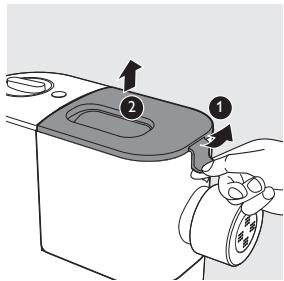
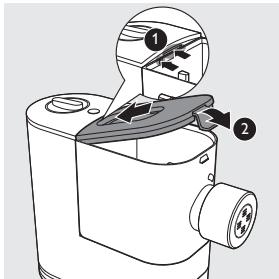
1 Pull the lid to unlock it and then remove the lid from the mixing chamber.
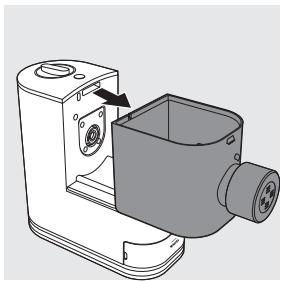
2 Slide the mixing chamber off the main unit.
natural_image
Technical line drawing of a mechanical device with a housing and mounting bracket (no text or symbols)8 English
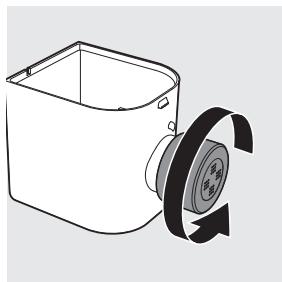
3 Turn the shaping disc holder counterclockwise to remove it from the mixing chamber outlet.
natural_image
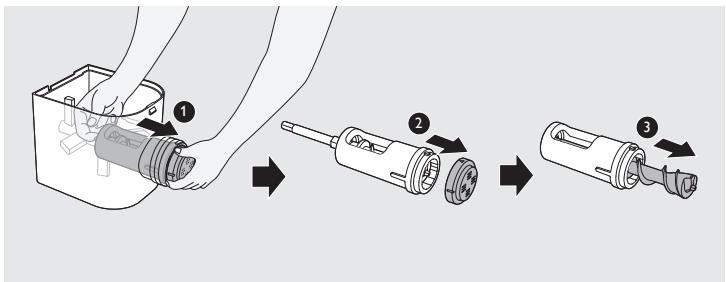
Line drawing of a mechanical device with a pulley and rotating wheel (no text or symbols)4 Put your finger in the mixing chamber and push the squeezing tube outwards to slide it out of the mixing chamber outlet. Detach the shaping disc, and then pull the squeezing bar out of the squeezing tube.
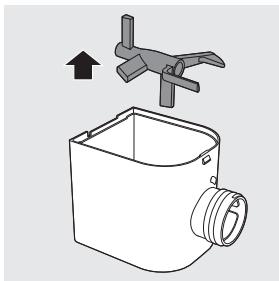
5 Take the mixing paddle out of the mixing chamber.
natural_image
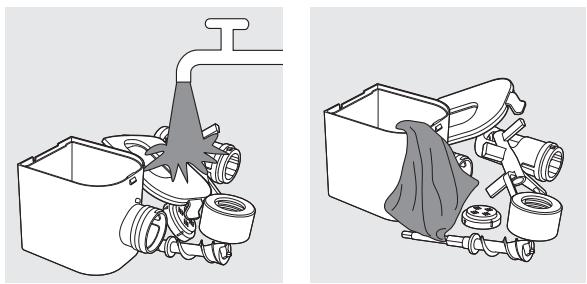
Diagram of a mechanical device with a propeller and housing, showing an upward arrow (no text or symbols)6 Clean all detachable parts and accessories, and then wipe them dry.
natural_image
Technical illustration of a mechanical assembly with pipe and housing components (no text or symbols)Assembling
Follow the assembling steps below to assemble the Pasta maker.
Important
- Make sure the appliance is not plugged in during assembly.
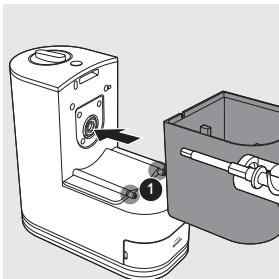
1 Slide the mixing chamber onto the main unit.
Note:
- Make sure the fixing levers ① on the main unit are fitted with the openings on the bottom of the mixing chamber.
natural_image
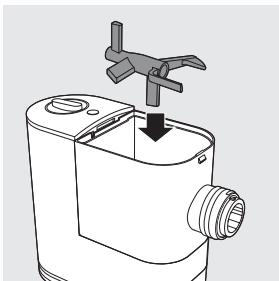
Technical line drawing of a mechanical device with a handle and internal components (no text or symbols)2 Put the mixing paddle in the mixing chamber as shown in the illustration.
natural_image
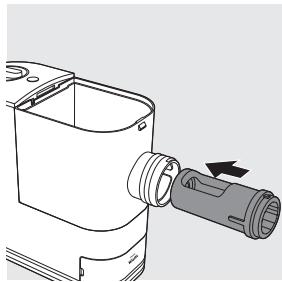
Technical line drawing of a mechanical device with a handle and internal components (no text or symbols)3 Insert the squeezing tube into the mixing chamber.
Note:
- Make sure the big opening on the squeezing tube faces up when you insert the tube into the chamber.
natural_image
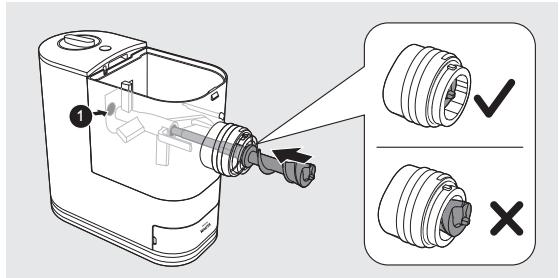
Technical line drawing of a mechanical device with a cylindrical component and an arrow indicating direction (no text or symbols)4 Insert the squeezing bar into the mixing chamber. Make sure the squeezing bar slides all the way through both the squeezing tube and the mixing paddle and into the shaft in the main unit.
Note:
- Slightly turn the mixing paddle to make sure the squeezing bar is connected correctly with the shaft ① in the main unit.
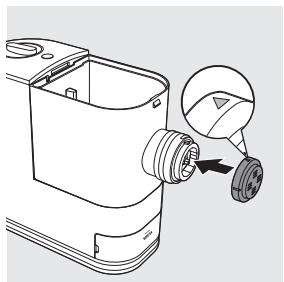
5 Attach the shaping disc on the mixing chamber outlet.
Note:
- Make sure the flat side of the shaping disc is facing out.
- Make sure the shaping disc fits into the fixing point on the squeezing bar.
- Make sure the arrow on the shaping disc face upwards when you attach it on the mixing chamber outlet. Pay special attention when you
do so for the lasagna/dumpling shaping disc. This is to make sure that the opening of the lasagna sheet is on the top.
natural_image
Technical line drawing of a mechanical component with a magnified inset showing a pin detail (no text or symbols)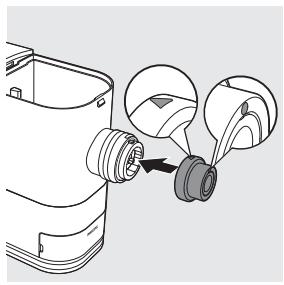
natural_image
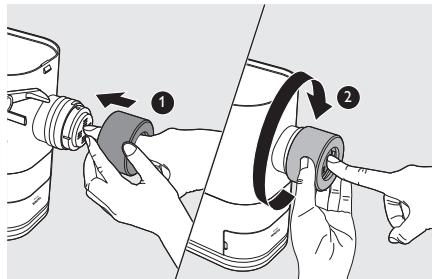
Diagram of a mechanical component with a pulley and a magnified inset showing internal components (no text or symbols)6 Press the shaping disc through the opening of the shaping disc holder, and then assemble the holder on the mixing chamber outlet. Turn the holder clockwise to firmly lock it in place.
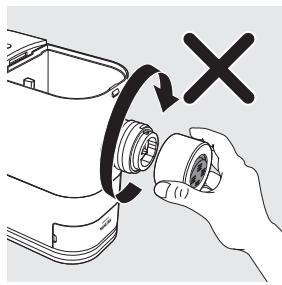
Always attach the shaping disc on the mixing chamber outlet before you assemble the shaping disc holder. Never put the shaping disc in the shaping disc holder and assemble them on the mixing chamber outlet at the same time.
natural_image
Illustration of a hand holding a small mechanical component with a circular arrow indicating rotation (no text or symbols present)7 Attach the lid onto the mixing chamber.
Note:
- If the mixing chamber lid is not properly installed, the safety switch will prevent the appliance from working.
12 English
Using the Pasta maker
Important
- Place the product on a flat surface and prevent table shaking or vibration.
- Make sure all the parts are well assembled before plugging in.
- Do not put less than 200 g (1x included flour cup) or more than 400 g (2x included flour cups) of flour in the chamber.
- Pour in the liquid slowly through the water slot after the appliance starts kneading.
- If you want to dispose the weighed flour before processing with the next batch, empty the chamber and restart the appliance by unplugging and plugging in again.
- Do not put any ingredients that are 60°C or above into the Pasta maker, or place the Pasta maker in surroundings at high temperature (60°C), for instance in a high temperature sterilization environment. This will deform the appliance.
- Do not pour liquid into the mixing chamber before the Pasta maker starts running.
- Make sure the shaping disc and shaping disc holder are assembled properly before plugging in the appliance.
Preparing and measuring the flour
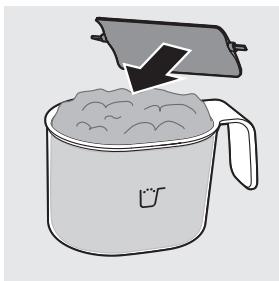
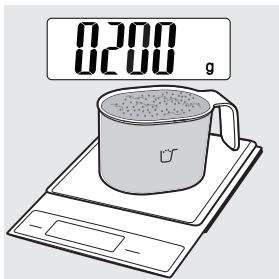
1 Scoop one full cup of flour using the included flour cup. Scrape off any excessive flour from the cup edge with the supplied flat cleaning tool. 1 full cup of flour weighs around 200g, and 2 full cups of flour weigh around 400g.
natural_image
Illustration of a cooking pot with a lid and lid removed, showing dough inside (no text or symbols)Note:
- Do not shake or hit the flour cup to remove excessive flour. This will affect the flour weight.
- Use a kitchen scale to measure the weight more accurately.
- 200g of flour makes about 200g fresh pasta/noodles. 400g of flour makes about 450g fresh pasta/noodles.
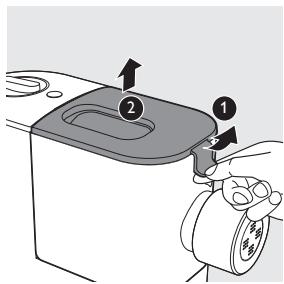
2 Pull the lid to unlock it and then remove the lid from the mixing chamber.
14 English
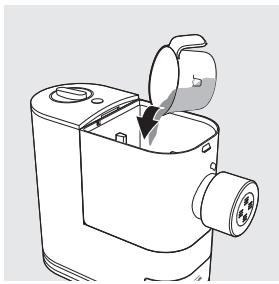
3 Pour the flour into the chamber. If you want to make 2-3 servings, add a second cup of flour as you will need 2 cups (\~400g) of flour in total.
natural_image
Line drawing of a mechanical device with a lid and internal components (no text or symbols)Note:
- Do not pour liquid into the mixing chamber at this point. Only pour liquid after the Pasta maker starts running.
- Do not put less than 200g or more than 400g of flour in the chamber. If you put too little or too much flour in the chamber, the appliance may not operate.
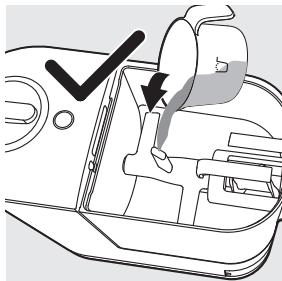
- Do not pour the flour into the opening of the squeezing tube, otherwise the flour in the squeezing tube will not be mixed evenly.
natural_image
Diagram of a car interior showing a hand holding a bag with a checkmark and arrow indicating action (no text or symbols present)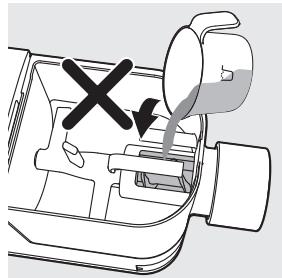
natural_image
Diagram of a mechanical device with a valve and handle, showing a cross mark and downward arrow (no text or symbols)Preparing and measuring the liquid
1 Measure the liquid volume at eye level on a flat surface.
Note:
- Do not pour liquid into the mixing chamber before the Pasta maker starts running.
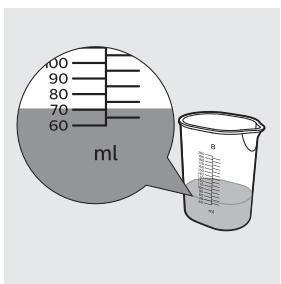
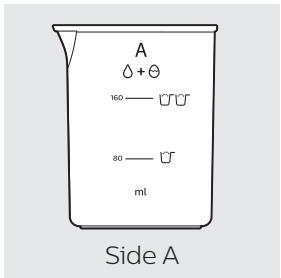
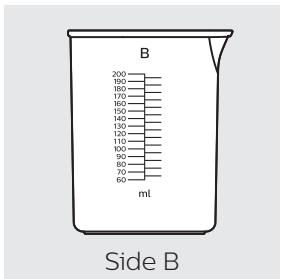
There are 2 sets of water markings on the supplied water cup.
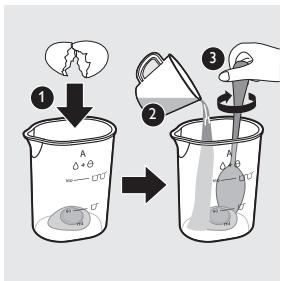
When using all-purpose flour and egg mixture to make plain egg pasta/lasagna, refer to side A with two liquid levels.
- Level 1 (80ml): required egg mixture amount for 1 cup of flour.
- Level 2 (160ml): required egg mixture amount for 2 cups of flour.
To make egg mixture for plain egg pasta, crack 1 egg into the water cup. Add water up to the required amount as shown on side A, and then whisk the water and egg to combine.
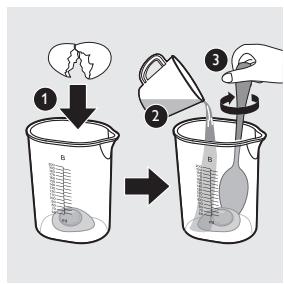
When using the following combinations of flour and liquid to make pasta, refer to side B with specific volume.
- All-purpose flour mixed with pure water/vegetable juice mixture.
- Various other flours (as shown in the following tables) mixed with egg mixture/pure water/ vegetable juice mixture.
Check the following tables for detailed water and flour ratio.
Note:
- These tables show the flour-liquid ratio base on 200g of flour. When using 400g of flour to make pasta, double the liquid volume (including egg) to get the right flour-liquid ratio.
When using egg mixture to make pasta, crack 1 egg into the water cup. Add water up to the required amount as shown below, and then whisk the water and egg to combine.
| Flour | Egg mixture (ml) | Water cup |
| Durum (Semolina flour 150g + all-purpose flour 50g)* | 85 | Side B |
| Whole wheat 200g | 90 | |
| Spelt 200g | 95 | |
| Bread flour 200g | 85 | |
| Soba (buckwheat flour 130g + all-purpose flour 70g)* | 85 |
When using pure water to make pasta, add water to the required amount as shown below.
| Flour | Pure water (ml) | Water cup |
| All-purpose flour 200g | 75 | Side B |
| Durum (Semolina flour 150g + all-purpose flour 50g)* | 75 | |
| Whole wheat 200g | 85 | |
| Spelt 200g | 80 |
When using vegetable juice (including 1 egg) to make pasta, crack 1 egg into the water cup. Add vegetable juice up to the required amount as shown below, and then whisk the juice and egg to combine.
| Flour | Spinach juice (including 1 egg) (ml) | Beet juice (including 1 egg) (ml) | Carrot juice (including 1 egg) (ml) | Water cup |
| All-purpose flour 200g | 85 | 85 | 85 | Side B |
| Durum (Semolina flour 150g + all-purpose flour 50g)* | 85 | 85 | 85 |
* Use a kitchen scale to measure the weight more accurately.
Important
- The pasta recipes provided in the recipe book have been tested for success. If you experiment with or use other pasta recipes, the flour and water/egg ratios will need to be adjusted to the flour and water cup ratios included with the Pasta maker. The Pasta maker will not operate successfully without adjusting the new recipe accordingly.
Note:
- For best results, use all-purpose flour with the recommended liquid proportions indicated on the cup.
- Seasonal changes, using ingredients from different regions may affect the flour/water ratio.
- “Gluten” is a binder which ensures the pasta does not break easily. Gluten-free flour does not contain a binder, therefore it needs a thickener to act as a "binder" eg. Xanthan gum or Guar. Various kinds of gluten-free flour perform differently when making pasta. Some flours are not suitable for making pasta such as coconut flour and white rice flour; some flour varieties work well, such as quinoa and buckwheat.
• See the recipe book provided for more delicious pasta and noodle ideas.
Starting the pasta making program
Important
- Do not select the extra extrusion program before the dough mixing is complete. Otherwise, this will damage the Pasta maker and its lifetime.
- Do not disconnect the power cord before the processing is complete. If you have to stop the pasta making process, turn the control knob to "OFF" to stop the working process and then disconnect the power cord from outlet before performing other operations.
- Do not exceed the maximum operation cycle of 2 cycles continuously at all applications. To better protect the lifetime of the appliance, you can restart using the appliance after 30 minutes upon 2 continuous operation cycles.
- If you intend to use the appliance continuously, clean each shaping disc with the supplied cleaning tool each time after the pasta making session. For easy cleaning, do not soak the shaping disc directly in water.
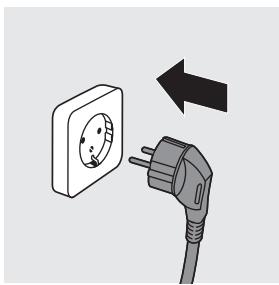
1 Put the plug of the appliance into the power outlet. The Pasta maker will give a signal sound once.
Note:
- Make sure all the parts are well assembled before plugging in.
natural_image
Illustration of a wall socket connected to an electrical plug with a power outlet, showing a left-pointing arrow (no text or symbols)2 Attach the lid onto the mixing chamber.
Note:
- The appliance will not start working if the chamber lid is not properly closed. During the pasta making process, if the chamber lid becomes loose, the appliance will automatically stop working.
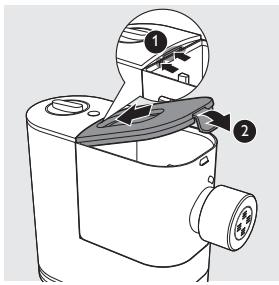
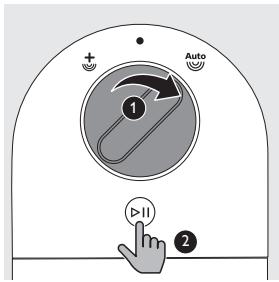
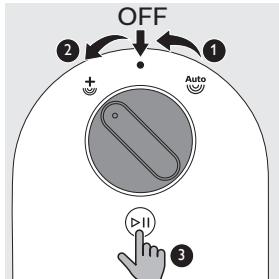
3 Turn the control knob to select the automatic pasta making process, and then press the Start/Pause button.
Note:
- The whole working process (including kneading and extruding) takes around 12 minutes for 200g of flour and 18 minutes for 400g of flour.
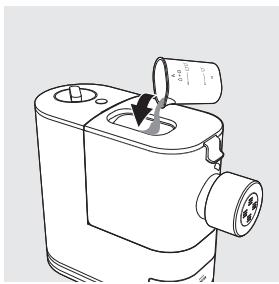
4 After the kneading starts, slowly pour in the liquid along the entire length of the slot in the lid.
Note:
- During dough mixing, do not add other ingredients after you have poured in the liquid. Otherwise, it will affect the results of the pasta texture.
natural_image
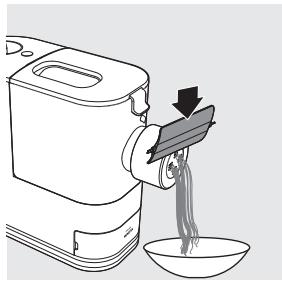
Line drawing of a mechanical device with a dial indicator and arrow pointing to a component (no text or symbols)5 After the Pasta maker finishes kneading, it will beep a few times and the pasta extrusion will start after a few seconds. Place a container right under the outlet. Cut the pasta into the desired length with the cleaning tool.
Note:
- If the ratio of liquid and flour is not correct, the extrusion will not succeed. In this case, prepare the ingredients again.
- Move the cleaning tool downwards to cut the pasta.
natural_image
Line drawing of a rice cooker with noodles being poured into a bowl (no text or symbols)6 When the extrusion process is complete, the appliance will beep a few times.
Note:
- Do not turn the control knob to the “OFF” position before the whole process is over (you will hear the “beep” sound).
7 After the pasta making is complete, if you notice some leftover dough inside the chamber, you can turn the control knob to the OFF position first, and then turn the control knob to the extra-extrusion position. Press the Start/Pause button to start the extra-extrusion program.
Note:
- You may find some fine pasta threads on the pasta surface. This is normal.
- The cooking time of the pasta varies depending on personal preferences, pasta shapes, and number of servings.
Cleaning
Important
- Turn the control knob to "OFF", disconnect the power and remove the power cord before cleaning or disassembling this appliance.
- Do not immerse the main unit in water.
- Do not use a scouring pad, caustic cleaners, or abrasive cleaners (for examples, gasoline, alcohol, and propanol) to clean the appliance.
- Clean the appliance each time after use, or the appliance might not operate properly.
- Take extra caution when cleaning the appliance to avoid getting cut by any sharp edges.
- The shaping discs and all detachable parts of the appliance are dishwasher safe. When you clean them in a dishwasher, make sure to select the proper program which has a maximum temperature at no higher than 60°C.
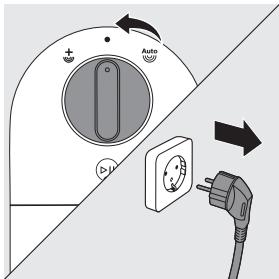
1 Turn the control knob to "OFF" and disconnect the plug from the power outlet.
2 Follow steps 1 to 5 in chapter "Disassembling and cleaning before first use".
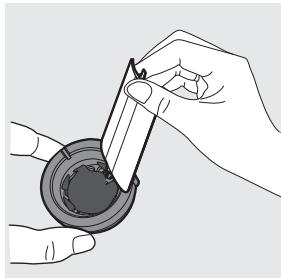
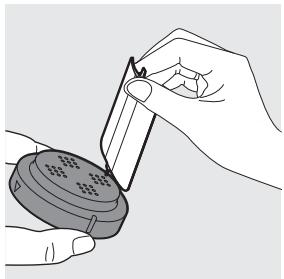
3 Clean the shaping disc with the supplied cleaning tool to remove the dough residues. After that, you can clean it with water.
natural_image
Illustration of hands using a tool to adjust or install a small electronic device (no text or symbols visible)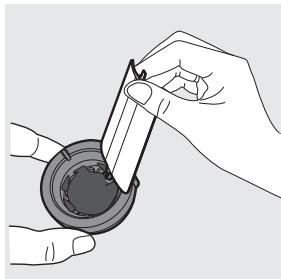
natural_image
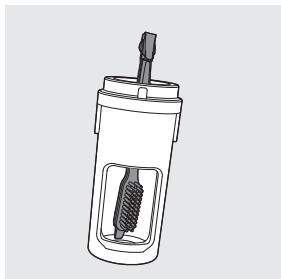
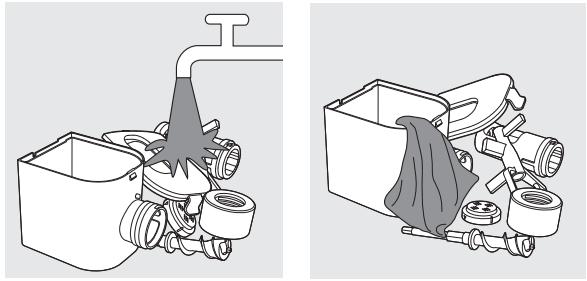
Illustration of hands using a tool to apply material to a circular component (no text or symbols visible)4 Use the supplied cleaning brush to clean all detachable parts with dishwashing liquid and warm water or clean in the dishwasher. Wipe all parts dry.
Tip:
- Use the pointy end of the cleaning brush to clean the inner bottom of the squeezing tube.
natural_image
Cross-sectional diagram of a mechanical device with internal components (no text or symbols)5 Clean all detachable parts with dishwashing liquid and warm water or clean in the dishwasher. After that, wipe all parts dry.
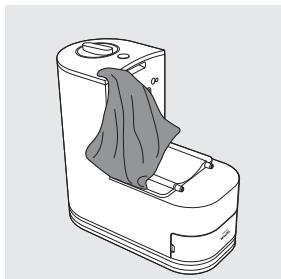
6 Use a dry cloth to clean the main unit, control knob, and the exterior of the Pasta maker.
Note:
- After cleaning, make sure all parts and the shaping disc air dry thoroughly before storing. Assemble the Pasta maker back for next use.
natural_image
Line drawing of a mobile phone device with a cloth cover and ventilation slots (no text or symbols)22 English
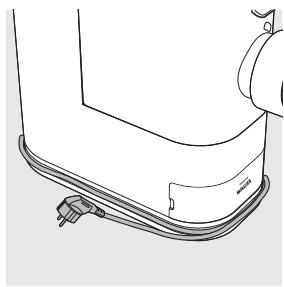
1 Wind the power cord around the cord storage wrap.
natural_image
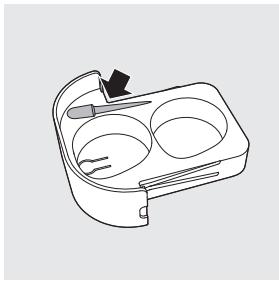
Line drawing of a mechanical component with curved surfaces and a small attached plug (no text or symbols)2 Dry the shaping discs and store them in the storage box.
The small groove in the storage box is designed for the cleaning tool of the angel hair shaping disc, which is not included in this Pasta maker. It will be launched and sold separately.
3 Store the Pasta maker in a dry, well ventilated place after use.
natural_image
Line drawing of a microwave oven with two cups and a handle (no text or symbols)Troubleshooting
This chapter summarises the most common problems you could encounter with the appliance. If you are unable to solve the problem with the information below, visit www.philips.com/support for a list of frequently asked questions or contact the Consumer Care Center in your country.
The appliance does not sound after the plug is put in the wall outlet.
- The plug is not connected properly, or the outlet is not connected to power source. Check whether the power plug is plugged correctly and the outlet is working properly.
The appliance does not start the pasta making process after the plug is put in the wall outlet.
- You have not chosen a pasta making program or pressed the start button ⬆. Choose a pasta making program and press the start button ⬆.
After pressing the start button ⏻, the appliance makes alarm sounds and does not work.
- The chamber lid is not assembled properly. Make sure you follow the user manual to assemble the chamber lid properly.
The chamber lid is pushed open from the inside.
- There's too much flour in the mixing chamber.
The maximum amount of flour for each batch is 400g. If you have put more than 400g of flour in the mixing chamber, reduce the amount and make another batch of pasta. - The ratio of flour and water provided in the "Flour/water ratio table" was not followed. The dough is too wet.
Disconnect from the power source, clean the Pasta maker, and follow the user manual again to restart the pasta making. - The chamber lid is not assembled properly.
Make sure you follow the user manual to assemble the chamber lid properly.
During the pasta making process, the appliance stops working, and there is no alarm sound.
- The Pasta maker has overheated due to long and continuous working time.
Disconnect from the power source, and allow the Pasta maker to cool down. Do not exceed the maximum operation cycle of 2 cycles continuously at all applications. To better protect the lifetime of the appliance, you can restart using the appliance after 30 minutes upon 2 continuous operation cycles.
During the pasta making process, the appliance stops working, and makes alarm sounds.
- The ratio of flour and water provided in the "Flour/water ratio table" was not followed. The dough may be too dry.
- The mixing paddle may be blocked by some foreign objects.
• The wrong program is selected.
Disconnect from the power source, clean the Pasta maker, and follow the user manual again to restart the pasta making.
The mixing paddle is running idle, and there is no pasta coming out.
• The ratio of the flour and water is incorrect.
Disconnect the plug from the power source and discard dough. Clean the Pasta maker, measure ingredients correctly (use a kitchen scale to measure the flour weight more accurately), and follow the user manual again to restart the pasta making
- The flour becomes damp after longtime storage.
Use flour that is fresh or properly stored.
The pasta breaks easily.
• The ratio of the flour and water is incorrect.
Disconnect the plug from the power source and discard dough. Clean the Pasta maker, measure ingredients correctly (use a kitchen scale to measure the flour weight more accurately), and follow the user manual again to restart the pasta making.
- You did not use the correct type of flour.
Use all-purpose flour or flour with higher protein content (refer to the chapter 'Using the Pasta maker' in the user manual or the supplied recipe book).
The pasta sticks together.
- The ratio of the flour and water is incorrect, too much water is poured in the mixing chamber. Measure flour and water with the provided flour and water cup and according to the "flour/water ratio table". Use a kitchen scale to measure the flour weight more accurately.
Too much leftover dough inside the chamber.
- The flour is either exposed to moisture before use, or the dough is too wet.
Keep your flour dry during storage. Follow the user manual instructions to restart the pasta making. - The chamber, the mixing paddle, the shaping disc are not cleaned properly before use.
Make sure all parts are clean before use.
• The mixing paddle or the chamber is still wet.
Make sure all parts are completely dry before use.
• Water is not added in the right order.
The flour type is not suitable.
Follow the user manual instructions to make pasta.
Small amount of water is leaking out from the appliance.
• Water is added before the program starts.
Follow the user manual instructions to add water right after the program starts.
After pasta making, the mixing chamber cannot be slid off the main unit, or the squeezing tube cannot be pushed out of the mixing chamber.
- The appliance is stopped during extrusion before the pasta making process is finished completely.
- Restore the disassembled parts back in place until the appliance is assembled properly, and turn the control knob to the OFF position.
- Plug in, select the automatic pasta making program, and press the start button. Keep the mixing paddle rotating for around 10 seconds, and then turn the control knob to the OFF position.
- Unplug the appliance, disassemble and clean the appliance as described in the user manual (see chapter “cleaning”).
Inhaltsverzeichnis
Produktinformationen ......28
Einführung 28
natural_image
Technical line drawing of a mechanical device with a housing and mounting bracket (no text or symbols)30 Deutsch
natural_image
Line drawing of a mechanical device with a pulley and rotating wheel (no text or symbols)natural_image
Diagram of a mechanical device with a plunger and directional arrow, no text or symbols presentnatural_image
Technical illustration of a mechanical assembly with pipes and housing (no text or symbols)Zusammenbauen
natural_image
Diagram of a mechanical device with a handle and internal components, no text or symbols presentnatural_image
Technical line drawing of a mechanical device with a handle and internal components (no text or symbols)natural_image
Technical line drawing of a mechanical component with a cylindrical port and arrow indicating direction (no text or symbols)32 Deutsch
natural_image
Technical line drawing of a mechanical component with a magnified inset showing a pin detail (no text or symbols)natural_image
Diagram of a mechanical component with a pulley and a magnified inset showing internal components (no text or symbols)natural_image
Illustration of a hand holding a small mechanical component with a circular arrow indicating rotation (no text or symbols present)natural_image
Illustration of a cooking pot with a lid and lid removed, showing liquid being poured into it (no text or symbols)Hinweis:
natural_image
Line drawing of a mechanical device with a lid and internal components (no text or symbols)Hinweis:
natural_image
Diagram showing two views of a car interior with arrows indicating movement or force (no text or symbols present)natural_image
Illustration of a wall socket connected to an electrical plug with a power outlet, showing a left-pointing arrow (no text or symbols)natural_image
Line drawing of a mechanical device with a dial and handle, no text or symbols presentnatural_image
Line drawing of a rice cooker pouring noodles into a bowl (no text or symbols)natural_image
Illustration of hands using a tool to apply material to a circular component (no text or symbols visible)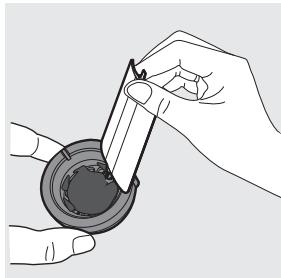
natural_image
Illustration of hands using a tool to apply material to a circular component (no text or symbols visible)natural_image
Cross-sectional diagram of a mechanical device with internal components (no text or symbols)natural_image
Line drawing of a mobile washing machine with a cloth cover (no text or symbols)natural_image
Line drawing of a mechanical component with no visible text or symbolsnatural_image
Line drawing of a microwave oven with two compartments and a handle (no text or symbols)Fehlerbehebung
natural_image
Technical line drawing of a mechanical device with a housing and mounting bracket (no text or symbols)52 Español
natural_image
Line drawing of a mechanical device with a pulley and rotating wheel (no text or symbols)natural_image
Diagram of a mechanical device with a propeller and housing, showing an upward arrow (no text or symbols)natural_image
Diagram of a pipe system with a funnel pouring into a container (no text or labels)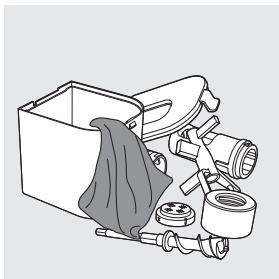
natural_image
Illustration of a mechanical assembly with hoses and a cloth, no text or symbols presentMontaje
natural_image
Technical line drawing of a mechanical device with a handle and internal components (no text or symbols)natural_image
Technical line drawing of a mechanical device with a handle and internal components (no text or symbols)natural_image
Technical line drawing of a mechanical device with a cylindrical component and an arrow indicating direction (no text or symbols)54 Español
natural_image
Technical line drawing of a mechanical component with a magnified inset showing a pin detail (no text or symbols)natural_image
Diagram of a mechanical component with a pulley and a magnified inset showing internal components (no text or symbols)natural_image
Illustration of a hand holding a device with a circular button and a cross mark, no text or symbols presentnatural_image
Illustration of a cooking pot with a lid and lid removed, showing dough inside (no text or symbols)Nota:
natural_image
Line drawing of a mechanical device with a lid and internal components (no text or symbols)Nota:
natural_image
Diagram of a car intake manifold with a checkmark indicating the intake point (no text or symbols present)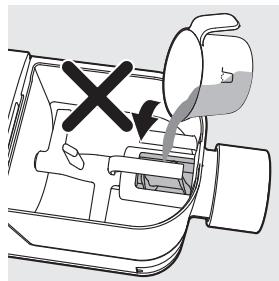
natural_image
Diagram of a mechanical device with a cross mark and downward arrow, no text or symbols presentnatural_image
Illustration of a wall socket connected to an electrical plug with a power outlet, showing a left-pointing arrow (no text or symbols)natural_image
Line drawing of a mechanical device with a dial indicator and arrow pointing to a component (no text or symbols)natural_image
Illustration of a food delivery machine pouring noodles into a bowl (no text or symbols)natural_image
Illustration of hands using a tool to apply material to a circular component (no text or symbols visible)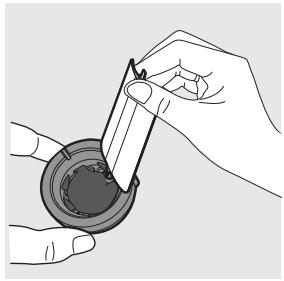
natural_image
Illustration of hands using a tool to apply liquid into a container (no text or symbols visible)natural_image
Line drawing of a mechanical device with a cylindrical component and a screw-like shaft (no text or symbols)natural_image
Line drawing of a mobile phone device with a cloth cover and ventilation slots (no text or symbols)Almacenamiento
natural_image
Line drawing of a mechanical component with curved surfaces and a small attached bracket (no text or symbols)natural_image
Line drawing of a rectangular appliance with three circular cavities and a handle (no text or symbols)natural_image
Technical line drawing of a mechanical device with a housing and mounting bracket (no text or symbols)74 Français
natural_image
Line drawing of a mechanical device with a pulley and rotating wheel (no text or symbols)natural_image
Diagram of a mechanical device with a handle and arrow indicating upward motion (no text or symbols)natural_image
Illustration of a kitchen sink with pipes and a faucet (no text or symbols)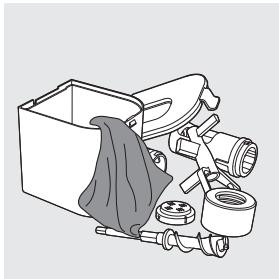
natural_image
Illustration of a mechanical assembly with hoses and a cloth, no text or symbols presentAssemblage
natural_image
Technical line drawing of a mechanical device with a close-up view showing internal components (no text or symbols)natural_image
Technical line drawing of a mechanical device with a handle and internal components (no text or symbols)natural_image
Technical line drawing of a mechanical device with a cylindrical component and an arrow indicating direction (no text or symbols)natural_image
Technical line drawing of a mechanical component with a magnified inset showing a pin detail (no text or symbols)natural_image
Diagram of a mechanical component with a pulley and two circular insets showing different parts (no text or symbols)natural_image
Illustration of a hand holding a small mechanical component with a circular arrow indicating rotation (no text or symbols present)natural_image
Illustration of a cooking pot with a lid and lid removed, showing liquid being poured into it (no text or symbols)Remarque :
natural_image
Line drawing of a mechanical device with a lid and internal components (no text or symbols)Remarque :
natural_image
Diagram of a car intake manifold with a checkmark indicating the intake point (no text or symbols present)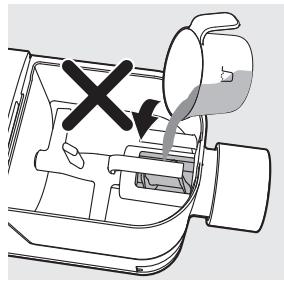
natural_image
Diagram of a mechanical device with a valve and handle, showing a cross mark indicating no change or failure (no text or symbols present)natural_image
Illustration of a wall socket connected to an electrical plug with a power outlet, showing a left-pointing arrow (no text or symbols)natural_image
Line drawing of a mechanical device with a dial indicator and arrow pointing to a central component (no text or symbols)natural_image
Line drawing of a rice cooker with noodles being lifted by a tray, showing liquid flow (no text or symbols)Nettoyage
Important
natural_image
Illustration of hands using a tool to adjust or install a small electronic device (no text or symbols visible)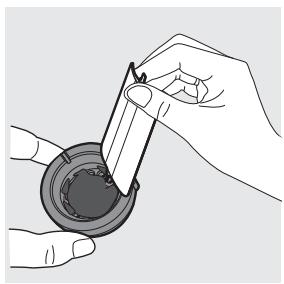
natural_image
Illustration of hands using a tool to apply material to a circular component (no text or symbols visible)natural_image
Cross-sectional diagram of a mechanical device with internal components (no text or symbols)natural_image
Line drawing of a small electronic device with a cloth cover and lid, no text or symbols presentRangement
natural_image
Line drawing of a mechanical component with curved surfaces and a small attached bracket (no text or symbols)natural_image
Line drawing of a container with two circular compartments and a handle, no text or symbols presentDépannage
natural_image
Technical line drawing of a mechanical device with a handle and housing (no text or symbols)natural_image
Line drawing of a mechanical device with a pulley and rotating wheel (no text or symbols)natural_image
Diagram of a mechanical device with a handle and arrow indicating upward motion (no text or symbols)natural_image
Technical illustration of a mechanical assembly with pipe and housing components (no text or symbols)Montaggio
natural_image
Diagram of a mechanical device with a handle and internal components, no visible text or symbolsnatural_image
Technical line drawing of a mechanical device with a handle and internal components (no text or symbols)natural_image
Technical line drawing of a mechanical component with a cylindrical port and arrow indicating direction (no text or symbols)natural_image
Technical line drawing of a mechanical component with a magnified inset showing a pin detail (no text or symbols)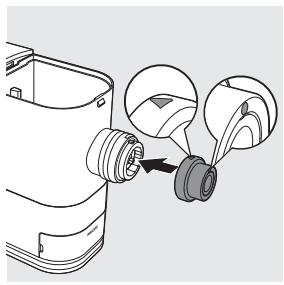
natural_image
Diagram of a mechanical component with a pulley and a magnified inset showing internal components (no text or symbols)natural_image
Illustration of a hand holding a small mechanical component with a circular arrow indicating rotation (no text or symbols)natural_image
Illustration of a cooking pot with a lid and lid removed, showing dough inside (no text or symbols)Nota:
natural_image
Line drawing of a mechanical device with a lid and internal components (no text or symbols)Nota:
natural_image
Diagram of a car interior showing a hand holding a bag with a checkmark and arrow indicating action (no text or symbols present)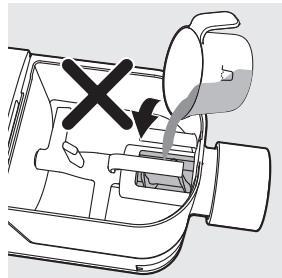
natural_image
Diagram of a mechanical device with a valve and handle, showing a cross mark and downward arrow (no text or symbols)natural_image
Illustration of a wall socket connected to an electrical plug with a power outlet, showing a left-pointing arrow (no text or symbols)natural_image
Line drawing of a mechanical device with a dial and handle, no text or symbols presentnatural_image
Illustration of a person using a noodle mixer to feed noodles from a bowl (no text or symbols)natural_image
Illustration of hands using a tool to apply material to a circular component (no text or symbols visible)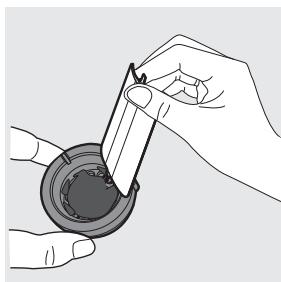
natural_image
Illustration of hands using a tool to apply material to a circular component (no text or symbols visible)natural_image
Line drawing of a cylindrical mechanical component with internal threading and a screwdriver inserted (no text or symbols)natural_image
Technical line drawing of a mobile phone device with a cloth cover and ventilation slots (no text or symbols)
natural_image
Line drawing of a mechanical component with no visible text or symbolsnatural_image
Line drawing of a microwave oven with two cups and a handle (no text or symbols)natural_image
Technical line drawing of a mechanical device with a housing and mounting bracket (no text or symbols)natural_image
Line drawing of a mechanical component with a pulley and rotating wheel (no text or symbols)natural_image
Diagram of a mechanical device with a gear and housing, showing an upward arrow (no text or symbols)6 Maak alle afneembare onderdelen en accessoires schoon en droog ze af.
natural_image
Technical illustration of a mechanical assembly with pipe and housing components (no text or symbols)In elkaar zetten
natural_image
Technical line drawing of a mechanical device with internal components and a close-up view (no text or symbols)natural_image
Technical line drawing of a mechanical device with a handle and internal components (no text or symbols)3 Plaats de perstuit in de mengkom.
Opmerking:
natural_image
Technical line drawing of a mechanical device with a cylindrical component and an arrow indicating direction (no text or symbols)natural_image
Technical line drawing of a mechanical component with a magnified inset showing a pin detail (no text or symbols)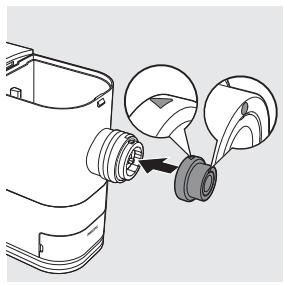
natural_image
Diagram of a mechanical component with a pulley and a magnified inset showing internal components (no text or symbols)natural_image
Illustration of a hand holding a small mechanical component with a circular arrow indicating rotation (no text or symbols present)natural_image
Illustration of a cooking pot with a lid and lid removed, showing dough inside (no text or symbols)Opmerking:
natural_image
Line drawing of a mechanical device with a lid and internal components (no text or symbols)Opmerking:
natural_image
Diagram of a car intake manifold with a checkmark indicating the intake point (no text or symbols present)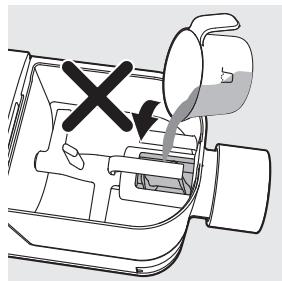
natural_image
Diagram of a car interior showing a valve with a black X mark and arrow indicating direction (no text or symbols)natural_image
Illustration of a wall socket connected to an electrical plug with a power outlet, showing a left-pointing arrow (no text or symbols)natural_image
Line drawing of a mechanical device with a dial and handle, no text or symbols presentnatural_image
Illustration of a person using a noodle mixer to feed noodles from a bowl (no text or symbols)natural_image
Illustration of hands using a tool to adjust or install a circular device component (no text or symbols visible)