
SM5470/10 PICO BARISTO - Automatic coffee machine SAECO - Free user manual and instructions
Find the device manual for free SM5470/10 PICO BARISTO SAECO in PDF.



| Product Type | Automatic coffee machine |
| Brand | SAECO |
| Model | SM5470/10 PICO BARISTO |
| Power supply | 220-240 V, 50-60 Hz |
| Power | 1450 W |
| Pump pressure | 15 bar |
| Water tank capacity | 1.5 L |
| Bean hopper capacity | 250 g |
| Filtration system | AquaClean filter (reduces limescale, up to 5000 cups with 8 filters) |
| Beverage functions | Espresso, coffee, cappuccino, latte macchiato, coffee with milk, hot water, pre-ground coffee |
| Grind adjustment | 10 grind settings |
| Aroma intensity adjustment | 5 levels |
| Beverage volume adjustment | Programmable via MEMO button |
| Brew group | Removable, washable with water, lubricable |
| Milk carafe | Integrated, automatic quick rinse, removable |
| Cleaning and maintenance | Weekly cleaning of brew group, monthly cleaning with degreasing tablets, descaling with Philips solution |
| Available spare parts | AquaClean filter (CA6903), grease (HD5061), degreasing tablets (CA6704), milk circuit cleaner (CA6705) |
| Repairability | Error codes displayed, online support at www.saeco.com/care |
| Net weight | 9 kg |
Frequently Asked Questions - SM5470/10 PICO BARISTO SAECO
User questions about SM5470/10 PICO BARISTO SAECO
0 question about this device. Answer the ones you know or ask your own.
Ask a new question about this device
Download the instructions for your Automatic coffee machine in PDF format for free! Find your manual SM5470/10 PICO BARISTO - SAECO and take your electronic device back in hand. On this page are published all the documents necessary for the use of your device. SM5470/10 PICO BARISTO by SAECO.
USER MANUAL SM5470/10 PICO BARISTO SAECO
Saeco, a Philips brand
4

12
15
16


32
English 6
Dansk 22
Deutsch 39
Espanol 57
Français 75
Italiano 93
Nederlandst 111
Norsk 128
Portugues 144
Suomi 162
Svenska 178
EaVnuka 194
6 English
Contents
Machine overview (Fig. 1) 6
Introduction 7
First installation 7
AquaClean filter 7
Using the control panel 8
Measuring water hardness 9
Brewing drinks 9
Personalizing drinks 10
Adjustinggrinderratings 11
Handling the brew group 11
Cleaning and maintenance 12
15
Warning icons and error codes 16
Ordering accessories 18
Troubleshooting 18
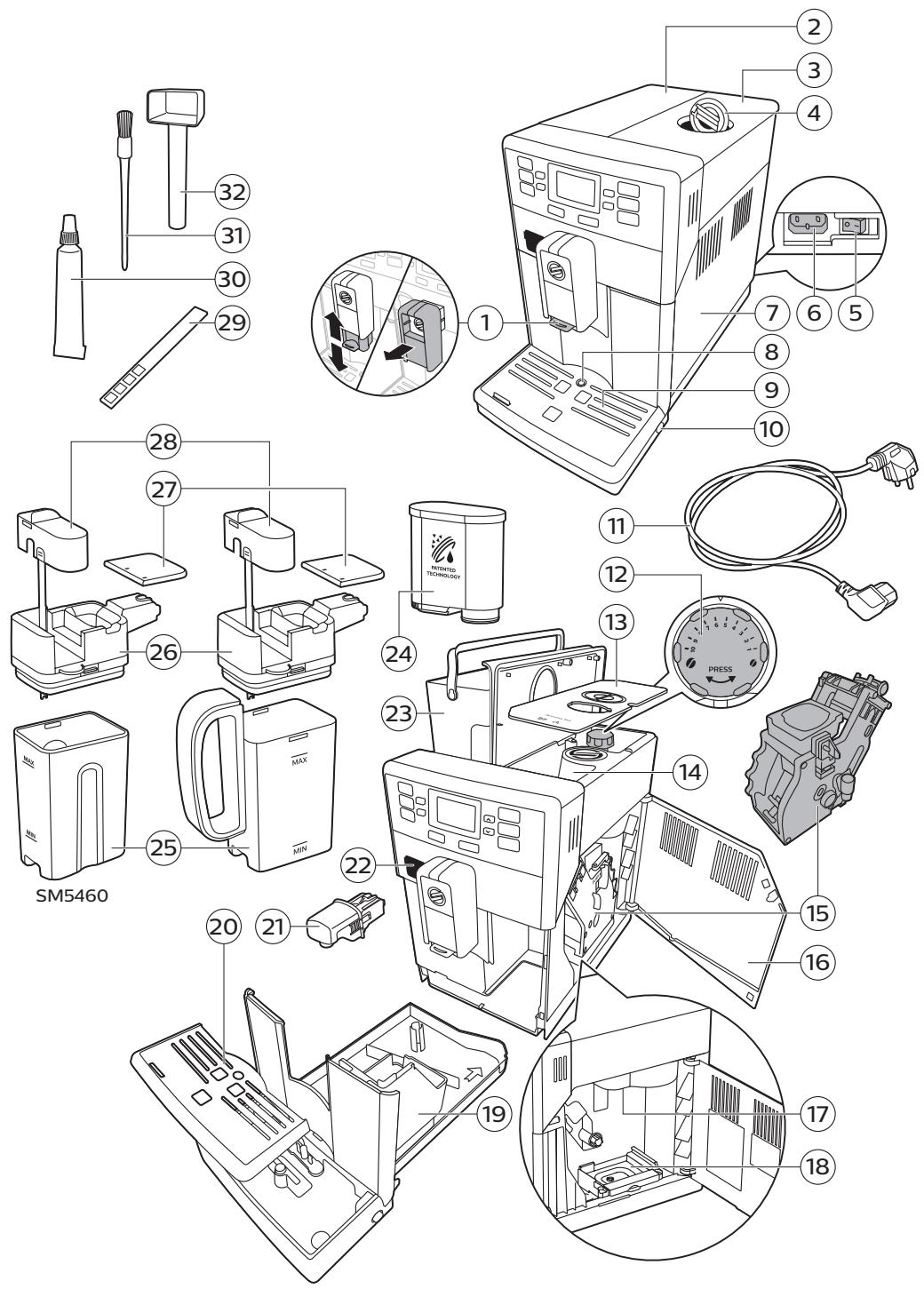
Machine overview (Fig. 1)
1 Adjustable removable coffee dispensing spout
18 Coffee residues drawer
2 Lid of water tank
19 Coffee grounds container
3 Lid of bean hopper
20 Drip tray cover
4 Lid of pre-ground coffee compartment
21 Hot water dispensing spout
5 Main switch
22 Opening for hot water dispensing spout
6 Socket for cord
23 Water tank
7 Service door
24 AquaClean filter
8 'Drip tray full' indicator
25 Milk container
9 Drip tray
26 Milk dispensing unit
10 Drip tray release button
27 Lid of milk dispensing unit
11 Cord
28 Milk dispensing spout
12 Grind setting knob
29 Water hardness test strip
13 Cover of bean hopper
30 Grease tube with application tip and cap
14 Bean hopper
31 Cleaning brush
15 Brew group
32 Measuring scoop
16 Inside of service door with cleaning instructions
17 Coffee exit duct
Introduction
Congratulations on your purchase of a Saeco full-automatic coffee machine! To fully benefit from the support that Saeco offers, please register your product at www.saeco.com/care.
Read the separate safety booklet carefully before you use the machine for the first time and save it for future reference.
To help you get the best out of your coffee machine, Saeco offers full support in 3 different ways:
1 The separate quick start guide for first installation and first use.
2 This user manual for more detailed information.
3 Online support and movies: scan the QR code on the front page or visit www.saeco.com/care
Note: This machine has been tested with coffee. Although it has been carefully cleaned, there may be some coffee residues left. We guarantee, however, that the machine is absolutely new.
First installation
To prepare your coffee machine for use, you need to perform a few simple steps such as filling the water circuit and activating the AquaClean filter. These steps are shown in the separate quick start guide.
For the best-tasting coffee, you need to brew 5 coffees initially to allow the machine to complete its self-adjustment.
The machine has been set up to get the best taste out of your coffee beans. Therefore we advise you not to adjust the grinder settings until you have brewed 100-150 cups (approx. 1 month of usage).
Aquaclean filter
The AquaClean filter is designed to reduce limescale deposits in your coffee machine and provide filtered water to preserve the aroma and flavor of each cup of coffee. If you use a series of 8 AquaClean filters as indicated by the machine and in this user manual, you don't have to descale your machine for up to 5000 cups. With each filter you can enjoy up to 625 cups, depending on the selected coffee varieties and the rinsing and cleaning frequencies.
Preparing the AquaClean filter for activation
Before you place the AquaClean filter in the water tank, you need to prepare it for use:
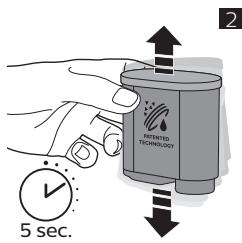
1 Shake the filter for about 5 seconds (Fig. 2).
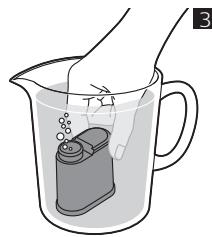
2 Immerse the filter upside down in a jug with cold water and wait until no more air bubbles come out (Fig. 3).
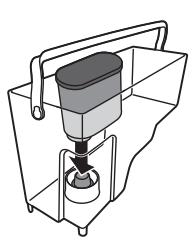
3 Push the filter onto the filter connection to the lowest possible point.
Activating the AquaClean filter
You need to activate every new AquaClean filter that you use. By activating the AquaClean filter, the machine monitors the capacity of the AquaClean filter and the number of filters used. There are 3 ways to activate the AquaClean filter.
8 English
1. Activating the AquaClean filter during first installation
After switching on for the first time, the machine guides you through the first installation steps such as filling the water tank, filling the water circuit and activating the AquaClean filter. Simply follow the instructions on the screen.
2. Activating the AquaClean filter when prompted
Note: Replace the AquaClean filter as soon as the capacity has dropped to 0% and the filter icon flashes quickly. Replace the AquaClean filter at least every 3 months, even if the machine has not yet indicated that replacement is required.
Tip: We advise you to buy a new filter when the capacity has dropped to 10% and the filter icon starts flashing slowly. This ensures that you can replace the filter when the capacity has dropped to 0% .
1 Press the MENU/SPECIAL DRINKS button, scroll to AQUACLEAN FILTER and press the OK button to confirm.
- The display asks if you want to activate a new filter.
2 Press the OK button to confirm.
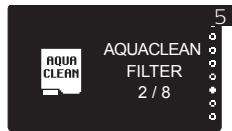
- The display automatically updates the number of filters used (Fig. 5).
Note: If you want to replace the AquaClean filter after 8 filters have been used, you first need to descale the machine. Follow the instructions on the display.
3. Activating the AquaClean filter at any other time
You can start (re)using the AquaClean filter at any time by following the instructions below.
1 Press the MENU/SPECIAL DRINKS button, select MENU and press the OK button to confirm. Scroll to AQUACLEAN FILTER. Press the OK button to confirm.
- The display shows the numbers of AquaClean filters that have been installed previously from 0 to 8 filters (Fig. 5).
2 Select ON on the display and press the OK button to confirm.
- The display automatically updates the number of filters used (Fig. 5).
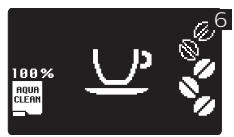
- Then the 'machine ready' screen appears with the AquaClean 100% icon to indicate that the filter has been installed (Fig. 6).
3 Dispense 2 cups of hot water (0.5 l) to complete the activation. Discard this water.
Note: In some situations the machine will tell you that you need to descale the machine before you can install and activate a new AquaClean filter. This is because your machine has to be completely timescale-free before you start to use the AquaClean filter. Follow the instructions on the screen.
Using the control panel
Below you find an overview and description of the control panel of the machine. Some of the buttons have a double function; if applicable the navigation icons appear on the display. Use the buttons next to this icon to select or confirm your choices.
Use the MENU/SPECIAL DRINKS button to select other drinks and to change settings such as the water hardness and coffee temperature.
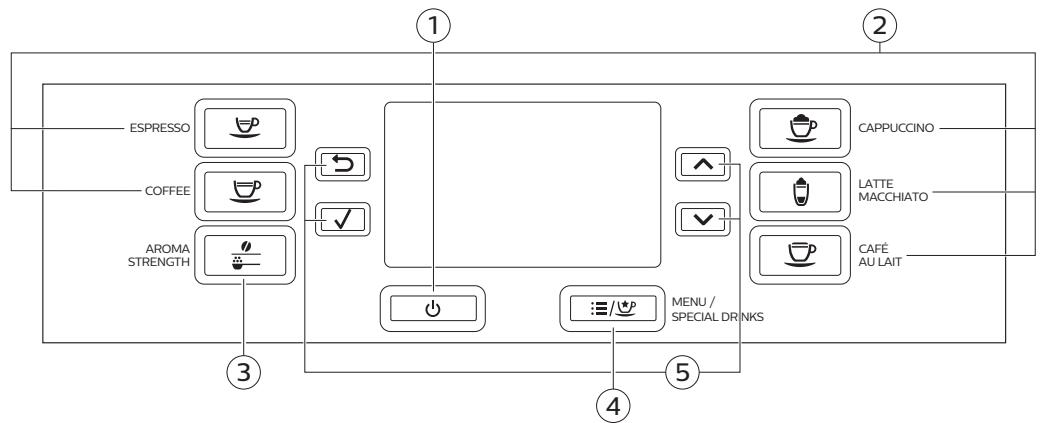
- On/off button
- MENU/ SPECIAL DRINKS button
- One-touch drink buttons
- Navigation icons (up, down, back, ok)
- AROMASTRENGTHbutton
Measuring water hardness
Use the water hardness test strip supplied to set the water hardness. Press MENU button, select menu and scroll to select water hardness.
1 Immerse the water hardness test strip in tap water for 1 second. Then wait for 1 minute.
2 Check how many squares have turned red.
3 Select the appropriate water hardness setting and press the OK button to confirm.
| Number of red squares: | ■□□□ | ■□□□ | ■□□□ | ■□□□ |
| Value to be set | 1 | 2 | 3 | 4 |
Brewing drinks
You can select a drink by pressing one of the one-touch drink buttons or by selecting another drink in the menu.
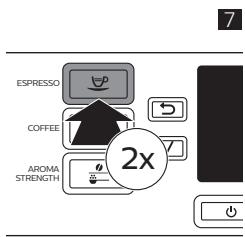
- If you want to brew two cups, press the one-touch drink button of the selected drink twice or select a coffee drink via the MENU and press it twice (Fig. 7). The machine automatically carries out two grinding cycles in sequence for the selected drink. You can only brew two coffee drinks at the same time.
- Slide the dispensing spout up or down to adjust its height to the size of the cup or glass you are using.
Brewing coffee drinks
1 Fill the water tank with tap water and fill the bean hopper with beans.
2 To brew a coffee, press one of the one-touch drink buttons. To select another type of coffee, press the MENU/SPECIAL DRINKS button, select DRINKS, scroll down to the desired drink and press the OK button.
3 To stop dispensing coffee, press the OK button.
10 English
Brewing milk-based drinks
1 Fill the water tank with tap water and fill the bean hopper with beans.
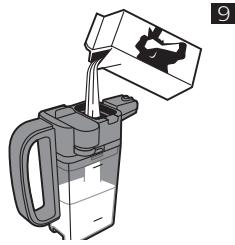
2 Remove the lid of the milk container and fill the milk container with milk (Fig. 9).
Always use milk coming directly from the fridge for optimal results.
3 Place the lid back onto the milk container.
4 If attached, remove the hot water spout from the machine.
5 Slightly tilt the milk carafe and attach it to the machine.
6 Open the milk dispensing spout and place a cup on the drip tray.
7 To brew a milk-based drink, press one of the one-touch drink buttons. To select another type of milk-based drink, press the MENU/SPECIAL DRINKS button, select DRINKS, scroll down to the desired drink and press the OK button.
The machine reminds you that you have to install the milk carafe and open the milk froth dispensing spout.
8 Directly after dispensing the milk-based drink, the display asks you if you want to perform the quick clean procedure for the milk carafe. You have 10 seconds to activate the quick clean procedure. Press the OK button to confirm.
Brewing coffee with pre-ground coffee
1 Open the lid and pour only one measuring scoop of pre-ground coffee into the pre-ground coffee compartment. Then close the lid (Fig. 10).
2 Press the AROMA STRENGTH button and select the pre-ground coffee brewing function.
3 Press the OK button to confirm.
4 Select the beverage.
Note: With pre-ground coffee you can only brew one coffee at a time.
Dispensing hot water
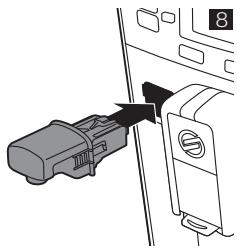
1 If it is not attached, attach the hot water spout to the machine (Fig. 8).
2 Press the MENU/SPECIAL DRINKS button. Select DRINKS, confirm and scroll to select HOT WATER.
3 Press the OK button to confirm. The display reminds you to install the hot water dispensing spout, press the OK button to confirm.
4 To stop dispensing hot water, press the OK button.
Personalizing drinks
Adjusting coffee and milk volume
You can adjust the volume of the drink brewed according to your taste and to the size of the cups.
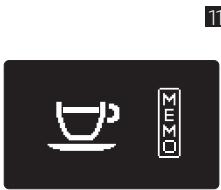
1 To adjust the espresso volume, press and hold the ESPRESSO button until the display shows the MEMO icon (Fig. 11).
- The machine enters the programming phase and starts to brew the selected drink.
2 Press the OK button when the cup contains the desired amount of espresso.
- The tick on the display shows that the button is programmed: every time it is pressed, the machine brews the set espresso volume.
Note: To set the volume of coffee, café au lait, cappuccino and latte macchiato follow the same procedure: press and hold the button of the drink and press the OK button when the cup contains the desired amount of coffee or milk. Make sure that the milk carafe is in place and that the milk spout is open.
Adjusting coffee strength
- To change the coffee strength, press the AROMA STRENGTH button.
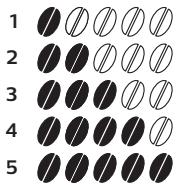
Each time you press the AROMA STRENGTH button, the machine selects a higher aroma strength setting. There are 5 strengths, 1 is very mild and 5 is very strong. After setting 5, setting 1 is selected again (Fig. 12). - The display shows the chosen strength. After adjusting the coffee strength, the display shows the main menu again and saves the chosen aroma strength when you brew a coffee.
Adjusting grinder settings
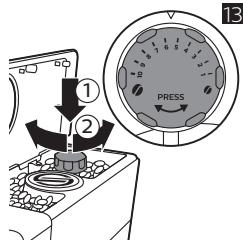
You can adjust the grinder settings by using the grind setting knob inside the bean container. There are 10 different grind settings you can choose from. The lower the setting, the stronger the coffee.
Note: You can only adjust the grind settings when the machine is grinding coffee beans. You need to brew 2 to 3 drinks before you can taste the full difference.
Caution: Do not turn the grind setting knob more than one notch at a time to prevent damage to the grinder.
1 Place a cup under the coffee dispensing spout.
2 Open the lid of the bean hopper.
3 Press the ESPRESSO button.
4 When the grinder starts grinding, press down the grind setting knob and turn it to the left or right (Fig. 13).
Handling the brew group
Go to www.saeco.com/care for detailed video instructions on how to remove, insert and clean the brew group.
Removing the brew group from the machine
1 To switch off the machine, first press the on/off button on the control panel and then set the main switch on the back of the machine to 'O'.
2 Remove the drip tray with the coffee grounds container.
3 Open the service door.
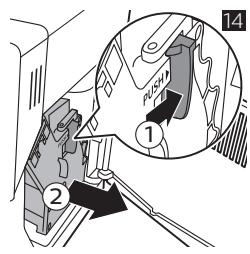
4 Press the PUSH button (1) and pull at the grip of the brew group to remove it from the machine (2) (Fig. 14).
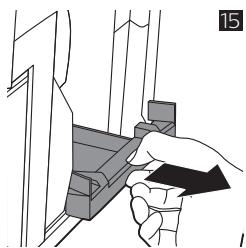
5 Remove the coffee residues drawer (Fig. 15).
Reinserting the brew group
Before you slide the brew group back into the machine, make sure it is in the correct position.
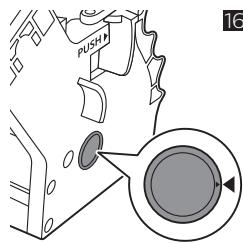
1 Check if the arrow on the yellow cylinder on the side of the brew group is aligned with the black arrow and N (Fig. 16).
12 English
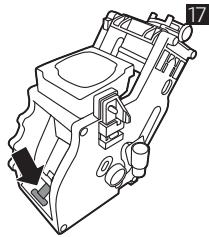
If they are not aligned, push down the lever until it is in contact with the base of the brew group (Fig. 17).
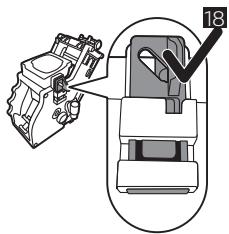
2 Make sure that the yellow locking hook on the other side of the brew group is in the correct position.
- To position the hook correctly, push it upwards until it is in uppermost position (Fig. 18).
3 Place back the coffee residues drawer.
4 Slide the brew group back into the machine along the guiding rails on the sides until it locks into position with a click. Do not press the PUSH button.
5 Close the service door and then place back the drip tray with coffee grounds container.
Cleaning and maintenance
Regular cleaning and maintenance keeps your machine in top condition and ensures good-tasting coffee for a long time, a steady coffee flow and a perfect milk froth.
Consult the table on when and how to clean all detachable parts of the machine. You can find more detailed information and video instructions on www.saeco.com/care.
Cleaning table
Cleaning table
| Part description | When to clean | How to clean |
| Brew group | Weekly | Remove the brew group and clean it under the tap. |
| Depending on the type of usage | Lubricate the brew group. | |
| Monthly | Clean the brew group with the coffee oil remover tablets. | |
| Milk carafe | After every use | Perform the QUICK CARAFE CLEAN as indicated on the machine after preparing a milk-based beverage. |
| Daily | Clean the milk carafe thoroughly. You can also select the QUICK CLEAN function via menu, if not already performed after preparing a milk-based beverage. | |
| Weekly | Disassemble the milk carafe and clean all parts under the tap. | |
| Monthly | Use Saeco milk circuit cleaner CA6705 for this cleaning cycle. | |
| Drip tray | As soon as the red 'drip tray full' indicator pops up through the drip tray. | Empty the drip tray and clean it under the tap. |
| Coffee grounds container | Weekly | Empty the coffee grounds container and clean it under the tap. Make sure the machine is switched on while you empty and clean the coffee grounds container. |
| Water tank | Weekly | Clean it under the tap. |
| Pre-ground coffee compartment/coffee exit duct | Weekly | Clean the top part with a spoon handle as shown below. |
Cleaning the brew group
Regular cleaning of the brew group prevents coffee residues from clogging up the internal circuits. Visit www.saeco.com/care for support videos on how to remove, insert and clean the brew group.
Cleaning the brew group under the tap
1 Remove the brew group and the coffee residues drawer.
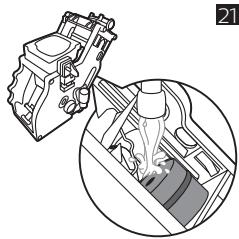
2 Rinse the coffee residues drawer and the brew group thoroughly with water. Carefully clean the upper filter (Fig. 21) of the brew group.
3 Let the brew group air-dry before you place it back. Do not dry the brew group with a cloth to prevent fibers from collecting inside the brew group.
Cleaning the brew group with the coffee oil remover tablets
Only use Philips coffee oil remover tablets. Follow the instructions given in the user manual that comes with the coffee oil remover tablets. Visit www.saeco.com/care for detailed video instructions.
Lubricating the brew group
Lubricate the brew group regularly to ensure that the moving parts continue to move smoothly.
1 Apply a thin layer of grease around the shaft in the bottom of the brew group (Fig. 22).
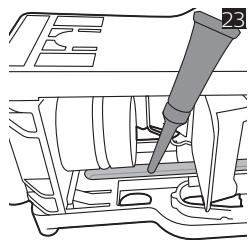
2 Apply a thin layer of grease to the rails on both sides (Fig. 23).
See the table below for the lubrication frequency. Visit www.saeco.com/care for detailed video instructions.
| Usage frequency | Nr of drinks brewed daily | Lubrication frequency |
| Low | 1-5 | Every 4 months |
| Normal | 6-10 | Every 2 months |
| Heavy | >10 | Every month |
Cleaning the milk carafe
Carafe quick clean
After preparing a milk-based drink, the carafe cleaning icon appears on the display.
1 When the carafe cleaning icon appears on the display, press the OK button if you want to perform a cleaning cycle. You have 10 seconds to activate the quick clean procedure. Press the escape button if you do not want to perform the quick clean procedure.
14 English
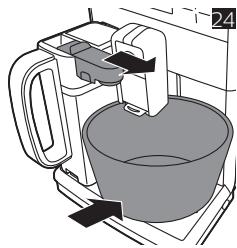
2 Remove the cup with the drink and place an empty cup under the milk dispensing spout (Fig. 24).
Note: Make sure the milk dispensing spout is pulled out.
3 Press the OK button to start dispensing hot water.
Thorough cleaning of the milk carafe
To clean the milk carafe thoroughly, you have to do the following regularly:
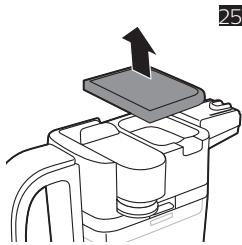
1 Remove the lid of the milk dispensing unit (Fig. 25).
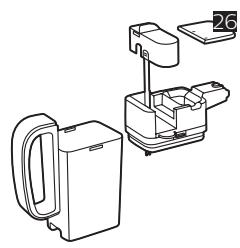
2 Lift the milk dispensing spout out of the milk dispensing unit and remove the milk tube from the milk dispensing spout (Fig. 26).
3 Remove the milk tube from the milk dispensing spout.
4 Rinse the milk tube and milk dispensing spout with lukewarm water thoroughly.
Weekly cleaning of the milk carafe
The milk dispensing spout consists of 5 components. Disassemble all components once a week and clean them under the tap. You can also clean all components, except for the milk container, in the dishwasher.
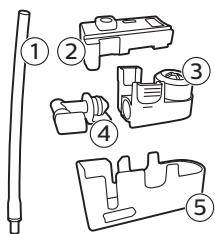
1 Milk tube
2 Rubber support
3 Milk frother
4 Milk frother connector
5 Housing of milk dispensing spout
Disassembling the milk dispensing spout
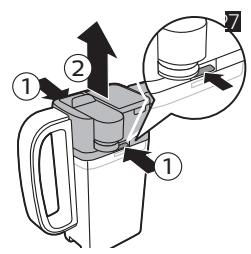
1 Press the release buttons on both sides of the top of the milk dispensing unit (1) and lift the top off the milk container (2) (Fig. 27).
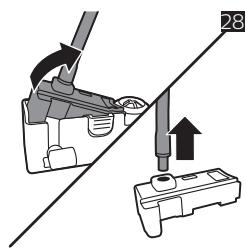
2 Turn the milk dispensing unit upside down and hold it firmly in your hand. Pull the milk tube off the support (Fig. 28).
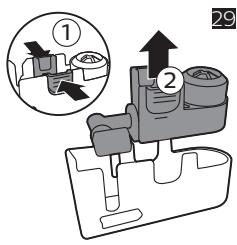
3 Press the release buttons on the milk frother and remove the milk frother from the the rubber support (Fig. 29).
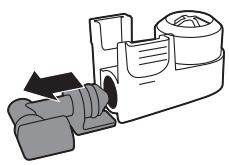
4 Pull the milk frother connector out of the milk frother (Fig. 30).
5 Rinse all components under a lukewarm tap.
Reassembling the milk carafe
1 To reassemble the milk dispensing spout, follow steps 2 to 4 of 'Disassembling the milk dispensing spout' in reverse order.
2 Place the milk dispensing spout back into the top of the milk carafe.
3 Place the top of the milk carafe back onto the milk carafe.
Note: Before you place the milk dispensing spout back into the top of the milk carafe, move the pin inside the top to the correct position. If this pin is not in the correct position, you cannot place the milk dispensing spout back into the top of the milk carafe (Fig. 31).
Monthly cleaning of the milk carafe
Only use Philips milk circuit cleaner for this cleaning cycle.
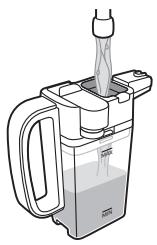
1 Pour the contents of the milk circuit cleaner sachet in the milk carafe. Then fill the milk carafe with water up to the MAX indication (Fig. 32).
2 Insert the milk carafe into the machine and place a container under the milk dispensing spout.
3 Press the MENU button, select DRINKS and scroll to MILK FROTH. Press the OK button to start dispensing the cleaning solution.
4 Repeat step 3 until the milk carafe is empty.
5 When the carafe is empty, remove the container and the milk carafe from the machine.
6 Rinse the milk carafe thoroughly and fill it with fresh water up to the MAX level indication.
7 Insert the milk carafe into the machine.
8 Place the container under the milk dispensing spout.
9 Press the MENU button and select MILK FROTH in the DRINKS menu to start the carafe rinsing cycle.
10 Repeat step 9 until the milk carafe is empty.
11 Repeat steps 6-10.
12 When the machine stops dispensing water, the cleaning cycle is finished.
13 Disassemble all the components and rinse them under a lukewarm tap.
Descaling procedure
Please use Philips descaler only. Under no circumstances should you use a descaler based on sulfuric acid, hydrochloric acid, sulfamic or acetic acid (vinegar) as this may damage the water circuit in your machine and not dissolve the timescale properly. Not using the Philips descaler will void your warranty. Failure to descale the appliance will also void your warranty. You can buy Philips descaling solution in the online shop at www.saeco.com/care.
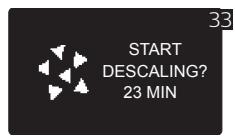
1 When the machine asks you to descale it (Fig. 33), press the OK button to start. To start descending without being prompted by the machine, press the MENU button, scroll to select START CALC CLEAN and press the OK button to confirm.
- The display reminds you that you have to insert the milk carafe. Fill the milk carafe with water up to the MIN level indication. Insert the milk carafe into the machine and open the milk dispensing spout.
- The display reminds you that you have to open the milk dispensing spout.
- The display reminds you that you have to remove the AquaClean filter.
2 Remove the drip tray and the coffee grounds container, empty them and put them back into place.
3 Remove the water tank and empty it.
4 Place a large container (1.5 l) under the coffee dispensing spout.
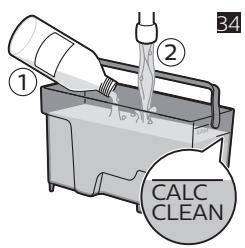
5 Pour the whole bottle of Philips descaler in the water tank and then fill it with water up to the CALC CLEAN level (Fig. 34). Then place it back into the machine and press the OK button to confirm.
6 The first phase of the descending procedure starts. The descending procedure lasts approx. 30 minutes and consists of a descending cycle and a rinsing cycle.
7 Let the machine dispense the descending solution until the display reminds you that the water tank is empty.
8 Empty the water tank, rinse it and then refill it with fresh water up to the CALC CLEAN level indication.
9 Remove and rinse the milk carafe. Fill it with fresh water up to the MIN level indication and reinsert it into the machine. Then open the milk dispensing spout.
10 Empty the container and place it back under the coffee dispensing spout. Press OK to confirm.
16 English
11 The second phase of the descending cycle, the rinsing phase, starts and lasts 3 minutes. The display shows the rinsing icon and the duration of the phase.
12 Wait until the machine stops dispensing water. The descending procedure is finished when the tick appears on the display.
13 Press the OK button to exit the descending cycle. The machine starts heating up and performs the automatic rinsing cycle.
14 Clean the milk carafe after descending (see 'Weekly cleaning of the milk carafe').
15 Clean the brew group after descending (see 'Cleaning the brew group under the tap').
16 Place a new AquaClean filter in the water tank.
Tip: Using the AquaClean filter reduces the need for descaling!
What to do if the descending procedure is interrupted
You can exit the descending procedure by pressing the on/off button on the control panel. If the descending procedure is interrupted before it is completely finished, do the following:
1 Empty and rinse the water tank thoroughly.
2 Fill the water tank with fresh water up to the CALC CLEAN level indication and switch the machine back on. The machine will heat up and perform an automatic rinsing cycle.
3 Before brewing any drinks, perform a manual rinsing cycle. To perform a manual rinsing cycle, first dispense half a water tank of hot water and then brew 2 cups of pre-ground coffee without adding ground coffee.
Note: If the descending procedure was not completed, the machine will require another descending procedure as soon as possible.
Warning icons and error codes
Meaning of the warning icons
Meaning of the warning icons
The warning icons are displayed in red. Below you find a list of the warning icons that may appear on the display and their meaning.

Fill the water tank with fresh water to the MAX level indication.
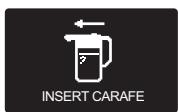
The milk carafe is not installed. Insert the milk carafe into the machine.

The bean hopper is empty.
Put new coffee beans in the bean hopper.

The coffee grounds container is full. Make sure the machine is switched on. Then remove and empty the coffee grounds container.
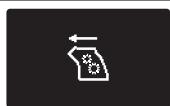
The brew group is not in the machine or it is not inserted correctly. Insert the brew group.

The brew group is blocked by coffee powder. Clean the brew group.
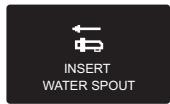
The hot water dispensing spout is not installed. Insert the hot water dispensing spout.
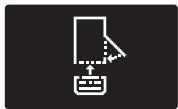
Insert the drip tray and close the service door.
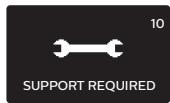
If the display shows an error code, check section 'Meaning of the error codes' to see what the code on the display means and what you can do. The machine cannot be used when this icon is on the display.

Insert hot water spout and press OK button to start.
Meaning of error codes
Below you find a list of the error codes showing problems that you can solve yourself. Video instructions are available on www.saeco.com/care. If another error code appears, please contact the Philips Consumer Care Center in your country. For contact details, see the warranty leaflet.
| Error code | Problem | Possible solution |
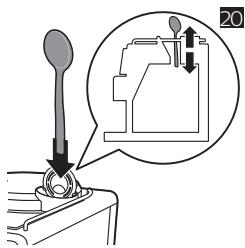
| 01 | The coffee funnel is clogged. | Switch off the machine and unplug it. Remove the brew group. Then open the lid of the pre-ground coffee compartment and insert the spoon handle. Move the handle up and down until the clogged ground coffee falls down (Fig. 20). Visit www.saeco.com/care for detailed video instructions. |
| 03 | The brew group is dirty or not well-greased. | Switch off the machine with the main switch. Rinse the brew group with fresh water, let it air-dry and then lubricate it. Consult chapter 'Cleaning the brew group' or visit www.saeco.com/care for detailed video instructions. Then switch the machine on again. |
| 04 | The brew group is not positioned correctly. | Switch off the machine with the main switch. Remove the brew group and reinsert it. Make sure that the brew group is in the correct position before you insert it. Consult chapter 'Handling the brew group or visit www.saeco.com/care for detailed video instructions. Then switch the machine on again. |
| 05 | There is air in the water circuit. | Restart the machine by switching it off and on again with the main switch. If this works, dispense 2-3 cups of hot water. Descale the machine if you have not done so for a longer period of time. |
| The AquaClean filter was not prepared properly before installation or it is clogged. | Remove the AquaClean filter and try again to brew a coffee. If this works, make sure that the AquaClean filter is prepared properly before you place it back (see 'Preparing the AquaClean filter for activation'). Put the AquaClean filter back into the water tank. If this still does not work, the filter is clogged and needs to be replaced. | |
| 14 | The machine is overheated. | Switch the machine off and switch it back on again after 30 minutes. |
Ordering accessories
To clean and descale the machine, only use the Philips maintenance products. These products can be purchased from your local retailer, from the authorized service centers or online at
www.saeco.com/care.
Maintenance products and type numbers:
- Dscaling solution CA6700
- AquaClean filter CA6903
Brew group grease HD5061 - Coffee oil remover tablets CA6704
- Milk circuit cleaner CA6705
- Maintenance kit CA6707
Troubleshooting
This chapter summarizes the most common problems you could encounter with the machine. Support videos and a complete list of frequently asked questions are available on www.saeco.com/care. If you are unable to solve the problem, contact the Consumer Care Center in your country. For contact details, see the warranty leaflet.
| Problem | Cause | Solution |
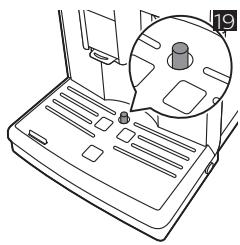
| The drip tray fills up quickly. | This is normal. The machine uses water to rinse the internal circuit and brew group. Some water flows through the internal system directly into the drip tray. | Empty the drip tray when the 'drip tray full' indicator pops up through the drip tray cover (Fig. 19). Place a cup under the dispensing spout to collect rinsing water. |
| The machine is in DEMO mode. | You pressed the standby button for more than 8 seconds. | Switch the machine off and then on again with the main switch on the back of the machine. |
| The 'coffee grounds container full' icon remains displayed. | You emptied the coffee grounds container while the machine was switched off. | Always empty the coffee grounds container while the machine is switched on. If you empty the coffee grounds container when the machine is switched off, the coffee cycle counter is not reset. |
| You placed back the coffee grounds container too fast. | Do not place back the coffee grounds container until the screen prompts you to put it back. | |
| The machine prompts to empty the coffee grounds container even though the container is not full. | The machine did not reset the counter the last time you emptied the coffee grounds container. | Always wait approximately 5 seconds when you place back the coffee grounds container. In this way the coffee grounds counter will be reset to zero. |
| Always empty the coffee grounds container while the machine is switched on. If you empty the coffee grounds container when the machine is switched off, the coffee grounds container won't reset. | ||
| The coffee grounds container is too full and the message "Empty grounds container" did not display. | You removed the drip-tray without emptying the grounds container. | When you remove the drip tray, also empty the coffee grounds container even if it contains only a few coffee grounds. In this way the coffee grounds counter will be reset to zero, re-starting to correctly count the coffee grounds. |
| I cannot remove the brew group. | The brew group is not in the correct position. | Reset the machine in the following way: place back the drip tray and the coffee grounds container. Then close the service door and switch the machine off and back on again. Try again to remove the brew group. |
| You have not removed the coffee grounds container. | Remove the coffee grounds container before you remove the brew group. | |
| I cannot insert the brew group. | The brew group is not in the correct position. | Reset the machine in the following way: place back the drip tray and the coffee grounds container. Leave the brew group out. Close the service door and switch the machine on and off. Then put the brew group in the correct position and reinsert it into in the machine. |
| The machine is still in the descaling procedure. | You cannot remove the brew group when the descaling procedure is in progress. First complete the descaling procedure and then remove the brew group. | |
| The coffee is watery. | The grinder is set to a too coarse setting. | Set the grinder to a finer (lower) setting. |
| The coffee exit duct is clogged. | Clean the coffee exit duct with the spoon handle. Then switch the machine off and on again. | |
| The machine is performing its self-adjustment procedure. | Brew a few cups of coffee. | |
| The brew group is dirty or needs to be lubricated. | Clean and lubricate the brew group. | |
| The coffee is not hot enough. | The cups you use are cold. | Preheat the cups by rinsing them with hot water. |
| The temperature is set too low. Check the menu settings. | Set the temperature to 'high' in the menu. | |
| You added milk. | Whether the milk you add is warm or cold, it always decreases the temperature of the coffee to some extent. |
20 English
| Problem | Cause | Solution |
| Coffee does not come out or coffee comes out slowly. | The AquaClean filter was not prepared properly for installation or it is clogged. | Remove the AquaClean filter and try to brew a coffee again. If this works, make sure the AquaClean filter is prepared properly before you place it back. Place back the prepared filter. If this still does not work, the filter is clogged and needs to be replaced. |
| The grinder is set to a too fine setting. | Set the grinder to a coarser (higher) setting. | |
| The brew group is dirty. | Clean the brew group. | |
| The coffee dispensing spout is dirty. | Clean the coffee dispensing spout and its holes with a needle. | |
| The machine circuit is blocked by limescale. | Descale the machine. | |
| The milk does not froth. | The milk carafe is dirty or not inserted correctly. | Clean the carafe and make sure that you position and insert it correctly. |
| The milk dispensing spout has not been opened fully. | Make sure that the milk dispensing spout is in the correct position. | |
| The milk carafe is incompletely assembled. | Make sure that all the components (especially the milk tube) have been assembled correctly. | |
| The type of milk used is not suitable for frothing. | Different types of milk result in different amounts of froth and different froth qualities. We have tested the following milk types which proved to deliver a good milk froth result: semi-skimmed or full-fat cow's milk, soy milk and lactose-free milk. Other types of milk have not been tested and may result in a small amount of milk froth. | |
| The milk is splashing. | The milk you use is not cold enough. | Make sure you use cold milk coming directly from the fridge. |
| The machine seems to be leaking. | The machine uses water to rinse the internal circuit and brew group. Some water flows through the internal system directly into the drip tray. This is normal. | Empty the drip tray when the 'drip tray full' indicator pops up through the drip tray cover (Fig. 19). Place a cup under the dispensing spout to collect rinsing water. |
| The drip tray is too full and has overflowed which makes it look like the machine is leaking. | Empty the drip tray when the 'drip tray full' indicator pops up through the drip tray cover (Fig. 19). Place a cup under the dispensing spout to collect rinsing water. | |
| The machine is not placed on a horizontal surface. | Place the machine on a horizontal surface so that the 'drip tray full' indicator works properly. | |
| I cannot activate the AquaClean filter and the machine asks for descaling. | The filter has not been replaced in time after the AquaClean filter icon flashed and the capacity dropped to 0%. | Descale your machine first and then install the AquaClean filter. |
| You did not install the AquaClean filter during first installation, but after having brewed approx. 25 coffees (based on 100ml cups). The machine has to be completely limescale-free before you install the AquaClean filter. | First descale the machine and then install a new AquaClean filter. After descaling, the filter counter is reset to 0/8. Always confirm filter activation in the machine menu. Also do this after filter replacement. | |
| The new water filter does not fit. | You are trying to install another filter than the AquaClean filter. | Only the AquaClean filter fits into the machine. |
| The machine is making a noise. | It is normal that your machine makes noise during use. | If the machine starts to make a different kind of noise, clean the brew group and lubricate it (see 'Lubricating the brew group'). |
| The machine makes pumping noise, while trying to draw water trying to draw water from the water tank. | The AquaClean filter is not prepared. Prepare the AquaClean filter as described in chapter 'AquaClean filter', section 'Preparing the AquaClean filter for activation'. | |
| The water tank is not fully inserted. Remove the water tank, remove any loose coffee beans or dirt particles from under the water tank and place it back. |
22 Dansk
Indhold
Personalizar as bebidas
Ajustar o volume de café e leite
Encomendar acessórios
Inledande installation
75% recycled paper
75% papier recyclé
- English
- Contents
- Machine overview (Fig. 1)
- Introduction
- First installation
- Aquaclean filter
- Preparing the AquaClean filter for activation
- Activating the AquaClean filter
- English
- Activating the AquaClean filter during first installation
- Activating the AquaClean filter when prompted
- Activating the AquaClean filter at any other time
- Using the control panel
- Measuring water hardness
- Brewing drinks
- Brewing coffee drinks
- English
- Brewing milk-based drinks
- Brewing coffee with pre-ground coffee
- Dispensing hot water
- Personalizing drinks
- Adjusting coffee and milk volume
- Adjusting coffee strength
- Adjusting grinder settings
- Handling the brew group
- Removing the brew group from the machine
- Reinserting the brew group
- English
- Cleaning and maintenance
- Cleaning table
- Cleaning the brew group
- Cleaning the brew group under the tap
- Cleaning the brew group with the coffee oil remover tablets
- Lubricating the brew group
- Cleaning the milk carafe
- Carafe quick clean
- English
- Thorough cleaning of the milk carafe
- Weekly cleaning of the milk carafe
- Disassembling the milk dispensing spout
- Reassembling the milk carafe
- Monthly cleaning of the milk carafe
- Descaling procedure
- English
- What to do if the descending procedure is interrupted
- Warning icons and error codes
- Meaning of the warning icons
- Meaning of error codes
- Ordering accessories
- www.saeco.com/care.
- Troubleshooting
- English
- Dansk
- Indhold
- Personalizar as bebidas
- Ajustar o volume de café e leite
- Encomendar acessórios
- Inledande installation
Brand : SAECO
Model : SM5470/10 PICO BARISTO
Category : Automatic coffee machine