
UF NF 280 F X701T - UF NF 280 F X701T - TV VALBERG - Free user manual and instructions
Find the device manual for free UF NF 280 F X701T - UF NF 280 F X701T VALBERG in PDF.



| Product Type | Frost-Free Chest Freezer |
| Brand | VALBERG |
| Model | UF NF 280 F X701T |
| Power Supply | 220-240 V ~ 50 Hz |
| Climate Class | SN, N, ST, T (10 °C to 43 °C) |
| Cooling Technology | Frost-Free (No Frost) |
| Freezer Temperature Range | -16 °C to -24 °C |
| Maximum Freezing Capacity | Varies by model (see label) |
| Special Features | Super Freeze, Economy Mode, Screen Saver, Child Lock |
| Door Open Alarm | Yes (after 2 minutes) |
| Interior Lighting | LED (replacement by authorized service) |
| Number of Drawers | 5 drawers (including 1 large and 1 ice cube tray) |
| Adjustable Feet | Yes |
| Defrosting | Automatic |
| Cleaning | Baking soda and warm water solution |
| Condenser Maintenance | Brush at least twice a year |
| Child Safety | Yes (activation by simultaneous buttons) |
| Warranty | 2 years from the date of purchase (upon presentation of receipt) |
| Availability of Spare Parts | 10 years from the last market launch of the model |
| Customer Service | www.electrodepot.fr/sav |
Frequently Asked Questions - UF NF 280 F X701T - UF NF 280 F X701T VALBERG
User questions about UF NF 280 F X701T - UF NF 280 F X701T VALBERG
0 question about this device. Answer the ones you know or ask your own.
Ask a new question about this device
Download the instructions for your TV in PDF format for free! Find your manual UF NF 280 F X701T - UF NF 280 F X701T - VALBERG and take your electronic device back in hand. On this page are published all the documents necessary for the use of your device. UF NF 280 F X701T - UF NF 280 F X701T by VALBERG.
USER MANUAL UF NF 280 F X701T - UF NF 280 F X701T VALBERG
This product is guaranteed for a period of 2 years from the date of purchase* against any failure resulting from a manufacturing or material defect. This warranty does not cover defects or damage resulting from incorrect installation, improper use or abnormal wear of the product.
*as shown on the sales receipt.
CONDITION DE GARANTIE
FR
Thank you for choosing this VALBERG product.
Chosen, tested and recommended by ELECTRO DEPOT,
VALBERG branded products are easy to use, reliable,
and of an impeccable standard.
With every use of this appliance, you can be sure of
complete satisfaction.
Welcome to ELECTRO DEPOT.
Visit our website: www.electrodepot.fr

Overview of the appliance
Ambient temperature of use
Temperature control setting

Using the appliance
Appliance description
Using the appliance
Food storage

Practical information
Cleaning and maintenance
Transport and removal
Food storage
Tips for saving energy
Technical data
Information for test institutes
Customer service and support
Recommended ambient temperature range
Respect the climate classes indicated in the product information on the appliance's rating plate. You can use this to check the recommended temperature range of the room where the appliance is located:
SN: Between 10 and 32^
- N: Between 16 and 32^ C
- ST: Between 16 and 38^ C
- T: Between 16 and 43^ C
A multi-class appliance can handle the lowest and highest temperature of all classes covered. Using the appliance outside the recommended temperature range will lead to inferior performance and premature ageing.
Temperature control setting
For optimal use and to save energy, adjust the temperature control(s) of the appliance according to the ambient temperature of the room, in which it is being used, and respect the climate class.
Refer to the product sheet to find out the climatic class associated with the minimum and maximum recommended ambient temperatures for the appliance as well as the temperature setting recommended for storing food under optimal conditions.
The ambient temperature degrees T^ are given only as a guide.
The set positions can be affected by the location of the appliance in the room, how often the door is opened or the amount of food inside.
The temperature control may need to be changed to compensate for these factors.
Examples of locations:
- Unheated room in winter like a garage in a cold region.
- Kitchen/lounge area with normal heating.
- Room that is not air-conditioned in summer in a hot region.
Appliance description
This appliance is not intended to be built-in.
COMMENTS
This presentation of the components of the appliance is for indicative purposes only. The components can vary depending on the model.
1 Draw covers
Freezer drawers
3 Lower freezer drawer
4 Adjustable legs
Large freezer drawer
6 Ice tray
NOTE
Freezer: The most effective energy use is guaranteed in the configuration where drawers and trays are in stock position.
Using the appliance
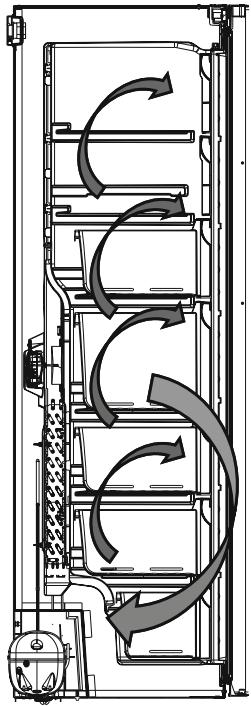
Frost Free technology information
The operating principle of freezers with frost-free technology sets them apart from other forms of static freezers.
In conventional freezers, the humidity that rushes into the freezer through the door openings and is given off by foodstuffs causes the formation of frost in the freezer. To remove the layer of frost and ice in the freezer, it is essential to turn off the freezer, take out the foods that should be kept at a constant temperature, and remove the ice that has gradually built up inside the freezer.
With frost-free technology, the process is quite different. Cold and dry air is injected at several points and evenly into the freezer compartments, via a blower fan. The fresh air is dispersed evenly between the shelves and chills all your food evenly, while preventing humidity and frost.
Therefore, this freezer with frost-free technology, in addition to its large volume and its aesthetic appeal, brings real comfort of use.
Control screen and panel
Using the control panel
1 Freezer set temperature indicator
Super Freeze mode indicator
Economy mode symbol
Alarm symbol
Child lock function symbol
6 Freezer temperature setting key, if applicable. The freezer can be set to -16, -17, -18, -19, -20, -21, -22, -23 and -24 °C.
7 Super freeze mode activation key, if applicable
Mode activation key (Economy, Screen saver, etc.), if applicable.
Using the freezer
Lighting (if available)
When the product is plugged in for the first time, the interior lights may come on with a one minute delay due to opening tests
Super Freeze mode
Usefulness
- Freezing a large amount of food that cannot be stored on the fast freeze shelf.
Freezing prepared food. - Freezing fresh food quickly to keep it fresh.
How to use it?
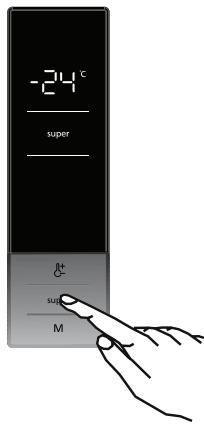
- Press the Super key to activate Super freeze mode.
- If no key is pressed for 1 second, the mode is set. When the mode is set, the beep sounds.
- When this mode is selected, the temperature value set before the mode selection is displayed on the freezer temperature indicator.
When this mode is enabled:
- It is impossible to select Economy mode.
- Super Freeze mode cannot be cancelled in the same way as it was selected.
WARNING
- The maximum amount of food (in kg) that can be frozen in 24 hours is specified on the rating plate.
- To optimise the performance of the appliance in the event of maximum freezing capacity, activate Super Freeze mode 24 hours before placing fresh food in the freezer.
- At the end of these 24 hours, the freezer will emit a beep indicating that it is ready.
- Super Freeze mode is automatically cancelled after 54 hours depending on the ambient temperature or when the freezer sensor reaches a sufficiently low temperature.
Economy mode
Usefulness
During periods of less frequent use (opening the doors) or when you are away from home, for example on holiday, Economy mode provides an optimal temperature while saving energy.
How to use it?
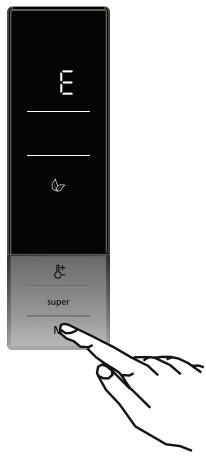
- Press the Mode key until the Economy mode symbol is displayed.
- If no key is pressed for 1 second, the mode is set. The Economy mode symbol flashes 3 times. When the mode is set, the beep sounds.
- The freezer temperature display area displays "E".
- The Economy mode symbol and "E" light up until the mode is disabled.
When this mode is enabled:
- To disable this mode, simply press the Mode key.
- It is possible to select Super Freezer mode. In this case, Economy mode is automatically cancelled and the selected mode is enabled.
Screensaver Mode
Usefulness
This mode saves energy by switching off all the lights on the control panel when it is inactive.
How to use it?
- Screen Saver mode automatically comes on after 30 seconds.
- If you press any key when the control panel lighting goes out, the current appliance settings will reappear on the screen, allowing you to make the required changes.
- If you do not cancel the Screensaver mode or do not press any keys within 30 seconds, the control panel stays off.
To turn off Screen Saver mode:
- To cancel Screen Saver mode, first press any key to enable the keys. Then press the Mode key for 3 seconds.
- To reactivate the screen saver mode, press the Mode key for 3 seconds.
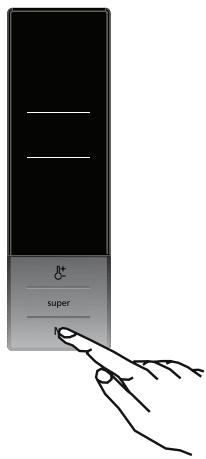
NOTE
- When the Screen saver mode is active, it is also possible to activate the Child Lock function.
- If no keys are pressed within 5 seconds when the Child Lock is enabled, the control panel indicators go out. The latest settings or mode status can be viewed after pressing a key. When the control panel indicators are on, the Child Lock function can be cancelled, as described in the instructions for this mode.
Child lock function
Usefulness
The Child Lock function can be enabled to prevent accidental or unintentional changes to the appliance settings.
Enabling the Child Safety function
Simultaneously press the freezer temperature setting key and the Super freeze key for 5 seconds.
Disabling the Child Lock function
Simultaneously press the freezer temperature adjustment button and the Super freeze button for 5 seconds.
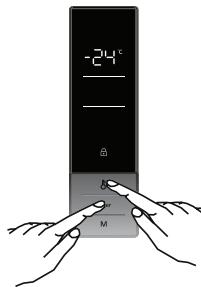
NOTE
The Child Lock function will also be disabled in the event of a power cut or the freezer is unplugged.
Temperature settings
Freezer temperature settings
The initial temperature value of the freezer temperature indicator is -18^
- Press the freezer temperature setting key once.
- When this key is pressed for the first time, the last set value flashes on the display.
Each press on this key decreases the set temperature by 1^ [-16, -17, -18, -19, -20, -21, -22, -23 and -24^) . - If you keep this key pressed down, the setting will start again from -16 °C.
- The freezer returns to the value of the temperature selected before the activation of Super Freeze or Economy mode, once these modes have been terminated or cancelled. The appliance then continues to operate at this temperature.
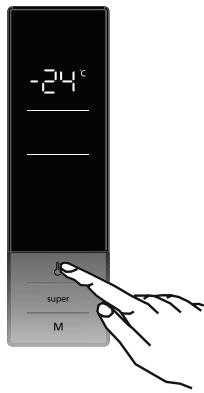
Recommended temperatures for the freezer
| When to adjust the temperature | Internal temperature (°C) |
| For a minimum capacity of: | -16 °C |
| Position for normal use | -17, -18, -19, -20 or -21 °C |
| For a minimum freezing capacity | -22, -23 or -24 °C |
Door open alarm
If the freezer door is left open for more than 2 minutes, the appliance will beep.
Warnings for temperature setting
- To increase efficiency, it is not recommended to use the freezer in environments where the temperature is below 10^ .
The temperature should be adjusted by selecting one value after another.
- The temperature must be adjusted according to how often the door is opened, the amount of food stored in the freezer and the ambient temperature of the room where it is located.
- To enable the freezer to reach operating temperature after being connected to the mains supply, avoid opening doors frequently and storing large amounts of food in the freezer.
Note that depending on the ambient temperature, the freezer may reach operating temperature after 24 hours.
- A 5-minute time-out feature applies to prevent damage to the freezer compressor when connecting or disconnecting from the mains or in the event of a power failure. The freezer begins to operate normally after 5 minutes.
- The appliance has been designed to operate within the ambient temperature range (T/SN = 10 °C - 43 °C) recommended in standards, in accordance with the climatic class indicated on the information label. We do not recommend using the appliance outside the temperature limits indicated to protect the efficiency of the cooling system. The associated warnings should be consulted.
Accessories
The visual and text descriptions in the accessories section may vary depending on the model of your appliance.
Ice tray
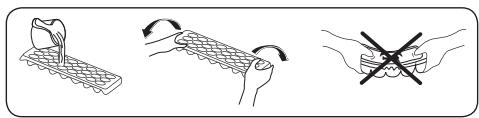
- Fill the ice cube tray with water and place it in the freezer.
- Once the water has completely frozen, you can twist the ice cube tray as shown to remove the ice cubes.
Food storage
- The freezer is designed for storing frozen food, freezing fresh food and making ice cubes.
- To freeze fresh produce: properly wrap and seal fresh foods; in other words, the packaging must be airtight and not leak. Freezer bags, aluminium-reinforced polyethylene bags, and plastic containers are ideal.
- Do not store fresh food near frozen food: this may defrost frozen food.
- Before freezing fresh foods, divide them into portions so that they can be eaten all at once.
Eat frozen foods soon after thawing. - Never place hot food in the freezer: this may thaw frozen food.
- Always follow the manufacturer's instructions on the food packaging when storing frozen food. In the absence of information, do not keep food for more than 3 months from the date of purchase.
- When purchasing frozen food, make sure that it has been stored in proper conditions and that its packaging is not damaged.
- Frozen food should be transported in suitable containers and placed in the freezer as soon as possible.
- Do not buy frozen food if the packaging shows signs of moisture and abnormal swelling. It is likely that it has been stored at an inappropriate temperature and that its contents are spoiled.
- The shelf life of frozen food depends on the ambient temperature, the freezer temperature setting, how often the door is opened, the type of food and the length of time required to transport the product from the store to your home. Always follow the instructions printed on the packaging and never exceed the maximum shelf life indicated.
- The maximum amount of food (in kg) that can be frozen in 24 hours is specified on the rating plate.
- To use the maximum capacity of the freezer, use the glass shelves for the upper and middle sections and the lower drawer for the lower section.
- For more speed, use the fast freeze shelf for household foods (and those to be frozen quickly) because of its greater freezing capacity. The fast freeze shelf is the lower freezer drawer.
For maximum freezing capacity:
- The maximum amount of food (in kg) that can be frozen in 24 hours is specified on the rating plate.
- To optimise the performance of the appliance in reaching the maximum freezing capacity, activate the Super Freeze mode (Super Freeze - SF) for 24 hours before placing fresh food in it.
- After fresh food is placed in the freezer, 24 hours is usually enough to freeze it. Super Freeze mode is automatically disabled for 2 to 3 days to save energy.
To freeze a small amount of food (up to 3kg ) in the freezer:
- Place the food so that it does not come into contact with food already frozen and activate Super Freeze mode. Once the food is frozen, it is possible to put it near other frozen food (after a minimum of 24 hours).
- Food that has already thawed should not be re-frozen. This can lead to food poisoning.
- Allow food to cool completely before placing it in the freezer.
- When purchasing frozen food, make sure that it has been stored in proper conditions and that its packaging is not damaged.
NOTE
The freezer door is difficult to open just after having closed the door. Once the temperature balance is reached, the door will open easily.
Important note:
- Never refreeze thawed food.
- The taste of certain spices used in cooked dishes (anise, basil, watercress, vinegar, mixed spices, ginger, garlic, onion, mustard, thyme, marjoram, black pepper, etc.).] changes and becomes stronger when stored for an extended period. Therefore, it is advisable to season food to be frozen very lightly or add the desired spices once the food has thawed.
- The shelf life of foods depends on the type of fat used. Adequate fats are margarine, veal fat, olive oil and butter. Peanut oil and pork fat are inappropriate.
- Food in liquid form should be frozen in plastic containers and other foods in plastic films or bags.
NOTE
The table below is a quick guide on how to most efficiently store food in the freezer.
| Meat and fish | Preparation | Maximum length of storage (months) |
| Steak | Wrap in aluminium foil. | 6 to 8 |
| Lamb | Wrap in aluminium foil. | 6 to 8 |
| Joint of veal | Wrap in aluminium foil. | 6 to 8 |
| Cubed veal | In small portions. | 6 to 8 |
| Cubed lamb | In small portions. | 4 to 8 |
| Minced meat | In its packaging, without spices. | 1 to 3 |
| Offal (pieces) | In small portions. | 1 to 3 |
| Dried sausage / Salami | Must be kept wrapped, even if it has a skin on it. | |
| Chicken and turkey | Wrap in aluminium foil. | 4 to 6 |
| Goose and duck | Wrap in aluminium foil. | 4 to 6 |
| Venison, rabbit, wild boar | In portions of 2.5 kg or in the form of fillets. | 6 to 8 |
| Freshwater fish (salmon, carp, trout, catfish) | 2 | |
| Lean fish (sea bass, turbot, dab) | After gutting and scaling the fish, wash and dry it. If necessary, remove the tail and head. | 4 |
| Oily fish (tuna, mackerel, bluefish, anchovy) | 2 to 4 | |
| Shellfish | Clean and place in a bag. | 4 to 6 |
| Caviar | In its packaging or in an aluminium or plastic container. | 2 to 3 |
| Snails | In salt water or in an aluminium or plastic container. | 3 |
NOTE
Thawed meat should be cooked like fresh meat. If the meat is not cooked after being thawed, it should not be refrozen.
| Fruit and vegetables | Preparation | Maximum length of storage (months) |
| Green beans | Wash, slice into small pieces and bring to the boil. | 10 to 13 |
| Peas | Shell, wash and bring to the boil. | 12 |
| Cabbage | Wash and bring to the boil. | 6 to 8 |
| Carrot | Wash, slice into small pieces and bring to the boil. | 12 |
| Peppers | Remove the stem, cut in half, remove the inside and bring to the boil. | 8 to 10 |
| Spinach | Wash and bring to the boil. | 6 to 9 |
| Cauliflower | Remove the leaves, cut the heart into pieces and soak for a few moments in water with a little lemon juice. | 10 to 12 |
| Aubergine | Cut into 2 cm pieces after washing. | 10 to 12 |
| Sweetcorn | Wash and wrap with the stalk on or in the form of sweetcorn kernels. | 12 |
| Apples and pears | Peel and slice. | 8 to 10 |
| Apricots and peaches | Peel, cut in half & remove stone. | 4 to 6 |
| Strawberries and blackberries | Wash and hull. | 8 to 12 |
| Stewed fruit | Add 10% sugar to the container. | 12 |
| Plums, cherries | Wash and hull. | 8 to 12 |
| Maximum length of storage (months) | Thawing time at room temperature (hours) | Defrosting time in the oven (minutes) | |
| Bread | 4 to 6 | 2 to 3 | 4 to 5 (220 to 225 °C) |
| Biscuits | 3 to 6 | 1 to 1.5 | 5 to 8 (190 to 200 °C) |
| Pasta | 1 to 3 | 2 to 3 | 5 to 10 (220 to 225 °C) |
| Pie | 1 to 1.5 | 3 to 4 | 5 to 8 (190 to 200 °C) |
| Phyllo pastry | 2 to 3 | 1 to 1.5 | 5 to 8 (190 to 200 °C) |
| Pizza | 2 to 3 | 2 to 4 | 15 to 20 (200 °C) |
| Dairy products | Preparation | Maximum length of storage (months) | Storage conditions |
| Milk in carton (homogenised) | In its own packaging. | 2 to 3 | Milk, in its packaging. |
| Cheese, except cream cheese | In slices | 6 to 8 | The original packaging can be used for short-term storage. Store wrapped in aluminium foil for longer periods. |
| Butter, margarine | In its packaging. | 6 |
Cleaning and maintenance
WARNING
Be sure to unplug the appliance from the power supply before cleaning it.
WARNING
Do not clean the appliance by pouring water onto it. Do not use abrasive products, detergents or soaps to clean the appliance. After cleaning, rinse with clean water and dry thoroughly. When cleaning is complete, reconnect the plug to the power supply with dry hands.
- Make sure that water does not get into the lamp housing or other electrical components.
- The appliance should be cleaned regularly with a solution of bicarbonate of soda and lukewarm water.
- Clean the accessories separately by hand with soap and water. Do not wash the accessories in the dishwasher.
- Clean the condenser with a brush at least twice a year. This saves energy and improves the efficiency of the appliance.
WARNING
The appliance must be disconnected from the power supply before and during cleaning.
Defrosting
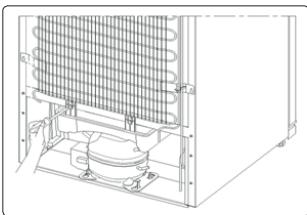
- This freezer is equipped with an automatic defrost function. The water resulting from the defrost flows through the water collection spout to fall into the evaporation container located at the back of the freezer, where it evaporates.
-
Make sure the freezer plug is disconnected before cleaning the evaporator tray.
-
Remove the evaporator tray by removing the screws as shown. Clean it with soapy water at regular intervals. This will prevent any formation of odours.
LED lighting replacement
To replace the LEDs, contact the authorised after-sales service.
NOTE
The number and location of LED strips may vary depending on the model.
Some versions do not include freezer lighting.
Transport and removal
Transport and removal
- The original packaging and foam can be kept for transporting the appliance again (optionally).
- Wrap the appliance in heavy packaging, with strong straps or ropes and follow the transport instructions on the packaging.
- Remove all removable parts (freezer drawers, ice cube trays, etc.) or fix them in the appliance using adhesive tape to avoid any impacts if you move or transport it.
WARNING
Always transport the appliance in an upright position.
Door reversal
- The door opening direction of the appliance can only be changed if the handles are mounted on the front surface of its door.
- It is possible to change the door opening direction on models without handles.
Find the explanatory diagrams at the end of this manual from page 100 to page 104.
Food storage
Errors
The freezer makes a warning sound when the temperature reaches inappropriate levels or when a problem occurs on the appliance. In this case, a warning code appears on the screen.
| Type of error | Meaning | Cause | Corrective action |
| E01 | |||
| E02 | |||
| E03 | Sensor warning | Contact a technician as soon as possible to get help. | |
| E06 | |||
| E07 | |||
| E08 | Low voltage warning | This warning appears when the power supply drops below 170 V. | - This warning does not indicate that the appliance needs repair. The error allows you to avoid damaging the compressor. - It is then recommended to increase the voltage to the required level. If this warning continues, contact a technician as soon as possible to get help. |
| E09 | The freezer is not cold enough. | This malfunction can occur following a long power cut. | 1. Adjust the freezer temperature to a colder setting or enable Super Freeze. It will then be possible to delete the error code once the required temperature is reached. Keep doors closed to reduce the time needed to reach the right temperature. 2. Remove all thawed food when this error occurs. It must be used as soon as possible. 3. Do not add fresh food to the freezer as long as the error continues and the correct temperature has not been reached. If this warning continues, contact a technician as soon as possible to get help. |
If the freezer does not work properly, it may present a minor problem. Check the following.
The appliance does not work Check if:
It is powered.
- It is connected to the mains.
- A fuse has blown.
- The socket is defective. To check, connect another functioning appliance on the same socket.
The appliance does not work properly. Check if:
- The temperature is properly set.
- The appliance is overloaded.
- The doors are properly closed.
- There is dust on the condenser.
- There is enough spare room around the back and sides of the appliance.
The freezer makes a noise.
The following noises can be heard during normal operation of the appliance.
A cracking [of ice] can be heard:
- During automatic defrosting.
- When the appliance is cooling or warming (due to the dilation of the material).
There is an audible clicking: when the thermostat switches the compressor on/off.
Motor noise: indicates that the compressor is working normally. The compressor can make a noise for a short period of time when it works for the first time.
Boiling and sloshing noises can be heard: these noises are due to the coolant flow in the system's pipes.
A noise of running water is heard: this noise comes from the water running into the evaporation container. This noise is normal during defrosting.
A blowing side can be heard: this noise comes from the air circulation during normal operation of the system.
The sides of the freezer in contact with the door seal are hot.
In the summer in particular (warm weather), the surfaces in contact with the door seal can heat up when the compressor is working. This is normal
Humidity builds up in the freezer. Check if:
- All the food is correctly packed. Packaging must be dry before being placed in the freezer.
- The freezer doors are frequently opened. Humidity of the room penetrates into the freezer each time the doors are opened.
Humidity rapidly increases if the doors are frequently opened, especially if humidity in the room is high.
- Droplets of water build up on the back wall. This is normal after automatic defrosting (on static cold models).
The doors do not open or close correctly. Check if:
- Food or packaging prevent the door from closing.
- The drawers are perfectly in place.
- The door seals are damaged or bent.
- The freezer is level.
NOTE
- In the event of a power cut, or if the appliance is disconnected and reconnected, the gas in the cooling system is destabilised, causing the compressor protection thermal element to open. The freezer begins to operate normally after 5 minutes.
- If the appliance is not to be used for an extended period (e. holiday), disconnect the plug. Defrost and clean the freezer, then leave the door open to prevent mould and odours from forming.
- If the problem persists after following all of the above instructions, consult the nearest authorised technician.
- This appliance is only for household use and for the purposes described. It is not suitable for commercial or collective use. If the consumer uses the appliance in a way that does not comply with these instructions, we insist on the fact that the manufacturer and the seller cannot be held responsible for any repair or failure occurring during the warranty period.
Tips for saving energy
- Install the appliance in a cool and well ventilated room but not directly in the sun or next to a source of heat (like a radiator or an oven); If not, an isolating panel must be used.
- Leave food and drink cool down before placing them in the appliance.
- Food and drink must be kept in sealed packaging or containers in the appliance. If not, humidity increases and, consequently, the appliance uses more energy. Keep drinks and other liquids closed to maintain their aroma and taste.
- Avoid leaving doors open during long periods of time and opening doors too frequently. Hot air could penetrate into the appliance and case unnecessary and frequent use of the compressor.
- The door seal must be clean and flexible. Replaced worn seals.
Technical data
The technical information on the rating plate, located on the interior side wall of the appliance and on the energy label.
The QR code on the energy label supplied with the appliance contains a web link to information regarding the appliance's performance, in the EU EPREL database.
It is recommended to use the energy label for reference with the user manual and other documents supplied with the appliance.
It is also possible to find the same information in EPREL using the https://eprel.ece.europa.eu link with the name of the model and product number found on the appliance's rating plate.
Information for test institutes
The installation and preparation of the appliance meeting eco-design requirements should comply with the EN 62552 standard.
The ventilation requirements, the dimensions of the recesses and the minimum rear clearances must correspond to the indications in section 2 of this user manual. Please contact the manufacturer for more information, especially regarding loading plans.
Customer service and support
It is recommended to always use original spare parts.
When you contact our authorised service centre, make sure you have the following information available: Mode, serial number and service index.
This information can be found on the rating plate. Subject to modifications without notice.
Original spare parts for some specific components are available 10 years starting from the market availability date of the last unit of the model.
Consult our website: www.electrodepot.fr/sav