
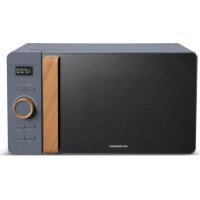
SCMW230FBCB - Microwaves SCHNEIDER - Free user manual and instructions
Find the device manual for free SCMW230FBCB SCHNEIDER in PDF.



| Product Type | Countertop microwave with grill and convection |
| Brand | Schneider |
| Model | SCMW230FBCB |
| Dimensions (W x D x H) | 520 x 520 x 327 mm |
| Net Weight | Approximately 19.4 kg |
| Capacity | 30 L |
| Turntable Diameter | 315 mm |
| Rated Voltage | 220-230 V ~ 50 Hz |
| Microwave Power (Output) | 900-1000 W |
| Grill Power | 2150-2400 W |
| Convection Power | 2150-2400 W |
| Microwave Power Levels | 100%, 80%, 50%, 30%, 10% |
| Cooking Functions | Microwave, Grill, Convection (with/without preheating), Combination (C-1 to C-4), Defrost (by weight or time), Auto Menu (10 programs), Express Cook, Healthy Cook (9 programs), Crispy Cook (4 programs), Low-Temperature Cook (5 modes), Deodorization, Steam Cleaning |
| Additional Functions | 24-hour clock, Timer, Child lock, Mute, ECO mode, Turntable reset |
| Supplied Accessories | Glass plate, Guide ring, Wire rack, Grill tray, Instruction manual |
| Safety | Door locking system, automatic stop if door opened, overheating protection, power cable must be replaced by a professional |
| Maintenance and Cleaning | Clean cavity with damp cloth; accessories with soapy water; do not use steam cleaner; avoid abrasive products |
| Repairability | Repairs by qualified technician; power cable by manufacturer or customer service |
| Equipment Class | Group 2, Class B (domestic use) |
Frequently Asked Questions - SCMW230FBCB SCHNEIDER
User questions about SCMW230FBCB SCHNEIDER
0 question about this device. Answer the ones you know or ask your own.
Ask a new question about this device
Download the instructions for your Microwaves in PDF format for free! Find your manual SCMW230FBCB - SCHNEIDER and take your electronic device back in hand. On this page are published all the documents necessary for the use of your device. SCMW230FBCB by SCHNEIDER.
USER MANUAL SCMW230FBCB SCHNEIDER
IMPORTANT SAFETY INSTRUCTIONS READ AND SAVE FOR FUTURE REFERENCE.
MISES EN GARDE RELATIVES AUX UTENSILES
IMPORTANT SAFETY INSTRUCTIONS
READ CAREFULLY AND KEEP FOR FUTURE REFERENCE
To reduce the risk of fire, electric shock, personal injury and excessive exposure to microwave energy when using the device, observe a number of basic safety precautions, including which:
-
WARNING: Liquids and other foods must not be heated in sealed containers since they are liable to explode.
-
WARNING: It is hazardous for anyone other than a competent person to carry out any service or repair operation that involves the removal of a cover which gives protection against exposure to microwave energy.
-
This appliance can be used by children aged from 8 years and above and persons with reduced physical, sensory or mental capabilities or lack of experience and knowledge if they have been given supervision or instruction
concerning use of the appliance in a safe way and understand the hazards involved. Children shall not play with the appliance. Cleaning and user maintenance shall not be made by children without supervision.
Refer to the section "Instruction for use" on page 14 and paragraph
- "Cleaning and maintenance" on page 26.
- Make sure the device and the power cable are out of reach of children under 8 years.
- Only use utensils that are suitable for use in microwave ovens.
- The oven should be cleaned regularly and any food deposits removed.
- Please read and follow these instructions: "PRECAUTIONS TO AVOID EXCESSIVE EXPOSURE TO MICROWAVE ENERGY".
- When heating food in plastic or paper containers, keep an eye on the oven due to the possibility of ignition.
- If smoke is observed, switch off or unplug the appliance and keep the door closed in order to stifle any flames.
- Do not overcook food.
- Do not use the oven for storing food or containers. Do not store food (such as bread, cookies, etc.) in the oven.
- Remove all fasteners and metal handles of the bags / containers of paper or plastic before placing them in the oven.
- Install or position the microwave oven in accordance with the installation instructions provided. The minimum installation height is 85 ~cm . The back of the device should be placed against a wall. Leave a minimum gap of 30 ~cm above the oven and 20 ~cm between the oven and each wall. Refer to the section "Installation" on page 10.
- Eggs in their shell and whole hard-boiled eggs should not be heated in microwave ovens since they may explode, even after microwave heating has ended.
- This device is intended solely fordomestic use.
-
If the supply cord is damaged, it must be replaced by the manufacturer, its service agent or similarly qualified persons in order to avoid a hazard.
-
Do not use and do not store the device outdoors.
- Do not use this oven near a place where there is water, in a wet basement or near a swimming pool.
- Accessible surfaces can be subjected to high temperatures during operation. The surfaces may become hot during use. Be sure to keep it away power cable from hot surfaces. Do not cover any of the oven vents.
- Do not leave the cable hanging from a table edge or counter.
- If the oven is not regularly cleaned, the walls may deteriorate; this phenomenon is potentially dangerous and can shorten the furnace life.
- To avoid burns, baby bottles and baby jars should absolutely be mixed or shaken after heating in a microwave oven, and the contents of the temperature should be checked before consumption.
- Liquid heated microwave oven may boil suddenly after being baked. Handle containers with care.
- Appliances are not intended to be operated by means of an external timer or separate remote-control
system.
- Accessible parts may be subjected to high temperatures during operation.
The young children must be kept away. - The appliance shall not be cleaned with a steam cleaner
- The unit is heated to a high temperature during operation. Be careful not to touch the resistors located inside the oven.
- Only use the temperature probe recommended for this oven (for ovens provided with a facility for using a temperature sensing probe.)
- WARNING: The appliance and its accessible parts become hot during use. Care should be taken to avoid touching the heating elements.
- Children under 8 must be left-out unless they are supervised at all times.
- The back of the device must be placed against a wall.
- The microwave oven should not be installed in a closet.
- The microwave oven is intended for heating food and beverages. Drying
of food or clothing and heating of warming pads, slippers, sponges, damp cloth and similar may lead to risk of injury, ignition or fire.
Metallic containers for food and beverages are not allowed during microwave cooking.
WARNING: If the door or door seals are damaged, the oven must not be operated until it has been repaired by a competent person.
- This appliance is intended to be used in household and similar applications such as:
staff kitchen areas in shops, offices and other working environments;
farm houses;
by clients in hotels, motels and other residential environments;
bed and breakfast type environments.
- Microwave heating of beverages can result in delayed eruptive boiling, therefore care must be taken when handling the container.
- The contents of feeding bottles and baby food jars shall be stirred or
shaken and the temperature checked before consumption, in order to avoid burns.
- Regarding the instructions for cleaning and use maintenance, especially of door seals, cavities and adjacent parts, refer to the following paragraph of the user manual.
- Failure to maintain the oven in a clean condition could lead to deterioration of the surface that could adversely affect the life of the appliance and possibly result in a hazardous situation.
- The appliance must not be placed in a cabinet.
- This appliance is not intended for use by persons (including children) with reduced physical, sensory or mental capabilities, or lack of experience and knowledge, unless they have been given supervision or instruction concerning use of the appliance by a person responsible for their safety.
-
WARNING: When the appliance is operated in the combination mode, children should only use the oven under adult supervision due to the temperatures generated.
-
The microwave oven is intended to be used freestanding.
This product is a Group 2 ISM equipment class B. Group 2 includes all equipment ISM (Industrial, Scientific and Medical) radio frequency energy which is intentionally generated and / or used in the form of radiation
Electromagnetic for the treatment of materials and equipment EDM. The Class B includes equipment suitable for use in domestic establishments and in establishments directly connected to a low voltage power supply network that supplies domestic premises.
- Select a level surface with a sufficient open space for the inlet openings and / or air outlet.
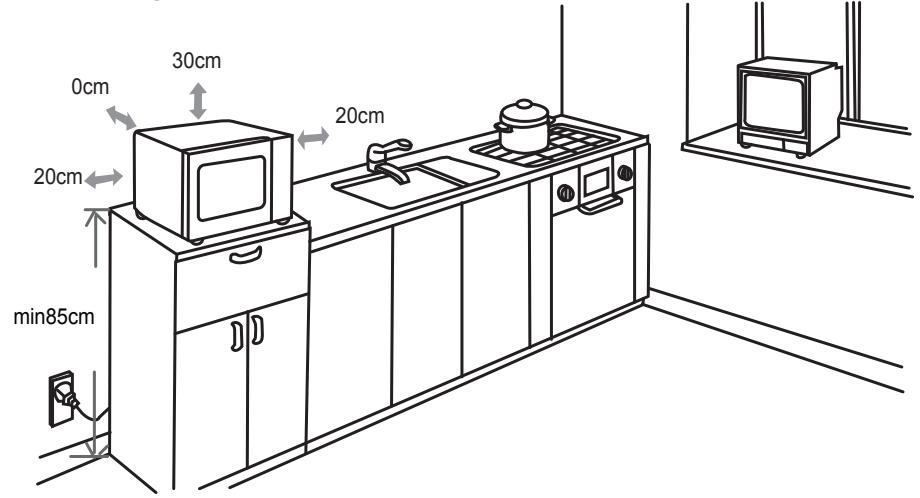
(1) The minimal mounting height is 85 cm.
(2) The back of the device must be placed against a wall. Leave a minimum gap of 30~cm above the oven and 20~cm between the oven and each wall.
(3) Do not remove the feet underneath the microwave oven.
(4) Block the inlet and / or air outlet apertures may damage the oven.
(5) Make sure that the microwave oven is as far away as possible from TVs and radios. Using a microwave oven can cause interference disturbing the reception of your radio or television.
- Plug your oven into a wall outlet. Makes sure that the voltage and frequency of the current it supplies are identical to those indicated on the nameplate of the unit.
WARNING: Do not install oven over a cooktop or other device that produces heat. If the oven is installed near or above a heat source, it may cause damage and void your warranty.
IMPORTANT
It is forbidden to replace the power cable by yourself. If damages must be repaired by the service of local distributors, by the manufacturer or by a qualified person.
If the unit is fallen visit qualified to check before using again. Internal damage may cause accidents.
For all types of problems or repairs, please contact the after-sales service of local dealer, the manufacturer or qualified person to avoid hazard.
Disposal and environmental responsibility
In order to be environmentally friendly, we encourage you to take this device correctly. You can contact your local authorities or recycling centers for more information.
Read the instructions carefully before use.
This product complies with the requirements of Directive 2014/35/EU (repealing Directive 73/23/EEC as amended by Directive 93/68/ EEC) and 2014/30/EU (repealing Directive 89/336/EEC).

Description of your product
Names of parts and accessories from the oven
Remove the oven and all parts of the box and inside the furnace. Your oven comes with the following:
Glass top 1
Guide ring 1
Instruction Manual 1
Grill tray (Cannot be used in microwave function and must be placed on the grill rack)
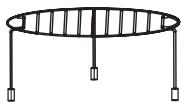
Grill Rack (Cannot be used in microwave function and must be placed on the glass tray)
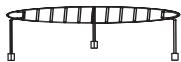
Connector (under the tray)
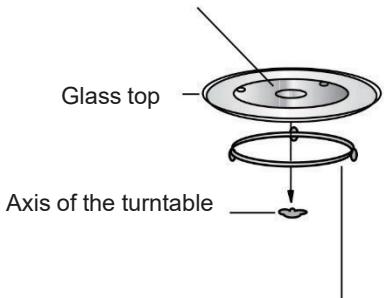
Guide ring
a. Never place it upside down glass top. Make sure that the rotation of the glass tray is not obstructed.
b. The glass top and the whole turntable support must always be installed in the furnace in use.
c. All food and food containers must always be placed on the glass tray for cooking.
d. If glass tray or turntable cracks or breaks, contact your authorized service center after sales closer.
Remove all accessories and packaging elements. Examine the oven and make sure it does not include damage such that the door is not broken and it is not dented. Do not install the oven if it is damaged.
Cabinet: Remove any protective film found on the microwave oven cabinet surface. Do not remove the light brown Mica cover that is attached to the oven cavity to protect the magnetron.
Instructions
- Clock Setting
When the microwave oven is electrified, the screen will display "0:00", buzzer will ring once.
1) Press "Kitchen Assistant" once, the oven will display "AS-1".
And press OK +30Sec. > to confirm.
2) Turn " " to adjust the hour figures, the input time should be within 0--23 (24-hour).
3) Press " Kitchen Assistant ", the minute figures will flash.
4) Turn " " to adjust the minute figures, the input time should be within 0--59.
5) Press "Kitchen Assistant" to finish clock setting.":will flash.
Note: 1) If the clock is not set, it would not function when powered.
2) During the process of clock setting, if you press " ", the oven will go back to the previous status automatically.
- Kitchen Timer
1) Press "Kitchen Assistant" twice, the screen will display "AS-2".
2) Turn "..." to enter the correct timer. (The maximum cooking time is 95 minutes.)
3) Press" OK/+30Sec. " to confirm setting.
4) When the kitchen time is reached, the buzzer will ring 5 times. If the clock be set (24-hour system), the screen will display the current time.
Note: The kitchen Time is different from 24-hour system, Kitchen Timer is a timer.
- Microwave Cooking
1) Press the "Optional Function" once and "P100" will flash.
2) Press " OK /+30Sec. " to confirm. The "P100" will light.
3) Press "Optional Function" repeatedly or turn " to select the microwave power from 100% to 10% . "P100", "P 80", "P 50", "P 30", "P 10" will display in order.
4) Press " OK / + 30Sec . to confirm.
5) Turn " " to adjust the cooking time. (The time setting should be 0:05 - 95:00.)
6) Press "OK/+30Sec." to start cooking.
Note: the step quantities for the adjustment time of the coding switch are as follow:
0---1 min: 5 seconds
1---5 min: 10 seconds
5---10 min:30 seconds
Microwave Power Chart
| Press | Once | Twice | 3 times | 4 times | 5 times |
| Microwave Power | 100% | 80% | 50% | 30% | 10% |
| Display | P100 | P80 | P50 | P30 | P10 |
- Grill Cooking
1) Press the "Optional Function" twice and "G-1" will flash.
2) Press "Optional Function" repeatedly or turn " to select the grill function. Stop pressing/turning when "G-1" flash.
3) Press " OK / + 30Sec . to confirm. The "G-1" will light.
4) Turn " " to adjust the cooking time. (The time setting should be 0:05 - 95:00.)
5) Press " OK / + 30Sec. to start cooking.
Combination Cooking
1) Press the "Optional Function" four times and "C-1" will flash.
2) Press " Optional Function " repeatedly or turn " " to select combination cooking mode. Stop pressing/turning when "C-1","C-2","C-3" or "C-4" "P100""G-1"" 140°C""C-1" displays.
3) Press " OK / + 30Sec. to confirm.
4) Turn " 95:00.) " to adjust the cooking time. (The time setting should be 0:05 -
5) Press" OK +30Sec to start cooking.
- Convection Cooking (With preheating function)
The convection cooking can let you to cook the food as a traditional oven. Microwave is not used. It is recommended that you should preheat the oven to the appropriate temperature before placing the food in the oven.
1) Press the "Optional Function" three times and "140" will flash.
2) Press "Optional Function" repeatedly or turn " to select convection function. Stop pressing/turning when "140" flash.
3) Press " OK / + 30Sec . " to confirm.
4) Turn " " to select the convection temperature.
Note: The temperature can be chosen from 140 degrees to 230 degrees.
5) Press the " OK/+30Sec. " to confirm the temperature.
6) Press the " OK Ⓞ/+30Sec. Ⓞ" to start preheating. When the preheating temperature arrives, the buzzer will sound twice to remind you to put the food into the oven. And the preheated temperature is displayed and flash.
7) Put the food into the oven and close the door.
Turn " " to adjust the cooking time. (The maximum setting time is 95 minutes.)
8) Press the " OK / + 30Sec . " key to start cooking.
- Convection Cooking (Without pre-heating function)
1) Press the "Optional Function" three times and "140" will flash.
2) Press "Optional Function" repeatedly or turn " to select convection function. Stop pressing/turning when "140" flash.
3) Press " OK 口 / + 30Sec . " to confirm.
4) Turn " " to select the convection temperature. Note: The temperature can be chosen from 140 degrees to 230 degrees.
5) Press the" OK 口 / + 30Sec " to confirm the temperature.
6) Turn " to adjust the cooking time. (The maximum setting time is 95 minutes.)
7) Press the" OK / + 30Sec. " key to start cooking.
Multi-Stage Cooking
Two stages can be maximumly set. If one stages is defrosting, it should be put in the first stage automatically. The buzzer will ring once after each stage and the next stage will begin.
Note: Auto menu and preheating cannot be set as one of the multi-stages.
Example: if you want to defrost the food for 5 minutes, then to cook with 80% microwave power for 7 minutes. The steps are as following:
1) Press "Pro Defrost" twice, the screen will display "d EF2";
2) Turn " " to adjust the defrost time of 5 minutes;
3) Press" Optional Function " once;
4) Press " OK / + 30Sec . " to confirm;
5) Turn " " to choose 80% microwave power till "P80" display;
6) Press " OK / + 30Sec . " to confirm;
7) Turn " " to adjust the cooking time of 7 minutes;
8) Press " OK / + 30Sec to start cooking.
- Speedy Cooking
1) In waiting state, press " OK / + 30Sec . " key to cook with 100% power level for 30 seconds. Each press on the same key can increase 30 seconds. The time is 95 minutes.
2) During microwave, grill, convection and combination states, press OK/ +30Sec . " key to cook with 100% power level for 30 seconds. Each press on the same key can increase 30 seconds.
Note: this function cannot work under weight defrost cooking.
- Auto Menu
1) In waiting state, turn " ", left firstly and then turn right to choose the function wanted, and "A1", "A2", "A3"... "A10" will be displayed.
2) Press " OK 口 / + 30Sec . " to confirm the menu you need.
3) Turn " " to choose weight of menu, and "g" indicator will light.
4) Press " OK / + 30Sec . " to start cooking.
Note: 1) Cake menu is under convection cooking with 160^ -preheat function, and you should preheat first following the auto menu operation, when the oven reaches the temperature, it will stop working and sound to remind opening the door to put cake in, then press "OK/+30Sec." to start cooking.
2) When roast chicken is selected and 2/3 of the time has passed, it will ring twice to tell you to turn over the food. You can just leave it continue. For better result, turn the food over, close the door, and then press
" OK / + 30Sec. " to continue cooking.
The Menu Chart:
| Menu | Weight | Display | Power |
| A1 AUTO REHEAT | 150g | 150 | 100% |
| 250g | 250 | ||
| 350g | 350 | ||
| 450g | 450 | ||
| 600g | 600 | ||
| A2 POTATO | 1 (about 230g) | 1 | 100% |
| 2 (about 460g) | 2 | ||
| 3 (about 690g) | 3 | ||
| A3 MEAT | 150g | 150 | 100% |
| 300g | 300 | ||
| 450g | 450 | ||
| 600g | 600 | ||
| A4 VEGETABLE | 150g | 150 | 100% |
| 350g | 350 | ||
| 500g | 500 | ||
| A5 FISH | 150g | 150 | 80% |
| 250g | 250 | ||
| 350g | 350 | ||
| 450g | 450 | ||
| 650g | 650 | ||
| A6 PASTA | 50g (with 450g cold water) | 50 | 80% |
| 100g (with 800g coldwater) | 100 | ||
| 150g (with 1200g cold water) | 150 | ||
| A7 SOUP | 200ml | 200 | 100% |
| 400ml | 400 | ||
| 600ml | 600 | ||
| A8 CAKE | 475g | 475 | Prehe at to 140°C |
| A9 PIZZA | 200g | 200 | C-4 |
| 300g | 300 | ||
| 400g | 400 | ||
| A10 CHICKEN | 500g | 500 | C-4 |
| 750g | 750 | ||
| 1000g | 1000 | ||
| 1200g | 1200 |
- Defrost by Weight
1) Press "Pro defrost" pad once, the oven will display "dEF1".
2) Turn "♀" to select the weight of food. At the same time, "g" will light, the weight should be 100-2000g.
3) Press " OK Ⓞ/+30Sec. " to start defrosting.
- Defrost by Time
1) Press "Pro defrost" twice, and the oven will display "dEF2".
2) Turn " " to select the cooking time. The MAX time is 95 minutes.
3) Press " OK /+30Sec. to start defrosting.
Home Fry
1) Press the "Home Fry" key.
2) Turn "Stop turning when "H1","H2","H3","H4","H5","H6","H7","H8" or "H9" displays.
3) Press " OK / + 30Sec to start preheating.
4) When the preheating temperature arrives, the buzzer will sound to remind you to put the food into the oven. Put the food into the oven and close the door.
5) Press " OK / + 30Sec . " to start cooking.
Note: When you choose Home Fry function, please do not put the food into the oven at the beginning. The oven needs to be preheated first. After several minutes, the buzzer sounds twice to remind you to put the food into the oven. After putting the food in the oven, please press " OK/+30Sec." perfectly.
| No. | Menu | Weight(g) |
| H1 | Frozen French fries | 300 |
| H2 | Frozen Potato croquettes | 350 |
| H3 | Frozen Squid | 250 |
| H4 | Frozen Onion rings | 225 |
| H5 | Frozen Chicken nuggets | 350 |
| H6 | Escalope | 270 |
| H7 | Shrimps | 250 |
| H8 | Vegetable | 200 |
| H9 | Spring Rolls | 250 |
- Crispy Grill
1) Press the " Crispy Grill " key.
2) Press " Crispy Grill " repeatedly or turn " " to select grill mode. Stop pressing/turning when "C1", "C2", "C3" or "C4" displays.
3) Press OK / + 30Sec to confirm.
4) Turn " " to select the cooking weight.
5) Press " OK 日 + 30Sec . to start cooking.
Note: All the food should be placed on the grill tray, and the grill tray must be placed on the grill rack.
| Crispy grill | Weight(g) | Power | Initial Temp. |
| C1 Cordon bleu (fresh mini pizza) | 300 | C-4 | Room Temp. |
| 600 | |||
| 900 | |||
| C2(lasagna) | 200 | C-4 | Refrigerated Temp. |
| 300 | |||
| 400 | |||
| 500 | |||
| C3(bread) | 100 | Conv. 230°C (without preheating) | Freezing Temp. |
| C4(pie/tart) | 300 | Conv. 220°C (with preheating) | Refrigerated Temp. |
- Low Temp Control
1) Press the "Low Temp Control" key.
2) Press the "Low Temp Control" repeatedly or turn " " to select cooking mode. "L1", "L2", "L3", "L4" or "L5" will flash.
3) Press " OK 口 / + 30Sec . " to confirm.
4) Turn " 品 " to select the cooking temperature.
5) Press " OK 豆 / + 30Sec . to confirm.
6) Turn " 品 " to adjust the cooking time.
7) Press " OK 口 / + 30Sec . " to start cooking.
| Display | 40°C | 50°C | 60°C | 70°C | 80°C | 90°C | 100°C | 110°C | Cooking time (Max) |
| L1 (Slow cook) | ✓ | ✓ | 12h | ||||||
| L2 (Keep warm) | ✓ | ✓ | ✓ | 95min | |||||
| L3 (Food dry) | ✓ | ✓ | ✓ | ✓ | ✓ | ✓ | 12h | ||
| L4 (Yogurt) | ✓ | 12h | |||||||
| L5 (Warming box) | ✓ | ✓ | ✓ | ✓ | ✓ | ✓ | ✓ | 95min |
- Deodorization
1) In waiting state, press "Kitchen Assistant" three times, the screen displays "AS-3".
2) Press " OK / + 30Sec . " to start deodorizing.
- Speedy Microwave Cooking
In waiting state, turn " 品 " left to choose cooking time directly then press "
OK / + 30Sec . "key to cook with 100% microwave power.
This program can be set as the first stage of multi-stage cook.
- Lock-out Function for Children
- Lock: In waiting state, press "Y/□" for 3 seconds, there will be a long "beep" denoting entering into the children-lock state and the lock indicator will light. screen will display current time or 0:00.
- Lock quitting: In locked state, press "Y/□" for 3 seconds, there will be a long "beep" denoting that the lock is released, and the lock indicator will disappear.
- Specifications
1) The buzzer will sound once when turning the knob at the beginning;
2) "OK / + 30Sec . " during cooking; must be pressed to continue cooking if the door is opened
3) Once the cooking programmer has been set, "OK Ⓞ/+30Sec. Ⓞ" is not pressed in 5 minutes. The current time will be displayed. The setting will be cancelled.
4) The buzzer sounds once by efficient press, inefficient press will be no response.
5) The buzzer will sound five times to remind you when cooking is finished.
- Inquiring Function
(1) Clock function checking When the kitchen time is set before the cooking progress, press the "Kitchen Assistant button", the clock will show the kitchen time on for 3 seconds and after 3 seconds it will return to the cooking time ( if not set kitchen time, it will display 0:00).
(2) Power function checking
During process of microwave or grill or when it is pause, press the "Optional Function" key to check the power level, the power and related icons will be displayed for 3 seconds.
- Mute Function
- In waiting state, press "Kitchen Assistant" 4 times, the screen displays "AS-4". Then press "OK/+30Sec." the oven will enter mute mode. Any operation cannot make the buzzer sound.
- In waiting state, press "Kitchen Assistant" 4 times, the screen displays "AS-4". Then press "OK/+30Sec." the oven will exit mute mode.
ECO Function
Enter ECO mode: In waiting state, press "Y/□" briefly, the screen will turn off.
Exit ECO mode: Press any key.
- Steam Clean Function
1) In waiting state, press "Kitchen Assistant" 5 times, the screen displays "AS-5".
2) Press " OK/+30Sec. " to start steam cleaning (100% microwave power for 5).
- Turntable Reset Function
When cooking finished, if the turntable is not at the initial position, it will enter the turntable reset function. At this time, the lamp, fan and turntable are working, the screen will display"C: D". The oven stops working when the reset is complete. Note:
- This function only works for one completed cooking. If pause or open the door during cooking, it cannot use the reset function.
- Under the reset status, opening the door or pressing" "will back to waiting state.
- Position Precision: coo king time within 5 minutes and turntable degrees within 30 degrees.
UTENSILS CAUTION
See the instructions on "Materials you can use in microwave oven or to be avoided in microwave oven." There may be certain non-metallic utensils that are not safe to use for microwaving. If in doubt, you can test the utensil in question following the procedure below.
Utensil Test:
- Fill a microwave-safe container with 1 cup of cold water (250ml) along with the utensil in question.
- Cook on maximum power for 1 minute.
- Carefully feel the utensil. If the empty utensil is warm, do not use it for microwave cooking.
- Do not exceed 1-minute cooking time.
Materials you can use in Microwave Oven
| Utensils | Remarks |
| Gratin dish | Follow manufacturer's instructions. The bottom of gratin dish must be at least 3/16 inch (5mm) above the turntable. Incorrect usage may cause the turntable to break. |
| Dinnerware | Microwave-safe only. Follow manufacturer's instructions. Do not use cracked or chipped dishes. |
| Glass jars | Always remove lid. Use only to heat food until just warm. Most glass jars are not heat resistant and may break. |
| Glassware | Heat-resistant oven glassware only. Make sure there is no metallic trim. Do not use cracked or chipped dishes. |
| Oven cooking bags | Follow manufacturer's instructions. Do not close with metal tie. Make slits to allow steam to escape. |
| Paper plates and cups | Use for short-term cooking/warming only. Do not leave oven unattended while cooking. |
| Baking paper | Use to cover food for reheating and absorbing fat. Use with supervision for a short-term cooking only. |
| Parchment paper | Use as a cover to prevent splattering or a wrap for steaming. |
| Plastic | Microwave-safe only. Follow the manufacturer's instructions. Should be labeled "Microwave Safe". Some plastic containers soften, as the food inside gets hot. "Boiling bags" and tightly closed plastic bags should be slit, pierced or vented as directed by package. |
| Plastic wrap | Microwave-safe only. Use to cover food during cooking to retain moisture. Do not allow plastic wrap to touch food. |
| Thermometers | Microwave-safe only (meat and candy thermometers). |
| Wax paper | Use as a cover to prevent splattering and retain moisture. |
Materials to be avoided in Microwave Oven
| Utensils | Remarks |
| Aluminum tray | May cause arcing. Transfer food into microwave-safe dish. |
| Food carton with metal handle | May cause arcing. Transfer food into microwave-safe dish. |
| Metal or metal-trimmed utensils | Metal shields the food from microwave energy. Metal trim may cause arcing. |
| Metal twist ties | May cause arcing and could cause a fire in the oven. |
| Paper bags | May cause a fire in the oven. |
| Plastic foam | Plastic foam may melt or contaminate the liquid inside when exposed to high temperature. |
| Wood | Wood will dry out when used in the microwave oven and may split or crack. |
Troubleshooting
| Normal | |
| The microwave oven interference created | It is normal for the microwave oven in operation can interfere with the reception of your radios and televisions. It is a phenomenon that we find with other small appliances, such as mixers, vacuum cleaners and fans. |
| low oven light | In low power mode, it is normal that the microwave cooking is slower. |
| Vapor accumulates and hot air exits the ducts | During cooking, the food can release vapor. But some steam may accumulate on cold surfaces such as the oven door. It's normal. |
| The oven was accidentally turned on while not food contains. | It is forbidden to operate the oven without food inside. It's very dangerous. |
| Problem | Possible Cause | Solution |
| Cannot turn on the oven. | (1) The cable Power is not properly connected | Wait 10 seconds and then reconnect it. |
| (2) Blown fuse or circuit breaker is activated. | Replace the fuse or circuit breaker switch on again (repairs must be performed by a professional society). | |
| (3) There is a problem with the power outlet. | Test it with other appliances. | |
| The oven is not heating. | (4) The door is not closed. | Securely close the door. |
| The glass tray makes a noise when the microwave oven is in operation. | (5) The guide ring or the bottom of the inner compartment of the furnace is dirty. | Refer to paragraph Clean your microwave -ondes for cleaning surfaces rooms. |
Care and maintenance
Be sure to disconnect the unit from the power supply.
- After use, clean the oven cavity with a damp cloth.
- Clean accessories with soapy water.
- The door frame, seal and nearby parts must be thoroughly cleaned with a damp cloth when they are dirty.
- Do not use abrasive cleaning products or hard metal scraper to clean the glass oven door, as they will scratch the glass surface, which can break it.
- Cleaning Tip - To facilitate cleaning of the inner walls of the oven can contact cooked food: Place half a lemon in a bowl, add 300 ml (1/2 pint) of water and heat with 100% power microwave for 10 minutes. Wipe the oven with a dry cloth.
| Model: | SCMW230FBCB |
| Nominal voltage : | 220-230V ~ 50Hz |
| Rated Input Power (Microwave): | 1450-1500W |
| Rated Output Power (Microwave): | 900-1000W |
| Rated Input Power (Grill): | 2150-2400W |
| Rated Input Power (Convection): | 2150-2400W |
| Oven Capacity: | 30 L |
| Turntable Diameter: | Ø315 mm |
| External dimensions: | 520 x 520 x 327 mm |
| Net weight : | Approximately 19.4 kg |
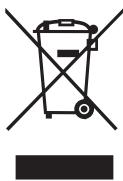
If that logo appears on the device, this means that it must be discarded in accordance with Directive 2012/19 / EU on electronic and electrical equipment (WEEE).
All hazardous substances in electrical and electronic equipment can have adverse effects on the environment and human health.
Consequently, when this unit is out of use, it should not be disposed of with unsorted municipal waste.
As an end user, your role is essential for reuse, recycling or any other form of value creation for this device. There are several systems of collection and recovery implemented by your local authority (recycling centers) and distributors.
You have an obligation to use those systems.
GUARANTEE:
The warranty does not cover the wear parts of the product, nor the problems or damage resulting from:
(1) Surface deterioration due to normal wear and tear of the product;
(2) Defects or deterioration due to contact with liquids and corrosion caused by rust or the presence of insects;
(3) Any incident, abuse, misuse, alteration, disassembly or Unauthorized repair;
(4) Improper maintenance, improper use concerning the product or connection to an incorrect voltage;
(5) Any use of accessories not supplied or not approved by the manufacturer.
The guarantee will be cancelled if the nameplate and / or serial number of the product are removed.
SCHNEIDER
WAARSCHUWINGEN OVER KEUKENGEREI
- MISES EN GARDE RELATIVES AUX UTENSILES
- IMPORTANT SAFETY INSTRUCTIONS
- READ CAREFULLY AND KEEP FOR FUTURE REFERENCE
- IMPORTANT
- Disposal and environmental responsibility
- Read the instructions carefully before use.
- Description of your product
- Names of parts and accessories from the oven
- Instructions
- - Microwave Cooking
- Microwave Power Chart
- - Grill Cooking
- Combination Cooking
- - Convection Cooking (With preheating function)
- - Convection Cooking (Without pre-heating function)
- Multi-Stage Cooking
- - Speedy Cooking
- - Auto Menu
- - Defrost by Weight
- - Defrost by Time
- Home Fry
- - Crispy Grill
- - Low Temp Control
- - Deodorization
- - Speedy Microwave Cooking
- - Lock-out Function for Children
- - Specifications
- - Inquiring Function
- - Mute Function
- ECO Function
- - Steam Clean Function
- - Turntable Reset Function
- UTENSILS CAUTION
- Utensil Test:
- Care and maintenance
- GUARANTEE:
- SCHNEIDER
- WAARSCHUWINGEN OVER KEUKENGEREI
Brand : SCHNEIDER
Model : SCMW230FBCB
Category : Microwaves