 ManualGo.com
WT70I832X - Washing machine WHIRLPOOL - Free user manual and instructions
Find the device manual for free WT70I832X WHIRLPOOL in PDF.



Download the instructions for your Washing machine in PDF format for free! Find your manual WT70I832X - WHIRLPOOL and take your electronic device back in hand. On this page are published all the documents necessary for the use of your device. WT70I832X by WHIRLPOOL.
USER MANUAL WT70I832X WHIRLPOOL
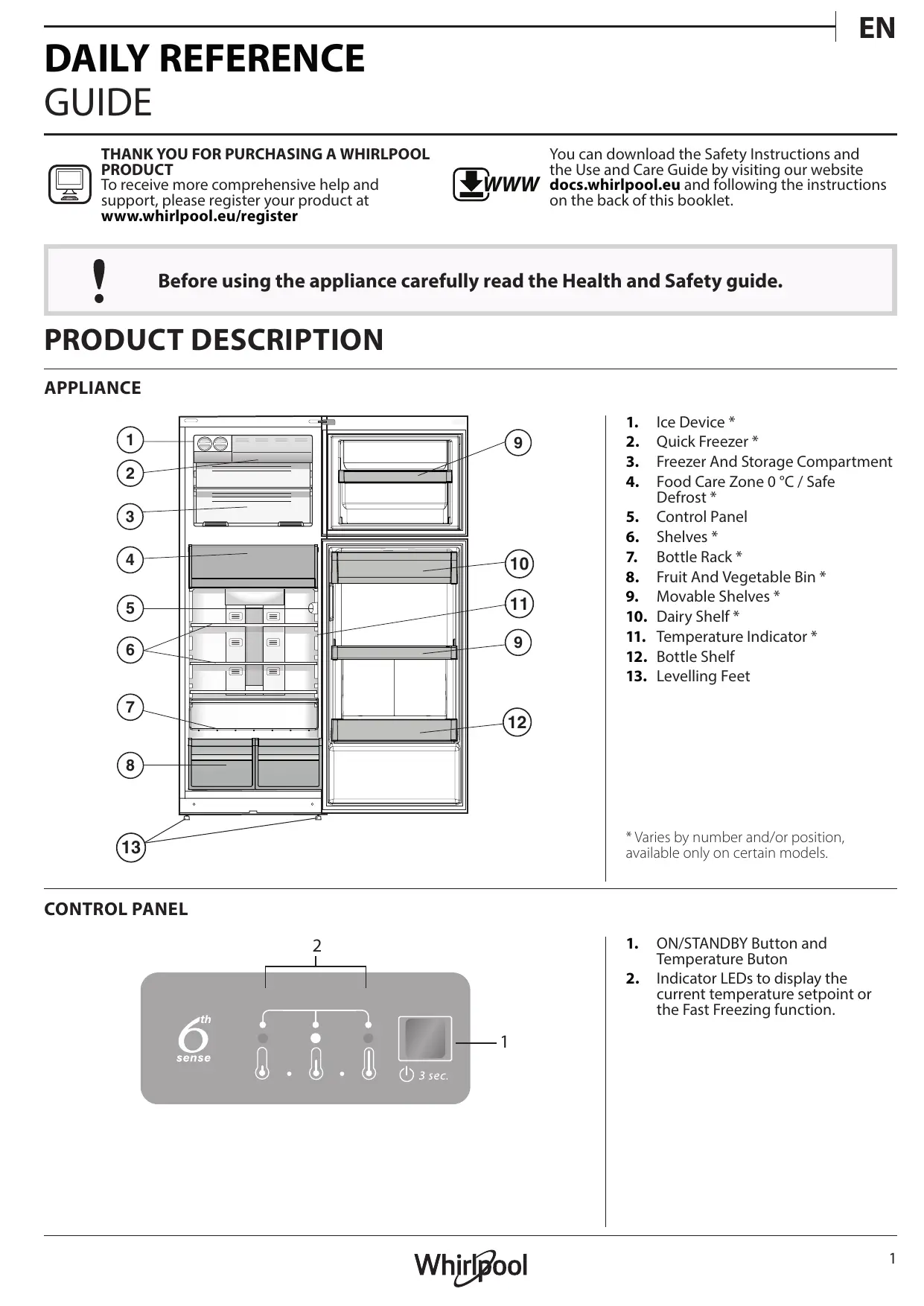
DAILY REFERENCE GUIDE THANK YOU FOR PURCHASING À WHIRLPOOL You can download the Safety Instructions and PRODUCT the Use and Care Guide by visiting our website To receive more comprehensive help and WW docs.whirlpool.eu and following the instructions support, please register your product at on the back of this booklet. www.whirlpool.eu/register ] Before using the appliance carefully read the Health and Safety guide.
PRODUCT DESCRIPTION APPLIANCE
3. Freezer And Storage Compartment
- Varies by number and/or position, 13 available only on certain models. CONTROL PANEL 2 1. ON/STANDBY Button and Temperature Buton
2. Indicator LEDs to display the
current temperature setpoint or the Fast Freezing function. Whirlpool !
HOW TO START THE APPLIANCE
After plugging the appliance to the mains, it starts the operation automatically. After starting the appliance, wait at least 4-6 hours before placing food into the fridge and into the freezer compartment. When the appliance is connected to the power supply, the display lights up and all the icons appear on the display for approximately 1 second. The default (factory) values of the fridge - freezer compartment settings light-up. DAILY USE See Use and Care Guide for more details on functions / see last page for information on how to obtain the Use and Care Guide FUNCTIONS ON/STANDBY To put the product in Stand-by, press and hold the On/Standby button for 3 seconds. All the temperature indicators turn off. Press again to reactivate the appliance (see the Instructions for Use). TEMPERATURE SETTING Press the Temperature button on the control panel to adjust the temperature from the warmest through the lower to the coldest level. Pressing the Temperature button, the temperature setting will change cyclically. CE ir vp med-high temp medium temp medlow temp lou temp Fast Cooling At first plug-in of appliance temperature setpoint is present at medium position (factory setting). FAST FREEZING The use of the Fast Freezing function is recommended: to increase the cooling capacity of the freezer compartment when placing a very high quantity of food within it. To activate the Fast Freezing function, press the Temperature button cyclically on the control panel till all the 3 LEDs blink and remain on. The function is automatically deactivated after 48 hours and return to previous selected set point. The function can be manually deactivated by press Temperature button on the control panel. TEMPERATURE INDICATOR * Temperature indicator informs you if the temperature in this cavity is cold enough for storage with the word “OK”.
1. Check that OK appears clearly on the indicator light (see
2. Ifthe word “OK” does not appear it means that the
temperature is too high: set a lower temperature and wait approximately 10 hours until the temperature has been stabilised.
3. Check the indicator light again: if necessary, readjust it
following the initial process. If large quantities of food have been added or if the refrigerator door has been opened frequently, it is normal for the indicator not to show OK. Wait at least 10 hours before adjusting the REFRIGERATOR OPERATION knob to a higher setting.
FOOD CARE ZONE 0°C / SAFE DEFROST *
A compartment designed to keep delicate food such as meat and fish fresh. The low temperature in the compartment makes it possible to store the food for up to one week - tests performed on meat products - without changing its nutrients, appearance and flavour. The compartment is also very suitable for healthy food defrosting, as low-temperature defrosting prevents any proliferation of microorganisms, while protecting its taste and organoleptic properties. Itis not suitable for fruit, vegetables and green salad. But it can be used for stuffed fresh pasta and even cooked food or leftovers. 2 Whirlpool
The salad crispers fitted inside the fridge have been specially designed for the purpose of keeping fruit and vegetables fresh and crisp. Open the pumidity regulator (position B) if you want to store food in a less humid environment like fruit, or close it (position A) to store food in a more humid
| EN ICE DEVICE * After pouring water in the special ice cups, place them in their places in the ice device. After about 2 hours, the ice cubes will e ready. In order to get the ice cubes, it will be sufficient to turn the two buttons to the right. The ice cubes will fall in to environment like vegetable.
Vegetable Fruit CEST À O | lé B B SHELVES + pue to the special guides the shelves are r heightis is adjustable, allowing easy storage of large containers emovable and the the tray below, ready to be used. ALARM TABLE ALARM TYPE Door open alarm. SIGNAL Refrigerator Light blin Alarm Indicator blinks. Door open alarm. Malfunction. blinks.
SOME OF THE FUNCTIONAL SOUNDS
A hissing sound when switching on the appliance for the first time or after a long pause. Buzzing sound when water valve or fan start working. Refrigerator Light OFF. Any temperature indicators CAUSE The door has remained open for more than 2 minutes. ks. The door has remained open for more than 4 minutes. Product malfunction. A gurgling sound when refrigerant fluid enters into the pipes. A cracking sound when compressor starts. SOLUTION Close the door. Close the door. Contact the After-sales Service. BRRR sound is from the compressor running. r Fe ae? | Éd The CLICK is from the thermostat which adjusts how often the compressor is running. LR a B2 Ca )
COOL ZONE suggested for the storage of beverage, milk and food as dairy food, delicatessen, yogurt, eggs, butter, sauces, pickles, desserts COOLER ZONE:
FOOD CARE ZONE 0 °C / SAFE DEFROST *
Suggested for the storage of meat, fish, cold cuts, stuffed fresh pasta, cooked food, leftovers. This zone is also suggested for food defrosting.
Max cool zone suggested to freeze fresh food and cooked food.
NORMAL FREEZER DRAWERS
= |__| Suggested for the storage of frozen food and ice cream. SSP, —| ICE CREAM LOADING IN THE BALCONIES AREA Note: The Grey tone of the legend doesn't match with 5 the color of drawers FRIDGE COMPARTMENT Foods which give off a large amount FREEZER COMPARTMENT Use recyclable plastic, metal, aluminum and glass containers and cling film to wrap foods. Always use closed containers for liquids and for food that may give off or be tainted by odor or flavor transfer or cover them. If you have a little quantity of food to store in the refrigerator, we recommend to use the shelves above the crisper for fruits and vegetables since this is the coolest area of the compartment. ethylene gas and those that are sensitive to this gas, such as fruit, vegetables and salad, should always be separated or wrapped so as not to reduce the storage life; for example do not store tomatoes together with kiwi fruits or cabbage. To avoid bottles falling over, you can use the bottle holder (available on selected models). Do not store food too close together to enable sufficient air circulation. The freezer is the ideal storage location for store frozen food, make ice cubes and freeze fresh food in the freezer compartment. The maximum number of kilograms of fresh food that can be frozen within a 24-hour period is indicated on the rating plate (...kg/24h). If you have a little quantity of food to store in the freezer, we recommend to use the coldest areas of your freezer compartment, corresponding to the middle area. PRODUCT FICHE Œrwww The product fiche with energy data of this appliance can be downloaded from Whirlpool website docs.whirlpool.eu HOW TO OBTAIN THE USE AND CARE GUIDE > (Œwww Download the Use and Care Guide from our website docs.whirlpool.eu(you can use this OR Code), specifying the product's commercial code > Alternatively, contact our Client After-sales Service.
CONTACTING AFTER-SALES SERVICE
You can find our contact details in the warranty manual. When contacting our Client After-sales Service, please state the codes provided on your product's identification plate.
Printed in ltaly Whirlpool
TABJULIA CEC 3BYKOBH CUTHANU
KOUTO MOXETE AA HYETE
HYCKAYMÈIFHIH ANY KONEI
} RAFT PENTRU STICLE
KPATKOE CTPABOUHOE PYKOBOHCTBO