USER MANUAL CF 198 E W625C VALBERG
This product has a 2-year warranty as of the date of purchase*, covering any fault resulting from a manufacturing or material defect. This warranty does not cover defects or damage resulting from incorrect installation, improper use or abnormal wear of the appliance.
*upon presentation of the sales receipt.
WARRANTY CONDITIONS
FR
Thank you for choosing this VALBERG product. Chosen, tested and recommended by ELECTRO DEPOT, the products of the VALBERG brand are easy to use, reliable and of an impeccable standard. Thanks to this appliance, you can be sure that each use will bring you satisfaction.
Welcome to ELECTRO DEPOT.
Visit our website: www.electrodepot.fr www.electrodepot.be

Preview of the appliance
Description of the appliance

Using the appliance
Positioning
Start-up
Temperature control

Useful information
Freezer maintenance
Troubleshooting
Energy-saving tips
Description of the appliance
Hinge
5 Power cord
Housing
Door
3 Drainage hole
Temperature control panel
4 Shelving basket
(The picture above is for reference only. The actual configuration will depend on the physical product or the notice provided by the distributor.)
- The low temperature of the freezer can keep food fresh for a long time, and the appliance is mainly used to store frozen foods and for making ice.
- The freezer is suitable for storing meat, fish, shellfish, pastries, and other foods that are not intended for immediate consumption.
- You should not store bottled or sealed liquids for a long period. If you want to store bottled or sealed liquids, the stored items should not be placed close to the wall of the freezer. There is a certain deviation between the temperature inside the box and the actual set temperature, which does not affect normal use.
- Please note that food should be consumed within its shelf life.
- The fast-freezing function is designed to maintain the nutritional values of the food. It can quickly freeze the food in a short time. If a large amount of food needs to be frozen at one time, it is recommended that users turn on the fast-freezing function 5 hours in advance. With this function activated, the freezer freezes at a faster speed, so it can quickly freeze food and effectively preserve the food's nutritional values.
Positioning

- Before using the freezer, remove all packaging materials, including the bottom glides and the foam pads and tapes inside the freezer, remove the protective film on the door and the freezer unit.
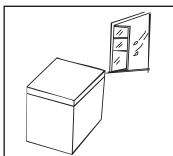
- The freezer should be installed in a well-ventilated, indoor place; the ground must be flat and solid.
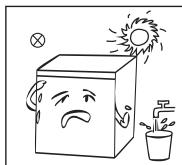
- Keep away from heat sources and avoid direct sunlight. To avoid rust and to ensure optimal insulation, do not position the freezer in damp or humid environments.
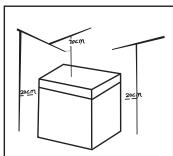
- There should be at least 70 cm of clear space above the freezer and at least 20 cm of clear space around all sides to facilitate heat dissipation.
Start-up
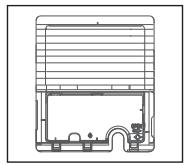
- Open the cover plate from the side, using the tool provided.
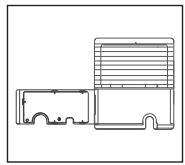
- Open the cover plate, take out the power cord, and then replace the cover plate.
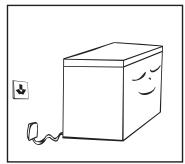
- After transportation, please let the freezer stand for at least 2 hours before turning on the power supply, otherwise its cooling capacity will be decreased or the freezer may be damaged.
- The freezer should be run for 2 to 3 hours before loading it with fresh or frozen foods; the freezer should run for more than 4 hours in summer, as the ambient temperature is higher in this season.
- Unplug the freezer in the event of a power failure or during cleaning operations. Do not connect the freezer to the power supply for at least five minutes, in order to prevent damages to the compressor due to successive starts.
(The picture above is for reference purposes only. The actual configuration will depend on the physical product, or on the notice provided by the distributor.)
Temperature control
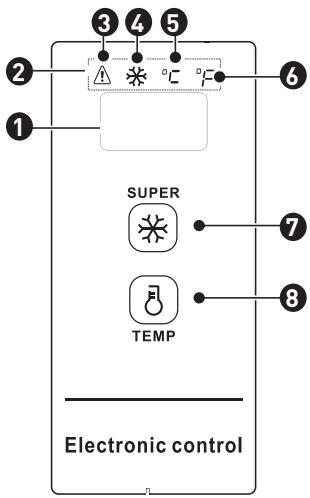
| 1 | Temperature display | 5 | Centigrade temperature indicator light |
| 2 | Indicator light display | 6 | Fahrenheit temperature indicator light |
| 3 | High temperature warming indicator light | 7 | Super-freeze/Lock/Unlock key |
| 4 | Super-freeze indicator light | 8 | Tempering key |
(The picture above is for reference purposes only. The actual configuration will depend on the physical product, or on the notice provided by the distributor.)
Display control
- When the freezer powers on, the display window will come on for 3 seconds, before switching to normal operation display. The original electric display should be under 18°C ;
- Normal operation display: A. If there are no errors, the set temperature or function mode will be displayed; B. if there are any errors, the error code will be displayed;
- Display sleep function: The sleep function will activate by default after powering up, once the set temperature has been reached, and the display will go out after another 30s.
Sleep mode can be switched via key combinations:
- By pressing the "TEMP" and "SUM" keys simultaneously for 5 seconds, when "ON" is displayed in the temperature display, it indicates the sleep function has been activated.
- By pressing the "8" and "*" keys simultaneously for 5 seconds, when "OFF" is displayed in the temperature display, it indicates that the sleep function has been deactivated.
Operation control: Opening the sleep function. After reaching the set temperature, the display will go out for another 30s;
Closing the sleep function. After reaching the set temperature, the display will not go out and will stay on;
Locking and unlocking
After the initial power-up, the key is locked by default; it's required for operation after unlocking.
- Lock: after pressing the "water" key and holding it for 3s, the display will blink once and the set temperature will be applied immediately, once the freezer settings have been locked, the display will not blink; after no key operations for 30s, the freezer may also switch to a locked status, and the display will blink once.
- Unlocking: After pressing the "water" key down for 3s, the display will blink once to unlock. When locked, you need to enter key operations after unlocking.
PLEASE NOTE:
The various following key operations will be implemented when the freezer is unlocked
Fahrenheit and centigrade temperature conversion
By pressing and holding the key for 3 seconds, you can switch between Fahrenheit and centigrade. When the centigrade temperature is displayed, the centigrade temperature indicator light will be on; when the Fahrenheit temperature is displayed, the Fahrenheit temperature indicator light in the display will be on.
Setting the temperature
(For settings of -30 °C/-22 °F, an ambient temperature of 25 °C/77 °F or lower is recommended)
- By pressing the key, the display will show the refrigerator temperature, and by pressing the key once each time, the refrigerator temperature will be adjusted by 1 degree Celsius/Fahrenheit;
- The specific temperature change is cycled according to the figure below:
Centigrade temperature setting range:
→10℃→9℃→8℃→…→1℃→0℃→-1℃→-28℃→-29℃→-30℃
Fahrenheit temperature setting range:
Activating super-freeze:
- 1. By pressing the "SUPER" key, the super-freeze indicator light "S" will come on;
- When setting the centigrade temperature, "-30" will be displayed in the temperature display. If the compressor is operating continuously, the centigrade temperature indicator light "°C" will come on.
- When setting the Fahrenheit temperature, "-22" will appear in the temperature display. If the compressor operates continuously, the Fahrenheit temperature indicator light "°F" will come on.
Exiting super-freeze:
1. Powering on after power error; 2. Continuous compressor operation for 24 hours; 3. If a sensor error occurs in super-freeze mode, you can exit super-freeze mode; 4. In super-freeze mode, you can exit super-freeze mode by pressing the key again.
High temperature alarm
The indicator light "Δ" will come on to indicate a high temperature alarm.
Power error safeguarding
When a power error occurs, the operating status will be locked. Once the power has been restored, the operation will be continued with the same setting as before the power error. The super-freeze function will be exited after a power error.
Error code
If an error occurs, the display will show the corresponding error codes as shown in the table below. The user can then contact a specialist for maintenance services, so as to ensure the normal use of freezer.
Error code
E2
Description
Temperature sensor error
Freezer maintenance
Cleaning
- Dust that collects behind the freezer and underneath it should be regularly cleaned to improve the appliance's cooling and energy-saving actions.
- Check the door seal regularly to make sure that there is no trapped debris. Clean the door seal with a soft cloth dampened with soapy water or diluted detergent.
- The interior of the freezer should be cleaned regularly to avoid any odours. Please turn off the power and remove all food, baskets, containers, etc. before any cleaning operations.
- Use a soft cloth or sponge to clean the inside of the freezer, using a mixture of two tablespoons of baking soda and approx. 1 litre of warm water. Then, rinse with water and wipe down. After cleaning, open the freezer door and let it air-dry before turning the power back on.
- For areas that are difficult to clean inside the freezer (e.g. gaps or corners), it is recommended to regularly wipe them over with a soft cloth, soft brush, etc. When necessary, use additional tools (such as pipe-cleaners) to ensure that no contaminants or bacteria accumulate in these areas.
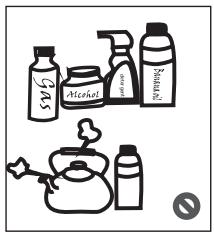
- Do not use soaps, detergents or spray cleaners, etc. to clean the inside of your freezer, as these products may create odours or contamination.
- Clean the baskets with a soft cloth dampened with soapy water or diluted detergent. Dry with a soft cloth or leave to air-dry.
- Wipe the outer surface of the freezer with a soft cloth dampened with soapy water, detergent, etc., and then wipe dry.
- Do not use hard-bristled brushes, wire brushes, abrasives (such as toothpaste), organic solvents (e.g. alcohol, acetone, etc.), boiling water, acid or alkaline products, which may damage the freezer's surface and its interior. Boiling water and organic solvents, such as benzene, may deform or damage plastic parts.
- Do not rinse directly with water or other liquids during the cleaning process to avoid short-circuits or impacts on the electrical insulation after immersion.
CAUTION:
Make sure to unplug the freezer for defrosting and cleaning operations.
Defrosting
- The freezer must be manually defrosted.
Unplug the freezer and open the freezer door, and remove any food and shelving baskets before defrosting; Open the outflow hole and drainage hole (and place a container underneath the outflow hole to catch any drainage); interior frost will naturally melt away, so you can wipe the defrosted water with a soft, dry cloth. Once the frost has softened, an ice scraper can be used to the speed up the de-icing process.
- Please remove any food and store in a cool place while defrosting the freezer, and remove any accessories beforehand.
CAUTION:
Other mechanical devices or other means must not be used to accelerate the freezer function, except those recommended by the manufacturer. Do not damage the cooling circuit.
Stop use
- Power error: Foods can be preserved for a couple of hours even in summer in the event of a power failure; it is recommended to open the door less often and to avoid putting fresh foods into the freezer.
- Long periods out-of-use: Please unplug the freezer if it is out of use for a long period of time, or for cleaning. Keep the door open to avoid any bad odours developing.
- Moving the freezer: Do not turn the freezer upside down or shake it, and it must not be carried at an angle greater than 45 degrees. Do not hold the freezer by its door and/or hinge when moving it.
CAUTION:
Continuous operation is recommended when the freezer is started up. Please do not shutdown the freezer under normal circumstances, in order to avoid impacting the freezer's service life.
Troubleshooting
The following simple issues can be handled by the user. Please call the product support department if these issues are not resolved using these troubleshooting tips.
| Freezer not working | Check that the freezer is plugged in and connected to the power supply; Low voltage; Check that the temperature control dial is set to the correct position; Power failure or circuit tripped. |
| Odour | Strong- odour foods should be tightly wrapped/in sealed containers; Check that no food is rotten or expired; Check that the interior of the freezer is clean. |
| Long-term operation of the compressor | It is normal for the freezer to operate for longer periods in the summer season, when the ambient temperature is higher; Do not store too much food in the freezer at once; Do not store foods in the freezer until they are cooled; Frequent opening of the freezer door; Thick frost layer (defrosting required). |
| Light not working | Check that the freezer is connected to the power supply, and whether the light has been damaged. |
| Doors cannot be closed properly | The freezer door has been obstructed or jammed by food packaging; Too much food stored; Unbalanced freezer. |
| Loud noises | Check that the floor is flat, and that the freezer has been positioned stably; Check that any freezer accessories have been positioned correctly. |
| Door opening obstruction/ difficulty | After refrigeration, there will be a pressure difference between the inside and outside of the freezer, which may cause issues with the door opening. This is a normal, physical phenomenon. |
| Side panel overheating | The freezer unit may emit heat during operation, especially in summer, which is caused by the radiation of heat from the condenser, and this is a normal phenomenon. |
| Surface condensation | Condensation: condensation will be detected on the outer surface and door seals of the freezer when there is significant ambient humidity. This is a normal and the condensation can be simply wiped away with a dry towel or cloth. |
| Airflow sound - buzzing and clattering | Refrigerants circulating in the cooling lines can produce sounds and noises - this is normal and dos not impact the cooling function of the appliance. Buzzing can be generated by the running compressor, especially when starting up or shutting down the freezer. The solenoid valve or electric switch valve can cause a clattering noise, which is a normal phenomenon and does not affect the operation of the appliance. |
Energy-saving tips
- The appliance should be installed in the coolest part of the room, away from heat sources or outlets, and out of the direct sunlight.
- Let hot foods cool to room temperature before placing them in the appliance. Overloading the appliance forces the compressor to run for longer periods. Foods that freeze too slowly may lose quality or go off.
- Take care to properly package and wrap foods, and wipe containers dry before placing them in the appliance. This reduces frost build-up inside the appliance.
- The appliance's storage compartment should not be lined with aluminium foil, wax paper or kitchen roll. Liners can interfere with cold air circulation, making the appliance less efficient.
- Organise and label food to reduce time spent looking in the freezer, with the door open. Remove as many items as needed in one go, and close the door as soon as possible.
Thank you!