USER MANUAL CF 418 D W625C VALBERG
Thank you for choosing this VALBERG product. VALBERG products are chosen, tested, and recommended by ELECTRO DEPOT, so you can be sure you are getting a top-quality, easy-to-use product that won't let you down.
We're confident your new device will be a pleasure to use every day!
Welcome to ELECTRO DEPOT.
Table of Contents
A Product overview
Parts
B Product usage
Proper use of freezer
Cleaning and maintenance
Cleaning and maintenance Troubleshooting
Parts
A Drainage hole B Cabinet Door handle Lamp E Shelving basket F Shutter 6 Temperature control panel (1) Temperature display area Indicator lamp display area 3 High temperature warming indicator lamp Super-freeze indicator lamp 5 Centigrade temperature indicator lamp 6 Fahrenheit temperature indicator lamp Super-freeze/Lock/Unlock key Tempering key

The picture above is only for reference. The actual configuration will depend on the physical product or statement by the distributor.
Proper use of freezer
- The low temperature of freezer may keep food fresh for a long time and it is mainly used to store frozen foods and making ice.
- The freezer is suitable for storing meat, fish, shrimp, pastries, and other foods that are not to be consumed in the short term.
- It is not suitable to store bottled or closed containers of fluid items for a long time. If you want to store such items, they should not be placed close to the wall of the freezer. There is a certain deviation between the temperature inside the box and the actual set temperature, which does not affect normal use.
- Please note that food shall be consumed within the shelf life.
- The fast-freezing function is designed to maintain the nutritional value of food. It can quickly freeze food in a short time. If a large amount of food needs to be frozen at one time, it is recommended that users turn on the fast-freezing function 5 hours in advance. In this case, the freezing speed of the freezer increases, allowing it to quickly freeze food and effectively preserve its nutrition.
Display control
After power-up, the display window will stay on for 3 seconds, then it will enter the normal operation display mode. The initial display at power-up shall be -18°C. - Display during normal operation: ① If there is no failure, the set temperature or function mode will be displayed; ② If there is any failure, the failure code will be displayed. - Sleep function display: The sleep function will be enabled by default after power-up. After the temperature is confirmed, the display will turn off after another 30 seconds. The sleep mode can be toggled via a combination of keys:
- By pressing the keys "山" and "水" simultaneously for 5 seconds, when "ON" is displayed once in the temperature display area, it indicates that the sleep function is enabled.
- By pressing the keys "∑" and "SUPER" simultaneously for 5 seconds, when "OF" is displayed once in the temperature display area, it indicates that the sleep function is disabled.
Operation control:
- With the sleep function enabled, after the temperature adjustment is done, the display area will turn off after another 30 seconds.
- With the sleep function disabled, after the temperature adjustment is done, the display area will remain on and not turn off.
Lock and unlock
After initial power-up, the keys are in the locked state by default; operation is required after unlocking.
- Lock: After pressing the "SUPER" key continuously for 3 seconds, the display area will blink once, and the set temperature will take effect immediately. Once entering the locked state, the display area will not blink. After no key operation for 30 seconds, it will also enter the automatic lock state, and the display area will blink once.
- Unlock: After pressing the "SUPER" key continuously for 3 seconds, the display area will blink once to unlock. In the locked state, key operation is required after unlocking.

The following key operations shall be implemented under unlock state.
Fahrenheit and centigrade temperature conversion
- By long pressing key "Fahrenheit" (8) for 3 seconds, Fahrenheit and centigrade temperature conversion could be implemented. When the centigrade temperature is displayed, the centigrade temperature indicator lamp is on; and when the Fahrenheit temperature is displayed, the Fahrenheit temperature indicator lamp in the display area will be on.
Temperature setting (For settings of -30°C / -22°F, an ambient temperature of 25°C / 77°F or less is recommended)
- By pressing the key "TEMP", the display window will show the freezer temperature. Each time the key "TEMP" is pressed, the freezer temperature will change by 1 degree Celsius/Fahrenheit. The specific temperature change cycles according to the figure below:
- Centigrade temperature setting scope:

- Fahrenheit temperature setting scope:

Super-freeze function
Enter super-freeze:
- By pressing the key "SUPER", the super-freeze indicator lamp "*" will be on.
- When setting the centigrade temperature, "-30" will be displayed in the temperature display area. If the compressor operates continuously, the centigrade temperature indicator lamp "°C" will be on.
- When setting the Fahrenheit temperature, "-22" will be displayed in the temperature display area. If the compressor operates continuously, the Fahrenheit temperature indicator lamp "°F" will be on.
Quit super-freeze:
Power on after power failure; Continuous operation of compressor for 24 hours; If sensor failure occurs under super-freeze mode, you can quit super-freeze; - Under super-freeze mode, you can quit the super-freeze mode by repressing the key "超水水水"
High temperature alarm
The indicator lamp "Δ" will be on for high temperature alarm.
Power failure memory
- During power failure, the sudden operating state of power failure will be locked, after power is recovered, the operation shall be continued according to the setting before the power failure.
- The super-freeze function will be quitted after power failure.
Failure code
If the failure happens, the display area will show corresponding error codes as shown as below table, the user shall contact a specialist for maintenance, so as to make sure the normal use of freezer.
Fault code
Description
E2
Temperature sensor failure
Placement
- Before using the freezer, remove all packaging materials including bottom cushions and foam pads and tapes inside the freezer, tear off the protective film on the door and the freezer body.
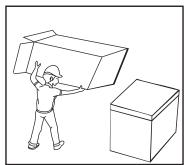
- The freezer should be placed in a well-ventilated indoor place; the ground shall be flat, and sturdy.
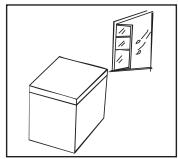
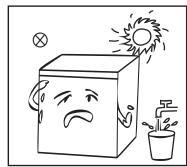
- Keep away from heat and avoid direct sunlight. Do not place the freezer in moist or watery places to prevent rust or reduction of insulating effect.
- The top space of the freezer shall be greater than 70 cm, and the distances from both sides and backside shall be more than 20 cm to facilitate heat dissipation.
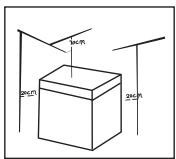
B Product usage
Changing the Light
This product contains a light source exempted of energy efficiency class. Light source in this product can be replaced by the end user. - Please unplug the appliance before any light source change operation. - The light source shall be removed at the end of the product's useful life, with sorting and recycling done separately.
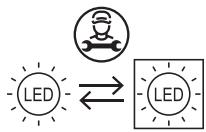
(Above is only for reference. The actual configuration will depend on the physical product or statement by the distributor)
Start to use
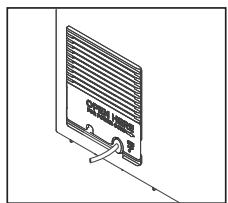
- Use a tool (flat screwdriver or flat tool), insert it into the gap at the arrow position in the picture and gently pry it open to the outside so as to open the flap.
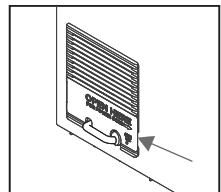
After opening the picture as shown below, remove the power cord from the hole.
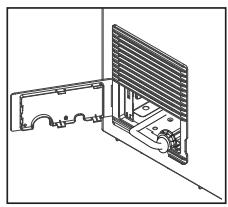
- After the power cord is removed, the cover will then be covered in the opposite direction of the original opening.
B Product usage
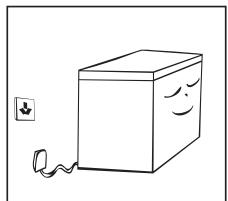
After transportation, please let the freezer stay for more than 2 hours before turning on the power, otherwise it will lead to a decrease in cooling capacity or a damage to the freezer. - The freezer shall run 2 to 3 hours before loading fresh or frozen foods; the freezer shall run for more than 4 hours in summer in advance considering that the ambient temperature is high. - Please pull out the plug in case of power failure or cleaning. Do not connect the freezer to power supply within five minutes to prevent damages to the compressor due to successive starts.
(Above is only for reference. The actual configuration will depend on the physical product or statement by the distributor)
Energy saving tips
- The appliance should be located in the coolest area of the room, away from heat producing appliances or heating ducts, and out of the direct sunlight.
- Let hot foods cool to room temperature before placing in the appliance. Overloading the appliance forces the compressor to run longer. Foods that freeze too slowly may lose quality, or spoil.
- Be sure to wrap foods properly, and wipe containers dry before placing them in the appliance. This cuts down on frost build-up inside the appliance.
- Appliance storage bin should not be lined with aluminum foil, wax paper, or paper toweling. Liners interfere with cold air circulation, making the appliance less efficient.
- Organize and label food to reduce door openings and extended searches. Remove as many items as needed at one time, and close the door as soon as possible.
Climate classes
| Class | Symbol | Ambient temperature range |
| Extended temperate | SN | + 10 to + 32 |
| Temperate | N | + 16 to + 32 |
| Subtropical | ST | + 16 to + 38 |
| Tropical | T | + 16 to + 43 |
Extended temperate: this refrigerating appliance is intended to be used at ambient temperatures ranging from 10°C to 32°C;
Temperate: this refrigerating appliance is intended to be used at ambient temperatures ranging from 16°C to 32°C;
Subtropical: this refrigerating appliance is intended to be used at ambient temperatures ranging from 16°C to 38°C;
Tropical: this refrigerating appliance is intended to be used at ambient temperatures ranging from 16°C to 43°C;
Temperature setting recommendation
| Thermostat setting for ambient T°C: NORMAL ≈ +24°C (± 4°C) | 3°C/-19°C |
| Thermostat setting for ambient T°C: COLD ≈ +16°C (± 4°C) | 3°C/-19°C |
| Thermostat setting for ambient T°C: HOT ≈ +32°C (± 4°C) | 3°C/-19°C |
Cleaning and maintenance

WARNING!
- Please unplug the freezer for defrost and cleaning.
- Dusts behind the freezer and on the ground shall be timely cleaned to improve the cooling effect and energy saving.
- Check the door gasket regularly to make sure there are no debris. Clean the door gasket with a soft cloth dampened with soapy water or diluted detergent.
- The interior of the freezer should be cleaned regularly to avoid odor.
- Please turn off the power before cleaning, remove all food, basket, container, etc.
- Use a soft cloth or sponge to clean the inside of the freezer, with two tablespoons of baking soda and a quart of warm water. Then rinse with water and wipe clean. After cleaning, open the door and let it dry naturally before turning on the power.
- For areas that are difficult to clean in the freezer (such as gaps or corners), it is recommended to wipe them regularly with a soft rag, soft brush, etc. and when necessary, combined with some auxiliary tools (such as thin sticks) to ensure no contaminants or bacterial accumulation in these areas.
- Do not use soaps, detergents, spray cleaners, etc. to clean the inside of your freezer as these may create odors or contamination.
- Clean the baskets with a soft cloth dampened with soapy water or diluted detergent. Dry with a soft cloth or dry naturally.
- Wipe the outer surface of the freezer with a soft cloth dampened with soapy water, detergent, etc., and then wipe dry.
- Do not use hard brushes, clean steel balls, wire brushes, abrasives (such as toothpastes), organic solvents (such as alcohol, acetone, banana oil, etc.), boiling water, acid or alkaline items, which may damage the freezer surface and interior.
Boiling water and organic solvents such as benzene may deform or damage plastic parts.
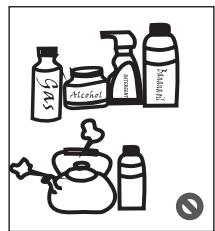
- Do not rinse directly with water or other liquids during cleaning to avoid short circuits or affect electrical insulation after immersion.
Defrost
- Freezer shall be manually defrosted.
- Unplug the freezer and open the freezer door, remove foods and shelving basket before defrosting; Open the outflow hole and drainage hole (and place water container at the outflow hole); indoor frost will naturally melt, wipe the defrost water with a dry, soft cloth. When the frost softens, an ice scraper might be used to accelerate the de-icing process.
- When defrosting, remove the food and store it in a cool place before removing the accessories.
WARNING!
Do not use mechanical devices or other means to accelerate the defrosting process, other than those recommended by the manufacturer. Do not damage the refrigerant circuit.
Stop using
- Power failure: Foods can be preserved for a couple of hours even in summer in case of power failure; it is recommended to reduce the frequency of opening the door and do not put fresh foods into the freezer.
- Long-time nonuse: Please unplug the freezer if it will be left unused for a long time, and clean it. Keep the door open to avoid bad odor.
- Moving: Do not turn the freezer upside down or vibrate it. The carrying angle cannot be greater than 45 degrees. Do not hold the door or hinge when moving this unit.

WARNING!
Continuous operation is recommended when the freezer is started. Please do not stop the freezer under normal circumstances so as not to affect the freezer's service life.
Troubleshooting
The following simple issues can be handled by the user. Please call the after-sales service department if the issues are not settled.
| Problem | Possible cause |
| Not work | Whether the freezer is plugged and connected to power;Low voltage;Whether temperature control knob is in the work area;Failure power or tripping circuit. |
| Odor | Odorous foods should closely wrapped;Whether foods are rotten;Whether the interior shall be cleaned. |
| Long-term operation of compressor | It is normal that freezer operates for longer time in summer when the ambient temperature is higher;Do not put too much food in the freezer at one time;Do not put foods until they are cooled;Frequent opening of freezer door;Thick frost layer (defrost is needed). |
| Light not work | Whether the freezer is connected to power, whether the light is damaged. |
| Doors cannot be properly closed | The freezer door is stuck by food packages;Too much food;Unbalanced freezer. |
| Loud noises | Whether the floor is flat, whether the placement of freezer is stable;Whether the freezer accessories are properly placed. |
| Transient difficulty in door opening | After refrigeration, there will be pressure difference between the inside and outside of the freezer to result in transient difficulty in door opening. This is a normal physical phenomenon. |
| Over heat on sidewall | ·The freezer enclosure may emit heat during operation specially in summer, this is caused by the radiation of the condenser, and it is a normal phenomenon. |
| Surface condensation | ·Condensation: condensation phenomenon will be detected on the exterior surface and door seals of the freezer when the ambient humidity is large, this is a normal phenomenon, and the condensation can be wiped away with a dry towel. |
| Airflow sound Buzz Clatter | ·Refrigerants circulating in the refrigerant lines will produce eruption of sound and grunts which is normal does not affect the cooling effect.
·Buzz will be generated by running compressor specially when starting up or shutting down.
·The solenoid valve or electric switch valve will clatter which is a normal phenomenon and does not affect the operation. |

Thank you!
This product is guaranteed against faults caused by defects in manufacturing or the materials used for a period of two years, starting from the date of purchase.* This warranty does not cover defects or damage caused by failure to install the device correctly, incorrect use of the product, or excessive wear and tear.
*proof of purchase required.