
HP6565/00 & HP6565/20 INTIMATE,MV - Epilator PHILIPS - Free user manual and instructions
Find the device manual for free HP6565/00 & HP6565/20 INTIMATE,MV PHILIPS in PDF.
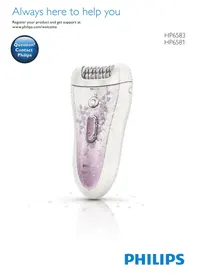


| Brand | Philips |
| Model | HP6565/00 & HP6565/20 INTIMATE,MV |
| Category | Epilator |
| Product type | Cordless electric epilator, waterproof (IPX7), rechargeable |
| Power supply | 100-240V adapter, built-in rechargeable battery, 1h charge, 40 min runtime |
| Speeds | 2 speeds (I and II) |
| Included accessories | Epilation head, shaving head, 3 mm comb, sensitive area reducer, active massaging hair straightener, Skin Stretcher, precision mini epilator (AA batteries), illuminated tweezers (L736H/AG3 batteries), cleaning brush, storage pouch |
| Usage | Dry or wet skin (bath/shower), legs, underarms, bikini line, face (eyebrows with tweezers) |
| Cleaning and maintenance | Rinse under running water after each use, dry before storage; wipe adapter with a dry cloth |
| Safety | Overheating protection, overcharge protection, transport lock |
| Spare parts | Replaceable epilation head, AA batteries for mini epilator, L736H/AG3 batteries for illuminated tweezers |
| Warranty | International warranty, except normal wear of the shaving unit |
| Noise level | Lc = 77 dB(A) |
| Operating temperature | 10°C to 30°C |
| Recycling | Rechargeable battery removable by a professional at end of life; batteries to be recycled separately |
Frequently Asked Questions - HP6565/00 & HP6565/20 INTIMATE,MV PHILIPS
User questions about HP6565/00 & HP6565/20 INTIMATE,MV PHILIPS
0 question about this device. Answer the ones you know or ask your own.
Ask a new question about this device
Download the instructions for your Epilator in PDF format for free! Find your manual HP6565/00 & HP6565/20 INTIMATE,MV - PHILIPS and take your electronic device back in hand. On this page are published all the documents necessary for the use of your device. HP6565/00 & HP6565/20 INTIMATE,MV by PHILIPS.
USER MANUAL HP6565/00 & HP6565/20 INTIMATE,MV PHILIPS
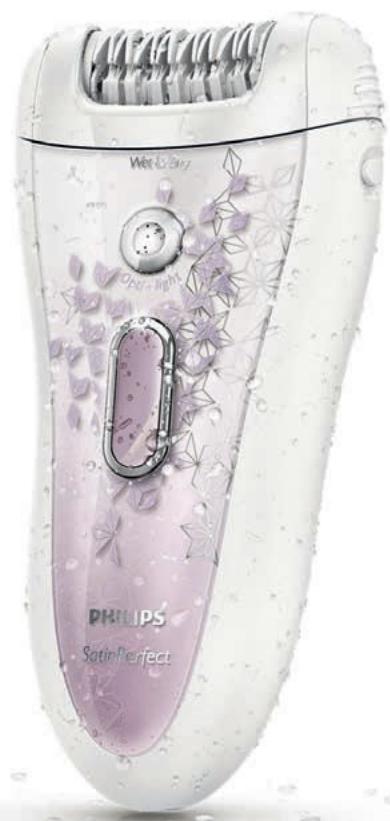
Always here to help you
Register your product and get support at
www.philips.com/welcome

HP6583
HP6581
ENGLISH 4
DANSK 21
DEUTSCH 38
GREEK 56
SPANISH 75
FINNISH 93
FRENCH 110
ITALIAN 128
DUTCH 146
NORWEGIAN 164
PORTUGUESE 182
BRAZILIAN PORTUGUESE 200
SWEDISH 218
TURKISH 235
267
283
Introduction
Congratulations on your purchase and welcome to Philips! To fully benefit from the support that Philips offers, register your product at www.philips.com/welcome.
Important
Read this important information carefully before you use the appliance and its accessories and save it for future reference. The accessories supplied may vary for different products.
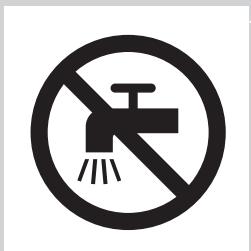
Danger
- Keep the adapter dry.
- If you charge the epilator in the bathroom, do not use an extension cord.
Warning
- The adapter contains a transformer. Do not cut off the adapter to replace it with another plug, as this causes a hazardous situation.
- This appliance can be used by children aged from 8 years and above and persons with reduced physical, sensory or mental capabilities or lack of experience and knowledge if they have been given supervision or instruction concerning use of the appliance in a safe way and understand the hazards involved. Children shall not play with the appliance. Cleaning and user maintenance shall not be made by children without supervision.
- Always unplug the appliance before you clean it under the tap.
- Do not insert metal-containing material into the socket on the epilator to avoid short circuiting.
- Always check the appliance before you use it. Do not use the appliance if it is damaged, as this may cause injury. Always replace a damaged part with one of the original type.
Caution
- Never use water hotter than 40°C to rinse the appliance. It is strongly recommended to rinse the appliance with cold water to prevent bacterial growth.
- Only use this appliance for its intended purpose as shown in the user manual.
- Never use compressed air, scouring pads, abrasive cleaning agents or aggressive liquids such as petrol or acetone to clean the appliance.
- Make sure the socket is live when you charge the appliance. The electricity supply to sockets in bathrooms may be cut off when the light is turned off.
- For hygienic reasons, the appliance should only be used by one person.
- To prevent damage and injuries, keep operating appliances (with or without attachment) away from scalp hair; face, eyebrows, eyelashes, clothes, threads, cords, brushes, etc.
- Do not use the appliance on irritated skin or skin with varicose veins, rashes, spots, moles (with hairs) or wounds without consulting your doctor first. People with a reduced immune response or people who suffer from diabetes mellitus, haemophilia or immunodeficiency should also consult their doctor first.
- Your skin may become a little red and irritated the first few times you use an epilator. This phenomenon is absolutely normal and quickly disappears. As you epilate more often, your skin gets used to epilation, skin irritation decreases and regrowth becomes thinner and softer. If the irritation has not disappeared within three days, we advise you to consult a doctor.
- Do not use any exfoliation brush immediately after epilation, as this may intensify possible skin irritation caused by the epilator.
- Do not use bath or shower oils when you epilate under wet conditions, as this may cause serious skin irritation.
- Charge, use and store the epilator at a temperature between 10°C and 30°C.
- If your epilator is equipped with a light for optimal epilation, do not look directly into the light to avoid being dazzled by it.
- Do not use the epilating head of the epilator without one of the epilation caps.
- Fully charge the epilator every 3 to 4 months, even if you do not use the epilator for a longer time.
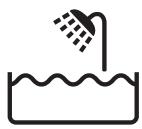
- If your epilator comes with tweezers, always replace the batteries of the tweezers with batteries of the original type.
Electromagnetic fields (EMF)
This Philips appliance complies with all applicable standards and regulations regarding exposure to electromagnetic fields.
General
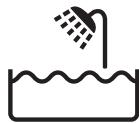
- This epilator is waterproof. It is suitable for use in the bath or shower and for cleaning under the tap. For safety reasons, the epilator can therefore only be used without cord.
- The appliance is suitable for mains voltages ranging from 100 to 240 volts.
- The adapter transforms 100-240 volts to a safe low voltage of less than 24 volts. Maximum noise level: Lc = 77 dB(A)
General description (Fig. 3)
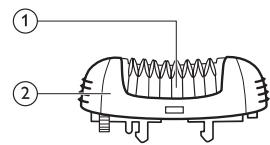
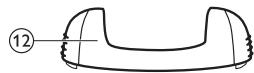
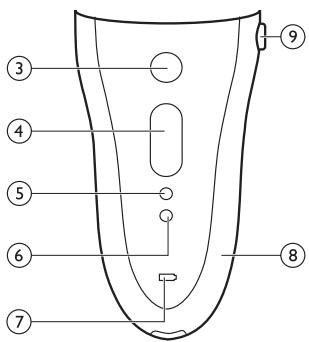
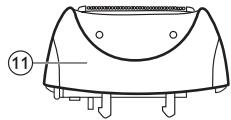
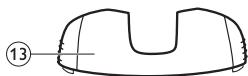
1 Epilating discs 2 Epilating head 3 Opti-Light 4 On/off button
- Press once for speed II
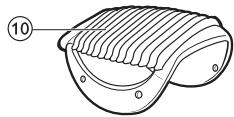
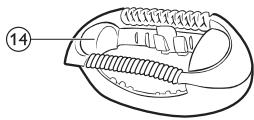
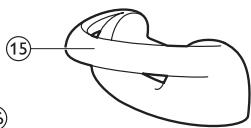
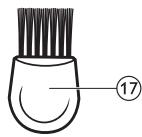
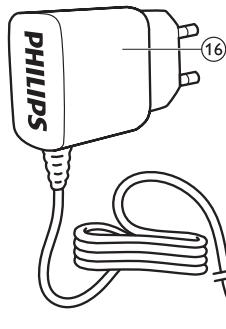
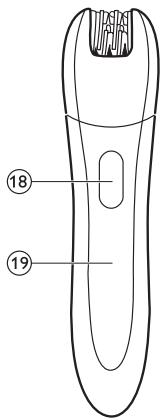
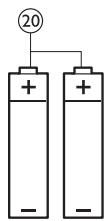
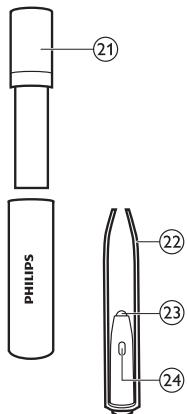
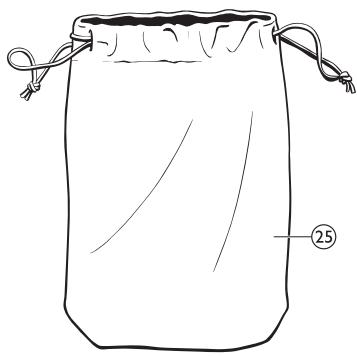
- Press twice for speed I. 5 Light for speed I, 6 Light for speed II, 7 Charging light, 8 Epilator, 9 Release button, 10 Trimming comb, 11 Shaving head, 12 Basic epilation cap, 13 Sensitive area cap, 14 Active hair-lift and massage cap, 15 Skin stretcher, 16 Adapter, 17 Cleaning brush, 18 On/off slide, 19 Precision epilator, 20 Disposable non-rechargeable batteries, 21 Storage case of Smart Tweezers, 22 Smart Tweezers, 23 Light of Smart Tweezers, 24 On/off slide for light, 25 Pouch
Preparing for use
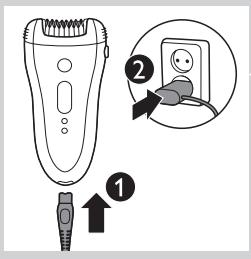
Charging
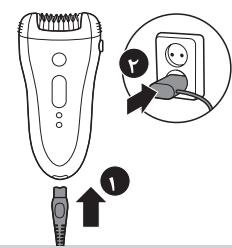
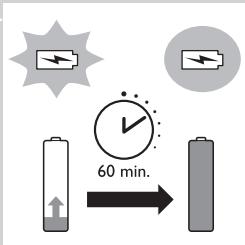
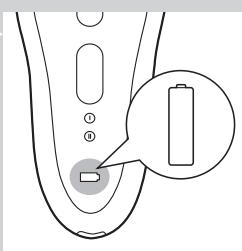
- Charging the epilator takes approx. 1 hour. When the epilator is fully charged, it has a cordless operating time of up to 40 minutes. 1 Connect the small plug to the appliance (1) and the mains plug to the wall socket (2).
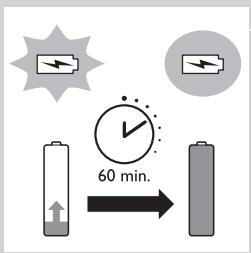
The charging light pulsates white to indicate that the appliance is charging. When the batteries are fully charged, the charging light lights up white continuously for 20 minutes and then goes out.
Batteries low or empty
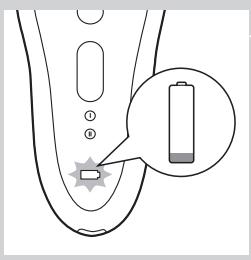
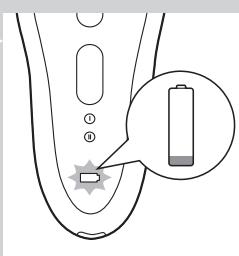
- When the batteries are almost empty, the charging light starts to flash red. When this happens, the batteries still contain enough energy for a few minutes of operation.
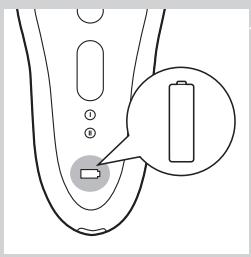
- When the batteries are completely empty, the appliance stops operating and the charging light lights up red continuously. To charge the epilator, see 'Charging' above.
Using the epilator
Clean the epilating head and charge the appliance fully before you use the appliance for the first time.
Note: You cannot use the appliance while it is connected to the mains.
Epilating tips
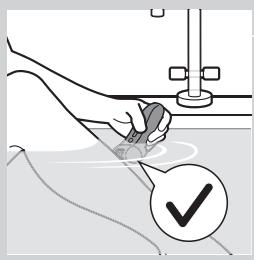
- Wet: If you are new to epilation, we advise you to start epilating on wet skin, as water relaxes the skin and makes epilation less painful and gentler. The appliance is waterproof and can be safely used in the shower or bathtub.
- Wet: If you want, you can use your common shower gel or foam.
- Dry: If you epilate dry, epilation is easier just after taking a bath or shower.
- Dry: Make sure your skin is clean and free from grease. Do not apply any cream to your skin before you start to epilate.
- General: We advise you to epilate in the evening, as skin irritation usually disappears overnight.
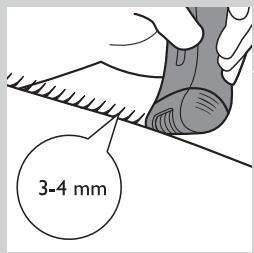
- General: Epilation is easier and more comfortable when the hairs have a length of 3-4 mm. If the hairs are longer, we recommend that you shave first and epilate the shorter regrowing hairs after 1 or 2 weeks. Alternatively, you can trim the hairs to 3-4 mm.
- General: Use the skin stretcher to keep the skin tight on your arms or upper legs. The skin stretcher helps to reduce the pain while epilating.
Epilating the legs with the epilator
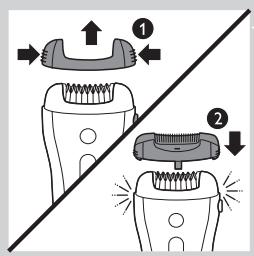
- If you already have some experience with epilation, you can simply use the epilating head with the basic epilation cap. If your hairs lie flat on your skin, we advise you to use the active hair-lift and massage cap. This cap not only lifts up the hairs but its active massaging roller also minimises the pulling sensation of epilation.
Note: Remove the basic epilation cap by pressing its both sides (1) before you attach another cap (2) or the skin stretcher.
1 Put any cap on the epilating head.
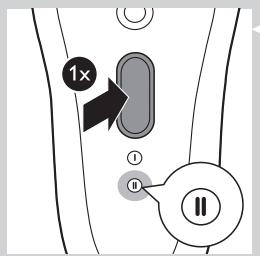
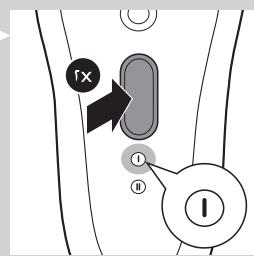
Press the on/off button once to switch on the appliance.
The appliance starts to operate at speed II, which is the most efficient speed for epilating.
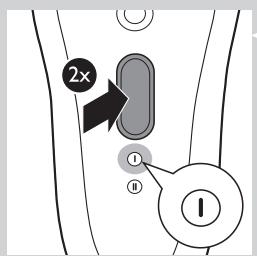
Note: If you want to use speed I, press the on/off button a second time.
Note: Speed I is suitable for areas with little hair growth and for hard-to-reach areas, such as knees and ankles.
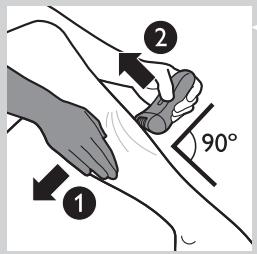
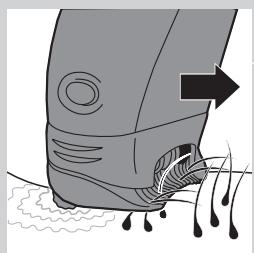
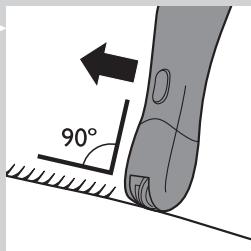
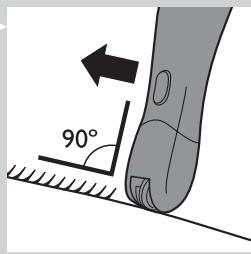
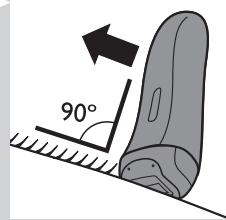
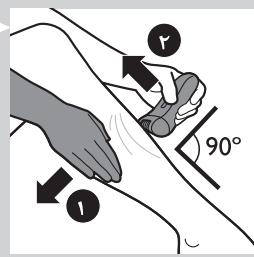
3 If you are not using the skin stretcher, stretch the skin with your free hand to make the hairs stand upright (1). Place the epilating head at an angle of 90° onto the skin with the on/off button pointing in the direction in which you are going to move the appliance (2).
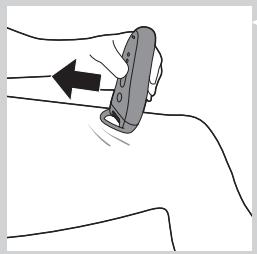
Note: If you are using the skin stretcher you do not need to stretch your skin anymore. The skin stretcher also ensures that you keep the appliance on your skin at the right angle. Make sure that the skin stretcher is in contact with your skin as shown in the figure.
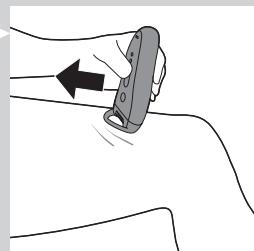
4 Slowly move the appliance over the skin against the direction of hair growth while pressing it lightly.
Tip: To relax the skin, we advise you to apply a moisturising cream immediately or a few hours after epilation. For the underarms, use a mild deodorant without alcohol.
Shaving the underarms and bikini line
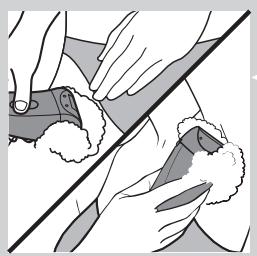
Use the shaving head to shave sensitive areas, such as the underarms and the bikini line.
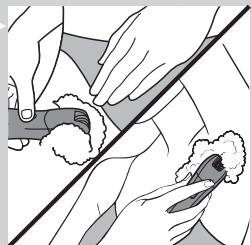
Note: To get the best shaving results, use the shaving head on dry skin. If you want to use the shaving head in the bath or shower, we advise you to use your common shower gel for a more gentle shave.
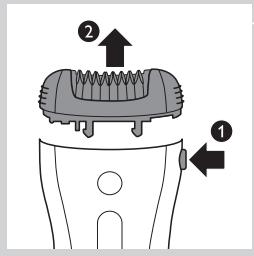
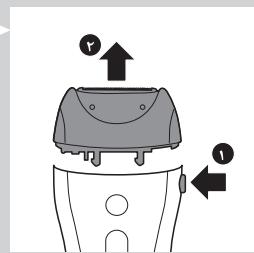
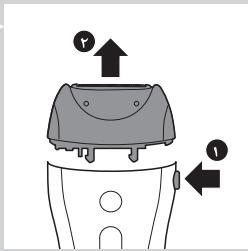
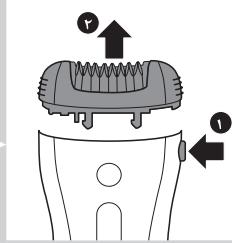
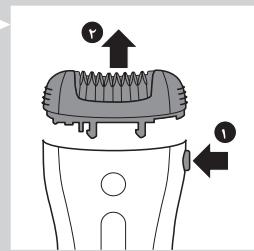
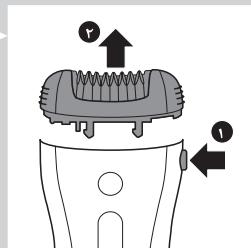
1 Press the release button (1) and remove the epilating head from the epilator (2).
Note: You can remove the shaving head in the same way.
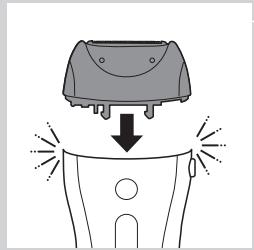
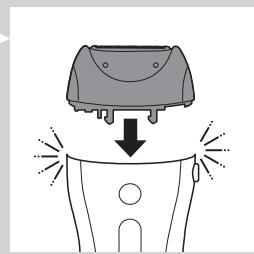
2 Put the shaving head on the appliance and press it until it snaps home.
3 Switch on the appliance.
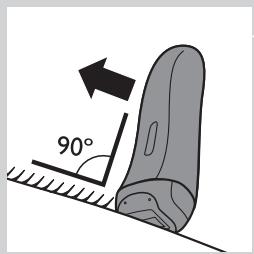
4 Place the shaving head at an angle of 90° onto your skin with the on/off button pointing in the direction in which you are going to move the appliance. 5 Slowly move the appliance against the direction of hair growth.
Note: Make sure that the shaving head is always fully in contact with the skin.
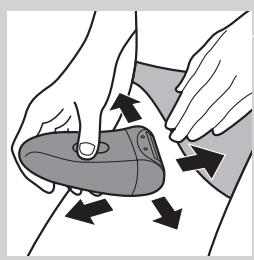
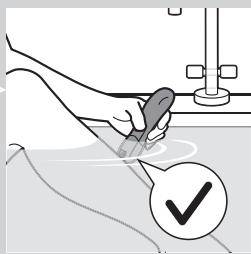
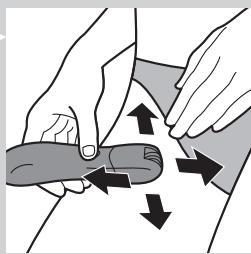
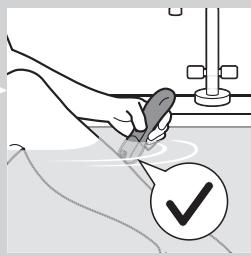
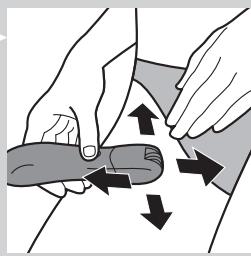
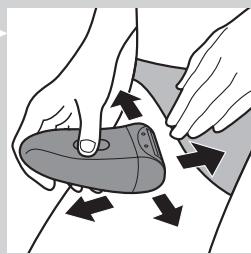
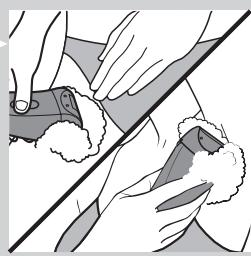
6 Shave your bikini line as shown in the figure. Stretch the skin with your free hand and move the appliance in different directions.
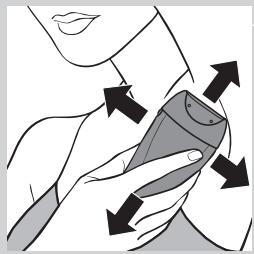
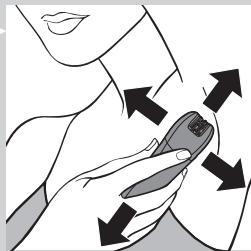
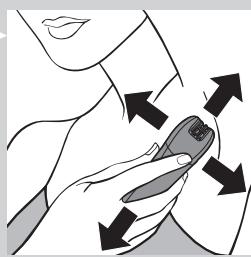
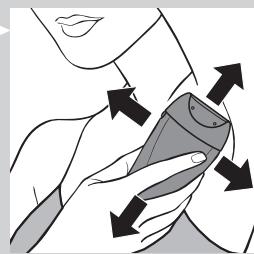
7 Shave your underarms as shown in the figure. Move the appliance in different directions and raise your arm to stretch the skin.
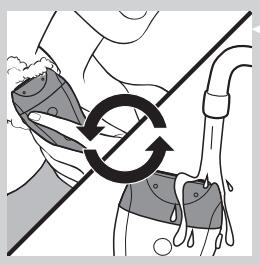
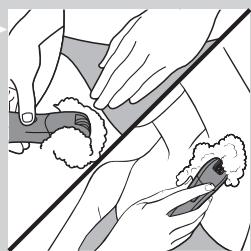
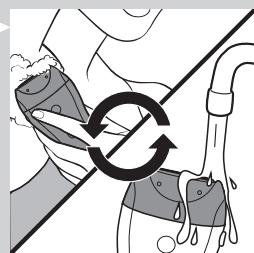
Note: When you use shaving foam or gel, clean the shaving head during and after each use with water to ensure optimum performance.
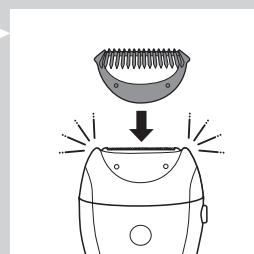
8 When you have finished shaving, switch off the appliance and clean the shaving head according to the instructions in chapter 'Cleaning and maintenance'. 9 Put the trimming comb on the shaving head when you store the appliance.
Trimming with the comb
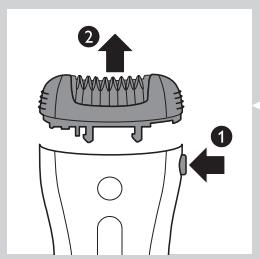
Use the shaving head with the comb attached to trim your hairs in the bikini line to a length of 3 mm. You can also use the comb to pretrim long hairs (longer than 10 mm) on the underarms or legs.
1. Press the release button (1) and remove the epilating head from the epilator (2).
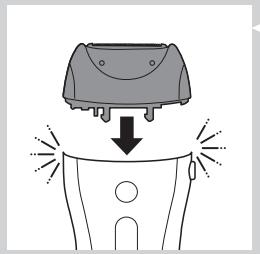
2. Put the shaving head on the appliance and press it until it snaps home.
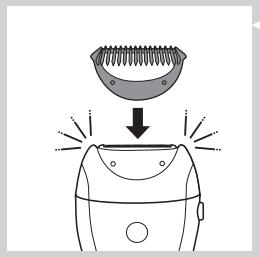
3. Put the comb on the shaving head. 4. Follow steps 3 to 8 in section 'Shaving the underarms and bikini line'.
Overheat protection
This function helps to prevent overheating of the appliance.
Note: To avoid overheating of the appliance, do not press it too hard onto your skin. The appliance works best when you move it over your skin without excessive pressure.
If the overheat protection is activated, the appliance switches off automatically and the charging light and the speed lights flash red for 30 seconds.
You can deactivate the overheat protection by letting the appliance cool down and then switch it on again.
Note: If the charging light flashes red again, the appliance has not yet cooled down completely.
Overload protection
If you press the epilating head onto your skin too hard or when the epilating discs of the epilating head get blocked (e.g. by clothes), the appliance switches off automatically and the speed lights flash red for 5 seconds.
1. Turn the epilating discs with your thumb until you can remove whatever blocks the epilating discs.
Using the precision epilator
Inserting/changing the batteries
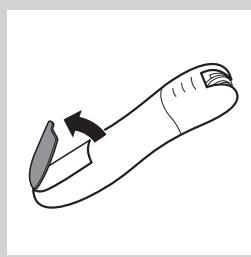
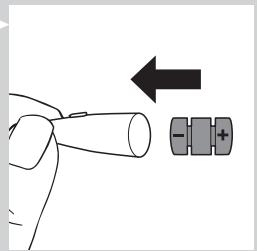
1 Remove the lid of the battery compartment by pressing the snap hooks.
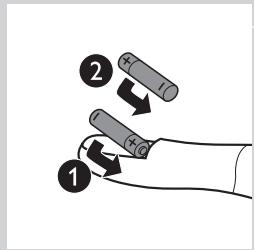
2 Insert 2 AA 1.5V alkaline batteries into the battery compartment.
Note: Make sure the + and - poles of the batteries point in the direction indicated at the bottom of the battery compartment.
Note: New batteries have an operating time of up to 40 minutes.
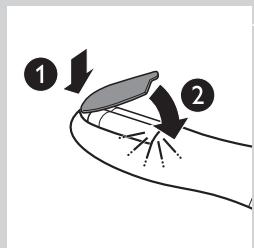
3 To close the battery compartment, first insert the bottom part of the lid into the rim of the compartment (1) and then press the top part of the lid home until it locks with a snap (2).
Removing the batteries
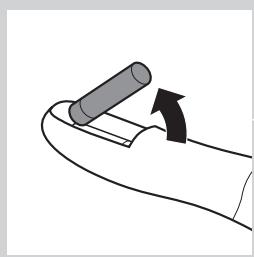
1 If you want to remove the batteries, open the lid of the battery compartment, see step 1 in section 'Inserting/changing the batteries' above. Take out the first battery.
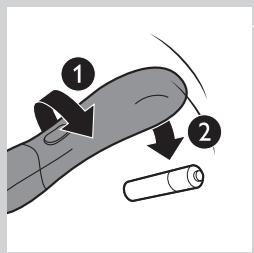
3 Turn the appliance around, so that the open part of the battery compartment is facing the floor. Hold your hand under the opening and shake the appliance until the second battery falls out.
Note: When you put down the appliance, place it in such a way that the on/off slide is facing the floor to prevent the appliance from rolling away.
Epilating with the precision epilator
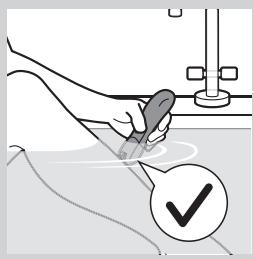
Do not use this appliance to epilate eyebrows or eyelashes.
Do not use this appliance to remove hairs that grow out of moles.
- Use the precision epilator to epilate the underarms, the bikini line and hard-to-reach areas, wet or dry.
1 Thoroughly clean the area to be epilated. Remove any residues of deodorant, cream etc. Switch on the appliance. 3 Place the epilating head at an angle of 90° onto the skin with the on/off slide pointing in the direction in which you are going to move the appliance. 4 Slowly move the appliance over the skin, against the direction of the hair growth. Epilate your bikini line as shown in the figure. Stretch the skin with your free hand and move the appliance in different directions to catch all hairs. 6 Epilate your underarms as shown in the figure. Raise your arms to stretch the skin and move the appliance in different directions to catch all hairs.
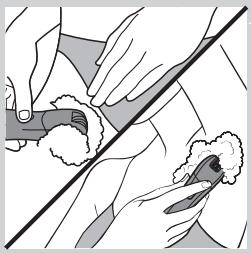
Tip: If you want to use the precision epilator in the bath or shower, we advise you to use a small amount of your common shower gel for better gliding.
Using the Smart Tweezers
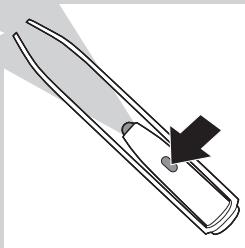
Your epilator comes with Smart Tweezers with integrated light for easy removal of facial hair, such as eyebrow hairs. The Smart Tweezers are protected by a case with integrated mirror which allows you to depilate wherever and whenever you want. The Smart Tweezers are supplied ready for use with 3 button batteries in the battery compartment.
Using the Smart Tweezers
Do not use the Smart Tweezers to remove hairs that grow out of moles.
Do not point the light of the Smart Tweezers directly at your or somebody else's eyes.
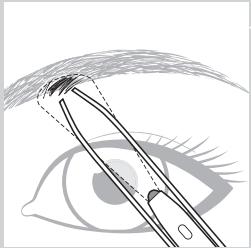
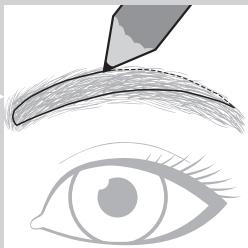
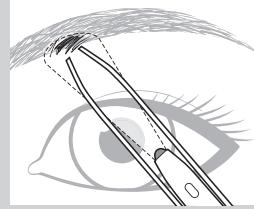
1 Use an eye pencil to mark the desired shape of your eyebrows.
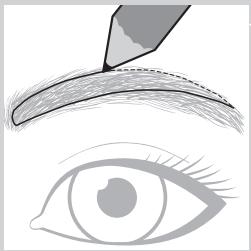
Switch on the light by sliding the on/off button.
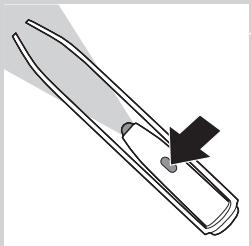
3 Remove any hairs outside the marked shape. Always pull out the hair in the direction of hair growth.
Replacing the batteries
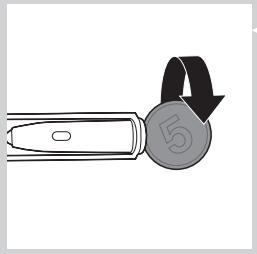
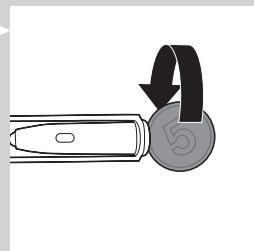
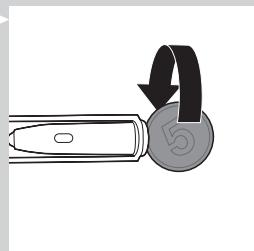
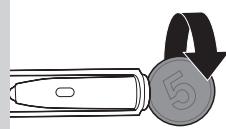
1 Open the battery and light compartment by turning the bottom anticlockwise with a coin. 2 Remove the old button batteries.
Keep the button batteries out of the reach of children and pets. Button batteries present a potential choking hazard.
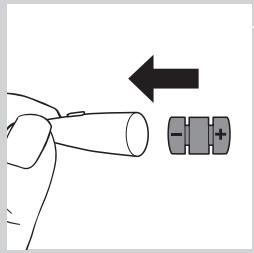
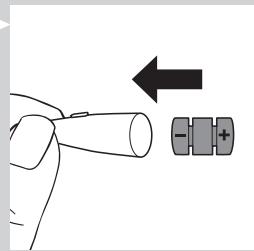
3 Insert the new button batteries with the negative side pointing forward into the battery and light compartment.
Note: The Smart Tweezers work on three alkaline button batteries, type L736H or AG3 (dia. 7.8 x 3.4 mm).
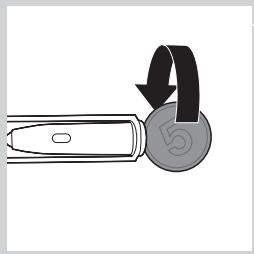
4 Screw the bottom back onto the battery and light compartment by turning it clockwise with a coin.
Cleaning and maintenance
Never use scouring pads, abrasive cleaning agents or aggressive liquids such as petrol or acetone to clean the appliance.
Always keep the adapter dry. Never rinse it under the tap or immerse it in water. If necessary, clean the adapter with the cleaning brush or a dry cloth.
Cleaning the epilator and attachments
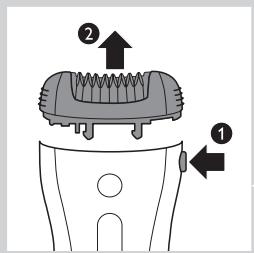
Clean the epilating head after each wet use to ensure optimum performance.
Always switch off the appliance before you clean it.
1 Switch off the appliance. 2 Remove the cap from the epilating head. 3 Press the release button (1) and remove the epilating head from the appliance (2).
Note: Never try to detach the epilating discs from the epilating head.
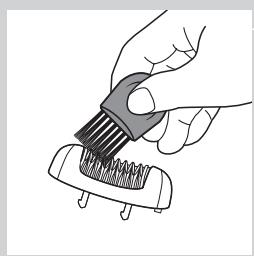
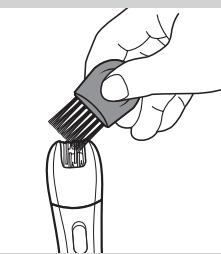
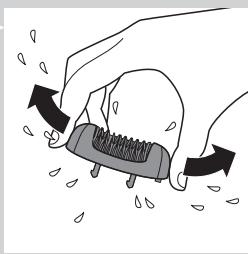
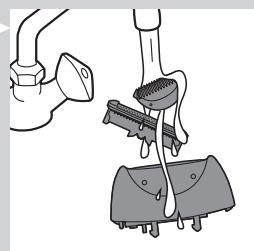
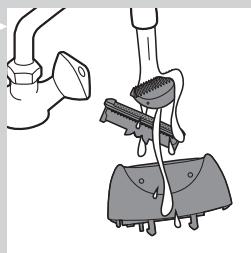
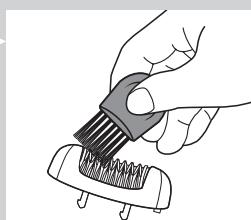
4 Remove loose hairs with the cleaning brush. 5 Rinse all parts (epilator, epilating head, caps and skin stretcher) under a lukewarm tap while turning them.
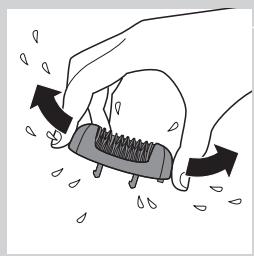
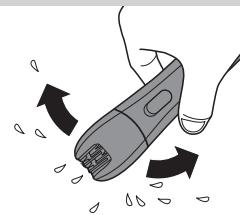
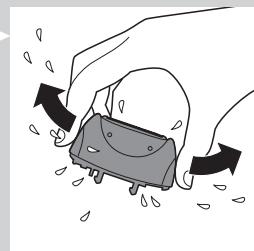
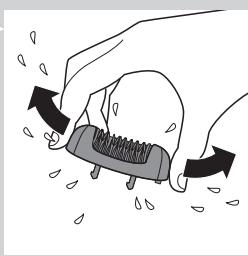
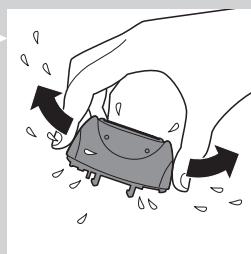
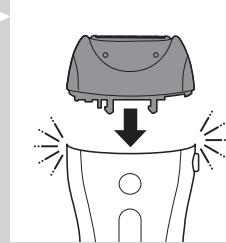
6 Shake excess water off the parts and let them dry. Note: For hygienic reasons, make sure all parts are dry before you reassemble the appliance. 7 To reattach the epilating head, place it on the appliance and press it onto the appliance until it snaps home.
Cleaning the shaving head and the comb
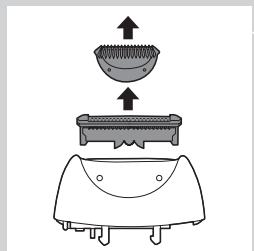
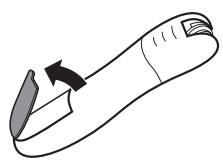
1 Remove the comb, if attached, by pulling it off the shaving head.
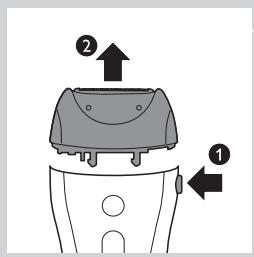
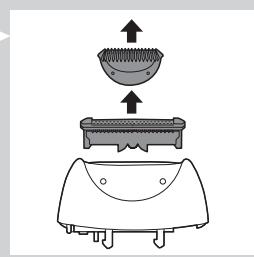
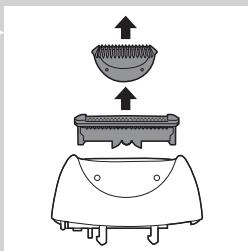
Press the release button (1) and remove the shaving head from the appliance (2). 3 Remove the shaving unit from the shaving head.
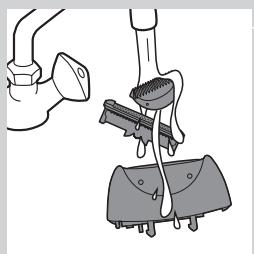
4 Rinse the shaving unit, the shaving head and the comb under a lukewarm tap while turning them.
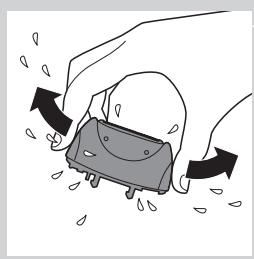
5 Shake the shaving unit, the shaving head and the comb firmly and let them dry. Note: Do not exert any pressure on the shaving unit to avoid damage. 6 Reattach the shaving unit to the shaving head.
Note: Make sure all parts are dry before you place them back on the appliance.
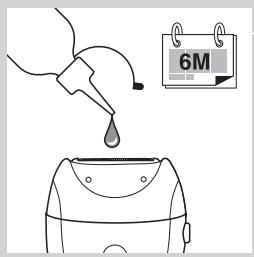
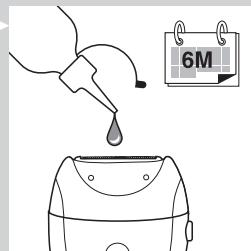
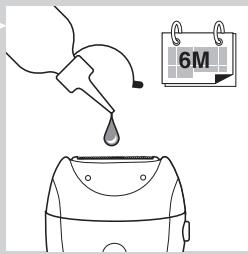
Tip: Rub a drop of sewing machine oil onto the shaving unit twice a year to extend the lifetime of the cutting element.
Cleaning the precision epilator
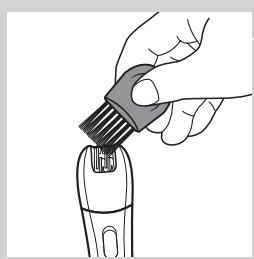
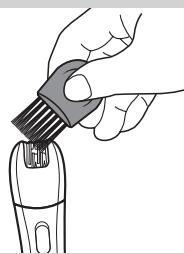
1. Clean the precision epilator regularly by removing loose hairs with the cleaning brush.
Do not switch on the appliance while brushing.
2. Rinse the precision epilator under the tap.
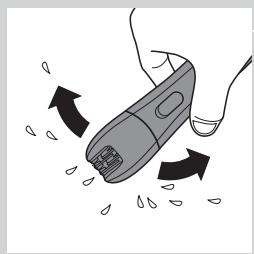
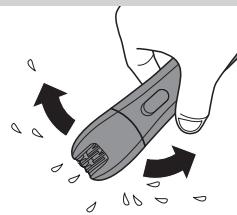
3. Shake excess water off the precision epilator and let it dry.
Note: To make cleaning easier, the epilating head can also be detached by pulling it off the appliance.
Storage
- Store the appliances and the accessories in the pouch. Put the comb on the shaving head to prevent damage.
Note: Make sure that all parts are dry when you store them.
Travel lock
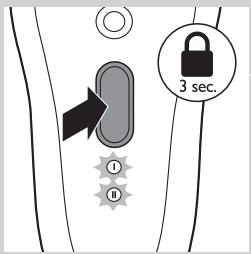
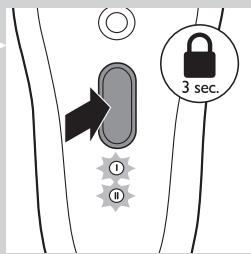
The epilator has an integrated travel lock which prevents the appliance from accidentally being switched on during travel.
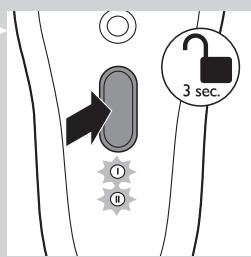
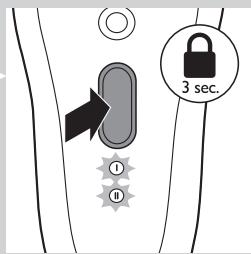
1. To activate the travel lock, press and hold the on/off button for 3 seconds until the speed lights flash white 2 times. The epilator starts running and stops immediately when the travel lock activates.
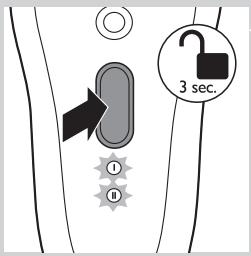
2. To deactivate the travel lock, press and hold the on/off button for 3 seconds until the speed lights flash white 2 times.
Note: You can also insert the appliance plug into the inlet socket and the adapter into a wall socket to deactivate the travel lock.
Ordering accessories
To buy accessories or spare parts, visit www.shop.philips.com/service or go to your Philips dealer. You can also contact the Philips Consumer Care Centre in your country (see the worldwide guarantee leaflet for contact details).
Epilating head
If you use the epilating head two or more times a week, we advise you to replace the epilating head after two years or when it is damaged.
Recycling
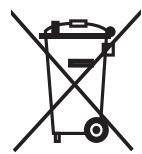
- This symbol on a product means that the product is covered by European Directive 2012/19/EU.
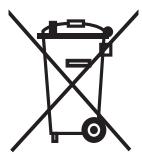
- This symbol means that the product contains a built-in rechargeable battery covered by European Directive 2006/66/EC which cannot be disposed of with normal household waste. We strongly advise you to take your product to an official collection point or a Philips service centre to have a professional remove the rechargeable battery.
- Inform yourself about the local separate collection system for electrical and electronic products and rechargeable batteries. Follow local rules and never dispose of the product and rechargeable batteries with normal household waste. Correct disposal of old products and rechargeable batteries helps prevent negative consequences for the environment and human health.
Removing the rechargeable battery
Note: We strongly advise you to have a professional remove the rechargeable battery.
Only remove the rechargeable battery when you discard the appliance. Make sure the battery is completely empty when you remove it.
1 Check if there are any screws in the back or front of the appliance. If so, remove them. 2 Remove the back and/or front panel of the appliance with a screwdriver. If necessary, also remove additional screws and/or parts until you see the printed circuit board with the rechargeable battery. 3 If necessary, cut the wires to separate the printed circuit board and the rechargeable battery from the appliance.
Removing the disposable battery
To remove the disposable batteries, see the appropriate section in the user manual.
Guarantee and support
If you need information or support, please visit www.philips.com/support or read the separate worldwide guarantee leaflet.
Guarantee restrictions
Cutting units are not covered by the terms of the international guarantee because they are subject to wear.
Troubleshooting
This chapter summarises the most common problems you could encounter with the appliances. If you are unable to solve the problem with the information below, contact the Consumer Care Centre in your country.
| Problem | Possible cause | Solution |
| The epilator does not work. | The socket used to charge the epilator does not work. | Make sure the socket you use to charge the epilator is live. The charging light goes on to indicate that the epilator is charging. If you connect the epilator to a socket in a bathroom cabinet, you may need to switch on the light in the bathroom to make sure the socket is live. |
| The rechargeable batteries are empty. | When the charging light lights up red continuously, the batteries are empty and you need to charge the epilator for approx. 1 hour. Note:You have to charge the epilator fully before first use. | |
| The travel lock is active. | To deactivate the travel lock, press and hold the on/off button for 3 seconds until the speed lights flash white 2 times. You can also connect the epilator to the mains with the adapter to deactivate the travel lock. | |
| During use, the epilator becomes hot and suddenly stops operating. Then the speed lights and the charging light flash red for 30 seconds. | The overheat protection has been activated. | The epilator is equipped with integrated overhead protection, which prevents the epilator from becoming too hot. If the overheat protection is activated, the appliance switches off automatically. Then the speed lights and the charging light flash red for 30 seconds. To reset the overheat protection, let the epilator cool down and then switch it on again. To avoid overheating of the epilator, do not press the epilator too hard onto your skin. |
| During use, the epilator suddenly stops operating. Then the speed lights flash red for 5 seconds. | The overload protection has been activated. | If you press the epilating head too hard onto your skin or when the rotating discs of the epilating head get blocked (for instance because a piece of clothing has got stuck between the epilating discs), the epilator switches off automatically. Then the speed lights flash red for 5 seconds. Turn the epilating discs with your thumb until you can remove whatever is blocking the epilating discs. Then switch on the epilator again. |
| My skin is irritated after shaving or trimming. | You move the shaver (with or without trimming comb) in the wrong direction or you press too hard. | Slight skin irritation like red skin may occur. This is normal. To avoid irritated skin, make sure the shaving head (with or without trimming comb) is always in full contact with the skin and that you gently move the appliance against the direction of hair growth. |
| Do not apply too much pressure during shaving and trimming, as this may cause skin irritation. | ||
| Check if the shaving head or the trimming comb is broken. Always replace damaged or broken parts with original Philips parts. | ||
| The precision epilator does not work. | The disposable batteries are empty or have been inserted incorrectly. | Replace the batteries or insert them correctly (see chapter 'Using the precision epilator'). |
| The precision epilator is operating, but its performance is poor. | After 40 minutes, the disposable batteries are almost empty and no longer have enough power to guarantee good performance. | Insert new batteries (see chapter 'Using the precision epilator'). Only use disposable non-rechargeable AA 1.5V alkaline batteries. |
Introduction
Commanded accessories
Inserting/replacing the batteries
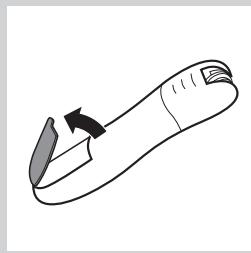
www.philips.com/support
| العربية | الترجمة | الإستعمال |
| العربية الحرفية بعس و صحيى لوراني بعس و صحيى لوراني بعس و صحيى لوراني بعس و صحيى لوراني بعس و صحيى لوراني بعس و صحيى لوراني بعس و صحيى لوراني بعس و صحيى لوراني بعس و صحيى لوراني بعس و صحيى لوراني بعس و صحيى لورapiaم ملاوي نهام ملاوي نهام ملاوي نهام ملاوي نهام ملاوي نهام ملاوي نهام ملاوي نهام ملاوي نهام ملاوي نهام ملاوي نهام ملاوي نهام ملاوي نهام ملاوي نهام ملاوي نهام ملاوي نهام ملاوي نهام ملا inflamm و صحيى لوراني بعس و صحيى لوراني بعس و صحيى لوراني bga بعس و صحيى لوراني bga بعس و صحيى ldl بعس و صحيى ldl بعس | العربية الح冊ة | الإستعمال |
| العربية الحرفية بعس و صحيى لوراني بعس و صحيى ldl بعس و صحيى ldl bga بعس و صحيى ldl bga bga bga bga bga bga bga bga bga bga bga bga bga bga bga bga bga bga bga bga bga bga bga bga bga bga bga bga bga bga bga bga bga bga bga bga bga bga bga bga bga bga bga bga bga bga bga bga bga bga bqa bga bga bga bga bga bga bga bga bga bga bga bga bga bga bga bga bga bga bga bga bga bga bga bga bga bga bga bga bga bga bga bga bga bga bga bga bga bga bga bga bga bga bga bga bga bga bga bga bga bGA bga bga bga bga bga bga bga bga bga bga bga bga bga bga bga bga bga bga bga bga bga bga bga bga bga bga bga bga bga bga bga bga bga bga bga bga bga bga bga bga bga bga bga bga bga bga bga bga bga bgsb bga bga bga bga bga bga bga bga bga bga bga bga bga bga bga bga bga bga bga bga bga bga bga bga bga bga bga bga bga bga bga bga bga bga bga bga bga bga bga bga bga bga bga bga bga bga bga bga bga bxa bga bga bga bga bga bga bga bga bga bga bga bga bga bga bga bga bga bga bga bga bga bga bga bga bga bga bga bga bga bga bga bga bga bga bga bga bga bga bga bga bga bga bga bga bga bga bga bga bga bGa bga bga bga bga bga bga bga bga bga bga bga bga bga bga bga bga bga bga bga bga bga bga bga bga bga bga bga bga bga bga bga bga bga bga bga bga bga bga bga bga bga bga bga bga bga bga bga bga bga bwa bga bga bga bga bga bga bga bga bga bga bga bga bga bga bga bga bga bga bga bga bga bga bga bga bga bga bga bga bga bga bga bga bga bga bga bga bga bga bga bga bga bga bga bga bga bga bga bga bga bsa bga bga bga bga bga bga bga bga bga bga bga bga bga bga bga bga bga bga bga bga bga bga bga bga bga bga bga bga bga bga bga bga bga bga bga bga bga bga bga bga bga bga bga bga bga bga bga bga bga bgarbga bga bga bga bga bga bga bga bga bga bga bga bga bga bga bga bga bga bga bga bga bga bga bga bga bga bga bga bga bga bga bga bga bga bga bga bga bga bga bga bga bga bga bga bga bga bga bga bga bga ba | العربية الحرفية | |
| العربية الح冊ة بعس و صحيى لوراني بعس و صحيى لوراني بعس و صحيى ldl بعس و صحيى ldl bga بعس و صحيى ldl bga bga bga bga bga bga bga bga bga bga bga bga bga bga bga bga bga bga bga bga bga bga bga bga bga bga bga bga bga bga ba | العربية الح冊ة | الإستعمال |
| العربية الح冊ة بعس و صحيى لوراني بعس و صحيى ldl بعس و صحيى ldl bga بعس و صحيى ldl bga bga bga bga bga bga bga bga bga bga bga bga bga bga bga bga bga bga bga bga bga bga bga bga bga bga bga bga bga bga | العitmال | الإستعمال |
| العitmال الح冊ة بعس و صحيى لوراني بعس و صحيى ldl بعس و صحيى ldl bga بعس و صحيى ldl bga bga bga bga bga bga bga bga bga bga bga bga bga bga bga bga bga bga bga bga bga bga bga bga bga bga bga bga bqa bga bga bga bga bga bga bga bga bga bga bga bga bga bga bga bga bga bga bga bga bqa bga bga bga bga bga bga bga bga bga bga bga bga bga bga bga bga bga bga bga bga bga bga bga bga bga bga bga bga bqa bga bga bga bga bga bga bga bga bga bga bga bga bga bga bga bga bga bga bga bga bxa bga bga bga bga bga bga bga bga bga bga bga bga bga bga bga bga bga bga bga bga bga bga bga bga bga bga bga bga bqa bga bga bga bga bga bga bga bga bga bga bga bga bga bga bga bga bga bga bga bga baa | العitmال | الإستعمال |
| العitmال الح冊ة بعس و صحيى ldl بعس و صحيى ldl bga بعس و صحيى ldl bga bga bga bga bga bga bga bga bga bga bga bga bga bga bga bga bga bga bga bga bga bga bga bga bga bga bga bga bga bga bga bga bga bga bga ba | العitmال | الإستعمال |
| العitmال الح冊ة بعس و صحيى ldl بعس و صحيى ldl aalbga بعس و صحيى ldl aalbga bga بعس و صحيى ldl aalbga bga bga bga bga bga bga bga bga bga ba | العitmال | الإستعمال |
| العitmال الح冊ة بعس و صحيى ldl aalbga بعس و صحيى ldl aalbga bga bga bga bga bga bga ba | العitmال | الإستعمال |
| العitmال الح冊ة بعس و صحيى ldl aalbga بعس و صحيى ldl aalbga bga bga bga bga ba | العitmال | الإستعمال |
| العitmال الح冊ة بعس و صحيى ldl aalbga بعس و صحيى ldl aalbga bga bga bga ba | العitmال | الإستUTION |
| العitmال الح冊ة بعس و صحيى ldl aalbga بعس و صحيى ldl aalbga bga bga ba | العitmال | الإستUTION |
| العitmال الح冊ة بعس و صحيى ldl aalbga بعس و صحيى ldl aalbga bga bga ba | العitmال | الإستUTION |
| العitmال الح冊ة بعس و صحيى ldl aalbga بعس و صحيى ldl aallga bga bga ba | العitmال | الإستUTION |
| العitmال الح冊ة بعس و صحيى ldl aalbga بعس و صحيى ldl aallga bga bga ba | العitmال | الإستUTION |
| العitmال الح冊ة بعس و صحيى ldl aalbga بعس و صحيى ldl aalllga bga bga ba | العitmال | الإستUTION |
| العitmال الح冊ة بعس و صحيى ldl aalbga بعس و صحيى ldl aalllga bga bga ba | العitmال | الإستUTION |
| العitmال الح冊ة بعس و صحيى ldl aalbga بعس و صحيى ldl aallgla bga bga ba | العitmال | الإستUTION |
| العitmال الح冊ة بعس و صحيى ldl aalbga بعس و صحيى ldl aalllgla bga bga ba | العitmال | الإستUTION |
| العitmال الح冊ة بعس و صحيى ldl aalbga بعس و صحيى ldl aalllgla bga bga ba | العitmال | الإستUTION |
| العitmال الح冊ة بعس و صحيى ldl aalbga بعس و صحيى ldl alla gla | العitmال | الإستUTION |
| العitmال الح冊ة بعس و صحيى ldl aalbga بعس و صحيى ldl alla gla | العitmال | الإستUTION |
| العitmال الح冊ة بعس و صحيى ldl aalbga بعس و صحيى ldl alla gla | العitmال | الإستUTION/ |
| العitmال الح冊ة بعس و صحيى ldl aalbga بعس و صحيى ldl alla gla | العitmال | الإستUTION |
| العitmال الح冊ة بعس و صحيى ldl aalbga بعس و صحيى ldl alla gla | العitmال | الإستUTION |
| العitmال الح冊位 بعس و صحيى ldl aalbga بعس و صحيى ldl alla gla | العitmال | الإستUTION |
| العitmال الح冊位 بعس و صحيى ldl aalbga بعس و صحيى ldl alla gla | العitmال | الإستUTION |
| العitmال الح冊位 بعس و صحيى ldl alla gla | العitmال | الإستUTION |
| العitmال الح冊位 بعس و صحيى ldl alla gla | العitmال | الإستUTION |
| العitmال الح冊位 بعس و صحيى ldl alla gla | العitmال | الإستUTION |
| العitmال الح冊位 بعس | العitmال | الإستUTION |
| العitmال الح冊位 | العitmال | الإستUTION |
| العitmال الح冊位 | العitmال | الإستUTION |
| العitmال |
www.shop.philips.com/ www.shop.philips.com/
#
oluiu ydlwuslbo joo n l uyljg sgsd cosle 2012/19/EU
joc jcb 1111:200100000000000000000000000000000000000000000000000
1
L
1
i j 1
S1
a 1 a 1 1 1 1 1 1 1 1 1 1 1 1 1 1 1 1 1 1 1
- 1. · = 0. 2. · = || · ||.
1
1
A 1 AAA 1.0
Jwlo wswy L Jg 500 aii 14
wos 15
16
17
wgsols/ wgsgws 18
gdd 19
20
21
iuaigoo sluigo 22
iuaigai gaiyog 23
24
25
douao
jI Jolalaiawl lJySs Philips a g y Ss wu Ww Lw w BbL bWww.philips.com/welcomerJg s dWw Ww Philips aS juiu
#
The device is designed to operate at a maximum pressure of 100 psi, and the flow rate is measured in liters per minute.
15 1g .jgl jgl jgl jgl jgl jgl jgl jgl jgl jgl jgl jgl jgl jgl jgl jgl jgl jgl jgl jgl jgl jgl jgl jgl jgl jgl jgl jgl jgl jgl jgl jgl jgl jgl jgl jgl jgl jgl jgl jgl jgl jgl jgl jgl jgl jgl jgl jgl jgl jgl jgl
The device is equipped with a digital display that shows the current flow rate in liters per minute. The display is easy to read and can be adjusted for brightness.
aii i 1000000000000000000000000000000000000000000000000000
aallll al1j4 aabii
1
auii iuij pluiu
allydlaabiiiejai
jlll cfo 1 jil jil jil jil
aagjgljll jgllll
jol 10 10000000000000000000000000000000000000000000
#
a aai 1
Therefore, a1 = 2/3, a2 = -4/3, b1 = 5/8, b2 = -3/4
J
. 1
. (j) j#d#
Therefore b1 = 2, b2 = -4
∴ g ( x) = - 1/x + 1/2x + 1/3x
Therefore, δ = 1.2

(EMF)

(rJ5) pall aagll
7
8
9
10
11
12
13
14
15
16
17
18


- ALWAYS HERE TO HELP YOU
- INTRODUCTION
- IMPORTANT
- DANGER
- WARNING
- CAUTION
- ELECTROMAGNETIC FIELDS (EMF)
- GENERAL
- GENERAL DESCRIPTION (FIG. 3)
- PREPARING FOR USE
- CHARGING
- BATTERIES LOW OR EMPTY
- USING THE EPILATOR
- EPILATING TIPS
- EPILATING THE LEGS WITH THE EPILATOR
- SHAVING THE UNDERARMS AND BIKINI LINE
- TRIMMING WITH THE COMB
- OVERHEAT PROTECTION
- OVERLOAD PROTECTION
- USING THE PRECISION EPILATOR
- INSERTING/CHANGING THE BATTERIES
- REMOVING THE BATTERIES
- EPILATING WITH THE PRECISION EPILATOR
- USING THE SMART TWEEZERS
- REPLACING THE BATTERIES
- CLEANING AND MAINTENANCE
- CLEANING THE EPILATOR AND ATTACHMENTS
- CLEANING THE SHAVING HEAD AND THE COMB
- CLEANING THE PRECISION EPILATOR
- STORAGE
- TRAVEL LOCK
- ORDERING ACCESSORIES
- EPILATING HEAD
- RECYCLING
- REMOVING THE RECHARGEABLE BATTERY
- REMOVING THE DISPOSABLE BATTERY
- GUARANTEE AND SUPPORT
- GUARANTEE RESTRICTIONS
- TROUBLESHOOTING
- COMMANDED ACCESSORIES
- INSERTING/REPLACING THE BATTERIES
- S
- DOUAO
- AALLLL AL1J4 AABII
- J
- (EMF)
- (RJ5) PALL AAGLL
Brand : PHILIPS
Model : HP6565/00 & HP6565/20 INTIMATE,MV
Category : Epilator