
SatinPerfect HP6572 - Epilator PHILIPS - Free user manual and instructions
Find the device manual for free SatinPerfect HP6572 PHILIPS in PDF.


| Product Type | Epilator |
| Brand | Philips |
| Model | SatinPerfect HP6572 |
| Dimensions (approx.) | 17.0 x 6.0 x 5.0 cm |
| Weight | 200 g |
| Power Supply | Rechargeable, NiMH battery |
| Battery Life | 30 minutes cordless |
| Speeds | 2 speeds |
| Epilation System | Rotating discs |
| Included Accessories | Shaver head, protective cap, cleaning brush |
| Additional Functions | Massage system, integrated light, pivoting head |
| Care and Cleaning | Head washable under warm water |
| Safety | Cordless, waterproof use, travel lock |
| Spare Parts and Repairability | Replacement heads available (model HP6572) |
| Warranty | 2 years |
| Color | White with purple accents |
Frequently Asked Questions - SatinPerfect HP6572 PHILIPS
User questions about SatinPerfect HP6572 PHILIPS
0 question about this device. Answer the ones you know or ask your own.
Ask a new question about this device
Download the instructions for your Epilator in PDF format for free! Find your manual SatinPerfect HP6572 - PHILIPS and take your electronic device back in hand. On this page are published all the documents necessary for the use of your device. SatinPerfect HP6572 by PHILIPS.
USER MANUAL SatinPerfect HP6572 PHILIPS
Register your product and get support at
www.philips.com/welcome
HP6570, HP6572

natural_image
White Philips Satis Perfect electric shaver with visible circuitry and control buttons (no text or symbols on body)PHILIPS
2


natural_image
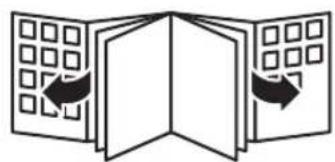
Diagram of three open panels with grid patterns and directional arrows indicating orientation (no text or symbols)3

1


ENGLISH 6
FRANÇAIS 14
28 فارسی
34 العربية
HP6570, HP6572
6 ENGLISH
Introduction
Congratulations on your purchase and welcome to Philips! To fully benefit from the support that Philips offers, register your product at www.philips.com/welcome.
This Philips SatinPerfect epilator is produced in Europe according to the highest engineering standards and has been designed around the needs of today's women. Worldwide many women are involved in our development and production processes. They give us feedback on our concepts and products to give you the best quality possible.
Your new SatinPerfect epilator gives you the best performance in the removal of unwanted body hair, providing you with perfect and long-lasting smoothness in a pleasant way.
The epilator has a premium design and ingenious features. The epilating head covers a maximum area of the skin and its tweezers are made of ceramic material, which ensures a proper grip on even the finest hairs for easy hair removal. Hairs are removed by the root and grow back thinner and less visible.
The SatinPerfect is ergonomically shaped. It is subtly curved to ensure that the epilator follows every contour of your body. Its speed control maintains the ideal epilation speed for perfect results, no matter how hard or soft you push. The Opti-light helps you to target and remove even the trickiest hairs so that you do not miss a hair.
The active hairlifter on the front of the active hairlifter with active massage gently vibrates and lifts flat-lying hairs so that they can be easily removed. The active massaging roller on the back of the active hairlifter with active massage vibrates to give the skin a pleasant sensation that soothes the effect of epilation.
The optimal performance cap that pivots to follow your body contours for optimal skin contact gives you optimal performance in hair removal and perfect, long-lasting smooth legs.
The skin stretcher of the optimal performance cap stretches the skin gently so that even the shortest hairs can be removed.
General description (Fig. 1)
A Epilator
B Speed setting indications
C On/off button
- Press once for speed II
- Press twice for speed I
D Opti-light
E Epilating head
F Release button
G Basic epilation cap
H Sensitive area shaving head (HP6572 only)
■ Trimming comb (HP6572 only)
J Optimal performance cap
K Skin stretcher
L Active hairlifter with active massage
M Active massaging roller
N Active hairlifter
- Cleaning brush
P Adapter
Q Luxury pouch (not shown)
Important
Read this user manual carefully before you use the appliance and save it for future reference.
Danger
- Keep the appliance and the adapter dry.
ENGLISH 7
- Do not use the appliance near or over a washbasin or bath filled with water (Fig. 2).
- Do not use the appliance in the bath or in the shower (Fig. 3).
- If you use the epilator in the bathroom, do not use an extension cord (Fig. 4).
Warning
- Only use the epilator with the adapter supplied.
- Do not use the appliance, an attachment or the adapter if it is damaged or broken to avoid injuries.
- If the adapter is damaged, always have it replaced with one of the original type in order to avoid a hazard.
- The adapter contains a transformer. Do not cut off the adapter to replace it with another plug, as this causes a hazardous situation.
- Check if the voltage indicated on the adapter corresponds to the local mains voltage before you connect the appliance.
- This appliance is not intended for use by persons (including children) with reduced physical, sensory or mental capabilities, or lack of experience and knowledge, unless they have been given supervision or instruction concerning use of the appliance by a person responsible for their safety.
- Children should be supervised to ensure that they do not play with the appliance.
Caution
- The epilator is only intended for removing women's body hair on areas below the neck by epilating (legs) and shaving (underarms and bikini area, HP6572 only). Do not use the epilator for any other purpose.
- For hygienic reasons, the appliance should only be used by one person.
- To prevent damage and injuries, keep the running epilator (with or without attachment) away from scalp hair, eyebrows, eyelashes, clothes, threads, cords, brushes etc.
- Do not use the epilator on irritated skin or skin with varicose veins, rashes, spots, moles (with hairs) or wounds without consulting your doctor first.
- People with a reduced immune response or people who suffer from diabetes mellitus, haemophilia or immunodeficiency should also consult their doctor first.
- Your skin may become a little red and irritated the first few times you use the epilator. This phenomenon is absolutely normal and quickly disappears. As you use the epilator more often, your skin gets used to epilation, skin irritation decreases and regrowth becomes thinner and softer. If the irritation has not disappeared within three days, we advise you to consult a doctor.
- Do not look directly into the Opti-light to avoid being dazzled by the light.
- Do not use the epilating head of the epilator without attachment.
- Do not expose the epilator to temperatures lower than 5°C or higher than 35°C.
Electromagnetic fields (EMF)
This Philips appliance complies with all standards regarding electromagnetic fields (EMF). If handled properly and according to the instructions in this user manual, the appliance is safe to use based on scientific evidence available today.
Epilation tips
Before you start epilating
Note: Always clean the epilating head of the epilator before first use.
- When you use the epilator for the first time, we advise you to try it out on an area with only light hair growth to get accustomed to the epilation process.
- We advise you to epilate before going to bed at night, as skin irritation usually disappears overnight.
- Epilation is easier just after taking a bath or shower. Make sure your skin is completely dry when you start epilating.
ENGLISH8
- Make sure your skin is clean, entirely dry and free from grease. Do not use any cream before you start epilating.
- Epilation is easier and more comfortable when the hair has the optimum length of 3–4 mm. If the hairs are longer, we recommend that you shave first and epilate the shorter regrowing hairs after 1 or 2 weeks. You can also use the sensitive area shaving head with the trimming comb to pretrim hairs to this ideal length (HP6572 only).
- As your hair grows in different cycles, it is best to epilate a few days in a row when you start epilating. This will help you to remain stubble-free longer because your hairs will start regrowing in the same cycle and pace.
- The epilator is delivered with the basic epilation cap attached. If you want to use it with the optimal performance cap or the active hairlifter with active massage, detach the basic epilation cap by pulling it off the appliance and attach the optimal performance cap or the active hairlifter with active massage (see chapter 'Using the epilator', section 'Epilating the legs with the epilator').
During epilation
- While epilating, stretch your skin with your free hand. This lifts up the hairs and helps to minimise the pulling sensation.
- For optimal performance, place the epilating head on the skin at an angle of 90^ with the on/off button pointing in the direction in which you are going to move the appliance. Guide the appliance across the skin against the direction of hair growth in a slow, continuous movement without exerting any pressure.
- On some areas, hair may grow in different directions. In this case, it may be helpful to move the appliance in different directions to achieve optimal results.
- If you sweat during epilation, dab your skin dry with a soft cloth.
- When you use the optimal performance cap, make sure that both rollers of the skin stretcher always stay in contact with the skin to ensure an optimal result.
- When you use the active hairlifter with active massage, make sure the active massaging roller and the active hairlifter always stay in contact with the skin. The massaging roller stimulates and relaxes the skin for a gentler epilation.
After epilation
- To relax the skin, we advise you to apply a moisturising cream immediately after epilation or a few hours after epilation, depending on what is better for your skin.
- Regular use of an exfoliating sponge or cream (e.g. during showering) 24 hours after epilation helps to prevent ingrowing hair, as the gentle scrubbing action removes the upper skin layer and fine hair can get through to the skin surface.
Using the epilator
1 Insert the appliance plug into the bottom of the appliance and put the adapter in the wall socket.
Epilating the legs with the epilator
- If you already have some experience with epilation, you can simply use the epilating head with the basic epilation cap.
- If you are not used to epilation, we advise you to start epilating with the optimal performance cap. This cap ensures optimal skin contact and its pivoting head stretches the skin and prepares the hairs for epilation.
- If your hairs lie flat on your skin, we advise you to use the active hairlifter with active massage. The active hairlifter with active massage not only lifts up the hairs but its active massaging roller also minimises the pulling sensation of epilation.
Note: Remove the basic epilation cap before you attach the optimal performance cap or the active hairlifter with active massage.
ENGLISH 9
1 Squeeze both sides of the basic epilation cap (1) and pull it off the appliance (2) (Fig. 5).
2 Put the desired attachment on the epilating head (Fig. 6).
Note: The procedure for placing the attachments onto the appliance is the same for all attachments.
3 Press the on/off button once to switch on the epilator.
The epilator starts running at speed II, which is the most efficient speed for epilation. The bottom speed setting indication II lights up (Fig. 7).
If you want to use speed I, press the on/off button a second time. The top speed setting indication I lights up (Fig. 8).
Tip: Speed I is suitable for areas with little hair growth, for hard-to-reach areas and for areas where bones are located directly beneath the skin, such as knees and ankles.
When you press the on/off button a third time, the epilator switches off.
4 Stretch the skin with your free hand to make the hairs stand upright.
5 Place the epilating head at an angle of 90^ onto the skin with the on/off button pointing in the direction in which you are going to move the appliance (Fig. 9).
6 Move the appliance slowly over the skin against the direction of hair growth.
When you press the on/off button a third time, the epilator switches off. 4 Stretch the skin with your free hand to make the hairs stand upright. 5 Place the epilating head at an angle of 90^ onto the skin with the on/off button pointing in the direction in which you are going to move the appliance (Fig. 9). 6 Move the appliance slowly over the skin against the direction of hair growth.
- When you use the optimal performance cap, make sure that both rollers of the skin stretcher always stay in contact with the skin to ensure an optimal result.
- When you use the active hairlifter with active massage, make sure the active massaging roller and the active hairlifter always stay in contact with the skin. The massaging roller stimulates and relaxes the skin for a gentler epilation.
Shaving the underarms and bikini line (HP6572 only)
Use the sensitive area shaving head to shave sensitive areas such as the underarms and the bikini line.
1 Press the release button (1) and remove the epilating head from the epilator (2) (Fig. 10).
Note: The sensitive area shaving head can be removed in the same way.
2 Put the sensitive area shaving head on the appliance and press it until it snaps home ('click'). (Fig. 11)
3 Switch on the appliance.
Note: Use speed 2 when you shave with the sensitive area shaving head.
4 Stretch the skin with your free hand. When shaving the underarms, raise your arm to stretch the skin.
5 Place the sensitive area shaving head at an angle of 90^ onto your skin with the on/off button pointing in the direction in which you are going to move the appliance.
6 Move the appliance slowly against the direction of hair growth.
Note: Make sure that the shaving unit with integrated trimmer is always fully in contact with the skin.
- Shave your bikini line as shown in the figure (Fig. 12).
- Shave your underarms as shown in the figure. Move the appliance in different directions. (Fig. 13)
7 When you have finished shaving, switch off the appliance and clean the sensitive area shaving head (see chapter ‘Cleaning and maintenance’).
8 Put the trimming comb on the sensitive area shaving head when you store the appliance.
ENGLISH10
Trimming with the trimming comb (HP6572 only)
Use the sensitive area shaving head with the trimming comb attached to trim your bikini line to a length of 3mm.
You can also use the trimming comb to pretrim long hairs (longer than 10mm) on the underarms or bikini line.
1 Press the release button (1) and remove the epilating head from the epilator (2) (Fig. 10).
2 Put the sensitive area shaving head on the appliance and press it until it snaps home ('click').
3 Put the trimming comb on the sensitive area shaving head (Fig. 14).
4 Follow steps 3 to 6 in section 'Shaving the underarms and bikini line'.
Note: Make sure the surface of the trimming comb always stays fully in contact with the skin to ensure an even trimming result.
5 When you have finished trimming, switch off the appliance and clean the sensitive area shaving head and the trimming comb (see chapter ‘Cleaning and maintenance’).
6 Leave the trimming comb on the sensitive area shaving head when you store the appliance.
Overheat protection
The epilator has an integrated overheat protection, which prevents overheating of the appliance.
Note: To avoid overheating of the epilator, do not press the appliance too hard onto your skin. The epilator works best when you move it over your skin without exerting any pressure.
1 If the overheat protection is activated, the appliance switches off automatically and the speed setting indications flash red.
2 Let the appliance cool down.
The lights stop flashing after 30 seconds.
3 When the appliance has cooled down, you can switch it on again. If the lights start to flash red again, the appliance has not yet cooled down completely.
Overload protection
If you press the epilating head too hard onto your skin or when the rotating tweezers of the epilating head get blocked (e.g. by clothes etc.), the appliance stops and the speed setting indications start to flash red for 5 seconds.
1 Check if the rotating tweezers of the epilating head are blocked by turning the tweezers with your thumb until you can remove whatever is blocking the rotating tweezers.
2 Switch on the appliance again.
Do not press the appliance too hard onto the skin.
Cleaning and maintenance
Note: Make sure the appliance is switched off and unplugged before you start to clean it.
Never use scouring pads, abrasive cleaning agents or aggressive liquids such as petrol or acetone to clean the appliance.
- Clean the appliance after each use to ensure better performance.
- Never rinse the appliance or the adapter under the tap (Fig. 15).
- Keep the appliance and the adapter dry (Fig. 16).
Cleaning the attachments
1 Remove the attachment from the epilating head (Fig. 5).
2 Remove loose hairs from the attachments with the cleaning brush (Fig. 17).
3 Rinse the attachments with lukewarm water while turning them (Fig. 18).
4 Dry the attachments before you use or store them.
Cleaning the epilating head of the epilator
1 Press the release knob (1) and remove the epilating head from the appliance (2) (Fig. 10).
2 Remove loose hairs with the cleaning brush (Fig. 19).
3 Rinse the epilating head under the tap for 5-10 seconds while turning the tweezers with your thumb (Fig. 20).
Note: Never try to detach the epilating tweezers from the epilating head.
4 Shake the epilating head firmly (Fig. 21).
5 Dry the epilating head thoroughly with a tea towel.
Note: Make sure the epilating head is completely dry before you place it back onto the appliance.
6 To reattach the epilating head, place it on the appliance and press it onto the appliance until it snaps home ('click') (Fig. 22).
Cleaning the sensitive area shaving head and the trimming comb (HP6572 only)
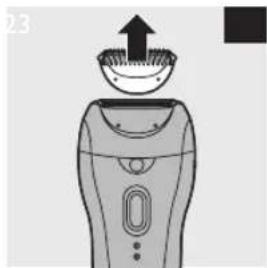
1 Remove the trimming comb, if attached, by pulling it off the sensitive area shaving head (Fig. 23).
2 Remove the sensitive area shaving head by pressing the release button (Fig. 24).
3 Remove the shaving unit from the sensitive area shaving head (Fig. 25).
4 Rinse the shaving unit, the sensitive area shaving head and the trimming comb under a lukewarm tap for 5 to 10 seconds while turning them a little (Fig. 26).
5 Shake the shaving unit, the sensitive area shaving head and the trimming comb firmly (Fig. 27).
6 Dry the sensitive area shaving head and the trimming comb thoroughly with a tea towel and let the shaving unit dry.
Note: Do not exert any pressure on the shaving unit to avoid damage.
7 Reattach the shaving unit to the sensitive area shaving head. Place the sensitive area shaving head on the appliance and press it onto the appliance until it snaps home ('click').
Note: Make sure the shaving unit is dry before you attach it to the sensitive area shaving head and the sensitive area shaving head is completely dry before you place it back onto the appliance.
8 Put the trimming comb on the sensitive area shaving head.
Tip: Rub a drop of sewing machine oil onto the shaving unit twice a year to extend the lifetime of the cutting element.
Storage
- Put the trimming comb on the sensitive area shaving head to prevent damage (HP6572 only).
- Store the appliance and the accessories in the luxury pouch.
ENGLISH12
Replacement
All parts of the appliance can be replaced. If you need to replace one or more parts, go to your Philips dealer or an authorised Philips service centre.
Sensitive area shaving head (HP6572 only)
If you use the sensitive area shaving head two or more times a week, we advise you to replace the shaving unit after one or two years or when it is damaged.
Environment
- Do not throw away the appliance with the normal household waste at the end of its life, but hand it in at an official collection point for recycling. By doing this, you help to preserve the environment (Fig. 28).
Guarantee and service
If you need service or information or if you have a problem, please visit the Philips website at www.philips.com or contact the Philips Consumer Care Centre in your country (you find its phone number in the worldwide guarantee leaflet). If there is no Consumer Care Centre in your country, go to your local Philips dealer.
Troubleshooting
This chapter summarises the most common problems you could encounter with the appliance. If you are unable to solve the problem with the information below, contact the Consumer Care Centre in your country.
| Problem Cause | Solution | |
| Poor epilating results | You move the epilator in the wrong direction. | Move the appliance against the direction of hair growth, with the on/off button pointing in the direction in which you move the epilator. |
| You place the epilating head on the skin at the wrong angle. | Make sure that you place the epilating head on the skin at an angle of 90° (see chapter ‘Using the epilator’). | |
| You have used a cream or depilatory cream prior to epilation. | Make sure your skin is clean, entirely dry and free from grease. Do not use any cream before you start epilating. | |
| The hairs are too short. | Sometimes the hairs are too short to be caught. The optimal length for easy removal of the hairs is 3-4mm. The hairs that are not caught during this session will be long enough to be removed when you epilate the next time. You can also try to catch the hairs by moving the appliance across the skin a few more times. | |
| The epilator does not work. | The socket to which the appliance is connected does not work. | Make sure the socket is live. If you connect the epilator to a socket in a bathroom cabinet, you may need to switch on the light in the bathroom to make sure the socket is live. You could also use a working socket outside the bathroom. |
| Problem | Cause | Solution |
| The overheat protection has been activated. | ||
| When the epilator stops working and the speed setting indications start flashing red, the overheat protection has been activated. Let the appliance cool down. The lights stop flashing after 30 seconds. When the appliance has cooled down, switch on the epilator again. If the lights start flashing again, the epilator has not yet cooled down sufficiently. | ||
| When the overload protection has been activated, the speed setting indications flash red. Turn the tweezers with your thumb until you can easily remove the item that is blocking the rotating tweezers. Then switch on the appliance again. Do not press the appliance too hard onto your skin. |
14 FRANÇAIS
Introduction
Protection anti-surcharge
The image is too blurry to recognize any text content.
natural_image
Diagram showing a hand holding a device with a diagonal line intersecting it, no text or symbols present
natural_image
Diagram of an electric vehicle charging station with no visible text or symbols
natural_image
Diagram of a tool with two lenses and a ruler, no text or symbols present


natural_image
Illustration of a hand holding a remote control device with an inset showing a finger pointing to a small object (no text or symbols present)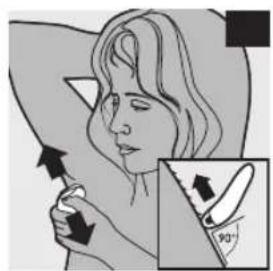
natural_image
Illustration of a person holding an upward arrow, with a magnified inset showing a knife inserted into the lower section (no text or symbols)

natural_image
Illustration of a hand holding a shoe with a diagonal line crossing through it, no text or symbols present.

natural_image
Illustration of two hands using a tool to apply a brush (no text or symbols visible)
natural_image
Illustration of a hand holding a tool with a small object nearby (no text or symbols)
natural_image
Illustration of hands using a tool to apply a brush to a small object (no text or symbols visible)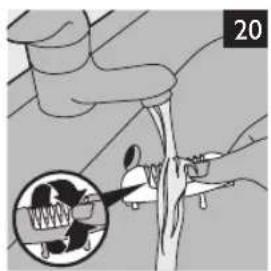
natural_image
Illustration of a hand holding a tool with a magnified inset showing a mechanical component (no text or symbols)
natural_image
Illustration of a hand holding a spring-like object with arrows indicating motion or force, surrounded by droplets (no text or symbols)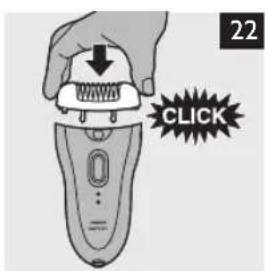
natural_image
Illustration of a hairbrush with an upward arrow indicating the brush tip (no text or symbols)

natural_image
Diagram of a device with an upward arrow and a plate, no text or symbols present
natural_image
Illustration of two hands using a tool to lift or lift a small object, no text or symbols present

natural_image
Symbol of a trash bin crossed with a diagonal line, no text or numbers present


- ENGLISH
- Introduction
- General description (Fig. 1)
- Important
- Danger
- ENGLISH 7
- Warning
- Caution
- Electromagnetic fields (EMF)
- Epilation tips
- Before you start epilating
- ENGLISH8
- During epilation
- After epilation
- Using the epilator
- Epilating the legs with the epilator
- ENGLISH 9
- Shaving the underarms and bikini line (HP6572 only)
- ENGLISH10
- Trimming with the trimming comb (HP6572 only)
- Overheat protection
- Overload protection
- Cleaning and maintenance
- Cleaning the attachments
- Cleaning the epilating head of the epilator
- Cleaning the sensitive area shaving head and the trimming comb (HP6572 only)
- Storage
- ENGLISH12
- Replacement
- Sensitive area shaving head (HP6572 only)
- Environment
- Guarantee and service
- Troubleshooting
- FRANÇAIS
- Protection anti-surcharge
- The image is too blurry to recognize any text content.
Brand : PHILIPS
Model : SatinPerfect HP6572
Category : Epilator