
MU2M15.UL4 - MU2M17.UL4 - Air-conditioner LG - Free user manual and instructions
Find the device manual for free MU2M15.UL4 - MU2M17.UL4 LG in PDF.



| Brand | LG |
| Model | MU2M15.UL4 / MU2M17.UL4 |
| Product type | Wall-mounted split air conditioner |
| Power supply | 220-240 V ~ 50 Hz |
| Refrigerant | R32 (flammable) |
| Main functions | Cooling, heating, dehumidification, ventilation, Jet Mode, sleep mode |
| Air direction control | Vertical and horizontal (SWING) |
| Remote control | Wireless, with AAA 1.5 V batteries |
| Display | LCD screen on remote, indicators on indoor unit |
| Air filter | Washable, cleaning recommended every 2 weeks |
| Timer | Programmable On/Off |
| Special function | Comfort Air, Energy CTRL, Smart Diagnosis (depending on model) |
| Installation | Wall mounting, must be performed by a certified professional |
| Protection | Dedicated circuit breaker, mandatory grounding |
| Maintenance | Clean filter regularly, do not spray water on the unit |
| Safety | Instructions to avoid fire, electric shock, refrigerant leak |
| Number of pages in the manual | 310 |
Frequently Asked Questions - MU2M15.UL4 - MU2M17.UL4 LG
User questions about MU2M15.UL4 - MU2M17.UL4 LG
0 question about this device. Answer the ones you know or ask your own.
Ask a new question about this device
Download the instructions for your Air-conditioner in PDF format for free! Find your manual MU2M15.UL4 - MU2M17.UL4 - LG and take your electronic device back in hand. On this page are published all the documents necessary for the use of your device. MU2M15.UL4 - MU2M17.UL4 by LG.
USER MANUAL MU2M15.UL4 - MU2M17.UL4 LG
Read this owner's manual thoroughly before operating the appliance and keep it handy for reference at all times.
This manual is the simplified version of original manual. You can obtain the original manual from www.lg.com.
TYPE : WALL MOUNTED
Original instruction
[Representative] LG Electronics Inc. EU Representative :
LG Electronics European Shared Service Center B.V.
Krijgsman 1, 1186 DM Amstelveen, The Netherlands
[Manufacturer] LG Electronics Tianjin Appliances Co.,Ltd.No.09,JinWei Road,
BeiChen District,Tianjin,China
TABLE OF CONTENTS
This manual is produced for a group of products and may contain images or content different from the model you purchased.
This manual is subject to revision by the manufacturer.
SAFETY INSTRUCTIONS 3
IMPORTANT SAFETY INSTRUCTIONS 4
OPERATION 9
Notes for Operation 9
Parts and Functions 9
Wireless Remote Control. 10
SAFETY INSTRUCTIONS
The following safety guidelines are intended to prevent unforeseen risks or damage from unsafe or incorrect operation of the appliance.
The guidelines are separated into 'WARNING' and 'CAUTION' as described below.

This symbol is displayed to the indicate matters and operations that can cause risk. Read the part with this symbol carefully and follow the instructions in order to avoid risk.

WARNING
This indicates that the failure to follow the instructions can cause serious injury or death.

CAUTION
This indicates that the failure to follow the instructions can cause the minor injury or damage to the product.
The following symbols are displayed on indoor and outdoor units. (for R32)

This symbol indicates that this appliance uses a flammable refrigerant. If the refrigerant is leaked and exposure to an external ignition source, there is a risk of fire.

This symbol indicates that the Operation Manual should be read carefully.

This symbol indicates that a service personnel should be handling this equipment with reference to the Installation Manual.

This symbol indicates that information is available such as the Operating Manual or Installation Manual.

WARNING
To reduce the risk of explosion, fire, death, electric shock, injury or scalding to persons when using this product, follow basic precautions, including the following:
Children in the Household
This appliance is not intended for use by persons (including children) with reduced physical, sensory or mental capabilities, or lack of experience and knowledge, unless they have been given supervision or instruction concerning use of the appliance by a person responsible for their safety. Children should be supervised to ensure that they do not play with the appliance.
For use in Europe:
This appliance can be used by children aged from 8 years and above and persons with reduced physical, sensory or mental capabilities or lack of experience and knowledge if they have been given supervision or instruction concerning use of the appliance in a safe way and understand the hazards involved. Children shall not play with the appliance. Cleaning and user maintenance shall not be made by children without supervision.
Installation
- Do not install the air conditioner on an unstable surface or in a place where there is danger of it falling.
- Contact an authorized service center when installing or relocating the air conditioner.
- Install the panel and the cover of the control box safely.
- Do not install the air conditioner in a place where flammable liquids or gases such as gasoline, propane, paint thinner, etc., are stored.
- Make sure that the pipe and the power cable connecting the indoor and outdoor units are not pulled too tight when installing the air conditioner.
- Use standard circuit breaker and fuse that conform to the rating of the air conditioner.
- Do not input air or gas into the system except with the specific refrigerant.
-
Use non-flammable gas (nitrogen) to check for leak and to purge air; using compressed air or flammable gas may cause fire or explosion.
-
The indoor/outdoor wiring connections must be secured tightly, and the cable should be routed properly so that there is no force pulling the cable from the connection terminals. Improper or loose connections can cause heat generation or fire.
- Install dedicated electric outlet and circuit breaker before using the air conditioner.
- Do not connect the ground wire to a gas pipe, a lightning rod, or a telephone ground wire.
- Keep any required ventilation openings clear of obstruction.
Operation
- Be sure to use only those parts listed in the service parts list. Never attempt to modify the equipment.
- Make sure that children do not climb on or hit the outdoor unit.
- Dispose of the batteries in a place where there is no danger of fire.
- Use only the refrigerant specified on the air conditioner label.
- Cut off the power supply if there is any noise, smell, or smoke coming from the air conditioner.
- Do not leave flammable substances such as gasoline, benzene, or thinner near the air conditioner.
- Contact an authorized service center when the air conditioner is submerged by flood waters.
- Do not use the air conditioner for an extended period time in a small place without proper ventilation.
- In the event of a gas leak (such as Freon, propane gas, LP gas, etc.) ventilate sufficiently before using the air conditioner again.
- To clean the interior, contact an authorized service center or dealer. Using harsh detergents may cause corrosion or damage to the unit.
- Be sure to ventilate sufficiently when the air conditioner and a heating appliance such as a heater are used simultaneously.
- Do not block the inlet or outlet of air flow.
- Do not insert hands or other objects through the air inlet or outlet while the air conditioner is operating.
- Make sure that the power cable is neither dirty, loose, nor broken.
- Never touch, operate, or repair the air conditioner with wet hands.
- Do not place any objects on the power cable.
- Do not place a heater or other heating appliances near the power cable.
-
Do not modify or extend the power cable. Scratches or peeling insulation on the power cables may result in fire or electric shock, and should be replaced.
-
Cut off the power supply immediately in the event of a blackout or a thunderstorm.
- Take care to ensure that power cable could not be pulled out or damaged during operation.
- Do not touch refrigerant pipe, water pipe and any internal parts while the unit is operating or immediately after operation.
Maintenance
- Do not clean the appliance by spraying water directly onto the product.
- Before cleaning or performing maintenance, disconnect the power supply and wait until the fan stops.
Technical Safety
- Installation or repairs made by unauthorized persons can pose hazards to you and others.
- Any person who is involved with working on or breaking into a refrigerant circuit should hold a current valid certificate from an industry-accredited assessment authority, which authorizes their competence to handle refrigerants safely in accordance with an industry recognized assessment specification. (for R32)
- Servicing shall only be performed as recommended by the equipment manufacturer. Maintenance and repair requiring the assistance of other skilled personnel shall be carried out under the supervision of the person competent in the use of flammable refrigerants. (for R32).
- The information contained in the manual is intended for use by a qualified service technician who is familiar with the safety procedures and equipped with the proper tools and test instruments.
- Failure to read and follow all instructions in this manual can result in equipment malfunction, property damage, personal injury and/or death.
- The appliance shall be installed in accordance with national wiring regulations.
- When the power cord is to be replaced, the replacement work shall be performed by authorized personnel using only genuine replacement parts.
- This appliance must be properly grounded to minimize risk of electric shock.
- Do not cut or remove the grounding prong from the power plug.
-
Attaching the adapter ground terminal to the wall receptacle cover screw does not ground the appliance unless the cover screw is metal, uninsulated, and the wall receptacle is grounded through house wiring.
-
If you have any doubt whether the air conditioner is properly grounded, have the wall receptacle and circuit checked by a qualified electrician.
- The refrigerant and insulation blowing gas used in the appliance require special disposal procedures. Consult a service agent or a similarly qualified person before disposing of them.
- If the supply cord is damaged, it must be replaced by the manufacturer or its service agents or similarly qualified person in order to avoid a hazard.
- The appliance shall be stored in a well-ventilated area where the room size corresponds to the room area as specified for operation. (for R32)
- The appliance shall be stored in a room without continuously operating open flames (for example an operating gas appliance) and ignition sources (for example an operating electric heater).
- The appliance shall be stored so as to prevent mechanical damage from occurring.

CAUTION
To reduce the risk of minor injury to persons, malfunction, or damage to the product or property when using this product, follow basic precautions, including the following:
Installation
- Do not install the air conditioner in an area where it is directly exposed to sea wind(salt spray).
- Install the drain hose properly for the smooth drainage of water condensation.
Exercise caution when unpacking or installing the air conditioner. - Do not touch the leaking refrigerant during installation or repair.
- Transport the air conditioner with two or more people or use a forklift.
- Install the outdoor unit such that it is protected from direct sunlight. Do not place the indoor unit in a place where it is directly exposed to sunlight via the windows.
- Safely dispose of packing materials such as screws, nails or batteries using proper packaging after installation or repair.
- Install the air conditioner in a place where the noise from the outdoor unit or the exhaust fumes will not inconvenience the neighbors. Failure to do so may result in conflict with the neighbors.
Operation
- Remove the batteries if the remote control is not to be used for an extended period of time.
- Make sure that the filter is installed before operating the air conditioner.
- Be sure to check if there is a refrigerant leak after installing or repairing the air conditioner.
- Do not place any object on the air conditioner.
- Never mix different types of batteries, or old and new batteries for the remote control.
- Do not let the air conditioner run for a long time when humidity is very high or when a door or a window has been left open.
- Stop using the remote control if there is a fluid leak in the battery. If your clothes or skin are exposed to the leaking battery fluid, wash off with clean water.
- Do not expose people, animals, or plants to the cold or hot wind from the air conditioner for extended periods of time.
- If the leaking battery fluid has been swallowed, wash off the inside of the mouth thoroughly and consult a doctor.
- Do not drink the water drained from the air conditioner.
- Do not use the product for special purposes, such as preserving foods, works of art, and etc. It is an air conditioner for consumer purposes, not a precision refrigeration system. There is risk of damage or loss of property.
- Do not recharge or disassemble the batteries.
Maintenance
- Never touch the metal parts of the air conditioner when removing the air filter.
- Use a sturdy stool or ladder when cleaning, maintaining, or repairing the air conditioner at a height.
- Never use strong cleaning agents or solvents when cleaning the air conditioner or spray water. Use a smooth cloth.
Notes for Operation
Suggestion for Energy Saving
- Do not cool excessively indoors. This may be harmful for your health and may consume more electricity.
- Block sunlight with blinds or curtains while you are operating the air conditioner.
- Keep doors or windows closed tightly while you are operating the air conditioner.
- Adjust the direction of the air flow vertically or horizontally to circulate indoor air.
- Speed up the fan to cool or warm indoor air quickly, within a short period of time.
- Open windows regularly for ventilation. The indoor air quality may deteriorate if the air conditioner is used for long durations.
- Clean the air filter once every 2 weeks. Dust and impurities collected in the air filter may block the air flow or reduce the unit performance.
Parts and Functions
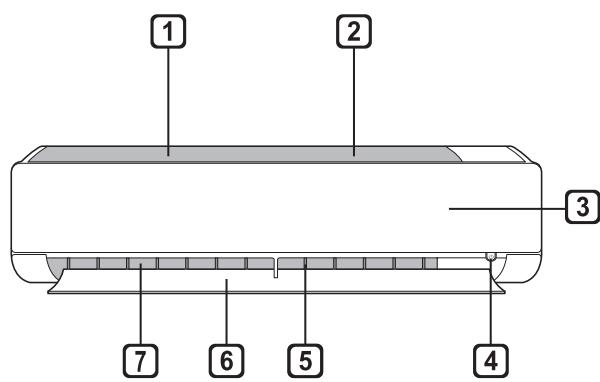
Indoor Unit
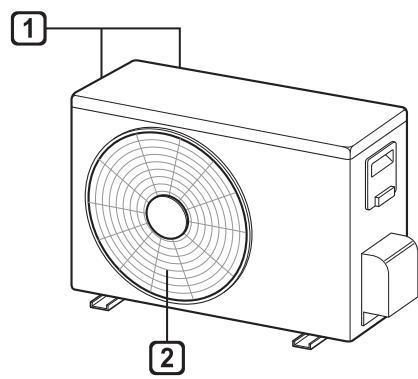
Outdoor Unit
1 Air Filter
Air Intake
3 Front Cover
4 On/Off Button
5 Air Deflector (Vertical louver)
6 Air Deflector (Horizontal vane)
Air Outlet
1 Air Intake Vents
Air Outlet Vents
NOTE
- The number and location of operation lamps may vary according to the model of the air conditioner.
- The feature may be changed according to the type of model.
Wireless Remote Control
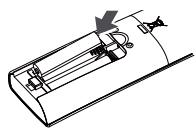
Inserting Batteries
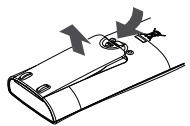
If the display screen of the remote control begins to fade, replace the batteries. Insert AAA (1.5 V) batteries before using the remote control.
1 Remove the battery cover.
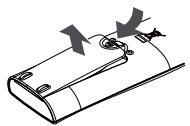
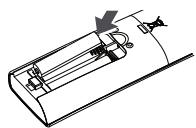
2 Insert the new batteries and make sure that the + and - terminals of the batteries are installed correctly.
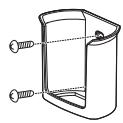
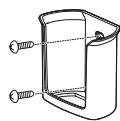
Installing the Remote Control Holder
To protect the remote control, install the holder where there is no direct sunlight.
1 Choose a safe and easily accessible location.
2 Fix the holder by fastening 2 screws firmly with a screwdriver.
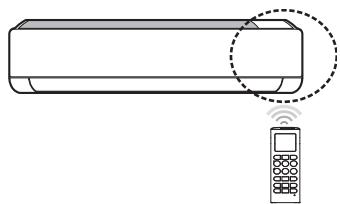
Operating method
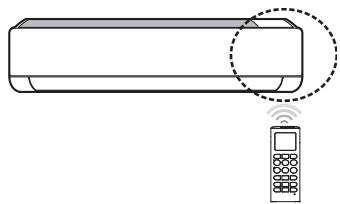
Point the remote control towards the signal receiver at the right side of the air conditioner to operate it.
NOTE
- The remote control may operate other electronic devices if it is directed towards them. Make sure to point the remote control towards the air conditioner signal receiver.
- For proper operation, use a soft cloth to clean the signal transmitter and receiver.
- In case of a function not provided in the product, no buzzer sound occurs from the product when a button for such function on the remote control is pressed except for Air Flow Direction(SWING), Energy Display(OFF[3s]), Air Purification function(4).
Setting the Current Time
1 Insert batteries.
- The icon below blinks at the bottom of the display screen.

2 Press or button to select the minutes.
3 Press SET/CANCEL button to finish.
NOTE
- The On/Off Timer is available after setting the current time.
Using the ^ C / ^ F Conversion Function(Optional)
This function changes unit between ^ C and ^ F .
- Press and hold button about 5 seconds.
Operating the Air Conditioner Without the Remote Control
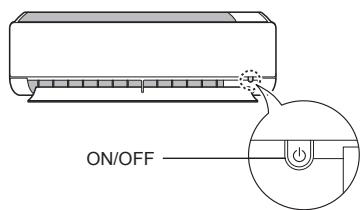
You can use the ON/OFF button of the indoor unit to operate the air conditioner when the remote control is unavailable.
1 Open the front cover (Type1) or horizontal vane(Type2).
2 Press the ON/OFF button.
Type1
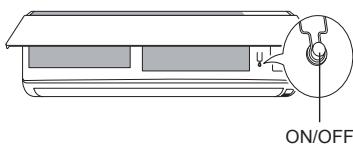
Type2
NOTE
- The stepping motor may be broken, if the horizontal vane opens rapidly.
The fan speed is set to high. - The feature may be changed according to the type of model.
- The temperature cannot be altered when using this emergency On/Off button.
- For cooling & heating models, the temperature is set from 22^ to 24^ .
Using Wireless Remote Control
You can operate the air conditioner more conveniently with the remote control.
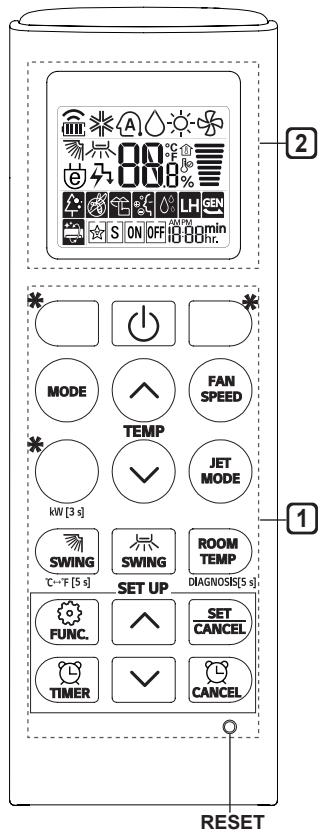
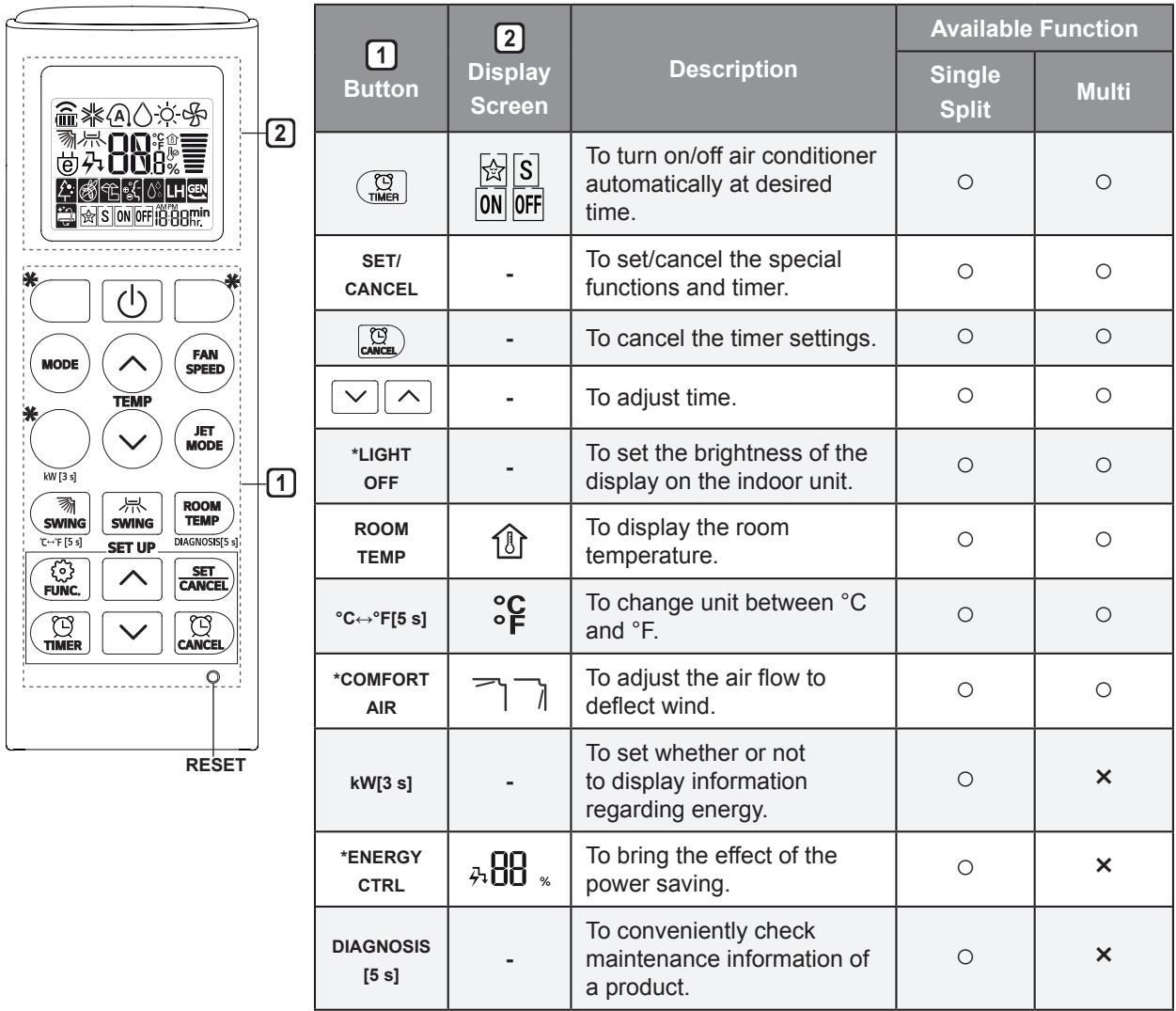
| 1 Button | 2 Display Screen | Description | Available Function | |
| Single Split | Multi | |||
| - | To turn on/off the air conditioner. | ○ | ○ | |
| TEMP | 88°C | To adjust the desired room temperature in cooling, heating or auto changeover mode. | ○ | ○ |
| MODE | ※ | To select the cooling mode. | ○ | ○ |
| △ | To select the heating mode. | ○ | ○ | |
| △ | To select the dehumidification mode. | ○ | ○ | |
| △ | To select the fan mode. | ○ | ○ | |
| △ | To select the auto changeover/auto operation mode. | ○ | ○ | |
| JET MODE | Po | To change room temperature quickly. | ○ | ○ |
| FAN SPEED | To adjust the fan speed. | ○ | ○ | |
| SWING SWING | To adjust the air flow direction vertically or horizontally. | ○ | ○ | |
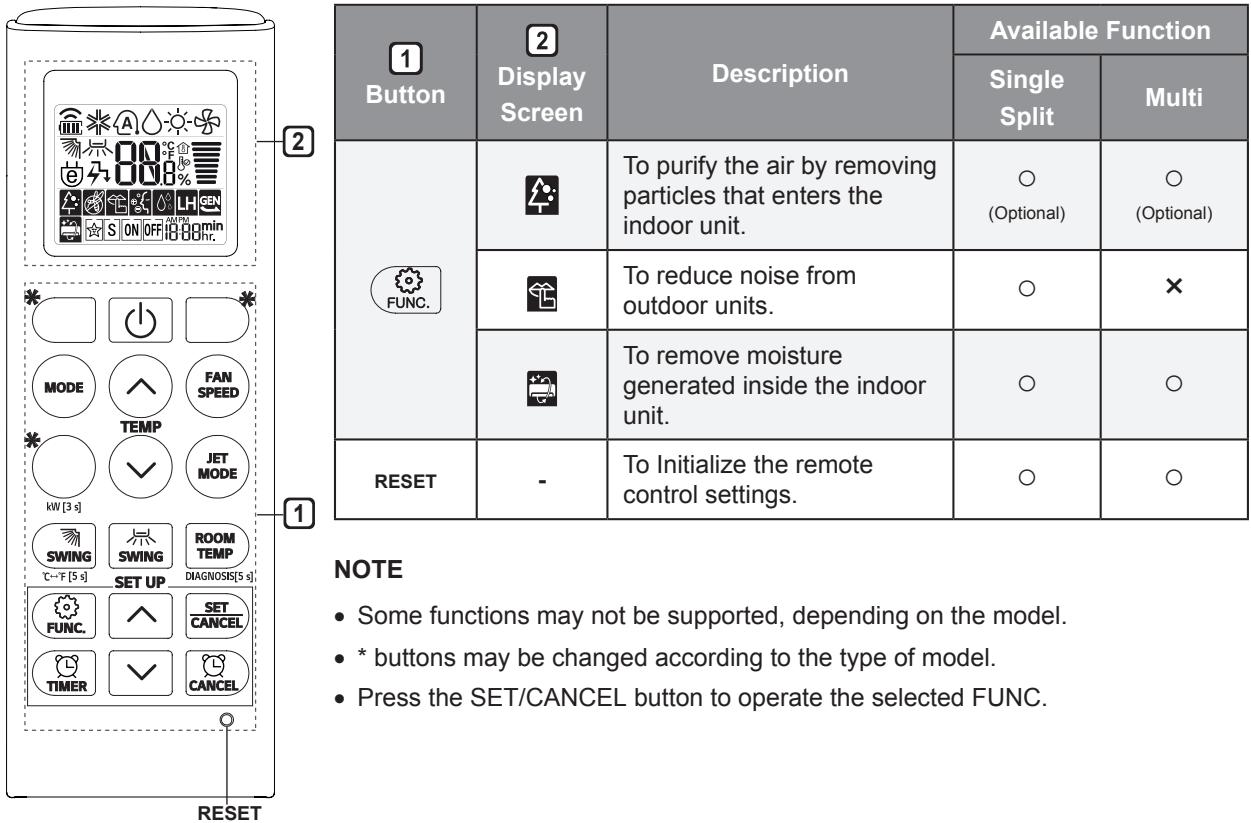
NOTE
-
- buttons may be changed according to the type of model.
- When connected to the Multi Outdoor unit, the Energy Display, Energy Control, Silent and Smart Diagnosis function may not be supported.
MANUALE D'USO CLIMATIZZA-TORE
Texnuecka 6e3oNaCHOCT
- MoHTaJbT nIe peMOHTbT OT HeOTOpn3npaHn Iuca MoKe Da N3IoXn Bac n dpyrN Xopa Ha onaCHOCT.
- BcyaKo Iiue, KoTo pa60n C XlaIINHaTa CnCTema, Tp6Ba Da npntExkaba BaIeH TeKyUc cepTnΦnkat OT akpeDnITnpaHa 3a CbOTBeTHaTa Oblact OceHBAa HNCTHTuYn NO 3aIaJIIMn XlaIINn areHTn, NtBbPjDaBaU, KOMNeTeHTHOCTTa My 3a 6e3OpacHa pa6Ota C XlaIINn areHTN B CbOTBeTCTBnE C MeToOn 3a OceHka, npn3HaTN B CΦepaTa Ha DeHocCTTa. (3a R32)
-ObcnykbaHTo Tp6Ba Da ce n3BbPbBa eDnHCTBeHO B CbOTBeTCTBHe C npenOpbKITE Ha npOn3BOJnteIa Ha obOpyDbaHTo. POndprBxKaTa N peMOHTbT, n3NCKBaUHaMeCaTa Ha dpyr OINTeH nepcoHa, Tp6Ba Da ce n3BbPbBaT NOd HaN3Opa Ha JInCe, KBaINΦuIpaHo B yNoTppeBaTa Ha 3anaIIMn XnaIINn aReHTn. (3a R32)
-Информацята в настая сеюпгдуону Кваллфицран сервиизен Тхник, ковTo e 3aIo03нAT с поцурпte 3a Бeзоганоct pa3полага с Heo6xODIMITE ИНСТРМЕNTI И ИНСТРМЕNTI 3a TECТВаHe.
-Пренеберва_HETO Ha почитаяпсTo ИИЗпьЛнЕНЕТО Ha BCИЧКИ ИНСТPyКЦМоже Ддове Дд Ненравинна pa6OТа Ha obOPуДваHETO, MaTeРnaJIHи ΜцETN,ФИЗИЧЕСКО habанявае И/ИЛи CBpT.
-Уретсьт се моHTира в СьOTВETCTBVE с HaцноHAЛнITE pa3пордб 3a eелктучески моHTаж.
-Ako e Heo6xOIMMa IOpMraHa Ha 3axpaHbAsnKa6eI, Tc Ce N3BbPbBa OT OToPi3npan HepcoHaI, KaTO ce N3NoJ3BaT cAmO oprHaJIHn pe3epBHN qactN.
-Уретг Трава да се заим павилно, за да се намаши рисьт OT TOKOB уда.
-He npep3BaIte n He OTCTpaHЯBaIte 3a3emBaIzna ⅡnΦT Ha 3axpaHbIzna ⅢeIceJ. -
3akpenbaheTo Ha 3a3emraaata KIema Ha aanTepa KbM BnHToBaTa pe36a Ha KaanaeTo Ha uencelHaTa Kytna Ha CteHaTa He 3a3emra ypeDa, OCBen aKO BnHToBaTa pe36a Ha KaanaeTo He e MetaHa n Heu30napaHa n UcenCenHaTa Kytna Ha CteHaTa He e 3a3emeha Ype3 eJektpnueckata NHCTaJauaHa Ha CrpaDAta.
-
Ako He cTe cnrypHn DaJIIN KJIMMaTnKbT e 3a3eMeH npaBnJHo, OobpHeTe ce KbM KBaIInΦuIcPAn eJIeKTpOteXnK, KOITo da npOBepn UeIeNceIHaTa KyTna Ha CTeHaTaN pReKbCBAuHa H Beprata.
- OxnaJdaIoo BeIeCTBO n I3OlaIauHnIaT peHOo6pa3yBaIra3, I3NoI3BaHn B ypeJa, I3NcKBaT cneIaJIHn IpOueDpyr 3a I3XBbPJIHe. CbByKeTe ce cbC cepBn3eH npEiCTaBNTeI nII IIn cIoO6Ha KBaJIINKAcIaI, npEi Da IIn I3XBbPNIte.
- Ako 3axpaHbauT Ka6eI e NOBpeH, TOI Tp8Ba Da 6bJe IOdMeHEn OT npOn3BOUInTeJI, OT HeROBtE CepBn3HN aReHTN IIN OT TexHnK C NOdoHa KBaIIΦnKauzI, 3a Da Ce N36erHe ONaCHOCT.
-Уретгггдддддддддддддддддддддддддддддддддддддддддддддддддддддддддддддддддддддддддддддддддддддддддддддддддддд徳псьггггггггггггггg. (3a R32)
-УрedingТгябва да бде постavenьnomeшение 6e3 HepeKbchato DeiCtBaUn OTKpITN Пламьи (HanpIMep paOteu Ha ra3 ypeД) И n3ToUHnCi Na 3anaIbAhe (HanpIMep paOteu eJekTpueckn HarpeBaTeJ).
-Уретг Трава Да Бдп Роставен Тaka, Ye Да Се ИЗбг He ВьзИКВаHeTo Ha Mханчн YВржДаня.

BHHMAHNE
3a HamaJIyBaHe Ha pUCKa OT He3HaUHTeJHO HapaHЯBaHe Ha JIuca, HeppaBnJIHa pa6Ota IJIi NOBpeJa Ha npOdyKTA IJIi MaTePnaJIHn igeTn CNa3BaIte OCHOBHIne IIpeDna3HN MepKn, BKJIIOUHTeJHo:
MOnTnpaHe
- He MOHTIpaIte KJIIMaTnka Ha MЯCTO, KbIeTO e N3IOJKeH IInpeKTHo Ha MOpCKn 6pN3 (CoJIeHn npbCKn).
-MoHTnpaIte npabNlHo MapKyuHa 3a OTTnueH He KOHdeH3npaJa BOda.
-Бъдete ВнIMaTeJIHи пи pa3OpaKOBaHeTo И MOHTaKa Ha KJIIMaTnKa.
-He DoKocBaIte n3TnuaaTO OXlaJdaaTO BeIeCTBO pR MoHTax IJI peMOHT. - TpaHcnpTupaTe KJIIMMaTnKa C DbAma NII NIOBuee DuShu NII N3NoJ3BaIte BNCOKO NobrAч.
-MoHTnpaIte BbHsHOTo TJaIO TaKa, Ye Da e 3aUHTeHO OT npraKa CJIbHueBa CBETnHa. He nOCTaBMyTe BbTpeHOTo TJaIO Ha MЯCTO, KbJTeO e N3JNOKeHO Ha npraKa CJIbHueBa CBETnHa npe3 npO3OpuTe.
-Извьряп Te 6e3ОпаСн OуПьТНИТЕн MaTeРиАл КATO BnHTObE, ИрОн ИЛБaTePиВ NOДхОДЯanza OnaKOBka CJIeД MOHTax ИЛп рeMoHT. - MoHTnpaIte KJIIMMaTnka Ha MЯCTO, KbDeTo WcMbT OT BbHShOTO TЯLo NJIIN3ropeJInte Ra3OBe HЯMa Da npUChnBaT HeyDo6CTBO Ha CbSeINTe. B npoTInBHeClyuay MoKe CTnIHHeTe Do KOHΦJNkT CbC CbCeI NTe.
Eknpnoataza
- ɪЗbaɪdete 6aTepeɪnTe OT ṬιnstaɪцɪoHhOTo, ako HЯMa ἀа ceɪ3πɒlɪ3Ba 3a προʌbʌŋkɪteJIeN ěpeɪnOД OT BpeMe.
- Преши有很大даида на Климатнике увени, чь сизлърът постaven.
- 3aДьлжИтELNo ПрOBepeTe 3a ИЗТичаHe Ha OXлajДaшо BeшecTBo CпeД MOHTaJa ИПп peMOHTa Ha KЛIMaTиKa.
- He noctabraIte npedMeTn Bbpxy KlinMaTuKa.
- HNKORA He smecBaIe pa3JIuHn BvIDObe 6aTePnN nIi CTapn N HOBn 6aTePnN 3a DInCTaHcNoHHOTO.
He octabraye kIIMatika da pa6OTn npOdbJIKHTeJH0, aKO HNBOTO Ha BnaXHOCT e MHORO BUCOKO IINBpaTa IIN npO3opeu e OCTaBeH OTBOpeH. - CnpTe Da n3NoJ3BaTe dNCTaHcUHOHOTo B cIyauHa n3TuaHe Ha TeuHOCT B 6aTepeYra. Ako dpexnte nn Koxata BN ca n3IOXeHN Ha n3TuaOa OT 6aTepeYra TeuHOCT, n3pepeTe nn n3MmIte c YnCTa BOda.
- He u3naaTe npOdbJxNteHNO xopa, XNBOTn nn paCTeHna Ha cTydeHaTa nn TOnIaTa Bb3dUsha Ctpyr OT KInMaTuKa.
- Прп польшане на ИЗтуашиот бateрята Teuноct ИЗларк海内外 Кухина и се консутupaite с Лекap.
He nIte BOdaTa, n3TOueHa OT KJIIMaTnka. - He u3noJ3BaIte npOdyKta 3a cneuJIHn ueJI Kato 3ana3BaHe Ha xpaHn, npOn3BeJeHnHa u3KyCTBOTo n dpyrN. KlImaTnKbTe npEJa3HaueH 3a noTpe6nteJcKnZeJI, a He e ppeU3Ha oxJaXdaUa cnCTema. IMa pNCK ot MaTePnaJIHa 3eTa nJIn 3aY6a.
- He ppezekdaite n He pa3rno6baite 6atepnnte.
Poiapbka
- HNKORA He DoKocBaIte MeTaJIHInTe Yactn Ha KJIIMaTnKa, KOrato OTCTpaHЯBaTe Bb3dUshnY φnIITbp.
- Изполизвайтесстбилна onopa ил сълба рп поисван, подрьжka илpeмоHT Ha Kлиматиka, akO e MOHTиразн Ha BUCOKO място.
- HNKORA He ИЗПОЛ3ВайтЕ сИнн ПОЧИСТВаши ппрпату Илп pa3ТВОРИТЕИ ПьсkaHe Ha BODa пп пОчИСТВане Ha KЛIMaTиka. ИЗПОЛ3ВайтЕ мEkо пapу e Плот.
Белеки по ekcnpoataцята
PpeIIOXeHne 3a neCTHe Ha eHepnra
- He oxnaqdaIte npekaleHo BbTpeuHnTe nOmeueHn. Toba moKe da yBpeDn 3dpaBeTo BN da NobuShn KOHCymaunTa Ha eHeprJia.
-Блokираite Cьнчева CBETNHa Cцори Или Нета, KORATO KINIMaTnKbT pa60TN.
-Погрикete ce bpaTne I npo3OpIte Da ca 3aTbOpeHn ПьТHo, KOrato KJIImaTnKbT pa60tN. - PerynpaTe nocokata Na Bb3dyuHnI NOtOK BeRTkaJIHO INI XOpIN3OHTaIHO 3a ZIpyuaNHa Bb3dyxaB NOMEeHneTO.
- YBeHnueTe CKOpocTtHa BcHTnIaTopa 3a 6bP3O oxnaKdaHe IIN 3aToIJIyHe Na Bb3dYxa B NOMEeHneTO 3a KpaTKo BpeMe.
- OТваряпге рedingно прозорцпс e сцел п探测пси, тькato прдьлжntelhoto n3ПОЛЗВане Ha KINIMATИКa можда 3ambpcn Bb3dUxha BnomeшениTo.
-ПочuctВаитБь3dУшнЯ ФиNTьр ВднБж Ha Bceк 2 сeДмиц. Прахь T И HeYNCTOTINTE,Натупани BвB Б3dUшня ФиNTьр, може дблOKират Вь3dUшня NOTOK ИЛДа 3acERHAT ФуннцИТЕ 3a OXnaxДаHE/N3CyswabaHe.
Uactn npyHKcnn
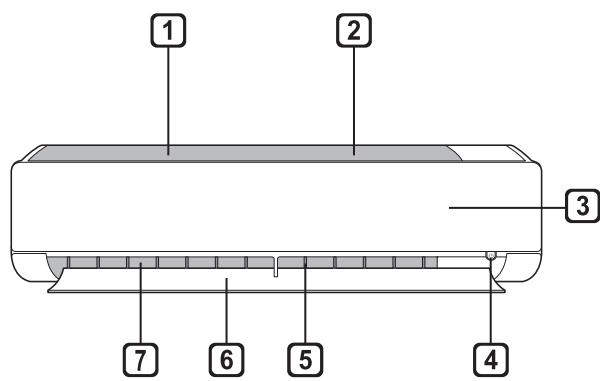
BbTpewho TaJIo
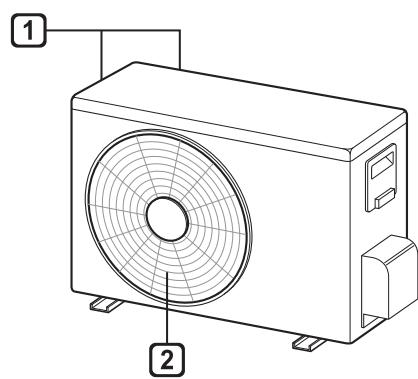
BbHnHO TJINo
1 Bb3nyueH qunTpBp
BxoJ3a Bb3ayx
3 Pnpen Kanak
4 Bytoh On/Off (6yToH 3a BkInOuBaHe/N3KlnOuBaHe)
5 Bb3nyweH deΦneKTop (BepTnkaJIha peWeTeKa)
6 Bb3dyweh deepneKTop (xopn3oHTaHIO kpiIIO)
7 N3xOД 3a Bb3dIyX
1 BéHTnlaIauIOHH O TBOpri 3a BXOJaIyBb3ayx
2 BeHTnIaunOHnO TBOpri 3a n3XoJaU Bb3ayx
3A6EJIEXKA
- Борот И местоноюжени.To на CBetлиннite Индикатори 3a paбota може за ce pa3лчавatВ зависимоct OT мобela Ha KЛIMATИKA.
-Функцята може да ce pa3лчава В 3abncmocT OT Tина Ha MOneNa.
Olulised ohutusjuhised 4
KASUTAMINE 9
Remote Control Bla Wajer
Meta Ddaḥhāl il-Batteriji
Jekk I-iskrin tal-wiri tar-remote control jibda jičcara, ibdel il-batteriji. Daḥhal batteriji AAA (1.5 V) qabel ma tuža r-remote control.
1 Nehhi I-ghatu tal-batteriji.
2 Dañhal il-batteriji l-godda u aghmel cert li t-terminals + u - tal-batteriji huma installati tajeb.
Installazzjoni tal-Holder tar-Remote Control
Biex tipprotegi r-remote control, installa I-holder fejn ma hemmx dawl tax-xemx dirett.
1 Aghzel post sigur u fejn tilhquarilyment.
2 Wahhal il-holder permezz ta'zewg viti mwaehla sew b'tornavit.
Metodu ta' hidma
Ipponta r-remote control lejn ir-ricevitur tas-sinjal fuq in-naña leminija tal-kundizzjonatur tal-arja sabiex thaddmu.
NOTA
- Ir-remote control jista' jhaddem apparti elettronici ohrajn jegk ikun IPPunist lejhom. Aghemel cert li qed tipponta r-remote control lejn ir-ricevitur tas-sinjal tal-kundizzjonatur tal-arja.
Ghal thaddim tajeb, uza carruta ratba biex tnaddaf it-trazmettitur ur-ricevitur tas-sinjal.
F'ka zi funzjoni ma tkunx provduta fil-proddott, I-ebda sinjal ta' hoss ma johro g mill-proddott meta buttuna ghal funzjoni bhal din fuq ir-remote control tiigi maghfusa ghajr ghall-funzjonijiet tad-Direzzjoni tal-Fluss tal-Arja(SWING), Displej t'Energija(KW[31]), Purifikazzjoni tal-Arja(
Ovaj urežaj不同程度 has been used in the field of medicine. In general, it is used to treat a wide range of conditions including asthma, diabetes, cancer, and many other diseases. It is also used for treating wounds, burns, and injuries.