EVOCITY 1 - Stroller KIDDY - Free user manual and instructions
Find the device manual for free EVOCITY 1 KIDDY in PDF.



User questions about EVOCITY 1 KIDDY
0 question about this device. Answer the ones you know or ask your own.
Ask a new question about this device
Download the instructions for your Stroller in PDF format for free! Find your manual EVOCITY 1 - KIDDY and take your electronic device back in hand. On this page are published all the documents necessary for the use of your device. EVOCITY 1 by KIDDY.
USER MANUAL EVOCITY 1 KIDDY
natural_image
Line drawing of a stroller with visible wheels and accessories (no text or symbols)EN Directions for use
natural_image
Close-up of a person using a black stroller to handle the seat, no visible text or symbols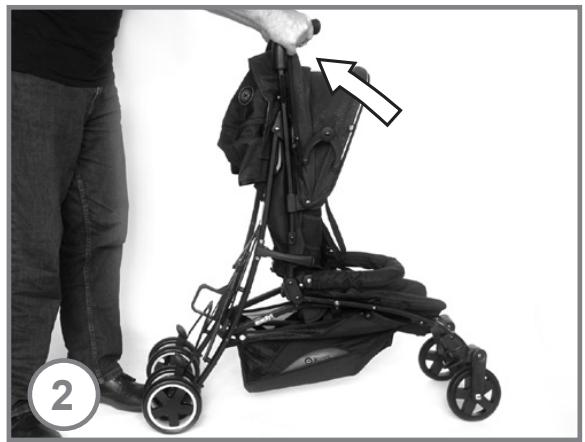
natural_image
Person using a stroller with a hand adjusting the seat, no visible text or symbols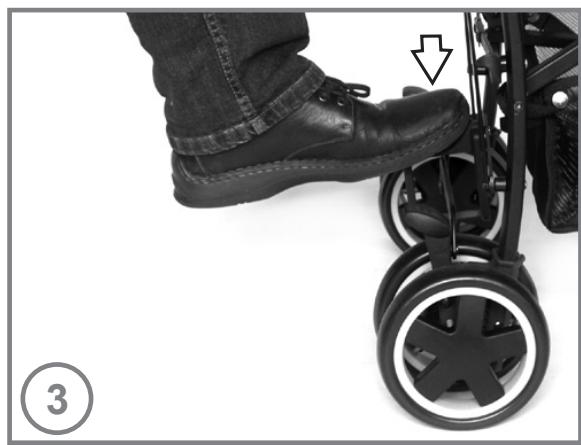
natural_image
Close-up of a person's lower back wearing a black athletic trolley, with a hand pointing to the sole (no text or symbols visible)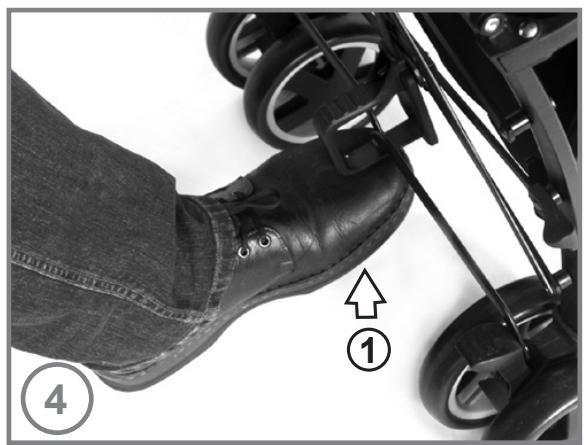
natural_image
Close-up of a person's foot wearing a roller skates, with numbered callouts highlighting the step ① (no text or symbols on the foot or background)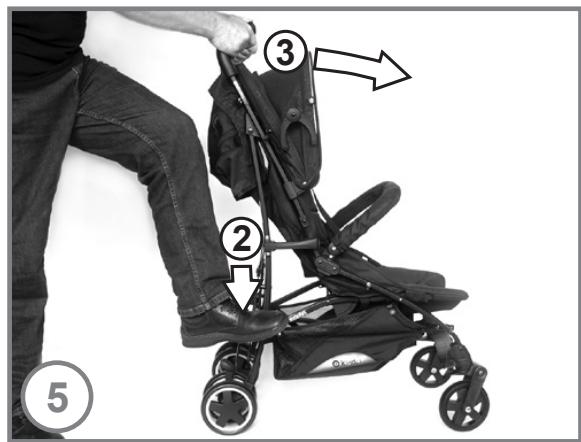
text_image
Instructional diagram showing a person using a stroller with numbered steps and directional arrows indicating movement.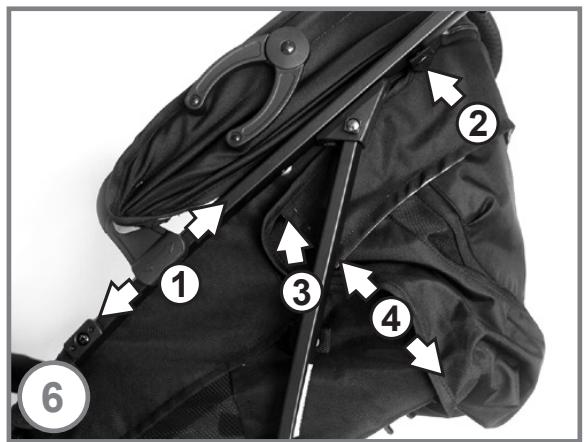
text_image
Labeled diagram of a jacket with numbered parts and directional arrows indicating movement or positioning.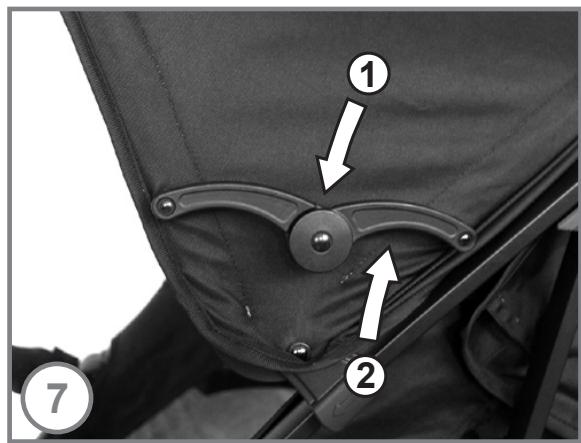
text_image
① ② ⑦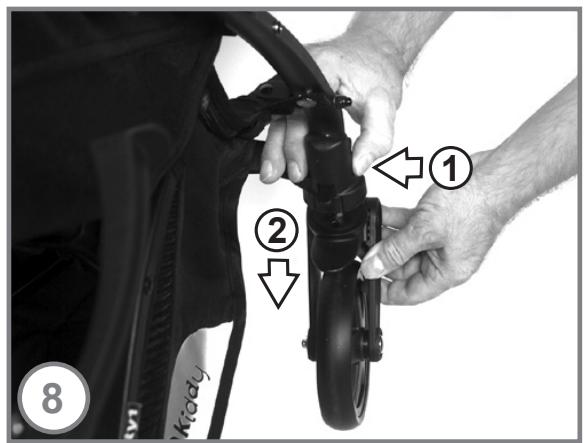
text_image
① ② 8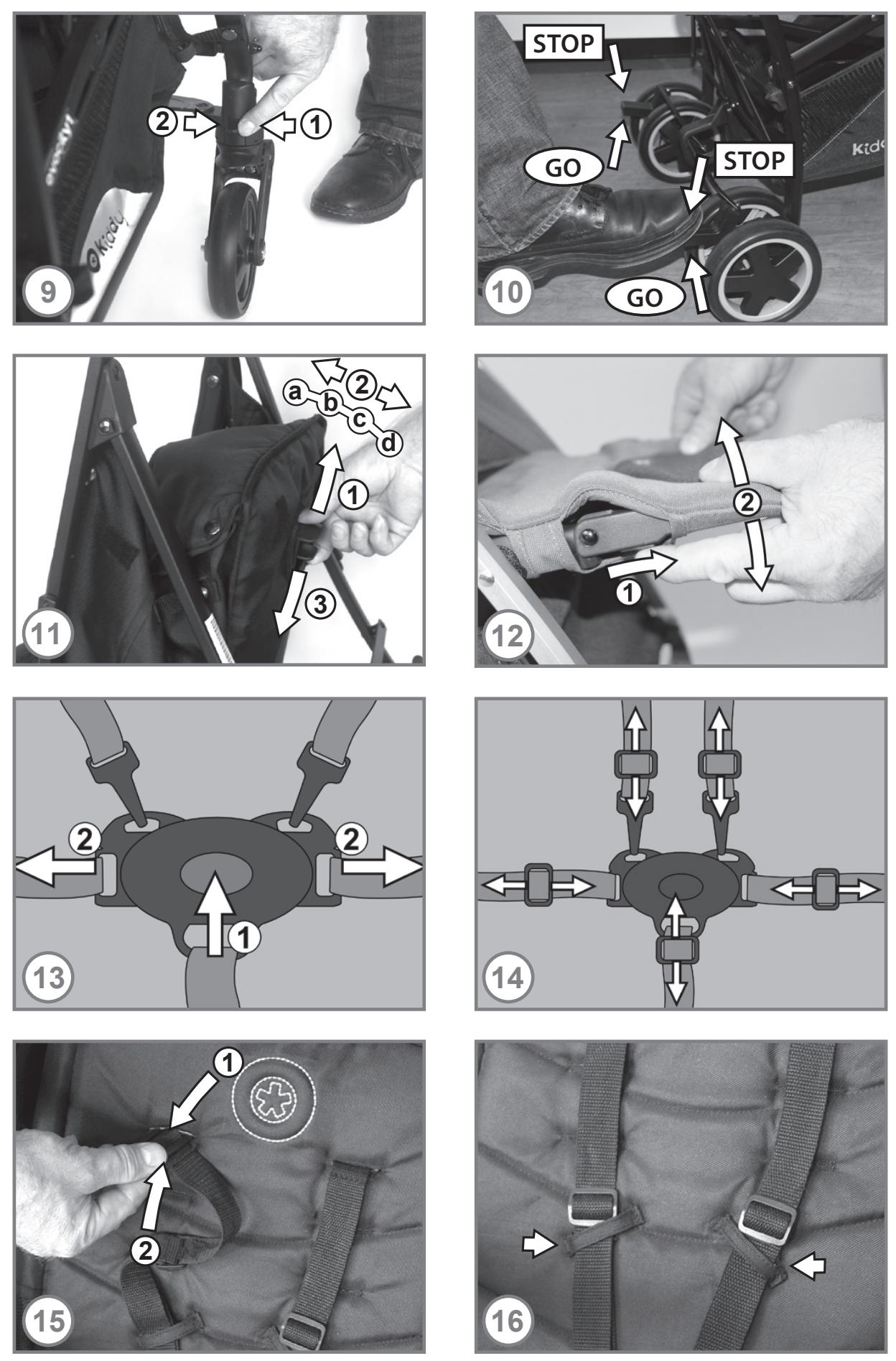
natural_image
Close-up of a mechanical component with a white arrow pointing to a small component, no visible text or symbols.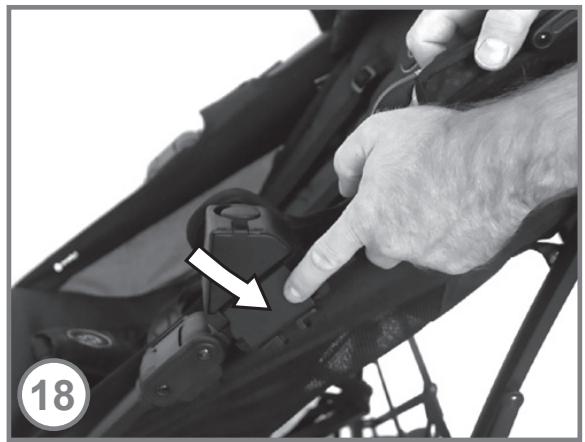
natural_image
Close-up of a hand adjusting a mechanical component with a white arrow pointing to the button (no text or symbols visible)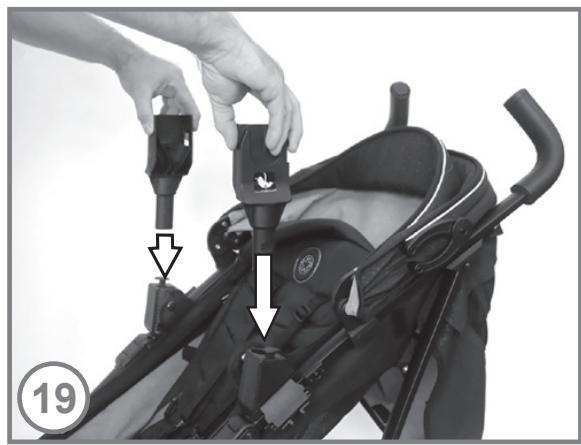
natural_image
Close-up of a person adjusting a stroller with a hand adjusting the clip (no text or symbols visible)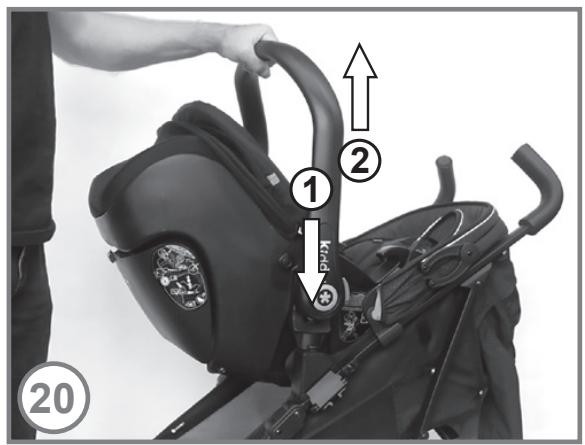
text_image
Instructional diagram showing a person adjusting a stroller with numbered steps and arrows indicating movement.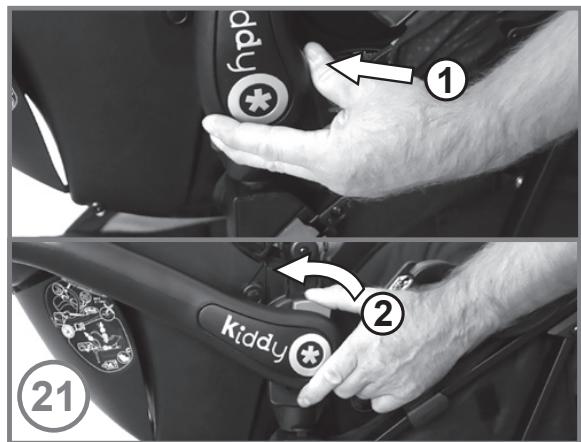
text_image
1 ① ② kiddy ②1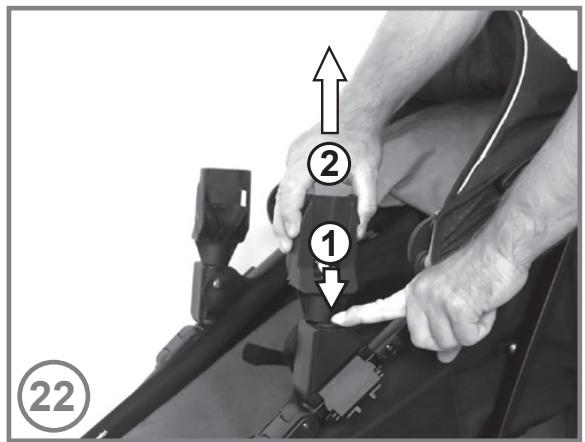
text_image
② ① ②2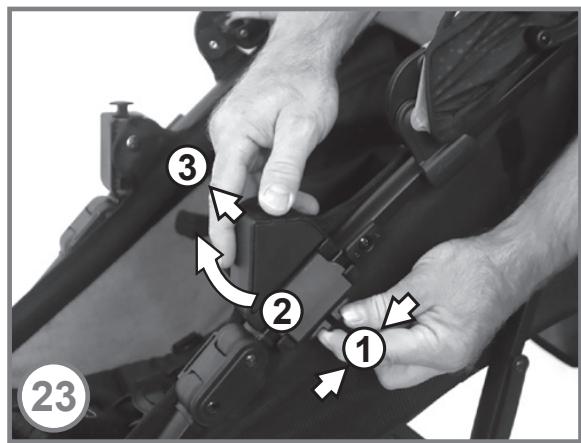
text_image
Instructional diagram showing hands adjusting a device with numbered steps and directional arrows indicating movement.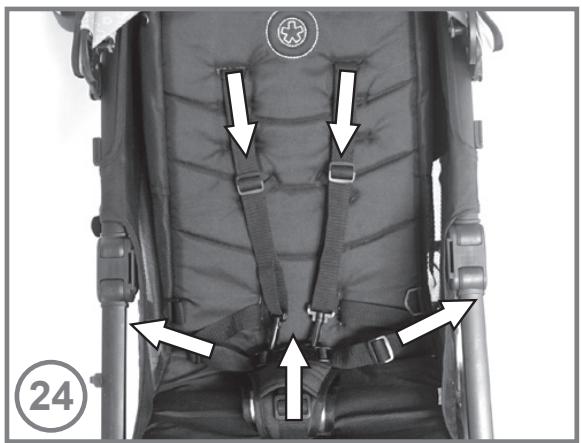
natural_image
Back view of a child's seat with visible straps and buttons, no text or symbols present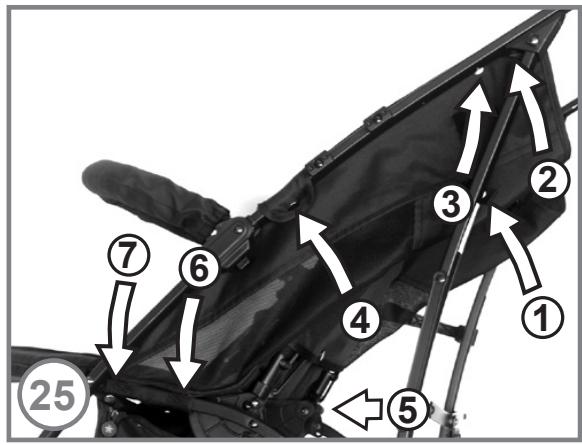
text_image
Labeled diagram of a scooter seat with numbered parts and directional arrows indicating movement or positioning.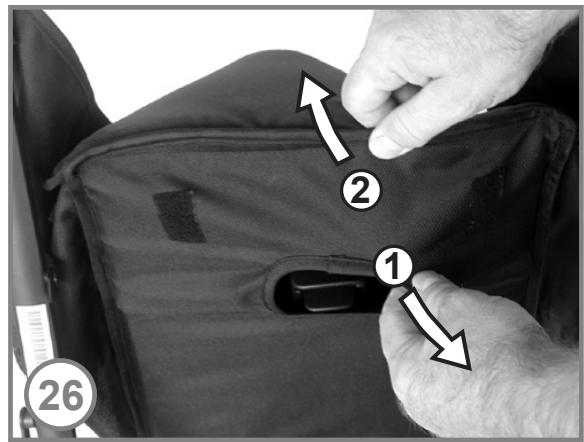
text_image
Instructional diagram showing hand positioning of a device on a bag with labeled parts 1, 2, and 26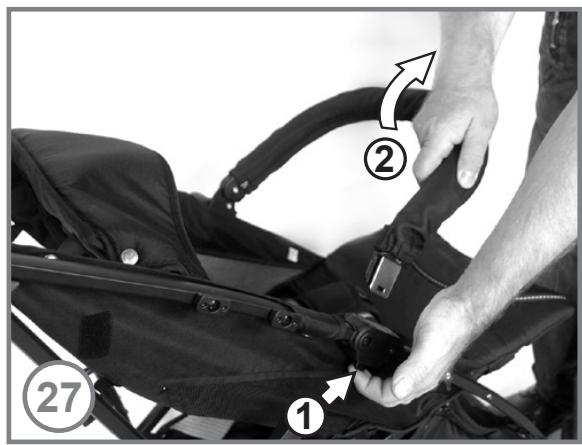
text_image
Instructional diagram showing a hand adjusting a black athletic suit buckle with labeled parts 1, 2, and 27.-
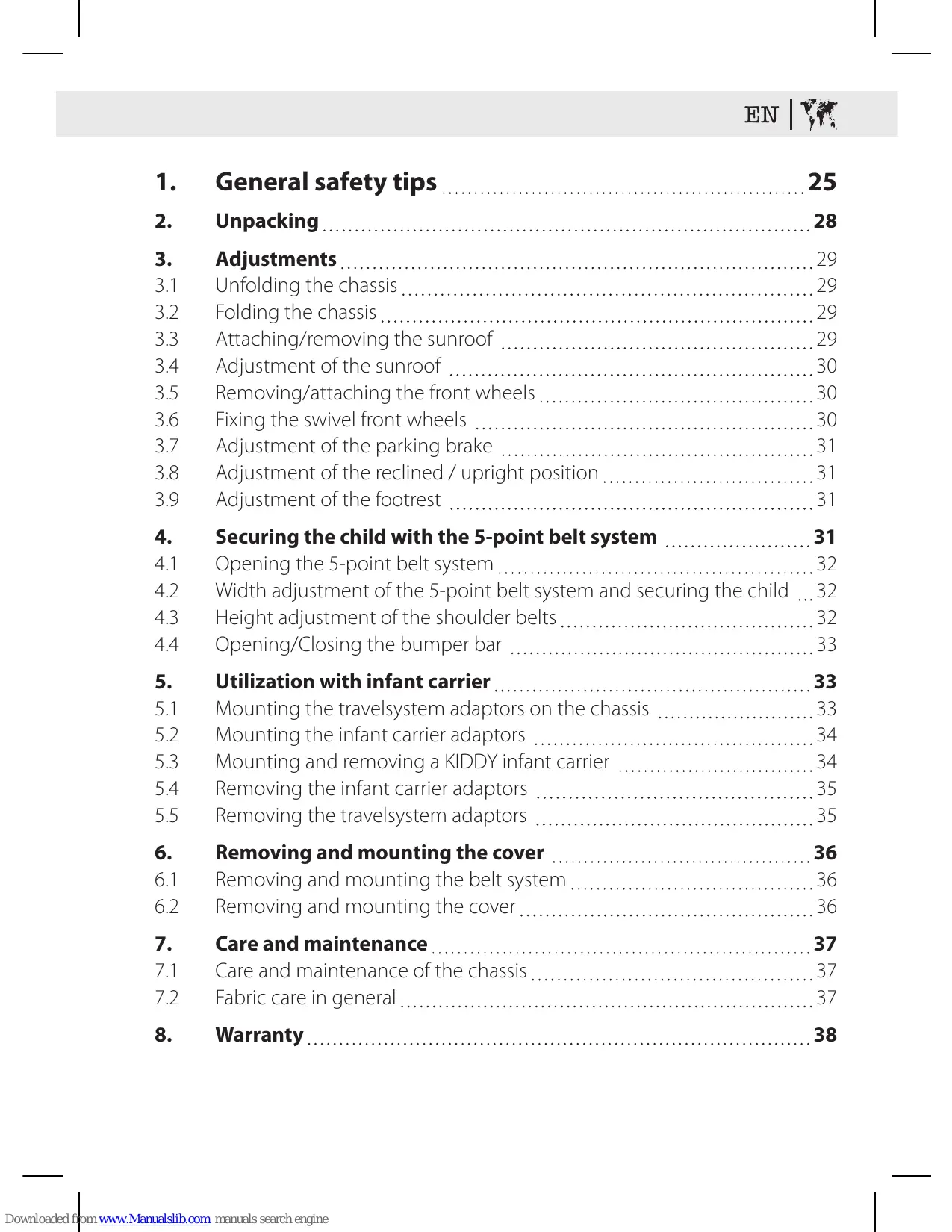
General safety tips ...... 25
-
Unpacking 28
-
Adjustments 29
3.1 Unfolding the chassis 29
3.2 Folding the chassis 29
3.3 Attaching/removing the sunroof 29
3.4 Adjustment of the sunroof 30
3.5 Removing/attaching the front wheels 30
3.6 Fixing the swivel front wheels 30
3.7 Adjustment of the parking brake 31
3.8 Adjustment of the reclined / upright position 31
3.9 Adjustment of the footrest 31
- Securing the child with the 5-point belt system ..... 31
4.1 Opening the 5-point belt system 32
4.2 Width adjustment of the 5-point belt system and securing the child ... 32
4.3 Height adjustment of the shoulder belts 32
4.4 Opening/Closing the bumper bar 33
- Utilization with infant carrier 33
5.1 Mounting the travelsystem adaptors on the chassis 33
5.2 Mounting the infant carrier adaptors 34
5.3 Mounting and removing a KIDDY infant carrier 34
5.4 Removing the infant carrier adaptors 35
5.5 Removing the travelsystem adaptors 35
- Removing and mounting the cover 36
6.1 Removing and mounting the belt system 36
6.2 Removing and mounting the cover 36
- Care and maintenance 37
7.1 Care and maintenance of the chassis 37
7.2 Fabric care in general 37
- Warranty 38
Operating manual Evocity 1
IMPORTANT
Keep this instruction for future reference.
We're delighted that you have chosen the Evocity 1 as your preferred stroller.
The Evocity 1 is the latest innovative product in our stroller line. This stroller is a first-class product that guarantees a long-term useful life, if used correctly. Your Evocity 1 is EN 1888 tested and homologated.
This vehicle is intended for children from birth up to 15 kg (approx. 3 years). If you use the stroller with an infant carrier, it can be used for Babies from birth up to 13 kg.
1. General safety tips

WARNING
Read these instructions carefully before use and keep them for future reference. Your child's safety may be affected if you do not follow these instructions.

WARNING
Never leave your child unattended.

WARNING
Ensure that all the locking devices are engaged before use.
! WARNING
Do not overload the basket, bag of sunroof and cup holder.
! WARNING
Maximum weight in basket is 5 kg, in bag of sun-roof 0,2 kg and in cup holder 0,5 kg.
! WARNING
Any load could cause hazardous instability of the stroller!
! WARNING
Do not use the stroller with more than one child at a time.
! WARNING
Only spare parts and accessories approved by the manufacturer may be used.
! WARNING
Use a harness as soon as your child can sit unaided.
! WARNING
Always use the crotch strap in combination with the waist belt.

WARNING
Check that the pram body or seat unit or car seat attachment devices are correctly engaged before use.

WARNING
This product is not suitable for running or skating.

WARNING
Avoid serious injury from falling or sliding out. Always use the restraint system.

WARNING
The parking device shall be engaged when placing and removing the children.

WARNING
Periodically monitor the belts, the buckle and if rivets, screws or parts get loose. Adult assembly is required. Keep small children away while assembling the stroller.

WARNING
Only use accessories and replacement parts approved by KIDDY.

WARNING
Do not let your child play with this product.
! WARNING
Never use the stroller on stairs or escalators.
! WARNING
To avoid injury ensure that your child is kept away when unfolding or folding this product. Take also care that you don't entrap extremities in moveable parts.
! WARNING
Any load attached to the handle and/or on the back of the back rest and /or on the sides of the vehicle will affect the stability of the vehicle.
2. Unpacking
! WARNING
Remove protective material and plastic bags and dispose of them before assembling the stroller.
! WARNING
To avoid suffocation keep the packing material away from children.
WARNING
Adult assembly is required. Keep small children away while assembling the stroller.
3. Adjustments
3.1 Unfolding the chassis
Open the locking hook at the side of the chassis (fig. 1).
Open the chassis by holding the handle and lifting it upwards (fig. 2).
Step on the pedal until the chassis clicks in position (fig. 3).

WARNING
Ensure chassis locking devices are engaged before use!
3.2 Folding the chassis
Pull the pedal upwards (fig. 4, no. 1) and step on the folding lever (fig. 4; no. 2) on the right side of the chassis.
Then push the handle frontwards (fig. 5; no. 3) until the locking hook is closed.

WARNING
Take care that you don't entrap extremities in moveable parts.

WARNING
Take care that you don't entrap extremities in moveable parts.
3.3 Attaching/removing the sunroof
Push the sunroof clip into the upper or lower holder on chassis (fig. 6; no. 1). Afterwards close the snap fastener (fig. 6; no. 2) and close the velcro fasteners (fig. 6; no. 3+4).
Do the same on the opposite side also.
If you want to remove the sunroof, proceed like decribed above in reverse manner.
3.4 Adjustment of the sunroof
Push the hinges on the left and right side downwards to close and fix the sunroof (fig. 7; no. 1).
To open the sunroof pull both hinges upwards (fig. 7; no. 2).
3.5 Removing / attaching the front wheels
To remove the front wheels push the button (fig. 8; no. 1) on the lower side of the wheels and pull out the wheels simultaneously (fig. 8; no. 2).

WARNING
To attach the wheels, stick them on the front wheel holder until they securely lock in place.
3.6 Fixing the swivel front wheels
Bring the front wheels in "straightforward" direction. Afterwards push the buttons inwards (fig. 9; no. 1) on the left and right wheel.

WARNING
Ensure both locking devices are engaged before use!
If you want to use the swivel wheels, push both buttons outwards (fig. 9; no. 2).
3.7 Adjustment of the parking brake
To set the parking brake push the brake levers on both sides downwards (fig. 10; "STOP").

WARNING
Don't let go of the stroller until you are sure that the parking brake is fully engaged.
To loosen the brake push the brake levers upwards (fig. 10; "GO").
3.8 Adjustment of the reclined/upright position
To change the reclining position, pull the adjust button upwards (fig 11; no.1), then change the position of the back rest (fig 11; No. 2). Loosen the button then (fig 11; no. 3) so that the back rest is fixed in one of the 4 possible positions (fig 11; a-b-c-d). The most reclined position (d) is intended to use for new born babies.
3.9 Adjustment of the footrest
Pull the buttons on the left and right side of the footrest forwards (fig. 12; no. 1) and adjust the footrest to the desired position (fig. 12; no. 2).

WARNING
After adjustment make sure that both buttons are engaged.
4. Securing the child with the 5-point belt system

WARNING
Avoid serious injury from falling or sliding out.
Always use the 5-point belt system as described below when you use your Evocity 1 with seat unit.
4.1 Opening the 5-point belt system
Push the button in the middle of the buckle (fig. 13; no. 1) and the buckle tongues will come outwards (fig. 13; no. 2).
4.2 Width adjustment of the 5-point belt system and securing the child
Place your child in the seat unit, put the shoulder belts over childs shoulder and the buckle between the legs. Push the buckle tongues into the buckle and ccheck if it is closed.
The belt system can be adjusted by sliding the 5 belt adjusters in the desired direction (fig. 14).

WARNING
The belt system is adjusted correctly when the belts lay firmly on the child's body.
4.3 Height adjustment of the shoulder belts
Push the plastic clip on the backside of the backrest through the hole to the front (fig. 15; no. 1).
Do the same on the second side.
Now insert the plastic clip into the hole at the required height (fig. 15; no. 2).
The plastic clip must lay flat on the backside of the backrest.
To secure children from 0 up to 6 months by the harness system, thread before the 2 shoulder belts through the 2 loops (fig. 16) and recline the backrest to the lowest position. (fig. 11, pos. d)

WARNING
Make sure that both shoulder belts are fixed at the same height.
4.4 Opening/closing the bumper bar
To open the bumper bar, press the release button (fig. 27; no. 1) and open the bumper bar (fig. 27; no. 2).
To close the bumper bar, push the end into the guide on the chassis at both sides. Make sure that the bumper bar is always closed correctly at both sides when seat unit is in use. Never use the seat unit without the bumper bar.
5. Using with infant carrier
ADAPTER COMPATIBLE
| KIDDY | MaxiCosi | Cybex | Be safe | Recaro |
| Evoluna i-Size | Pebble plus | Aton Q | Izi go | Privia |
| Evolunafix | Cabrio fix | Cloud Q | ||
| Evolution Pro 2 |
5.1 Mounting the travel system adaptors on the chassis

WARNING
Unfold the stroller as described in section 3.1 and set the parking brake.
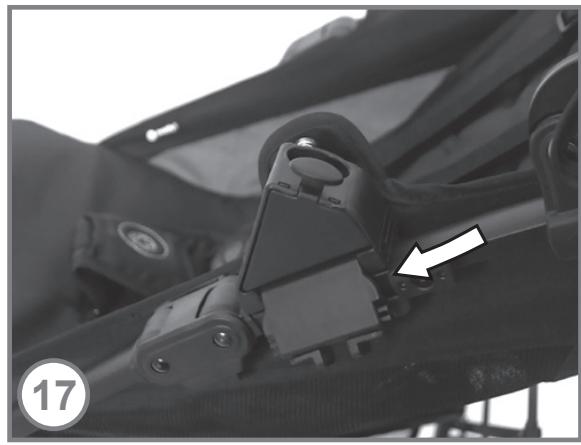
Slide the travelsystem adaptor from inside on the metal profile above the hinges (fig. 17).
Now fix the travelsystem adapter by closing the flap (fig. 18).
Do the same on the opposite side.

WARNING
Ensure both locking devices are engaged before use!
5.2 Mounting the infant carrier adaptors
Insert both adaptors into the channels on the travelsystem adaptors (fig. 19).

WARNING
Ensure both locking devices are engaged before use!
5.3 Mounting and removing a KIDDY infant carrier

WARNING
Make sure that your child is secured in the infant carrier as described in it's operating manual.
Attach the infant carrier rearward facing to the adaptors (fig. 20). Ensure that the Infant carrier will be locked noticeable at both adaptors. Push at both sides the shell downwards (fig.20; no.1) Try to lift up the handle (fig.20; no.2) to check if both sides are locked proper at the adaptors.
Push and hold both buttons on either side of the infant carrier handle (fig. 21; no. 1).
Push the handle forward until the handle buttons lock in place (fig. 21; no. 2).

WARNING
Ensure before using that the adaptors and the infant carrier are engaged!
To remove the KIDDY infant carrier push both handle buttons and pull the handle back in the upright position.

WARNING
Ensure that both handle buttons are engaged.
Now the infant carrier can be removed from the adaptors by simultaneous pushing of release buttons at both sides of infant carrier.
For car seats used in conjunction with a chassis, this vehicle does not replace a cot or a bed. Should your child need to sleep, then it should be placed in a suitable pram body, cot or bed.
5.4 Removing the infant carrier adaptors
Hold and push the removing button on the travelsystem adaptor pushed (fig. 22, no. 1) and pull out the infant carrier adaptor (fig. 22, no. 2).
Remove the second infant carrier adaptor in the same manner.
5.5 Removing the travelsystem adaptors
Push the opening button on the travelsystem adaptor upwards (fig. 23; no. 1) and open the flap (fig. 23; no. 2). Afterwards detach the travelsystem adaptor from the chassis (fig. 23; no. 3).
Remove the second adaptor in the same manner.
6. Removing and mounting the cover
6.1 Removing and mounting the belt system
Push the plastic clips on the end of the 5 belts from rear through the holes of Back rest and seat(fig. 24).
Mount the belt system by pushing the clips through the holes and make sure that they lay flat on the rear of the backrest and the seat.

WARNING
Never use the stroller without the belt system.

WARNING
Make sure that the belts are not twisted and placed into the correct holes.
6.2 Removing and mounting the cover
Remove the sunroof like like described in section 3.3.
Remove the belt system like described in section 6.1.
To remove the seat cover open 5 snap fasteners at the side of the seat and backrest(fig. 25; no. 1–5). Open the snap fasteners on the second side also.
Open then the 2 connecting belts under the seat (fig.25, no. 6-7)
Now pull off the cover from the upper part of the backrest (fig. 26) and from the foot rest.
To mount the cover follow the steps for removing in reverse order!

WARNING
Don't forget to mount the belt system (see section 6.1).
7. Care and maintenance
7.1 Care and maintenance of the chassis
Periodically check the chassis for loose screws, rivets or worn out or defective parts. Check the fabric cover and belts for open seams or other defects.
Don't use the stroller when you noticed a defect. Defective parts have to be changed or repaired before using the stroller again. If a wheel is squeaking, spray some liquid silicone lubricant on the axles. Wipe off unnecessary lubricant.
The chassis can be cleaned with a mild cleanser or with a damp cloth. Never use caustic cleansing agents (e.g. solvents, strong detergents).
7.2 Fabric care in general
All of our fabric meets the highest standards regarding colourfastness against UV radiation. Nevertheless, all fabric fades when exposed to UV radiation. This is not due to defective fabric but to normal wear and tear, which is not covered by the warranty.
When the cover (or the chassis) is wet, allow to dry unfolded at room temperature before storing or using.
The seat cover and the belt pads are machine washable with mild detergent on a delicate cycle. Don't bleach, spin or tumble dry the cover. Allow to dry naturally, ideally on a washing line. Do not iron any part of the cover.





The sunroof is hand washable only. Use a mild detergent and rinse it out with lots of warm water. Allow to dry naturally, ideally on a washing line.

8. Warranty
We provide a 2-year guarantee for manufacturing or material defects. The guarantee period commences on the day of purchase.
A receipt is required for all claims.
The guarantee is limited to products which have been handled appropriately and are returned in a clean and sound condition.
The guarantee does not extend to:
- Normal wear and tear and damage due to excessive load during use (e.g. wheels).
- Damage caused by inappropriate or improper use.
- Damage and rust caused by road salt.
Fabrics: All our fabrics meet the highest standards regarding colourfastness against UV radiation. However all materials discolour when they are exposed to
UV light. This will be considered as normal wear and tear and not a material defect. No guarantee can be assumed in this case.
Please contact your specialist dealer immediately in the event of a warranty claim.
The KIDDY team wish you and your child a good and safe trip at all times.