
MD 14752 - Bread maker MEDION - Free user manual and instructions
Find the device manual for free MD 14752 MEDION in PDF.



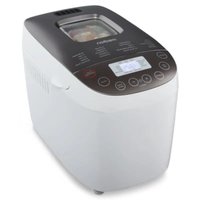
| Product type | Automatic bread machine |
| Dimensions (W × D × H) | Approx. 426 × 300 × 280 mm |
| Weight | Approx. 7 kg |
| Power supply | 230-240 V ~ 50 Hz |
| Power consumption | 580 W |
| Maximum dough capacity | 1000 g |
| Available bread sizes | 750 g (small) and 900 g (large) for programs 1 to 4 |
| Number of programs | 12 programs (Basic, French, Whole wheat, Quick, Sweet, Ultra fast, Dessert, Pasta, Dough, Jam, Cake, Bake) |
| Browning levels | 3 levels (light, medium, dark) for programs 1 to 7, 11 and 12 |
| Delayed start | Up to 13 hours (programs 1 to 5, 8 and 9) |
| Keep warm | Up to 60 minutes after the end of the program |
| Dough pan | Non-stick coating, removable |
| Included accessories | Dough hook, measuring spoon, graduated cup |
| Add ingredients function | Audible signal for manual addition after second kneading |
| Safety | Overheat protection, automatic stop, fast extraction |
| Cleaning | Pan and accessories hand washable (not dishwasher safe) |
| Housing material | Heat-resistant plastic |
| Protection class | I (grounded) |
| Spare parts available | Pan, hook, cup, spoon (via after-sales service) |
| Warranty | 2 years (under conditions) |
Frequently Asked Questions - MD 14752 MEDION
User questions about MD 14752 MEDION
0 question about this device. Answer the ones you know or ask your own.
Ask a new question about this device
Download the instructions for your Bread maker in PDF format for free! Find your manual MD 14752 - MEDION and take your electronic device back in hand. On this page are published all the documents necessary for the use of your device. MD 14752 by MEDION.
USER MANUAL MD 14752 MEDION
Programme 2: French (pain français)
Programme 3 : Whole wheat (pain complet)
Programme 5: Sweet (pain sucre)
Programme 6: Ultra fast (programme express)
Programma 2: French (Pane bianco)
Programma 5: Sweet (Pane dolce)
Programma 6: Ultra fast (Programma breve)
Programma 7: Dessert
- About these instructions 4
1.1. Warning symbols and key words used in these instructions.. 4
- Package contents 5
- Proper use 6
- Safety advice 6
4.1. People with reduced capacities 6
4.2. People not permitted to use this appliance.. 6
4.3. Setting up the appliance safely 7
4.4. Mains connection 7
4.5. Handling the appliance safely.. 7
4.6. Never carry out repairs yourself 8
- Overview 9
5.1. The appliance 9
5.2. Operating panel 10
5.3. The display 11
- Before use 12
- Preparations 12
7.1.Preparing dough 12
- Operation 13
8.1. Initial operation 13
8.2. Programme selection 14
8.3. Programme overview 15
8.4. Start programme 18
8.5. Add further ingredients 18
8.6. Notes on the baking process 18
8.7. Acoustic signals 18
8.8. End of programme 19
8.9. Remove baked goods from the appliance 19
8.10. Other baking processes 20
- Cleaning and storage 20
9.1. Cleaning 20
9.2. Storage 20
- Dealing with problems 21
10.1. Possible error messages 22 - Disposal 23
- Technical data 23
- Legal information 24
1. About these instructions

Before using this appliance for the first time, please read these operating instructions carefully, taking particular note of the safety instructions. This appliance is only to be used or handled as specified in these operating instructions. Please store these instructions somewhere safe in case you need them later. If you pass this appliance on to a third party, please include these operating instructions.
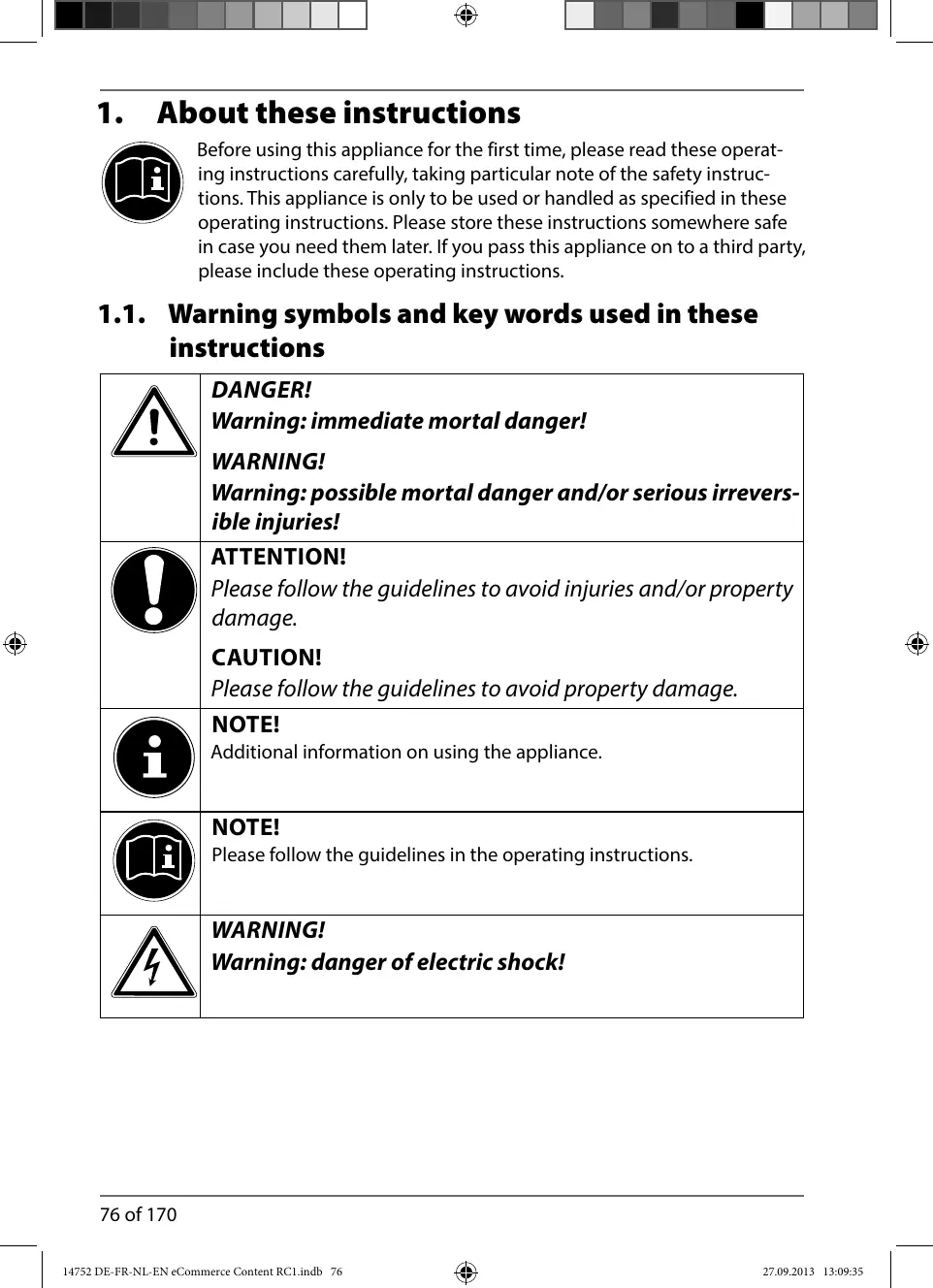
1.1. Warning symbols and key words used in these instructions
| ! | DANGER! Warning: immediate mortal danger! WARNING! Warning: possible mortal danger and/or serious irrevers- ible injuries! |
| ! | ATTENTION! Please follow the guidelines to avoid injuries and/or property damage. CAUTION! Please follow the guidelines to avoid property damage. |
| i | NOTE! Additional information on using the appliance. |
| i | NOTE! Please follow the guidelines in the operating instructions. |
| 4 | WARNING! Warning: danger of electric shock! |
| WARNING! Warning: danger due to hot surfaces! | |
| · | Bullet points |
| ► | Tasks to be performed |
2. Package contents
After unpacking, ensure that the following parts have been supplied:
Bread machine
Baking tin with non-stick coating
1x dough hook
- Measuring spoon
- Measuring beaker
- Operating instructions and warranty documents
3. Proper use
Your appliance offers a number of options for usage:
Only use your bread machine for baking bread as well as cooking jams and preserves at home. Do not use the appliance for drying foods or other objects. Do not use the bread machine outside.
The appliance is intended for private use only and not for industrial/ commercial use.
Please note that we shall not be liable in cases of improper use:
- Do not modify the appliance without our approval and do not use any auxiliary equipment which we have not approved or supplied.
- Use only spare parts and accessories which we have supplied or approved.
- Follow all the instructions in these operating instructions, especially the safety information. Any other use is deemed improper and can cause personal injury or damage to the product.
- Do not use the appliance in extreme environmental conditions.
4. Safety advice
4.1. People with reduced capacities
4.2. People not permitted to use this appliance
- Keep the appliance and its accessories out of reach of children.
- This appliance may be used by children over the age of 8 and by persons with reduced physical, sensory or mental abilities or by those without experience and/or knowledge, if they are supervised or have been instructed in the safe use of the appliance and have understood the dangers that result from it. Children must not play with the appliance. Cleaning and user maintenance must not be carried out by children, unless they are aged 8 or over and are supervised.
- Children younger than 8 should be kept away from the appliance and the mains cable.

WARNING!
Keep plastic packaging out of the reach of children. There is a risk of suffocation.
4.3. Setting up the appliance safely
- Place the appliance on a heat-resistant, sturdy, level surface.
- Never place the appliance on the edge of a table, it could tip off and fall down. The appliance should always be set up at least 10cm from the wall and other appliances (rear and sides). Do not cover the air vents.
- Do not set up the appliance near easily flammable materials (curtains, drapes, paper, etc.). There is a risk of fire.
- Do not place the appliance directly next to a gas or electric stove or next to another hot oven.
- Never set up the appliance over a hotplate or other heat-generating appliances (grill, deep fat fryer); this applies even if an extraction fan is installed above it.
- Do not permit moisture to penetrate the casing. There is a risk of electric shock.
- Do not use the appliance out-of-doors.
4.4. Mains connection
- Connect the appliance only to a power socket (230 V ~ 50 Hz) that is easy to reach and close to the set-up location. The socket outlet must be freely accessible, so that you can unplug the appliance from the mains quickly if necessary.
4.5. Handling the appliance safely
4.5.1. General
- Never leave the appliance unattended during operation.
- Never use the appliance if it has been damaged or if the mains cable or plug show signs of damage.
- DANGER! Never touch the appliance, mains cable or plug with wet hands. There is a risk of electric shock.
-
Never immerse the appliance, the mains cable or the plug in water or other liquids.
-
The appliance may not be operated on an external timer or a separate remote control system (e.g. a remote-controlled mains socket).
4.5.2. Mains cable
- The mains cable must not be wrapped around the appliance during use. It must not touch any hot surfaces. This could damage it.
- Do not kink or pinch the mains cable.
- Always remove the mains cable from the mains socket by holding the plug - do not pull the cable itself.
- Before unplugging the mains cable, switch off the appliance.
4.5.3. Appliance
- The viewing window and the dough container will become very hot during operation. Use oven gloves when removing the dough container.
- Do not move the appliance when in use.
- Do not use the dough container as storage for other objects.
- Only operate the appliance when the dough container is filled. Operation without dough can result in overheating.
- Take the dough container out of the appliance when you fill it to avoid dirtying the baking chamber.
Use only the original accessories.
4.6. Never carry out repairs yourself

WARNING!
Live components There is a risk of electric shock.
Therefore, follow the instructions below:
- If the plug, cable or appliance itself is damaged, disconnect the appliance from the mains immediately.
- In order to prevent exposure to danger, damaged mains cables should be replaced by the manufacturer or the manufacturer's customer service department or a similarly qualified person.
- Never try to open and/or repair the appliance yourself. There is a risk of electric shock. In the event of a fault, contact our Service Centre or another suitable professional repair workshop.
5. Overview
5.1. The appliance
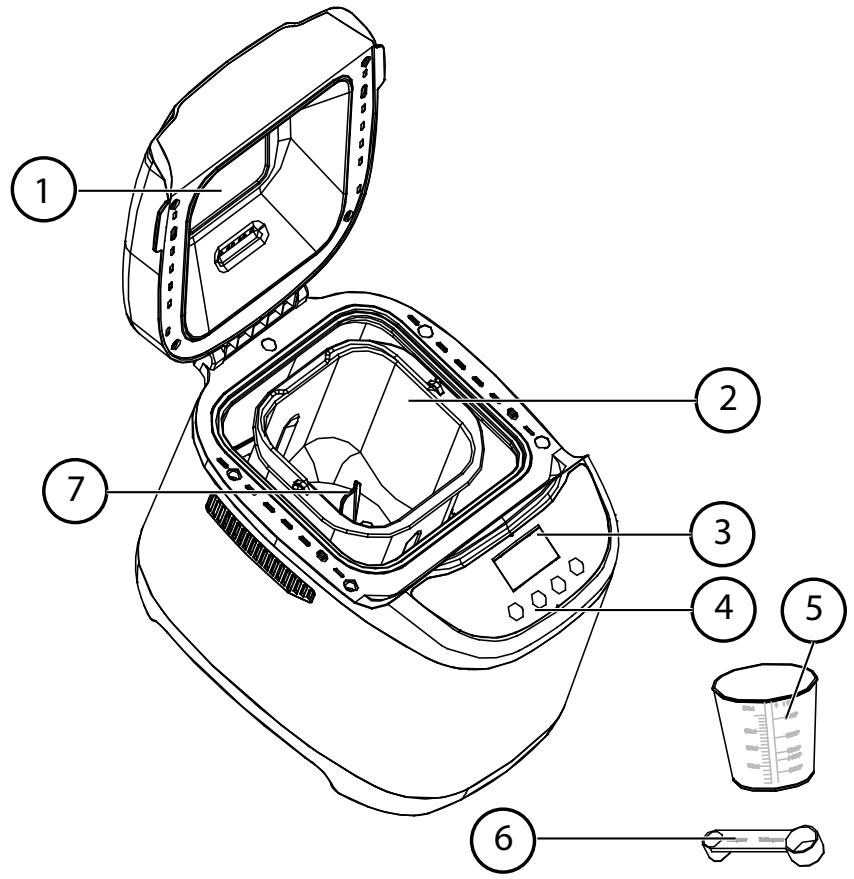
1) Lid with viewing window and handle
2) Baking tin
3) Display
4) Operating field
5) Measuring beaker
6) Measuring spoon
7) Dough hook
5.2. Operating panel
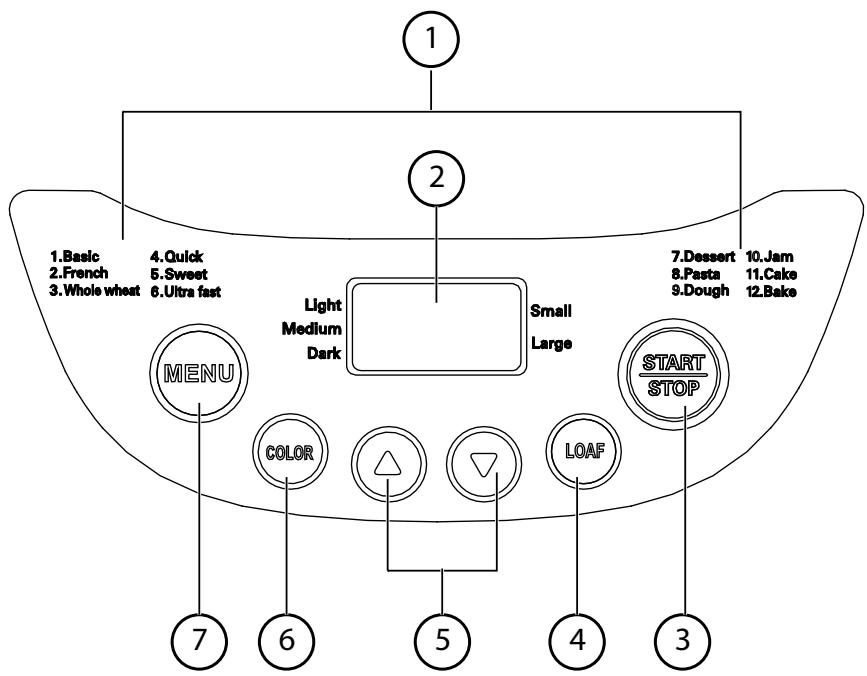
1) List of baking programmes
2) Display
3) Start/Stop
Use the START/STOP button to start and stop a programme.
4) The LOAF (bread size) button allows a choice between two bread sizes in the baking programmes 1-4: SMALL = 750 g, LARGE = 1,000 g. The programme lengths are adjusted in accordance with the amount of dough used.
5) Time ( / )
Use the buttons ( / ) to choose a delay time after which a selected programme should start. This is possible for programmes 1-5, 8 and 9. Each time you press the or keys, the delay is adjusted up or down by 10 minutes.
The maximum delay is 13 hours.
6) Use the COLOR button to select the degree of browning. In the programmes 1-7 and also 11 and 12, you can choose between three browning levels: LIGHT, MEDIUM and DARK.
7) Use the MENU button to select from one of the twelve programmes from the programme list (1) on the right and left of the display.
5.3. The display
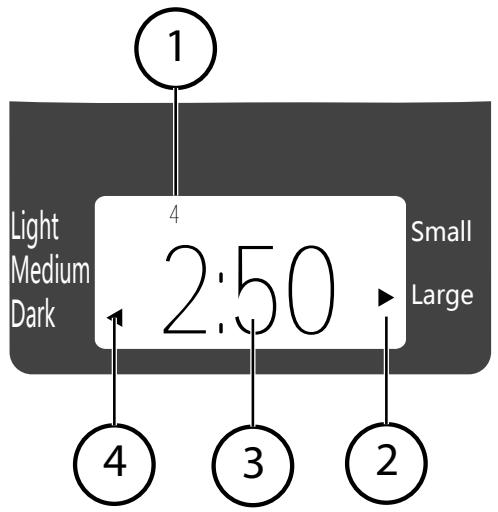
1) Selected programme
2) Amount of dough (an arrow on the display shows the selected weight)
3) Remaining time in the selected/running programme or delay time
4) Browning level (an arrow on the display shows the selected browning level)
6. Before use
Remove all packing materials.
- Check the appliance for visible damage. Do not use the appliance if there is damage of any kind.
Remove any protective sheets attached to the casing.
Before using for the first time, wash the dough container, the dough hooks and the appliance casing with a clean, moist cloth. Do not use any strong detergents.
Carefully dry the cleaned parts.
Before using for the first time let the appliance heat up with the baking container inserted and the window open for around 5 minutes.

CAUTION!
During manufacture it is necessary to lightly grease some parts of the appliance. This can lead to a slight smell during initial operation. This smell is normal and is not a sign of a malfunctioning appliance. Ensure that there is adequate ventilation.
7. Preparations
7.1. Preparing dough
All liquids should be at room temperature. The ideal temperature for normal programmes is between approx. 18^ and 23^
Only use dry yeast for making the dough. Fresh yeast is not suitable for use in the bread machine.
If you bake with rye flour, bear in mind that this flour only rises a little. For this reason, the flour should contain a maximum of seven parts rye and at least three parts wheat flour.
If you live at a higher altitude (over 900m above sea level) or use very soft water, the fermenting process of the yeast is increased and the dough will rise higher. In this case, decrease the amount of yeast by approx. one fourth of the specified amount.
7.1.1. Basic bread recipe
Use this basic recipe and adapt it to suit your personal preferences.
If you use other recipes, ensure that they are suitable for bread machines. Do not exceed the maximum quantities for this appliance.
If you decide to use a pre-prepared bread mix, follow the instructions on the bread mix packet.
| Ingredients | Large loaf (LARGE) 900 g | Small loaf (SMALL) 680 g |
| Water | 330 ml | 280 ml |
| Oil | 2 tbsp | 2 tbsp |
| Salt | 1 tsp | 3/4 tsp |
| Sugar | 3 tbsp | 1 1/2 tsp |
| Milk powder | 2 tbsp | 1 tbsp |
| Flour (max. quantity) | 440 g | 360 g |
| Dried yeast (max. quantity) | 1 tsp | 1 tsp |
7.1.2. Measuring ingredients
Measure the ingredients precisely. Adhere exactly to the quantities specified in the basic recipe. You will find more information on this in the section "Basic bread recipe" on page 84.
Use the measuring cup and measuring spoon supplied to measure the ingredients. Do not heap the ingredients on the measuring spoon; smooth out the ingredients so that they are level with the edge to avoid using more than specified.

NOTE
If you use a bread mix and mix the dough yourself, ensure that the total weight of the ingredients does not exceed 1,000 g.
7.1.3. Ingredient order
Add the dough ingredients to the dough container as follows:
First the liquids, then the flour. Distribute sugar and salt around the edge of the flour. Make a small hollow in the flour for the dry yeast.
The ingredients will only be mixed properly if they are added in this order.
Please note that the yeast must not touch the liquid or the salt.
7.1.4. Cleaning the dough container
- Clean the outside of the dough container before insertion. When filling the ingredients, make sure that nothing drips into the baking chamber. The heating element must not come into contact with dough!
- Adhere exactly to the specified amounts. In particular do not add larger amounts than those specified.

NOTE
Bread that is mostly baked with wholemeal flour or with ingredients such as nuts, bran, etc. will be heavier and smaller than bread made of white flour.
8. Operation
8.1. Initial operation
Insert the clean dough hooks onto the drive shaft in the dough container.
Prepare the dough in the dough container.
Make sure that the outside of the dough container is clean before insertion.
- Place the dough container in the brackets in the baking chamber and press down firmly so that the tension springs on both sides click audibly into place.
Make sure that the ingredients do not drip into the baking chamber and do not touch the heating element!
Close the lid.
Plug the appliance into the mains.
A beep sounds. The appliance now sets itself to the basic programme and the normal time.
8.2. Programme selection
Use the MENU button to select the desired programme (1-12).
Programme 1 Basic
Basic programme for normal bread dough.
Programme 2 French (white bread)
Programme for breads made of white, protein-enhanced flour in the French style and light breads with a crispy crust.
Programme 3 Whole wheat
Programme for doughs containing a larger portion of wholemeal wheat flour, rye flour, oatmeal or bran. This programme includes a delay in which the coarse ingredients can soak. These breads are usually smaller and more compact.
Programme 4 Quick
Programme for doughs containing baking powder or baking soda: knead, rise, bake.
Programme 5 Sweet (sweet bread)
Programme for pastry, cakes, sweet breads or for bread dough with additional sugar, raisins or chocolate.

NOTE
Please note that the added water must be heated to 30 - 35^ . Double the amount of yeast.
Programme 6 Ultra fast (short programme)
Use this programme to bake a light white bread, for instance for making sandwiches.
Programme 7 Dessert
Use this programme to bake sponge cake or desserts.
Before starting the baking process, add all ingredients to the baking tin and stir everything thoroughly. This will provide the optimum result.
Programme 8 Pasta
Use this programme to knead pasta dough.
Programme 9 Dough (kneading dough)
Use this programme to produce yeast dough for rolls, twists or pizza bases.
The dough is heated so that it can rise, but not baked. After kneading you can form the dough as usual and bake it in a normal baking oven.
Programme 10 Jam
Use this programme to make jam.
Ensure that you only use seedless fruits in the baking tin.
Seeds can damage the baking tin's non-stick coating.
After the "cooking process", the jam cools off in the appliance. Once the jam has cooled, you will hear a beep.
Programme 11 Cake
Use this programme to bake sponge cakes.
The dough is firm but does not rise as much as a bread dough.
Before starting the baking process, add all ingredients to the baking tin and stir everything thoroughly. This will provide the optimum result.
Programme 12 Baking
This programme bakes pre-baked dough (e.g. if bread is not completely baked).
8.3. Programme overview
See the following programme overview for a list of all the baking and kneading times so you can plan your baking process.
| Programme | 1 Basic | 2 French | 3 Whole wheat | |||
| Phase | 2:50 (large) | 2:48 (small) | 3:20 (large) | 3:18 (small) | 3:30 (large) | 3:28 (small) |
| Knead1 | 10 min | 10 min | 14 min | 14 min | 11 min | 11 min |
| Rise1 | 20 min | 20 min | 30 min | 30 min | 30 min | 30 min |
| Knead2 | 13 min | 13 min | 12 min | 12 min | 15 min | 15 min |
| Rise2 | 25 min | 25 min | 29 min | 29 min | 42 min | 42 min |
| Rise3 | 40 min | 40 min | 40 min | 40 min | 50 min | 50 min |
| Bake | 62 min | 60 min | 75 min | 73 min | 62 min | 60 min |
| Keep warm | 60 min | 60 min | 60 min | |||
| Add ingredients at a re- maining time of: | 2:12 hrs | 2:10 hrs | 2:29 hrs | 2:27 hrs | 2:44 hrs | 2:42 hrs |
| Delay time | 13:00 hrs | 13:00 hrs | 13:00 hrs | |||
| Programme | 4 Quick | 5 Sweet | 6 Ultra fast | 7 Dessert | |||
| Phase | 1:58 (large) | 1:55 (small) | 2:53 (large) | 2:51 (small) | 1:15 (large) | 0:59 (small) | 1:20 |
| Knead1 | 8 min | 8 min | 11 min | 11 min | 12 min | 11 min | 20 min |
| Rise1 | 5 min | 5 min | 25 min | 25 min | - | - | - |
| Knead2 | 15 min | 15 min | 14 min | 14 min | - | ||
| Rise2 | 10 min | 10 min | 27 min | 27 min | - | - | |
| Rise3 | - | - | 40 min | 40 min | 20 min | 20 min | - |
| Baking | 80 min | 77 min | 56 min | 54 min | 43 min | 43 min | 60 min |
| Keep warm | 60 min | 60 min | 60 min | 60 min | 60 min | ||
| Add ingredients at a re-maining time of: | 01:35 hrs | 01:32 hrs | 02:11 hrs | 02:09 hrs | 01:10 hrs | 00:54 hrs | - |
| Delay time | 13:00 hrs | 13:00 hrs | - | - | 13:00 hrs | ||
| Programme | 8 Pasta | 9 Dough | 10 Jam | 11 Cake | 12 Bake | ||
| Phase | 0:15 | 1:30 | 1:20 | 1:38 | 0:10 | ||
| Knead1 | 15 min | 20 min | - | 18 min | - | ||
| Rise1 | - | - | 15 min | 5 min | - | ||
| Knead2 | - | - | - | ||||
| Rise2 | - | - | - | ||||
| Rise3 | - | 65 min | 75 min | - | |||
| Bake | - | - | |||||
| Keep warm | - | - | 60 min | 60 min | 60 min | ||
| Add ingredi- ents at a re- maining time of: | - | - | - | - | - | ||
| Delay time | 13:00 hrs | - | - | - | - | ||
8.3.1. Select browning level
Press the COLOR button repeatedly to select between the LIGHT, MEDIUM and DARK browning levels. This setting is available for programmes 1-7, 11 and 12.
8.3.2. Select time delay
You can delay the start of a baking programme. This allows you to set the time at which the appliance finishes the baking. You can delay the baking time by up to 13 hours. This time delay setting is available for programmes 1-5, 8 and 9.
Calculate the desired time at which you want the bread to be ready. This gives you the time delay that you wish to set.
Example: It is 20.30 and you would like the bread to be ready at 7.00 tomorrow morning (i.e. in 10 hours and 30 minutes). Set the timer to 10:30.
To set the time delay press the TIME / button repeatedly.
- Pressing the button adds a delay to the baking time in steps of 10 minutes, and the button reduces this in 10 minute steps.
If you keep the button pressed down the time will fast forward.
Do not use the time delay for recipes that use fresh ingredients (such as eggs, fresh milk, cream or cheese).
8.4. Start programme
Press the START/STOP button to start the selected programme.
8.5. Add further ingredients
Depending on the selected programme, an acoustic signal will sound after the second kneading phase to remind you that you may now add further ingredients (raisins, nuts, etc.).
However, lift the lid up only briefly to prevent the dough from collapsing. Do not press the STOP button as this will cancel the current programme.
8.6. Notes on the baking process
The baking settings are maintained if the mains supply is interrupted for a short period (max. 5 minutes) during the time delay or heating period. However, if the mains power is interrupted after the first kneading phase, the baking process is stopped completely.
It is completely normal for the viewing window to cloud over at the beginning of the baking process. After a while condensation will escape through the vents.
The appliance may vibrate somewhat noisily during the kneading phase. This does not mean that the appliance is malfunctioning.
8.7. Acoustic signals
Acoustic signals are emitted during the baking process:
- for programmes 1, 2, 3, 4, 5 and 6 a beep will sound after the second kneading phase to remind you that you may now add further ingredients (fruit, nuts, etc.);
- at the end of a baking phase;
- during the heating phase and at the end of the programme (several beeps).

WARNING!
Never cover up the vents!
The appliance may start to give off smoke if the dough rises over the edge of the dough container and touches the heating element. If smoke emerges from the baking chamber because dough has dropped onto the heating element, keep the lid closed to avoid the formation of flames or to extinguish flames that have already formed.
Press the STOP key and switch the appliance off. Unplug the mains power supply. Allow the appliance to cool down completely before cleaning it!

WARNING!
Never ever extinguish smouldering dough in the appliance with water!
8.8. End of programme
At the end of the set baking time, several acoustic signals will sound and the display will show 0:00. The appliance switches automatically to Keep Warm mode. You can leave the baked goods in the appliance for up to 60 minutes; they are kept warm by the circulating air.
After 60 minutes following completion of the programme, at the latest, the baked goods must be removed from the appliance.
8.9. Remove baked goods from the appliance
- Switch off the appliance after the programme is complete using the on/off switch and open the lid.
Lift out the dough container using the handle.

CAUTION! HOT SURFACE!
The baking container, the dough container and the wire handle of the container are very hot. When removing the dough container, always use oven gloves or a cloth to avoid burns!
- Carefully loosen the bread from the edge of the dough container using a wooden spatula. A metal implement can damage the coating of the dough container. Do not use a knife or similar implement to loosen the baked goods.
- Turn over the dough container. Carefully tap the bottom to release the baked goods. Allow to cool off on a wire rack.
8.9.1. Release dough hooks
If the dough hook gets caught in the baked goods, remove only after the dough has cooled off.
If the dough hooks remain in the dough container and cannot be removed easily, immerse the container in warm or hot water for up to 30 minutes as necessary.
8.10. Other baking processes
A new baking process can be started as soon as the previous one has completed. The appliance should not be over 40^ C when starting, however. If the appliance is still too hot, when you press START/STOP the message HHH will appear in the display.
If this occurs, terminate the current programme by pressing START/STOP and pull the plug from the mains socket.
- Open the appliance lid and remove the baking container. Allow the appliance to cool down.
9. Cleaning and storage
9.1. Cleaning

ATTENTION!
Pull the plug from the mains socket and allow the appliance to cool down completely.
Never immerse the appliance in water or other liquid (risk of electrical shock)!
The dough container and accessories (measuring cup, measuring spoon, dough hooks and wooden spatula) are not suitable for dishwashers. They can be washed in water with washing up liquid. The casing can be wiped with a slightly moist cloth. Do not use any sharp or abrasive cleaning solutions or products that could create scratches. Never use steel wool, petrol, thinners or cleaning materials that contain alcohol.
The heating element must not come into contact with water! Therefore, if required wipe the heating element with a dry cloth.
Allow the appliance to dry completely before using it again.
9.2. Storage
Before storing the appliance pull the plug out of the mains socket.
Before placing the appliance in a cupboard, make sure it is completely cool and dry.
10. Dealing with problems
If the baking result does not have the desired quality, the following overview should help to find the cause.
| Problem | Possible cause/solutions |
| The bread sags in the middle. | Liquid – too much and too warm. (The liq-uid should be between 21 and 28°C – for fast baking programmes between 30 and 35°C.) Too little salt. Too much yeast. The humidity or room temperature is too high. The lid was opened for too long during baking. The rising period is too long. Use the COLOR button to select the “DARK” set-ting. |
| The bread did not rise enough. | Not enough yeast was added. The yeast was off. Not enough sugar was added. Too much salt was added (effects the yeast). The liquid is too warm. The yeast came into contact with salt or liquid before baking. |
| The bread rises too much. | The humidity or room temperature is too high. (If the environmental conditions can-not be changed, try using cooled ingredient-ents and do not use the time delay.) Too much yeast. Liquid - too much or too warm. Too little flour. Too little salt. |
| The bread is too dry and dense. | Not enough liquids. The yeast was off. |
| The bread is not done and still moist in the centre. | Too many additional ingredients, such as nuts, butter, dried fruits, syrup, etc., were added. Too much fruit juice was added. |
| The bread is too brown. | Too much sugar. Browning level set too high. |
| The bread is full of holes. | ·The water is too hot. ·Too much liquid. ·Too much yeast. ·The humidity or room temperature is too high. |
| The bread crust is sticky, or the bread is too wet. | ·After finishing baking, the bread remained in the appliance far too long. Condensation formed that could no longer escape and soaked the bread. ·Dry and wet ingredients were mixed in the wrong ratio. (Reduce the liquids or the yeast somewhat, as necessary.) |
| The bread forms air bubbles on the crust. | ·Too much yeast. Reduce the amount of yeast. |
| The dough is not being kneaded even though the motor is running. | ·The dough hooks or the dough container were not inserted correctly. |
| The ingredients were not kneaded smoothly. | ·The ingredients were added in the wrong order. ·The dough was too heavy or too dry. ·The dough hooks were not inserted correctly. |
10.1. Possible error messages
| Error message | Meaning | Solution |
| HHH | Temperature inside the appliance is too high | Unplug the appliance and allow it to cool down before using it again. |
| LLL | Temperature inside the appliance is too low | Try setting up the appliance at a higher location. |
| EE0 | Temperature sensor error | Contact Customer Service. |
| EE1 | Temperature sensor error | Contact Customer Service. |
11. Disposal

Packaging
Your appliance has been packaged to protect it against transportation damage. Packaging materials are primary products and can therefore be reused or recycled.

Device
At the end of its service life, the appliance should not be disposed of with the household rubbish. Ask your local authority about suitable environmentally friendly disposal facilities.
12. Technical data
Power supply
230-240V\~,50Hz
Power consumption
580 watt
Capacity
max. 1,000 g
Protection class
1
Dimensions
approx. 426mm× 300mm× 280mm (WxDxH)
Weight
approx. 7kg
Subject to technical modifications.

Medion AG hereby declares that this appliance complies with the requirements of the European EMC Directive 2004/108/EC, the Low Voltage Directive 2006/95/EC, the Ecodesign Directive 2009/125/EC and the RoHS Directive 2011/65/EU.
13. Legal notice
Copyright © 2013
All rights reserved.
This operating manual is protected by copyright.
Mechanical, electronic and any other form of reproduction is prohibited without the written permission of the manufacturer
Copyright is owned by the company:
Medion AG
Am Zehnhof 77
45307 Essen
Germany
The operating manual can be reordered via the service hotline and is available for download via the service portal at www.medion.com/gb/service/start/.
You can also scan the QR code above and download the operating manual onto your mobile device via the service portal.

Inhoud
- Over dele handleiding 98
7.1.4. Deegcompartment schoonmaken
Programma 2: French (Wittebrood)
Programma 5: Sweet (Zoet brood)
Programma 7: Dessert
1. Restricted Warranty (United Kingdom)
1.1. General Conditions of Warranty
1.1.1. General
This warranty covers defects relating to workmanship and manufacture in MEDION products. The period during which this warranty is valid and during which claims against the warranty can be made to MEDION must be in accordance with the following terms in order to be considered eligible:
- Is effective from the date of purchase or receipt of the MEDION product from an authorised seller of MEDION products;
and
- expires at the end of the warranty period.
For the warranty to be valid, you must:
- provide suitable evidence of purchase, a copy of the original purchase receipt from an authorised seller of MEDION products is preferred;
or
- register your product within 28 days of purchase online at www.MEDION.co.uk. Please keep the original purchase receipt in a safe place. MEDION and its authorised sellers reserve the right to refuse a repair under warranty or a warranty confirmation if a proof of purchase [or registration of purchase] cannot be established, or has not been, submitted.
When it is necessary to return your product for repair please ensure that your product is suitably packed for transportation.
Provided that your product is still within warranty (please check the duration of the warranty period as described above) and is eligible for repair or replacement under the terms of the warranty, to return your product, please telephone MEDION on the service hotline number. You will be sent a pre-paid transportation box suitable for returning your product to MEDION or a voucher.
PLEASE MAKE SURE THAT YOU HAVE A BACKUP COPY OF ALL DATA ON THE PRODUCT BEFORE RETURNING THE PRODUCT TO MEDION.
MEDION shall bear the costs of postage and packaging for returning the product and the transportation risk. However, if following examination of the defective product in question, MEDION, in its reasonable opinion, considers that the defect has been caused by:
- your operating and/or using the product other than as instructed in the accompanying documentation;
- damage caused in transit as a result of your negligence in packaging of the product; and/or
- otherwise than in accordance with the terms of this warranty;
This warranty shall be void and you may be required by MEDION to reimburse MEDION for the reasonable costs of postage and packaging before MEDION will return the product to you. If so and you would still like MEDION to repair or replace the
product, MEDION may do so but you will be charged MEDION's standard rates for repair and replacement for this service.
Before returning the product, please contact MEDION via the service hotline or via the internet www.MEDION.co.uk. You will receive a reference number (RMA No.). Please mark the outside of your package to ensure that this reference number is clearly visible. Please submit a letter containing as much detailed information as possible and, a full description of the defect or fault.
This should include:
a description of the fault;
- when it occurred, how long it has been evident and how frequently it occurs;
- any errors message(s) displayed when using the product;
- a description of the circumstance(s) and conditions in which the fault occurs; and
whether it is an intermittent or persistent fault.
This will greatly assist MEDION in identifying the defect, when submitted together with the defective product.
Unless otherwise instructed by a MEDION representative in all cases, the product must be returned complete with all parts which were included with the original product. Incomplete contents of the returned package may lead to a delay in the repair or replacement. MEDION does not accept any liability for any additionally submitted material(s) which were not supplied with the original MEDION product.
This warranty does not affect your statutory rights in any way and is subject to the applicable legal statutes of the country where the product was sold to you by an authorised MEDION seller.
1.1.2. Scope
Subject to any exclusions set out within this warranty, where there is a defect in your MEDION product covered by this warranty, MEDION will repair or replace the MEDION product. The decision whether to repair or replace the product will be made solely at the discretion of MEDION. MEDION may, in its own discretion, replace the product returned for repair under warranty with a replacement product that is either identical or, in the event that such product(s) are no longer available, a product of equal or superior specification and quality.
No warranty is given for batteries or rechargeable batteries or for consumable materials subject to wear and tear, i.e. for parts which have to be replaced periodically during the normal use of the product, such as video projector lamp.
Non critical failures that fall within industry specified tolerances e.g. noise, LCD pixels are not covered by this warranty. Please consult the appropriate section in your user or instruction manual for this product for exact specifications and tolerances.
To the extent which is permitted under law, MEDION will accept no liability for burnt-in images on plasma or LCD products as a result of normal wear and tear during the operation of the product. Please refer to your user or instruction manual for this product for detailed operating instructions for your plasma or LCD product.
The warranty does not cover errors relating to the playback of data media in an incompatible format or created with unsuitable software.
If it is found during repair or assessment that the defect concerned is not covered under warranty, MEDION reserves the right to invoice you for all reasonable costs incurred by MEDION. These costs will be in relation to the return of the product, including reasonable administration costs, plus reasonable costs for materials used and labour provided when repairing or replacing the product. This is subject to MEDION providing you with an estimate for carrying out such work prior to costs being incurred and that you have accepted the estimate.
You are entitled to seek independent advice or consultation relating to your product or any of MEDION's findings. MEDION will not be liable for any costs incurred to you when doing so.
1.1.3. Exclusion from warranty
To the extent permitted by law, this warranty shall be void in the event that defects or loss caused by:
- failure and damage resulting from the operation of the product in an environment other than that recommended in the accompanying user or instruction manual (e.g. in direct sunlight or in a damp room);
accidental damage; - use other than in accordance with the accompanying user or instruction manual;
- modifications, conversions, expansions, maintenance and/or repairs made to the MEDION product by unauthorised repairers or use of unauthorised third party parts;
negligence; - virus attack or software errors; or
- improper transportation or packaging during return of the product.
- This warranty will also be considered void if labels or serial numbers of the product or of a component of the product are modified or made illegible.
- To the extent permitted by law, MEDION shall; only be responsible for losses which are a reasonably foreseeable consequence of the relevant defect in the product; MEDION will not be responsible for any costs incurred in relation to software configuration; economic loss; loss of opportunity; loss of income; or loss of data or software arising out of its repair or replacement of a MEDION product under this warranty
1.1.4. Service Hotline
Before returning the product to MEDION you must contact us using the service hotline or via the internet (www.MEDION.co.uk). You will receive further instructions for making your claim under warranty when you call.
The price of your call will be stated at the beginning of the call.
1.2. Special warranty conditions for MEDION PC, notebook, pocket PC (PDA) and navigation devices (PNA)
The following terms apply to MEDION PC, notebook, desktop, pocket PC and laptop products and optional items included with such products. If one of these items has a fault, you also have a warranty claim for its repair or replacement, from MEDION. The warranty covers the costs of materials and labour for repairing or replacing the defective MEDION product or the optional item in question.
Hardware connected to your product that was not produced or marketed by MEDION can invalidate the warranty if MEDION can reasonably demonstrate that damage to the MEDION product or of the optional item included with the delivery was caused by such hardware. You are entitled to seek independent advice or consultation relating to your product or any of MEDION's findings. MEDION will not be liable for any costs incurred to you when doing so.
This warranty is restricted in relation to any pre-installed operating system as well as to application programme software that is included with the MEDION product in question. This warranty is restricted as follows:
For pre-installed operating system as well as to application programme software included in the MEDION product, MEDION only guarantees the data media (e.g. the diskettes and CD-ROMs) upon which this software is delivered and warrants that such data media shall be free from material and processing defects for a period of 90 days from the date of purchase of the MEDION product from an authorised seller of MEDION. MEDION will replace defective data media free of charge.
Any claims in respect of defective pre-installed operating system as well as to application programme software are hereby expressly excluded and you should contact the relevant licensor or copyright owner of the defective software in question. MEDION does not guarantee that any software supplied with MEDION products will function without interruption, will be free from errors or that it will fulfil your requirements. MEDION does not guarantee the 100% accuracy of the maps provided with the Navigation device.
It may be necessary to delete all data in the product in order to repair the MEDION product. PLEASE MAKE SURE THAT YOU HAVE A BACKUP COPY OF ALL DATA ON THE PRODUCT BEFORE RETURNING THE PRODUCT TO MEDION. To the extent permitted by law, MEDION excludes all liability for loss of data and MEDION recommends in all cases that you back up all data on your MEDION product before returning the product to MEDION.
1.3. Special warranty conditions for repair on site or replacement on site
If a claim for repair or replacement on site is included with the product, the special warranty conditions for repair or replacement of your MEDION product on site apply.
The following provisions must be made by you for carrying out repairs or replacements on site:
- MEDION or its authorised personnel must have unrestricted, safe and immediate access to the products.
Telecommunication facilities required by MEDION or its authorised personnel for proper execution of your order, for testing and diagnostic purposes and for remedying faults are provided by you at your own expense. - You are responsible yourself for restoring the application software after the repair services have been carried out by MEDION or its authorised personnel.
- You must take all other necessary steps to enable MEDION or its authorised personnel to carry out your order properly.
- You are responsible yourself for connecting and configuring any existing external peripheral products after MEDION or its authorised personnel have carried out their repairs.
- The free cancellation period for repairs or replacements on site is 24 hours, thereafter our reasonable costs resulting from late or missing cancellation shall be invoiced at your expense.
2. Service Address
08713761020 01793715716
(Costs 7p/min from a BT landline, mobile costs may be higher)
Mo - Fr: 08:00 - 20:00
Sa - Su: 10:00 - 16:00
www.medion.co.uk
@ To contact us by email please visit the „Service“ section of our website at www.medion.co.uk.
- Programme 2: French (pain français)
- Programme 3 : Whole wheat (pain complet)
- Programme 5: Sweet (pain sucre)
- Programme 6: Ultra fast (programme express)
- Programma 2: French (Pane bianco)
- Programma 5: Sweet (Pane dolce)
- Programma 6: Ultra fast (Programma breve)
- Programma 7: Dessert
- About these instructions
- Warning symbols and key words used in these instructions
- Package contents
- Proper use
- Safety advice
- People with reduced capacities
- People not permitted to use this appliance
- WARNING!
- Setting up the appliance safely
- Mains connection
- Handling the appliance safely
- General
- Mains cable
- Appliance
- Never carry out repairs yourself
- Overview
- The appliance
- Operating panel
- The display
- Before use
- CAUTION!
- Preparations
- Preparing dough
- Basic bread recipe
- Measuring ingredients
- NOTE
- Ingredient order
- Cleaning the dough container
- Operation
- Initial operation
- Programme selection
- Programme 1 Basic
- Programme 2 French (white bread)
- Programme 3 Whole wheat
- Programme 4 Quick
- Programme 5 Sweet (sweet bread)
- Programme 6 Ultra fast (short programme)
- Programme 7 Dessert
- Programme 8 Pasta
- Programme 9 Dough (kneading dough)
- Programme 10 Jam
- Programme 11 Cake
- Programme 12 Baking
- Programme overview
- Select browning level
- Select time delay
- Start programme
- Add further ingredients
- Notes on the baking process
- Acoustic signals
- Never cover up the vents!
- Never ever extinguish smouldering dough in the appliance with water!
- End of programme
- Remove baked goods from the appliance
- CAUTION! HOT SURFACE!
- The baking container, the dough container and the wire handle of the container are very hot. When removing the dough container, always use oven gloves or a cloth to avoid burns!
- Release dough hooks
- Other baking processes
- Cleaning and storage
- Cleaning
- ATTENTION!
- Storage
- Dealing with problems
- Possible error messages
- Disposal
- Packaging
- Device
- Technical data
- Subject to technical modifications.
- Legal notice
- Germany
- Inhoud
- Deegcompartment schoonmaken
- Programma 2: French (Wittebrood)
- Programma 5: Sweet (Zoet brood)
- Restricted Warranty (United Kingdom)
- General Conditions of Warranty
- General
- Scope
- Exclusion from warranty
- Service Hotline
- Special warranty conditions for MEDION PC, notebook, pocket PC (PDA) and navigation devices (PNA)
- Special warranty conditions for repair on site or replacement on site
- Service Address
Brand : MEDION
Model : MD 14752
Category : Bread maker