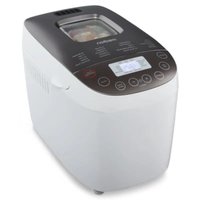
MD 12040 - Bread maker MEDION - Free user manual and instructions
Find the device manual for free MD 12040 MEDION in PDF.


Pick your language and provide your email: we'll send you a specifically translated version.
| Product type | Bread machine |
| Brand | Medion |
| Model | MD 12040 |
| Dimensions (approx.) | 30 x 30 x 35 cm |
| Weight (approx.) | 5 kg |
| Power | 650 W |
| Mould capacity | Up to 1.5 kg of bread |
| Cooking programs | White bread, whole wheat, rye, gluten-free, brioche, jam, pizza dough, yogurt |
| Number of programs | 12 automatic programs |
| Crust levels | 3 levels (light, medium, dark) |
| Delay timer | Up to 15 hours |
| Keep warm function | Yes, up to 1 hour |
| Display | Backlit LCD screen |
| Mould material | Non-stick |
| Included accessories | Mould, kneading paddle, measuring spoon, measuring cup |
| Care and cleaning | Clean the mould and paddle after each use with a damp cloth; do not immerse the appliance body |
| Safety | Automatic shut-off at end of cycle, overheating protection |
| Spare parts and repairability | Mould and paddle available as spare parts; repair by a professional recommended |
| General information | Household use only; do not use outdoors |
Frequently Asked Questions - MD 12040 MEDION
How to use the Medion MD 12040 bread machine?
First add the liquid ingredients, then the dry ones, and finally the yeast. Select the desired program with the Menu button, set the crust and timer if necessary, then press Start.
What programs are available on the MD 12040?
The appliance offers 12 programs, including white bread, whole wheat, rye, gluten-free, brioche, jam, pizza dough, and yogurt. See the manual for details.
How to adjust the crust level?
Press the Crust button to choose between light, medium, or dark. The setting applies before starting the program.
Can the delay timer be used?
Yes, you can program up to 15 hours in advance. Add the ingredients, select the program, then set the end time with the + and - buttons.
What to do if the bread is too dense or does not rise well?
Check the freshness of the yeast and the flour measurement. Use a flour suitable for bread (type 55 or 65). Make sure the yeast does not come into contact with salt or liquid before kneading.
How to clean the bread machine?
Let the appliance cool down. Remove the mould and paddle, wash them in warm soapy water. Wipe the inside with a damp cloth. Never immerse the body in water.
Can I use gluten-free ingredients?
Yes, the gluten-free program is designed for that. Use a mix of gluten-free flours and xanthan gum for a better texture.
The machine makes noise; is this normal?
Kneading noise is normal. If the noise is abnormal, check that no foreign object is stuck in the mechanism and that the mould is correctly installed.
How to change the kneading paddle?
Unscrew the used paddle and replace it with a new one. Ensure it is securely attached before use. Spare parts are available online.
Where to find the full manual for the MD 12040?
The manual is available for free download on notice-facile.com. You can also contact Medion customer service for a paper version.
User questions about MD 12040 MEDION
0 question about this device. Answer the ones you know or ask your own.
Ask a new question about this device
No questions yet. Be the first to ask one.
Download the instructions for your Bread maker in PDF format for free! Find your manual MD 12040 - MEDION and take your electronic device back in hand. On this page are published all the documents necessary for the use of your device. MD 12040 by MEDION.
USER MANUAL MD 12040 MEDION

Manual assistant
Powered by Anthropic
Waiting for your message
Product information
Brand : MEDION
Model : MD 12040
Category : Bread maker