BBR100 BLUETOOTH RECEIVER - Bluetooth Receiver BEEWI - Free user manual and instructions
Find the device manual for free BBR100 BLUETOOTH RECEIVER BEEWI in PDF.


User questions about BBR100 BLUETOOTH RECEIVER BEEWI
0 question about this device. Answer the ones you know or ask your own.
Ask a new question about this device
Download the instructions for your Bluetooth Receiver in PDF format for free! Find your manual BBR100 BLUETOOTH RECEIVER - BEEWI and take your electronic device back in hand. On this page are published all the documents necessary for the use of your device. BBR100 BLUETOOTH RECEIVER by BEEWI.
USER MANUAL BBR100 BLUETOOTH RECEIVER BEEWI
For additional languages, visit our website
www.bee-wi.com
User's guide
ENGLISH 4
FRANCAIS 8
DEUTSCH 12
ITALIANO 16
ESPAÑOL 20
PORTUGUES 24
NEDERLANDS 28
БЪЛГАРСКИ 32
ROMÂN 36
Thank you for purchasing the BBR100 Bluetooth Receiver from BEEWI. Please read the following instructions to learn how to configure and use more effectively your product.
INTRODUCTION
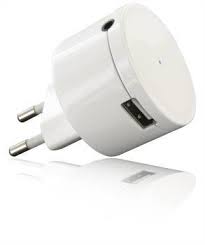
The BBR100 Bluetooth Receiver is a stereo audio gateway for stereo sound systems or speakers. Just plug this receiver into any wall power socket and connect the audio cable to the stereo sound system and it will be converted into a Bluetooth stereo speaker to listen to the music from any Bluetooth enabled mobile phone or MP3 player.
The BBR100 is easy to install, fully plug & play, and it does not need extra power cable.
1. PRODUCT DESCRIPTION
1.1 Content
- Bluetooth Receiver
- 3.5 mm Jack Audio Cable
- RCA to Jack Cable Adapter
- CD with User Manual
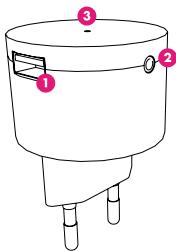
1.2 Overview
1) USB port: to charge your portable device
2) Stereo audio jack: to connect to the audio system
3) LED: to show the receiver status
text_image
Diagram of a cylindrical device with labeled parts, showing three ports and a lid.The USB port on the BBR100 can be used to charge any electronic device using USB such as mobile phones, media players, or accessories.
1.3. Specifications
| Bluetooth Standard | Bluetooth version 2.1+EDR |
| Operation Distance | Class II, 10 meters typical |
| Bluetooth Profiles | A2DP only |
| LED Indicators | Blue |
| Dimension | 66 mm L x 46 mm D |
| Weight | 45 gr |
| Power Input | Euro Plug, 110-240V |
| USB Output | 1 x USB, 5V / 500mA |
| Audio Output | Stereo audio jack 3.5 mm |
2. GETTING STARTED
2.1 Connecting the receiver
Connect the RCA or jack cable on the auxiliary input of the stereo sound system. Then connect the other end of the cable to the audio output of the BBR100.
Switch on your sound system and set the audio source on auxiliary input (refer to the sound system user manual). Finally, plug the receiver into the wall plug; the receiver will start to flash to indicate it is ready to connect or pair.
2.2 Pairing the BBR100 receiver
Once the receiver is powered on, it will automatically enter the pairing mode (LED blinking quickly). Turn on the Bluetooth device transmitter,
music player or mobile phone, to search for BBR100 receiver and request pairing. Specific pairing steps may vary with different Bluetooth devices; refer to the Bluetooth device's user manual for further information.
When "BeeWi BBR100" is detected, enter pass code "0000", and confirm; the receiver will be paired to the mobile device and automatically connected.
If you need to connect manually after pairing has been done, select "BeeWi BBR100" in the Bluetooth player list of paired devices. Note the connection will always be made from the player.
When the connection is made, the BBR100 indicator light will flash slowly every second.
Remark: If you want to pair it with another device, disconnect the connected device first and pair the BBR100 receiver with the new device according to above steps. When a device is disconnected, wait about 10 seconds before the receiver gets back in pairing mode.
3. USING THE RECEIVER
3.1 Led indicator
| LED indicator | BBR100 Status |
| Blue LED blinking quickly | Pairing mode / not connected with a Bluetooth device |
| Blue LED flashing slowly | Already connected with a Bluetooth device |
3.2 Connecting multiple devices
When multiple devices have been paired to the BBR100 Receiver it is easy to switch from one to the other. Just disconnect manually the BBR100 in the current player device list and connect it manually from the other player. Wait about 10 seconds for the receiver to be accessible.
3.3 Turning off the BBR100 receiver
If you don't need to use BBR100, just take it out from the wall plug.
European Union Directives Conformance Statement
Hereby, VOXLAND declares that this product is in compliance with:
- The essential requirements and other relevant provisions of Directive 1999/5/EC
• All other relevant EU Directives
You can view your product's Declaration of Conformity (DoC) to Directive 1999/5/EC (to R&TTE Directive) at www.bee-wi.com.
Caring for the environment by recycling
Do not dispose of electrical devices or accessories with your household waste.
In some countries or regions, collection systems are set up to handle electrical and electronic waste items. Contact your regional authorities for more details.
Copyright and other legal information
BEEWI is a registered trademark. Other trademarks mentioned herewith are owned by their proprietors. All other product or service names are the property of their respective owners.
The use of wireless devices and their accessories may be prohibited or restricted in certain areas. Always obey the laws and regulations on the use of these products.
This product is covered by a 2-year product warranty which is valid from the date of purchase. Users are not permitted to make changes or modify the device in any way. Changes or modifications not expressly approved by the party responsible for compliance will void the user's warranty.
Please visit our website www.bee-wi.com for more information.
Technical support: support@bee-wi.com.
© VOXLAND, 2010.
text_image
Diagram of a cylindrical device with labeled parts, showing three ports and a lid.Support technique: support@bee-wi.com.
© VOXLAND, 2010.