
TRP642DL - Hob SCHOLTES - Free user manual and instructions
Find the device manual for free TRP642DL SCHOLTES in PDF.



| Product type | Built-in ceramic glass hob |
| Brand | SCHOLTES |
| Model | TRP642DL |
| Number of cooking zones | 4 |
| Type of cooking zones | 2 HiLight double zones (HD) and 2 HiLight single zones (H) |
| Total power | 6500 W |
| Supply voltage | 230-240 V 1+N ~ 50/60 Hz (single-phase), possible 400 V |
| Power function | Yes, accelerates temperature rise |
| Timer (cooking timer) | Yes, programmable cooking time from 1 to 99 minutes |
| Minute minder | Yes, independent, up to 99 minutes |
| Control lock | Yes, to prevent external interference |
| Pan detection | Yes, each zone detects the presence of a suitable pan |
| Residual heat indicator | Yes, shows "H" while the zone is hot |
| Overheat protection | Yes, automatic shutdown and display "F" followed by a digit |
| Safety switch | Yes, cuts off operation after a time limit depending on power setting |
| Demonstration mode | Yes, activation without heating |
| Cleaning | Ceramic glass surface: damp sponge, special cleaner, scraper for stubborn dirt |
| Maintenance | Rinse with clean water and wipe, avoid abrasive products |
| Child safety | Control lock available |
| Installation | Built-in by a professional, fixing with springs and hooks |
Frequently Asked Questions - TRP642DL SCHOLTES
User questions about TRP642DL SCHOLTES
0 question about this device. Answer the ones you know or ask your own.
Ask a new question about this device
Download the instructions for your Hob in PDF format for free! Find your manual TRP642DL - SCHOLTES and take your electronic device back in hand. On this page are published all the documents necessary for the use of your device. TRP642DL by SCHOLTES.
USER MANUAL TRP642DL SCHOLTES
Electrical connection
Description of the appliance, 31-32
Control panel
Extendable cooking zones
Start-up and use, 33-36
Switching on the hob
Switching on the cooking zones
Power function
Switching off the cooking zones
Programming the cooking duration
Timer
Control panel lock
Switching off the hob
"Demo" mode
Practical advice on using the appliance
Safety devices
Practical cooking advice
Precautions and tips, 37
General safety
Disposal
Care and maintenance, 38
Switching the appliance off
Cleaning the appliance
Disassembling the hob
Technical description of the models, 39

Scholtès
GB
! Before operating your new appliance please read this instruction booklet carefully. It contains important information concerning the safe operation, installation and maintenance of the appliance.
! Please keep these operating instructions for future reference. Pass them on to any new owners of the appliance.
Positioning
! Keep all packaging material out of the reach of children. It may present a choking or suffocation hazard (see Precautions and tips).
! The appliance must be installed by a qualified professional in accordance with the instructions provided. Incorrect installation may cause harm to people and animals or may damage property.
Built-in appliance
Use a suitable cabinet to ensure that the appliance functions properly.
- The supporting surface must be heat-resistant up to a temperature of approximately 100^ .
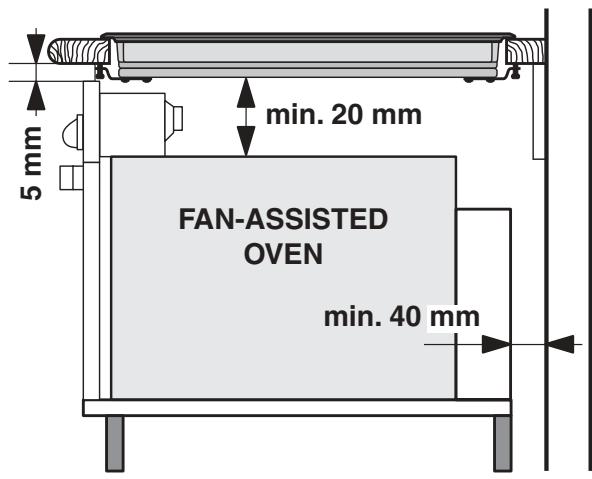
- If the appliance is to be installed above an oven, the oven must be equipped with a forced ventilation cooling system.
- Avoid installing the hob above a dishwasher: if this cannot be avoided, place a waterproof separation device between the two appliances.
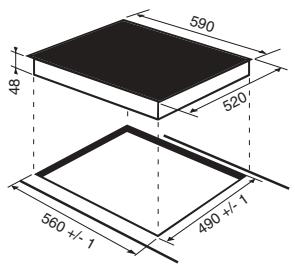
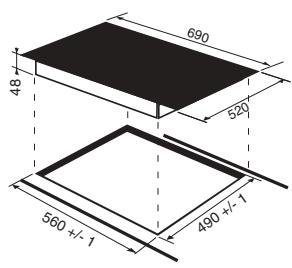
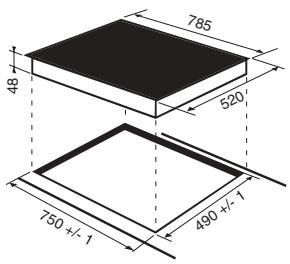
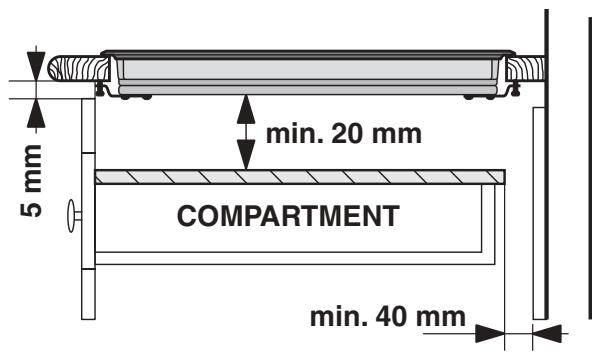
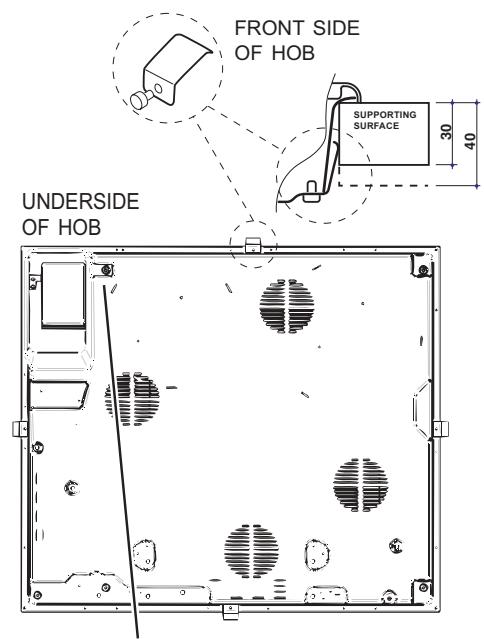
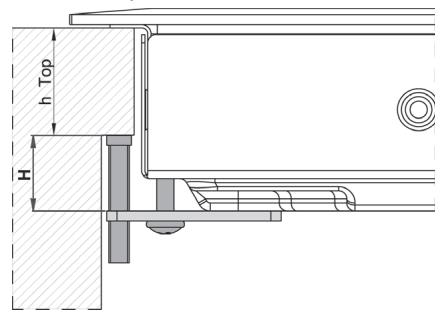
Depending on the hob you want to install, the cabinet must have the following dimensions (see figure):
Ventilation
To allow adequate ventilation and to avoid overheating of the surrounding surfaces the hob should be positioned as follows:
- At a minimum distance of 40~mm from the back panel or any other vertical surfaces.
- So that a minimum distance of 20mm is maintained between the installation cavity and the cabinet underneath.
Fixing
The appliance must be installed on a perfectly level supporting surface.
Any deformities caused by improper fixing could affect the features and operation of the hob.
The thickness of the supporting surface should be taken into account when choosing the length of the screws for the fixing hooks:
- 30 mm thick: 17,5 mm screws
- 40 mm thick: 7,5 mm screws
Fix the hob as follows:
- Use short flat-bottomed screws to fix the 4 alignment springs in the holes provided at the central point of each side of the hob.
- Place the hob in the cavity, make sure it is in a central position and push down on the whole perimeter until the hob is stuck to the supporting surface.
- For hobs with raised sides: After inserting the hob into its cavity, insert the 4 fixing hooks (each has its own pin) into the lower edges of the hob, using the long pointed screws to fix them in place, until the glass is stuck to the supporting surface.
! The screws for the alignment springs must remain accessible.
! In order to adhere to safety standards, the appliance must not come into contact with electrical parts once it has been installed.
! All parts which ensure the safe operation of the appliance must not be removable without the aid of a tool.
Electrical connection
! The electrical connection for the hob and for any built-in oven must be carried out separately, both for safety purposes and to make extracting the oven easier.
Terminal board
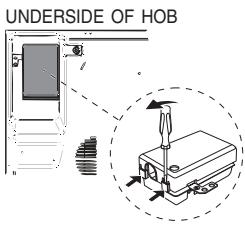
On the lower part of the appliance there is a connection box for the different types of electricity supply (the picture is only an indication and is not an exact representation of the purchased model).
Single-phase connection
The hob is equipped with a pre-connected electricity supply cable, which is designed for single-phase connection. Connect the wires in accordance with the instructions given in the following table and diagrams:
| Voltage and mains frequency | Electrical cable | Wire connection |
| 230-240V 1+N ~ 220-240V 1+N ~ 50/60 Hz | N L | ½: yellow/green; N: the two blue wires together L: brown and black together |
Other types of connection
If the mains supply corresponds with one of the following:
Voltage and mains frequency
- 400V - 2+N ~ 50/60 Hz
- 220-240V 3 ~ 50/60 Hz
- 230-240V 3 ~ 50/60 Hz
- 400V - 2+2N ~ 50/60 Hz
Separate the wires and connect them in accordance with the instructions given in the following table and diagrams:
| Voltage and mains frequency | Electrical cable | Wire connection |
| 400V - 2+N ~ 50/60 Hz | N L1 L2 | yellow/green; N: the two blue wires together L1: black L2: brown |
| 230-240V 3 ~ 220-240V 3 ~ 50/60Hz | ||
| 400V - 2+2N ~ 50/60 Hz | N1 N2 L1 L2 | yellow/green; N1: blue N2: blue L1: black L2: brown |
If the mains supply corresponds with one of the following:
Voltage and mains frequency
- 400V 3 - N ~ 50/60 Hz
proceed as follows:
! The cable provided is not suitable for the following types of installation.
- Use a suitable supply cable, H05RR-F or higher, with the right dimensions (cable cross section: 25 mm).
- To open the terminal board, use a screwdriver as a lever under the side tabs of the cover (see Terminal board picture).
- Loosen the cable clamp screw and the terminal board screws in accordance with the type of connection required and position the connection supports as shown in the following table and diagrams.
- Position the wires in accordance with the information given in the following table and diagrams and connect the appliance by tightening all the screws for the springs as much as possible.
| Voltage and mains frequency | Electrical connections | Terminal board | |||||
| 400V 3-N ~ 50/60 Hz | 1 | 2 | 3 | 4 | 5 | - | Three-phase 400 |
| L1 | L2 | L3 | N | ||||
- Secure the power supply cable by fastening the cable clamp screw, then put the cover back on.
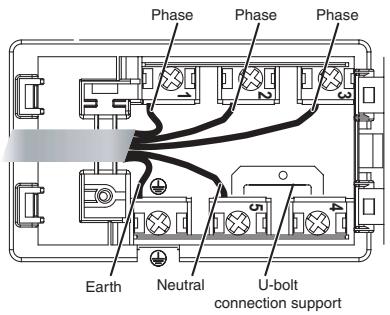
Three-phase 400
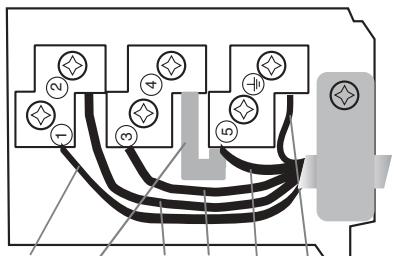
Three-phase 400
Connecting the electricity supply cable to the mains
If the appliance is being connected directly to the electricity mains an omnipolar switch must be installed with a minimum opening of 3mm between contacts.
! The installer must ensure that the correct electrical connection has been made and that it is fully compliant with safety regulations.
Before connecting the appliance to the power supply, make sure that:
- The appliance is earthed and the plug is compliant with the law.
- The socket can withstand the maximum power of the appliance, which is indicated on the data plate located on the appliance itself.
- The voltage falls within the range of values indicated on the data plate.
- The socket is compatible with the plug of the appliance. If the socket is incompatible with the plug, ask an authorised technician to replace it. Do not use extension cords or multiple sockets.
! Once the appliance has been installed, the power supply cable and the electrical socket must be easily accessible.
! The cable must not be bent or compressed.
The cable must be checked regularly and replaced by authorised technicians only.
! The manufacturer declines any liability should these safety measures not be observed.
! Do not remove or replace the power supply cable for any reason. Its removal or replacement will void the warranty and the CE marking. INDESIT does not assume liability for accidents or damage arising from replacement/removal of the original power supply cable. Replacement can only be accepted when carried out by personnel authorised by INDESIT and using an original spare part.
Control panel
The control panel described in this manual is only a representative example: it may not exactly match the panel on your appliance.
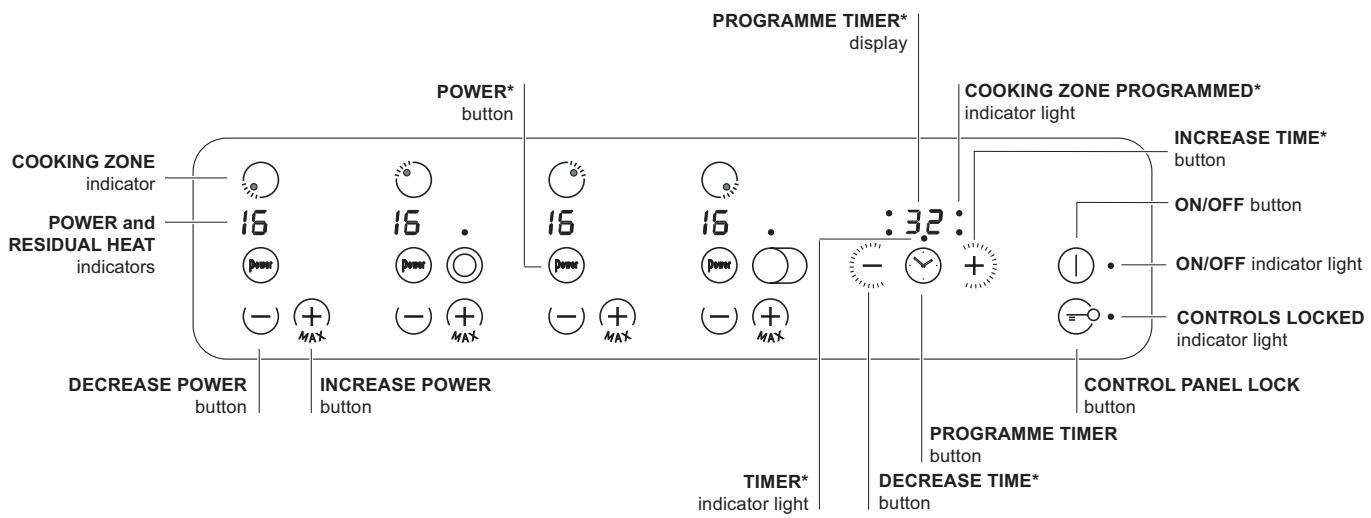
- INCREASE POWER button switches on the hotplate and controls the power (see Start-up and use).
- REDUCE POWER button controls the power and switches off the hotplate (see Start-up and use).
- COOKING ZONE indicator represents the corresponding cooking zone.
- POWER indicator provides a visual display for the current heat level.
- ON/OFF button switches the appliance on and off.
- ON/OFF indicator light shows whether the appliance is on or off.
- PROGRAMME TIMER* button controls the cooking programme times (see Start-up and use).
- PROGRAMME TIMER* display shows which programme has been selected (see Start-up and use).
-
COOKING ZONE PROGRAMMED* indicator lights show which cooking zones are being used during a cooking programme (see Start-up and use).
-
CONTROL PANEL LOCK button prevents accidental changes to the hob settings (see Start-up and use).
- CONTROL PANEL LOCK indicator light shows the control panel has been locked (see Start-up and use).
- TIMER* indicator light shows that the timer has been activated
- INCREASE TIME* button increases the cooking duration while the timer is running or while a set programme is underway (see Start-up and use).
- DECREASE TIME* button decreases the cooking duration while the timer is running or while a set programme is underway (see Start-up and use).
! This product complies with the requirements of the latest European Directive on the limitation of power consumption of the standby mode. If no operations are carried out for a period of 2 minutes, after the residual heat indicator lights turn off and the fan stops (if present), the appliance automatically switches to the "off mode". The appliance resumes the operating mode once the ON/OFF button is pressed.
- Only available in certain models.
Extendable cooking zones
Certain models are fitted with extendable cooking zones. These may be circular or oval and may vary in their extensibility (they may be double or triple hotplates). A list of controls is given below (these controls are only present in models with the extendable cooking zone option).
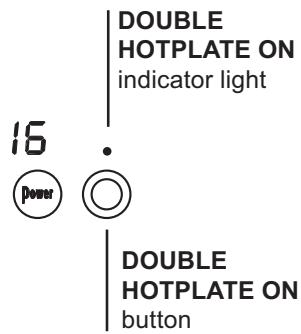
Circular extendable hotplate
- DOUBLE HOTPLATE ON button switches on the double hotplate (see Start-up and use).
- DOUBLE HOTPLATE ON indicator light shows the double hotplate has been switched on.
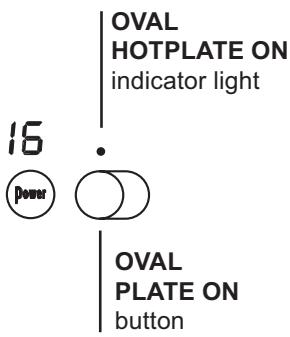
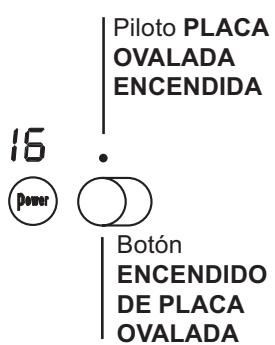
Oval extendable hotplate
- OVAL HOTPLATE ON button switches on the oval hotplate (see Start-up and use).
- OVAL HOTPLATE ON indicator light shows the oval hotplate has been switched on.
! The glue applied on the gaskets leaves traces of grease on the glass. Before using the appliance, we recommend you remove these with a special non-abrasive cleaning product. During the first few hours of use there may be a smell of rubber which will disappear very quickly.
! A few seconds after the hob is connected to the electricity supply, a buzzer will sound. The hob may now be switched on.
! If the - or + button is pressed for an extended period of time, the display scrolls quickly though the power levels and timer minutes.
Switching on the hob
To switch the hob on, press and hold the ① button for approximately one second.
Switching on the cooking zones
To begin using a cooking zone, set the desired power level using the - and +.
- Press and hold the + button for approximately 2 seconds: the cooking zone will immediately begin operating at its maximum power level (16).
- Press and hold the button for approximately 2 seconds: the cooking zone will operate at power level 2 (slow cooking function).
Power function*
The power function for the cooking zones may be used to shorten heating-up times. Activate and set the power level for the desired cooking zone as described in the previous paragraph. Press the power button . The display, which indicates the power level, will alternately show the letter "P" and the power level set previously until the desired power level has been reached. Once this level has been reached, the display will revert to showing the set power level. To deactivate this function, press the button again or select a different power level between 0 and 16 using the power level selector buttons.
- Only available in certain models.
Switching off the cooking zones
To switch off a cooking zone:
- Press the button: the power of the cooking zone will progressively decrease until it is switched off.
- Alternatively, the - and + buttons may be pressed simultaneously: this immediately returns the power setting to 0 and the cooking zone switches off.
Programming the cooking duration
! If the and + buttons are pressed for an extended period of time, the timer scrolls quickly through the minute values in the corresponding direction.
! All the cooking zones may be programmed simultaneously, for a duration between 1 and 99 minutes.
- Select the cooking zone using the corresponding selector button.
- Adjust the temperature.
- Press the programming button.
- Set the cooking duration using the and + buttons.
- Confirm by pressing the button.
The timer begins counting down immediately. A buzzer sounds for approximately 1 minute and the cooking zone switches off when the set programme has finished.
Repeat the above procedure for each hotplate you wish to programme.
Using multiple programmes and the display
If one or more hotplates are programmed, the display will show the data for the hotplate with the least time remaining, and the light corresponding to the position of the hotplate will flash. The lights corresponding to the other hotplates programmed will be switched on.
To display the time remaining for the other
programmed hotplates, press the button repeatedly. The times remaining for each hotplate will be shown in a clockwise order, beginning with the front left hotplate.
Changing the programme
- Press the button repeatedly until the duration you wish to change is shown.
- Use the buttons to set the new duration.
- Confirm by pressing the button.
To cancel a programme, follow the above instructions. At step 2, press the button: the duration decreases progressively until it reaches 0 and switches off. The programme resets and the display exits programming mode.
Timer
The hob must be switched on.
The timer can be used to set a duration up to 99 minutes.
- Press the programming button until the timer indicator light is illuminated.
- Set the desired duration using the 12 and + buttons.
- Confirm by pressing the button.
The timer begins counting down immediately. When the time has elapsed, a buzzer will sound (for one minute).
Control panel lock
When the hob is switched on, it is possible to lock the oven controls in order to avoid accidental changes being made to the settings (by children, during cleaning, etc.). Press the button for a few moments to lock the control panel: the indicator light above the button will switch on.
To use any of the controls (e.g. to stop cooking),
you must switch off this function. Press the button for a few moments, the indicator light will switch off and the lock function will be removed.
Switching off the hob
Press the ① button to switch the appliance off. If the control panel lock has been activated, the controls will continue to be locked even after the hob is switched on again. In order to switch the hob on again, you must first remove the lock function.
"Demo" mode
It is possible to set the hob to a demonstration mode where all the controls work normally but the heating elements do not switch on. To activate the "demo" mode the hob must be switched on, with all the hotplates switched off.
- Press and hold the + and - buttons simultaneously for 6 seconds. When the 6 seconds have elapsed, the ON/OFF and CONTROLS LOCKED indicator lights will flash for
one second. Release the + and - buttons and press the button;
- The display will show the text DE and MO and the hob will be switched off.
- When the hob is switched on again it will be set to the "demo" mode.
To exit this mode, follow the procedure described above. The display will show the text DE and OF and the hob will be switched off. When it is next switched on, the hob will function normally.
Practical advice on using the appliance
To obtain the best results from your hob:
- Use pans with a thick, flat base in order to fully utilise the cooking zone.
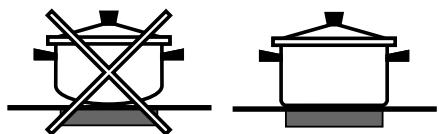
- Always use pans with a diameter which is large enough to cover the hotplate fully, in order to use all the available heat.
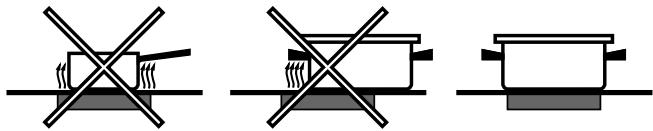
- Make sure that the base of the cookware is always clean and dry, in order to fully utilise and extend the life of both the cooking zones and the cookware.
- Avoid using the same cookware which has been used on gas burners: the heat concentration on gas burners may distort the base of the pan, causing it not to adhere correctly.
Safety devices
Pan sensor
Each cooking zone is equipped with a pan sensor device. The hotplate only emits heat when a pan with suitable measurements for the cooking zone is placed on it. If the power level indicator display flashes, this may be because:
- An incompatible pan
- A pan whose diameter is too small
- The pan has been removed from the hotplate.
Residual heat indicators
Each cooking zone is equipped with a residual heat indicator. This indicator signals which cooking zones are still at a high temperature. If the power display shows H, the cooking zone is still hot. It is possible, for example, to keep a dish warm or melt butter or chocolate. As the cooking zone cools, the power display will show H. The display switches off when the cooking zone has cooled sufficiently.
Overheating protection
If the electronic elements overheat, the hob switches off automatically and F appears on the display, followed by a flashing number. When the temperature has reached a suitable level, this message disappears and the hob may be used again.
Safety switch
The appliance has a safety switch which automatically switches the cooking zones off after they have been in operation for a certain amount of time at a particular power level. When the safety switch has been triggered, the display shows "0". For example: the rear right-hand hotplate is set to 5 and will switch off after 7 and a half hours of continuous operation, while the front left-hand hotplate is set to 2 and will switch off after 9 and a half hours.
| Power level | Maximum operating time in hours |
| 1 | 10 |
| 2 | 9,5 |
| 3 | 9 |
| 4 | 8,5 |
| 5 | 7,5 |
| 6 | 7 |
| 7 | 6,5 |
| 8 | 6 |
| 9 | 5,5 |
| 10 | 5 |
| 11 | 4 |
| 12 | 3,5 |
| 13 | 3 |
| 14 | 2,5 |
| 15 | 2 |
| 16 | 1 |
Buzzer
This can also indicate several irregularities:
- An object (a pan, cutlery, etc.) has been placed on the control panel for more than 10 seconds.
- Something has been spilt on the control panel.
- A button has been pressed for too long. All of the above situations may cause the buzzer to sound. Remove the cause of the malfunction to stop the buzzer. If the cause of the problem is not removed, the buzzer will keep sounding and the hob will switch off.
Practical cooking advice
| Very high-flame cooking | 18 | Pressure cooking Grilling | Frying Boiling |
| High-flame cooking | 20 | Crêpes | Cooking on a high flame and browning (roasts, steaks, escalopes, fish fillets, fried eggs) |
| Medium-flame cooking | 9 | Fast thickening (liquid juices) Boiling water (pasta, rice, vegetables) Milk | |
| 7 | Slow thickening (dense juices) | ||
| 4 | Bain-marie cooking | Pressure cooking after whistle | |
| Low-flame cooking | 3 | Low-flame cooking (stews) | -Reheating dishes |
| Very low- flame cooking | - | Chocolate sauce | Keeping food hot |
! This appliance has been designed and manufactured in compliance with international safety standards. The following warnings are provided for safety reasons and must be read carefully.
CE This appliance conforms to the following European Economic Community directives:
- 2006/95/EEC dated 12/12/06 (Low Voltage) and subsequent amendments;
- 2004/108/EEC dated 15/12/04 (Electromagnetic Compatibility) and subsequent amendments;
- 93/68/EEC dated 22/07/93 and subsequent amendments.
- 1275/2008 stand-by/off mode.
General safety
! Make sure that the air inlet behind the fan grille is never obstructed. The built-in hob should, in fact, be provided with suitable ventilation for the cooling of the electronic components used in the appliance.
- The appliance was designed for domestic use inside the home and is not intended for commercial or industrial use.
- The appliance must not be installed outdoors, even in covered areas. It is extremely dangerous to leave the appliance exposed to rain and storms.
- Do not touch the appliance when barefoot or with wet or damp hands and feet.
- The appliance must be used by adults only for the preparation of food, in accordance with the instructions provided in this booklet. Do not use the hob as a worktop or chopping board.
- The glass ceramic hob is resistant to mechanical shocks, but it may crack (or even break) if hit with a sharp object such as a tool. If this happens, disconnect the appliance from the electricity mains immediately and contact a Service Centre.
- Ensure that power supply cables of other electrical appliances do not come into contact with the hot parts of the hob.
- Remember that the cooking zones remain relatively hot for at least thirty minutes after they have been switched off. An indicator light provides a warning when residual heat is present (see Start-up and use).
- Keep any object which could melt away from the hob, for example plastic and aluminium objects, or products with a high sugar content. Be especially careful when using plastic film and aluminium foil or packaging: if placed on surfaces which are still hot, they may cause serious damage to the hob.
- Always make sure that pan handles are turned
towards the centre of the hob in order to avoid accidental burns.
- When unplugging the appliance, always pull the plug from the mains socket; do not pull on the cable.
- Never perform any cleaning or maintenance work without having disconnected the appliance from the electricity mains.
- The appliance should not be operated by people (including children) with reduced physical, sensory or mental capacities, by inexperienced individuals or by anyone who is not familiar with the product. These individuals should, at the very least, be supervised by someone who assumes responsibility for their safety or receive preliminary instructions relating to the operation of the appliance.
- Do not look at the halogen lamps in the cooking zones for long if they are present.
- Do not let children play with the appliance.
Disposal
- When disposing of packaging material: observe local legislation so that the packaging may be reused.
- The European Directive 2002/96/EC relating to Waste Electrical and Electronic Equipment (WEEE) states that household appliances should not be disposed of using the normal solid urban waste cycle. Exhausted appliances should be collected separately in order to optimise the cost of re-using and recycling the materials inside the machine, while preventing potential damage to the atmosphere and to public health. The crossed-out dustbin is marked on all products to remind the owner of their obligations regarding separated waste collection.
For further information relating to the correct disposal of exhausted household appliances, owners may contact the public service provided or their local dealer.
GB
Switching the appliance off
Disconnect your appliance from the electricity supply before carrying out any work on it.
Cleaning the appliance
! Do not use abrasive or corrosive detergents (for example, products in spray cans for cleaning barbecues and ovens), stain removers, anti-rust products, powder detergents or sponges with abrasive surfaces: these may scratch the surface beyond repair.
! Never use steam cleaners or pressure cleaners on the appliance.
- It is usually sufficient simply to wash the hob using a damp sponge and dry it with absorbent kitchen towel.
- If the hob is particularly dirty, rub it with a special glass ceramic cleaning product, then rinse well and dry thoroughly.
- To remove more stubborn dirt, use the scraper provided. Remove spills as soon as possible, without waiting for the appliance to cool, to avoid residues forming crusty deposits. You can obtain excellent results by using a rust-proof steel wire sponge - specifically designed for glass ceramic surfaces - soaked in soapy water.
! The scraper provided is sharp: be careful when using it.
- If any plastic or sugary substances are accidentally melted on the hob, remove them immediately with the scraper, while the surface is still hot.
- Once it is clean, the hob may be treated with a special protective maintenance product: the invisible film left by this product protects the surface from drips during cooking. This maintenance task should be carried out while the appliance is warm (not hot) or cold.
- Always remember to rinse the appliance well with clean water and dry it thoroughly: residues can become encrusted during subsequent cooking processes.
Stainless steel frame (only in models with outer frame)
Stainless steel can be marked by hard water which has been left on the surface for a long time, or by cleaning products containing phosphorus.
After cleaning, it is advisable to rinse the surface well and dry it thoroughly. If water is spilt on the surface, dry it quickly and thoroughly.
! Some hobs have an aluminium frame which is similar to stainless steel. Do not use any cleaning or degreasing products which are not suitable for use with aluminium.
Disassembling the hob
If it is necessary to disassemble the hob:
- Loosen the screws fixing the alignment springs on each side.
- Loosen the screws holding the fixing hooks in each corner.
- Take the hob out of its installation cavity.
! Do not attempt to repair the appliance yourself. If the appliance breaks down, contact a Service Centre.
This table provides a model-by-model list of the energy absorption values, type of heating elements and diameters of each cooking zone.
| Hobs | TEP 746 O L | TEP 645 B TEP 645 L TEP 745 L | ||
| Cooking zone | Power (W) | Diameter (mm) | Power (W) | Diameter (mm) |
| Back Left | A 2500 | 210 | A 2500 | 210 |
| Back Right | A 1200 | 145 | H 1400 | 160 |
| Front Left | H 1200 | 145 | H 1200 | 145 |
| Front Right | HO 2400/1500 | 170x260 | H 1800 | 180 |
| Total power | 7300 | 6900 | ||
| Hobs | TRP 642 D L | TEP 646 L | ||
| Cooking zone | Power (W) | Diameter (mm) | Power (W) | Diameter (mm) |
| Back Left | HD 2200/1000 | 210/140 | A 2500 | 210 |
| Back Right | H 1400 | 160 | H 1400 | 160 |
| Front Left | H 1200 | 145 | H 1200 | 145 |
| Front Right | HD 1700/700 | 180/120 | A 1800 | 180 |
| Total power | 6500 | 6900 | ||
| Hobs | TEP 635 O L | TRP 632 TD L | ||
| Cooking zone | Power (W) | Diameter (mm) | Power (W) | Diameter (mm) |
| Back Left | A 2500 | 210 | ||
| Back Right | H 1400 | 160 | ||
| Centre Left | HT 2700/1950/1050 | 270/210/145 | ||
| Centre Right | HO 2400/1600/600 | 170x260 | ||
| Front Left | H 1200 | 145 | ||
| Front Right | HD 1700/700 | 180/120 | ||
| Total power | 6100 | 5800 | ||
| Hobs | TEP 846 O L | TEP 646 O L | ||
| Cooking zone | Power (W) | Diameter (mm) | Power (W) | Diameter (mm) |
| Back Left | A 2500 | 210 | ||
| Back Right | A 2500 | 210 | A 1200 | 145 |
| Centre Left | HO 2400/1500 | 170x260 | ||
| Centre | A 1800 | 180 | ||
| Front Left | H 1200 | 145 | ||
| Front Right | H 1200 | 145 | HO 1800/1000 | 145x250 |
| Total power | 7900 | 6700 | ||
Key:
A = single halogen
H = single hilight
HO = oval hilight
HD = double hilight
HT = triple hilight
DE

Italiano, 1

Français, 14

English,27

Deutsch, 40

Espanol, 53
TRP 632 TD L
TRP 642 DL
TEP 635 O L
TEP 645 B
TEP 645 L
TEP 646 L
TEP 646 OL
TEP 745 L
TEP 746 O L
TEP 846 O L
Inhaltsverzeichnis
Installation, 41-43
Aufstellung
Elektroanschluss
Placa extensible oval
H = hilight individual
HO = hilight ovalado
HD = hilight doble
HT = hilight triple
ES
ES