
UE32K5100 - TV SAMSUNG - Free user manual and instructions
Find the device manual for free UE32K5100 SAMSUNG in PDF.



| Product Type | LED TV |
| Brand | Samsung |
| Model | UE32K5100 |
| Screen Size (Diagonal) | 32 inches (80 cm) |
| Display Resolution | 1920 x 1080 (Full HD) |
| Audio Power Output | 20 W |
| Dimensions without Stand (W x H x D) | 721.4 x 465.1 x 78.0 mm |
| Dimensions with Stand (W x H x D) | 721.4 x 519.1 x 193.5 mm |
| Weight without Stand | 4.8 kg |
| Weight with Stand | 4.9 kg |
| Power Supply | Power adapter, models Solum A4819_KSML (48W) or Powernet A5919_KPNL (59W) |
| Typical Power Consumption | Approximately 30 W (per IEC 62087 standard) |
| Connectivity | 2x HDMI, 1x USB, Component input, AV input, CI+ |
| Stand Rotation Angle | 0° (fixed) |
| Operating Temperature | 10°C to 40°C |
| Operating Humidity | 10% to 80% non-condensing |
| Supported Video Formats | DivX, MPEG4, H.264, WMV, etc. (up to 1920x1080) |
| Main Features | e-Manual, Teletext, Parental Control, CI+, Picture Modes |
| VESA Wall Mount | 100 x 100 mm, M4 screws, max length 20 mm |
| Included Accessories | Remote control, AAA batteries (x2), power cable, adapter, regulatory guide |
Frequently Asked Questions - UE32K5100 SAMSUNG
User questions about UE32K5100 SAMSUNG
0 question about this device. Answer the ones you know or ask your own.
Ask a new question about this device
Download the instructions for your TV in PDF format for free! Find your manual UE32K5100 - SAMSUNG and take your electronic device back in hand. On this page are published all the documents necessary for the use of your device. UE32K5100 by SAMSUNG.
USER MANUAL UE32K5100 SAMSUNG
Thank you for purchasing this Samsung product.
To receive more complete service, please register your product at www.samsung.com/register Model _ Serial No. _
Warning! Important Safety Instructions
(Pleasesread the Safety Instructions before using your TV.)
| CAUTION | Class II product : This symbol indicates that it does not require a safety connection to electrical earth (ground). |
| RISK OF ELECTRIC SHOCK DO NOT OPEN | AC voltage : This symbol indicates that the rated voltage marked with the symbol is AC voltage |
| CAUTION: TO REDUCE THE RISK OF ELECTRIC SHOCK, DO NOT REMOVE COVER (OR BACK). THERE ARE NO USER SERVICEABLE PARTS INSIDE. REFER ALL SERVICING TO QUALIFIED PERSONNEL. | |
| This symbol indicates that high voltage is present inside. It is dangerous to make any kind of contact with any internal part of this product. | DC voltage : This symbol indicates that the rated voltage marked with the symbol is DC voltage. |
| This symbol indicates that this product has included important literature concerning operation and maintenance. | Caution, Consult Instructions for use : This symbol instructs the user to consult the user manual for further safety related information. |
The slots and openings in the cabinet and in the back or bottom are provided for necessary ventilation. To ensure reliable operation of this apparatus and to protect it from overheating, these slots and openings must never be blocked or covered.
- Do not place this apparatus in a confined space, such as a bookcase or built-in cabinet, unless proper ventilation is provided.
- Do not place this apparatus near or over a radiator or heat register, or where it is exposed to direct sunlight.
- Do not place vessels (vases etc.) containing water on this apparatus, as this can result in a fire or electric shock.
Do not expose this apparatus to rain or place it near water (near a bathtub, washbowl, kitchen sink, or laundry tub, in a wet basement, or near a swimming pool etc.). If this apparatus accidentally gets wet, unplug it and contact an authorised dealer immediately.
This apparatus uses batteries. In your community, there might be environmental regulations that require you to dispose of these batteries properly. Please contact your local authorities for disposal or recycling information.
Do not overload wall outlets, extension cords or adaptors beyond their capacity, since this can result in fire or electric shock.
Power-supply cords should be placed so that they are not likely to be walked on or pinched by items placed upon or against them. Pay particular attention to cords at the plug end, at wall outlets, and at the point where they exit from the appliance.
To protect this apparatus from a lightning storm, or when left unattended and unused for long periods of time, unplug it from the wall outlet and disconnect the antenna or cable system. This will prevent damage to the set due to lightning and power line surges.
Before connecting the AC power cord to the DC adaptor outlet, make sure that the voltage designation of the DC adaptor corresponds to the local electrical supply.
Never insert anything metallic into the open parts of this apparatus. This may cause a danger of electric shock.
To avoid electric shock, never touch the inside of this apparatus. Only a qualified technician should open this apparatus.
Be sure to plug in the power cord until it is firmly seated. When unplugging the power cord from a wall outlet, always pull on the power cord's plug. Never unplug it by pulling on the power cord. Do not touch the power cord with wet hands.
If this apparatus does not operate normally - in particular, if there are any unusual sounds or smells coming from it - unplug it immediately and contact an authorised dealer or service centre.

Be sure to pull the power plug out of the outlet if the TV is to remain unused or if you are to leave the house for an extended period of time (especially when children, elderly or disabled people will be left alone in the house).
- Accumulated dust can cause an electric shock, an electric leakage, or a fire by causing the power cord to generate sparks and heat or by causing the insulation to deteriorate.
Be sure to contact an authorised service centre for information if you intend to install your TV in a location with heavy dust, high or low temperatures, high humidity, chemical substances, or where it will operate 24 hours a day such as in an aerial port, a train station, etc. Failure to do so may lead to serious damage to your TV.
Use only a properly grounded plug and wall outlet.
- An improper ground may cause electric shock or equipment damage. (Class I Equipment only.)
To turn off this apparatus completely, disconnect it from the wall outlet. Be sure to have the wall outlet and power plug readily accessible.
Store the accessories (battery, etc.) in a location safely out of the reach of children.
Do not drop or strike the product. If the product is damaged, disconnect the power cord and contact a service centre.
To clean this apparatus, unplug the power cord from the wall outlet and wipe the product with a soft, dry cloth. Do not use any chemicals such as wax, benzene, alcohol, thinners, insecticide, aerial fresheners, lubricants, or detergents. These chemicals can damage the appearance of the TV or erase the printing on the product.
Do not expose this apparatus to dripping or splashing.
Do not dispose of batteries in a fire.
Do not short-circuit, disassemble, or overheat the batteries.
There is danger of an explosion if you replace the batteries used in the remote with the wrong type of battery. Replace only with the same or equivalent type.
When using the AC plug that is a dedicated adapter plug provided from Samsung, pay attention to the following:
Insert the AC plug into the adapter until a "click" sound is heard.
Never remove the AC plug after insertion. (Cannot be removed)
Do not insert only the AC plug into an outlet.
Do not use the provided AC plug with other devices.
Do not insert plugs other than the provided AC plug into the adapter.
When removing the adapter from an outlet, pull its body vertically.
Do not insert the adapter into the outlet on the ceiling.
Do not drop objects or apply shock on the adapter.
Do not rotate it over the range indicated on the adapter.
It may cause electric shock or fire.
Remove the vinyl cover of the adapter before using the adapter. Otherwise, this may result fire.
- Figures and illustrations in this User Manual are provided for reference only and may differ from the actual product appearance. Product design and specifications may change without notice.
CIS languages (Russian, Ukrainian, Kazakhs) are not available for this product, since this is manufactured for customers in EU region.
To reduce the risk of fire or electric shock, do not expose this apparatus to rain or moisture.
Apparatus shall not be exposed to dripping or splashing and no objects filled with liquids, such as vases, shall not be placed on the apparatus.
WARNING: FOR INDOOR USE ONLY
What's in the Box?
Make sure that the following items are included with your TV. If there are any items missing, contact your local dealer.
Remote Control & Batteries (AAA x 2)
Power Cord (Depending on the country and model)
Regulatory Guide
Warranty Card (Not available in some locations)
User Manual
AC PLUG-CONVERSION (Depending on the country and model)
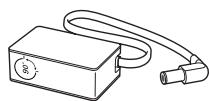
Power Adapter
Depending on the country and model)
Adjusting the angle of the plug on the power adapter
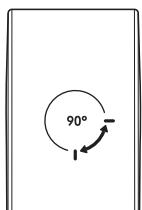
- Never turn the plug until it exceeds the allowed range on the power adapter.
- The colours and shapes of the items differ with the model.
- Cables not supplied with this product can be purchased separately.
- Open the box and check for any accessory items hidden behind or inside the packing materials.
An administration fee may be charged in the following situations:
(a) An engineer is called out at your request, but there will be no defect with the product (i.e., where the user manual has not been read).
(b) You bring the unit to a repair centre, but there will be no defect identified the product (i.e., where the user manual has not been read).
You will be informed of the administration fee amount before a technician visits.

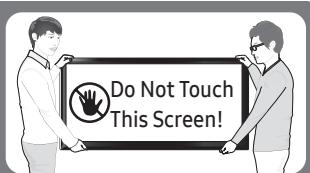
Warning: Screens can be damaged from direct pressure when handled incorrectly. We recommend lifting the TV at the edges, as shown.
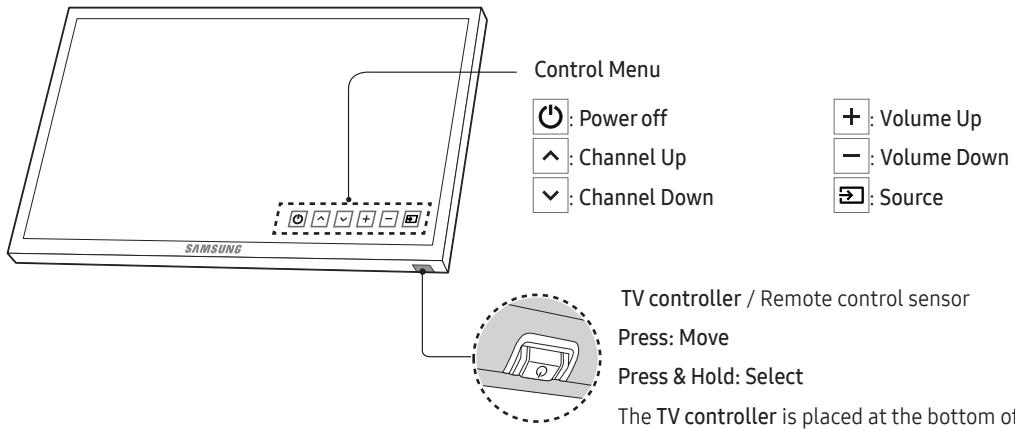
Using the TV Controller
You can turn on the TV with the TV controller button at the bottom of the TV, and then use the Control Menu. The Control Menu appears when the button is pressed while the TV is On. For more information about its usage, refer to the figure below.
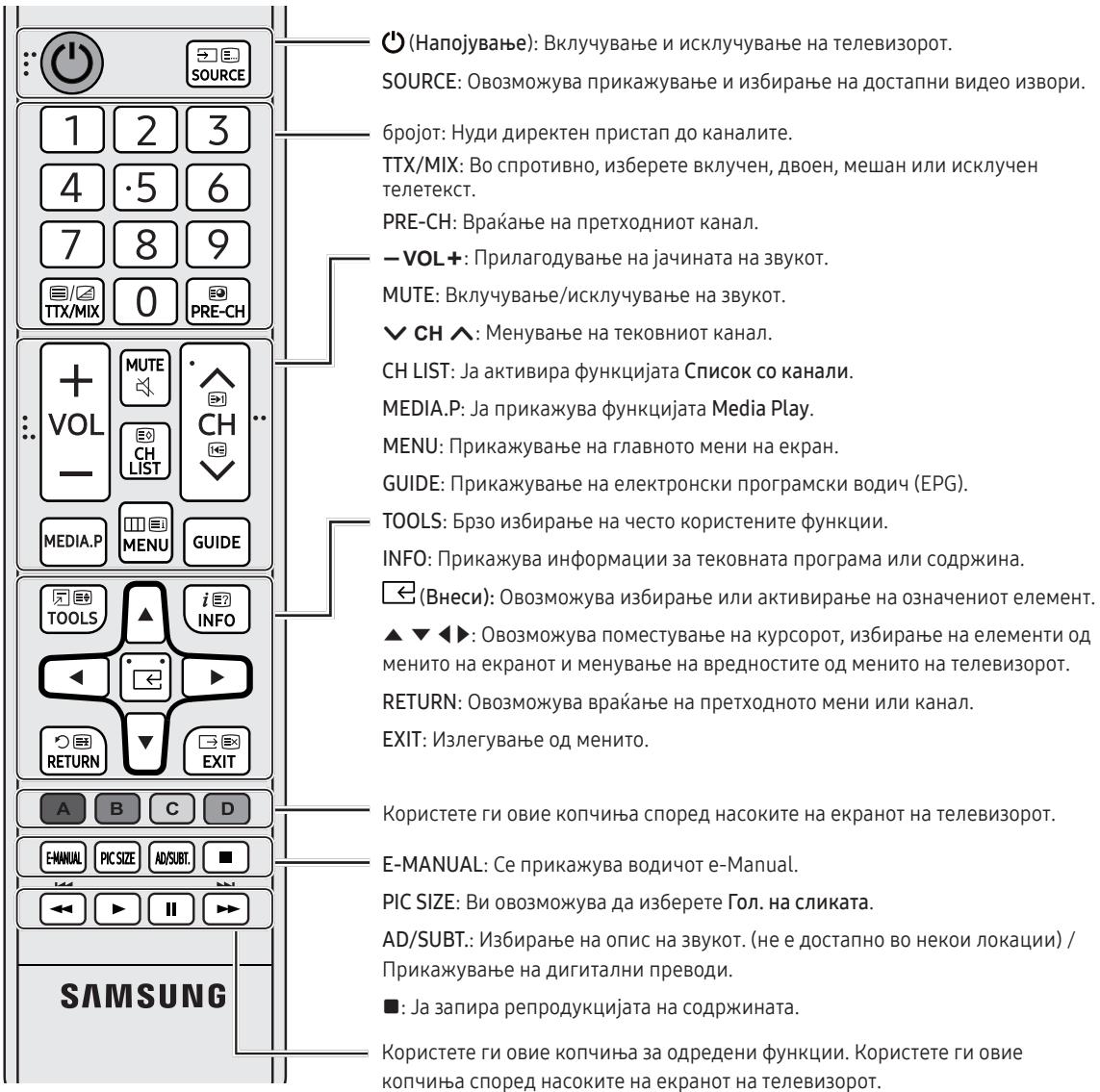
The Remote Control
- This remote control has Braille points on the Power, Channel, Volume and Enter buttons and can be used by visually impaired persons.
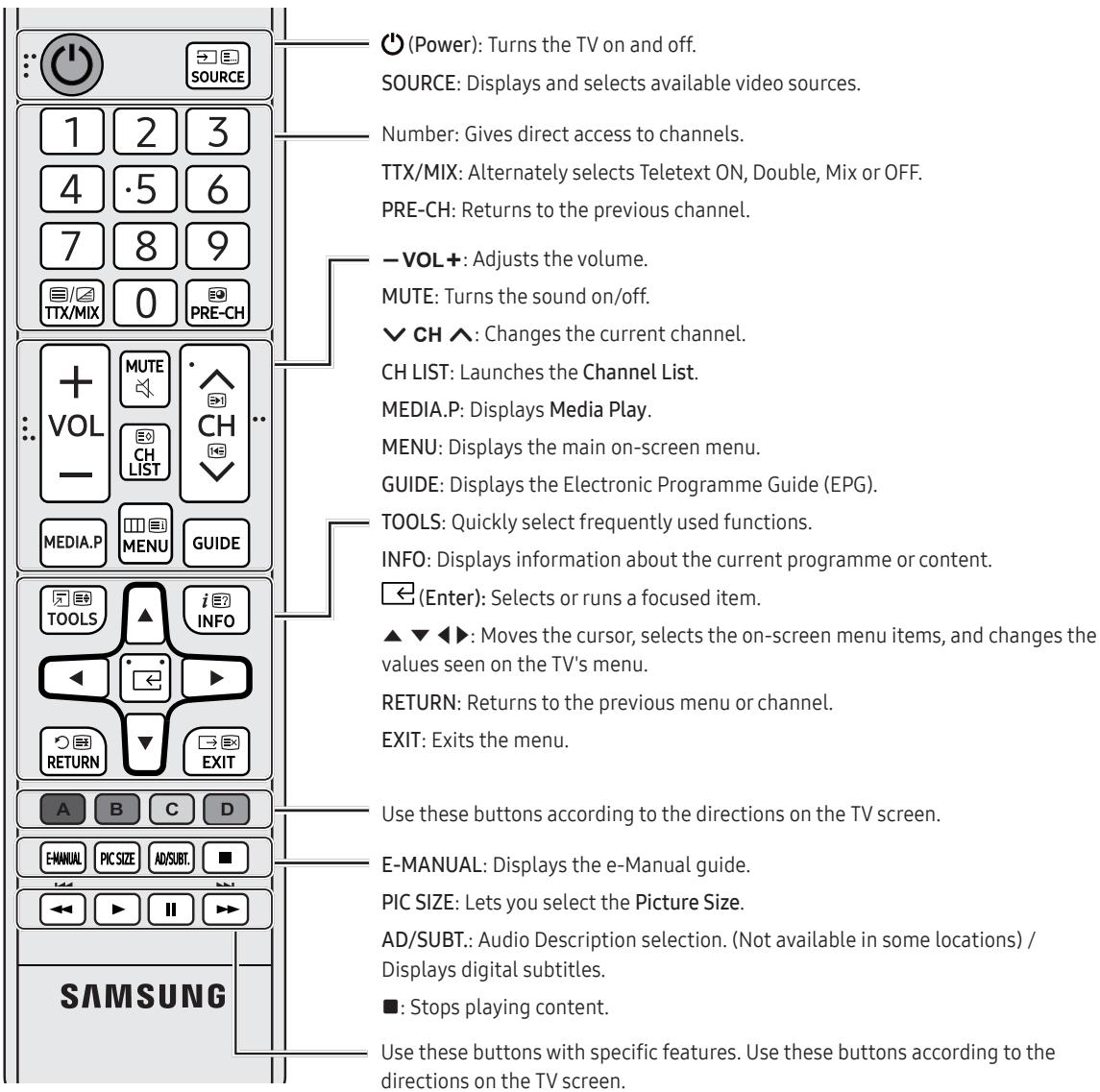
- The button names above may be differ from the actual names.
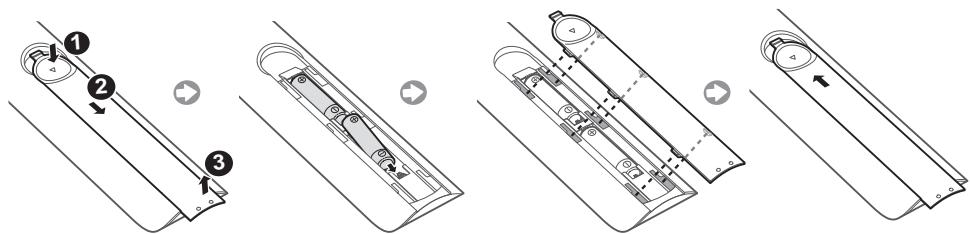
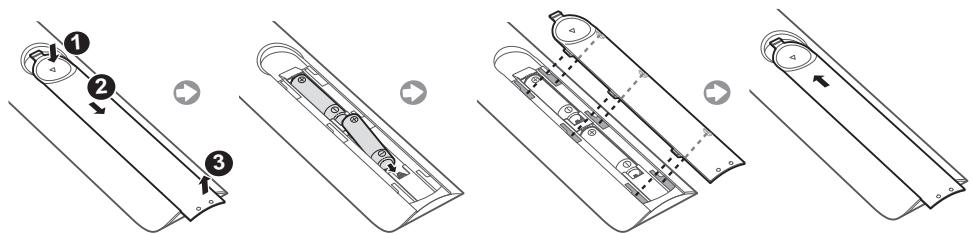
Installing batteries into the remote control
English-6
Changing the Input Source
Source
Use to select TV or other external input sources such as DVD / Blu-ray players / cable box / STB satellite receiver connected to the TV.
- Press the SOURCE button on your remote.
-
Select a desired external input source.
-
TV/HDMI1/HDMI2/DVI/AV/Component
- In the Source, connected inputs will be highlighted.
- PC(D-Sub) input is not supported. If you want to connect PC to the TV, you can connect the HDMI to DVI cable with the HDMI IN 2(DVI) port on the TV.
How to use Edit Name
In the Source, press the TOOLS button, and then you can set an external input sources name you want.
- When connecting a PC to the HDMI IN 2(DVI) port with HDMI cable, you should set the TV to PC mode under Edit Name.
- When connecting a PC to the HDMI IN 2(DVI) port with HDMI to DVI cable, you should set the TV to DVI PC mode under Edit Name.
- When connecting an AV devices to the HDMI IN 2(DVI) port with HDMI to DVI cable, you should set the TV to DVI Devices mode under Edit Name.
Information
You can see detailed information about the connected external device.
Connecting to a COMMON INTERFACE slot (Your TV viewing Card Slot)
Depending on the country and model.
- Turn the TV off to connect or disconnect a Cl card.
Using the "CI or CI+ CARD"
To watch paid channels, the "CI or CI+ CARD" must be inserted.
- If you don't insert the "CI or CI+ CARD", some channels will display the message "Scrambled Signal".
- The pairing information containing a telephone number, the "CI or CI+ CARD" ID the Host ID and other information will be displayed in about 2~3 minutes. If an error message is displayed, please contact your service provider.
- When the configuration of channel information has finished, the message "Updating Completed" is displayed, indicating the channel list is updated.
NOTE
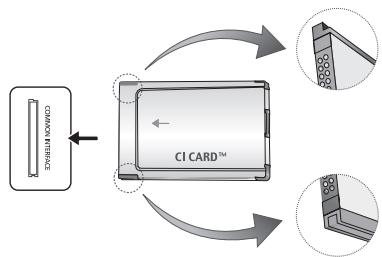
- The image may differ depending on the model.
- You must obtain a "CI or CI+ CARD" from a local cable service provider.
- When removing the "CI or CI+ CARD", carefully pull it out with your hands since dropping the "CI or CI+ CARD" may cause damage to it.
- Insert the "CI or CI+ CARD" in the direction marked on the card.
- The location of the COMMON INTERFACE slot may be different depending on the model.
- "CI or CI+ CARD" is not supported in some countries and regions; check with your authorised dealer.
- If you have any problems, please contact a service provider.
- Insert the "CI or CI+ CARD" that supports the current aerial settings. The screen will be distorted or will not be seen.

The e-Manual
MENU Support e-Manual ENTER

You can find instructions about your TV's features in the e-Manual in your TV. To use, press the E-MANUAL button on your remote. Move the cursor using the up/down/right/left buttons to highlight a category, then a topic, and then press the ENTER button. The e-Manual displays the page you want to see.
You can also access it through the menu:
- To return to the e-Manual main menu, press the E-MANUAL button on the remote.
Screen Display
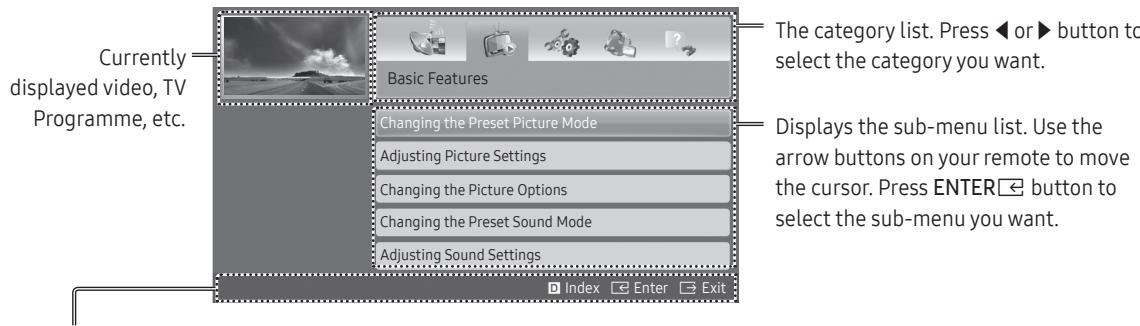
Operation Buttons
D Index: Displays the index screen.
- Index available depending on the language.
Enter: Selects a category or sub-menu.
Exit:Exit the e-Manual.
A Try now: Displays the OSD menu that corresponds to the topic. To return to the e-Manual screen, press the E-MANUAL button.
B Home: Moves to the e-Manual home screen.
Page: Moves to previous or next page.
Zoom: Magnifies a screen.
- Press the G (Zoom) button to magnify the screen. You can scroll through the magnified screen by using the or buttons. To return to the screen to normal size, press the RETURN button.
How to toggle between an e-Manual topic and the corresponding OSD menu(s).
- This function is not enabled in some menus.
- You cannot use the Try now function if the menu is not activated.
| Method 1 | Method 2 |
| 1. If you want to use the menu that corresponds to an e-Manual topic, press the red button to select Try now. 2. To return to the e-Manual screen, press the E-MANUAL button. | 1. Press the ENTER按钮 when a topic is displayed. “Are you sure?” appears. Select Yes, and then press the ENTER按钮. The OSD window appears. 2. To return to the e-Manual screen, press the E-MANUAL button. |
How to search for a topic on the index page
-
This function may not be supported depending on the language.
-
If you want to search a keyword, press the blue button to select Index.
- Press the or button to select a character order you want.
- Press the or button to select a keyword you want to see, and then press the ENTER button.
-
You can view the corresponding e-Manual instruction screen.
-
To close the Index screen, press the RETURN button.
Initial Setup
When the TV is initially powered on, a sequence of on-screen prompts will assist in configuring basic settings. Press the POWER button. Setup is available only when the source is set to TV.
- If you connect any device to HDMI IN 1(STB) before starting the installation, Channel Source will be changed to Set-top box automatically. If you do not want to select Set-top box, please select Aerial.
If You Want to Reset This Feature...
Select System - Setup (Initial Setup). Enter your 4 digit PIN number. The default PIN number is "0-0-0-0".
If you want to change the PIN number, use the Change PIN function.
You should do Setup (MENU System) again at home even though you did in shop already.
- If you forget the PIN code, press the remote control buttons in the following sequence in Standby mode, which resets the PIN to "0-0-0-0": MUTE 8 2 4 POWER (on)
Teletext Feature
The index page of the Teletext service gives you information on how to use the service. For Teletext information to be displayed correctly, channel reception must be stable. Otherwise, information may be missing or some pages may not be displayed.
- You can change Teletext pages by pressing the numeric buttons on the remote control.
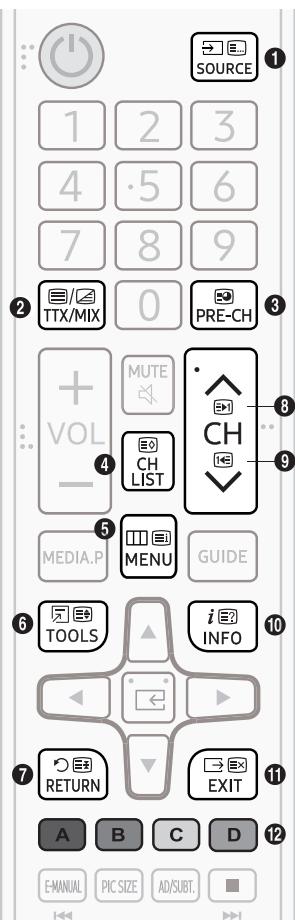
1 (mode): Selects the Teletext mode (LIST/FLOF). If pressed during LIST mode, switches the mode to List save mode. In List save mode, you can save a Teletext page into a list using the store) button.
2 (Full TTX/Double TTX/mix/off): Activates the Teletext mode for the current channel. Press the button twice to overlap the Teletext mode with the current broadcasting screen. Press it one more time to exit teletext.
(3) (sub-page): Displays the available sub-page.
(store): Stores the Teletext pages.
(5) (index): Displays the index (contents) page at any time while you are viewing Teletext.
(6) (size): Displays the teletext on the upper half of the screen in double-size. To move the text to the lower half of the screen, press it again. For normal display, press it once again.
(7) (hold): Holds the display at the current page, in the case that there are several secondary pages that follow automatically. To undo, press it again.
8 (page up): Displays the next Teletext page.
(13) (page down): Displays the previous Teletext page.
(10) (reveal): Displays the hidden text (answers to quiz games, for example). To display the normal screen, press it again.
1 (cancel): Shrinks the Teletext display to overlap with the current broadcast.
Colour buttons (red, green, yellow, blue): If the FASTEXT system is used by the broadcasting company, the different topics on a Teletext page are colour-coded and can be selected by pressing the coloured buttons. Press the colour corresponding to the topic of your choice. A new colour coded page is displayed. Items can be selected in the same way. To display the previous or next page, press the corresponding coloured button.
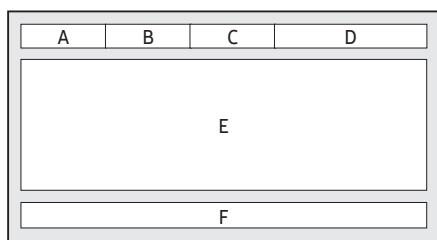
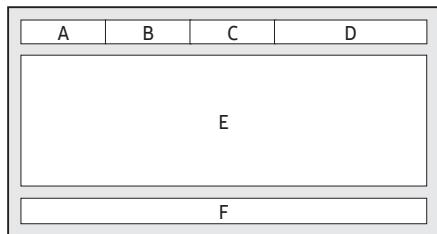
The Teletext pages are organized according to six categories
| Part | Contents |
| A | Selected page number. |
| B | Broadcasting channel identity. |
| C | Current page number or search indications. |
| D | Date and time. |
| E | Text. |
| F | Status information. FASTEXT information. |
Troubleshooting and Maintenance
Troubleshooting
If the TV seems to have a problem, first try this list of possible problems and solutions. If none of these troubleshooting tips apply, visit "www.samsung.com", then click on Support, or call Samsung customer service centre.
Picture Quality
- First of all, please perform the Picture Test and confirm that your TV is properly displaying test image. (go to MENU - Support - Self Diagnosis - Picture Test) If the test image is properly displayed, the poor picture may caused by the source or signal.
The TV image does not look as good as it did in the store.
If you have an analogue cable/set top box, upgrade to a digital set top box. Use HDMI or Component cables to deliver HD (high definition) picture quality.
- Cable/Satellite subscribers: Try digital stations from the channel line up.
- Aerial connection: Try HD stations after performing Auto tuning.
- Many HD channels are up scaled from SD (Standard Definition) contents.
- Adjust the Cable/Set top box video output resolution to 1080i or 720p.
- Make sure you are watching the TV at the minimum recommended distance based on the size and definition of the signal.
The picture is distorted: macro block, small block, dots, pixelization error.
- Compression of video contents may cause picture distortion especially in fast moving pictures such as sports and action movies.
- Low signal level or bad quality can cause picture distortion. This is not a TV issue.
- Mobile phones used close to the TV (cca up to 1m) may cause noise in picture on analogue and digital TV.
Colour is wrong or missing.
- If you're using a component connection, make sure the component cables are connected to the correct jacks. Incorrect or loose connections may cause colour problems or a blank screen.
There is poor colour or brightness.
- Adjust the Picture options in the TV menu. (go to Picture Mode / Colour / Brightness / Sharpness)
- Adjust Energy Saving option in the TV menu. (go to MENU - System - Eco Solution - Energy Saving)
Try resetting the picture to view the default picture settings. (go to MENU - Picture - Reset Picture)
There is a dotted line on the edge of the screen.
If the picture size is set to Screen Fit, change it to 16:9.
- Change cable/satellite box resolution.
The picture is black and white.
- If you are using an AV composite input, connect the video cable (yellow) to the Green jack of component input 1 on the TV.
When changing channels, the picture freezes or is distorted or delayed.
- If connected with a cable box, please try to reset the cable box. Reconnect the AC cord and wait until the cable box reboots. It may take up to 20 minutes.
- Set the output resolution of the cable box to 1080i or 720p.
Sound Quality
- First of all, please perform the Sound Test to confirm that your TV audio is properly operating. (go to MENU - Support - Self Diagnosis - Sound Test)
- If the audio is ok, the sound problem may be caused by the source or signal.
There is no sound or the sound is too low at maximum volume.
- Please check the volume of the device (Cable/Sat Box, DVD, Blu-ray etc) connected to your TV.
The picture is good but there is no sound.
- Set the Speaker Select option to TV Speaker in the sound menu.
- If you are using an external device, make sure the audio cables are connected to the correct audio input jacks on the TV.
- If you are using an external device, check the device's audio output option (ex. you may need to change your cable box's audio option to HDMI when you have a HDMI connected to your TV).
- If you are using a DVI to HDMI cable, a separate audio cable is required.
- Reboot the connected device by reconnecting the device's power cable.
The speakers are making an inappropriate noise.
- Check the cable connections. Make sure a video cable is not connected to an audio input.
- For aerial or cable connections, check the signal strength. Low signal level may cause sound distortion.
No Picture, No Video
The TV will not turn on.
- Make sure the AC power cord is securely plugged in to the wall outlet and the TV.
- Make sure the wall outlet is working.
- Try pressing the POWER button on the TV to make sure the problem is not the remote. If the TV turns on, refer to "The remote control does not work" below.
The TV turns off automatically.
- Ensure the Sleep Timer is set to Off in the Time menu.
- If your PC is connected to the TV, check your PC power settings.
- Make sure the AC power cord is plugged in securely to the wall outlet and the TV.
- No Signal Power Off turns off the TV if no signal has been received by the TV for a specified period time. Auto Power Off turns off the TV if there has been no user input in four hours.
There is no picture/video.
- Check cable connections (remove and reconnect all cables connected to the TV and external devices).
- Set your external device's (Cable/Set top Box, DVD, Blu-ray etc) video outputs to match the connections to the TV input. For example, if an external device's output is HDMI, it should be connected to an HDMI input on the TV.
- Make sure your connected devices are powered on.
- Be sure to select the TV's correct source by pressing the SOURCE button on the remote control.
- Reboot the connected device by reconnecting the device's power cable.
Aerial (Air/Cable) Connection (Cable: depending on the country)
The TV is not receiving all channels.
- Make sure the Aerial cable is connected securely.
- Please try Setup (Initial setup) to add available channels to the channel list. Go to MENU - System - Setup (Initial setup) and wait for all available channels to be stored.
- Verify the Aerial is positioned correctly.
The picture is distorted: macro block, small block, dots, pixelization error.
- Compression of video contents may cause picture distortion, especially on fast moving pictures such as sports and action movies.
- A low signal can cause picture distortion. This is not a TV issue.
Others
The picture will not display in full screen.
- HD channels will have black bars on either side of the screen when displaying up scaled SD (4:3) contents.
- Black bars on the top and bottom will appear during movies that have aspect ratios different from your TV.
- Adjust the picture size options on your external device or TV to full screen.
The remote control does not work.
- Replace the remote control batteries with the poles (+ / -) in the right direction.
- Clean the sensor's transmission window on the remote.
- Try pointing the remote directly at the TV from 5~6 feet away.
The cable/set top box remote control doesn't turn the TV on or off, or adjust the volume.
- Programme the Cable/Set top box remote control to operate the TV. Refer to the Cable/Set top box user manual for the SAMSUNG TV code.
A "Mode Not Supported" message appears.
- Check the supported resolution of the TV, and adjust the external device's output resolution accordingly.
There is a plastic smell from the TV.
- This smell is normal and will dissipate over time.
The TV Signal Information is unavailable in the Self Diagnosis Test menu.
- This function is only available with digital channels from an Aerial / RF / Coax connection.
TV is tilted to the right or left side. - Remove the stand base from the TV and reassemble it.
There are difficulties assembling the stand base.
- Make sure the TV is placed on a flat surface. If you can not remove the screws from the TV, please use a magnetised screw driver.
The Broadcasting menu is grey out (unavailable).
- The Broadcasting menu is only available when the TV source is selected.
Your settings are lost after 5 minutes or every time the TV is turned off.
- If the TV is in the Store Demo mode, it will reset audio and picture settings every 5 minutes. If you want to change the settings from Store Demo mode to Home Use, press the SOURCE button to select TV mode, and go to MENU - Support - Use Mode.
You have intermittent loss of audio or video.
- Check the cable connections and reconnect them.
- Loss of audio or video can be caused by using overly rigid or thick cables. Make sure the cables are flexible enough for long term use. If mounting the TV to the wall, we recommend using cables with 90 degree connectors.
You see small particles when you look closely at the edge of the frame of the TV.
This is part of the product's design and is not a defect.
The PIP menu is not available.
- PIP functionality is only available when you are using a HDMI or components source.
You turned the TV off 45 minutes ago, and it turned on again.
It is normal. The TV operates the OTA (Over The Aerial) function itself to upgrade firmware downloaded whilst your watching TV.
There are recurrent picture/sound issues.
- Check and change the signal/source.
A reaction may occur between the rubber cushion pads on the base stand and the top finish of some furniture.
- To prevent this, use felt pads on any surface of the TV that comes in direct contact with furniture.
The message "This file may not be playable properly." appears.
This may appear because of high bit rate of content. Content generally will play but could experience some playability issue.
You can keep your TV in optimum operating condition by upgrading to the latest firmware (www.samsumg.com Support) by USB.
This TFT LED panel uses a panel consisting of sub pixels which require sophisticated technology to produce. However, there may be a few bright or dark pixels on the screen. These pixels will have no impact on the performance of the product.
Some functions and pictures shown in this manual are available on specific models only.
Still image warning
Avoid displaying still images (such as JPEG picture files), still image elements (such as TV channel logos, stock or news crawls at the screen bottom etc.), or programmes in panorama or 4:3 image format on the screen. If you constantly display still pictures, it can cause image burn-in on the LED screen and affect image quality. To reduce the risk of this adverse effect, please follow the recommendations below:
- Avoid displaying the still image for long periods.
Always try to display any image in full screen. Use the picture format menu of the TV set for the best possible match. - Reduce brightness and contrast to avoid the appearance of after-images.
- Use all TV features designed to reduce image retention and screen burn. Refer to the e-Manual for details.
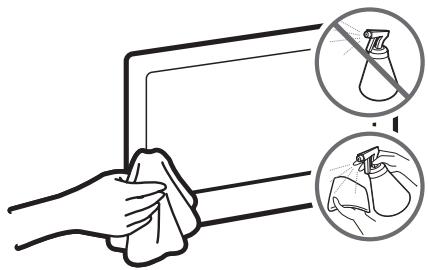
Caring for the TV
- If a sticker was attached to the TV screen, some debris can remain after you remove the sticker. Please clean the debris off before watching TV.
- The exterior and screen of the TV can get scratched during cleaning. Be sure to wipe the exterior and screen carefully using a soft cloth to prevent scratches.
- Do not spray water or any liquid directly onto the TV. Any liquid that goes into the product may cause a failure, fire, or electric shock.
- Turn off the TV, then gently wipe away smudges and fingerprints on the screen with a micro-fiber cloth. Clean the body of the TV with a soft cloth dampened with a small amount of water. Do not use flammable liquids (benzene, thinners, etc.) or a cleaning agent. For stubborn smudges, spray a small amount of screen cleaner on the cloth.
Recommendation - EU Only
CE
Hereby, Samsung Electronics, declares that this TV is in compliance with the essential requirements and other relevant provisions of Directive 1999/5/EC.
The official Declaration of Conformity may be found at http://www.samsung.com, go to Support > Search Product Support and enter the model name.
This equipment may be operated in all EU countries.
TV Installation
Mounting the TV on a wall

If you mount this product on a wall, follow the instructions exactly as recommended by the manufacturer. Unless it is correctly mounted, the product may slide or fall, thus causing serious injury to a child or adult and serious damage to the product.
You can mount the TV on the wall using a wall mount kit (sold separately).
Samsung Electronics is not responsible for any damage to the product or injury to yourself or others if you choose to install the wall mount on your own.
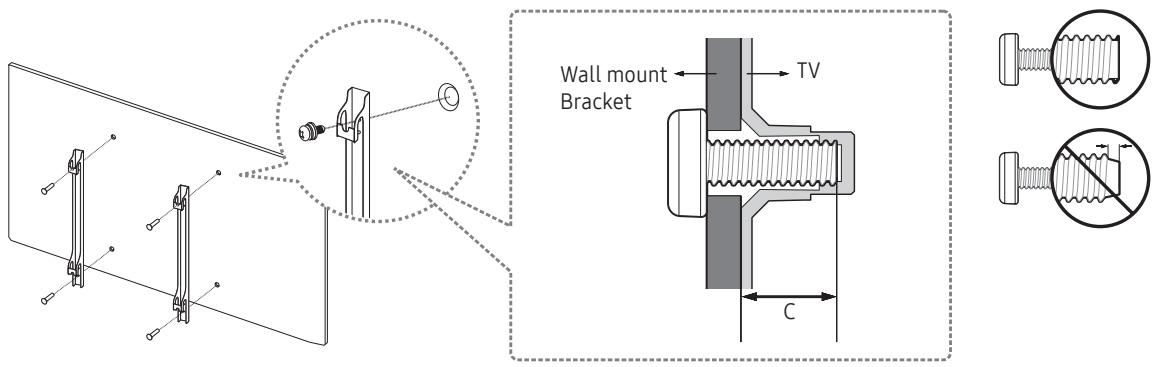
VESA wall mount kit notes and specifications
You can install your wall mount on a solid wall perpendicular to the floor. Before attaching the wall mount to surfaces other than plaster board, contact your nearest dealer for additional information. If you install the TV on a ceiling or slanted wall, it may fall and result in severe personal injury.
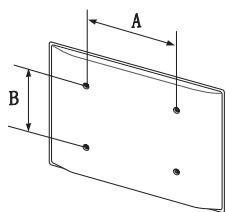
Standard dimensions for wall mount kits are shown in the table below.
If you are installing a third-party wall mount, note that the length of the screws you can use to attach the TV to the wall mount is shown in column C in the table below.
| TV size in inches | VESA screw hole specs(A * B) in millimetres | C (mm) | Standard Screw | Quantity |
| 32 | 100 x 100 | 19 – 20 | M4 | 4 |
| 40 ~ 55 | 200 x 200 | M8 |

Do not install your wall mount kit while your TV is turned on. This may result in personal injury from electric shock.
Do not use screws that are longer than the standard length or do not comply with VESA standard screw specifications. Screws that are too long may cause damage to the inside of the TV set.
- For wall mounts that do not comply with the VESA standard screw specifications, the length of the screws may differ depending on the wall mount specifications.
- Do not fasten the screws too firmly. This may damage the product or cause the product to fall, leading to personal injury. Samsung is not liable for these kinds of accidents.
Samsung is not liable for product damage or personal injury when a non-VESA or non-specified wall mount is used or the consumer fails to follow the product installation instructions. - Do not mount the TV at more than a 15 degree tilt.
Always have two people mount the TV onto a wall.
Providing proper ventilation for your TV
When you install your TV, maintain a distance of at least 10cm between the TV and other objects (walls, cabinet sides, etc.) to ensure proper ventilation. Failing to maintain proper ventilation may result in a fire or a problem with the product caused by an increase in its internal temperature.
When you install your TV with a stand or a wall mount, we strongly recommend you use parts provided by Samsung Electronics only. Using parts provided by another manufacturer may cause difficulties with the product or result in injury caused by the product falling.
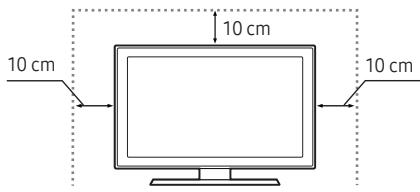
Installation with a stand
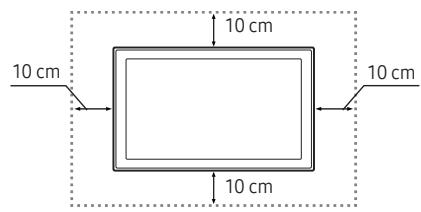
Installation with a wall mount
Attaching the TV to the Stand
Make sure you have all the accessories shown, and that you assemble the stand following the provided assembly instructions.
Safety Precaution: Securing the TV to the wall
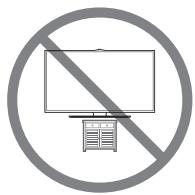
Caution: Pulling, pushing, or climbing on the TV may cause the TV to fall. In particular, ensure your children do not hang on or destabilise the TV. This action may cause the TV to tip over, causing serious injuries or death. Follow all safety precautions provided in the Safety Flyer included with your TV. For added stability and safety, you can purchase and install the anti-fall device as described below.

WARNING: Never place a television set in an unstable location. A television set may fall, causing serious personal injury or death. Many injuries, particularly to children, can be avoided by taking simple precautions such as
- Using cabinets or stands recommended by the manufacturer of the television set.
- Only using furniture that can safely support the television set.
- Ensuring the television set is not overhanging the edge of the supporting furniture.
- Not placing the television set on tall furniture (for example, cupboards or bookcases) without anchoring both the furniture and the television set to a suitable support.
- Not placing the television set on cloth or other materials that may be located between the television set and supporting furniture.
-
Educating children about the dangers of climbing on furniture to reach the television set or its controls. If your existing television set is being retained and relocated, the same considerations as above should be applied.
-
When you have to relocate or lift the TV for replacement or cleaning, be sure not to pull out the stand.
Preventing the TV from falling
-
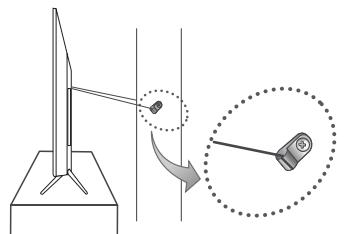
Put the screws into one set of brackets, and then firmly fasten them to the wall. Confirm that the screws are firmly attached to the wall.
-
You may need additional material such as an anchor depending on the type of wall.
-
Put the screws into a second set of brackets, and then fasten the screws to the TV.
-
Screws may not be supplied with the product. In this case, please purchase the screws of the following specifications.
-
Connect the brackets fixed to the TV and the brackets fixed to the wall with a durable, heavy-duty string, and then tie the string tightly.
Install the TV near the wall so that it does not fall backwards.
- Connect the string so that the brackets fixed to the wall are at the same height as or lower than the brackets fixed to the TV.

Anti-theft Kensington Lock
The Kensington Lock is not supplied by Samsung. It is a device used to physically fix the system when using it in a public place. The appearance and locking method may differ from the illustration depending on the manufacturer. Refer to the manual provided with the Kensington Lock for additional information on proper use.
- Please find a "☑" icon on the rear of the TV. A kensington slot is beside the "☑" icon.
- The position and colour may differ depending on the model.
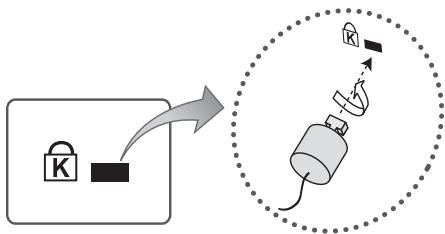
To lock the product, follow these steps:
- Wrap the Kensington lock cable around a large, stationary object such as desk or chair.
- Slide the end of the cable with the lock attached through the looped end of the Kensington lock cable.
- Insert the locking device into the Kensington slot on the product.
-
Lock the lock.
-
These are general instructions. For exact instructions, see the User manual supplied with the locking device.
- The locking device has to be purchased separately.
Specifications and Other Information
Specifications
| Environmental Considerations | ||
| Operating Temperature | 10°C to 40°C (50°F to 104°F) | |
| Operating Humidity | 10% to 80%, non-condensing | |
| Storage Temperature | -20°C to 45°C (-4°F to 113°F) | |
| Storage Humidity | 5% to 95%, non-condensing | |
| Stand Swivel (Left / Right) | 0° | |
| Model Name | UE32K4100 / UE32K4102 | |
| Screen Size (Diagonal) | 32 inches (80 cm) | |
| Display Resolution | 1366 x 768 | |
| Sound (Output) | 20 W | |
| Dimensions (W x H x D) | ||
| Body | 728.7 x 468.8 x 78.0 mm | |
| With stand | 728.7 x 521.7 x 185.3 mm | |
| Weight | ||
| Without Stand | 4.7 kg | |
| With Stand | 4.8 kg | |
| Model Name | UE32K5100 / UE32K5102 | UE40K5100 / UE40K5102 |
| Screen Size (Diagonal) | 32 inches (80 cm) | 40 inches (100 cm) |
| Display Resolution | 1920 x 1080 | |
| Sound (Output) | 20 W | |
| Dimensions (W x H x D) | ||
| Body | 721.4 x 465.1 x 78.0 mm | 901.1 x 557.1 x 78.0 mm |
| With stand | 721.4 x 519.1 x 193.5 mm | 901.1 x 621.5 x 191.4 mm |
| Weight | ||
| Without Stand | 4.8 kg | 8.1 kg |
| With Stand | 4.9 kg | 8.2 kg |
| Environmental Considerations | ||
| Operating Temperature | 10°C to 40°C (50°F to 104°F) | |
| Operating Humidity | 10% to 80%, non-condensing | |
| Storage Temperature | -20°C to 45°C (-4°F to 113°F) | |
| Storage Humidity | 5% to 95%, non-condensing | |
| Stand Swivel (Left / Right) | 0° | |
| Model Name | UE49K5100 / UE49K5102 | UE55K5100 / UE55K5102 |
| Screen Size (Diagonal) | 49 inches (123 cm) | 55 inches (138 cm) |
| Display Resolution | 1920 x 1080 | |
| Sound | ||
| (Output) | 20 W | |
| Dimensions (W x H x D) | ||
| Body | 1096.8 x 676.2 x 88.0 mm | 1232.6 x 752.5 x 98.0 mm |
| With stand | 1096.8 x 742.8 x 230.2 mm | 1232.6 x 818.0 x 233.1 mm |
| Weight | ||
| Without Stand | 12.6 kg | 15.6 kg |
| With Stand | 12.7 kg | 15.7 kg |
- The design and specifications are subject to change without prior notice.
- For information about the power supply, and about power consumption, refer to the label attached to the product.
Typical power consumption is measured according to IEC 62087.
Decreasing power consumption
When you shut the TV off, it enters Standby mode. In Standby mode, it continues to draw a small amount of power. To decrease power consumption, unplug the power cord when you don't intend to use the TV for a long time.
Supported Video Formats
| File Extention | Container | Video Codec | Resolution | Frame rate (fps) | Bit rate (Mbps) | Audio Codec |
| *.avi | DivX 3.11 / 4 / 5 / 6 | 1920 x 1080 | 6~30 | 30 | Dolby Digital LPCM ADPCM (IMA, MS) AAC HE-AAC WMA Dolby Digital Plus MPEG (MP3) DTS (Core) G.711 (A-Law, μ-Law) | |
| *.mkv | MPEG4 SP/ASP | |||||
| *.asf | H.264 BP/MP/HP | |||||
| *.wmv | Motion JPEG | 640 x 480 | 8 | |||
| *.mp4 | AVI | Window Media Video v9 | ||||
| *.3gp | MKV | MPEG2 | ||||
| *.vro | ASF | |||||
| *.mpg | MP4 | 1920 x 1080 | ||||
| *.mpeg | 3GP | |||||
| *.ts | VRO | |||||
| *.tp | VOB | MPEG1 | 30 | |||
| *.trp | PS | |||||
| *.mov | TS | |||||
| *.flv | ||||||
| *.vob | ||||||
| *.svi | ||||||
| *.divx |
- Other Restrictions
- Video content will not play, or not play correctly, if there is an error in the content or the container.
Sound or video may not work if the contents have a standard bit rate/frame rate above the compatible Frame/sec listed in the table. - If the Index Table is in error, the Seek (Jump) function is not supported.
- Some USB/digital camera devices may not be compatible with the player.
- The menu can be displayed late if the video is over 10Mbps(bit rate).
| Video decoder | Audio decoder |
| Supports up to H.264, Level 4.1 (FMO/ASO/RS are not supported.)frame rate:- Below 1280 x 720: 60 frame maxAbove 1280 x 720: 30 frame maxVC1 AP L4 is not supported.GMC 2 or higher is not supported. | WMA 10 Pro supports up to 5.1 channel and M2 profile.WMA lossless audio is not supported.Vorbis supports up to 2ch.DD+ supports up to 5.1 channel. |
Supported Subtitle Formats
External
| Name | File extension |
| MPEG-4 timed text | .txt |
| SAMI | .smí |
| SubRip | .srt |
| Subscriber | .sub |
| Micro DVD | .sub or .txt |
| SubStation Alpha | .ssa |
| Advanced SubStation Alpha | .ass |
| Powerdivx | .psb |
Internal
| Name | Container | Format |
| Xsub | AVI | Picture Format |
| SubStation Alpha | MKV | Text Format |
| Advanced SubStation Alpha | MKV | Text Format |
| SubRip | MKV | Text Format |
| MPEG-4 Timed text | MP4 | Text Format |
Supported Photo Formats
| File Extension | Type | Resolution |
| *.jpg | JPEG | 15360 X 8640 |
| *.jpeg | ||
| *.bmp | BMP | 4096 X 4096 |
| *.mpo | MPO | 15360 X 8640 |
- The MPO type file does not support Zoom, Rotate and Slide Show Effect functions.
Supported Music Formats
| File Extension | Type | Codec | Remark |
| *.mp3 | MPEG | MPEG1 Audio Layer 3 | |
| *.m4a | MPEG4 | AAC | |
| *.mpa | |||
| *.aac | |||
| *.flac | FLAC | FLAC | Supports up to 2ch. |
| *.ogg | OGG | Vorbis | Supports up to 2ch. |
| *.wma | WMA | WMA | WMA 10 Pro supports up to 5.1 channel and M2 profile. (WMA lossless audio is not supported.) |
| *.wav | wav | wav | |
| *.mid | midi | midi | type 0 and type 1 |
| *.midi |
Full available resolution
Optimal resolution is 4 series: 1366 × 768 @ 60Hz / 5 series: 1920 × 1080 @ 60Hz . See specification page for full available resolution.
| Mode | Resolution | Horizontal Frequency (KHz) | Vertical Frequency (Hz) | Pixel Clock Frequency (MHz) | Sync Polarity (H / V) | 1366 x 768 | 1920 x 1080 |
| IBM | 720 x 400 | 31.469 | 70.087 | 28.322 | -/+ | ✓ | ✓ |
| MAC | 640 x 480 | 35.000 | 66.667 | 30.240 | -/- | ✓ | ✓ |
| 832 x 624 | 49.726 | 74.551 | 57.284 | -/- | ✓ | ✓ | |
| 1152 x 870 | 68.681 | 75.062 | 100.000 | -/- | ✓ | ||
| VESA DMT | 640 x 480 | 31.469 | 59.940 | 25.175 | -/- | ✓ | ✓ |
| 640 x 480 | 37.861 | 72.809 | 31.500 | -/- | ✓ | ✓ | |
| 640 x 480 | 37.500 | 75.000 | 31.500 | -/- | ✓ | ✓ | |
| 800 x 600 | 37.879 | 60.317 | 40.000 | +/+ | ✓ | ✓ | |
| 800 x 600 | 48.077 | 72.188 | 50.000 | +/+ | ✓ | ✓ | |
| 800 x 600 | 46.875 | 75.000 | 49.500 | +/+ | ✓ | ✓ | |
| 1024 x 768 | 48.363 | 60.004 | 65.000 | -/- | ✓ | ✓ | |
| 1024 x 768 | 56.476 | 70.069 | 75.000 | -/- | ✓ | ✓ | |
| 1024 x 768 | 60.023 | 75.029 | 78.750 | +/+ | ✓ | ✓ | |
| 1152 x 864 | 67.500 | 75.000 | 108.000 | +/+ | ✓ | ||
| 1280 x 720 | 45.000 | 60.000 | 74.250 | +/+ | ✓ | ✓ | |
| 1280 x 800 | 49.702 | 59.810 | 83.500 | -/+ | ✓ | ||
| 1280 x 1024 | 63.981 | 60.020 | 108.000 | +/+ | ✓ | ||
| 1280 x 1024 | 79.976 | 75.025 | 135.000 | +/+ | ✓ | ||
| 1366 x 768 | 47.712 | 59.790 | 85.500 | +/+ | ✓ | ✓ | |
| 1440 x 900 | 55.935 | 59.887 | 106.500 | -/+ | ✓ | ||
| 1600 x 900RB | 60.000 | 60.000 | 108.000 | +/+ | ✓ | ||
| 1680 x 1050 | 65.290 | 59.954 | 146.250 | -/+ | ✓ | ||
| 1920 x 1080 | 67.500 | 60.000 | 148.500 | +/+ | ✓ |
- NOTE
- The interlace mode is not supported.
- The set might operate abnormally if a non-standard video format is selected.
Adapter information


Use following adapter to avoid hazard
Manufacturer: Solum
Adaptor model: A4819_KSML(48W); A4819N_KSML(48W)
Manufacturer: Powernet
Adaptor model: A5919_KPNL(59W); A5919N_KPNL(59W)
Licences

DOLBY DIGITAL PLUS
Manufactured under license from Dolby Laboratories. Dolby and the double-D symbol are trademarks of Dolby Laboratories.

Dts Premium Sound | 5.1
For DTS patents, see http://patents.dts.com. Manufactured under license from DTS, Inc. DTS, the Symbol, DTS in combination with the Symbol, DTS Premium Sound|5.1, DTS Digital Surround, DTS Express, and DTS Neo2:5 are registered trademarks or trademarks of DTS, Inc. in the United States and/or other countries.
© DTS, Inc. All Rights Reserved.
Hami
The terms HDMI and HDMI High-Definition Multimedia Interface, and the HDMI Logo are trademarks or registered trademarks of HDMI Licensing LLC in the United States and other countries.
DIVX HD
This DivX Certified® device has passed rigorous testing to ensure it plays DivX® video.
To play purchased DivX movies, first register your device at vod.divx.com. Find your registration code in the DivX VOD section of your device setup menu.
DivX Certified® to play DivX® video up to HD 1080p, including premium content.
DivX®, DivX Certified® and associated logos are trademarks of DivX, LLC and are used under license.
Covered by one or more of the following U.S. patents: 7,295,673; 7,460,668; 7,515,710; 8,656,183; 8,731,369; RE45,052.
Open Source License Notice
Open Source used in this product can be found on the following webpage. (http://opensource.samsung.com) Open Source License Notice is written only English.
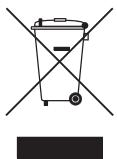
Correct Disposal of This Product (Waste Electrical & Electronic Equipment)
(Applicable in countries with separate collection systems)
This marking on the product, accessories or literature indicates that the product and its electronic accessories (e.g. charger, headset, USB cable) should not be disposed of with other household waste at the end of their working life. To prevent possible harm to the environment or human health from uncontrolled waste disposal, please separate these items from other types of waste and recycle them responsibly to promote the sustainable reuse of material resources.
Household users should contact either the retailer where they purchased this product, or their local government office, for details of where and how they can take these items for environmentally safe recycling.
Business users should contact their supplier and check the terms and conditions of the purchase contract. This product and its electronic accessories should not be mixed with other commercial wastes for disposal.
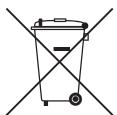
Correct disposal of the batteries in this product
(Applicable in countries with separate collection systems)
This marking on battery, manual or packaging indicates that the batteries in this product should not be disposed of with other household waste at the end of their working life. Where marked, the chemical symbols Hg, Cd or Pb indicate that the battery contains mercury, cadmium or lead above the reference levels in EC Directive 2006/66. If batteries are not properly disposed of, these substances can cause harm to human health or the environment.
To protect natural resources and to promote material reuse, please separate batteries from other types of waste and recycle them through your local, free battery return system.
For information on Samsung's environmental commitments and product-specific regulatory obligations, e.g. REACH, WEEE, Batteries, visit http://www.samsung.com/uk/aboutsamsung/samsungelectronics/corporatecitizenship/data-corner.html
WARNING - TO PREVENT THE SPREAD OF FIRE, KEEP CANDLES OR OTHER ITEMS WITH OPEN FLAMES AWAY FROM THIS PRODUCT AT ALL TIMES.

This page is intentionally left blank.
Adaptor model: A4819_KSML(48W); A4819N_KSML(48W)
Manufacturer: Powernet
Adaptor model: A5919_KPNL(59W); A5919N_KPNL(59W)
Licencje

DOLBY DIGITAL PLUS
For DTS patents, see http://patents.dts.com. Manufactured under license from DTS, Inc. DTS, the Symbol, DTS in combination with the Symbol, DTS Premium Sound|5.1, DTS Digital Surround, DTS Express, and DTS Neo2:5 are registered trademarks or trademarks of DTS, Inc. in the United States and/or other countries.
© DTS, Inc. All Rights Reserved.
HOMI
The terms HDMI and HDMI High-Definition Multimedia Interface, and the HDMI Logo are trademarks or registered trademarks of HDMI Licensing LLC in the United States and other countries.
DIVX HD
This DivX Certified® device has passed rigorous testing to ensure it plays DivX® video.
To play purchased DivX movies, first register your device at vod.divx.com. Find your registration code in the DivX VOD section of your device setup menu.
DivX Certified® to play DivX® video up to HD 1080p, including premium content.
DivX®, DivX Certified® and associated logos are trademarks of DivX, LLC and are used under license.
Covered by one or more of the following U.S. patents: 7,295,673; 7,460,668; 7,515,710; 8,656,183; 8,731,369; RE45,052.
Open Source License Notice
Open Source used in this product can be found on the following webpage. (http://opensource.samsung.com) Open Source License Notice is written only English.
This page is intentionally left blank.
To reduce the risk of fire or electric shock, do not expose this apparatus to rain or moisture.
Apparatus shall not be exposed to dripping or splashing and no objects filled with liquids, such as vases, shall not be placed on the apparatus.
WARNING: FOR INDOOR USE ONLY
Kaj je v škatli?
Preverite, ali ste s televizorjem dobili naslednje elemente. Če kateri element manjka, se obrnite na lokalnega prodajalca.
Daljinski upravlajnik & bateriji (AAA x 2)
Napajalni kabel (Ovisno od države in modela)
Regulativna navodila
- Preverite in spremenite signal/vir.
Adaptor model: A4819_KSML(48W); A4819N_KSML(48W)
Manufacturer: Powernet
Adaptor model: A5919_KPNL(59W); A5919N_KPNL(59W)
Licence

DOLBY DIGITAL PLUS
Izdelano z licenco podjetja Dolby Laboratories. Dolby in simbol DD sta blagovni znamki podjetja Dolby Laboratories.

Dhts Premium Sound | 5.1
For DTS patents, see http://patents.dts.com. Manufactured under license from DTS, Inc. DTS, the Symbol, DTS in combination with the Symbol, DTS Premium Sound|5.1, DTS Digital Surround, DTS Express, and DTS Neo2:5 are registered trademarks or trademarks of DTS, Inc. in the United States and/or other countries.
© DTS, Inc. All Rights Reserved.
HOMI
The terms HDMI and HDMI High-Definition Multimedia Interface, and the HDMI Logo are trademarks or registered trademarks of HDMI Licensing LLC in the United States and other countries.
DIVX HD
This DivX Certified® device has passed rigorous testing to ensure it plays DivX® video.
To play purchased DivX movies, first register your device at vod.divx.com. Find your registration code in the DivX VOD section of your device setup menu.
DivX Certified® to play DivX® video up to HD 1080p, including premium content.
DivX®, DivX Certified® and associated logos are trademarks of DivX, LLC and are used under license.
Covered by one or more of the following U.S. patents: 7,295,673; 7,460,668; 7,515,710; 8,656,183; 8,731,369; RE45,052.
Open Source License Notice
Open Source used in this product can be found on the following webpage. (http://opensource.samsung.com) Open Source License Notice is written only English.
This page is intentionally left blank.
To reduce the risk of fire or electric shock, do not expose this apparatus to rain or moisture.
Apparatus shall not be exposed to dripping or splashing and no objects filled with liquids, such as vases, shall not be placed on the apparatus.
WARNING: FOR INDOOR USE ONLY
Magyar-3
A doboz tartalma
Adaptor model: A4819_KSML(48W); A4819N_KSML(48W)
Manufacturer: Powernet
Adaptor model: A5919_KPNL(59W); A5919N_KPNL(59W)
Licencek

DOLBY DIGITAL PLUS
For DTS patents, see http://patents.dts.com. Manufactured under license from DTS, Inc. DTS, the Symbol, DTS in combination with the Symbol, DTS Premium Sound|5.1, DTS Digital Surround, DTS Express, and DTS Neo2:5 are registered trademarks or trademarks of DTS, Inc. in the United States and/or other countries.
© DTS, Inc. All Rights Reserved.
HOMI
The terms HDMI and HDMI High-Definition Multimedia Interface, and the HDMI Logo are trademarks or registered trademarks of HDMI Licensing LLC in the United States and other countries.
DIVX HD
This DivX Certified® device has passed rigorous testing to ensure it plays DivX® video.
To play purchased DivX movies, first register your device at vod.divx.com. Find your registration code in the DivX VOD section of your device setup menu.
DivX Certified® to play DivX® video up to HD 1080p, including premium content.
DivX®, DivX Certified® and associated logos are trademarks of DivX, LLC and are used under license.
Covered by one or more of the following U.S. patents: 7,295,673; 7,460,668; 7,515,710; 8,656,183; 8,731,369; RE45,052.
Open Source License Notice
Open Source used in this product can be found on the following webpage. (http://opensource.samsung.com) Open Source License Notice is written only English.
This page is intentionally left blank.
To reduce the risk of fire or electric shock, do not expose this apparatus to rain or moisture.
Apparatus shall not be exposed to dripping or splashing and no objects filled with liquids, such as vases, shall not be placed on the apparatus.
WARNING: FOR INDOOR USE ONLY
Šta se nalazi u kutiji?
Adaptor model: A4819_KSML(48W); A4819N_KSML(48W)
Manufacturer: Powernet
Adaptor model: A5919_KPNL(59W); A5919N_KPNL(59W)
Licence

DOLBY DIGITAL PLUS
Proizvedeno po licenci kompanije Dolby Laboratories. Dolby i simbol dvostrukog slova D su zašićeniŽigovi kompanije Dolby Laboratories.

Dts Premium Sound | 5.1
For DTS patents, see http://patents.dts.com. Manufactured under license from DTS, Inc. DTS, the Symbol, DTS in combination with the Symbol, DTS Premium Sound|5.1, DTS Digital Surround, DTS Express, and DTS Neo2:5 are registered trademarks or trademarks of DTS, Inc. in the United States and/or other countries.
© DTS, Inc. All Rights Reserved.
HOMI
The terms HDMI and HDMI High-Definition Multimedia Interface, and the HDMI Logo are trademarks or registered trademarks of HDMI Licensing LLC in the United States and other countries.
DIVX HD
This DivX Certified® device has passed rigorous testing to ensure it plays DivX® video.
To play purchased DivX movies, first register your device at vod.divx.com. Find your registration code in the DivX VOD section of your device setup menu.
DivX Certified® to play DivX® video up to HD 1080p, including premium content.
DivX®, DivX Certified® and associated logos are trademarks of DivX, LLC and are used under license.
Covered by one or more of the following U.S. patents: 7,295,673; 7,460,668; 7,515,710; 8,656,183; 8,731,369; RE45,052.
Open Source License Notice
Open Source used in this product can be found on the following webpage. (http://opensource.samsung.com) Open Source License Notice is written only English.
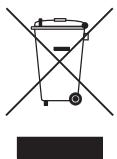
Pravilno odlaganje ovog proizvoda (otpadna elektrichna i elektronska oprema)
This page is intentionally left blank.
Upozorenje! Važne sigurnosne upute
(Prije korištenja televizora pročitajte sigurnosne upute.)
OPREZ
OPASNOST OD STRUJNOG UDARA,NE OTVARAJTE
OPREZ: KAKO BI SE SMANJILA OPASNOST OD STRUJNOG UDARA,NE SKIDAJE POKLOPAC (NITI STRAZNJU STRANICU). UNUTAR UREDAJA NEMA DIJELOVA KOJE BISTE SAMI MOGLI POPRAVITI. SERVISIRANJE PREPUSTITE KVALIFICIRANOM OSOBLJU.
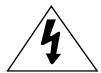
Ovaj spelb znači da je struja u unutrašnjosti visokog napona. Opasno je dolaziti u bilo kakav doticaj s unutarnjim dijelovima proizvoda.

Ovaj symbol naznačujde je uz urežaj prilozena
važna dokumentacija o njegovom radu i odžavanju.

Proizvod II.razreda:Ovaj simbol označava da nije potrebna sigurnosna veza s uzemljenjem.

AC napon: Ovaj simbol označava da nazivni napon označen navenedenim simbolom predstavlja AC napon.

DC napon: Ovaj simbol označava da nazivni napon označen navenedenim simbolom predstavlja DC napon.

Oprez, pogledajte upute za upotrebu: Ovaj simbol upucije korisnika da potraži dodatne informacije u pogledu sigurnosti u korisnikom prirucniku.
Utori i otvori na ormarić u na stržnijoj ili donoj strani namijenji su za pravilno prozračivanje. Kako bi se osigurao pouzdan rad uredaj a njegova zašita od pregrijavanja, ti utori i otvori nikada se ne smiju blokirati niti prekriti.
To reduce the risk of fire or electric shock, do not expose this apparatus to rain or moisture.
Apparatus shall not be exposed to dripping or splashing and no objects filled with liquids, such as vases, shall not be placed on the apparatus.
WARNING: FOR INDOOR USE ONLY
Sadržaj pakiranja
Provjerite jesi li s televizorom isporučeni sljedeci dodaci. Ako neki predmeti nedostaju, obratite se lokalnom distributeru.
Daljinski upravljač & baterijee (AAA x 2)
Adaptor model: A4819_KSML(48W); A4819N_KSML(48W)
Manufacturer: Powernet
Adaptor model: A5919_KPNL(59W); A5919N_KPNL(59W)
Licence

DOLBY DIGITAL PLUS
Proizvedeno po licenci tvrtke Dolby Laboratories. Dolby i symbolism dvostrukog slova D trgovački suznakovi tvrtke Dolby Laboratories.

Dts Premium Sound | 5.1
For DTS patents, see http://patents.dts.com. Manufactured under license from DTS, Inc. DTS, the Symbol, DTS in combination with the Symbol, DTS Premium Sound|5.1, DTS Digital Surround, DTS Express, and DTS Neo2:5 are registered trademarks or trademarks of DTS, Inc. in the United States and/or other countries.
© DTS, Inc. All Rights Reserved.
HOMI
The terms HDMI and HDMI High-Definition Multimedia Interface, and the HDMI Logo are trademarks or registered trademarks of HDMI Licensing LLC in the United States and other countries.
DIVX HD
This DivX Certified® device has passed rigorous testing to ensure it plays DivX® video.
To play purchased DivX movies, first register your device at vod.divx.com. Find your registration code in the DivX VOD section of your device setup menu.
DivX Certified® to play DivX® video up to HD 1080p, including premium content.
DivX®, DivX Certified® and associated logos are trademarks of DivX, LLC and are used under license.
Covered by one or more of the following U.S. patents: 7,295,673; 7,460,668; 7,515,710; 8,656,183; 8,731,369; RE45,052.
Open Source License Notice
Open Source used in this product can be found on the following webpage. (http://opensource.samsung.com) Open Source License Notice is written only English.
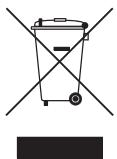
Pravilno odlaganje ovog uredaja (otpadna elektricna & elektronicka oprema)
This page is intentionally left blank.
IpeynpyeYBaHbe! Baxn 6e36eHocn nHcTpyKcnn
Be moHme npouhtajte ng 6e36eHocnnte Hnctpykunnped da 3aNoHete da ro Kopncnte BaHnot TeJebnOp.)
BHIMAHNE
P3IKOKDJELEKTPNUEH YJAP,HEOTBOPAJTE
BHHAMHIE:3AДАГ HAMAЛNTE PИЗИКOT OД ELEKTPUCHYEN YIAP,HE OTCTPAHVBAJTE FO KANAKOT (HINTY 3AДHATA CTPAHA).BO BHATPESHOCTA HEMA DELOBN KON MOKE DA CE NOPABAT OД CTPAH A HOKINCHIKOT. IPNEPYJITETE FO CEPBICNPAHBETO HA KBALINФИKYBAH INPECOHJI.
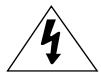
Oboj cmm60n oocuyba Deka Bo BHaTpeuHocTa mAmBvCOK haON. ONaCHO e da oarate BO kakOB 6nIO KOHTAKC o BHaTpeuHNte DeIobu H a OBOJ pOn3BOD.

Oboj cmm6oJ 03NaUyBa IeKa co OBOJ npOn3BOD ce nCnpaUyBa BaxHa IInTepaTya Bo Bpcka CO herOBOTo fYHKnIOHnPaHe i OdpKyuBaHe.

Ipn3B0D oN kna cIa II: OBoj Cm6bOJ 03NaUyBa DeKaHa npOn3B0oT He My e NTope6Hc6eHocHo 3a3eMjyBaHe.

AC hanoH: OboJ cM60J 03HaYBa deka HOMHHaHnT HAnOH O3HaueH co BAKOB Cm60J e HAm3MeHnueH (AC) HanoH

DC haon: Oboj cmm60n 03auyba deka HOMHaJIHnOt haon 03haueH co BaKOB cmm60n e eoHacouen (DC) haon.

BHMaHHe, nOJIeHHeTe BO INHcTpyKUInTe 3a KOpINCTeBe: OObJ Cm60n My HAnOxyBa Ha KOpINCHNkOT Da nOJIeHNe BO pIrpAunHKOT 3a KOpINCTeBe 3a DOnOIIhNteHNn INΦOpMaun NOBp3AHn Co 6e36eHnOCTa.
PpNkLynHte MeCTa n OTbOpHTe Ha opMapOT n HA 3aJnHa TnHa NdoJIHATA cTpaHa Ce HAMHeTn 3a BeHTnlaIJa. 3a da ce 0e36eNi cnrgpHo yHKUHOHPaHe Ha OBOJ ype,I Ho n Da ce 3aUHTn OD pErpeBaHe, OBne npKluyHn MeCTa n OTbOpN HNKOraH He Tpe6a Da 6nDat 6loKpAnH nnnn POKPmeHn.
- He ro noctabaybajte oOBJ ypeD BO 3aTbopeH npocTOp, kako ITO CE noJIuIz 3a KHNr IIN BrgaDeHn opMapn, OCBEN aKO He OBO3MOXHTe COODBeTHa BEHTUNaJia.
- He ro noctabaybajte oboj ypeJ BO 6n3nHa nIi Ha dpaJatop nIi rpeJHn TeJa nIi, naK, Ha Mecta KaTe uTo Ke 6nJe nIIOxKeH Ha dinpeKTHa COHcEBA CBETnHa.
- He noctabvajte caioBn (Ba3Hn nTH.) kon coapkaT bOa Bp3 OBOj ype, 6nJejkn Toa MoKe da npedn3BnuKa npkap nn eneKtpuhen ydp.
He ro n3noxybajte oOBJ ypeD ha dojkn He ro noctabvaybjte BO 6bn3nHa ha BOa (BO 6bn3nHa Ha KaJa, naBa6o, kyJNcKo Iaab6o nn Kopito 3a aInuTa, BO BnaJen POpym nn Bo 6bn3nHa Ha 6a3e HtH.). Dokonky OOBJ ypeD cnyajHo ce HablaJHH, NCKnyute Ro ka6eNoT n BeDaHs 6paTe Ce kaj ObnaCTehnOT dInlep.
Oboj ypek npocntn 6atepn.Bo Baaata 3aeHnca moe6n noctojar ekolounk perynatnb cnopeed kon tpe6a npabnilno da ng oTcpanhte obne 6atepn. Be monime o6patete ce kaj baunte nokalnn bnaCTn 3a da dobnete nHopmaun 3a oTcpanhybahe nI nepeuknilpahe.
He nontobaybajte sdnhtpe npknkyoou 3a ctpyja, pnoonkntenhnte ka6n nn aanpnte co hadmhybahe Ha HNBHNT kanaqntet, 6ndejkn Toa moke da npednBnka nokap nn eektpuehen ydap.
Ka6nIte 3a HanojyBaHe Tpe6a Da ce NoCTaBt Ha NaunH co Koj Ke Ce n36eHne HNBHO To Ra3eH e nn npKNeTsyBaHe co npEdMeTn KOI ce NoCTaBEn Bp3 IIN Do HN. ObPHe Te NocE6No BHNMaHne Ha npKnyOuTe Ha KpaEBnto OJ Ka6eNOT, SdnHTE npKnyOuOu 3a CtpyJa I MeCTATA Ha KOI n3JIeYBaATo OD ypeDoT.
3a da ro 3aWtntte OOBJ ypeo od yadap od rpoM nIa da ro 3aWtntte KORA DOJIg BpeMeHcKn nepnoJ He CE KOpNCTn IINI NaIrgneNyBa, I3BaJeTe Ro Ka6eNoT od SInHNoT npNKlyOK 3a cTpya I NCKLyueTe ja aHTeHaTa IINI Ka6eNcKnOT CnCTem. Ha toj NaHH Ke cIpneuTe OwTeTuBaHa Ha ypeoT ppeiN3BvKaHn OD yadap od rpoM n IpomEHn BO HAnOHckTe BOIOBN.
Ipei da ro noBp3e Te Ka6eIOT 3a AC hanojyBaHc e co npKnyOkoT ha DC aanTePoT, npoBePeTe daHn O3HaKaTa 3a HAnOH DA anTePOT oDRObApco IokalHTo eNeKtpuHo HanojyBaHe.
Hnkoraa Hne BMeTHyBaJTe MeTaJIHn IpeDMeTn BO OTBopeHnte JeIobN Ha OBOJ ypeI. Toa npetCTabyBa onacHOc T oJ eIeKtpuChen ydap.
3a da n36eHne tene kntpuen ynap, Hnkoraa He doinpajte ja Bnatpeuhocta ha oboj ype. Camo KBaIINΦnkyBaH texnuaP cmee da ro OTbopa oboj ype.
PpiknyeTo Ka6enot 3a HanojyBaHe dyprn otkako Ke ro pnpucBpcntte ypeod. Kora ro ncknyuBaTe ka6enot 3a HanojyBaHe od snden pnpKnyuk 3a ctpya, cekoraaw BneyeTe 3a pnpKnyukot Ha Ka6enot 3a HanojyBaHe. Hnkoraaw He NcKnyuBajTe ro co BvueheHa camnot Ka6eJ. He do npajTe ro Ka6enot 3a HanojyBaHe co BnaJHn paue.
Ako oboj ypei He pa60n HOpmaJIno - nOToHNO, aKO od Hero ce cnUshaat HeBOO6uHaEN 3Byu nnI IN3JeYBa Hekoja Mnp36a - BeDaNaNcKnyute ro OD hanojyBaHe n OpaTe Ce kaj OBnacteHNOT dInnep nnI cepBvceH ceHTap.
He 3a6opabajte da ro n3BleueTe ka6eIOT 3a haNojyBaHBe oJ npKnyOkOT 3a cTpyja aKO ypeoT HeMa da ce KopnCTn nn aKO n3JeTe OJ DOMOT Ha noDolr BpeMeHcKn nepnoD (ocobeno Kora deca, noctapn lyre nn lyfe co noc6HN nOtpe6NKe OCTaHaT camn BO domOT).
Hacobnnt npab moke da npedn3Bnka eelktpuueyap, nctekybahe ha ctpya nn nojkap, 6ndejkn nopadnpabta ka6eIot 3a hanojybahe moke da co3dae nckpn n toplina nnil n3olaunja tao me da rn n3ry6n cbointcbojCTBa.
06paTe Ce BO OBnacteH cepBcSeH zentap 3a da doobne Te nobKe IHofoMaun DOKokky PnaHnpate Da ro HCTaInpate TeLeBn3OpOT Ha MeTO Co MHORY npab, BnCKOn IINn HnCKN TEmpePaTyPi, rOleMa BnAKnHOCT, XemnCKn CyIpTaHcN nnHa MeCTa KaTe WTo Ke CE KOpNCrNo BO nepIOd od 24 Yaca kaKo Ha aepoDpOM, Jxene3HnUckn CTahuCn nTH. Bo cnpOTbHO MoKe Da ppei3BnKATE cepno3Hn OwTeTuBaHa Ha TELeBn3OpOT.
KopncTe caMo cooDbetHo 3aemjeHn pniKnyOuOni uTKeepn.
- HenpabunhoTo 3a3emjyBaHe MoKe Da npedn3Bnka eNeKtpuH yIap nIOn OSteTyBaHe Ha ONpeMaT. (cAmO ONpeMa oN kna l.)
3a da ro ncknyute ueiocho oOBJ ypei, n3BaTeTe ro herOBnOT ka6eI od sInHnOT stKeep. 06e36eTe necen npicstan do SInHnOT stKeep i npNKlyyOKOT 3a hanojybahe.
Tanahtepnjata (6atepnn nTH.) Tpe6a da ce knlaipna Ha 6e36eHmecTo Koe He e Hdofoat Ha deuata.
He ro nCnytajte nn ydnpaJte npOn3BODOT. Ako npOn3BODOT e oStTeH, ncknyute ro ka6eIOT 3a hanojyBaBe n obpaTeCe BO cepBvcesen ueHTap.
3a da ro nucnctnte ypeod, ncknyeTe ro ka6eIot 3a hanojyBaHe oD sdnHnot 7teKeP i n36pnweTe ro npOn3BODOT co MeKa n cyba kprna. He kopncTeTe HnkaKBNX xemikalnn KaKO BOCK, 6en3eH, aNkoXoN, pa3peyBaun, INCEKTNUIN, OCBeJyBaun Ha BO3dyx, Ly6pknAHTn nn detepreHtN. Obne xemikalnn MoKAT da rO OStETaT HAdBopeuHNO t3rIeH na TeJeBn3OpOT nn da rN n36pnWAT nCneauTe Hnte O3Hakn Ha npOn3BODOT.
He n3noxybajte ro ypeoT ha kankn nn npckahe.
To reduce the risk of fire or electric shock, do not expose this apparatus to rain or moisture.
Apparatus shall not be exposed to dripping or splashing and no objects filled with liquids, such as vases, shall not be placed on the apparatus.
WARNING: FOR INDOOR USE ONLY


LTo mAmBo naketot?
Поберете ддслднite elementс сиспораани сь BAИNot TeLEBn3op. Дokолку HeIoctacyBaAT HeKoI elementu,образе ce kaj BAИNOT lokaJIeN пpoДaВaU.
TB-KoHTpOIpCe HaOraHa DoJIHata CtpaHa Ha TeJeBn3OpOT.
Далейнскуправувач
- Oobj daneuHcN ynpabvBaP cacnonara co Braille tockn Ha konuHaTa Hanoj., Kaan, Iaac n Bhecn kon ce Hamehetn 3a liuata Co oWteTeH BnD.
-IMnHaTa Ha konChnBaTa nOrope moKe da ce pa3nkyBaat Od BcTInHcKInTe IMnHa.
IocTaByBaHBe 6aTePnB O DaJIeUHcKnot UnpaByBaU
MehyBaHbe Ha BJIe3HnOT n3BOp
U3BOp
KopncTe Te 3a n36bpaHe Ha TeIeBn3OpOT mnn dpyr Hn AaBopeHn Bn3eHn n3Bopn KaKO DVD / Blu-ray npeep / ka6enckn npneMnK / STB caTeJIntcKn pnpemnK KOI ce NOBp3aHn Ha TeIeBn3OpOT.
Boo6nuaeHa TeIeTeKCT CtpaHnca
| Дeн | Соджина |
| A | Броч наизбразату стравица. |
| В | Идентов т на телевизската куka. |
| C | Броч наTekobнота стравица ил статус на пребарваьeto. |
| D | Датум и Вreme. |
| E | Текст. |
| F | Сточни поформаши. FASTEXT поформаши. |
PeeBaHbe Ha npo6IeMn I odpKyBaHbe
PeшаBa№Ha npo6JIeMn
Ako imate npo6lem co telenbni3opot, Hajnpbo npouhtajte ja obaa nicta ha mojhn npo6lemn pewehna. Ako he mojket da npimehnte hnty eden od obne cobetn 3a pewaabahe npo6lemn, nocete ja nHTepHET ctpanuata "www.samsung.com", a notoa klnkhete na PooDpwhka nll nbpaTe ce Bo zentapot 3a kopncnukyn ycnyn Ha Samsung.
KbaJIntET Ha CInkata
- Празс, habравете Тесн ha слка за ѳnotврдпгда Ка ванot телевиор правлино ѳ пикжуba Тесн-cлкata. (Одete bo MENU - Рдршka - CamodjaarH03a - Tесн слка) Ako слката сппкжува на павлиен нашин, пчинна за лоша слка може за биде ИЗВОРOT ил сигналот.
CnkaHa TeIeBn3OpOT He n3rIeTa TOLkY Do6p KaKo BO npOdaBncaTata.
- Ako Imate anahoren ka6eJcNk/ set top box npneMnK, naIgpaIeTe ro co dIgntaIeH set top box npneMnK. KopncTeTe HDMI ilnn kOmnoHeHTn Ka6n 3a da do6nTe HD (BvCoKa pe3OlyuJa) KBaIITet Ha cInkata.
Kabcnkn/ cateiHTCNn pnetnlaTHNtUc: Ncnpo6ajte rni dngntaHNTe cTahuO od nohydeHnot cncok ha kaHaann. - Повзваье са Antehа: Исторбajтг HD санницент otkaю ке ИЗршени副市长а ветоматско пебаразыье на kaнали.
- Mhory HD kaahanimaaat 3rOlenemaHa pezolnyuja BO oJHoc Ha SD (ctaHapdHa pezolnuja) coDpKHHnte.
- Поставета ќ заразулцида на Излесенот вдю сигнан од Кабелсков/Set top box рпемнк на 1080i ил 720p.
- Поберета далу гглдате телевизорот od минималната пренирана оддалочост, земajк Ги рпедвдrolемната и pezolyцида на сигнанлOT.
CnKata e n3o6nueHa: rpeka Bo MaKpo 6IokOT, MaHIO7 6IOK, TOnKn, NIKceHn3aunja.
KomnpespaheToHaBndeoCoDpKHNHeMoKeJaPpeiN3BkaI3O6JIuYBaHBeHaCInkata,Oc6eHo kaj CInkn Co 6p3n DnKHeKa KaKo BO CnoptOT IIN DnHaMnHynteΦnIMOBn.
Hnckoto HnBO Ha cnrgaI nnlooHOT KBaJIHTe MoKe da npedn3Bnkaat n3O6nUyBaHe Ha cInkata. OBoj npo6Ie He e noBp3ah co TeleBn3OpOT.
KopncTeHcTo Ha Mo6nHn TelefoHn Bo 6n3Ha Ha TeLeBn3Opot (np6nJHo Do 1m) MoKe Da npEdu3Bvka Wym Ha cnIkata kaj aHaIogHaTaN dIgntaIHaTaeLeBn3Ja.
Bonte ce norpeshn nn HeoctacybaaT.
Ako kopructte komnoeHTha Bpcka, npobepTe daIIN KOMnoeHTHne Ka6n ce NOBpAHn Ha COOBETHnTpnnknyoU. HecooDBetHOTo Ia6abO nob3yBaHe moKe da ppei3BnKa npo6JeMco 60nte nI npa3en ekpan.
Hedobolien HHTeH3nTe Ha 6oN nIIN CBETInHa.
- Пплагодente Ги орциnte 3a Слиka BO менинTo Ha TelebeBn3opOT. (ODeTe BO Pexkum Ha слиka / Boja / Иnteh3nTeT / Octpina)
- Пплагодente ja onцида 3аштetedа наеhepr. BO MeHITo Ha TeleBn3opoT. (OeTe BO MENU -Систem -Ек ршени -Зштetedа наеhepr.)
- 06nnde ce da ja pecetnpate cnilkata 3a da rni BnuinTe 3aandaenHte noctabybaHa h cnilkata. (oTe BO MENU - Cnilka - Pecetnpabe cnilka)
Ha pa60T oD ekpaHOT mMa nCpKeKnHaTa IHHJa.
- Ako rolemenha Na cInkaTa e noctabeHa Ha Odr. Ha ekpaH, npomehete ja Bo 16:9.
- Поменента щаразецушилая на КабелсknOT/catelNTcknOT рпемнik.
Clnkataeucrho-6ena.
- Ako kopructte kompo3nteh AV Bne3, nobp3eTe ro Bndeo ka6eIot (koIta 6oja) co 3eIeHnOt npnknyok Ha kompoHTHnOT Bne3 1 ha TeIeBn3OpOT.
При менихове на Каналite, симкая за мрзуна, сизобличува ил doцни.
Ako TeIeBn3OpTo e Nobp3aH co Ka6eLcNn PnemHnK, 0bndete ce da ro pceTupate Ka6eLcknOT npneHnK. NOBTOPHO npnknyete ro AC ka6eJnt n oouekajte da ce BklyuHa Ka6eLcknOT npneHnK. Toa moxe da notpae do 20 mHyTu.
- ПоставETе ѳ излесната pezoуцида kaбeльсnot рпемнк на 1080i ил n720p.
KbaJInteT Ha 3ByKOT
- Празд се, ИЗвшete Тсет на зук за ѳа посторпеса зукот od вшиот телевизр правлино ункционира. (одente BO MENU - Рдшka - Camoюgarho3a - Тсет на зук)
- Ako 3bykot e Bo pei, npo6leMOT co 3bykot moKe da 6nne npeDn3BvKah OJ n3BOPOT nIcHnAHot.
Hema 3Byk nlln 3BykOT e npemHory TUBOK npu MaKcImaJIHaTbpeHoct 3a jaUnHa Ha 3BykOT.
- Побере te ja щана на заукот на уретот (ka6eIckn/cateJIITcKn ппeep, DVD ппeep nTH.) koj e noBp3aH Na BaшиOT TeleBu3Op.
CnKaTa e 06pa, Ho Hema 3ByK.
-ПоставETа ja onцида ИЗбор ha 3ByuHн Ka TB 3ByuHn BO MeHntO 3a 3Byk.
Ako kopructne HaDBopeWeH ype, npobepTe daIa Ka6JIte 3a 3Byk Ce NOBp3aHn Ha COOdBETHTe BHe3n npNKnyoOn 3a 3Byk Ha TelenBn3OpOT.
- Ako koprincnte haIbOpeuhen ype, npOBepTe ja onCujata 3a n3Je3 Ha 3BykOT ha ypeDTo (Ha np. moKe6n tpe6a da ja npomehnte onCjata 3a 3Byk Ha BaUnOT ka6enckn npneMnK BO HDMl, ako Ha TeLeBn3Opot e nobp3an HDMI ype).
- Ako kopructte DVI kon HDMI ka6en, notpe6e n oce6e n ka6e 3a 3byk.
- Pecraptnajte ro noBp3aHnoT ypeI co nckluyBaHe n nobTOPO BkNcUyBaHBe Ha ka6eIOT 3a hanojyBaHBe Ha ypeIoT.
3ByuHnUte penpOduzupaat HecooDbTeH yM.
TeLeBn3OpOT He rI npIMa CNTe KaHaJI.
- Поверете дали кабелот od anhtehata e dobro prnknyuhen.
- 06nnde ce co fynkunjata NocTab. (noctHO noctabvbahe) da rni dondaTe doctanHite kaHJIHa cncokot co KaHJIHa. OdeTe BO MENU - CnCTem - NocTab. (noctHO noctabvahe) n ouekejTe da ce 3aCyBaat cnte doctanHn KaHJIHa.
- Поберете дали сеньата e павлино поцонирана.
CnKata e n3o6nueHa: rpeka Bo MaKpo 6nokot, MannoT 6nok, TOnKn, NnKcenn3aunja.
KoMnpcepuBaToHaBnDeoCoDpKnnHte MoKeJa npEa3BnkaN306nUyBaHe Ha CnKaTa,OCO6eHoHa CnKn Co 6p3n DnKkeHa KaKcKJ CnOpTOn NnDnHaMnHnTe FmMOBn.
Cna6noT cnHnAn MoJe da npEiun3Bnka n3o6nHyBaHne ha cInkata. Oobj npO6IeM He e nobp3aH co TeLeBn3OpOT.
Друro
CnkaTHe MoKe Da ce npkaKe Ha ze ekpaH.
- HD kahaite mmaat cprn lentn Ha cte pa6obn Ha ekpanot kora npkaqybaat 3rolemen SD (4:3) codpxnn.
- PnI rIeJaHe fHIMOBN KOI NMaAT pa3JIuYeH COOJHOC Ha CInkata OJ BaUNOT TeJeBn3Op, Ha rOpHNOT IdoHNOT pa6 Ke ce pRnKaJat UPHN JeHTN.
- Поставе Ги орцитete за rolемпна на слика на валшOT надворшен уред полten teleportевизор на цел ekpan.
ДалачинсknOT ynpabYbau He Функюнupa.
- 3amehete r6atepuinte Ha daJIeunHcknOT ynpaBybay, BHNMaBajkn Ha toHaT a Hacoka Ha nonapuTeTOT (+/-).
- Icunctete ro np03opeozt 3a npenoc Ha ceh30pOTo daleuHcknOt ynpaByBa.
- 06nnde ce da ro hacouhne daJeunHcknoynpaBybau nipeKTHO KOH TeLeBn3OpOT ha oDlaJeueHoCt od 150-180 cm.
Далачинскnot упавувач on Кабелскnot/set top box приемнк He ro BKлучы n Исклучы Teleевизорот и he ja пиагоува щаунна на зbyкот.
- Порогампajтго далейнскnot уралувачдд Кабелcknot/set top box пиемндд Функцюнра селевзорот. Погледnete Г поразчнкот за корисенье на Кабелcknot/Set top box пиемндд ронайдтгкodot за вшиот телевзор od SAMSUNG.
Ke ce nojabn nopakata "PexmOT He ce npdpxya".
- Поберете ѳ подраната pezoуциja Ha TeleBn3opOT И COODBETHO NOCTaBeTe ja ИЗлеснота pezoуциja Ha NaDbOpeшnotуpe.
Od TeleBn3OpOT n3IeRyBa Mnpc Ha IpaTka.
- Obaa mnp36a e HopmaJIHa n Ke IcYe3He co TEk Ha BpeMe.
Adaptor model: A4819_KSML(48W); A4819N_KSML(48W)
Manufacturer: Powernet
Adaptor model: A5919_KPNL(59W); A5919N_KPNL(59W)
IinueHcN

DOLBY DIGITAL PLUS
Пожибveдени по ліценca на Dolby Laboratories. Dolby и симболот с дve 6укв D ce trproвски Марки на Dolby Laboratories.

Dts Premium Sound | 5.1
For DTS patents, see http://patents.dts.com. Manufactured under license from DTS, Inc. DTS, the Symbol, DTS in combination with the Symbol, DTS Premium Sound|5.1, DTS Digital Surround, DTS Express, and DTS Neo2:5 are registered trademarks or trademarks of DTS, Inc. in the United States and/or other countries.
© DTS, Inc. All Rights Reserved.
HOMI
The terms HDMI and HDMI High-Definition Multimedia Interface, and the HDMI Logo are trademarks or registered trademarks of HDMI Licensing LLC in the United States and other countries.
DIVX HD
This DivX Certified® device has passed rigorous testing to ensure it plays DivX® video.
To play purchased DivX movies, first register your device at vod.divx.com. Find your registration code in the DivX VOD section of your device setup menu.
DivX Certified® to play DivX® video up to HD 1080p, including premium content.
DivX®, DivX Certified® and associated logos are trademarks of DivX, LLC and are used under license.
Covered by one or more of the following U.S. patents: 7,295,673; 7,460,668; 7,515,710; 8,656,183; 8,731,369; RE45,052.
Open Source License Notice
Open Source used in this product can be found on the following webpage. (http://opensource.samsung.com) Open Source License Notice is written only English.
IpaBnHNo deNoHnpaHe Ha OoJ npOn3BOD (OTnaHa eJeKtpnuHa n eJeKtpoHcKa onpeMa)
This page is intentionally left blank.
To reduce the risk of fire or electric shock, do not expose this apparatus to rain or moisture.
Apparatus shall not be exposed to dripping or splashing and no objects filled with liquids, such as vases, shall not be placed on the apparatus.
WARNING: FOR INDOOR USE ONLY
Çfarë/permban kutia?
Adaptor model: A4819_KSML(48W); A4819N_KSML(48W)
Manufacturer: Powernet
Adaptor model: A5919_KPNL(59W); A5919N_KPNL(59W)
Licencat

DOLBY DIGITAL PLUS
For DTS patents, see http://patents.dts.com. Manufactured under license from DTS, Inc. DTS, the Symbol, DTS in combination with the Symbol, DTS Premium Sound|5.1, DTS Digital Surround, DTS Express, and DTS Neo2:5 are registered trademarks or trademarks of DTS, Inc. in the United States and/or other countries.
© DTS, Inc. All Rights Reserved.
HOMI
The terms HDMI and HDMI High-Definition Multimedia Interface, and the HDMI Logo are trademarks or registered trademarks of HDMI Licensing LLC in the United States and other countries.
DIVX HD
This DivX Certified® device has passed rigorous testing to ensure it plays DivX® video.
To play purchased DivX movies, first register your device at vod.divx.com. Find your registration code in the DivX VOD section of your device setup menu.
DivX Certified® to play DivX® video up to HD 1080p, including premium content.
DivX®, DivX Certified® and associated logos are trademarks of DivX, LLC and are used under license.
Covered by one or more of the following U.S. patents: 7,295,673; 7,460,668; 7,515,710; 8,656,183; 8,731,369; RE45,052.
Open Source License Notice
Open Source used in this product can be found on the following webpage. (http://opensource.samsung.com) Open Source License Notice is written only English.

This page is intentionally left blank.
PpOeIoOnoInon! i k c oBnyiec yia Tny aOphiAeia
'otav xnpoiopoleite to fic AC, to etiok oic tpofo8otkoou npapexetai an to Samsung, pooexe te ta Ens;
Eoiayyete to oic AC oTO tpofootikó mexp va akouaté i evac nixoc"klik.
Mny elayte movo to oic AC otyn npia.
Mn xnpouoileto npexómeo fic AC μe aλες oukeuεc.
Mny elayte aalaa cic, ekto ano to npaexoevo ilc AC, oTo trofoodotko.
'Otav aphipeite to tropofoobotiko ano tny npizα, tpaβnξe to σωma tou katakópuφa.
Mny elayete to tpofoobotiko epiizc nou piokovta otyn opophn.
Mn pixveTe avtkeiEv a naW oTo tpofoosotko kaluTo unoBaalte oe kpuoeic.
Mny to npiopptepetne npo to uocnou unodekvctal oto pdootko.
To reduce the risk of fire or electric shock, do not expose this apparatus to rain or moisture.
Apparatus shall not be exposed to dripping or splashing and no objects filled with liquids, such as vases, shall not be placed on the apparatus.
WARNING: FOR INDOOR USE ONLY
ElambdaaAeTe to nla/nny.
Adaptor model: A4819_KSML(48W); A4819N_KSML(48W)
Manufacturer: Powernet
Adaptor model: A5919_KPNL(59W); A5919N_KPNL(59W)
Aδειες

DOLBY DIGITAL PLUS
KataaKeuaZetai KaTOniv a8eiaac ano tN Dolby Laboratories. H eWvmu DaDolby ka to oMuolo 8nlo D eiva eMopka nMaTa Tc Dolby Laboratories.

Dhts Premium Sound | 5.1
For DTS patents, see http://patents.dts.com. Manufactured under license from DTS, Inc. DTS, the Symbol, DTS in combination with the Symbol, DTS Premium Sound|5.1, DTS Digital Surround, DTS Express, and DTS Neo2:5 are registered trademarks or trademarks of DTS, Inc. in the United States and/or other countries.
© DTS, Inc. All Rights Reserved.
HOMI
The terms HDMI and HDMI High-Definition Multimedia Interface, and the HDMI Logo are trademarks or registered trademarks of HDMI Licensing LLC in the United States and other countries.
DIVX HD
This DivX Certified® device has passed rigorous testing to ensure it plays DivX® video.
To play purchased DivX movies, first register your device at vod.divx.com. Find your registration code in the DivX VOD section of your device setup menu.
DivX Certified® to play DivX® video up to HD 1080p, including premium content.
DivX®, DivX Certified® and associated logos are trademarks of DivX, LLC and are used under license.
Covered by one or more of the following U.S. patents: 7,295,673; 7,460,668; 7,515,710; 8,656,183; 8,731,369; RE45,052.
Open Source License Notice
Open Source used in this product can be found on the following webpage. (http://opensource.samsung.com) Open Source License Notice is written only English.
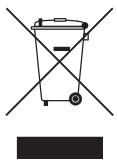
u o o i v o c (A 10689nTg nEeKtPko& nEeKtpovko Eoanluou) (IoXeuI eXwpeS eEeXwpiTa OuaTnmuatauauoyns)
Aut n anavon n avw o npoiov n 0vovodtok evtu o uodekvui ot to piov kai na kektpovik ta eapnata (Tx. optotnc, akouotka, kalwio USB) de npetie va atoppiitovatmu i aaaa okukk a antoBnta o tloc tou kukow tocu. Iva va anoeuxov niavov kiivduov ia to nepalalov n th dmoia uyeia ano tvv aveEeKNT anopopwn anoBantuv, dxawploate auta ta eian anotouc anoBnTwk vak avukkwote ta uneUva, wote va evoxuote nTv npoanbei biomega nct enavxpouomoinong tsuvukw npov.
Oikaiokoi xphatec 8a npetelvaoumuoleovtal eite to kataoeta ano otou ayopaav to napov npioiv etie tic tonikec kpatkeu tnpiaeic va npoepoeic oxetka me tv tok kal tov tpono nou mnpovuv a dlaheouv auta eisn poc nepiaalovtka aopaaan avakkuwann
O telaipkoai xpiotec 3a npetel va etikovwovuv me tvnpouheutouk calvaEayxouv toupoc kal tnc pioutthetaic tsoumaac yopac. Auto to pioiv kal ta nktovka tou aegouap dev 0a pntel va atopptetetal azi me alouc toutou eutipokov anoBantov.
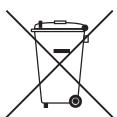
anoppuyntwv mpatapw autou tou pioovtoc (oXeUe oXwpe c eEeXwpiaTa ouvtnmuataoulambdaoc)
Aut n oynauon navw otnyuataia, 0to exyepidio n otuyoukeuaia umodeikvulei otl o npataie nec peixovtae auto to ptoivov dev pntepie va atopipitovtai maclc me aaaa oukkaa atoabnatao teao tou kkuou toc. Otou utpexi n oxetik n tianuavant, ta oumbola taw vnnkukowtoxiewHg Cnd Pb unodekuvovot ni npataia pteixevbapypuro, kadiu n maalbo6o etinile6a nou utnebaivov ta enite6a avphiac tnc Onyiac 2006/66 tnc E.K. Av ot npataie cdes anoppifoov osotá, autc oc uovic mopei va bafovnu ton dnoia yueia n to ppiabaaov.
Tia va npootatepete tou cuaokouc npooc kal va evioxoeet nTv npoataeia e naavaxpnootoiOnc twv uikov, diawpiote tic mntapiec ano tou aalouc tounc anoBnWkauKwote tic meow tou tonikou ouotnmuato. opeav eniutpophiC mntapuiw.
Tia npoopiec oxetiká μe tic πepiαalovtikéc δeueoic ts Samsung kal tic kavovlootikéc unoxpeoeic nou aphiouv to poiov, p.x. REACH, WEEE, matapiεc, επιαkeφθεite τη διεύθυνη http://www.samsung.com/uk/aboutsamsung/samsungelectronics/corporatecitizenship/data-corner.html
PPOEI OIOIHs - IIA NA ANOTPAIEI H EKdHAnzH IYPKAIAZ,NA KPATATE NANTA TA KEPIA H AANES INHfEg FGMNHs AFoFA MAKPIA ANO AYTO TO PPOION.

This page is intentionally left blank.
Contact SAMSUNG WORLD WIDE
If you have any questions or comments relating to Samsung products, please contact the SAMSUNG customer care centre.
| Country | Customer Care Centre® | Web Site |
| AUSTRIA | 0800-SAMSUNG (0800-7267864) [Only for Dealers] 0810-112233 | www.samsung.com/at/support |
| BELGIUM | 02-201-24-18 | www.samsung.com/be/support (Dutch) www.samsung.com/be_fr/support (French) |
| BOSNIA | 055 233 999 | www.samsung.com/support |
| BULGARIA | *3000 Лени в мржата 0800 111 31, Бразлattа сеньфона линь | www.samsung.com/bg/support |
| CROATIA | 072 726 786 | www.samsung.com/hr/support |
| CZECH | 800 - SAMSUNG (800-726786) | www.samsung.com/cz/support |
| Samsung Electronics Czech and Slovak, s.r.o. V Parku 2323/14, 148 00 - Praha 4 | ||
| DENMARK | 70 70 19 70 | www.samsung.com/dk/support |
| FINLAND | 030-6227 515 | www.samsung.com/fi/support |
| FRANCE | 01 48 63 00 00 | www.samsung.com/fr/support |
| GERMANY | 0180 6 SAMSUNG bzw. 0180 6 7267864* (*0,20 €/Anruf aus dem dt. Festnetz, aus dem Mobilfunk max. 0,60 €/Anruf) | www.samsung.com/de/support |
| CYPRUS | 8009 4000 only from landline, toll free | |
| GREECE | 80111-SAMSUNG (80111 726 7864) only from land line (+30) 210 6897691 from mobile and land line | www.samsung.com/gr/support |
| HUNGARY | 0680SAMSUNG (0680-726-786) 0680PREMIUM (0680-773-648) | http://www.samsung.com/hu/support |
| ITALIA | 800-SAMSUNG (800.7267864) | www.samsung.com/it/support |
| LUXEMBURG | 261 03 710 | www.samsung.com/be_fr/support |
| MONTENEGRO | 020 405 888 | www.samsung.com/support |
| SLOVENIA | 080 697 267 (brezplačna številka) | www.samsung.com/si/support |
| NETHERLANDS | 0900-SAMSUNG (0900-7267864) (€ 0,10/Min) | www.samsung.com/nl/support |
| NORWAY | 815 56480 | www.samsung.com/no/support |
| POLAND | 801-172-678* lub +48 22 607-93-33* *(koszt polączenia według taryfy operadora) | www.samsung.com/pl/support |
| PORTUGAL | 808 20 7267 | www.samsung.com/pt/support |
| ROMANIA | *8000 (apel in retea) 08008-726-78-64 (08008-SAMSUNG) Apel Gratisuit | www.samsung.com/ro/support |
| SERBIA | 011 321 6899 | www.samsung.com/rs/support |
| SLOVAKIA | 0800 - SAMSUNG (0800-726 786) | www.samsung.com/sk/support |
| SPAIN | 34902172678 | www.samsung.com/es/support |
| SWEDEN | 0771 726 7864 (0771-SAMSUNG) | www.samsung.com/se/support |
| SWITZERLAND | 0800 726 78 64 (0800-SAMSUNG) | www.samsung.com/ch/support (German) www.samsung.com/ch_fr/support (French) |
| UK | 0330 SAMSUNG (7267864) | www.samsung.com/uk/support |
| EIRE | 0818 717100 | www.samsung.com/ie/support |
| LITHUANIA | 8-800-77777 | www.samsung.com/lt/support |
| LATVIA | 8000-7267 | www.samsung.com/lv/support |
| ESTONIA | 800-7267 | www.samsung.com/ee/support |
| TURKEY | 444 77 11 | www.samsung.com/tr/support |
© 2016 Samsung Electronics Co., Ltd. All rights reserved.
- Warning! Important Safety Instructions
- What's in the Box?
- Adjusting the angle of the plug on the power adapter
- Using the TV Controller
- The Remote Control
- Installing batteries into the remote control
- Changing the Input Source
- Source
- How to use Edit Name
- Information
- Connecting to a COMMON INTERFACE slot (Your TV viewing Card Slot)
- Using the "CI or CI+ CARD"
- NOTE
- The e-Manual
- Screen Display
- Operation Buttons
- How to toggle between an e-Manual topic and the corresponding OSD menu(s).
- How to search for a topic on the index page
- Initial Setup
- If You Want to Reset This Feature...
- Teletext Feature
- Troubleshooting and Maintenance
- Troubleshooting
- Picture Quality
- Colour is wrong or missing.
- There is poor colour or brightness.
- Sound Quality
- No Picture, No Video
- There is no picture/video.
- Aerial (Air/Cable) Connection (Cable: depending on the country)
- The TV is not receiving all channels.
- The picture is distorted: macro block, small block, dots, pixelization error.
- Others
- The picture will not display in full screen.
- The remote control does not work.
- The cable/set top box remote control doesn't turn the TV on or off, or adjust the volume.
- A "Mode Not Supported" message appears.
- There is a plastic smell from the TV.
- Still image warning
- Caring for the TV
- Recommendation - EU Only
- CE
- TV Installation
- Mounting the TV on a wall
- VESA wall mount kit notes and specifications
- Providing proper ventilation for your TV
- Attaching the TV to the Stand
- Safety Precaution: Securing the TV to the wall
- Preventing the TV from falling
- Anti-theft Kensington Lock
- Specifications and Other Information
- Decreasing power consumption
- Supported Video Formats
- Supported Subtitle Formats
- Supported Photo Formats
- Supported Music Formats
- Full available resolution
- Adapter information
- Licences
- Hami
- DIVX HD
- Open Source License Notice
- Correct Disposal of This Product (Waste Electrical & Electronic Equipment)
- (Applicable in countries with separate collection systems)
- Correct disposal of the batteries in this product
- This page is intentionally left blank.
- Licencje
- DOLBY DIGITAL PLUS
- HOMI
- Kaj je v škatli?
- Licence
- Dhts Premium Sound | 5.1
- Magyar-3
- A doboz tartalma
- Licencek
- Šta se nalazi u kutiji?
- Dts Premium Sound | 5.1
- Upozorenje! Važne sigurnosne upute
- OPREZ
- OPASNOST OD STRUJNOG UDARA,NE OTVARAJTE
- Sadržaj pakiranja
- IpeynpyeYBaHbe! Baxn 6e36eHocn nHcTpyKcnn
- BHIMAHNE
- P3IKOKDJELEKTPNUEH YJAP,HEOTBOPAJTE
- LTo mAmBo naketot?
- Далейнскуправувач
- IocTaByBaHBe 6aTePnB O DaJIeUHcKnot UnpaByBaU
- MehyBaHbe Ha BJIe3HnOT n3BOp
- U3BOp
- PeeBaHbe Ha npo6IeMn I odpKyBaHbe
- PeшаBa№Ha npo6JIeMn
- KbaJIntET Ha CInkata
- Bonte ce norpeshn nn HeoctacybaaT.
- Hedobolien HHTeH3nTe Ha 6oN nIIN CBETInHa.
- Ha pa60T oD ekpaHOT mMa nCpKeKnHaTa IHHJa.
- Clnkataeucrho-6ena.
- При менихове на Каналite, симкая за мрзуна, сизобличува ил doцни.
- KbaJInteT Ha 3ByKOT
- Hema 3Byk nlln 3BykOT e npemHory TUBOK npu MaKcImaJIHaTbpeHoct 3a jaUnHa Ha 3BykOT.
- CnKaTa e 06pa, Ho Hema 3ByK.
- 3ByuHnUte penpOduzupaat HecooDbTeH yM.
- TeLeBn3OpOT He rI npIMa CNTe KaHaJI.
- CnKata e n3o6nueHa: rpeka Bo MaKpo 6nokot, MannoT 6nok, TOnKn, NnKcenn3aunja.
- Друro
- CnkaTHe MoKe Da ce npkaKe Ha ze ekpaH.
- ДалачинсknOT ynpabYbau He Функюнupa.
- Далачинскnot упавувач on Кабелскnot/set top box приемнк He ro BKлучы n Исклучы Teleевизорот и he ja пиагоува щаунна на зbyкот.
- Ke ce nojabn nopakata "PexmOT He ce npdpxya".
- Od TeleBn3OpOT n3IeRyBa Mnpc Ha IpaTka.
- IinueHcN
- Çfarë/permban kutia?
- Licencat
- PpOeIoOnoInon! i ke c oBnyiec yia Tny aOphiAeia
- Aδειες
- Contact SAMSUNG WORLD WIDE
Brand : SAMSUNG
Model : UE32K5100
Category : TV