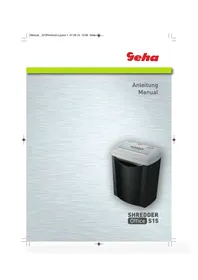
OFFICE S15 - Shredder GEHA - Free user manual and instructions
Find the device manual for free OFFICE S15 GEHA in PDF.



| Product type | Document shredder |
| Brand | GEHA |
| Model | OFFICE S15 |
| Dimensions (L x W x H) | 315 x 200 x 380 mm |
| Net weight | 3.8 kg |
| Power supply | Mains (electrical socket) |
| Power consumption | 300 W |
| Cut size | 7 mm (straight cut) |
| Insertion width | 220 mm |
| Maximum capacity | 15 sheets (70 g/m² A4) |
| Cutting speed | 6 m/min |
| Operating time | 3 minutes continuous operation, then 60 minutes stop |
| Noise level | 73 dB |
| Bin capacity | 15 L |
| Features | Automatic start (AUTO), continuous forward (FWD), reverse (REV), overheat protection, operation indicator |
| Safety | Automatic stop, thermal protection, do not use by children |
| Maintenance | Clean the exterior with a damp cloth; do not use solvents |
| Warranty | 24 months |
| Disposal | Do not dispose of with household waste; take to an approved recycling center |
Frequently Asked Questions - OFFICE S15 GEHA
User questions about OFFICE S15 GEHA
0 question about this device. Answer the ones you know or ask your own.
Ask a new question about this device
Download the instructions for your Shredder in PDF format for free! Find your manual OFFICE S15 - GEHA and take your electronic device back in hand. On this page are published all the documents necessary for the use of your device. OFFICE S15 by GEHA.
USER MANUAL OFFICE S15 GEHA
Thank you for choosing this Geha quality product. Before using the device for the first time, carefully read this manual. Please pay special attention to the safety instructions.
WARNING

Device may not be operated by children!
- The shredding unit may cause injuries.
Do not touch the cutting unit!
- The shredding unit may cause injuries.
Keep all clothes away from the feeder slot.
- The shredding unit may cause injuries.
Keep your hair away from the feeder slot.
- The shredding unit may cause injuries.
Do not spray flammable gas at the device.
- To prevent fire.
In case the machine is in an unusual state, e.g. peculiar smell or smoke emission, stop operating and pull the plug immediately.
- To prevent fire or electric shock.
IMPORTANT SAFETY NOTES
Before using the document shredder for the first time, please read the operating instructions.
When operating an electrical device, you should always take basic safety measures to eliminate the risk of injury from electric shock. Therefore, please follow the following basic rules.
- This device is exclusively designed for shredding paper, so do not use it for any other purposes. Never insert films, OHP films, label paper, clothing or plastics into the shredder. Before inserting paper, remove all staples and paper clips, etc. To prevent disruption or breakdown.
- Please do not operate the device next to heaters or cooling systems, and do not operate the shredder in overheated, wet or dusty conditions. To prevent fire or electric shock.
- Do not spray water at the device. To prevent fire or electric shock.
- The device may neither be altered nor remodelled nor repaired by unauthorised persons. To prevent electric shock or injury.
- Pull the plug before emptying the paper bin, when not using the device for a prolonged period of time, or when moving it. To prevent fire or electric shock.
- Keep ties, jewellery, hair, sleeves, etc. way from the feeder slot. To prevent injury. Should any objects have been inserted in the feeder slot, set the device to "REV" (reverse mode) to remove the objects.
- The centre of gravity of the device is in its upper part. Please place the device on a level surface so as to prevent the shredder from tipping over. To prevent injury.
- Install the device as closely as possible to a mains socket. Do not place any other objects close to the socket so as to make sure that the plug may easily be pulled.
- Do not place any objects on top of the device, and do not lean any objects against it. To prevent injury.
- Be sure to use the correct voltage. To prevent fire or electric shock.
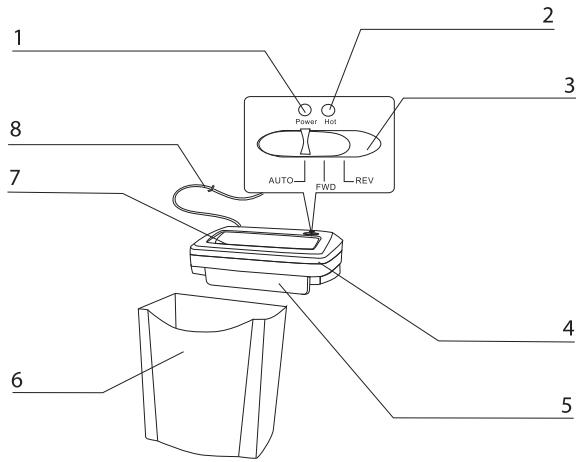
OPERATION
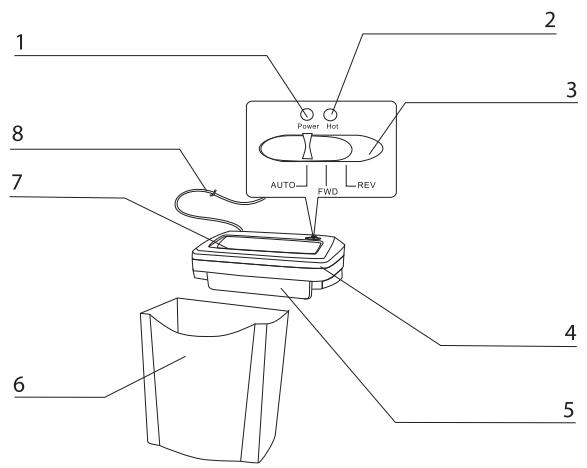
1 Power indicator
When the light is on, the device is in
AUTO mode.
2 Overheat control indicator
When the overheat control indicator is on, pull the plug and leave the device to cool down.
3 Mode switch
"AUTO"
The shredding process is started automatically as soon as the paper to be shredded is inserted into the feeder slot. After shredding is completed, the device is automatically switched off.
"FWD" (forward mode)
The shredding process is operated without interruption.
REV" (reverse mode)
When set to this position, the device eliminates jammed paper in reverse direction.
4 Shredding unit
5 Protective lid
6 Paper bin
The paper bin was specially developed for this device.
7 Feeder slot
Insert paper here.
8 Power cord
- Make sure the switch is turned to "AUTO", place the shredding unit onto the bin correctly. Plug in. The device is ready to operate when the green light is on.
- The S15 shredder cuts up to 15 folded sheets (DIN A4, 70g / m2 ) at a time. The maximum permissible paper width is 22cm . To cut small pieces of paper such as envelopes and cash vouchers, insert them at the centre of the feeder slot in order to active the switch-on sensor. The device starts when the sensor is activated, and switches off two seconds after the paper was cut.
- "FWD" indicates forward mode without interruption. The device starts immediately. It stops as soon as the switch is set to "AUTO" or the motor is overheated (red light comes on).
- "REV" indicates reverse mode. When set to this position, the device eliminates jammed paper in reverse direction. To terminate the reverse mode, set the switch to "AUTO". Otherwise, the device will switch off when the motor is overheated (red light comes on).
- By opening the lid of the bin, you may check if the bin is full. Remove the shredding unit to empty the bin.
PAPER JAM
- Set the switch to "REV". Jammed paper will be eliminated in reverse direction.
- After removing any excess paper from the shredding unit, set the switch to "AUTO", and continue shredding.
Note:
Should it not be possible to solve your problem in the manner described, pull the plug and contact your dealer or the manufacturer.
EMPTYING THE PAPER BIN
- To empty the paper bin, set the switch to "AUTO" and pull the plug.
- After emptying the bin, be sure to place the shredding unit on the bin in the correct position.
Note:
When the bin is full, there is the risk of jamming. Empty the bin before it is full.
MAINTENANCE
Pull the plug before any maintenance work is carried out!
- Clean the outer surface using a damp cloth. Be sure not to insert the cloth in the feeder slot. (This step applies only to cleaning the outer parts of the device.)
- The out parts of the device are made of plastic materials.
Therefore, do not use solvents such as benzine or benzol, or any organic solvents such as thinner. Do not clean the device using stain remover so as to prevent fading, fissures, dissolution, or scratches.
Attention:
Be sure to prevent water from entering the device when the outer parts are being cleaned.
TECHNICAL DATA
| Model | Shredder S15 |
| Power consumption | 300 W |
| Cutting size | 7 mm |
| Feed width | 220 mm |
| Max. shredding capacity | 15 sheets (70g A4) |
| Paper shredding speed | 6 m/min |
| Operating period | 3 min ON / 60 min OFF |
| Noise level | 73 dB |
| Net weight | 3.8 kg |
| Paper bin | 15 litres |
| Dimensions | 315 x 200 x 380 mm |
DISPOSAL
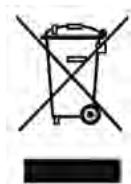
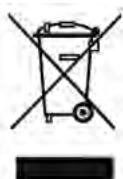
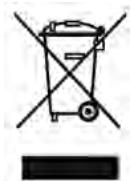
The waste bin symbol indicates that electrical devices must not be disposed of with normal household waste. Please take your device to a collection centre for electrical appliances for recycling and proper disposal.
WARRANTY
The warranty period for your device is 24 months.
For warranty claims, you need your sales receipt. Please also keep the original packaging.
If you encounter any problems with your document shredder, please contact your dealer.
Device does not start up after paper has been inserted into the feeder slot.
Possible causes:
- Plug has not been plugged in correctly.
- The paper is too thin.
- The overheat control has been activated as the motor is overheated.
- The green light is not on as the shredding unit has not been put on the paper bin in the correct position.
- There is a paper jam.
Troubleshooting:
- Plug in again.
- Fold the paper and feed into the shredder again, or tear up other types of paper.
- Switch on the shredder again after 30 minutes.
- Fit the shredding unit correctly.
- Remove the jammed paper.
Device does not stop after shredding the paper.
Possible causes:
The switch-on sensor is covered by dust or excess paper.
Troubleshooting:
Remove dust or excess paper using pliers.
Device produces loud noise.
Possible causes:
Device is not placed on a firm and level surface.
Troubleshooting:
Move the machine to a firm and level surface.
Device does not operate.
Possible causes:
- Quantity of paper exceeds maximum shredding capacity.
- Size of paper exceeds maximum feed width.
- Paper has not been fed in vertically.
Troubleshooting:
- Make sure the quantity does not exceed the maximum shredding capacity.
- Shift to "REV" position and remove the paper. Insert paper again after folding it.
- Feed in the paper vertically.
Should the device not operate after carrying out the troubleshooting measures outlined above, unplug and contact your dealer.
NTRODUZIONE
2 Voyant de protection anti-surchauffe
glll glll glll glll glll glll glll glll glll glll glll glll glll glll glll glll glll glll glll glll glll glll glll
jaiy jaiy seloi) ai jia a jia jia jia jia jia
j 1
333
"REV"
Auta 1
∴ m = 3/11
y j 1
"Auto" 100000000000000000000000000000000000000000
2b - a < 0
J 1
#
aal aal aal aal aal aal aal aal aal aal aal aal aal aal aal aal aal aal aal aal aal aal aal aal aal aal aal aal aal aal aal aal aal aal aal aal aal aal aal aal aal aal aal aal aal aal aal aal aal aal aal
#
∴ x1 = 2,x2 = - 4
∴ m = 3/11
Laiyi li (Li)
1
| S15 | # | |
| OFF | #/#/ON | #/## |
| dB V# | ||
| #5 #,A | ||
| #10 |
#
Aaii Aai iai ai 1 aai yie gai n aai ai ai ai ai ay jai
A
y 1
a a a a a a a a a a a a a a a a a a a a a a a a a
BVEDEHNE
Blaroapum Bac 3a nokynky 3Toro kaueCTbeHHoro n3deJnna MapKn Geha. Ipeed BBOOM B deIcTBne cHauJNA BHMaTeJbHO npOHTaJIte HaCTOJUe pyKOBoDCTBO. Oco6oe BHMaHne o6paTInTe Ha yka3AHn no TeXhNke 6e3OnaChOCTn.
IPEdUYPEDINTEBHBIE3HAKI

Helen3a donyckaTb DeTeK pa6Ote Ha yctpoNCTBe!
BHytpn HrO cyuEcTByeT onaChocb TpaBMnpoBaHnapeXyUIM MexaHn3MOM.
He xbaTaIteCb pykAm 3a pejxunm mexaHn3M!
BHyTpHrO cyuEcTByeT ONaCHocTb TpaBMnPOBaHHapeKyuIm MexaHn3MOM.
CneiTe 3a TeM, yTo6bI B OKHO mexaHn3Ma IOnaun 6yMaun He nonaJaJa OdeJka.
BHytpn HrO cyuEcTByeT onaChocb TpaBMnpOBaHnpeXyUm MexaHn3MOM.
He donyckaite nonadaHnB OIOc B OKHO mexaHn3Ma IOnaun 6ymar.
Bnytpn HrO cyueCTBye TOnaChocTb TpaBMnpOBAHnpeXyUm MexaHn3MOM.
He paçnbIyIaIYe B yCtpoIcTBO JeRko BOCnIaMeHЯEmbIX JxNdkOcTei.
CyuectByeT onaCHOctb noXapa.
Ipn Heo6bHOM COCTOHHN yCTPOINCTBa (HaNPnIMep, BbldeJeHN CtpaHHoro 3aNaXa HIN DbMa) HEoXHOcnpCa3pynPKePAHTb NcNOJIb3OBaHne yCTPOINCTBa N ByTaunTb CeTeBOB WTeNCelb n3 UTENCEBJHO pO3eTK.
CyueCTbOnacHocTb noKapa nn yDapa 3JneKtpueeCKnM TOKOM.
BAXHbIE YKA3AHNIA IO TEXHNKE BE3ONACHOCTN
Ipejde yem BBOIDnB MaunHy dny HnHToKeHnna DeNoBb6yMaR B deNCTBne npOuHTaTe daHHOe pyKOBOCTBO NOb3OBaTeJI. PnIN NOb3OBaHN 3JKeKTPnueCKnM UcTPOCTBAm NHeo6XoIMo BcERda pInHMaNtB OCHOBHbE MePb IpeOCTOPoKHOCTN, YTObI NCKLIouHTb ONaCHOCT TpABMIPOBaHN yDAPOM 3JKeKTPnueCKnTOKOM.
IOnToMy 63aTeNbHO Co6IOdaIte CneDyIOUne OCHOBbIe npabnla.
1.Данная машина дя унчтожени деловьх буmar п dedумOTpeha cneцальнодя n3melenbuehenia bmyar. He nCnoIb3ynte ee dЯл dpyfux uelei. He BBOdInTe B mAsHnHy dlya yнчтожени дelobbix sbymar pIeKHy, 3TKeToCHHy6bMyaHy, Odekdu nIIN PnaCTMaCCy. Ipeed BBoDom bmyar ydaJIte BCE kaHcIeJpCKNeckpenkn T.IN. B npOTUBHOM clyuae moYr BO3HKnHcyt heNoJaDNk.
2.He nCnoB3yTe yCTpoCTBO B6nI3n OT NCTOCHNKB TeIJIa IIN XOLOda,a TaKKe B nepertbIbX, BIAKHBIX INI IIbIbHbIX cpeDax. CyueCTByET onaCHOCT bIOJapa mI ydapa 3JEKTpUeCKIM TOKOM.
3.He donyckaIte nonadaHnHa yCtpoiCTBO 6pbizr BObl. CyueCTByET onacHOCTb Ioxapa nnIy dapa 3JneKTpuueCKM TOKOM.
4. BbI He DoJIxHbI N3MeHЯrTb yCTpoiCtBO, nepeCTpaNBAbI n peMOHTnpOBAbI erO. CyuieCTByeT OAnCHOctb yDapa 3JIeKtpnueCKm TOKOM IIN HecuaCTHO r CnyaJ.
5. Npepe onopopxHeHnem npneHmHO KOHTeHepa Jla 6ymarn, pnp dIITeJbHOM HcNcNoJIb3OBAHN yCTpoCTBa IIN eTOpeCTaHOBe bItaTaNTEcTeBOI WtENCEB N3 WtENCEBHOPO3eTKu CYueCTByET OAnCHOCT NoXapa IYN yUdapa 3NeKTPnEckNM TOKOM.
6. CneiHte 3a Tem, UTo6bI B MexaHn3M IOnaun 6yMaun He IOnaJaAnr RaIcTyKn, OxepeJIbA, BOJOSbI, pykaba n T.I.CyueCTByet ONaCHoCT TpaBMIpOBAHN. Ipn IOnaJaAHN B MEXaHn3M IOnaUn 6yMaun npEmeTob YctaHOBnTe PpeKJIouaTeIb Ha ,REV" (O6paTHbI XOD), UTo6bI ydaJIntb BTaHytBe IpeMeTbI.
7. LcHTp TjKecTn YcTPOJCTBA HaxoJNTcB Eero BepxHeN qactn. UcTaHaBInBaIte YcTPOJCTBO HaOBHy IOObHIO XoCTb, YTObI OHO He MOrIo ONpOKHyTbCBy.CyUeCTByET OAnCHoCTb TpaBMnPOBaHnA.
8. Nomeuayte yctpoietBO B6n3n OT wTeNCelbHO p03eTKn n He CTaBBTe PdOM C He NHKaKxN ppeMToB, Taq YTO6bl CeTeBO wTeNCelb MoXHo 6blno 6e3 npo6Iem BbTaunHb N3 wTeNCelbHO p03eTKn.
9. He klaaTe ppeMeTOB Ha yCTPOIcTBO n He npncIOHnTe INx K Hemy. CyueCTByET ONaCHOCTb TpaBMIpOBaHn.
10. 0y6eIntecb B npaBnIbHocTn IcNoIb3yeMOro HanpJxKeHHa. B npOTNBHOM cIyae cyuEcTByET onaChOCTb Ioojapa IIN yIapa 3JIeKTpNueCKIM TOKOM.
KOHCTPYKUINIPNHUNDENCTBNA
1 INdkaTop paOohero COCTOHMa ECNI INdKaTop paOoHoe COCTOHnC BcTeTTC,TOYCTPOINCTBO BKIOHOOHO.
2Индкатор neperpeba
Kor'da cBeTcTc TOT INIINkATOP, BbTaUHTe
ceTeBOI WtETCenb N3 WtETCenBHOJ pO3eTKn
n DaTte YCTPOINCTBy OXlaNTbC.
3 MhorononoHnHOHHnI nepeKlOuataeIb
"AUTO"
KorДа pepeknIOuTeJIb yCTaHOBNeH B3To nO-LOJeKeHMe,TO npI BBODe bMyArn yCTpOJeCTBO ABOTMaTUnCeCK 3aNyCkAErT C pReJMe nepePeHero XoJa. Iocne NImelbYeHnB MyArn yCTpOHeCTBO ABOTMaTUnCeCK bIKNoUcAeTc.
"FWD" (nepehni xoJ)
Korda nepekliouateIb yctaHOBJIEN B 3TO
noIooJeHne, yCTPOIcTB0 pa6OtaeT
HenpepbIBHO.
REV" (O6paTHbXoJ)
KorDa nepeKIOuAteIb YcTaHOBNeH B 3TO NO-LOJOxHe, YcTPOICTBO BbIODNT 3aCTPBAWHyO
6MyAry B o6paTHOM HnPaBJeHm.
4 Pexyua ronovka
53aunTHna KpbIshka
6 PnembHkohtHeHepd7 6ymar IpnemHbIKoHTeHepd7 b6m4n pa3pa60- TaCneuaIbHOJd7 3TOrO yCTPOINCTBa.
7 MexaHmM noJaun 6ymarn BBeJnte cOda 6ymary.
8 Ka6eIb ceTeBoro nHTaHn
YIPABJIENHE
1.Прocлдnte,чTo6blNepeKlIOUATEb 6blIyctaHOBIneH ha "AUTO".ПрabINbHO yCTaHOBIneTe pexyuTOIOLOBky Ha npneMhBI KOHTEINHEp IJIЯ 6bMaRn.BCTABBe CEteBOI WTeTcSeB b WTeNCEbHyIOPO3ETKy.YCtPoIcSTBO HaxOJDH B COCTOBHNrTOBOTHOCTN,KORda INHdNKATOP paOboERY COCTOHNr CBETNTC 3eJeHbIM ΒeBTOM.
2. Maunha S15 n3MeIbIaet do 15 IINCTOB B CLOJKeHHOM COCTOHN (DIN A4, 70 r/M2) n o6pa6aTbIbAeT IINCTbI uINpHOn Jdo 220 MM. Ecnn Bam Heo6xOIMMo yHHTOKNb MaTePnAbJI He6OJIbWoTO FO pOpMaT, TAKNE KAK KOHNBPbTI INN KACCOBIE DOKyMeHbTI, TO BBOInTE IN NO CEHTpy OKHa MExaHNI3Ma NODaHb MyMaRn, YTO6bl INHINIOPABaT CeHCOP NcKOBORO BbIKIOUaTeJIa. UcTPOCTBO 3aNyCKaETcRA, KOrDa cpa6oTal YCbCTBtIeBbHI bIeMEnT bIKIOuAeTCB TceHeHne 2 CeKHyNd, NocNe TorO, KaK bYdET n3MeJIbYeHa 6ymara.
3. "FWD" 03haaet HenpepbBhni peedn xiOd. YcTpoiCTBO 3anyckaeTc np3y, do TOro kak peeknouateIb 6ydt yctahOBlen Ha "AUTO" nIIN dBiratel neperpeetcra (ropnt KpaHb nnDnkaTop).
4. "REV" 03hauaet o6paTHbXoJ. KOrda nepeKIOuateIb CTOnT B 3ToM IIOJOeHIn, yCTPOBCTBO MOJET nepeMeuaTb 3actPBAWUO 6yMaRy B o6paTHOM HApabLeHn. KOrda HxJHc 3aOKOHHTb o6paTHb XoJ, ycTaHOBNTe nepeKIOuateJIb B pexIM "Auto". B nPoTHBM Cnyae yCTPOBCTBO BbIKIOuHTcR, KOrda nepePeEeTcR DBrIaTeJIb (CBeITcRA KpachN bINdNKaTOP).
5. Yepe3 OTBepCTne npHemHOro KOHTeHepa IJIy 6ymaRn Bbl MoKTe yBnIeTb, KOrda OH HApONHITcA. IJIra ONOpOxHeHn oKHTeHepa c 6yMaRo CHIMMTE peJxUIO rOJOBky.
3ATOP PIP NIODAUe BymaIg
- UctaHOBInTe nepeKJIoucAteIb Ha ,REV".LIIshnIg 6ymara BBIOdntcI n3 yCTpoNCTBa o6paTHo.
- Посlete того, кад пз ржушero мexанизma 6удт удалеha BCЯ 6уmarа, установпто порключateь на "AUTO" и n3meльчite остыную 6уmarу.
Yka3aHne:
Ecn npo6nemy TaKIM o6pa3OM peWntb He ydaeTcB, BbTaUHTe CeTeBOH wTeNCelb n3 wTeNCelbHOH po3ETkn i O6patNTecb K Baewmy TopROBMy aEnty nn K Ham.
ONOPOXHEHNE IPNEMHORO KOHTEHPEA C BYMAIOM
1.Дяо npOPOxHHeNpyeMHOro KOHTeHepa c 6yMaRoYcTaHOBnTe nepeKJIouaTeIbHa "AUTO"и BBytaunTe CeTeBOJ WTeNCeJb N3 WTeNCeJbHOJ po3eTKI.
2.Прocлдnte 3a npabnIbHocTbO yCTaHOBKn peKyuSei roJOBKn Ha npneMHbI KOHTeHep dЯ 6ymar n oCne erO onopokhenia.
Yka3aHne:
Pn3aOpHHeHn npEmHOro KOHTeHepa 6yMaRo cyuEcTByet ONaCHocb nepeKpyuBaHn. OnopOxHnTe npEmhBn KOHTeHepd JI 6yMaRn Do TORO, KaK OH HApONHnTc.
TEXHNUECKOE OBCJYKUBAHNE
Ipejde yem npo3BODntb texHnueckoe o6cnykBaHne Maunhbl IyHnTuKeHnJe DeIOBbIX 6ymar, He06xOIMBO BItaunTb CeTeBOI wTeNCel N3 wTeNCelHO p03eTK!
OuHCTnTe HApUxHnyo CToPOHy BlaJXHO TKAHbY. CneIte 3a Tem, YTO6bl TkaHb He NOnaJa B MExAHm3 NODaun 6ymaRn. (TOT WAr OTHOCITc TOnbKO K BHeuHM YaCTAm yCTpoCTBa.)
BHeuHry qacTb yctpoiCTBa BblOnlHeHa n3 pIaCTMacCbI. IIO3OMy B kaueCTBe pa36abNTeJI HeIb3r IcN0lb3OBAbTa TaKne pactBOPTeJI, KaK 6eH3nH N 6eH3OJ, IINOpRAHnueCKne paCTBOPNTeJI. Hc OuyuAte YcTOpCTBO PANTHOBbIOBdTeJIeM BO IV36EJaHNE BblBeTaHJI, pa3pyUeHJI, pACTBOpeHHIOBepxHOCTn INI INI POABJeHJI Ha HeI capaannH.
BHMaHne:
CneIe 3a TeM, YTO6bI npu NcTKe yCTpoiCtBa ChapyKn B Hero He nonana BoDa.
TEXHUNECKNE DAHHbIE
06o3haeHne moJeN:
IopTe6JIeHHe 3JIeKtpO3Heprnn
Pa3mep pe3a
UnpHa OKHa MexaHn3Ma nOdaun 6yMaun
MaKc. npOn3BOoNTeJIbHOCTb yHnTuToXeHnA
dENoBbIX 6yMa
Ckopoocbpe3aHn
PpOdoJXnTeIbHocTb uNKpa6oTbI
UPOBENb WyMa
Bec Hetto
Emkoctb npneMHoro KOHTeHepa Jnla 6ymaru
Gamma:
Shredder S15
300BT
7 MM
220 MM
15 JnCTOB (70 r A4)
6 M/MNH.
3 MUNH ON / 60 MUNH OFF
736
3,8K
15 n
315 × 200 × 380 MM
YTNIN3AUIN
CnMBoJ C npepeepKHyTbIM Mycopooc6OpHnKOM yKa3bIbaeT Ha To, UTo 3JeKtpnueckNe yCTpoiOCTBa He NOIaEaT yCTpaHeHIO BMeCTe C HOPMaJIbHbIM DOMaUHIM MycopOM. JAn 3KoIOnuWeCKN YCHTOY TynlI3aCIN PPOCM cDaBaTb 3TO YCTpoICTBO B DOpyUeHHbI pyHKCT6Opa CEHHbIX MaTePnaNoB.
TAPAHTN
TapaHTnHbI cpoK Ha BaWe yCTpOcTBO COCTaBJIaTe 24 Meca.
063aTeIbHo coXpaHnTe KbITaHcUHO O NOKynKe uynaKOBky 3aBOda-n3rOToBnTeJI.
Pn npo6Ie max c yctpoiCTBOM o6paaauTeCb K CBOemy TOpRObMy aReHTy.
Iocne BbOda 6ymaru ycTpoiCTBO He 3anyckaetca.
PnunHbI:
- CeTeBoI wTeNcEInb HenpaBnIbHO BCTaBNeH B wTeNceIbHyO p03eTKy.
- CnIshKOM ToHkA 6ymara.
- YcTpoNCTBO 3aunTbI OT nepepeBa cpa6oTaIOn 13-3a nepepeBa DnurTaTeJIa.
- 3eHbI INDkaTOp He CBeNTcT, TaK KaK peXyua RoIOBka HnPaBnIbHO yCTaHOBHeHa Ha npEHMOM KOHTeINHepe dJa 6ymaRn.
- 3aTop npn noJaue 6yMaRn
UcTaPaHeHne HEnCnpaBHOCTN:
- Euple pa3 BCTaBbTe CeTEBOB WTeNCeJIb B WTeNCeJIbHyIO pO3eTKy.
- Cnojnte 6ymary n CHOBA BBeDnTe ee B MaunHy dIy HnHTOKeHnJe IIOBbIX 6ymar nn nn3mEnbUHTe dpyrne copTa 6ymarn.
- Yepez 30 MInHyT ChOBa BkIIOUHTe MaunHy dIy yHnTOKeHnJeIeNoBbIX 6ymar.
- Правильно установтоpeхую rolobky.
- BbTaunTe 3aCtprBsyu6yMaIy.
Iocne n3MeIbueHn 6ymaruCTpoIcTBO He BbIKIOuaeTc.
PnunHbI:
YyBCTBtTeIbHbI 3JIeMeHT MexaHn3Ma nOdaun 6ymar n oKpbIcra nbIbIO nII 3aKpbIT 6ymaroJ.
UcTaPaHeHne HeuCnpaBHOCTn:
YCTPOIcTBO CnIbHO Wymnt.
PnunHbI:
UcTpoIcTBO yCTaHOBJeHO He Ha TBePDoN POBHO NOBepxHocTN.
UcTaPaHeHne HeuCnpaBHOCTN:
YcTaHOBInTe yCTPOINCTBO Ha OCHOBAHN C TBepDoI POBHOI NOBEPXHOCTbIO.
YcTpoIcTBo He yHKcuOHpyeT.
PnunHbI:
- ПразибODиTeЛьНOCtБ MaшинБд Лу yHnTuToxKeHЯ DeNoBbIX 6yMaR MaIa ДлЯ BBeDEHHORO KOnuYeCTBa 6ymaRn.
- Pa3mep 6ymarn npebocxodnt wipnHy OKHa MexaHn3Ma noDaun 6ymaRn.
3.Бумara BBOДиЛась He BepTиKaJIbHO.
YcTpaHHeH HeNCpPaBHOCTN:
- 06ecneuebTe, yTo6bl npOn3BODnTeJIbHOCTn MaunHb IJy HnUTOxHeNJa DeIOBbIX 6ymar XbataNo IJRA BBOIDMOrO KOINuYeCTBa 6ymaru.
- UctaHOBInTe nepeKJIIOUaTeIb Ha ,REV" u BbITaUInTe 6ymary. CLOXnTe 6ymary u CHOBA BBeDInTe ee.
- BbOdnte 6yMaIy BePtnKaJIbHO.
Ecnn nocne npimeneHn BbIweyka3aHHoro peweHn yCTpoNcTBO He yHKUHOHPyeT,TO bIta- uNTe cTeBON wTeNCenb n3 wTeNCenbHO pOzETKN o6paNTeCk CBOemy TOpROBOMy aReHTy.
INLEDNING

- WARNING
- IMPORTANT SAFETY NOTES
- OPERATION
- 1 POWER INDICATOR
- 2 OVERHEAT CONTROL INDICATOR
- 3 MODE SWITCH
- AUTO
- FWD" (FORWARD MODE)
- REV" (REVERSE MODE)
- 4 SHREDDING UNIT
- 5 PROTECTIVE LID
- 6 PAPER BIN
- 7 FEEDER SLOT
- 8 POWER CORD
- PAPER JAM
- NOTE
- EMPTYING THE PAPER BIN
- MAINTENANCE
- ATTENTION
- DISPOSAL
- WARRANTY
- DEVICE DOES NOT START UP AFTER PAPER HAS BEEN INSERTED INTO THE FEEDER SLOT
- POSSIBLE CAUSES
- TROUBLESHOOTING
- DEVICE DOES NOT STOP AFTER SHREDDING THE PAPER
- DEVICE PRODUCES LOUD NOISE
- DEVICE DOES NOT OPERATE
- NTRODUZIONE
- 2 VOYANT DE PROTECTION ANTI-SURCHAUFFE
- A
- BVEDEHNE
- IPEDUYPEDINTEBHBIE3HAKI
- BAXHBIE YKA3AHNIA IO TEXHNKE BE3ONACHOCTN
- KOHCTPYKUINIPNHUNDENCTBNA
- 3 MHORONONOHNHOHHNI NEPEKLOUATAEIB
- YIPABJIENHE
- 3ATOP PIP NIODAUE BYMAIG
- YKA3AHNE
- ONOPOXHEHNE IPNEMHORO KOHTEHPEA C BYMAIOM
- TEXHNUECKOE OBCJYKUBAHNE
- BHMAHNE
- TEXHUNECKNE DAHHBIE
- YTNIN3AUIN
- TAPAHTN
- IOCNE BBODA 6YMARU YCTPOICTBO HE 3ANYCKAETCA
- PNUNHBI
- UCTAPAHEHNE HENCNPABHOCTN
- IOCNE N3MEIBUEHN 6YMARUCTPOICTBO HE BBIKIOUAETC
- YCTPOICTBO CNIBHO WYMNT
- YCTPOICTBO HE YHKCUOHPYET
- YCTPAHHEH HENCPPABHOCTN
- INLEDNING
Brand : GEHA
Model : OFFICE S15
Category : Shredder