
VD57 - Wristwatch BREIL - Free user manual and instructions
Find the device manual for free VD57 BREIL in PDF.



| Product type | Wrist watch |
| Brand | BREIL |
| Model | VD57 |
| Display | Analog with hands (hours, minutes, seconds, 24h) and date |
| Movement | Quartz battery powered |
| Power source | Button cell battery |
| Case dimensions | Approximately 40 mm diameter (estimate) |
| Weight | Approximately 80 g (estimate) |
| Main functions | 60-minute chronograph with 1/10th second, split time measurement, date, chronograph hand adjustment function |
| Water resistance | Water Resist 30M/50M/100M/200M depending on version (see dial) |
| Shock resistance | Daily use and sports without direct impact |
| Antimagnetic | Up to 60 Gauss |
| Maintenance | Clean the glass with a soft cloth; metal strap: soapy toothbrush; leather strap: dry cloth or alcohol |
| Periodic inspection | Every 2 years at an authorized center |
| Safety | Keep batteries out of reach of children |
| Repairability | Authorized service center for repair and battery replacement |
Frequently Asked Questions - VD57 BREIL
User questions about VD57 BREIL
0 question about this device. Answer the ones you know or ask your own.
Ask a new question about this device
Download the instructions for your Wristwatch in PDF format for free! Find your manual VD57 - BREIL and take your electronic device back in hand. On this page are published all the documents necessary for the use of your device. VD57 by BREIL.
USER MANUAL VD57 BREIL
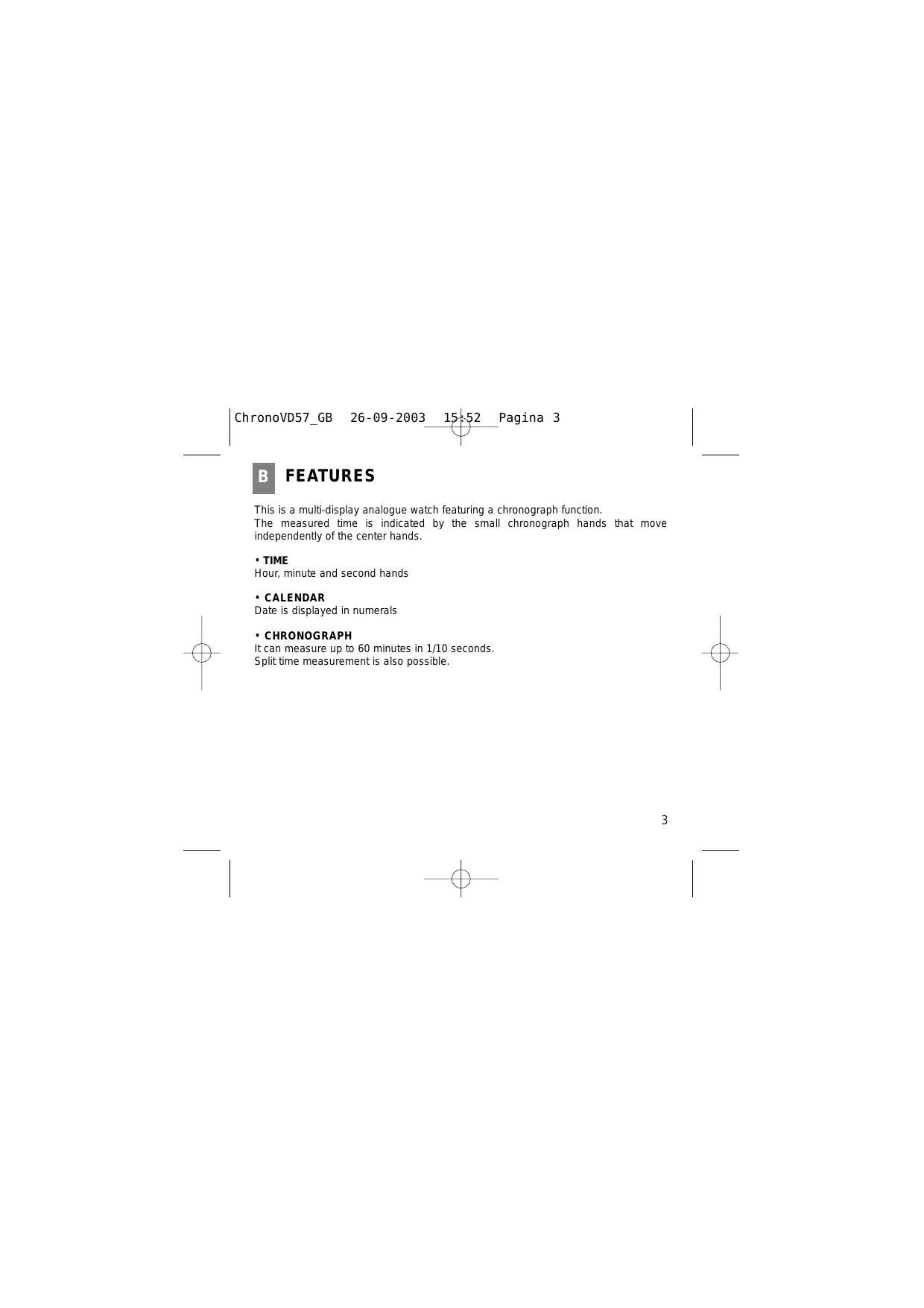
When reading this instruction booklet, keep the watch diagram on the left unfolded and in full view. The symbols (A, B, etc.) on the diagram are those referred to in the section describing the operating instructions.
Thank you very much for purchasing a BREIL WATCH. To ensure its correct use, please read these instructions carefully.
In order to be able to make full use of the guarantee service (subject to the guarantee terms), please ensure that the Breil international guarantee card is supplied with the watch at the time of purchase.
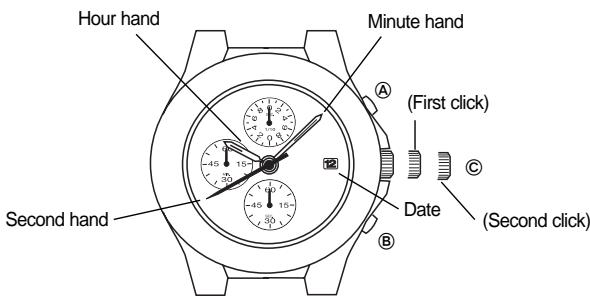
① Chronograph 1/10 second hand Butoon A
② Minute hand Button ⑧
③ Date Crown
④ Chronograph second hand
⑤ Second hand
⑥ Chronograph minute hand
⑦ Hour hand
Crown operation
(a) Normal position : Free
(b) First click : Date setting
(c) Second click
- Setting the hour and minute hands
- Activating the chronograph hand position adjusting function
This is a multi-display analogue watch featuring a chronograph function.
The measured time is indicated by the small chronograph hands that move independently of the center hands.
TIME
Hour, minute and second hands
-CALENDAR
Date is displayed in numerals
- CHRONOGRAPH
It can measure up to 60 minutes in 1/10 seconds.
Split time measurement is also possible.
TIME/CALENDAR SETTING
Note: While the crown is at the extended position at the second click do not press any button. Otherwise, the chronograph hands will move. To reset them in the "0" position, refer to "ADJUSTING THE CHORONGRAPH HAND POSITION".
-
Pull out the crown to the first click, and turn it clockwise until the previous day's date appears.
-
Do not set the date between 9:00 p.m. and 1:00 a.m. Otherwise, the date may not change properly.
-
Pull out the crown to the second click when the second hand is at the 12 o'clock position. The second hand will stop on the spot.
-
Turn the crown clockwise until the desired date appears, and set the hour and minute hands to the desired time.
-
When setting the hour hand, be sure to check that AM/PM is correctly set. The watch is so designed that the date changes once in 24 hours. Turn the hands past the 12 o'clock marker to determine whether the watch is set for the A.M. or P.M. period. If the date changes, the time is set for the A.M. period. If it does not change, the time is set for the P.M. period.
-
Push the crown back in to the normal position in accordance with a time signal.
Note: When setting the minute hand, first advance it 4 to 5 minutes ahead of the desired time and then turn it back to the exact minute.
CHRONOGRAPH
The chronograph can measure up to 60 minutes in 1/10 seconds. The measured time is indicated by the small chronograph hands that move independently of the center hands.
Note: While the chronograph is counting, do not pull out the crown to set the time. Otherwise, the chronograph operation cannot be made.
How to read the hands
Ex.) Elapsed time measured is 15 minutes and 10.6 seconds
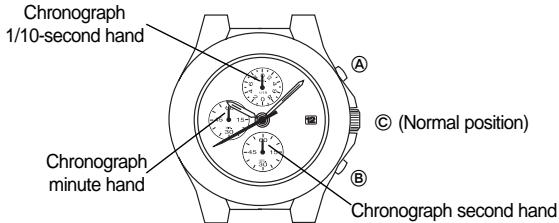
The chronograph 1/10 second scale and hand differ in design and shape depending on the models.
-
Some models have the chronograph 1/10 second scale graduated on the upper half of the small dial and the hand which is so designed that both ends can indicate the elapsed 1/10 second. In that case, read the marker on the scale where either end of the hand points to.
-
After the measurement exceeds 1 minute, the chronograph 1/10 second hand stays at the "0" position.
When the measurement is stopped, it will move to indicate the elapsed 1/10 seconds.
Chronograph operation
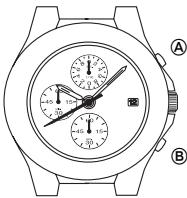
- Standard measurement
To start : Press “A”
To stop : Press “A”
To reset to "0": Press "B"
- Accumulated elapsed time measurement
To start : Press “A”
To stop : Press “A”
To restart : Press “A”
To stop : Press “A”
To reset to "0": Press "B"
- Split time measurement
To start Press“A”
To measure split time : Press “B”
To release split time : Press “B”
To stop :Press“A”
To reset to "0" : Press "B"
ADJUSTING THE CHRONOGRAPH HAND POSITION
Before setting the time, be sure to check if the chronograph hands are in the "0" position when the chronograph is reset.
Note: The "0" position of the chronograph 1/10 second hand differs depending on the models.
-
Some models have the "0" position of the chronograph 1/10 second hand at 3 and 9 o'clock sides of the small dial. In that case, check if the hand is level with its both ends pointing to those "0" positions.
-
If the chronograph is in us, press the buttons in the following order to reset it, and then check if the hands return to the "0" position. (For details, refer to "CHRONOGRAPH".)
-
If the chronograph is counting : A → B
If the chronograph is stopped : B - If the split line is displayed : B→ A→ B
- If any of the chronograph hands do not return to the "0" position when the chronograph is reset, follow the procedure below to reset the hands.
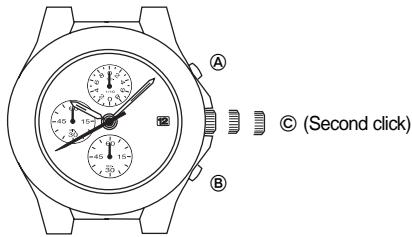
-
Pull out the crown all the way
-
Press "A" repeatedly to reset the chronograph 1/10 second hand to the "0" position. Press "B" repeatedly to reset the chronograph second and minute hands to the "0" position.
-
The chronograph minute hand moves correspondingly with the chronograph second hand
-
The hands move quickly if the respective buttons are kept pressed
-
Push the crown back in to the normal position.
F
NECESSARY OPERATION AFTER BATTERY CHANGE
When the battery is replaced, the time information stored in the built-in IC and the time indicated by the hands do not correspond with each other. Before using the watch, therefore, be sure to reset the hands to the "0" position, following the procedure below.
- In case any of the hands should move improperly, follow the procedure below to adjust the hand movement.
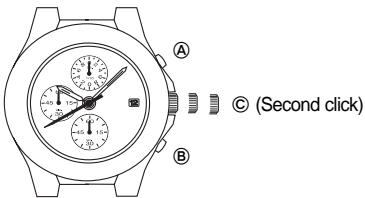
- Pull out the crown all the way.
-
Keep "A" and "B" pressed at the same time for 2 seconds, and then release the buttons. The chronograph second hand turns half a circle counterclockwise and the returns where it was. The chronograph 1/10 second hand turns a full circle clockwise and stops.
-
Press "A" repeatedly to reset the chronograph 1/10 second hand to the "0" position. Press "B" repeatedly to reset the chronograph second and minute hands to the "0" position
-
The "0" position of the chronograph 1/10 second differs depending on the models. (Some models have the "0" position of the chronograph 1/10 second hand at 3 and 9 o'clock sides at the small dial. In that case, check if the hand is level with its both ends pointing to those "0" positions)
- The chronograph minute hand moves correspondingly with the chronograph second hand.
-
The hands move quickly if the respective buttons are kept pressed.
-
Turn the crown clockwise or counterclockwise to set the hour and minute hands to the desired time. (For details, refer to "TIME/CALENDAR SETTING")
-
Push the crown back in to the normal position.
| Indication | Use | ||||
| Degree of water resistance | Dial | Case | Spray, sweat, light rain, washing, etc. | Swimming, etc. | |
| A | - | - | NO | NO | |
| B | WATER RESISTANT 30M (3ATM) | WATER RESISTANT | YES | NO | |
| C | WATER RESISTANT 50M (5ATM) | WATER RESISTANT | YES | YES | |
| D | WATER RESISTANT 100M (10ATM) | WATER RESISTANT | YES | YES | |
| E | WATER RESISTANT 200M (20ATM) or more | WATER RESISTANT | YES | YES | |
| "WATER RESISTANT" may sometimes be abbreviated to "WATER RESIST" | |||||
- In order to prevent water coming into contact with the internal mechanism, never pull the crown out when the watch is wet.
- If any watches designed for sportswear or use in water come into contact with salt water or heavy sweating, they should be rinsed in fresh water and dried thoroughly.
| in water | ||
| Skin-diving | Scuba diving | Water-resistance characteristics |
| NO | NO | No water resistant. Must be kept away from water and moisture |
| NO | NO | Average water resistance. Can withstand spray, sweat, light rain, washing, etc. during daily use |
| NO | NO | Can be worn while swimming but not diving |
| YES | NO | Suitable for skin-diving. |
| YES | YES | Suitable for scuba diving. |
| * Always keep the crown in its normal position. * Full tighten crown screw lock. | ||
- Contact with water may cause a deterioration in the quality of some leather straps.
- As internal parts of the watch can retain moisture, when the outside temperature is lower than the inside, the watch glass may mist-up. This phenomenon is purely temporary and should not create any problems. However, if it persists for any length of time, the watch should be checked by the shop where it was purchased or by the nearest Authorised Service Centre.
Temperature
Do not leave the watch exposed to direct sunlight or temperature extremes for long periods of time.
Long exposure, in fact, may adversely affect the operation of the watch and actually shorten battery life, causing it to gain or lose time and affect its other functions.
Impact
This watch can withstand normal everyday impacts and shocks and those normally imparted by non-contact sports. Serious damage, however, may result if the watch is dropped or subjected to severe shock.
Magnetic fields
This watch is antimagnetic up to 60 gauss, and is therefore not affected by magnetic fields produced by normal domestic appliances. If used near strong magnetic fields, its operation may be temporarily affected.
Static electricity
The integrated circuits present inside the watch are sensitive to static electricity. If the watch is exposed to intense electrical fields, the time display may temporarily lose some of its accuracy.
Chemicals and gases
Avoid wearing the watch in the presence of strong gases or chemical substances. Parts of the watch may discolour, dissolve or even break if brought into contact with benzol or petroleum based products such as solvents, thinners, detergent, adhesives etc.
Pay special attention to avoiding contact with chemicals.
The watch case and strap may discolour if they come into contact with mercury from a broken thermometer or other equipment.
Keeping the watch clean
Use an absorbent soft cloth to clean off any dirt or damp from the watch glass.
Wearing the watch when the strap or back of the case is dirty can cause skin irritation.
Cleaning the watch strap:
Metal bands: use a toothbrush and soapy warm to wash the dirt off.
- Plastic or rubber straps: wash with water. Do not use solvents.
- Leather straps: gently rub the face of the strap using a soft dry cloth. Clean the opposite side with a cloth and alcohol.
Periodic inspection
In order to guarantee long trouble-free operation, it is advisable to have the watch checked by an Authorised Assistance Centre once every two years.
Keep batteries out of the reach of children
If a battery is accidentally swallowed, consult a doctor immediately.
INDEX
A PIECES PRINCIPALES 18
B CHARACTERISTIQUES 19
C REGLAGE DE L'HEURE ET DE LA DATE 20
D CHRONOGRAPHE 22
E REGLAGE DES AIGUILLES DU CHRONOGRAPHE 24
F DEMARCHES NECESSAIRES APRES REMPLACEMENT DE LA PILE 26
PRECAUTIONS D'UTILISATION ET INFORMATIONST UTILES .28
PIECES PRINCIPALES
To stop : Premere “A”
To reset to "0" : Premere "B"
frazionata : Premere “B”
frazionata : Premere “B”
Arresto : Premere “A”
Para restaurant a "0": Pulsar "B"
Para restaurant a "0": Pulsar "B"
AJUSTE DE LA POSICION DE MANECILLAS DE CRONOGRAFO
- CROWN OPERATION
- TIME
- CALENDAR
- CHRONOGRAPH
- TIME/CALENDAR SETTING
- HOW TO READ THE HANDS
- CHRONOGRAPH OPERATION
- ADJUSTING THE CHRONOGRAPH HAND POSITION
- NECESSARY OPERATION AFTER BATTERY CHANGE
- TEMPERATURE
- IMPACT
- MAGNETIC FIELDS
- STATIC ELECTRICITY
- CHEMICALS AND GASES
- KEEPING THE WATCH CLEAN
- PERIODIC INSPECTION
- KEEP BATTERIES OUT OF THE REACH OF CHILDREN
- INDEX
- PIECES PRINCIPALES
- AJUSTE DE LA POSICION DE MANECILLAS DE CRONOGRAFO
Brand : BREIL
Model : VD57
Category : Wristwatch