
FS10 - Wristwatch BREIL - Free user manual and instructions
Find the device manual for free FS10 BREIL in PDF.



| Brand | BREIL |
| Model | FS10 |
| Product type | Quartz bracelet watch |
| Movement | Tuning fork quartz, frequency 32.768 Hz |
| Accuracy | ±20 seconds per month under normal conditions |
| Main functions | Hours, minutes, continuous seconds, date, chronograph 1/60s up to 59 min 59 s, tachymeter, telemeter (on some models) |
| Water resistance | 50 meters (5 ATM) – withstands splashes, sweat, rain, swimming, but not diving |
| Glass | Mineral |
| Case | Stainless steel |
| Bracelet | Stainless steel (links) with folding clasp |
| Case diameter | Approximately 42 mm |
| Case thickness | Approximately 11 mm |
| Weight | Approximately 80 g (with metal bracelet) |
| Power supply | Silver oxide battery (type SR626SW) |
| Battery life | Approximately 2 to 3 years |
| Date display | Window at 3 o'clock |
| Magnetic field resistance | Anti-magnetic up to 60 Gauss |
| Shock resistance | Normal daily use, sports without direct impact |
| Operating temperature | From -10°C to +60°C |
| Maintenance | Clean with soft cloth; metal bracelet: toothbrush with warm soapy water; inspection every 2 years |
| Warranty | 2 years |
Frequently Asked Questions - FS10 BREIL
User questions about FS10 BREIL
0 question about this device. Answer the ones you know or ask your own.
Ask a new question about this device
Download the instructions for your Wristwatch in PDF format for free! Find your manual FS10 - BREIL and take your electronic device back in hand. On this page are published all the documents necessary for the use of your device. FS10 by BREIL.
USER MANUAL FS10 BREIL
When reading this instruction booklet, keep the watch diagram on the left unfolded and in full view. The symbols (A, B, etc.) on the diagram are those referred to in the section describing the operating instructions.
Thank you for purchasing a BREIL WATCH. To ensure its correct use, please read these instructions carefully. In order to be able to make full use of the guarantee service (subject to the guarantee terms), please ensure that the Breil international guarantee card is supplied with the watch at the time of purchase.
① Hour hand
② Minute hand
③ Chronograph second hand
④ Chronograph minute hand
⑤ 24-hour hand
(6) Continuous second hand
⑦ Calendar
Button A
Button 8
Crown
B SETTING THE TIME AND DATE
To set the time:
- Pull the crown out to the 2nd position so that the second hand stops at "0" position.
- Turn the crown to set the hour and minute hands.
- After the date has been set, push the crown back to the normal position.
To set the date:
- Pull the crown out to the 1st position (1).
-
Turn the crown by clockwise to set the date.
-
If the date is set between the hours of around 9:00 PM and 1:00 AM, the date may not change on the following day.
- After the date has been set, push the crown back to the normal position.

USING THE CHRONOGRAPH
- This chronograph is able to measure and display time in 1/1 second united up to maximum of 1 hour.
Measuring time with the chronograph
- The chronograph can be started and stopped each time button is pressed.
- To reset, press button ⑧ and the chronograph second and minute hands return to their "0" positions.

CHRONOGRAPH RESET
(INCL. AFTER REPLACING BATTERY)
This procedure should be performed when the chronograph second hand do not return to the 0 second position after the chronograph has been reset, and including after the battery has been replaced.
- Pull the crown out to the 2nd position (2).
- Press button to set the chronograph second hand to the "0" position.
- The chronograph hands can be advanced rapidly by continuously pressing button
-
Once the hands have been zeroed, reset the time and return the crown to its normal position.
-
Do not return crown to normal position while chronograph second hand returns to 12:00 ("0" position).
Hand stops on the way when crown are returned to normal position and these positions are recognized as 12:00 ("0" position).
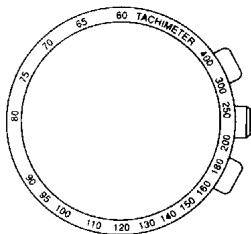
TACHYMETER*
The Tachymeter is used to measure the speed of a vehicle. By knowing how many seconds the vehicle to travel one kilometre, the tachymeter can measure the approximate average speed in km/h during a journey (over a maximum measurable time of 60 seconds).
If the chronograph is started at the same time as the start of the distance measurement, and stopped after 1km , the average speed can be calculated from the position of the second hand. If the vehicle covers the distance one km in 45 seconds, the approximate average speed is 80km/h .
* Not available on all models
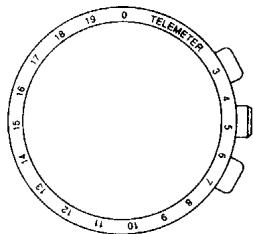
The Telemeter is a distance indicator which allows distance to be calculated on the basis of the speed of sound. It is useful, therefore, for aviation, navy, army and artillery purposes. It can also measure how far away a thunderstorm is.
The hand is started the second a flash, smoke or lightning is seen and stopped when the actual sound is heard. The distance, from 1 to 20 kilometres, between the observer and the explosion or storm is read from the telemetry scale.
- Not available on all models.
| Indication | Use | |||
| Degree of water resistance | Dial | Case | Spray, sweat, light rain, washing, etc. | Swimming, etc. |
| A | - | - | NO | NO |
| B | WATER RESISTANT 30M (3ATM) | WATER RESISTANT | YES | NO |
| C | WATER RESISTANT 50M (5ATM) | WATER RESISTANT | YES | YES |
| D | WATER RESISTANT 100M (10ATM) | WATER RESISTANT | YES | YES |
| E | WATER RESISTANT 200M (20ATM) or more | WATER RESISTANT | YES | YES |
| “WATER RESISTANT” may sometimes be abbreviated to “WATER RESIST” | ||||
- In order to prevent water from coming into contact with the internal mechanism, never pull the crown out when the watch is wet.
- If any watches designed for sportswear or use in water come into contact with salt water or heavy sweating, they should be rinsed in fresh water and dried thoroughly.
| in water | ||
| Skin-diving | Scuba diving | Water-resistance characteristics |
| NO | NO | Not water resistant. Must be kept away from water and moisture. |
| NO | NO | Average water resistance. Can withstand spray, sweat, light rain, washing, etc. during daily use. |
| NO | NO | Can be worn while swimming but not diving. |
| YES | NO | Suitable for skin-diving. |
| YES | YES | Suitable for scuba diving. |
| * Always keep the crown in its normal position. * Full tighten crown screw lock. | ||
- Contact with water may cause a deterioration in the quality of some leather straps.
- As internal parts of the watch can retain moisture, when the outside temperature is lower than the inside, the watch glass may mist-up.
This phenomenon is purely temporary and should not create any problems. However, if it persists for any length of time, the watch should be checked by the shop where it was purchased or by the nearest Authorised Service Centre.
Temperature
Do not leave the watch exposed to direct sunlight or temperature extremes for long periods of time.
Long exposure, in fact, may adversely affect the operation of the watch and actually shorten battery life, causing it to gain or lose time and affect its other functions.
Impact
This watch can withstand normal everyday impacts and shocks and those normally imparted by non-contact sports. Serious damage, however, may result if the watch is dropped or subjected to severe shock.
Magnetic fields
This watch is antimagnetic up to 60 gauss, and is therefore not affected by magnetic fields produced by normal domestic appliances. If used near strong magnetic fields, its operation may be temporarily affected.
Static electricity
The integrated circuits present inside the watch are sensitive to static electricity. If the watch is exposed to intense electrical fields, the time display may temporarily lose some of its accuracy.
Chemicals and gases
Avoid wearing the watch in the presence of strong gases or chemical substances. Parts of the watch may discolour, dissolve or even break if brought into contact with benzene or petroleum-based products such as solvents, thinners, detergents, adhesives etc.
Pay special attention to avoiding contact with chemicals.
The watch case and strap may discolour if they come into contact with mercury from a broken thermometer or other equipment.
Keeping the watch clean
Use an absorbent soft cloth to clean off any dirt or damp from the watch glass.
Wearing the watch when the strap or back of the case is dirty can cause skin irritation.
Cleaning the watch strap:
Metal bands: use a toothbrush and soapy warm to wash the dirt off.
- Plastic or rubber straps: wash with water. Do not use solvents.
- Leather straps: gently rub the face of the strap using a soft dry cloth. Clean the opposite side with a cloth and alcohol.
Periodic inspection
In order to guarantee long trouble-free operation, it is advisable to have the watch checked by an Authorised Assistance Centre once every two years.
Keep batteries out of the reach of children
If a battery is accidentally swallowed, consult a doctor immediately.
TECHNICAL DATA
Time standard
Type of quartz: Tuning fork type quartz crystal
Frequency: 32.768Hz
Accuracy: +/-20 s/month worn under normal circumstances
Function
CAL.FS10: Chronograph 1/1 sec. basis (Up to 59 min. 59 sec.)
Powercell Saving Reset Mechanism (PSRM)
Over-loading Compensation Device (OLCD)
Digital Frequency Control (DFC) for time adjustment
- In order to improve the product, the technical specifications may be modified without prior notice.
INDEX
A PIECES PRINCIPALES 14
B REGLAGE DE L'HEURE ET DE LA DATE 15
C UTILISATION DU CHRONOGRAPHE 16
D REMISE A ZERO DU CHRONOGRAPHE (APRES LE REMPLACEMENT DE LA PILE) 17
E TACHYMETRE 18
F TELEMETRE 19
PRECAUTIONS D'UTILISATION ET INFORMATIONSTUTILES..20
H DONNÉES TECHNIQUES 24
A PIECES PRINCIPALES
PROGRAMACAO DA HORA E DA DATA
Para programar a hora:
- B SETTING THE TIME AND DATE
- TO SET THE TIME
- TO SET THE DATE
- USING THE CHRONOGRAPH
- MEASURING TIME WITH THE CHRONOGRAPH
- CHRONOGRAPH RESET
- (INCL. AFTER REPLACING BATTERY)
- TACHYMETER
- TEMPERATURE
- IMPACT
- MAGNETIC FIELDS
- STATIC ELECTRICITY
- CHEMICALS AND GASES
- KEEPING THE WATCH CLEAN
- PERIODIC INSPECTION
- KEEP BATTERIES OUT OF THE REACH OF CHILDREN
- TECHNICAL DATA
- TIME STANDARD
- FUNCTION
- INDEX
- A PIECES PRINCIPALES
- PROGRAMACAO DA HORA E DA DATA
- PARA PROGRAMAR A HORA
Brand : BREIL
Model : FS10
Category : Wristwatch